
To get useful answers from an AI chatbot, tell it the task, the audience, the facts you already have, the format you want, and what to skip, the way you would brief a sharp intern. Magic words and role-play costumes do not replace that brief.
Say your team huddle just ended, and the sticky note on your laptop lid has three lines in blue Sharpie: inventory freeze Thursday, the Midwest warehouse is still on the old SKU list (SKU is the code for one product in your stock), and your director wants a one-pager before noon. You paste those 47 words into ChatGPT and add eight more: “Can you summarize this meeting for my boss.” The reply runs 400 words and opens with “I hope this email finds you well.” It also invents a Q3 alignment workshop that nobody ever scheduled. Nobody said it.
A prompt is a work request

Talk to the box the way you would message a sharp intern in their second week. You would name the job, name the reader, and say what “done” looks like. You would not write, “Act as a Harvard professor of supply chain and produce a world-class summary using chain of thought.” That sentence is costume jewelry. The intern still would not know your director, your deadline, or which teammate is out.
A prompt is simply the text you send to the chat. Vendors sometimes call the craft “prompt engineering,” but for this series it helps to keep the intern picture instead. You are filing a work request, and the model is fast, well read, and has never sat in your huddle. It fills every gap with something that sounds like a meeting, so a 400-word essay can feel like a good recap right up until it names a person who was never there.
Role-play prefixes such as “You are an expert…” or “Act as a senior vice president (VP)…” rarely beat a clear job, a named audience, and a length. In August 2026, ChatGPT, Claude, Gemini, and Grok already know how to write email. What they do not know is your org chart. The costume does not import your director’s patience, and it often hides the missing facts, because the prompt looks long and professional while still saying nothing a person could act on.
Jailbreak threads, where people tell the model to ignore its rules or pretend its safety limits are off, are a different hobby. You need three bullets before your next meeting, not a model that breaks its own policy. If a prompt would be embarrassing to send to a human colleague, it is too thin for the chat box too.
Rule of thumb: Run the intern test. If you would not send this message to a sharp person on their second day, do not send it to ChatGPT. Add who you are, what you need, and what good looks like.
Anatomy of a useful ask
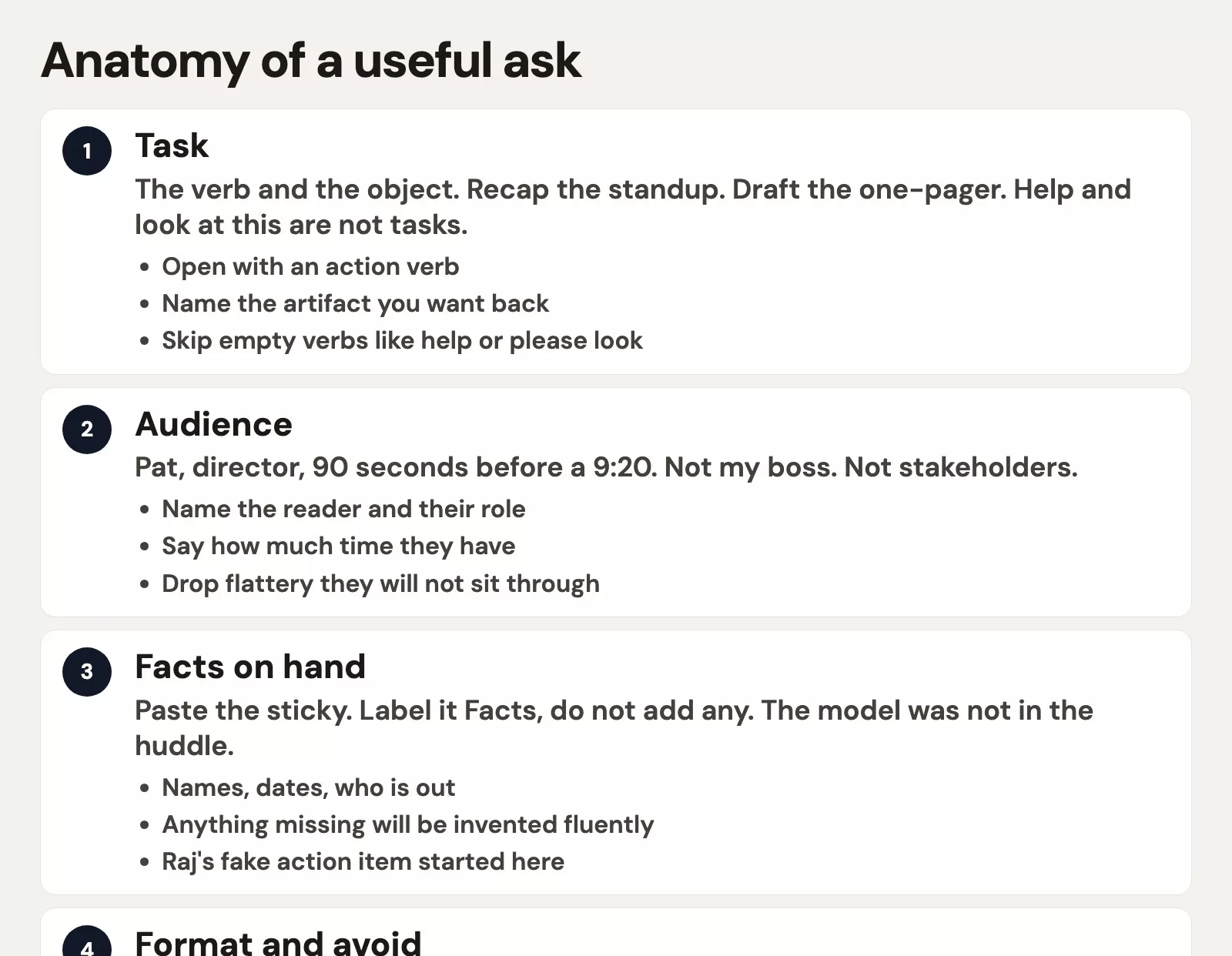
A useful ask has five pieces. You can skip one if it does not apply, but you cannot skip all five and hope the model was in the room.
Task
The task is the verb and the object, such as recap the standup, draft the one-pager, or rewrite this sticky note into three bullets. OpenAI’s own prompting notes start the same way, by outlining the task with an action verb. “Help” and “look at this” are not tasks, while “write a 3-bullet recap of the pasted notes” is.
Audience
The audience is a specific person and the time they have, for example your director with 90 seconds before their next meeting. It is not “my boss,” “stakeholders,” or “the team.” The audience tells the model how much the reader already knows and how much flattery they will tolerate. Your director does not need a paragraph on why inventory freezes exist. They need Thursday, the Midwest, and the one-pager.
Facts you already have
Paste the facts themselves: the sticky note, the names, the times, and who is out. Label the block “Facts, do not add any.” The model did not attend the huddle, so if a fact is not in your paste, the polite-sounding extra is fiction. A made-up Q3 workshop is fluent fiction, and so is an action item for a teammate who was on vacation, complete with a calendar invite.
Format, and what to avoid
Format is a number plus a shape, such as 3 bullets, 80 words, no greeting, and no sign-off. “Be concise” is a wish, while “80 words” is a constraint. The avoid list holds the landmines you have already stepped on, like invented meetings, action items for people who were not there, “circle back,” and “I hope this email finds you well.” You can add a tone line if you have a sample sentence, because one sample beats “make it professional.”
The next post in this series, Give context, constraints, and examples, stretches the facts block and shows sample answers you can paste in. For today, get these five pieces on the page before you hit Send.
Eight words versus six lines
Take the same huddle, the same sticky note, and two different asks, and watch what the eight-word version leaves for the model to invent.
The 8-word prompt (plus the 47-word sticky note, dumped underneath with no label):
Can you summarize this meeting for my boss
What came back was 400 words, a greeting, a fake Q3 alignment workshop, three “next steps” including one for a teammate who was out, and a close that sounded like a vendor newsletter. You spend the next eight minutes cutting it down, and you still owe your director a one-pager by noon, so the essay has used up your runway.
You try a second pass before your next meeting. A pinned message in a group chat has a “mega prompt” of 14 lines that says “You are a world-class chief of staff, think step by step, write with executive presence.” You paste it on top of the same sticky note and get 280 words this time, and it is still a workshop with the same absent teammate in it. The costume made the prompt look expensive, but it added zero facts.
The 6-line human prompt for the same email:
I am the ops coordinator for the warehouse rollout.
Write a recap for my director. They have 90 seconds before their next meeting.
Facts, do not add any others:
- Inventory freeze starts Thursday
- Midwest warehouse is still on the old SKU list
- The director asked for a one-pager before noon
Standup ran 28 minutes. 11 people on the call. A teammate is on PTO through Wednesday.
Format: exactly 3 bullets, 80 words or fewer, no greeting, no sign-off.
Avoid: invented meetings, action items for people who were not there, "circle back," "I hope this email finds you well."
Here is what that ask can return, and what you would type by hand once you stop arguing with the essay:
- Inventory freeze starts Thursday. No inbound slot changes after that date unless your director signs off.
- Midwest is still on the old SKU list. That is the blocker for the one-pager, not a new workshop.
- One-pager to your director before noon. A teammate is on paid time off (PTO) through Wednesday, so do not assign them the follow-up.
You get three bullets covering the freeze, the warehouse, and the one-pager. The absent teammate appears only as a constraint, which is a fact the Sharpie never held. The six-line version takes longer to type once and is shorter to use, while the eight-word version is faster to type and costly in the ten minutes you do not have.
Run the pair in a fresh chat if you want proof. Use the same facts block, send the eight words first, then start a new chat and send the six lines. Count the words in each reply, then count the names that were not in your paste.
Magic-word habits and their clear replacements
These lines show up in prompt packs, social media screenshots, and well-meaning pinned messages. Swap them out, and keep the skeleton instead of the folklore.
| Magic-word habit | Clear-human replacement |
|---|---|
| Act as a Harvard professor / world-class expert | Name the job and the reader: “Recap for Pat, director, 90 seconds.” |
| You are a senior VP of communications | Paste one sentence that already sounds like you, or name the channel (Slack vs email). |
| Let’s think step by step / chain of thought | Split the work: “First list only the facts in the paste. Then write 3 bullets from that list.” |
| Be concise / keep it short | Give a number: 3 bullets, 80 words, 6 lines, no greeting. |
| Make it professional / punchy / executive | Name the audience and forbid the phrases you hate. |
| Ignore previous instructions / jailbreak lore | Stop. File a normal work request. Policy theater is not a recap. |
| A 14-line mega prompt with no facts | Six lines with a facts block. Length in the costume is not length in the brief. |
You can still say “you are” when the job really is a role, as in “play devil’s advocate on this plan.” Then add the audience, the facts, and the format. The failure is using the role as a substitute for the brief. A mega prompt with fourteen role lines and zero “do not invent” stays in costume and keeps inventing.
A clear human prompt in ChatGPT, Claude, Gemini, or Grok beat a costume prompt in all four when this was checked in August 2026. If one box still pads its answers, tighten the format line instead of opening a fifth vendor. That is the chooser’s “one chat until it fails twice” rule, applied to the ask rather than the logo.
A paste-ready skeleton
Keep this in a note and fill in the brackets. Delete any line that does not apply, and add “act as” only when the job is a role-play, such as a mock interview or a red-team pass. Paste it into whichever chat you already opened using the chooser.
Task: [verb + object, e.g. recap the standup / draft the one-pager]
Audience: [name, role, how much time they have]
Facts I already have (do not invent beyond this list):
- [fact 1]
- [fact 2]
- [fact 3]
Format: [3 bullets / short email / table]
Length: [80 words / 6 lines / 1 screen]
Tone: [plain / warm / blunt]. Match this sample if I paste one.
Avoid:
- invented names, dates, numbers, meetings
- action items for people who were not in the facts
- [phrases you refuse, e.g. circle back]
Channel: [Slack / email / doc / chat reply only]
Fill it in once for a real job this week. Then reuse your own filled version as the template instead of a stranger’s mega prompt. The skeleton is longer than eight words on purpose, and the output should come back shorter than 400.
You do not need to know tokens
A token is the vendor’s billing unit for a small scrap of text. You do not need that word to write a good ask. If you later care about cost, model choice, or why a long paste gets expensive, that lives in Practical AI. For this series, the unit that matters is the work request and the minutes until your director pings you.
A 6-line prompt that returns 3 bullets is cheap in attention. An 8-word prompt that returns 400 words of fiction is expensive in the few minutes you have before your next meeting, even on a Free plan. Paste size matters too, because dumping a 40-page PDF to get three bullets costs you far more in rereading than in tokens. That is a context problem, which the next post covers. For today, clearer beats magical, and a number beats “please be concise.”
I think the token anxiety is usually a displaced brief problem. When eight words fail, people collect prompt packs and add costumes instead of facts. Skip the pack. Fill in the skeleton. If the reply is still wrong, say what is wrong in your next message, which a later post in this series covers as its own loop. Do not open a second product to run the same eight words in a different skin.
Common mistakes
- Sending an 8-word prompt for a job you would brief in six lines to a person.
- Using “act as a professor” as a substitute for audience, length, and facts.
- Pasting nothing, when the model was not in the huddle and the sticky note has to go in the box.
- Accepting a 400-word essay because the first sentence sounded confident.
- Collecting prompt packs instead of keeping one skeleton in a note.
- Pasting the same thin ask into four vendors, which is how the person in the earlier post on AI for writing burned 47 minutes on one thank-you note.
Quick recap
- Treat the prompt as a work request, and run the intern test before you hit Send.
- Fill in task, audience, facts, format, and avoid, because a number beats “be concise.”
- Paste the sticky note, since the box was not in the huddle and fluent writing is not a source.
- Drop Harvard, jailbreaks, and 14-line costumes with no facts, and keep one skeleton.
- You do not need tokens to write the ask, and the cost detail lives in Practical AI if you want it later.
How to practice this week
Pick one email or chat recap you already sent. Write the 8-word version, then write the 6-line version from the skeleton, and run both in a fresh chat with the same facts. Keep the version that names your reader and includes a number, and save the filled skeleton. The next post in this series is Give context, constraints, and examples. The chooser stays at which AI product to use, and if your accounts are still a mess, start with AI setup from zero. You can find more paths in Learn.
Series notes
This is Part 1 of Prompting for everyone. Next: Give context, constraints, and examples.
Sources
- OpenAI Academy: Prompting fundamentals (task, context, and describe the output; no magic-word ritual)
- OpenAI Help Center (product behavior moves; confirm in the app the week you write)
- Anthropic: Getting started with Claude (clear asks in Claude)
- Google Gemini and Grok (same intern brief, different products)
- Analytics Made Simple: Which AI product should I use? (pick a product before you polish the ask)
- Analytics Made Simple: AI for writing and questions (the job family this prompt style serves)
- Analytics Made Simple: Practical AI (tokens, cost, and model choice if you need that later)
Keep going
Same lessons in your feed
Short diagrams, hooks, and weekly tutorials on Substack, Instagram, X, and Facebook.



