
Telling an AI chatbot what to do is only half the job. Before you hit send, also tell it who the answer is for, why you need it, and the facts it may use. Add the limits, such as length, tone, and what must not appear, and show one short example of the shape you want.
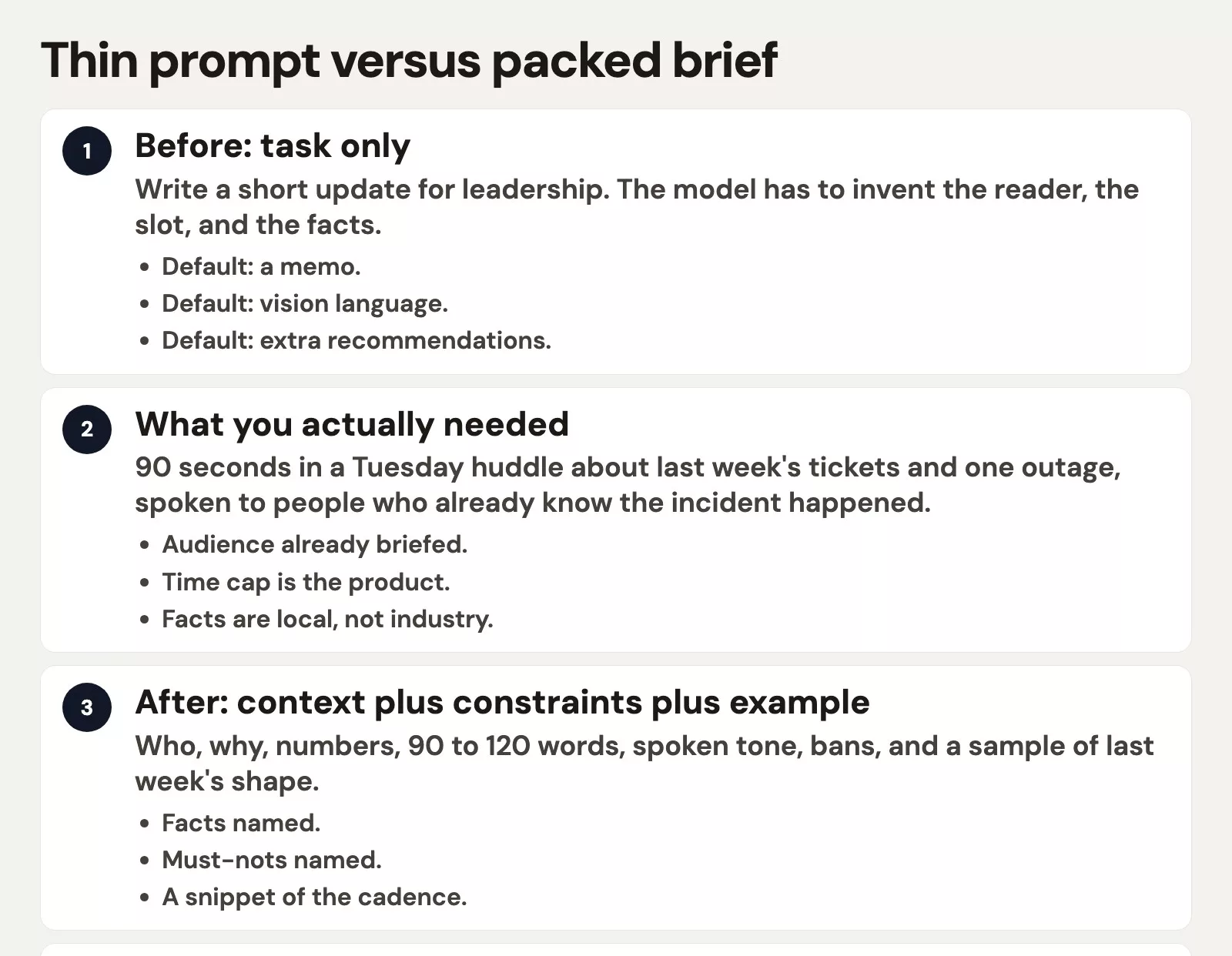
Say you type “write a short update for leadership” into Claude just before a weekly team meeting where you get 90 seconds to talk. The reply comes back at 1,140 words, with headings such as Strategic outlook, Cross-functional alignment, and Recommended next steps for next year. What you actually needed was about 120 spoken words: last week’s 14 closed tickets, the 3 still open, and Tuesday’s login outage that ran 37 minutes, from 14:12 to 14:49 Pacific time.
The model fills the hole you leave
ChatGPT, Claude, Gemini, and Grok are good at completing a pattern. They are less good at knowing which meeting you are walking into. “Short” could mean 80 words or 800, and “leadership” could mean a vice president who already sat through the incident channel or a board packet that wants a big-picture argument. “Update” is a noun with nothing attached to it. The model still has to write something, so it reaches for the shape it has seen a thousand times: titled sections, a look at the year ahead, three recommendations, and a warm close.
You never asked for a plan for next fiscal year. The gap in your prompt asked for it. There was no audience, no time limit, no ticket counts, and no ban on strategy language, and a 90-second standup has a clock that a vision memo does not. If you do not name the clock, you get the memo.
You will see the same pattern on other jobs. “Help me study this chapter” becomes a 12-heading outline with no quiz, and “Draft a note to the vendor” becomes a two-page relationship letter. You typed the task but left the brief empty. The vendors’ own guides say this in their own words, and their help pages were checked in August 2026. OpenAI’s ChatGPT Learn page talks about goal, context, output, and boundaries, while Google’s Gemini tips talk about persona, task, context, and format. Anthropic’s prompting notes push you to add motivation and examples. None of them ask you to collect secret words, and all of them ask you to stop making the model guess the meeting.
Rule of thumb: If you cannot point at who will hear it, why it exists this morning, and one fact the model cannot look up, you are still sending a task, not a brief.
Context: who, why, and the facts
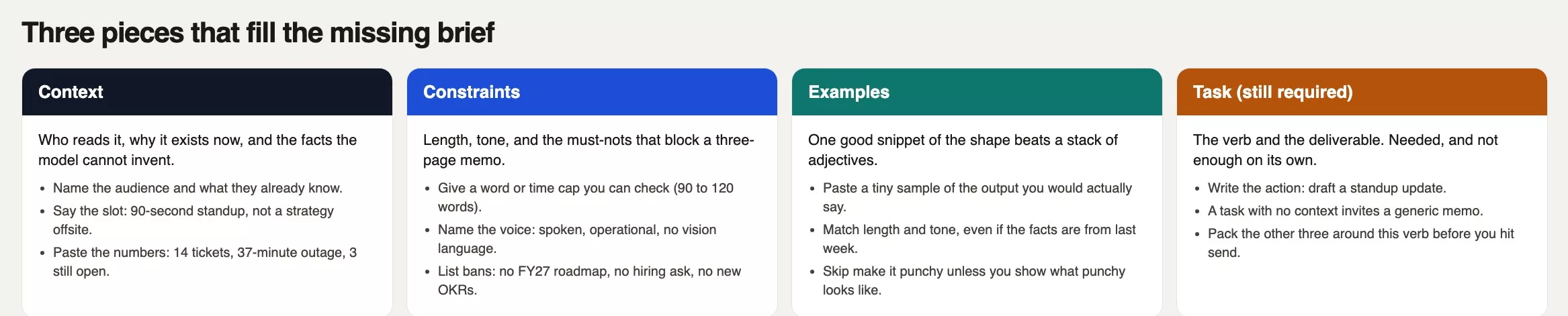
Context is the part of the brief that lives in your head and nowhere in the prompt. It covers who is in the room, what they already know, why this piece of writing exists now, and which numbers are allowed to appear. The model cannot see the sticky note on your monitor, the video call waiting room, or the title of the team huddle. If you skip all that, it invents a generic executive and a generic quarter.
For the standup, the useful context is small and local:
- Audience: the head of operations plus two directors. They already know the outage happened, so they do not need a recap of what “login” means.
- Why now: the huddle is 90 seconds long, and the goal is a status report, not a new program.
- Facts: 14 tickets closed last week, 3 still open (one waiting on a vendor patch), a Tuesday login outage of 37 minutes, no customer data lost, and status green as of 17:10 Pacific time on Tuesday.
That is enough. You do not paste the whole incident document, only the facts that would change the sentence you say out loud. “No customer data lost” changes the tone, and “vendor patch” changes the ask, because there is no ask. Telling the model the room already knows stops it from opening with “Yesterday, our systems experienced…” as if everyone were hearing it cold. If you leave out the 37 minutes, some chats will fill in a round number that sounds official, so put the facts in the prompt to keep the draft from wandering into a press release.
Do not dump the last six months either. Context is only the slice that changes this output. Your fiscal-year hiring plan is real, but it does not belong in a 90-second standup prompt unless the huddle is about hiring. Extra context is how the vision memo sneaks back in, and if a fact would sound strange said out loud in that room, it probably should not be in the prompt for that room.
Constraints: length, tone, and must-nots
Constraints are the fences around the draft. Length is the fence you can check with a timer, and tone is the one you can check by reading the draft aloud. Must-nots are the ones that would create extra work if they slipped through, such as a fake deadline, a new set of team goals, or a promise you cannot keep in a chat message.
Adjectives are weak fences. “Keep it short,” “be professional,” and “make it executive-ready” are all compatible with 1,140 words and three headings. A checkable fence looks like this:
- Length: 90 to 120 words, meant to be spoken in 90 seconds, with no headings and no bullet list in the spoken version.
- Tone: calm and operational, in present tense where that is true, with no “exciting opportunity,” no “strategic,” and no “alignment.” You talk like a support lead, not a keynote speaker.
- Must-not: no roadmap for next year, no hiring ask, no new goals (the objectives and key results your company might track, called OKRs), no customer names, and no invented numbers. If a number is missing, the draft should say “I do not have that” instead of guessing. If your company rolls its eyes at “circle back,” put that on the list too.
OpenAI’s consumer prompting page calls a close cousin of this idea “boundaries.” That means keeping approved dates unchanged, flagging missing information, and preparing a draft without sending it. Google’s guide for developers who call Gemini from their own programs tells you to put limits on length and to say what the model should not do. You do not need their vocabulary, but you do need a fence the draft can fail. A draft of 1,140 words fails a limit of 90 to 120, and “Recommended next steps for next year” fails the must-not list.
Put the must-nots in a short list instead of burying them in a paragraph of vibes. If the output still smuggles in a roadmap, you can fix that in the next round by pointing at the line, as the follow-up post on when the first answer is wrong shows. Even so, the first prompt should name the ban, because a fix is cheaper when the fence was already there. “Punchy” and “board-ready” are guesses, while “spoken, no headings, you can say it in 90 seconds” is a test.
Examples: one good snippet beats adjectives
An example is a tiny sample of the shape you want, not a second copy of the facts. Anthropic’s prompting notes treat examples as one of the more reliable ways to steer format and tone, and Google’s Gemini API (the way one program connects to another) docs recommend showing a few sample answers in the prompt (people call this few-shot prompting). You do not need five. One good spoken paragraph from last week is enough for a standup, and two is plenty if the second one shows a miss, such as a version that is too long or that sneaks in a hiring line.
Suppose you have a real sample from the week before: 94 words, no headings, one cluster of numbers, and zero asks. That sample does more than “make it concise,” because concise is a feeling and 94 words is a ruler. Paste the sample and label it as shape, not as this week’s facts, so the model does not copy last week’s ticket counts into this week’s talk. If your sample ends with “Ask: none,” you will get fewer invented asks.
Skip stock wrappers like “act as a world-class chief of staff,” which are just adjectives in a costume. If you do not have last week’s talking points, write three sentences by hand that you would say out loud and paste those. Ugly and true beats polished and generic.
Pack all three into one prompt
Here is the empty prompt next to the packed brief. The task verb is the same, but the outcome is very different.
| Piece | Job | Thin prompt (before) | Packed line (after) |
|---|---|---|---|
| Context | Who, why, facts | (missing) | VP Ops plus two directors, 9:00 huddle, they already know the outage; 14 closed, 3 open, 37-minute login outage Tuesday, no data lost |
| Constraints | Length, tone, must-nots | “short” | 90 to 120 words, spoken, no headings; no FY27, no hiring, no new OKRs, no guessed numbers |
| Examples | Shape of a good answer | (missing) | A 94-word sample from last week that ends “Ask: none” |
| Task | The verb | Write a short update for leadership | Draft the 90-second standup script for this huddle |
Copy the block below into ChatGPT, Claude, Gemini, or Grok. Swap in your own facts and keep the labels. For a huddle script, labeled sections in plain English are enough in a consumer chat. Developer documentation sometimes shows angle-bracket tags or code fences instead, and you can use those when you are wiring the prompt into an app. Use this pack when you are late for a meeting.
TASK
Draft the 90-second standup script I will say at 9:00.

CONTEXT
Audience: VP Ops plus two directors. They already know Tuesday's login outage happened.
Why now: weekly ops huddle, 90 seconds, status only.
Facts you may use (do not add others):
- 14 tickets closed last week
- 3 still open; one is waiting on a vendor patch
- Tuesday login outage 14:12 to 14:49 PT (37 minutes)
- No customer data lost
- Status green as of 17:10 PT Tuesday

CONSTRAINTS
Length: 90 to 120 words. No headings. No bullet list in the spoken script.
Tone: calm, operational, support-lead voice. No "strategic," "alignment," or "opportunity."
Must-not: no FY27 roadmap, no hiring ask, no new OKRs, no customer names, no invented numbers.
If a number is missing, write "I do not have that" instead of guessing.

EXAMPLE OUTPUT (shape only; last week's facts, not this week's)
"Last week we closed 11 tickets and carried 2. The only incident was a 12-minute cache miss on Thursday. Status: green. Ask: none."
Here is what that prompt is aiming at, with this week’s facts, spoken aloud:
Last week we closed 14 tickets and still have 3 open. One open item is waiting on a vendor patch. The only incident was a 37-minute login outage Tuesday from 14:12 to 14:49 PT. No customer data lost. Status green as of 17:10. Ask: none.Read that second block aloud. It is about 70 words, so it fits inside 90 seconds even with a breath added. That is the product you wanted. The 1,140-word memo was a different product wearing the same task verb.
Same facts, different pack
The three pieces change when the reader changes. Keep the outage numbers and switch the slot to a customer-facing status note. The context becomes “public post, customers already saw the 37-minute blip, legal already approved ‘no data lost.’” The constraints become “under 80 words, no internal ticket counts, no vendor name, no humor.” The example becomes last quarter’s status blurb, not last week’s huddle script. Paste a new pack each time, because if you reuse the standup script and hope the model knows it is public now, it will not. You have to say who is outside the room.
Common mistakes
- Stopping at a clear verb, when “write a short update” is a task and the 1,140-word memo is what a missing brief looks like.
- Using adjectives as fences, when “short,” “punchy,” and “executive” all fit a three-page vision note. Use a word cap or a timer instead.
- Pasting six months of chat history as “context,” because extra history invites extra recommendations. Slice out the facts that change this sentence.
- Asking for “an example” and then describing the vibe. Paste a snippet of the shape, even a rough one you wrote by hand.
- Letting the example’s old numbers leak into this week. Label the sample as shape only, and then list this week’s facts in their own block.
- Skipping must-nots because you assume the model would never add a hiring ask, when the plan for next year arrived anyway.
Quick recap
- A clear task still leaves a hole, and the model fills it with a default memo.
- Context is who, why, and the facts the model cannot invent.
- Constraints are a checkable length, a speakable tone, and a must-not list.
- One real snippet of the shape beats “make it punchy.”
- Pack all three around the verb before you hit send, and change the pack when the reader changes.
How to practice this week
Pick one real piece of writing you will send in the next two days, such as a standup script, a status note, a parent email, or a message to a vendor. Write the thin one-liner you would have typed, then fill the four labels from the code block (task, context, constraints, example). Run both versions in the same chat tool you already use, and time the spoken draft. If it blows the cap, tighten the constraints before you rewrite the whole thing by hand, and keep the thin prompt in the thread so you can see the hole. The next post covers what to do when the first answer is still wrong, which you will need once the brief is packed and one line still drifts. You can also head back to Learn, Practical AI, or Prompting for everyone.
Series notes
This is Part 2 of Prompting for everyone. Previous: Talk like a clear human. Next: Iterate when the first answer is wrong.
Sources
- OpenAI, ChatGPT Learn: Prompting (goal, context, output, boundaries; checked August 2026)
- OpenAI: Prompt engineering (API-side prompting notes; names move)
- Anthropic: Prompt engineering overview (when prompting is the right lever)
- Anthropic: Prompting best practices (context, examples, structure)
- Google: Gemini API prompt design strategies (few-shot examples and constraints)
- Google Workspace: Tips to write prompts for Gemini (context, natural language, split hard jobs)
- Anthropic: Getting started with Claude
- Analytics Made Simple: Prompting for everyone (this series)
- Analytics Made Simple: Talk to AI like a clear human (Part 1)
Keep going
Same lessons in your feed
Short diagrams, hooks, and weekly tutorials on Substack, Instagram, X, and Facebook.



