VoiceStudio is a free app that makes voice-overs, clones voices and transcribes recordings on your own computer, and for internal work like training videos it can stand in for a paid service such as ElevenLabs. Before you publish anything made with it, check the licence of the voice model you picked inside the app, because the default one is for non-commercial use only.
Imagine your team needs a narrated walkthrough of the new expense system by next week. Nobody wants to record it, the budget for a voice actor is zero, and the script mentions supplier names and internal figures you would rather not upload to another company’s servers. A tool that turns the script into a decent voice on your own laptop sounds ideal, and for that job it often is.
This guide covers what VoiceStudio is, how it compares with ElevenLabs, how to install it and make your first voice-over, the licence detail that catches people out, and a blind listening test to decide whether it is good enough. For the rules on cloning anyone’s voice, read our guide on voice cloning ethics and consent first.
What VoiceStudio is
VoiceStudio is a free, open-source desktop app for voice work: text to speech (TTS), which turns written text into spoken audio, cloning a voice from a sample, designing a new voice from a description, dubbing video into other languages, and transcribing audio. Open source means anyone can read and change its code. The VoiceStudio project on GitHub (checked October 29, 2026) shows about 94,000 stars, a measure of how many people have bookmarked it, a latest release of v0.5.7 on October 26, 2026, and the AGPL-3.0 licence.
The GNU Affero General Public License (AGPL), version 3.0, is a licence that lets you use and change the app freely, with one main condition: if you change the code and offer it to others, including over a network, you must share your changes under the same terms. For a team that just installs the app and uses it, that condition rarely matters.
The app itself does not contain one voice. It is a front end for speech models, the AI programs that actually produce or recognize speech, which it downloads on first use. Its default speech engine is OmniVoice, and its engine list includes others such as CosyVoice 3, VoxCPM2, KittenTTS and Pocket TTS. That detail matters for the licence question later.
What it runs on
According to the project’s front page on GitHub, its README (README means the read-me file every project opens with; checked October 29, 2026), the desktop app is stable on Apple Silicon Macs, Windows 10 and 11, and Linux, with phone versions in preview. The macOS install guide says Intel Macs can show the app’s screens but cannot run the speech engines locally, and asks for about 10 GB of free disk space for the app, its tools and the model files. A graphics chip speeds things up, but the README says the app works on an ordinary processor, just more slowly.
VoiceStudio and ElevenLabs side by side
ElevenLabs is one of the best-known paid voice services: you type text in a browser and get natural-sounding speech back from its servers. The two tools solve the same problem with very different trade-offs.
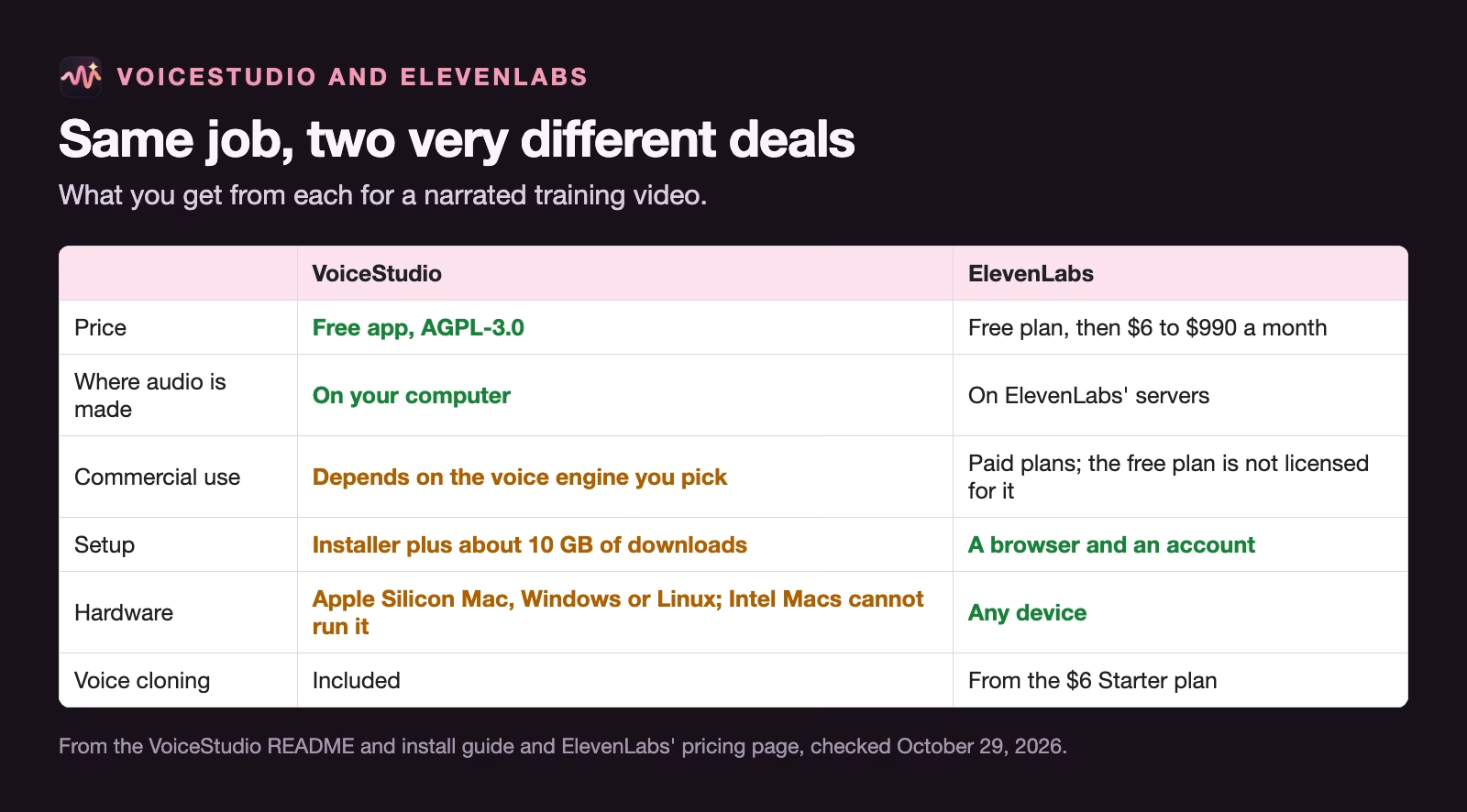
ElevenLabs’ pricing page (checked October 29, 2026) lists a free plan with 10,000 credits a month, about 10 minutes of speech, without a commercial licence, and paid plans from $6 a month up to $990 a month that include commercial use and instant voice cloning.
| ElevenLabs plan | Price a month | Credits a month | About | Commercial use |
|---|---|---|---|---|
| Free | $0 | 10,000 | 10 minutes | No |
| Starter | $6 | 30,000 | 30 minutes | Yes |
| Creator | $22 | 121,000 | 121 minutes | Yes |
| Pro | $99 | 600,000 | 600 minutes | Yes |
The short version: ElevenLabs is easier and works on any device, and you pay per minute once you go past the free allowance. VoiceStudio costs nothing per minute and keeps your script on your computer, and you pay in setup time, disk space and the job of checking licences yourself.
How to make your first voice-over
The first run takes about half an hour, most of it waiting for downloads. After that, a short voice-over takes minutes.
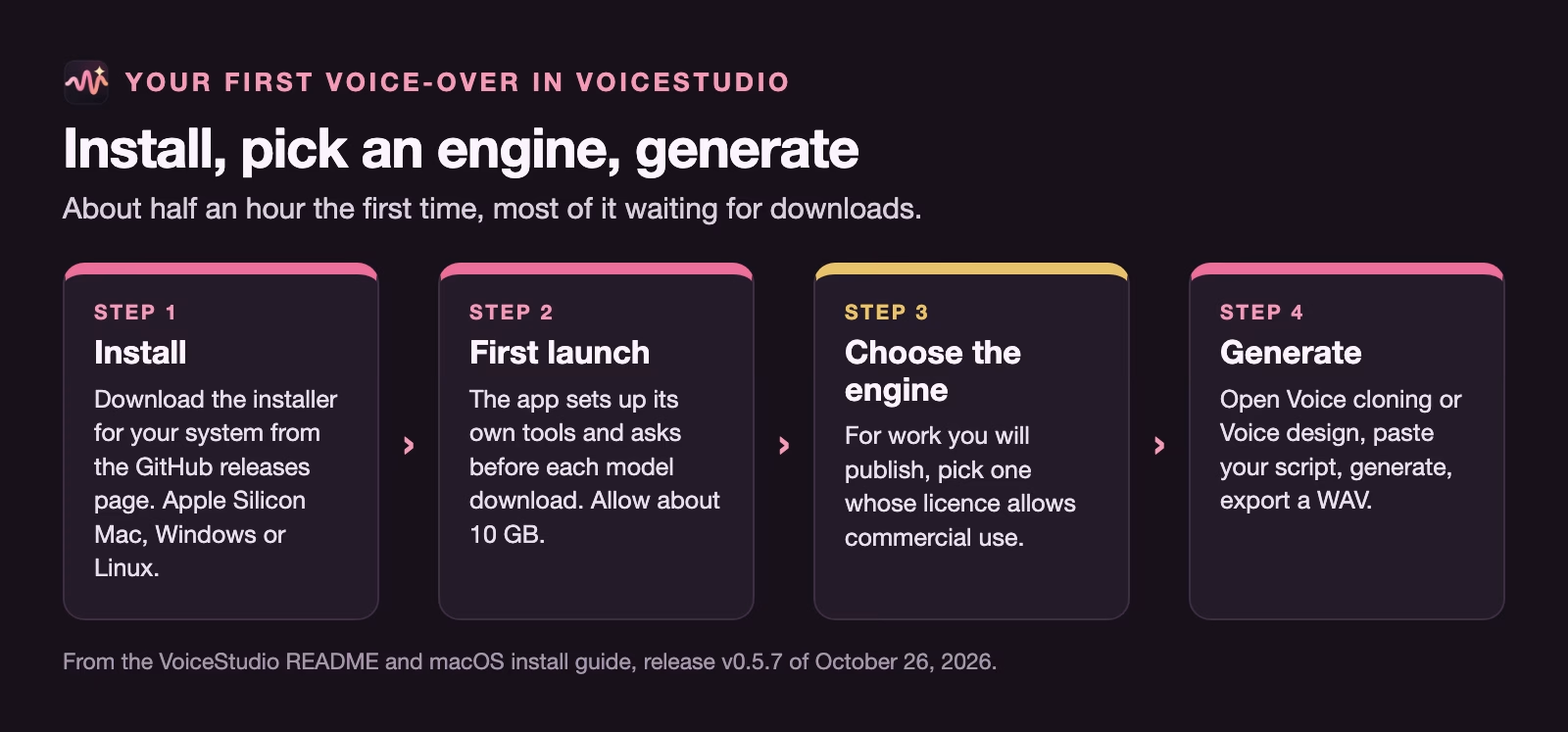
- Install it. Download the installer for your system from the latest release on GitHub. On a Mac, pick the file with “arm64” in the name, since that is the version for Apple Silicon. Using the official release page, rather than a copy from another site, protects you from tampered downloads.
- Open it and let it set up. On first launch the app installs its own tools. It asks before downloading each model, so you can see what is coming.
- Pick a voice engine. In the Model Manager, choose the engine you will use. For anything you might publish, pick one whose licence allows commercial use (see the next section).
- Make the audio. Open Voice design to describe a voice in words, or Voice cloning to start from a recording. Paste your script, generate, listen, and export a WAV file (a standard uncompressed audio format) when you are happy.
Cloning a voice, carefully
Voice cloning makes new speech in the voice of a sample recording. VoiceStudio’s README asks for a clean reference recording, which in practice means a quiet room, no music and a steady speaking pace.
Only clone your own voice, or the voice of someone who has agreed in writing to this specific use. The app’s privacy settings page describes an invisible watermark setting, which marks generated audio as synthetic so detection tools can recognise it; leave it on. Our guide to voice cloning ethics and consent covers the consent wording.
The licence detail that catches people out
The app is free to use, but each voice model inside it has its own licence, and the default one does not allow commercial use. The OmniVoice model card (checked October 29, 2026) says its code is released under Apache 2.0 but the pre-trained model is licensed under CC BY-NC, because of limits in its training data. CC BY-NC is short for Creative Commons Attribution-NonCommercial: you must credit the maker, and NC means non-commercial use only.
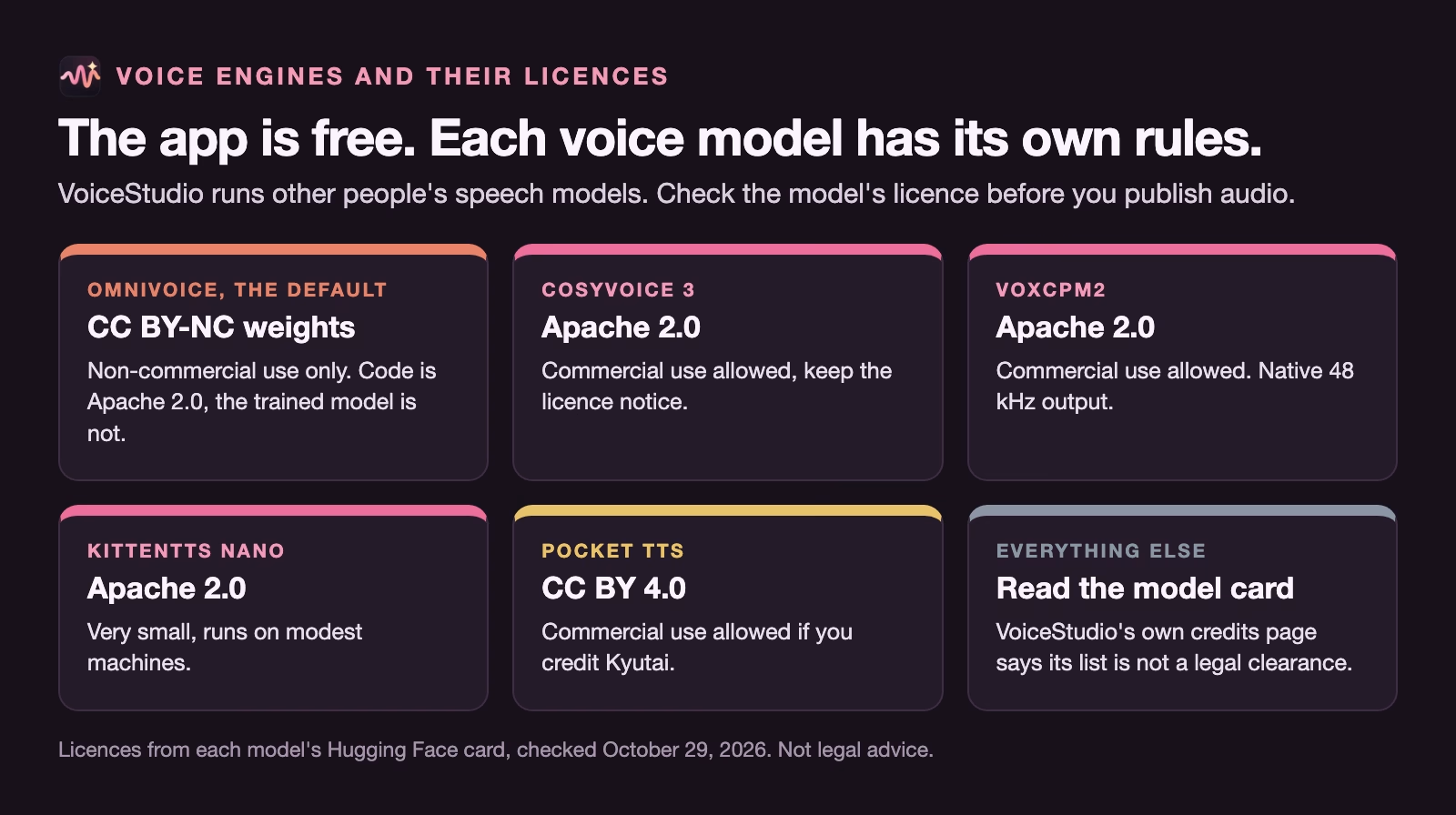
So if you generate a voice-over with the default engine and put it in a paid course, an advert or a client deliverable, you are likely outside that model’s licence, even though VoiceStudio itself is free. Several other engines in the app have more permissive licences. On Hugging Face (checked October 29, 2026), CosyVoice 3, VoxCPM2 and KittenTTS list Apache 2.0, which allows commercial use, and Pocket TTS lists CC BY 4.0, the Attribution licence (BY), which allows it if you credit the maker. VoxCPM2 also produces 48 kHz audio natively, a higher sample rate than many voice models, which helps if the voice-over goes into a polished video.
VoiceStudio’s own model credits page is careful on this point: it says its list of credits is not a clearance registry and that the app’s licence does not replace each model’s terms. Treat that as an instruction: check the model card of the exact engine you use, and keep a note of it with the project.
A simple rule for teams:
- Internal only (training for your own staff, drafts, rehearsal): any engine, with the voice owner’s consent.
- Anything public or paid (customer videos, ads, courses you sell): an engine whose licence allows commercial use, checked on its model card the week you publish.
The blind listening test
The only fair way to compare voices is to let people listen without knowing which tool made which clip. Your own ear is biased toward the option you set up yourself.
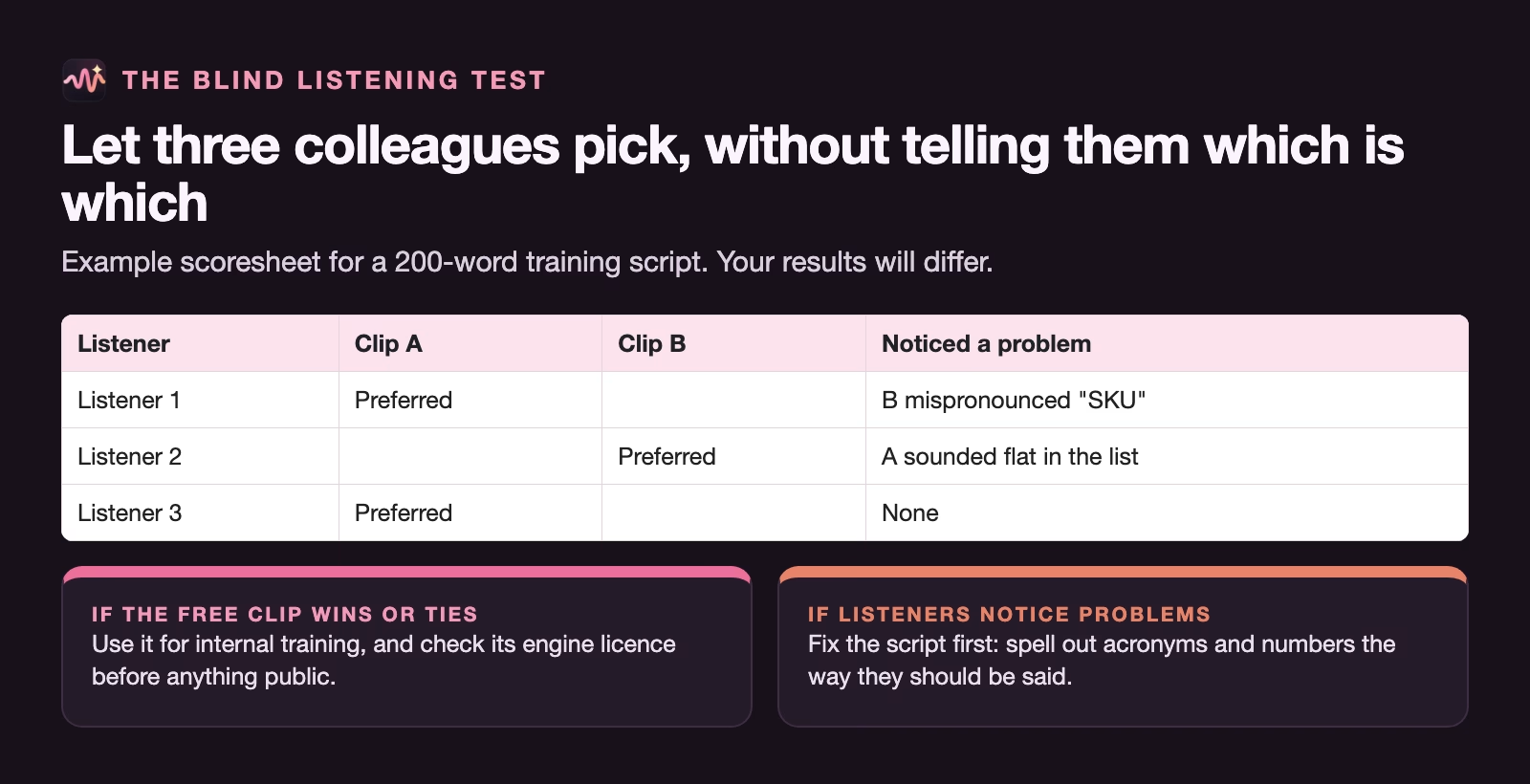
- Write a 200-word script typical of your real work, including a few hard words: product names, acronyms and numbers.
- Make one clip in VoiceStudio and one in ElevenLabs’ free plan, with similar voices, and export both in the same format.
- Rename them A and B, so the file names do not give the answer away.
- Ask three colleagues to pick the one they would rather hear in a training video, and to note anything that sounded wrong.
- If VoiceStudio wins or ties, use it for internal work. If both lose on the same words, the script is the problem: write acronyms and numbers the way they should be said, such as spelling out an abbreviation letter by letter or writing “twelve hundred” for 1,200.
A worked example: the expense-system walkthrough
Let’s go back to the expense-system video. It is for staff only, the script mentions supplier names, and you have no budget.
You install VoiceStudio on an Apple Silicon laptop, let it download the default engine and one Apache-licensed engine, and generate the 600-word script with each. Then you run the blind test with three colleagues. Suppose two of the three prefer the default engine’s clip, and all three trip on “SKU”, the stock-keeping unit (SKU) code your finance team uses, which both engines read as a word.
You change the script to “S K U”, regenerate, and the problem goes away. Because the video is internal, the default engine’s non-commercial licence is fine here, assuming your company’s lawyers agree that internal training counts as non-commercial; if in doubt, use the Apache-licensed engine, which is safe either way. You note the engine and its licence in the project folder, so whoever reuses the audio for a public version later knows to regenerate it.
No script left your laptop, the cost was an afternoon, and the decision about public use is written down instead of guessed.
Common mistakes
- Assuming free app means free to publish. The default voice model is non-commercial.
- Cloning a colleague’s voice without written consent. Get it in writing, for that use.
- Installing on an Intel Mac. The speech engines will not run locally there.
- Downloading from a mirror site. Use the GitHub releases page.
- Judging quality with your own ears only. Run the blind test.
- Blaming the engine for mispronunciations. Rewrite acronyms and numbers as they should sound.
Try it this week
- Install VoiceStudio from the official releases page on a supported machine.
- Generate a 200-word script with the default engine and with one Apache-licensed engine.
- Make the same script in ElevenLabs’ free plan.
- Run the blind test with three colleagues and note the problem words.
- Write down which engine you would use for internal work and which for public work, with the licence of each.
For everyday dictation and transcription, which VoiceStudio also does, see how to use voice dictation and AI speech tools for everyday work.
Quick recap
- VoiceStudio is a free, open-source voice app that runs on your own computer.
- It needs an Apple Silicon Mac, Windows or Linux, and about 10 GB of disk.
- The default voice model, OmniVoice, is licensed for non-commercial use only.
- CosyVoice 3, VoxCPM2 and KittenTTS list Apache 2.0; Pocket TTS needs a credit.
- ElevenLabs’ free plan is non-commercial too; paid plans start at $6 a month.
- Compare voices blind, and only clone voices with written consent.
Sources
- VoiceStudio on GitHub (README) (features, platforms, install, engines; release v0.5.7 of October 26, 2026; checked October 29, 2026)
- VoiceStudio: Install on macOS (Intel Mac limit, macOS 13.3 or newer, about 10 GB of disk)
- VoiceStudio: Model credits (credits are not a clearance registry; app licence does not replace model terms)
- VoiceStudio: Privacy and retention (invisible watermark setting, analytics consent)
- Hugging Face: k2-fsa/OmniVoice model card (Apache 2.0 code, CC BY-NC pre-trained model; checked October 29, 2026)
- ElevenLabs pricing (plans, credits, commercial licence; checked October 29, 2026)
Keep going
Same lessons in your feed
Short diagrams, hooks, and weekly tutorials on Substack, Instagram, X, and Facebook.