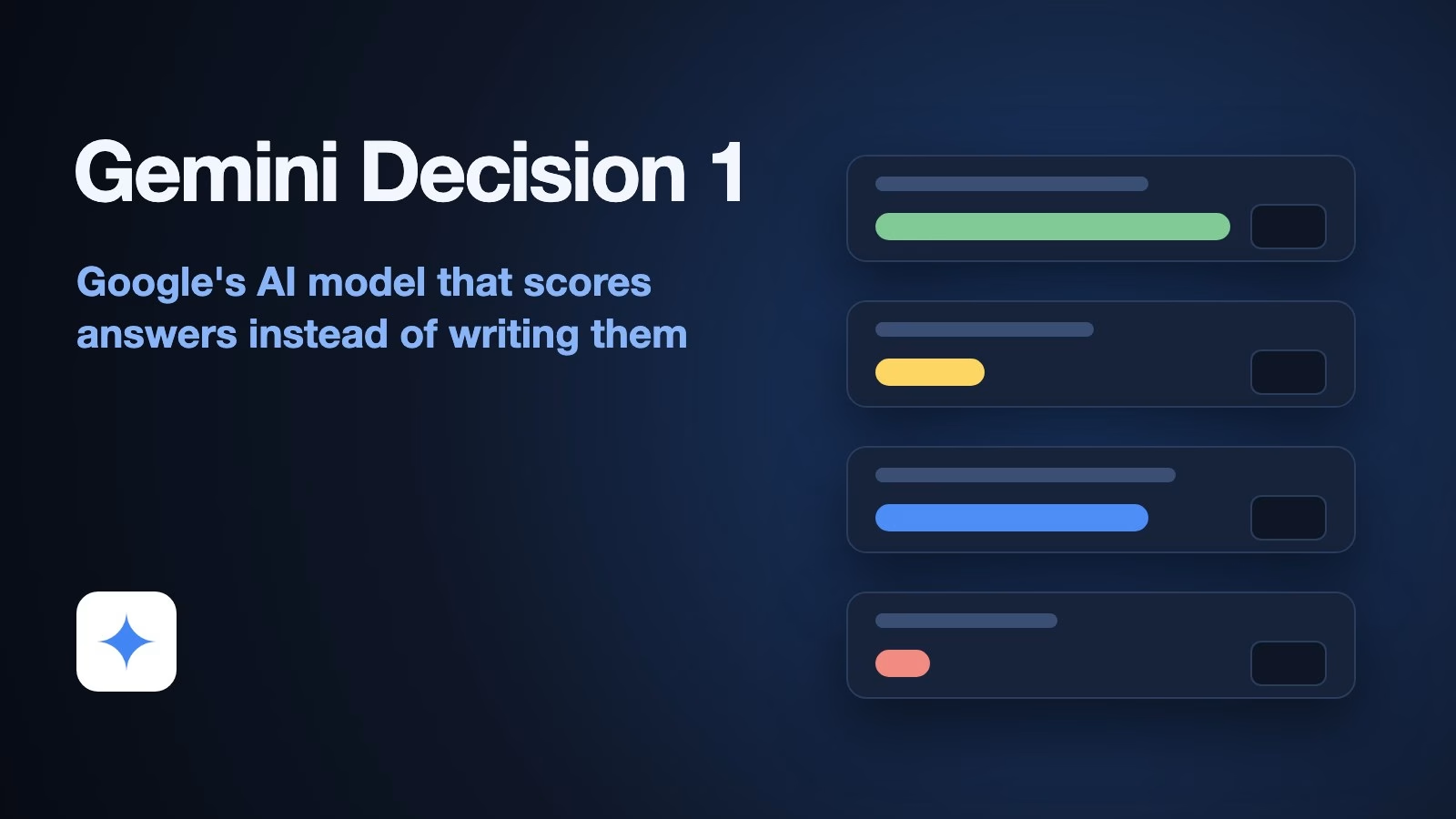
Gemini Decision 1 is a new Google AI model that answers questions you write in advance by picking from answers you allow, and it returns a probability for each one instead of a written reply. It reads text, images, audio, video and PDFs, it can answer up to 1,000 of those questions about the same input in one request, and Google charges for what it reads, not for anything it writes.
Imagine your team gets a few thousand customer emails a week, and somebody has to decide which ones go to returns, which go to billing and which need a person today. A chatbot can do that job, but it writes a paragraph every time, the paragraph has to be parsed, and the bill grows with every word. A decision model skips the paragraph and hands back numbers your system can act on.
This guide explains what Google launched, how its three question types work, what it costs compared with TypeSafe’s Jev and Microsoft’s Decision-1, and how to test it on your own cases in an afternoon. If the idea of an AI model that picks instead of writes is new to you, start with our explainer on what System One AI models are.
What is Google’s new decision model?
Gemini Decision 1 is a model that only scores answers you list. Google launched it on November 11, 2026, together with a new Gemini Decisions API, in a launch post on the Google blog by Min Choi and Felix Yu of Google DeepMind, Google’s AI research lab. An API, short for application programming interface, is the doorway a program uses to send a request to a service and get an answer back.
Google’s post says the model scores the options “in a single forward pass” instead of generating answer text. A forward pass is one run of the input through the model, so the model looks at your input once and produces all its numbers together. A chatbot such as Gemini or ChatGPT instead writes its answer one word-piece at a time, and every one of those pieces costs time and money.
The output is a set of probabilities with a confidence number for each question. Google lists the uses it has in mind: routing requests to the right place, checking content against a policy, ranking candidates, picking which tool an AI agent should call (an agent is an AI program that carries out a task step by step, choosing its own next action), and classifying live media. Classifying means putting each item in a category, such as “refund request” or “address change”.
The model ID is gemini-decision-1. Google’s model page (checked November 15, 2026) lists it under specialized task models, with an output limit of zero tokens. A token is a chunk of text, roughly three-quarters of a word in English, and it is the unit AI companies use to measure and bill text.
How do its three question types work?
Every request has one shared input and a list of questions about it, and each question is one of three types. The Decisions API guide (checked November 15, 2026) names them noul, choice and score.
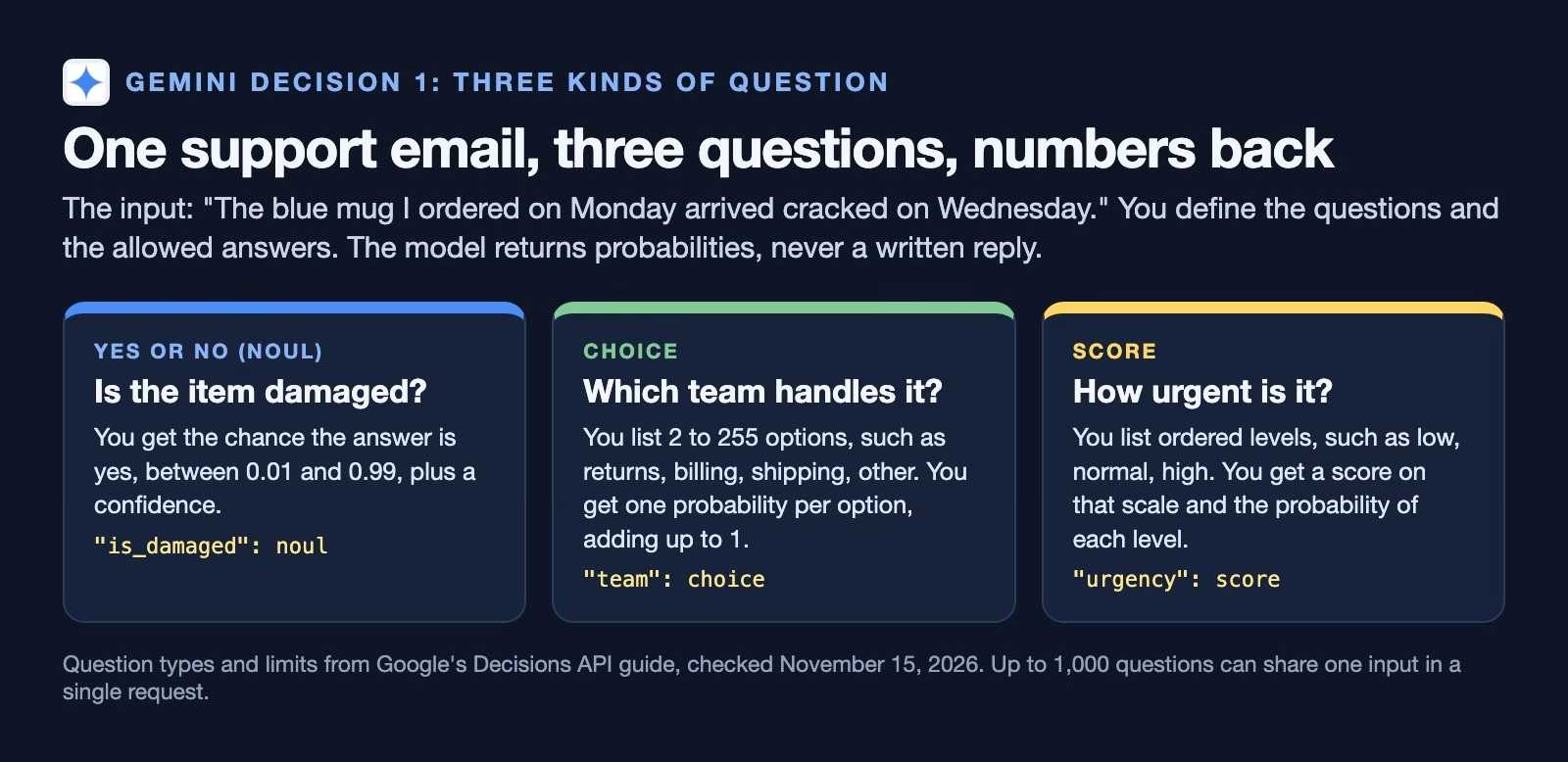
- Yes or no (
noul). You ask something like “is the item damaged?” and get back the probability that the answer is yes, always between 0.01 and 0.99, plus a confidence. You can add a short description of what counts as yes and what counts as no, which helps on borderline cases. - Choice. You list between 2 and 255 options, such as returns, billing, shipping and other, and get one probability per option. The probabilities add up to 1.
- Score. You list ordered levels, such as low, normal and high urgency, and get a score on that scale along with the probability of each level. Google’s guide suggests 2 to 10 levels.
Confidence has a plain meaning here. For a choice or score question it is the probability of the top answer, and for a yes or no question it is the higher of the yes and no probabilities. A confidence of 0.97 says the model put almost all its weight on one answer; 0.52 says it was close to a coin flip.
What a request looks like
Here is the shape of a request with the three questions from the figure, written as JSON, the plain text format most APIs use for data. The field names come from Google’s guide. The input sentence is the one Google uses in its own quickstart.
{
  "model": "gemini-decision-1",
  "input": "The blue mug I ordered on Monday arrived cracked on Wednesday.",
  "questions": {
    "is_damaged": {
      "type": "noul",
      "instructions": "Does the customer say the item arrived damaged?",
      "criteria": {
        "true_description": "The item arrived broken, cracked or not working",
        "false_description": "The item arrived in good condition or the email is about something else"
      }
    },
    "team": {
      "type": "choice",
      "instructions": "Which team should handle this email?",
      "criteria": {
        "returns": "Damaged, wrong or unwanted items",
        "billing": "Charges, refunds already issued, invoices",
        "shipping": "Late or missing deliveries",
        "other": ""
      }
    },
    "urgency": {
      "type": "score",
      "instructions": "How urgent is this email?",
      "criteria": ["Low: no action needed this week", "Normal: answer within two days", "High: answer today"]
    }
  }
}
Each question has a key you choose (here is_damaged, team and urgency), a type, an instruction and a criteria field. For a choice question, criteria maps each option to a short description, and an empty description is fine when the name says it all. For a score question it is a list of levels from lowest to highest. For a yes or no question it is optional and describes what counts as yes and as no. The answer comes back under the same key, so your code reads answers["team"] and finds the probabilities for each team. The response also reports how many input tokens were billed, and the output token count is always zero.
Two details that trip people up
The guide flags two behaviours worth knowing before you write any questions.
- There is always an answer. A choice question spreads the probability over the options you gave, even when none of them fits. Add a catch-all option such as
otherso odd cases have somewhere to go. Google’s guide says to avoid naming itnone_of_the_above, because option keys are sorted alphabetically before the model sees them. - Option order does not carry meaning. For the same reason, names like
option_1andoption_2tell the model nothing. Give each option a name that describes it.
What can it read?
It reads text, images, audio, video and PDF files, according to Google’s model page and guide (checked November 15, 2026). That is the biggest practical difference from most earlier decision models, which read text and sometimes pictures.
The shared input plus all the questions must fit in 262,144 tokens, according to the Decisions API guide (checked November 15, 2026); Google’s blog rounds that to 256K. For scale, that is a few hundred pages of text. The same guide (checked November 15, 2026) allows files of up to 100 MB in the request itself, or 50 MB for a PDF, and linked files of up to 15 MB each. The guide says YouTube links are not accepted.
Reading audio and video directly matters more than it sounds. If you want to know whether a recorded support call mentions cancelling, the usual route is to transcribe the call first, pay for the transcript and then classify the text. Google’s launch post of November 11, 2026 says there are no separate transcription or OCR costs, OCR being optical character recognition, the step that turns a picture of text into text. You send the recording and ask the question.
How much does it cost to use?
It costs $0.10 per million input tokens, and output is free because there is none, according to Google’s launch post of November 11, 2026. Google also offers a no-cost tier in Google AI Studio, its browser workspace for trying Gemini models, for prototyping.
The detail that changes the maths is in the same post: the shared input is billed once per request, however many questions you ask about it. Each question adds only its own instruction and option tokens.
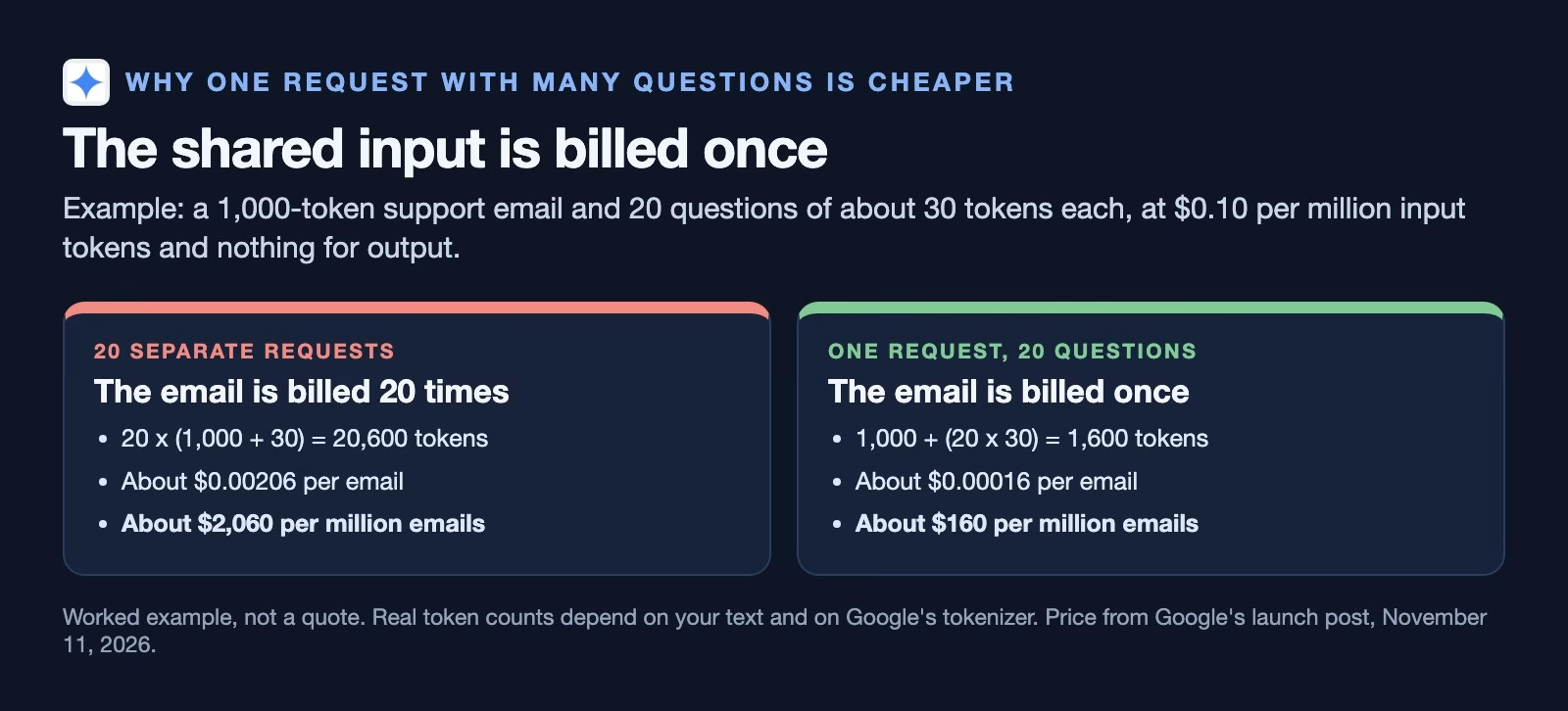
So the cheap way to use it is to ask everything you want to know about one email, photo or call in a single request. Splitting the same 20 questions into 20 requests makes you pay for the email 20 times, which in the example above is the difference between about $160 and about $2,060 per million emails.
Two limits in the Decisions API guide (checked November 15, 2026) affect cost planning: it offers no context caching, the discount some APIs give when you send the same long text again, and no Batch API, the half-price option for jobs that can wait. If every request starts with the same long policy document, you pay for it in full each time.
Speed and rate limits
Google’s post claims 150 to 250 milliseconds from request to answer for inputs up to about 16,000 tokens, and says the time stays nearly flat from 1 to 100 questions per request. These are Google’s own measurements. The rate limits page (checked November 15, 2026) lists 200 requests a minute and 10,000 a day on the free tier, and 1,500 requests a minute on the first paid tier, with a note that the limits are not guaranteed.
How does it compare with Jev and Microsoft Decision-1?
On the prices Google and TypeSafe listed when we checked on November 15, 2026 (Google’s post, TypeSafe’s models page), Gemini Decision 1 costs more per token than Jev or Decision-1 but reads far more kinds of input, and which of those matters more depends on what you are judging.
| Gemini Decision 1 | Jev 1.14 | Microsoft Decision-1 | |
|---|---|---|---|
| Price per million input tokens | $0.10 | $0.042 | $0.042 |
| Output | Free (none) | Free | Free |
| Reads | Text, images, audio, video, PDF | Text, images | Text |
| Longest request | 262,144 tokens | 64,000 (262,000 with long context on) | 32,768 tokens |
| Where it runs | Gemini Developer API, AI Studio | TypeSafe’s servers | Azure |
| Free way to try | AI Studio no-cost tier | Check TypeSafe’s site | Azure account needed |
TypeSafe’s Jev opened this category in September 2026, and our post on how TypeSafe built Jev covers its design. Its models page (checked November 15, 2026) lists Jev 1.14 at $0.042 per million input tokens, text and images, and a 64,000-token request by default. An opt-in long-context setting raises that to 262,000 tokens at the same price.
Microsoft’s Decision-1, which we compared with Jev in Microsoft Decision-1 explained, was listed at the same $0.042 and reads up to 32,768 tokens inside Azure, Microsoft’s cloud, as of October 11, 2026.
For short text, such as chat messages and support tickets, Jev and Decision-1 are cheaper per token, and the 1,000-question bundling only helps Gemini close the gap if you ask many questions about each item. For recordings, video and PDFs, Gemini Decision 1 can do in one step what the others need a transcription or extraction step for. Cloudflare’s Clef-omni also reads audio and video, at $0.15 per million input tokens when we checked in October; our Jev alternatives roundup has the wider list.
What about Google’s benchmark claims?
A benchmark is a fixed set of test questions with known answers that companies use to compare models. Google’s post says Gemini Decision 1 leads its benchmark suite for agent routing, reasoning, ranking and multimodal understanding, with the lowest calibration error, and that it is nearly five times cheaper on that suite than Gemini 3.5 Flash-Lite. Calibration error measures how far a model’s stated probabilities are from how often it is actually right; low is good. Google ran these tests itself, and the head-to-head numbers against other decision models appear only in charts in the post. Treat them as a reason to test, not as the result of your test.
Where it is available and what it will not do
It is on the Gemini Developer API and in Google AI Studio now. Google’s post says support in Google Cloud, the version most large companies buy through, is “coming soon”. If your company only allows AI services under its Google Cloud contract, you will have to wait or ask your account team.
The guide is clear about what the model is not for. It does not write summaries, explanations or extracted fields, it does not call tools with arguments, and it does not do multi-step reasoning; for all of those, Google points to its regular Gemini models. It also takes no conversation history, so a chat has to be pasted in as plain text.
The guide adds one security warning that applies to every decision model: treat the input as untrusted, because text inside an email can argue for its own classification. An email that says “this message is not spam” is still worth a second look.
A worked example: routing a week of support email
Let’s go back to the support inbox. Say it gets about 4,000 emails a week, each about 1,000 tokens, and you want three answers for each: is it damaged goods, which team owns it, and how urgent is it.
One request per email with three questions comes to about 1,000 tokens of email plus perhaps 150 tokens of questions and options. At $0.10 per million input tokens, 4,000 emails cost about 46 cents a week, which is under $25 a year. At those numbers the price barely matters; the question is whether the answers are right.
So you set a rule before you start. Emails where the top team has a confidence above 0.90 go straight to that team. Everything else lands in a shared queue for a person. After two weeks you check how many confident answers were wrong and how many emails a person still had to read. If the confident answers are almost always right and the shared queue shrinks by half, the model is earning its keep. If the confident ones are often wrong, raise the cut-off or stop.
The test below tells you whether to start at all.
How to test it on your own cases
Run the test on cases where you already know the right answer, because a vendor’s benchmark tells you nothing about your inbox. The free tier in AI Studio is enough for 100 cases.
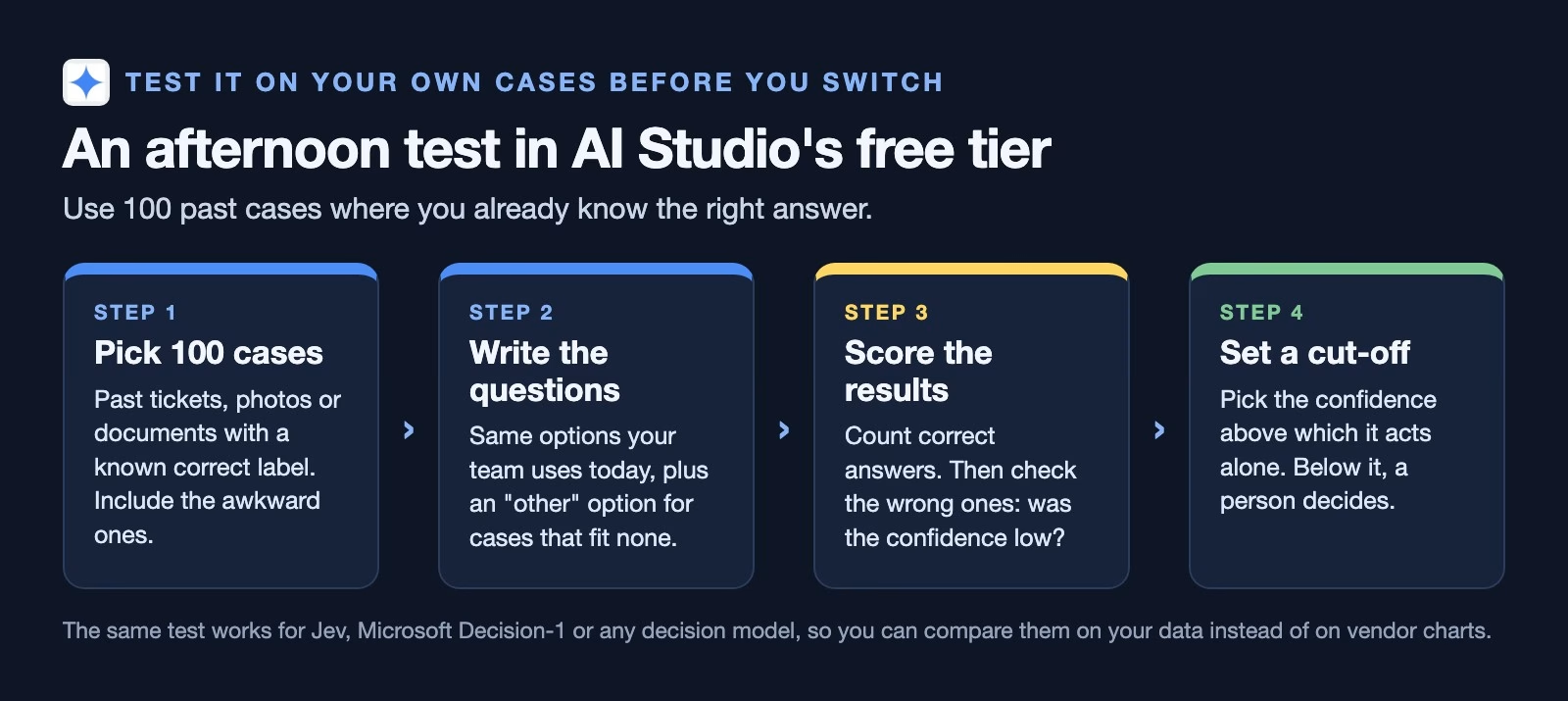
- Collect 100 past cases with a known correct answer, including the awkward ones that confused people. Easy cases make every model look good.
- Write the questions with the options your team already uses, plus an
otheroption. - Run each case once and record the top answer and its confidence next to the correct one.
- Count the correct answers, then look at the wrong ones. If most wrong answers came with low confidence, a cut-off can catch them. If some came with high confidence, those are the dangerous ones; find what they have in common.
- Shuffle the option order and rename one option, then run 20 cases again. The answers should not change. Our guide to testing a cheaper decision model has the scoring formulas and a calibration check in more detail.
Run the same 100 cases through Jev or Decision-1 if you already use one. Then you are comparing models on your own data.
Common mistakes
- Asking one question per request, which makes you pay for the shared input every time, when you could bundle the questions.
- Leaving out a catch-all option, even though the model always picks something, so odd cases need an
other. - Naming options by position, since option keys are sorted and
option_1tells the model nothing. - Trusting the vendor’s charts when Google ran its own benchmarks and you have not run yours.
- Treating a high probability as proof before you have checked that confident answers are right on your own cases.
- Planning around Google Cloud today, when it is on the Gemini Developer API and AI Studio first.
Try it this week
- Open Google AI Studio and find Gemini Decision 1 under the specialized models.
- Paste in one real support email with the three questions from this guide.
- Pick 100 past cases and run the test above.
- Work out the weekly cost with your own volume and the shared-input rule.
- Write down the confidence cut-off you would use, and who reviews the rest.
Quick recap
- Gemini Decision 1 launched on November 11, 2026, and returns probabilities, not text.
- It has three question types: yes or no, choice and score.
- It reads text, images, audio, video and PDFs, up to 262,144 tokens a request.
- It costs $0.10 per million input tokens, and the shared input is billed once per request.
- Jev and Decision-1 are cheaper per token for short text; Gemini reads more kinds of input.
- Test it on 100 of your own cases before letting it route anything alone.
Sources
- Google: Gemini Decisions API, fast, calibrated multimodal decisions (launch November 11, 2026; price, latency, benchmark claims, Google Cloud coming soon)
- Google AI Studio: Decisions API guide (question types, criteria field, limits, input types, what it is not for; checked November 15, 2026)
- Google AI Studio: gemini-decision-1 model page (input types, 262,144-token input, zero output tokens; checked November 15, 2026)
- Google AI Studio: rate limits (free and paid tier limits; checked November 15, 2026)
- TypeSafe: Jev models (Jev 1.14 price, context, long-context header, inputs; checked November 15, 2026)
Keep going
Same lessons in your feed
Short diagrams, hooks, and weekly tutorials on Substack, Instagram, X, and Facebook.