

Keep Jev if your app already uses it for quick yes-or-no and pick-one decisions about text, and switch only when you need something it cannot do. OpenAI and Cloudflare now sell similar services that already read pictures as a finished feature, and Amazon, OpenJev, and Laya offer free models you run on your own computer. They differ in price, speed, and privacy, so the right one depends on the job.
Imagine you built a small helper that reads every support email and decides three things: is it urgent, which team gets it, and how angry is the customer. It runs on Jev and works well. Then your boss asks whether it could also check the photos customers attach, and your security team asks whether the emails can stay inside the company. Jev reads pictures only in a test mode its maker does not recommend for real use yet, and it runs on someone else’s servers, so you need to know what else is out there.
Jev is a model from TypeSafe AI that answers typed questions instead of writing text. If that idea is new, the earlier posts on what System One models are and how TypeSafe built Jev explain it from the start. This post compares the options that showed up in the three weeks after Jev launched, with prices and limits checked on October 8, 2026 and prices rechecked on October 13, 2026.
What does a Jev alternative have to do?
A Jev alternative has to take some text (and sometimes an image), take a list of questions with fixed answers, and return a probability for each answer instead of a paragraph. A probability is a number from 0 to 1 that says how sure the model is, so 0.92 means “very likely yes”. Your code reads that number and acts on it, which means there is no free text to parse and nothing for the model to make up.
Every option in this post asks three kinds of question, though the names change from vendor to vendor:
- A yes-or-no question returns the chance the answer is yes. Jev calls this a noul. OpenAI calls it a predicate.
- A pick-one question returns a probability for each option you list, like billing, technical, or sales. Everyone calls this a choice.
- A rating question returns a position on a scale you describe, like no impact, minor, major, or critical. Everyone calls this a score.
Each answer comes back in a single quick pass, because the model does not write one word after another the way ChatGPT does. That is why these models answer in a fraction of a second and cost so little. It also means they cannot explain themselves or draft a reply, so you still need a regular chat model for anything that has to be written.
Three paid services you call over the internet
The paid options are services you call over the internet with an API key. An API is a way for one program to ask another program for data or actions, and the key is the password that bills your account. You send a request, and the vendor’s computers do the work, so you have nothing to install or keep running.
Jev from TypeSafe
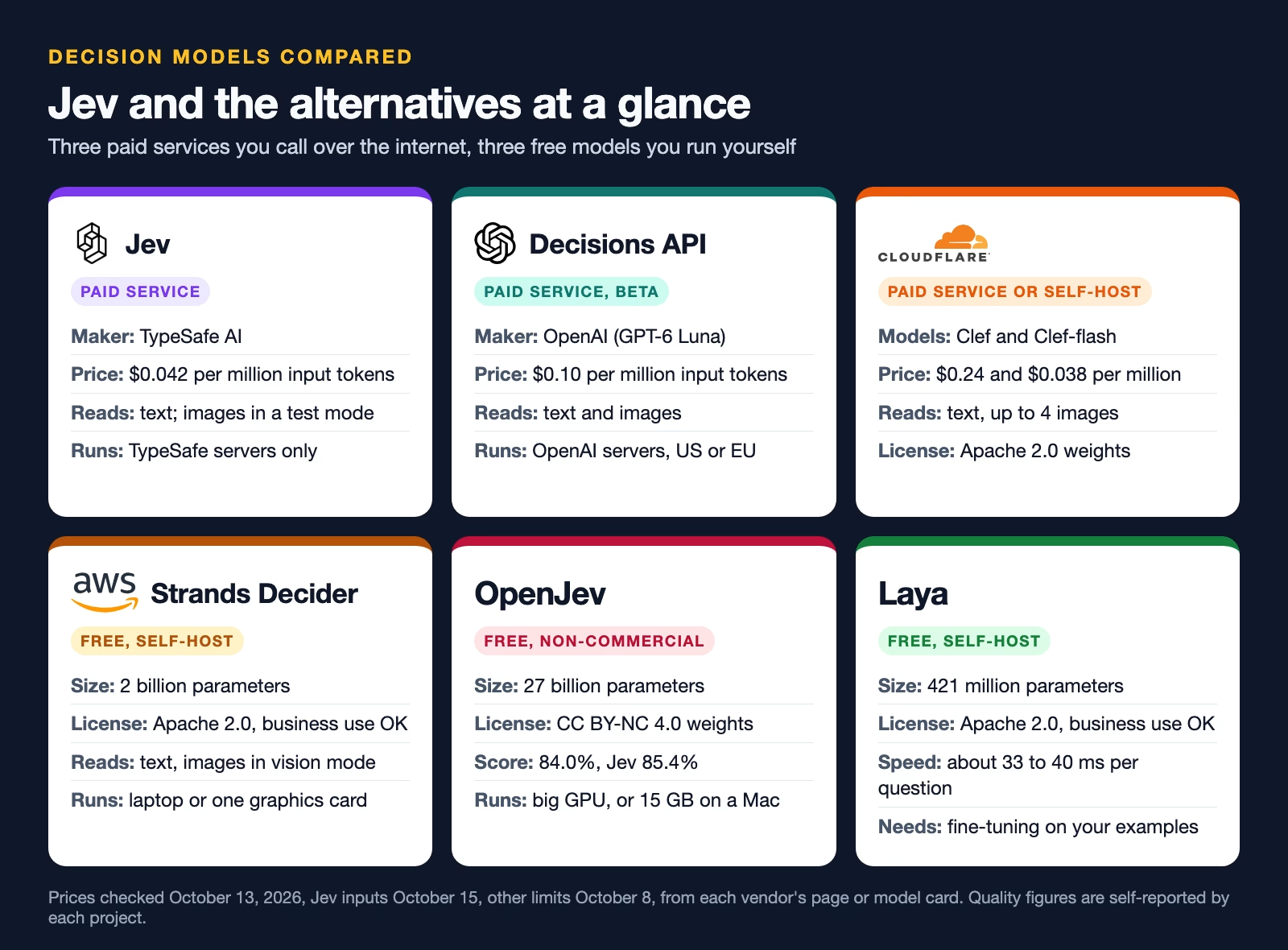
Jev is the original. TypeSafe charges $0.042 per million input tokens and nothing for output, according to its models page (checked October 13, 2026). A token is a small chunk of text, and 1,000 tokens is about 750 English words. One request can hold 64,000 tokens across the text and all the questions, and the standard plan allows up to 80 requests per second before it starts refusing them. A second test-mode setting added on October 14, 2026 raises the request size to 262,000 tokens, at some cost in speed and accuracy, per the same models page (checked October 15, 2026).
The catch is that Jev reads pictures only in a test mode. TypeSafe released Jev 1.14 on October 14, 2026, and its images page says you can now send photos by switching on an extra setting with each request, but that the feature is not ready for real use yet and its format and accuracy can change (checked October 15, 2026). For a production app that has to read photos today, the alternatives below are the safer choice. There is still no audio or video input, so a recording has to be turned into text first. Jev is also closed, which means you cannot download it, and every request goes to TypeSafe’s servers. TypeSafe says it does not train on customer requests.
OpenAI Decisions API
OpenAI’s version is called the Decisions API, and it went into public beta on October 6, 2026, according to the OpenAI developer forum announcement. It runs on a special version of GPT-6 Luna, OpenAI’s fast model. The Decisions guide lists $0.10 per million input tokens with no charge for output (checked October 13, 2026). The same page adds extra charges for regional processing and very long inputs, and it says general availability is coming in the next few weeks.
The big difference is pictures. You can send an image with the text, so a question like “does this product photo show damage?” works without a description step. The image has to be inside the request as encoded data, and OpenAI does not accept a web link to the image. OpenAI also offers zero data retention and HIPAA use for eligible customers. HIPAA is the US law that sets the rules for patient data, so this matters if you work in health care.
Early users on the forum also reported a rough edge. One test found that pick-one questions pushed too much probability onto the most likely option, and another found that changing the order of the options changed the answer. Those are forum reports, not official numbers, but they are good reasons to test before you trust the beta.
Cloudflare Clef and Clef-flash
Cloudflare released two decision models, Clef and the faster Clef-flash, on October 1, 2026, and runs them on Workers AI, its service for running AI models on Cloudflare’s network. The Cloudflare announcement says both accept the same request shape as Jev, so a program written for Jev needs only small changes. The Clef model page lists $0.24 per million input tokens, a 65,536-token limit, and up to four images per request (checked October 13, 2026).
Clef-flash costs $0.038 per million input tokens, down from $0.09, according to the Workers AI pricing page (checked October 13, 2026). Cloudflare cut the price on October 9, 2026, and in the same announcement it lowered the hosted Clef-flash limit from 64,000 to 24,000 tokens per request. Cloudflare’s own tests put Clef ahead of Jev on most sorting tasks, such as picking the right tool or the right banking topic. Jev stayed ahead on When2Call, a test of whether an AI agent (an AI that takes actions on its own) should act at all. Cloudflare ran those tests itself, so treat them as a claim to check, not a result. The same comparison found Clef-flash much weaker than Jev at noticing a request that fits none of your options, so give it a clear “other” choice, according to an independent comparison by Beri.
That October 9 announcement also added Clef-omni, which reads audio and video as well as text and pictures. The Workers AI pricing page lists it at $0.15 per million input tokens (checked October 13, 2026). It can judge a call recording or a short clip directly, without first turning it into text.
Clef has an unusual twist: the model files are public under the Apache 2.0 license, which lets anyone use them, even in a paid product. You can pay Cloudflare to run Clef, or download the weights and run them yourself. Weights are the billions of numbers a model learned during training, stored as a large file.
Three free models you run on your own computer
Open-weights models are free to download and run on your own computer or server, so your data never leaves the building. You pay for the hardware and the time to keep it running instead of paying per token. Each one below speaks the same request shape as Jev and serves it from a small local web address, so switching is mostly a change of address.
Strands Decider 2B from AWS
AWS (Amazon Web Services, Amazon’s cloud business) has a research team called Strands Labs, which released Strands Decider 2B in the first week of October 2026, and TechCrunch’s report says it grew out of an Amazon engineer’s side project. It is not an Amazon Bedrock service you pay for. It is a free download under the Apache 2.0 license, built on Qwen3.5 2B, a small open model from Alibaba.
The model card on Hugging Face shows a one-line install, pip install strands-decider, and a local server with an optional image mode. It scored 0.762 on the public JevBench set of 231 tasks. Amazon’s own warning is worth repeating: it is much weaker than a full reasoning model on complex problems, and the card says it does poorly on long documents that need several steps of thinking.
OpenJev
OpenJev is a community model built to match Jev’s answers, and it is not made by TypeSafe. Its model card reports 84.0% against Jev’s 85.4% on its own 10,000-question test, which is close. The full model has 27 billion parameters (the learned numbers inside a model), so it needs a large graphics card. A shrunken 4-bit version runs in about 15 GB on a Mac with Apple silicon.
The license is the big catch. The OpenJev weights are under CC BY-NC 4.0, and NC means non-commercial. You can use it for personal projects, research, or as a backup on your own laptop, but a business product needs a separate commercial license from the authors. Read that line before you build anything on it.
Laya
Laya is the small one. Built by Convai Innovations on a 421-million-parameter base, it is Apache 2.0 licensed and answers one question in about 33 to 40 milliseconds on an entry-level cloud graphics card, according to its model card. It installs with pip install laya.
The speed comes with a trade. The same card says the base checkpoints are close to random guessing on the typed-decision test until you fine-tune them, which means giving them extra training on examples of your own. The fine-tuned checkpoint scored 0.766 on that test. Laya also struggles with more than about 20 options in one question. It is the right pick when you have labeled examples and need speed, not when you want good answers out of the box.
What a million decisions costs
For the paid services, the cost is the number of input tokens times the price, because none of them charge for output. If each decision reads about 2,000 tokens (a long email plus three questions), a million decisions read two billion tokens. The chart below does that sum with each vendor’s listed price.
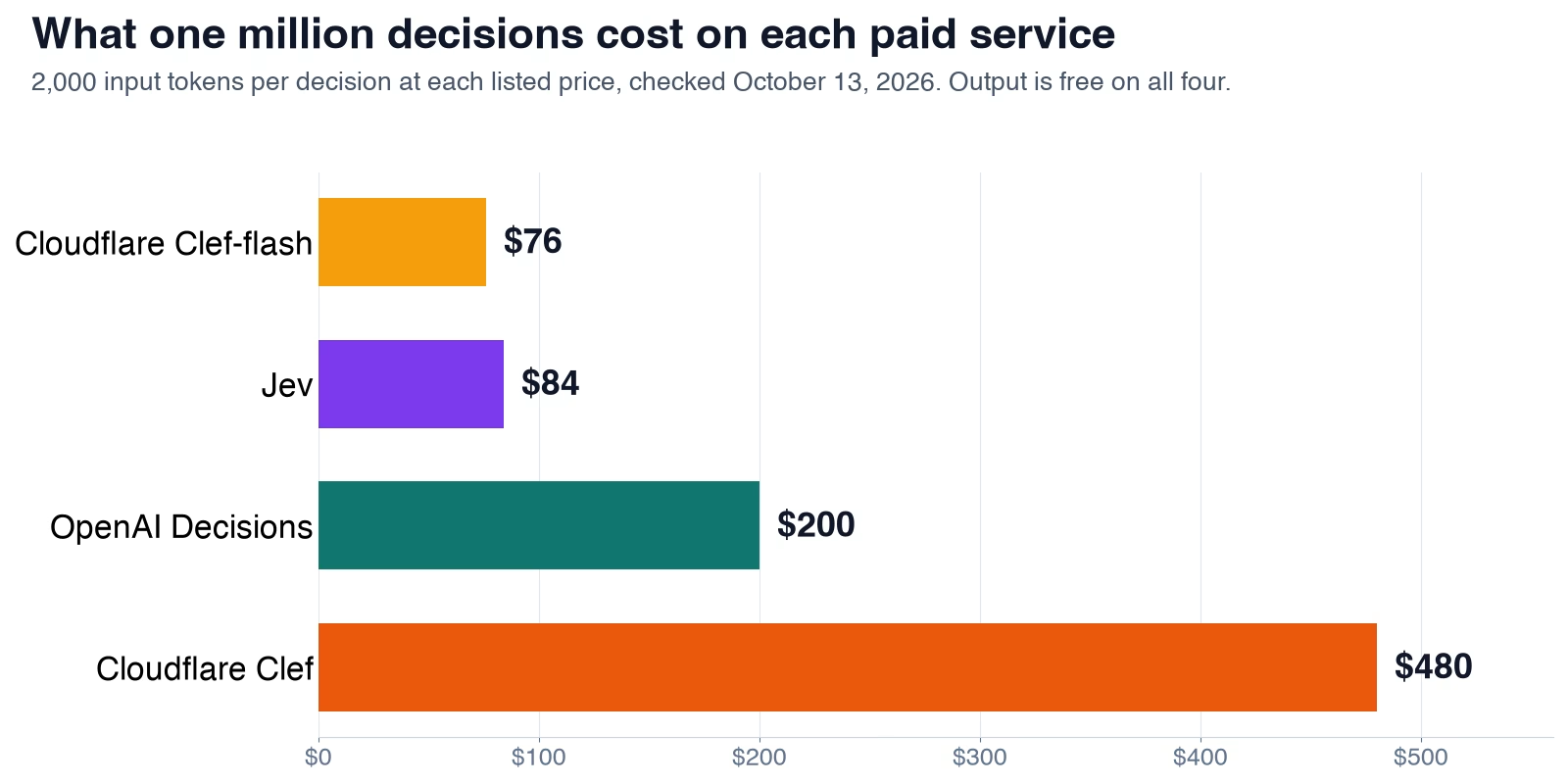
At that volume Clef-flash costs $76 and Jev $84, close enough that the price gap hardly matters. Clef costs $480, more than five times as much. For most teams none of these numbers is large, so price alone is a weak reason to switch. A better reason is a feature you need: pictures, keeping data in-house, or a model you can retrain.
The self-hosted models have no per-token bill, but they are not free. A server with a graphics card costs money every hour it runs, whether it handles ten decisions or ten million. Below a few million decisions a month, a paid service is usually cheaper and much less work. Self-hosting starts to pay off when the volume is very high or the data is not allowed to leave.
Switching between them in code
Switching is easiest between Jev, Clef, Strands Decider, Laya, and OpenJev, because they all accept the same request. You change the web address and the key, and the questions stay the same. OpenAI’s Decisions API uses different field names, so you need a small translation step. A script is a small file of instructions that runs from top to bottom, and the one below writes one ticket question in both shapes and prints them.
# One ticket, three questions, written the Jev way.
# The same request works for Jev, Cloudflare Clef, Strands Decider, Laya and OpenJev.
jev_request = {
    "state": "Checkout has failed for every customer for the last hour.",
    "questions": {
        "urgent": {"type": "noul", "instructions": "Is this request urgent?"},
        "team": {
            "type": "choice",
            "instructions": "Which team should handle it?",
            "criteria": {"billing": "Charges and refunds", "technical": "Bugs and outages"},
        },
        "severity": {
            "type": "score",
            "instructions": "How bad is the customer impact?",
            "criteria": ["No impact", "Minor", "Major", "Critical"],
        },
    },
}


def to_openai(req):
    """Rewrite a Jev-style request in the OpenAI Decisions API shape."""
    questions = []
    for name, q in req["questions"].items():
        if q["type"] == "noul":
            questions.append({"name": name, "type": "predicate",
                              "instructions": q["instructions"]})
        elif q["type"] == "choice":
            questions.append({"name": name, "type": "choice",
                              "instructions": q["instructions"],
                              "choices": [{"value": k, "description": v}
                                          for k, v in q["criteria"].items()]})
        elif q["type"] == "score":
            questions.append({"name": name, "type": "score",
                              "instructions": q["instructions"],
                              "levels": [{"label": level} for level in q["criteria"]]})
    return {"model": "gpt-6-luna", "input": req["state"], "questions": questions}


openai_request = to_openai(jev_request)
print("Jev-style question types:", [q["type"] for q in jev_request["questions"].values()])
print("OpenAI question types:  ", [q["type"] for q in openai_request["questions"]])
print("OpenAI severity levels: ", openai_request["questions"][2]["levels"])
Here is what that script prints. The Jev-style request goes unchanged to Jev, Clef, or a local server. The OpenAI version renames noul to predicate, turns the option list into choices, and turns the scale into levels.
Jev-style question types: ['noul', 'choice', 'score']
OpenAI question types:   ['predicate', 'choice', 'score']
OpenAI severity levels:  [{'label': 'No impact'}, {'label': 'Minor'}, {'label': 'Major'}, {'label': 'Critical'}]
If you keep a translation function like to_openai in one place, the rest of your program never needs to know which vendor answered. This table lists the field names that change between the two shapes.
| What it is | Jev, Clef, Strands, Laya, OpenJev | OpenAI Decisions API |
|---|---|---|
| Yes-or-no question | noul | predicate |
| List of options | criteria (name: description) | choices (value, description) |
| Ordered scale | criteria (list of levels) | levels (label, description) |
| The text to judge | state | input |
| Where questions go | questions (keyed by name) | questions (list, each with a name) |
| Address | /v1/systemone | /v1/decisions |
One more difference matters for pictures. Cloudflare and OpenAI both want the image bytes inside the request. Neither accepts a link to an image on the web, so your code has to download the image and encode it before sending.
Which one should you use?
Keep Jev when it already works and your decisions are text, because it costs about the same as the cheapest option here and is still the strongest on “should I act” judgment calls in Cloudflare’s own tests. Switch only when you need something Jev cannot do. The cards below match each need to an option.
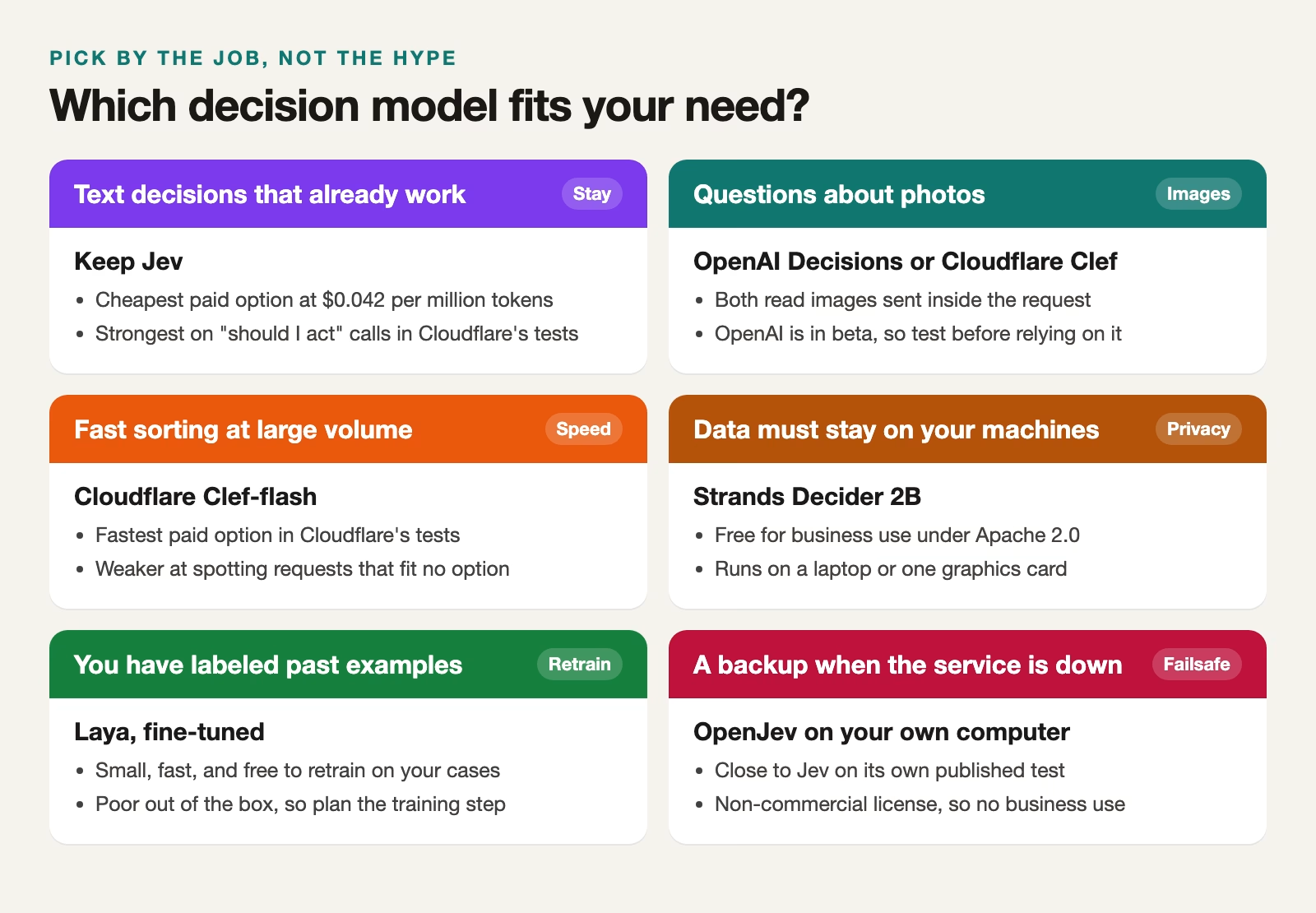
A sensible setup for many teams uses two models. A paid service handles everyday traffic, and a local model is the backup when the service is down. That way an outage slows you down instead of stopping you. The other common split is to send simple sorting jobs (which team, which topic) to a cheaper or local model and keep the judgment calls on the stronger one.
How to test an alternative before you switch
Never switch on a vendor’s benchmark (a standard test every model takes) alone, because every number in this post except prices came from the people selling the model. Test the new model on your own decisions first, alongside the one you already use. Here is a short plan that takes an afternoon:
- Pull 200 to 500 real past cases where you know the right answer, so you have something honest to score against.
- Send each case to your current model and the new one with the same questions, and save both answers.
- Count how often each one is right, and look closely at the cases where they disagree, because that is where the risk is.
- Check calibration, which means asking whether a 0.9 answer is right about 90% of the time. A model that is often confidently wrong is worse than one that says it is unsure.
- Time the answers from your own server, since speed in a vendor’s test lab is not speed from your office.
Then pick your cut-off numbers, such as “act on its own above 0.85, ask a person between 0.5 and 0.85”, using what the test showed. Those cut-offs belong to your data and your model, so set them again any time you change models.
Recap
- All the options ask the same three kinds of question and return probabilities, so your program logic carries over.
- Jev and Clef-flash are the cheapest paid choices for text. OpenAI’s Decisions API and Cloudflare’s Clef add pictures, and Clef-omni adds audio and video.
- Strands Decider and Laya are free for business use. OpenJev is close to Jev in quality but non-commercial.
- Self-hosting pays off for privacy, very high volume, or retraining, not for small savings.
- Test any switch on a few hundred of your own past cases before it touches real customers.
If you want to try one today, pip install laya or pip install strands-decider on your laptop and send it ten of your own tickets. You will learn more from those ten answers than from any chart.
Sources
- TypeSafe: Models (Jev price, context limits, long-context test mode, rate limits)
- TypeSafe: Images (image input in a test mode since Jev 1.14, checked October 15, 2026)
- OpenAI Developer Community: Decisions API is now available in Public Beta (beta date, early user reports)
- OpenAI: Decisions guide (request shape, question types, price, image input, data residency)
- Cloudflare blog: Introducing Clef (release, Jev compatibility, benchmark and latency claims)
- Cloudflare Workers AI: Clef model page (price, context size, image limits, request shape)
- Cloudflare blog: Introducing Clef-omni, a faster Clef and a cheaper Clef-flash (October 9 price cut, Clef-flash limit, Clef-omni inputs and price)
- Cloudflare Workers AI pricing (Clef, Clef-flash and Clef-omni prices)
- Beri: Cloudflare’s Clef Beats Jev at Routing and Loses at Judgment (Clef-flash weaknesses)
- TechCrunch: Amazon releases its own Jev clone as decision models flood the web (Strands Decider background)
- Hugging Face: strands-decider-2B model card (license, install, JevBench score, limits)
- Hugging Face: OpenJev model card (license, size, quality vs Jev, hardware)
- Hugging Face: Laya model card (license, size, speed, accuracy, limits)
Keep going
Same lessons in your feed
Short diagrams, hooks, and weekly tutorials on Substack, Instagram, X, and Facebook.



