A new kind of AI model does not write text at all. It reads a piece of data and answers a few questions about it. The answer comes back in a fixed format, such as yes or no, a category from a fixed list, or a score, in a fraction of a second. These are called System One models, and they are built for the decisions that software makes hundreds of times a minute, not for chatting with people.
Say your billing system gets a customer message that reads, “Please cancel my subscription and refund my last invoice because your server double billed me.” Your software has to settle three things before it touches the database. Did the customer ask for a refund? Is this an urgent billing dispute? Does the attached charge log show a duplicate charge?
If you send that message to a standard chat model like ChatGPT or Claude, you set off a slow and costly process. These models write their answer one small piece of text at a time. Each piece is called a token, which is roughly a short word or part of a word, and each new token depends on all the ones before it. Experts call this autoregressive generation. The model produces polite filler, formats the answer with brackets, and adds explanation you never asked for. You wait between three and fifteen seconds and pay for dozens of extra output tokens. Then you have to hope it does not drop a closing bracket or invent a status code that crashes the next system in line.
This points to a mismatch in how we have used AI for the last four years. We took chatbots built for human readers and squeezed them into software as awkward helper calls. Software does not need polite prose or step-by-step essays. It needs decisions in a fixed format, such as true or false, one choice from a list, a score, and a confidence number, delivered in milliseconds.
TypeSafe introduced System One models on September 15, 2026 to fill that gap. They skip text generation completely. Instead of predicting words one after another, they look at the input once, in a single parallel pass, and return a structured answer straight to your code. This post explains how they work and why the industry is splitting between fast reflex-style models and slow, careful reasoning models. It then walks through four ways software teams can use them today.
The problem with using chatbots inside code
Chat models are built to talk with people, one piece of text at a time. That makes them slow, expensive, and fragile when a program uses them to make decisions inside an automated pipeline (a chain of automated steps that moves and cleans data).
To see why, look at what happens when software calls a standard large language model. When you ask it to sort a support ticket, it does not work out the category in one step. It scores every word it knows and picks the most likely next token. Then it adds that token to the text so far and feeds the whole thing back into itself to pick the second token. This loop repeats dozens or hundreds of times until the model signals that it is done.
That loop causes three problems for anyone building software.
- Delay: Every token requires another trip through the model. Even a lightweight model can take a second or more to write a short JSON answer, which is a common format for sending structured data between programs. A web page, a mobile app, or a busy backend (the server side of an app that users never see) that waits several seconds for what is really an if-statement will feel broken.
- Cost of output: Cloud AI vendors charge for the text a model reads and the text it writes. The written part usually costs several times more per token; TypeSafe’s launch post puts it at about five times. If you ask a model to categorize an email and it writes fifty tokens of formatting and explanation, you are paying a premium for filler.
- Formatting mistakes: Some tools force a strict format, such as JSON schemas or the libraries Outlines and Guidance. Even so, a model can still return an invalid key or a cut-off bracket under heavy load. One syntax error in a chain of small services can stop a whole automated workflow.
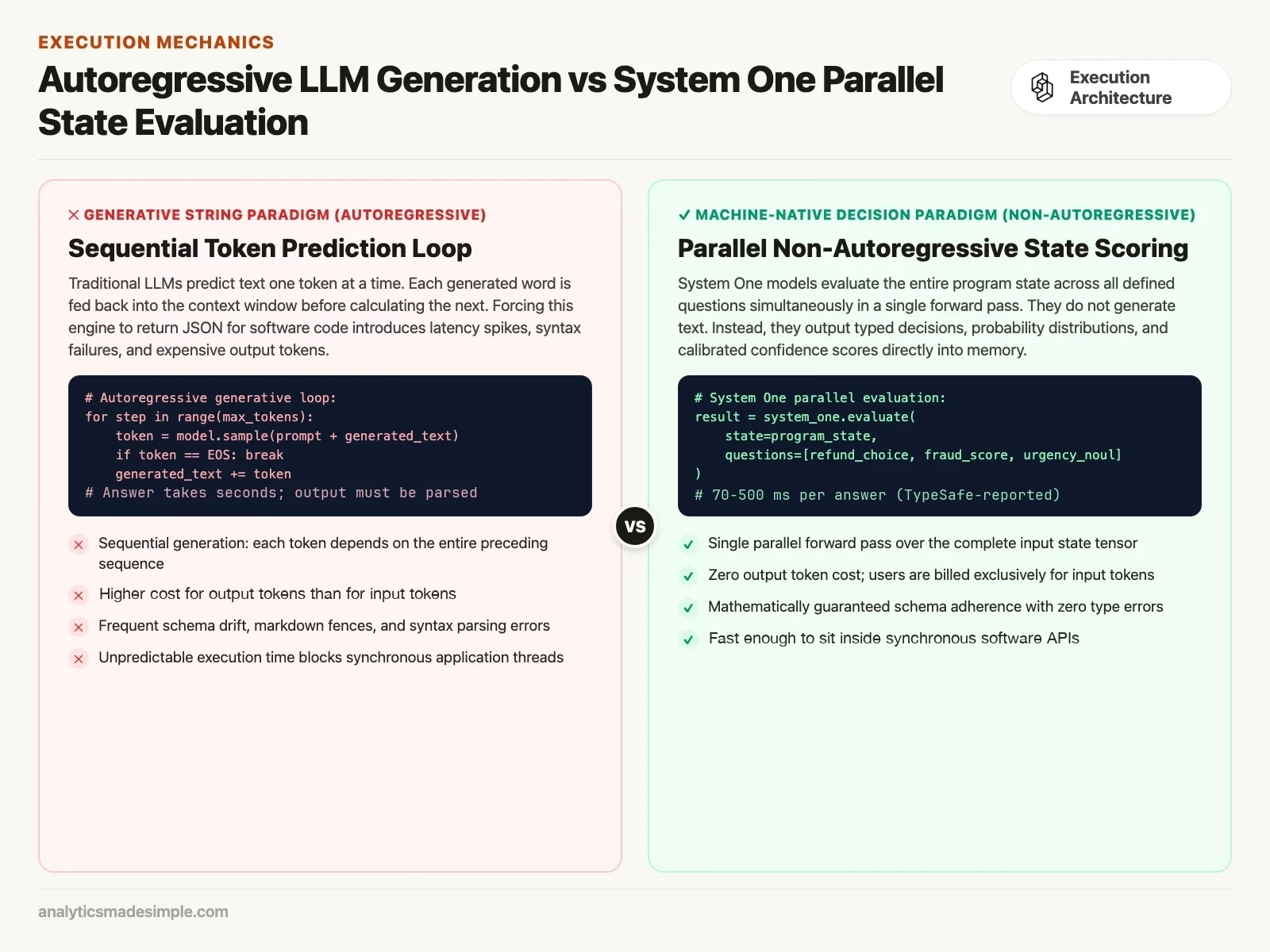
Figure 1 shows how System One models turn this around. Because they give up free-form writing, they can read the input and all of your questions at the same time. The model turns the input into numbers, then maps those numbers straight onto the answer options you defined ahead of time. What comes back is not a block of text that you have to pick apart with pattern matching. It is a typed object that your code can use immediately. TypeSafe reports 70 to 500 milliseconds from request to answer (launch post, September 2026).
Kahneman’s split in silicon: fast reflex versus slow reasoning
AI models are dividing along a line the psychologist Daniel Kahneman drew for people. Fast, intuitive models handle quick classification in under a second, and slower, deliberate models handle multi-step checking.
In his book Thinking, Fast and Slow, Kahneman described the human mind as running in two modes. System 1 works automatically and quickly, with almost no effort. It lets you recognize an angry face, read a billboard from a moving car, or duck a ball that is thrown at you. System 2 takes over when you need to concentrate on something hard, such as a tricky calculation, a chain of logic, or a plan.
For years, AI researchers tried to make one model do both jobs. The same underlying network wrote poems, translated languages, solved geometry proofs, and decided whether a tweet was spam. That single-model approach is now breaking into specialized tiers, because each job wants a different balance of speed, cost, and depth.
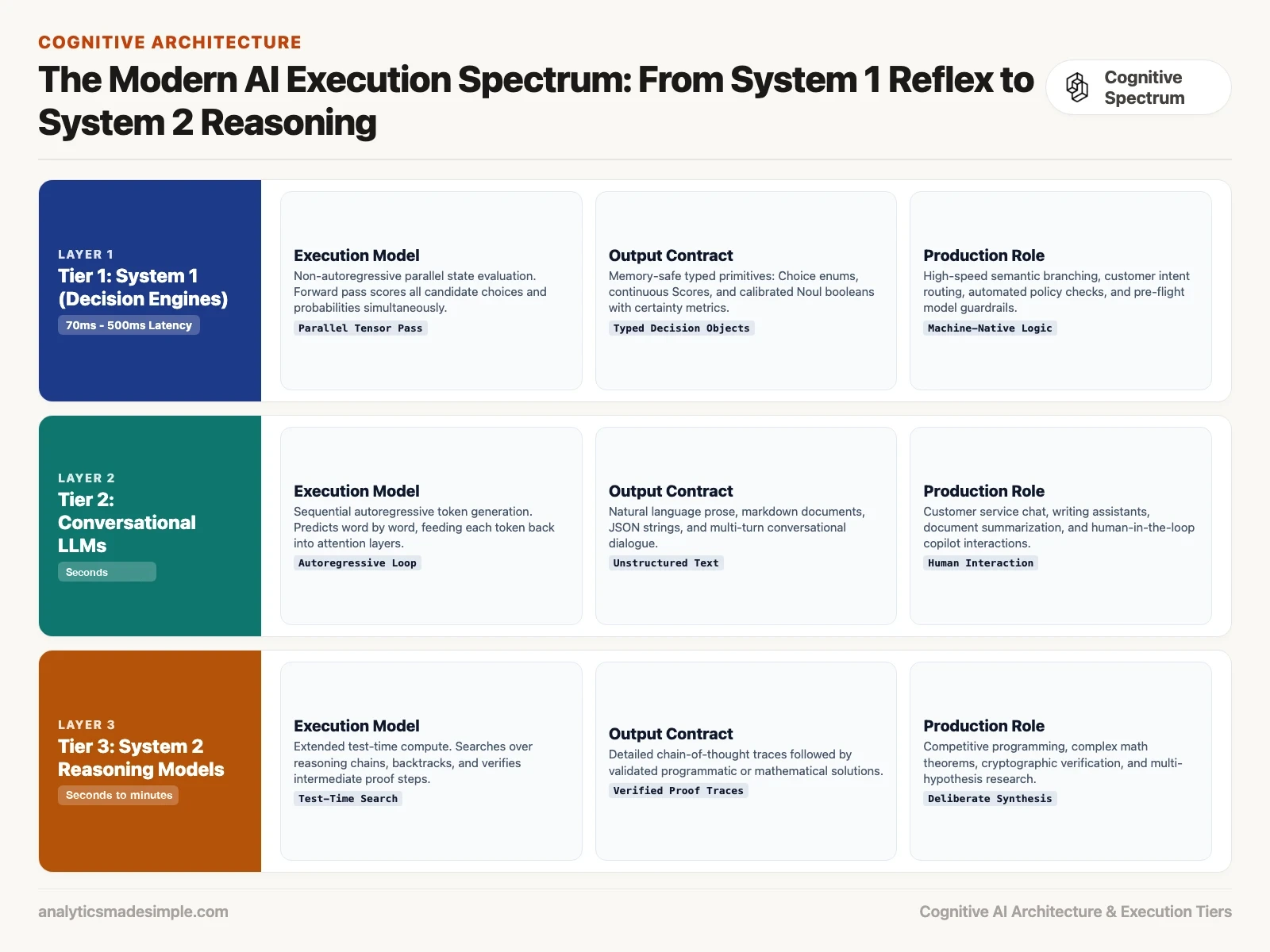
The three tiers in Figure 2 show where each family of models does its best work.
- System 1 (decision engines): Models like Jev from TypeSafe AI. They write no text, and TypeSafe reports answers in 70 to 500 milliseconds at a few cents per million input tokens (launch post). They return typed decisions with calibrated probabilities, which are numbers that match how often the model is really right. Think of them as the quick reflexes of your software.
- Conversational models: The chat models behind ChatGPT, Claude, and Gemini. They usually take seconds rather than milliseconds, cost more per request, and shine at writing prose, summarizing reports, and talking with people.
- System 2 (reasoning models): Models built to think step by step before answering, such as OpenAI’s reasoning models and DeepSeek-R1. They can spend anywhere from several seconds to a few minutes on extra thinking at the moment you ask; TypeSafe measured 3 to 329 seconds for frontier models (launch post). During that time they search through possible lines of reasoning and check their own steps. They are excellent at competitive programming and math, and they are far too slow and expensive for high-volume routing.
In a mature system, you would not send a customer’s password reset request to a slow reasoning model. A fast decision model can route the routine events in milliseconds, and send only the hard ones onward. That leaves the expensive reasoning models free for the deep analysis that needs them.
The four-step loop for automated decisions
When AI runs inside software that nobody watches, it works best as a pipeline with four steps. You gather the facts, ask several questions at once, check how confident the model is, and let ordinary code carry out the result.
In a chat app, a person sits in the loop. That person can catch a mistake, clear up an unclear phrase, or ask the question again. In an automated billing, moderation, or shipping pipeline, nobody is reading. The AI has to talk directly to databases, message queues, and other programs. So its answer has to arrive in a format those systems can trust.
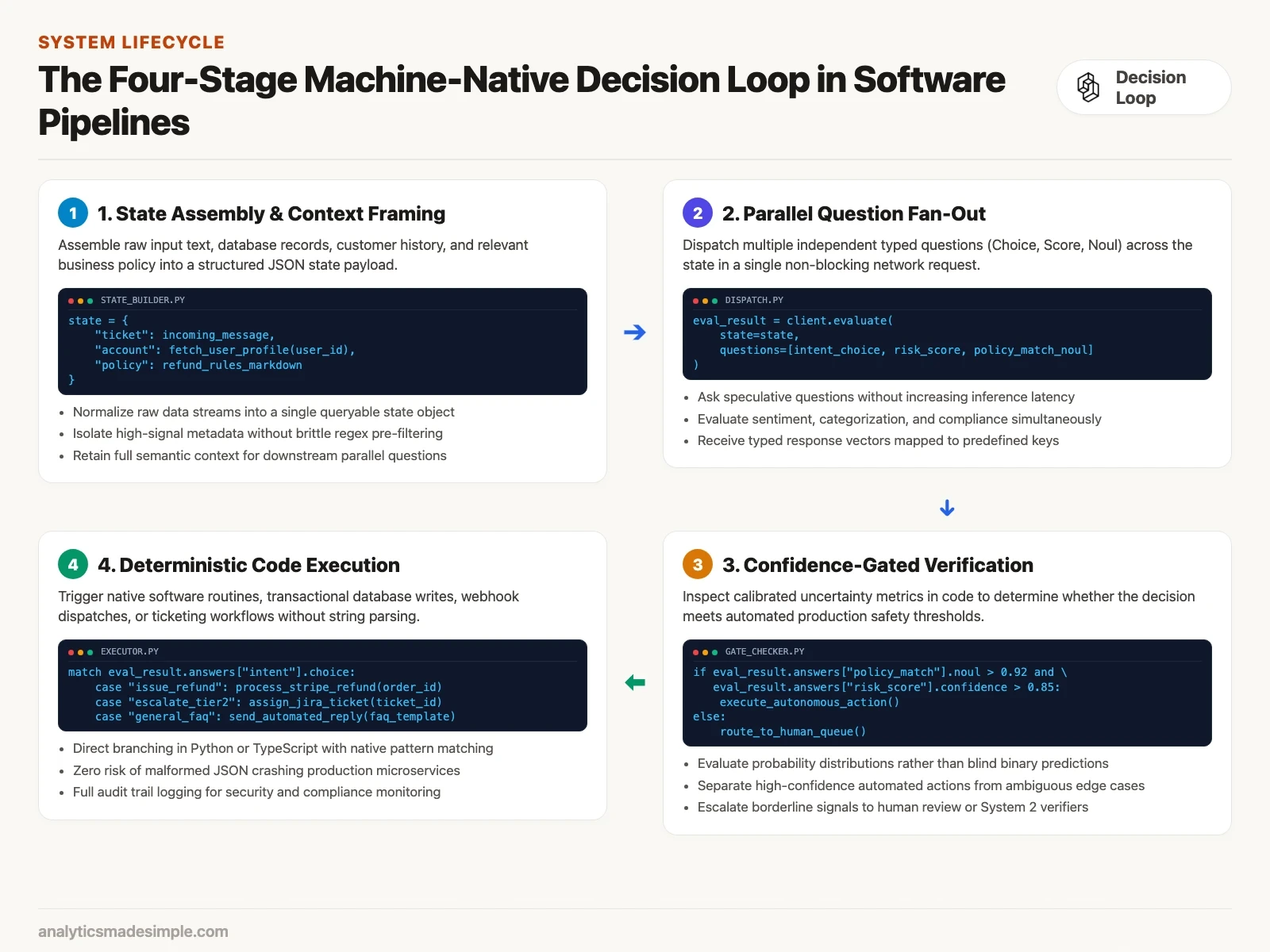
The four steps in Figure 3 give you a blueprint for keeping such a system reliable.
Step 1: Gather the facts into one input
System One models call their input the state. You skip the long chat prompt full of instructions and worked examples. Instead you pass in your raw data as a clean, structured object, such as a string of text, a JSON record, or a list of records. For example, your state could bundle an incoming support ticket, the customer’s account tier, the times of recent transactions, and the exact text of your cancellation policy. That way the model sees the same facts a human support rep would look at.
Step 2: Ask many small questions at once
One huge prompt might say “categorize this email, rate its urgency, check for fraud, and score the customer’s frustration.” Here you write each question separately and keep each one narrow. A System One model answers all of them against the state in the same pass, which means adding ten more questions barely changes how long you wait. You can therefore ask speculative questions at almost no extra cost.
Step 3: Check how sure the model is
One serious weakness of standard chat models is that they are overconfident in ways you cannot measure. A chat model will often state a complete invention, called a hallucination, in the same confident tone it uses for verified facts. System One models are trained to be honest about uncertainty. Each answer comes with a probability spread and an overall confidence score, and your application code looks at that score before it acts.
Step 4: Let ordinary code act on the answer
The answers come in a fixed shape, such as one of a set of labels or a decimal score. So you do not need elaborate parsers or defensive error handling to catch odd formatting. The result drops straight into the tools your developers already use, like a Python match statement, a TypeScript switch block, or a SQL update (a database change). Since the code that acts on the answer is plain and predictable, the whole workflow is easier to test.
Four ways teams put System One models to work
These models make four patterns practical. They are smarter if-statements, extra questions asked in parallel, acting only when the model is confident, and a fast safety check before an expensive model runs.
To see how these ideas turn into working code, here are the four patterns that engineering teams use most when they deploy System One models.
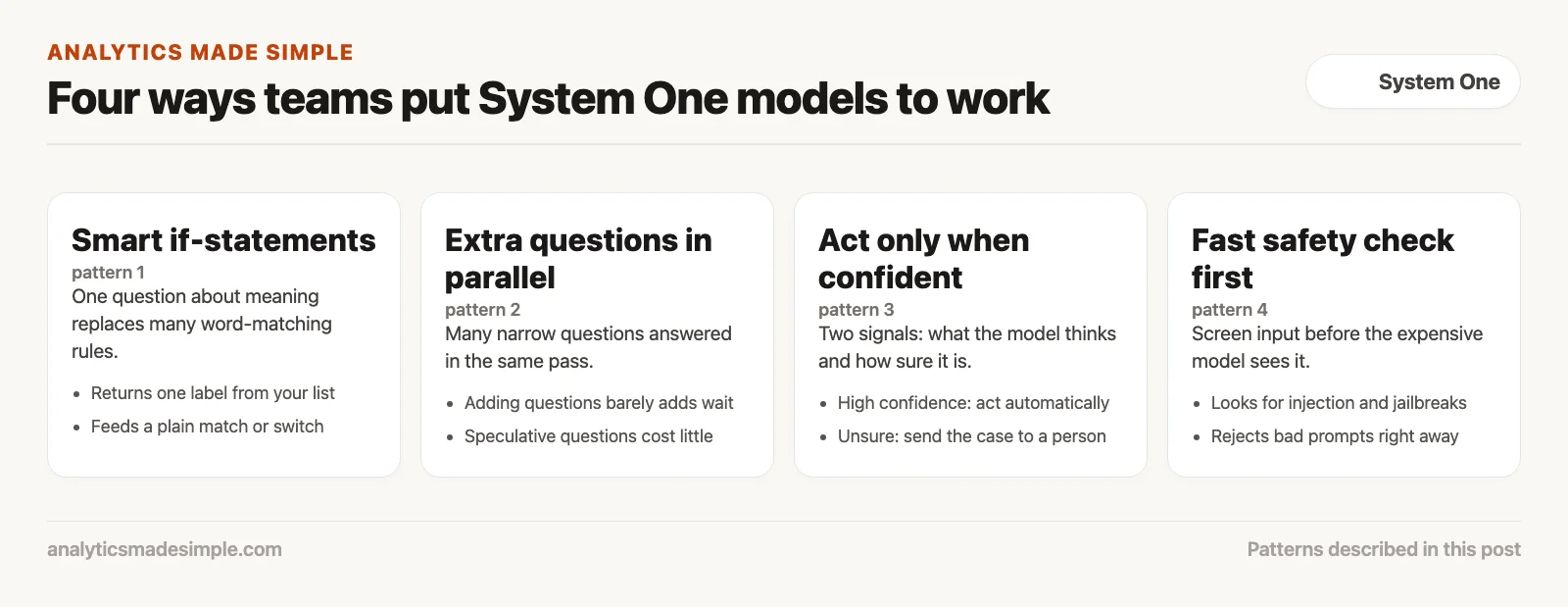
Pattern 1: Smart if-statements
Almost every engineering team has old code full of brittle rules that look for exact words. Imagine a support ticket system that tries to spot billing questions by searching for words like “invoice” or “receipt.” When a customer writes, “My card was debited twice for the annual renewal,” the rule might work. When a customer writes, “Do not charge me until next month,” the rule fires by mistake and the ticket lands in the wrong queue.
With a System One model, you replace dozens of fragile word-matching rules with a single question about meaning. The model compares the customer’s actual intent to plain-language definitions of each choice and returns one label from your list, in a fraction of a second. The code below shows what that looks like in Python.
# Example: Smart If-Statement logic in Python
result = client.system_one(
    state=incoming_ticket_text,
    questions={
        "department": Choice(
            instructions="Which operational team should handle this ticket?",
            criteria={
                "billing": "Inquiries regarding invoices, double charges, refunds, or payment methods",
                "technical": "Software bugs, 500 errors, broken buttons, or integration issues",
                "account": "Password resets, two-factor authentication, or profile updates"
            }
        )
    }
)

# Deterministic branching in your application code
match result.choices["department"].choice:
    case "billing":
        route_to_billing_queue(ticket_id)
    case "technical":
        assign_engineering_oncall(ticket_id)
    case "account":
        trigger_self_service_auth_flow(ticket_id)
Pattern 2: Ask extra questions in parallel
With a conventional chat model, asking several questions one after another multiplies both the delay and the cost. If each call takes two seconds, five questions take ten. That is why engineers cram every question into one giant prompt, which then turns into its own prompt-writing headache.
A System One model answers all of its questions in parallel during a single pass through the hardware. That means you can ask questions that you only need in special cases. You can check whether the message contains a legal threat, whether the customer sounds in crisis, whether the text is in Spanish, and whether an order number is present. The whole batch comes back in one call, instead of one call per question. Your code reads the answers it needs and ignores the rest.
Pattern 3: Act only when the model is confident
An automated system should not treat every AI prediction the same way. If the AI flags a tax return as fraudulent with 99 percent confidence, you can reasonably quarantine it on the spot. If it flags the same return with only 52 percent confidence, an automatic account suspension will anger a lot of honest customers.
A System One model returns a calibrated confidence score next to its prediction. Your software therefore gets two separate signals: what the model thinks, and how sure it is. The example below uses both to decide between blocking an account, sending the case to a person, and letting the transaction through.
# Example: Two-axis confidence gating
fraud_check = result.scores["fraud_risk"]

if fraud_check.score >= 2.0 and fraud_check.confidence >= 0.85:
    # High risk, high confidence: Automated block
    freeze_suspicious_account(user_id)
elif fraud_check.score >= 1.5 and fraud_check.confidence < 0.70:
    # Borderline score with uncertainty: Escalate to human fraud investigator
    enqueue_manual_investigation(user_id, reason="Ambiguous risk signals")
else:
    # Safe to proceed
    authorize_transaction(transaction_id)
Pattern 4: A fast safety check before the expensive model
The most capable models are also the most expensive to run. OpenAI’s models page lists GPT-6 Astra at $10 per million input tokens and $50 per million output tokens (checked October 8, 2026). That is the kind of model you might point at a custom report or a contract review. If you feed hostile user input straight into those models, you expose the application to several risks. One is prompt injection, which is text that tricks the model into ignoring its instructions. Another is a jailbreak, an attempt to talk a model past its safety rules. The third is a very large token bill.
You can put a System One model in front as a pre-flight check. Before the incoming prompt reaches the expensive model, the fast model scans it for injection attempts, policy violations, or leaks of sensitive data. It does this in a fraction of a second, at the low input price covered below. If the prompt fails the check, your application rejects it right away, which protects both your budget and your systems.
What this costs compared with chat models
System One models charge only for the text they read, and their answers cost nothing. That makes it affordable to run millions of background decision checks.
Traditional cloud pricing charges heavily for output. For example, a price list might charge $2.50 per million input tokens and $10.00 per million output tokens. TypeSafe’s launch post puts chat-model input prices between $0.20 and $10 per million tokens. The reason is that generating text word by word keeps expensive graphics processors busy, running one slow memory lookup after another for every word.
System One models remove that word-by-word loop. Because the network works out the decision in one pass, the cost of producing the answer is close to nothing. TypeSafe AI, the company behind Jev, lists its input price as $42 per billion tokens, which is $0.042 per million (TypeSafe homepage, checked October 2026). Its launch post lists output tokens as free, because the answer is a short structured value instead of paragraphs of text.
To make that concrete, picture an analytics pipeline that processes one million customer reviews a day. Suppose each review is about 100 tokens long. One million reviews is then 100 million input tokens a day. At $0.042 per million, the decision model’s input costs about $4.20 a day. A chat model charges for the same 100 million input tokens at its own rate, and also for every output token it writes, so multiply both by the prices on your provider’s page to compare. TypeSafe says Jev is about two orders of magnitude (roughly 100 times) faster and more efficient than chat models on these tasks (launch post, September 15, 2026); time a sample of your own reviews before you rely on that.
When not to use System One models
System One models are built for decisions only. Do not use them when your application needs to write natural language, hold an open-ended conversation, or work through a long math proof.
Every engineering choice has tradeoffs. System One models get their speed, low cost, and reliable formats by giving up text generation on purpose, which means you should know where they stop.
- No conversational chat: Suppose your product is a customer-facing chatbot that drafts kind replies or explains technical ideas. A System One model cannot help there, because it does not write prose.
- No free-form code writing: These models cannot draft a Python script or rework a React component. They can tell you which programming language an unlabeled script uses, but they cannot write the script.
- No deep multi-step proofs: Some problems are new, like designing a cryptographic algorithm (a step-by-step method) or proving a hard math theorem. They go better when a model gets extra time to search through dozens of chains of reasoning. That is the territory of System 2 reasoning models, the slower kind that works through many steps before answering, such as Claude Fable 5.1 or GPT-6 Astra at a high reasoning setting.
The best software design does not pick one model family for everything. It uses System One models for the fast, always-on decision layer that routes traffic and guards your systems. It hands work to a chat or reasoning model only when the job needs free-form writing or deep analysis.
Your next step
Find one decision in your code that is made with brittle keyword rules, such as routing support tickets, and write it as a single question with a fixed list of answers. Run it on twenty past examples and compare with the old rules. A small, measurable trial shows whether a decision model fits your work.
Sources
- TypeSafe AI Blog: Introducing System One Models and Jev (September 15, 2026)
- TypeSafe AI Official Documentation and API Reference
- Daniel Kahneman: Thinking, Fast and Slow (Farrar, Straus and Giroux, 2011)
- OpenAI Research: Training Language Models to Follow Instructions with Human Feedback (Ouyang et al.)
- TypeSafe AI Production Workflow Evaluations and Pareto Benchmarks
Keep going
Same lessons in your feed
Short diagrams, hooks, and weekly tutorials on Substack, Instagram, X, and Facebook.