
Claude Duet is a new app from Anthropic in which Claude works as an agent for you: it reads your connected email, calendar and work apps, sends you a morning brief, checks in through the day, and takes on bigger jobs like a sales forecast or a slide deck while your phone is off. It opened as a research preview on October 21, 2026, for US Pro and Max subscribers through a waitlist, and it asks your permission before it sends, pays, signs or deletes anything.
Imagine you run a small business and your day starts with forty unread emails, two calendar clashes and an invoice you meant to chase last week. A chat assistant can help once you sit down and explain all that. Duet is built to have already looked, so the first message you see in the morning is a short list of what needs you, with replies drafted for the ones that can be handled.
An agent, in this guide, means an AI tool that takes actions for you, like drafting and sending messages or filling in forms, rather than only answering questions. If that idea is new, start with the plain guide to what an AI agent is.
This guide covers what Claude Duet is, how it works, its main features, who can get it and what it costs, how to set it up, what it will and will not do on its own, how it compares with Claude Cowork and other agents, and good first jobs to give it.
What is the Duet app?
Claude Duet is a separate app from the main Claude app, available on iPhone, Android and claude.ai. According to Anthropic’s announcement (October 21, 2026), it is aimed at professionals and small business owners who have more tasks than they can keep track of, and it is designed to decide what needs you, what can wait, and when to check with you first.
Three things set it apart from chatting with Claude.
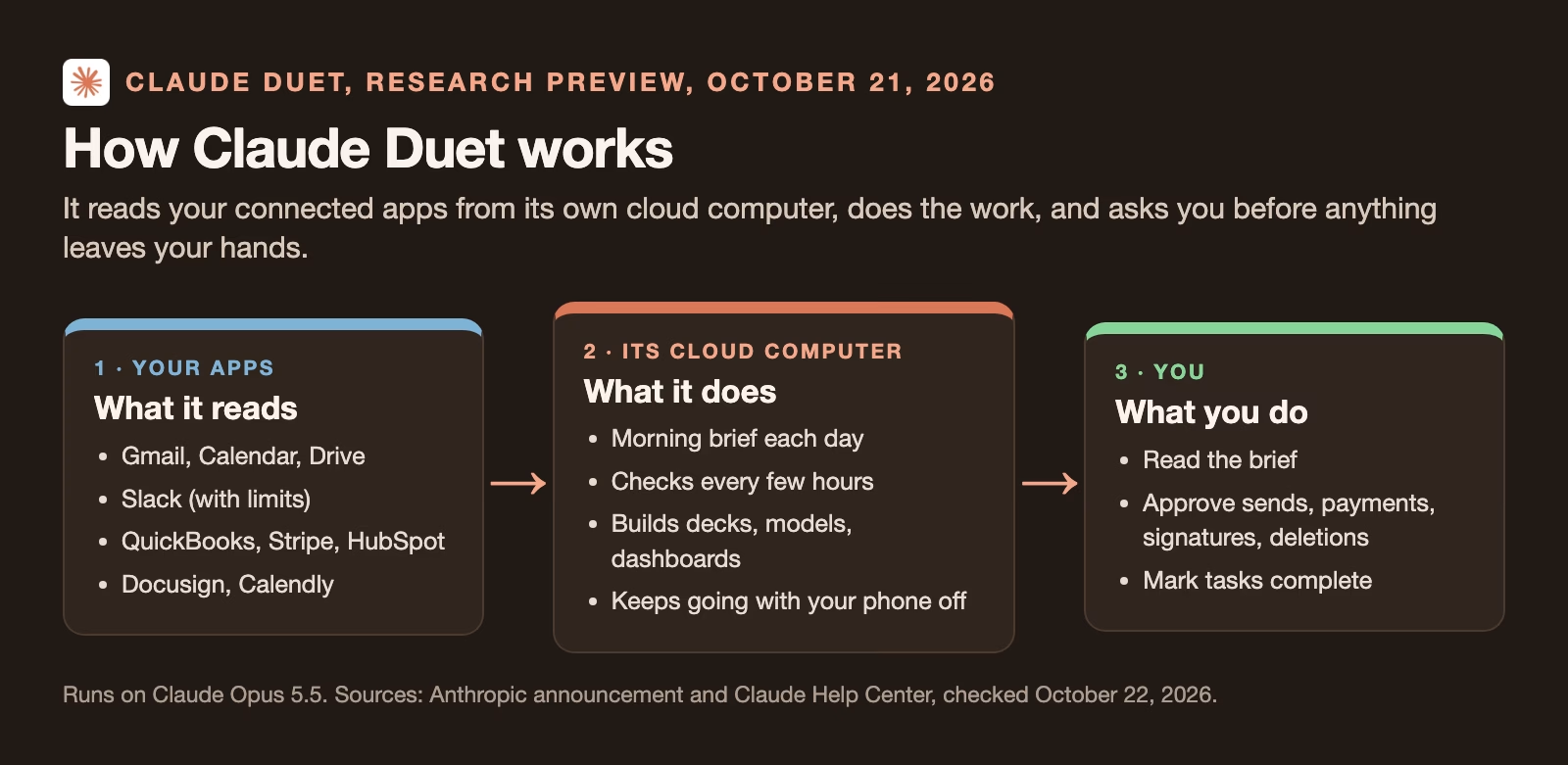
It works when you are not there. Duet runs on its own computer in the cloud, a virtual machine, which is a computer that exists as software in a data center, with its own web browser. You can close the app or switch off your laptop and it keeps working.
It starts things itself. A chat waits for your question. Duet checks your connected apps every few hours and messages you when something needs attention, such as a meeting that moved or a client email that has gone unanswered.
It produces finished files. Larger jobs come back as documents you can open and edit, such as a research brief, a financial model, a slide deck or a dashboard.
It runs on Claude Opus 5.5, one of Anthropic’s current models. You cannot pick a different model; the Claude Help Center page (checked October 22, 2026) says Duet sets how much effort to spend on each job itself.
Main features
Morning brief
Each morning Duet sends a short summary of the most important items across your connected apps. The Help Center page says it reviews your email and calendar, highlights priorities, and may take first steps such as drafting replies for you to review. Drafts stay drafts until you approve them.
Check-ins through the day
Duet looks at your connected accounts at set intervals, every few hours by Anthropic’s description, and messages you only when something needs you. You can tell it what you want to hear about and how often. It also follows up on threads that have gone quiet.
The catch is the word “intervals”. Because it checks on a schedule, something urgent can arrive between two checks and wait. Do not rely on Duet as an alarm for anything that cannot wait a few hours.
Bigger jobs that come back as files
You can hand Duet work that takes more than a quick answer. Anthropic lists scheduling meetings, building dashboards, financial or sales forecasts, slide decks, research briefs, prototypes and web apps. Finished files land in a tab called Make.
One thread, plus channels
You talk to Duet by typing or by voice in one ongoing main thread that carries on across days. You can open separate channels for other topics, and all channels share the same memory.
It brings your Claude setup with it
Duet runs on your Claude account, so your memory, your skills and your connectors carry over. Skills are saved instructions Claude uses for a type of task; the guide to AI skills explains them. Connectors are links between Claude and other apps, like Gmail or Slack. Duet can also search your past Claude chats outside projects for context, which you can switch off under Settings, then Memory, with the “Search and reference chats” setting.
Payments with one-time cards
Duet can buy things you approve through Link, Stripe’s digital wallet, or Shop Pay, Shopify’s wallet. The Help Center says each purchase uses a one-time card that works only for that purchase, so your real card number is not handed to the store.
The three tabs
The app is organized around one thread and two tabs, and knowing what goes where saves confusion.
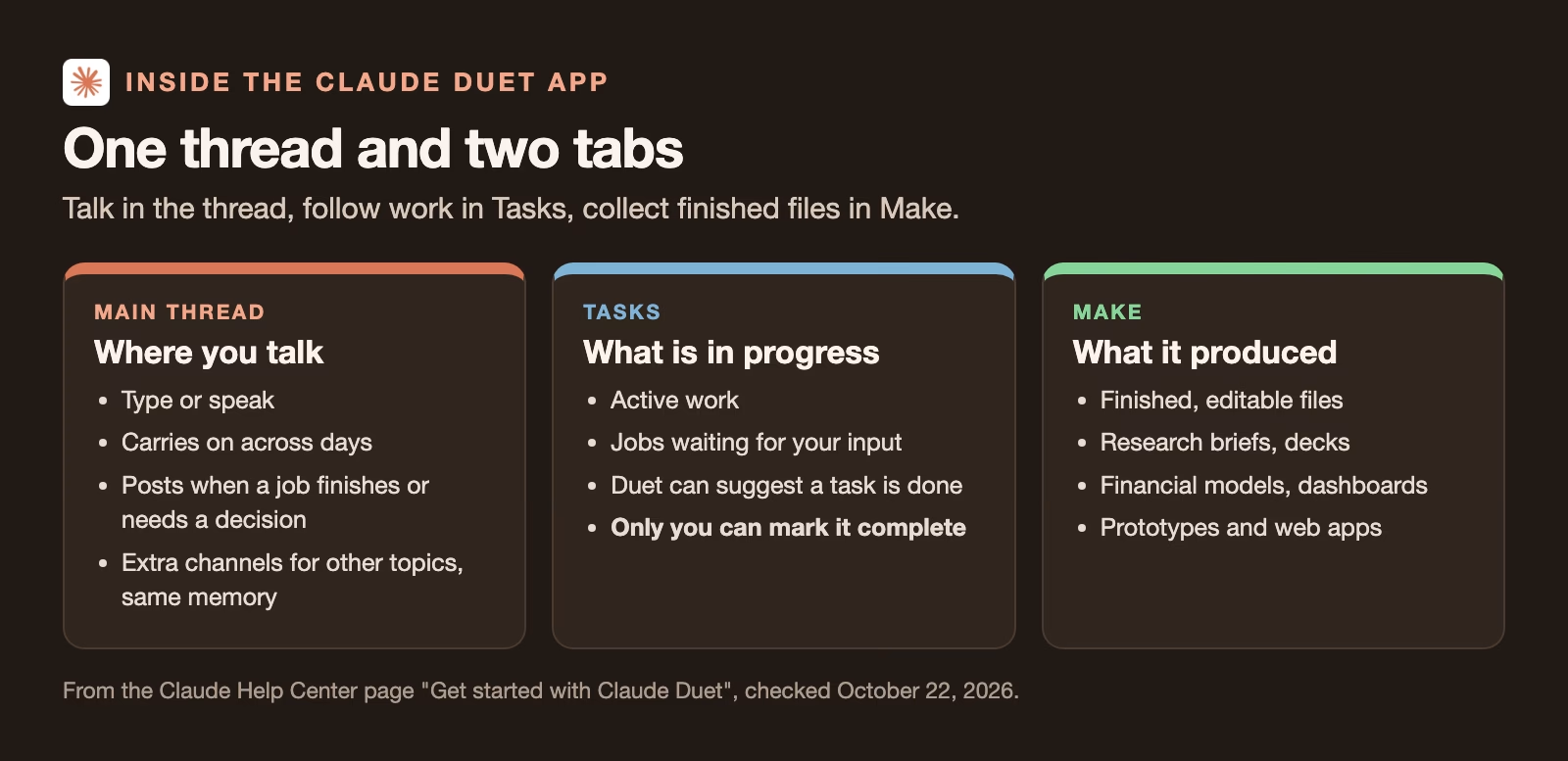
The rule worth remembering is in the Tasks tab: Duet can suggest a task is finished, but only you can mark it complete. That keeps the “done” list honest, because nothing drops off it until you have looked.
Who can get Claude Duet, and what does it cost?
According to the Claude Help Center (checked October 22, 2026), only US Pro and Max subscribers can get it, through a waitlist, and it costs nothing extra during the preview. Here are the details.
| Question | Answer during the preview |
|---|---|
| Who can get it | Pro and Max subscribers with a US Claude account, admitted from a waitlist in waves |
| Team or Enterprise plans | Not yet; Anthropic plans to add them later |
| Where it runs | iPhone app, Android app and claude.ai |
| Price | No extra cost during the preview; no later price announced |
| Usage | Counts against your five-hour and weekly Claude limits, including background checks |
| One-time bonus | One full reset of both limits, usable until November 30, 2026 |
| Model | Claude Opus 5.5; you cannot choose another |
The usage point needs care. The same Help Center page (checked October 22, 2026) explains that Pro and Max plans limit how much you can use Claude in a five-hour window and in a week. Duet uses the same limits at the same rate as chat, and its background work, including the morning brief and check-ins, counts too. Big jobs like a financial model take many more steps. If you also use Claude heavily for other work, expect to reach your limit sooner. Anthropic gives each admitted user one full reset of both limits, which you can use until November 30, 2026.
As of October 22, 2026, Anthropic’s announcement lists no price for after the preview.
How to set up Claude Duet
The setup follows the Help Center page. It takes a few minutes once your invitation arrives.
- Go to the Claude Duet product page and choose “Join the waitlist”.
- Enter your name and the email address of your Claude account, because access is tied to the waitlist email and a mismatch can block you.
- Choose your plan and your phone type, iPhone or Android. You can add a line about your work and what you would hand off first.
- Wait for the invitation email. Invitations go out in waves, with no guaranteed date.
- Open the invitation on your phone, install the app with the Apple or Google account that matches the waitlist email, and sign in with your Claude account. The app can take a few minutes to become available.
- Connect apps one at a time, starting with the ones the first job needs, such as Gmail and Google Calendar for a morning brief. Fewer connections mean less for Duet to read and fewer places a mistake can reach.
- Tell it what you want to hear about and how often, so check-ins match how you work instead of interrupting you.
Which apps it connects to
Duet uses the connectors you already set up in Claude. The Help Center names Gmail, Google Calendar, Google Drive, Slack, QuickBooks, HubSpot, Docusign and Calendly, and Stripe for invoices. Anthropic’s announcement (October 21, 2026) says Duet has access to over 6,000 connectors and plugins in the Claude Marketplace, which is Anthropic’s own count. Plugins are add-on packs of skills and connectors; Anthropic mentions a small business plugin.
Two gaps matter for many offices. The Help Center (checked October 22, 2026) says Microsoft 365 is not available yet, so Outlook and Teams users are out for now. Slack works with limits. For sites without a connector, Duet uses its own cloud browser, and you type any password into a separate form that goes to that browser, not into the chat.
You can disconnect any app at any time. That stops future access, but Duet keeps what it remembered from past conversations.
What it does on its own, and what it asks first
Duet can read and draft without asking. Anything that leaves your control needs your approval, and some actions are off the table completely.
| Claude Duet… | Examples |
|---|---|
| Does on its own | Reads email, calendar and files; drafts replies; builds documents; searches the web; checks in |
| Shows you the exact action and waits | Sending a message, making a payment, signing a document, deleting anything |
| Never does, even with approval | Trading securities, moving money between accounts, using someone else’s account |
When you cannot approve right away, Duet carries on with other work and brings the request back later.
Anthropic also describes protections in the background. A new classifier, a model that checks each outgoing message, together with a safety instruction, refuses to share the most sensitive data, such as card numbers and government ID numbers. Health and personal finance details go out only when you explicitly say so. Duet never sees your passwords or sign-in tokens, the codes that keep you logged in to an app, directly. Anthropic says outside red teams and a penetration testing firm tested it, and that more safety details are coming.
The Help Center (checked October 22, 2026) is frank about one limit: content from other people, like an email or a web page, is treated as information, but Duet can still be exposed to prompt injection, where text is written to trick the AI into doing something else. That is the reason approvals matter. Read the action it shows you before you tap approve, especially for payments and messages to people outside your company.
Limits of Duet during the preview
The Help Center (checked October 22, 2026) lists these limits for the preview:
- No phone calls and no text messages to other people. It can email from your connected accounts, with approval.
- You cannot watch or take over its browser.
- It cannot see files on your computer or all your Claude projects. It can read your Claude work but cannot change it.
- No Microsoft 365 yet, and Slack has limits.
- It is weaker at personal errands, like booking tickets, because it was built for work.
- It can misread a thread or misjudge how urgent something is.
- Urgent items can wait until the next scheduled check.
Duet vs Cowork: which one to use
Anthropic now has two agents that sound alike, and they suit different jobs. Claude Cowork works on folders and files on your own computer. Duet works in the cloud on your connected apps and cannot see your local files.
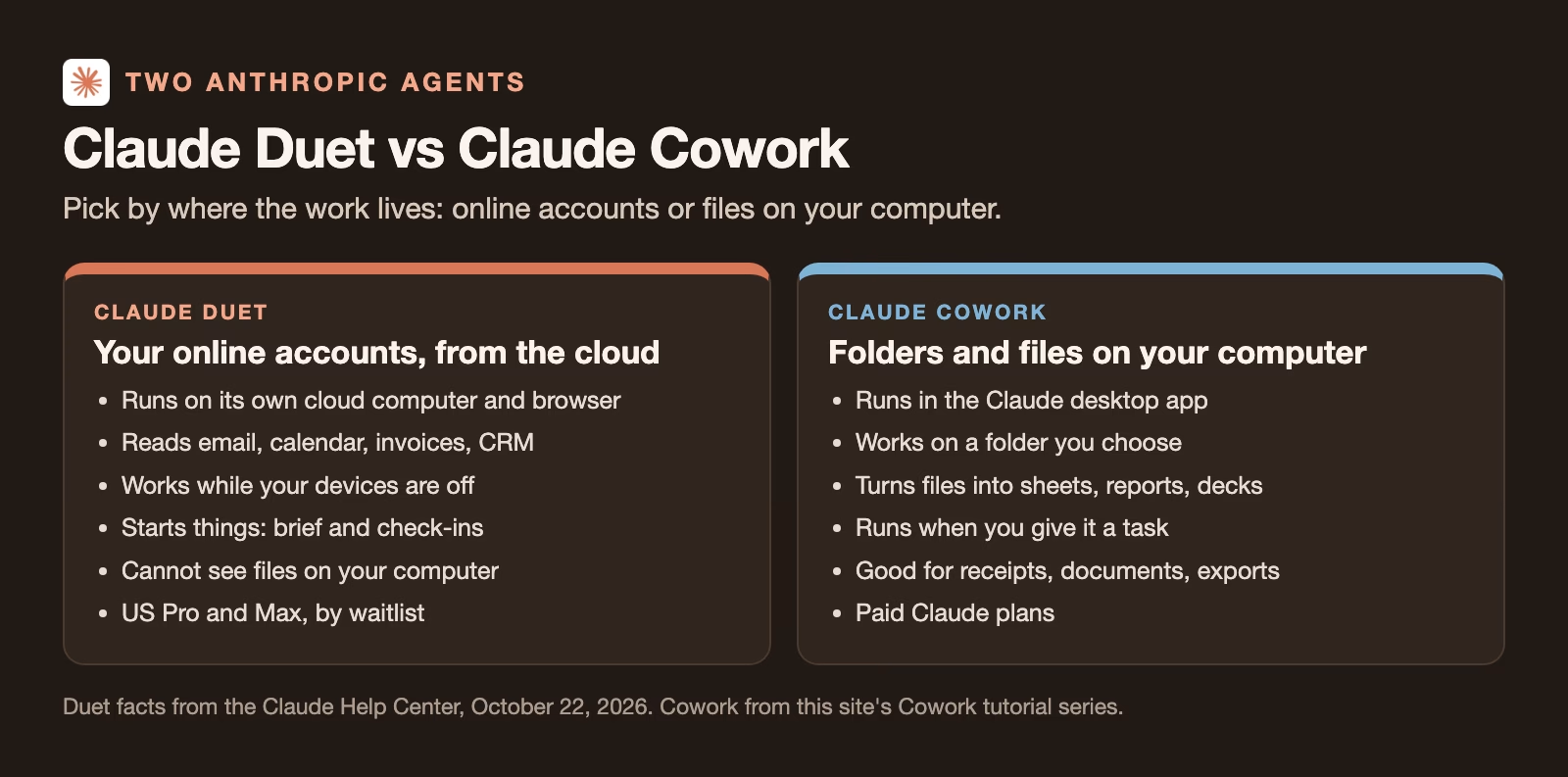
So use Cowork when the material is on your laptop: a folder of receipts to turn into an expense sheet, or a set of documents to tidy into a report. The Cowork setup guide walks through a first task. Use Duet when the work lives in email, calendars, invoices and other online accounts, and you want it watched while you are busy.
Duet also joins a group of always-on agents from other companies: ChatGPT dots and Grok Bot, which also run on their own cloud computers, Google’s Gemini agent, which works across Gmail, Docs and Slack, and Meta Muse, which shops and books for you. The differences that matter in practice are which apps each one connects to, which plan you already pay for, and what each will do without asking.
Good first jobs to give Duet
Start with jobs where a mistake is cheap and the result is easy to check. These come from the examples Anthropic and the Help Center give.
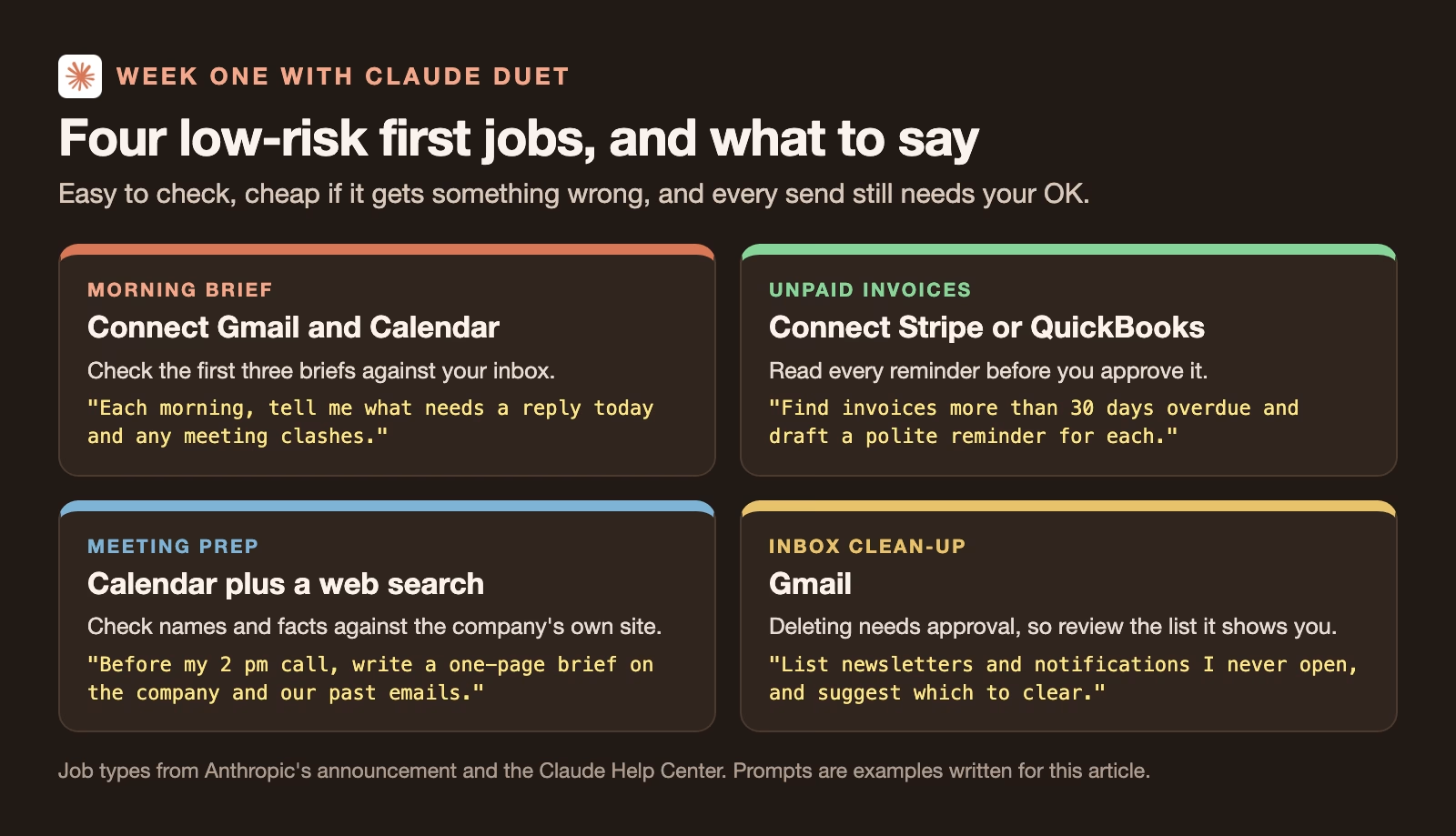
Keep these for yourself for now: anything sent to a client in your name without reading it, payments above an amount you would notice, and anything legal you would not sign without reading. Approval is required for all of those anyway, but reading what you approve is the habit that protects you. The guides on how much freedom to give an AI agent and how to check an agent’s work go deeper.
Check every number in a dashboard or forecast
If you ask Duet for a dashboard or a forecast, check where each number came from before you share it. The Help Center says Duet cites the source email, file or spreadsheet behind figures and summaries. Use that.
- Pick the three numbers that matter most in the file, such as total revenue, the biggest customer and the forecast for next month.
- Open the source Duet names for each one and find the same figure there, because a number with no source you can open is a guess.
- Recalculate one total yourself, for example in a spreadsheet, because a model can add up the wrong rows even when every source is right.
- Check the date range, because last quarter’s invoices in this quarter’s report is an easy mistake to miss.
If one of the three fails, ask Duet to fix it and check again before you send the file to anyone.
Quick recap
- Claude Duet is Anthropic’s agent app: a morning brief, check-ins every few hours, and bigger jobs returned as files, running on its own cloud computer.
- Research preview from October 21, 2026, for US Pro and Max plans by waitlist; no extra cost during the preview, but it uses your normal limits.
- It reads and drafts on its own, asks before sending, paying, signing or deleting, and never trades securities or moves money between accounts.
- It cannot see your computer’s files, call or text people, or use Microsoft 365 yet.
- Use Cowork for files on your laptop and Duet for work in your online accounts.
- Start with low-risk jobs, and check every number in a dashboard against the source Duet names.
Sources
- Anthropic: Introducing Claude Duet (October 21, 2026: features, availability, connectors, purchases, safety design, known limits)
- Claude Help Center: Get started with Claude Duet (setup steps, tabs, connectors, approvals, limits, usage and limit reset; checked October 22, 2026)
Keep going
Same lessons in your feed
Short diagrams, hooks, and weekly tutorials on Substack, Instagram, X, and Facebook.