Qwen-Coder is a version of Alibaba’s Qwen AI model that was trained specifically to write computer code, and you can run it on your own computer. For code that has to actually work, pair it with a sandbox (a sealed-off space where code can run without touching anything important) and check the result before you trust it.
Imagine you ask a general chatbot to rewrite a database query (a request that asks a database for data) so it works on your company’s newer database. The answer looks tidy, and the notes that come with it sound careful. But it quietly changed how weeks are counted, so your warehouse dashboard (the screen of charts your team checks) now shows Monday’s busiest hour on Sunday. Nobody noticed for a week. A coding model that ran the new query in a sandbox and compared the numbers would have caught the problem in about five minutes.
This post explains what makes a coding model different from a chatbot, what an AI agent (an AI that can take actions, like running code, and check the results) adds on top, and how to run one on your own machine without putting your data or your computer at risk.
Why general chat models stumble on real code
General chat models learn code the same way they learn English, as patterns of likely next words. That is why they sometimes invent functions that do not exist or settings a tool never had. Coding models are trained on code that was actually run and tested, so they follow the rules of each programming language more closely.
Say you spend three weeks trying to move your company’s database queries to a newer system with a general chatbot’s help. The old queries were written for an older database called Sybase, the new home is PostgreSQL, and some data arrives as CSV files (plain text tables). Every time you ask the chatbot to convert a batch, small mistakes slip in and only show up later, in the reports.
The chatbot invents settings that the tools do not accept. It uses functions that only exist in one company’s version of SQL, the language for asking databases questions. Sometimes it gets date math wrong across time zones. Because it was built to write confident, pleasant sentences, its explanations sound right even when the code is wrong. That is the trap.
This comes from how the model was trained, not from bad luck. A general model treats code as just more text and predicts what usually comes next. A coding model is trained on the messages that programs print when they fail, on test results, and on the structure of real code, so it learns what actually runs instead of what merely looks plausible.
Alibaba builds Qwen-Coder models for exactly this gap. The current generation, Qwen3-Coder, arrived in July 2025, and Qwen3-Coder-Next followed in January 2026. Both are trained for agent work: writing code, running it, and fixing what fails.
Inside the Qwen-Coder family and its sizes
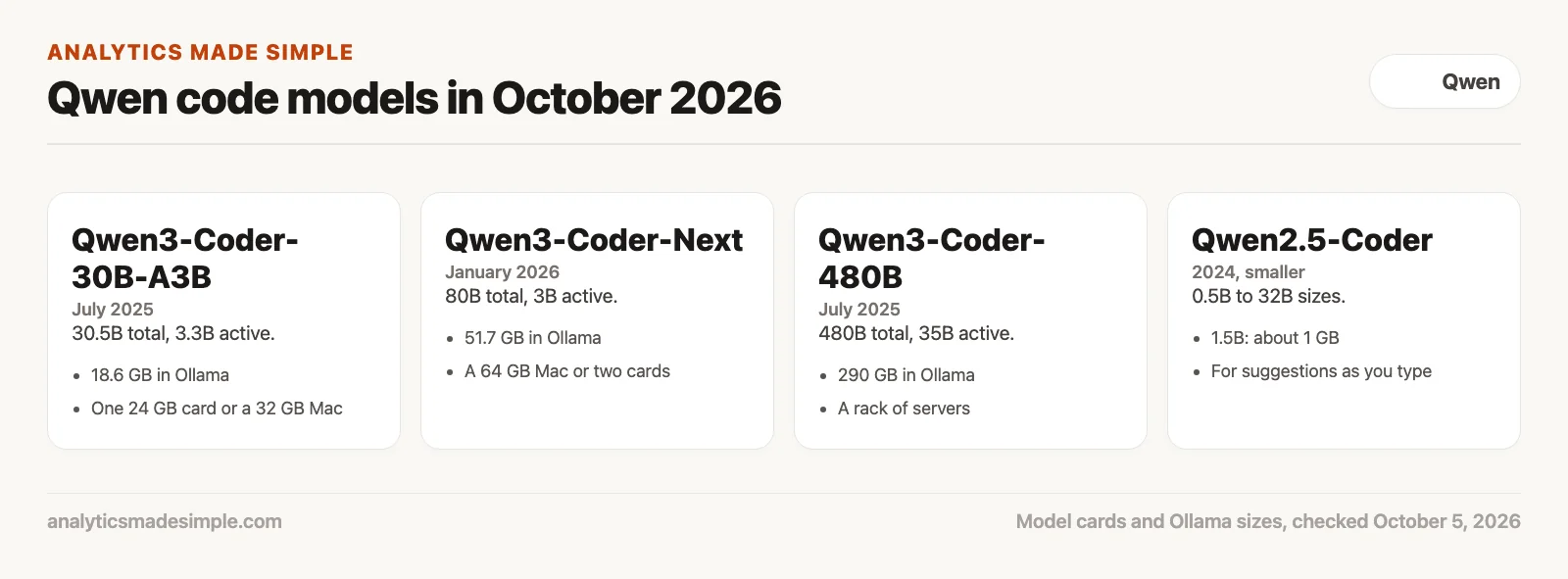
As of October 2026, the current Qwen code models are Qwen3-Coder-30B-A3B, Qwen3-Coder-Next, and Qwen3-Coder-480B, all under the Apache 2.0 license, which allows business use. The older Qwen2.5-Coder family from 2024 still has the smallest sizes, which is why people keep it for suggestions as you type (checked October 5, 2026).
Each size has two numbers, because these models use a mixture-of-experts design: the model has many specialist parts and uses only a few of them for each token (a small chunk of text, about three-quarters of a word). The total sets how much memory you need, and the active part sets how fast it runs.
- Qwen3-Coder-30B-A3B has 30.5 billion parameters in total (the numbers a model learns in training) and uses 3.3 billion at a time. Ollama’s download is 18.6 GB, so it fits one 24 GB graphics card or a Mac with 32 GB of memory.
- Qwen3-Coder-Next has 80 billion in total and 3 billion active. Ollama’s download is 51.7 GB, which means a Mac with 64 GB of memory or two large cards.
- Qwen3-Coder-480B has 480 billion in total and 35 billion active. Its 290 GB download is for a rack of servers, so most teams use it through a hosted service.
- Qwen2.5-Coder comes in 0.5B to 32B sizes. Its 1.5B model is about 1 GB in Ollama, small enough to suggest code as you type on an ordinary laptop.
All three current models read up to 262,144 tokens at once, per their model cards, which is enough to hold a large part of a code project.
How tokenizers handle code
AI models read text in small chunks called tokens, cut by a part called the tokenizer. Older tokenizers chopped code into many pieces, which wasted space and gave the model more chances to drop a space or a bracket. Modern ones, including Qwen’s, keep common code patterns whole.
Spacing matters in languages like Python and YAML (a simple text format for settings), where the number of spaces at the start of a line changes what the code does. A model that writes three spaces where four were needed breaks the whole script, so keeping a run of spaces as one piece helps.
You can measure the difference yourself. The script below counts the tokens for the same short function with three tokenizers: GPT-2’s from 2019, the general Qwen3.5 model’s, and Qwen3-Coder’s. Install the library first with pip install transformers; it downloads only the small tokenizer files, not the models.
from transformers import AutoTokenizer

code = '''def get_customer_transaction_v2_by_id(customer_id: int) -> dict:
    """Return one customer's latest transaction."""
    query = """
        SELECT order_id, shipped_at, total_usd
        FROM transactions
        WHERE customer_id = %s
        ORDER BY shipped_at DESC
        LIMIT 1
    """
    with connect() as conn:
        return conn.execute(query, (customer_id,)).fetchone()
'''

for name in ["openai-community/gpt2", "Qwen/Qwen3.5-9B", "Qwen/Qwen3-Coder-30B-A3B-Instruct"]:
    tok = AutoTokenizer.from_pretrained(name)
    ids = tok.encode(code, add_special_tokens=False)
    eight = tok.tokenize("        ")
    print(f"{name}: {len(ids)} tokens for the snippet; 8 spaces -> {len(eight)} token(s)")
We ran it on October 5, 2026, and it printed:
openai-community/gpt2: 160 tokens for the snippet; 8 spaces -> 8 token(s)
Qwen/Qwen3.5-9B: 94 tokens for the snippet; 8 spaces -> 1 token(s)
Qwen/Qwen3-Coder-30B-A3B-Instruct: 88 tokens for the snippet; 8 spaces -> 1 token(s)
The big gap is between old and new tokenizers: 160 tokens against 88, and eight spaces as eight pieces against one. Qwen’s coding tokenizer is only a little leaner than its general one, 88 against 94. A coding model’s real advantage comes from its training on code that was run and tested, not from the tokenizer.
What makes an agent different from code completion
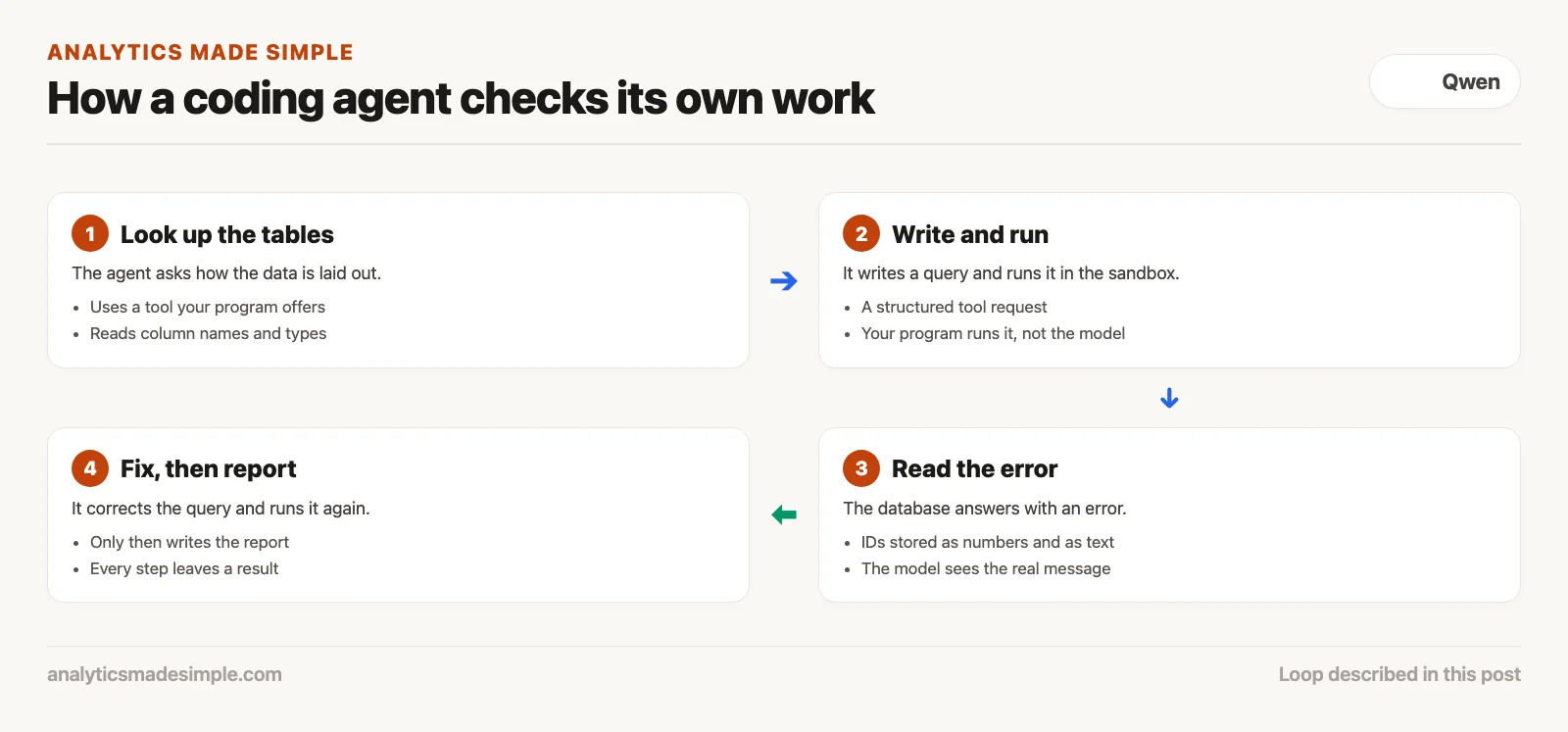
Code completion only suggests the next line and has no idea whether the code will run. An AI agent works in a loop: it decides what to do, uses tools such as a database or a sandbox, reads the results or error messages, and fixes its own mistakes before it answers.
Many teams mix up smart autocomplete with a real agent. When an editor add-on finishes a SQL line for you, it is guessing text. It does not know whether that column exists in the table, whether the database is reachable, or whether the query will be too slow on real data.
An agent adds the missing step, which is checking. The model sits inside a harness, a small program that gives it tools such as a way to run database queries, read files, or run Python in a sandbox. Instead of handing you code and hoping, it tries the code and looks at what happens.
Say you ask an agent to find inventory counts that do not match across three warehouses. First, it looks up how the tables are laid out. Second, it writes a query and runs it in the sandbox. Third, the database answers with an error because one table stores IDs as numbers and another as text, and the model reads that error. Fourth, it fixes the query, runs it again, and only then writes your report.
That loop of trying, checking, and fixing is what separates a coding agent from a chatbot. It does not just guess, because it sees the result of every step. It checks.
How Qwen tool calling works
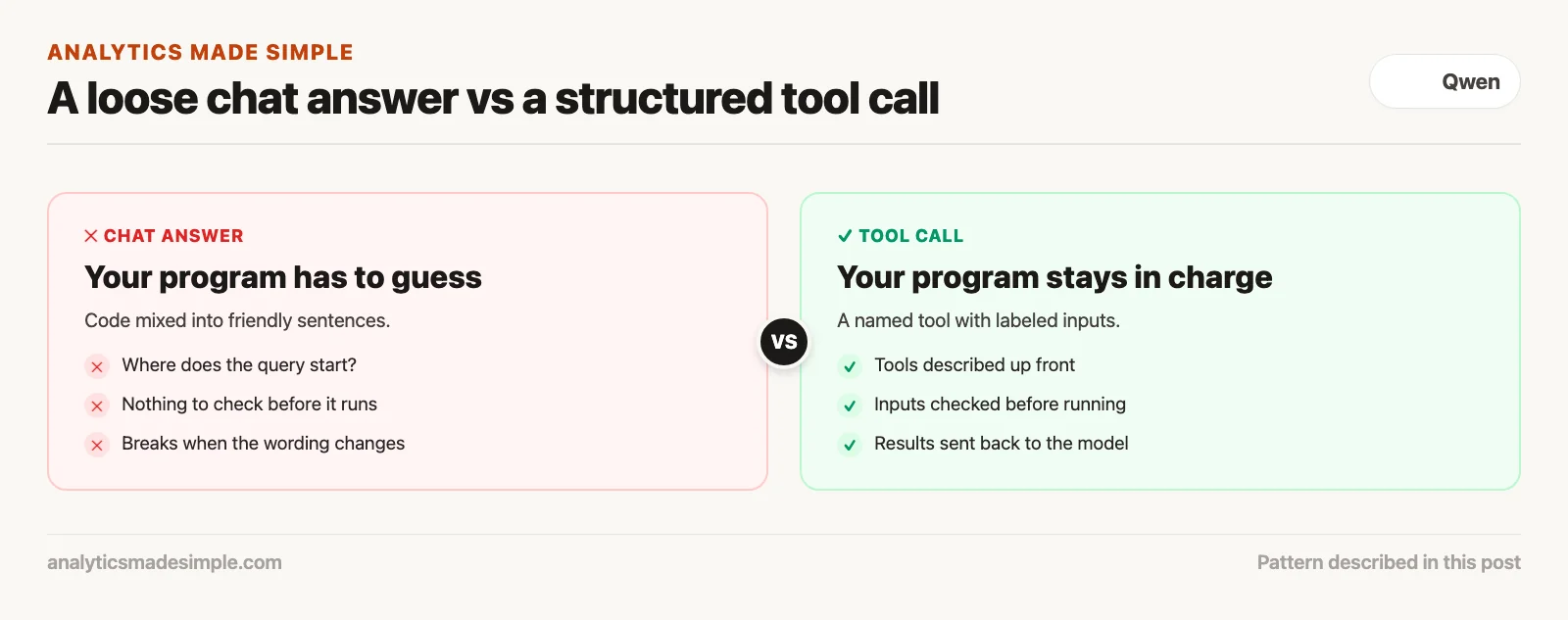
Tool calling means the model asks your program to do something for it, like run a query. You describe the available tools up front in a structured format called JSON (a plain-text format programs use to pass structured data). When the model needs one, it stops writing and sends a short, structured request that names the tool and its inputs, your program runs it, and the result goes back to the model.
This only works if your program and the model agree on a clear format. If the model just wrote “I am now checking the database for you” followed by loose SQL, your program would have to guess where the query starts and ends, and it would break easily.
Qwen3-Coder supports tool calling directly, using what its model card calls a specially designed format. You list the tools your program offers, the inputs each one takes, and what each one is for, and the serving software, such as Ollama or vLLM, hands your program a structured request instead of a paragraph.
Your program catches that request, reads the inputs, and runs the tool itself. The model never connects to your database directly, so your program stays in charge of passwords, permissions, and time limits. When the query finishes, your program turns the result into plain text and passes it back to the model.
The model then reads the numbers, explains them in plain words, and lays them out in a table for you. If something looks odd, it can ask for a second tool call in the same conversation and keep investigating step by step.
Building a local safe execution sandbox
Letting AI-written code run directly on your computer is risky. A sandbox keeps it contained, using a lightweight container such as Docker, a Python that runs inside a web-style sandbox called Pyodide, or a limited process with no special permissions. Cutting off the internet, giving it a throwaway folder, and capping memory stops accidents from spreading.
Letting an AI run commands or scripts on your laptop with no limits is asking for trouble. One wrong line in a cleanup script could delete folders you care about, and a loop that never ends could use up all your computer’s memory and freeze it.
You can build a safe setup for your team in two layers. For Python data work, use Pyodide, a version of Python that runs inside a sealed browser-style sandbox. It can use real data libraries, but it cannot see your files, your operating system, or the internet.
For work that needs a database, use small Docker containers (sealed mini-computers that run one job) whose main files cannot be changed. Give the container one throwaway folder, such as /tmp/agent_scratch, where the model can save temporary files and check its output.
Always set hard limits. Then test them. Stop any script after fifteen seconds, cap memory at two gigabytes, and remove administrator rights. If a script hangs or loops forever, the sandbox ends it cleanly and tells the agent it timed out.
A real-world example: automating SQL dialect migrations
Every database has its own flavor of SQL, and moving old queries to a new database means translating date math, text handling, and special functions without changing what the query means. Give Qwen-Coder the table layouts and the translation rules, and it can convert many old queries and test each one automatically.
Here is a common job for it: converting hundreds of old Sybase queries to PostgreSQL and DuckDB, a fast database you can run on a laptop. Say the old queries use Sybase-only date math, like dateadd(dd, -30, getdate()) for “30 days ago,” and join text with plus signs, which newer databases do differently.
A small Python harness running Qwen3-Coder-30B-A3B gives the model two tools: one to look up a table’s layout and one to test a query in DuckDB. For each old query, the model translates it, then immediately runs it against a small practice database filled with made-up rows.
Now say one inventory query joins tables with the old *= style, which Sybase itself later retired. A translation that misreads it can run without errors and still return far too many rows, because the join matches rows more than once.
That is the mistake the harness is built to catch. Because the model runs every translated query and compares the row counts with the expected results, a doubled count shows up right away instead of in next month’s reports. Check the comparisons yourself before you trust a batch.
The 4-tier guardrail protocol for production code
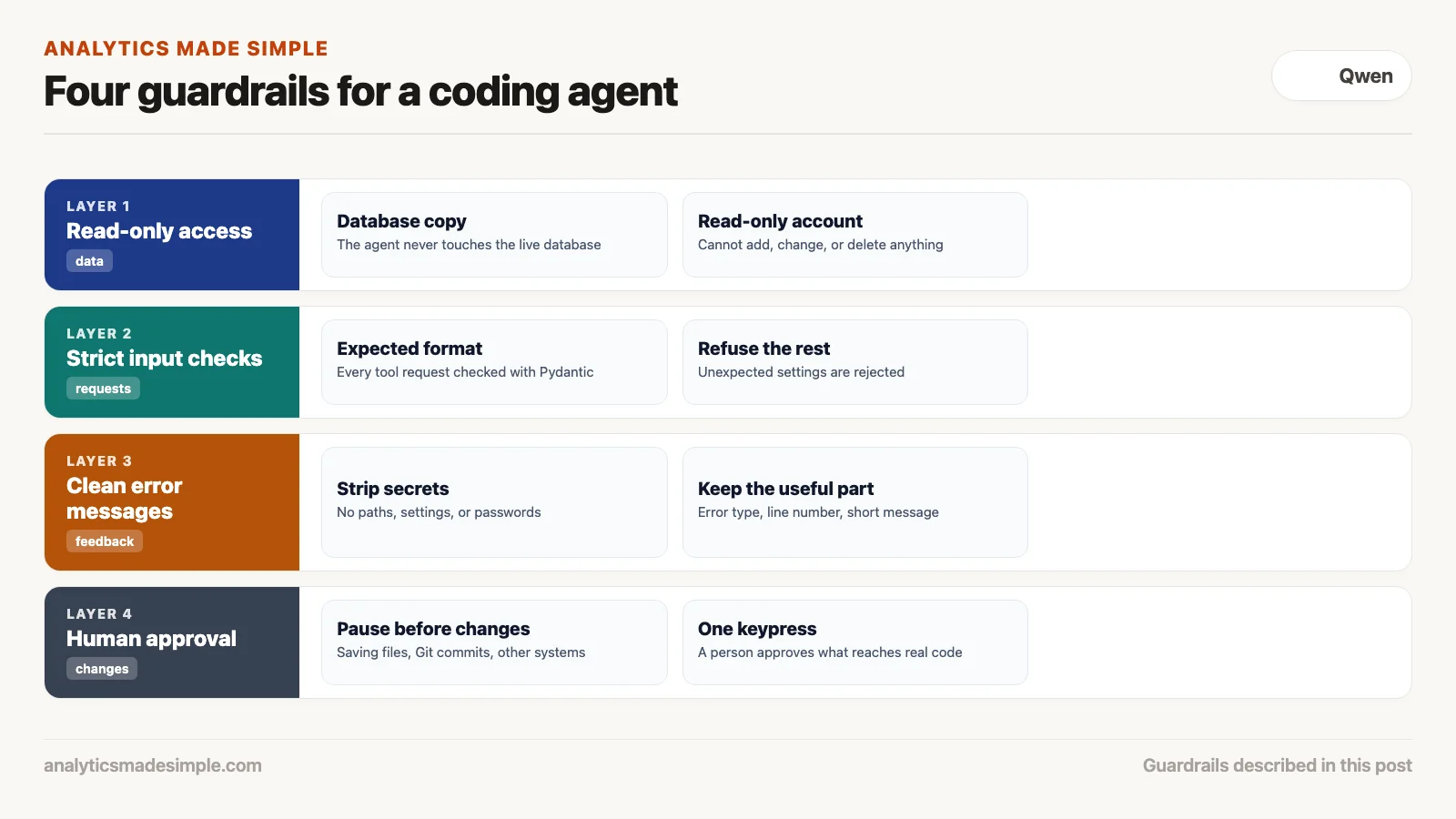
To use coding agents safely on real systems, put four guardrails in place: read-only access, strict checks on every request, cleaned-up error messages, and a human approval step. Together they mean the agent can look at your data freely but can never change anything without a person saying yes.
Careful teams do not trust a model to behave. They set things up so that a serious mistake is impossible. The first guardrail is read-only access. Connect the agent only to a copy of the database, using an account that cannot add, change, or delete anything, so there is simply no way for it to write.
The second guardrail is strict input checks. Check every tool request from the model against the exact format you expect, using a validation library such as Pydantic, before your program runs it. If the model adds an unexpected setting or sends the wrong kind of value, the harness refuses the request.
The third guardrail is cleaning up error messages. When a script fails, the full error report can include file paths, settings, and even passwords. Strip those out and pass the model only the error type, the line number, and the short message.
The fourth guardrail is human approval. Anything that saves a file, records a change in Git (the tool that tracks code history), or changes another system must pause and show a person exactly what will change. One keypress to approve keeps a human in charge of what reaches your real code.
Getting started with Qwen-Coder on your own machine
To run Qwen-Coder on your own computer, you need a free tool such as Ollama or vLLM and enough memory for the size you pick. With 32 GB of memory or a 24 GB graphics card, run ollama run qwen3-coder:30b, about a 19 GB download (Ollama library, checked October 5, 2026). It costs nothing per use and works offline once downloaded.
On a 16 GB laptop, the current models are too big. Use the older qwen2.5-coder:7b (4.7 GB) for chat about code, or qwen2.5-coder:1.5b (about 1 GB) for suggestions as you type, and connect it to a free editor add-on such as Continue.
For a team, vLLM is a free server program built to answer many requests at once. Running Qwen3-Coder-30B-A3B on one shared machine lets your whole analytics team get automatic query reviews and code comments without paying a per-use fee to an online service.
Because the model’s files run entirely on your own machine and the sandbox keeps its code contained, your code, your database layouts, and your company’s private details never leave your own network.
Keep going
Same lessons in your feed
Short diagrams, hooks, and weekly tutorials on Substack, Instagram, X, and Facebook.
Merch on Etsy
Open store →

Series notes
This is Part 4 of Learn Qwen. Previous: multilingual strengths. Later parts cover work caution and choosers.
Sources
- Qwen Team, model cards for Qwen3-Coder-30B-A3B-Instruct, Qwen3-Coder-Next, Qwen3-Coder-480B-A35B-Instruct, and Qwen2.5-Coder-7B-Instruct, checked October 5, 2026.
- Ollama, qwen3-coder and qwen2.5-coder library pages (download sizes), checked October 5, 2026.
- Qwen, Qwen-Agent on GitHub (function calling and code interpreter).
- vLLM documentation and Pyodide, checked October 5, 2026.