

You can use a Llama model in two ways: through a company that runs it for you online (hosted), or on your own computer (self-hosted). The difference matters for privacy, because with a hosted model whatever you paste leaves your computer and goes to that company’s servers, even if you also downloaded a copy. Before you tell anyone their data stayed “local,” check where your prompt actually went.
Imagine you have a product list from a customer, about 9,000 rows, and you want it cleaned up. You try the copy of Llama on your own computer, but it runs out of memory and quits. So you open a website that runs Llama for you, paste the same file, and get a tidy result in 12 seconds. By lunch that site has billed you $47.20, and the customer’s full list now sits on someone else’s servers.
The toggle that looked local
The session looked like every other Ollama morning: same command-line tool, same localhost:11434, same llama icon in the corner of the app. You might have used that exact pattern before for smaller 8B models on a laptop, and the Studio was supposed to be the grown-up version of it: more unified memory, a closed lid, no browser tab with an API key (the secret password a program uses to reach an online AI service) sitting open. You type the command, watch the spinner, and treat speed itself as proof the metal is doing the work.
Speed is the tell that is easy to ignore. A Q4 version of Scout often sits in the 55 to 61 GB range on public model file cards, though you should confirm the exact card the week you pull it, since blogs disagree on the number. A well-specced Studio can hold that file, but it does not usually stream like a cloud playground while the fans stay completely dead. The first tokens (the small chunks of text a model writes, each about three-quarters of a word) arrive in under a second, Activity Monitor barely moves, and 9,102 rows getting remapped would normally have heated up the whole machine. This felt more like Slack autocomplete than a local model working through a big file.
Ollama’s cloud path is built to look almost identical to the local path. You run ollama signin, then pull a model name that the Ollama library (its online catalog of models) marks as cloud, and the daemon still answers on port 11434 while your Python client still points at localhost. Cloud tags often carry a -cloud suffix, and in ollama ls the size column shows a hyphen or a blank space instead of an actual 60 GB file. In this scenario, the workspace mixed a partial local download with a cloud-hosted Scout endpoint (an online address that answers requests), and you picked whichever one did not need another hour of downloading.
The desktop app can hide the same fork behind a single Cloud control, so read the model line itself, not the window chrome around it. If you signed in, if the tag says cloud, or if the size is not a real number on disk, the prompt is leaving your machine. For local-only mode, set disable_ollama_cloud to true in ~/.ollama/server.json, or set OLLAMA_NO_CLOUD=1, then restart the app; the logs should then show cloud disabled. Until you have actually done that, “I used Ollama” is not a location, just a tool name.
Say the buyer email promised the remap would stay on the Studio. Ollama’s public cloud notes say they process prompts to run the service and do not train on that content, which is a fair policy on its own terms. But the buyer heard “nothing leaves the building,” and a retention page is not the same sentence as that promise. If you told someone the work was local, you need the file on disk, cloud turned off, and a model whose size on disk you can actually point at.
Rule of thumb: If the fans are idle, the size column is a hyphen, and tokens arrive like a website response, assume a hosted service until you prove otherwise.
Four places a Llama prompt can go
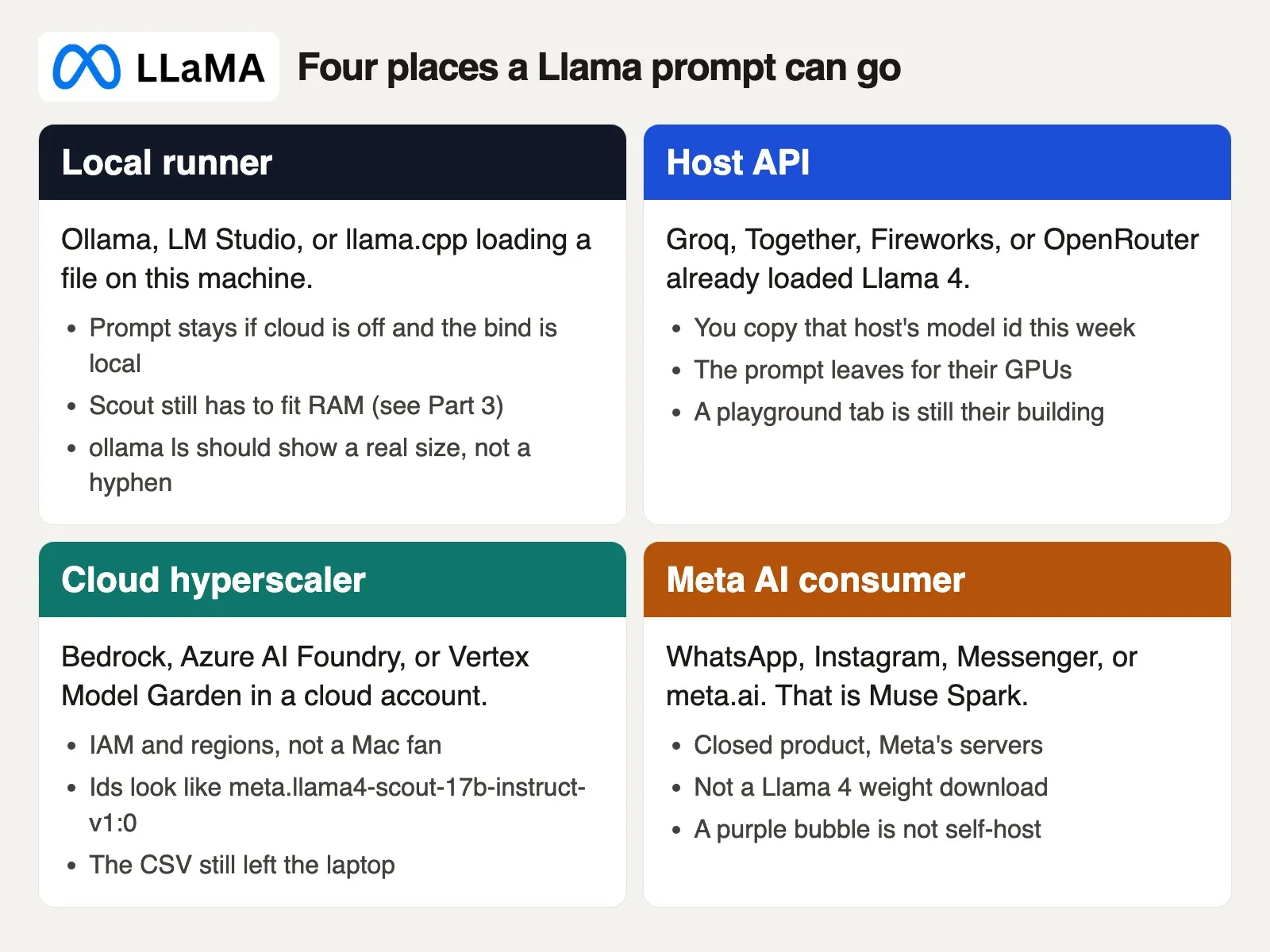
People say “we use Llama” and actually mean four different rooms, but only one of them can keep buyer_catalog_remap.csv on your own desk. The others still run Llama-shaped models, or sometimes a different Meta product that just borrowed the hallway. Name the room you are actually in before you paste anything sensitive.
Local runner
Ollama, LM Studio (LM stands for language model), and llama.cpp all load a weight file you already downloaded yourself. The program itself is just a runner, and the chat window is not Meta. The privacy story here is “this process, this system memory (RAM),” and that is only true if you never pointed the runner at a remote address and never enabled cloud. llama.cpp’s server (a computer that runs programs for others to use) on 127.0.0.1 stays on the box, and even binding 0.0.0.0 so your local network can call it is still your own machines. Point that same client at a hosted base_url, though, and you have already left the building. LM Studio will happily hold both a local model file and a saved server profile named “work” that quietly hits a host instead. Your memory of “I opened LM Studio” will not sort those two apart for you later.
Host API
Groq, Together, Fireworks, and OpenRouter have already loaded some Llama 4 files onto their own graphics cards and rented you a web address for it. You send a prompt, tokens come back, and you either pay per token, burn through a free-tier quota, or click around a playground until a bill shows up. The Llama 4 Community License does not move the prompt onto your own Studio just because the license terms apply. Location is still the thing that matters most here, the same idea covered in the earlier post on hosted models versus downloading them yourself. A playground tab is their building. An API key is the same building, just with a meter attached. OpenRouter works like a switchboard: one key, many possible backends behind it. Unless you pin a specific provider, you may not even know which company actually saw the CSV (a plain-text table with commas between values).
Cloud hyperscaler
Amazon’s cloud service Bedrock, Azure AI Foundry, and Google Vertex Model Garden all put Llama 4 behind an account you probably already use for other cloud work. The ids look like plain infrastructure: something like meta.llama4-scout-17b-instruct-v1:0 on Bedrock, sometimes with a us. prefix for geographic routing, the name of your running copy of the model in Azure’s Foundry, or a Model Garden string on Vertex such as meta/llama-4-scout-17b-16e-instruct-maas. Copy the exact id from the console the week you actually run it. Regions, account permissions, and private network endpoints are real controls, and they matter, but they are not the same thing as a quiet Mac fan. The CSV still left your laptop either way. “It stayed in our Amazon cloud account” is a genuinely different sentence from “it stayed on the Studio.”
Meta AI consumer
WhatsApp, Instagram, Messenger, and meta.ai are Meta’s own consumer chat products. Vendor pages checked in September 2026 show that stack running on Muse Spark, a closed model, not a Llama 4 download you could pull yourself. You cannot pull Spark as a downloadable file at all. A purple chat bubble that answers “like Llama” is still Meta’s own product running on Meta’s own servers. A teammate might have been pasting product codes into Meta AI from a phone earlier that same week, without realizing it was a completely different door than the Studio. Same company family, different room, different weights (the numbers a model learned during training) entirely. Muse Glimmer, the separate 30-billion-parameter Apache-licensed line, is yet another Meta family and not Scout either. If the model card does not say Llama 4 Scout or Maverick by name, you are somewhere else.
Hosted ids you can actually copy
Hosted Llama is not one single string you can memorize, because each vendor invents its own id. Hugging Face’s meta-llama/Llama-4-Scout-17B-16E-Instruct is a repository (a project folder that tracks every change) path. Groq, Together, Fireworks, OpenRouter, Bedrock, Azure, and Vertex each rewrite that same model under their own naming scheme. Paste the host’s own id, not one you remember from somewhere else. If a gist and the live catalog disagree, the catalog wins every time. If the catalog page 404s, the model has likely been rotated out, so do not invent a replacement from memory.
Groq, the inference (the model doing its work to produce an answer) host spelled with a Q, is not Grok, the xAI chatbot. One letter of difference, two completely different companies, two different privacy stories. If a slide in a meeting says “we moved to Groq,” ask exactly which spelling they typed into their browser.
Vendor pages checked in September 2026 show Scout Instruct in these shapes. Treat them as spelling examples, and then open the live list yourself before you rely on any of them:
- Groq served
meta-llama/llama-4-scout-17b-16e-instructuntil July 17, 2026, when it shut that model down; its deprecations page namesopenai/gpt-oss-120bas the replacement (checked October 5, 2026). That is a different model, not Scout, so copy whatever the catalog lists as live that week. Do not keep an old blog’s id sitting in a cron (a built-in scheduler that runs tasks at set times) job. - Together has used
meta-llama/Llama-4-Scout-17B-16E-Instruct, capital L, in the Hugging Face style. - OpenRouter has used
meta-llama/llama-4-scout, which is a router slug. Pin a specific provider if the buyer’s file is going in the request body. - Fireworks uses an
accounts/fireworks/models/...path. Copy it directly from their own model library, not from a screenshot of Together’s page. - Bedrock uses
meta.llama4-scout-17b-instruct-v1:0, or the regional inference idus.meta.llama4-scout-17b-instruct-v1:0. - Vertex Model Garden has used
meta/llama-4-scout-17b-16e-instruct-maas. Azure AI Foundry instead uses a name you create for your running copy of the model yourself on top of a catalog model. Neither one is a Groq-style string.
A toy call should look roughly like this. Put your key in an environment variable (a setting stored outside your code), keep max_tokens small, and send three sample rows rather than the whole file. The model field is the exact id you copied today. This example uses OpenRouter, because Groq no longer serves Scout; on October 5, 2026, OpenRouter’s Scout page listed DeepInfra, Novita, and Google as providers. The provider lines pin one of them and turn off fallbacks, so your rows go to the company you chose.
curl -s https://openrouter.ai/api/v1/chat/completions \
  -H "Authorization: Bearer $OPENROUTER_API_KEY" \
  -H "Content-Type: application/json" \
  -d '{
    "model": "meta-llama/llama-4-scout",
    "provider": {"order": ["deepinfra"], "allow_fallbacks": false},
    "messages": [
      {"role": "user", "content": "Return one JSON object with sku and shelf_title. Input: SKU-1044, Blue mug 12oz, case of 6."}
    ],
    "max_tokens": 200
  }'
That request body is basically a location card written in curl form: host address, model id, one toy SKU (a product stock code), and a tight token cap. Together wants a different base address and often the model’s full repository name with a capital L (its folder name on Hugging Face). Bedrock wants a request signed with your Amazon cloud credentials, not a simple Bearer key pointed at a Groq hostname. Prices move often, so do not copy a blog’s quoted $0.11 straight into a budget; open the host’s own pricing page the morning you actually start. That $47.20 charge in the story above was not one single call. Someone pasted the full CSV, disliked the JSON (a structured text format that programs read) that came back, pasted it again, and then asked for a cleaner pass on top of that. Three large prompts, long outputs, and a playground that does not warn you the way a finance system would.
| Host | Where the prompt goes |
|---|---|
| Groq / Together / Fireworks playground or API | That company’s own inference machines |
| OpenRouter (unpinned) | A backend you may not have specifically named |
| AWS Bedrock Llama 4 | Your AWS region (and maybe a geo-routing region) |
| Azure AI Foundry | The Azure deployment you created |
| Vertex Model Garden | Google Cloud in the region you chose |
| Ollama / LM Studio / llama.cpp, cloud off | This machine’s own RAM |
| Ollama cloud tag or signed-in cloud path | ollama.com, even when the client still says localhost |
| Meta AI (WhatsApp, IG, meta.ai) | Meta’s Muse Spark stack, not Llama 4 weights |
Read the retention policy for whichever host you actually named. Some advertise zero retention, others log activity for abuse prevention, and you should assume logs exist somewhere until a signed contract says otherwise. Bedrock’s private networking setup can beat a public playground on paper, but it is still hosted Llama at the end of the day. The paste test from the earlier post on running AI yourself for privacy still applies here: would you actually email this CSV to that vendor’s support inbox?
Self-host means the files stay unless you flipped a switch
Self-host, in this post, means a Llama 4 or 3.x weight file sitting on hardware you personally control, loaded by a runner you can name, with no cloud offload happening anywhere. The files stay put, the prompt stays put, and heat plus memory become your own problem to manage. The earlier post on Llama sizes covered why Scout’s total parameter count drives memory use even when only 17 billion parameters (the learned numbers inside a model) are active for any single token. If a tag will not fit on your machine, that is a size problem, not a reason to quietly flip on Cloud while the buyer still believes the work is local. Pick one runner and stick with it for a week: Ollama if you want a single command, LM Studio if you want a visible window, or llama.cpp if you already speak in command-line flags comfortably. You might already have Ollama installed from a quick tutorial and LM Studio from a teammate’s setup guide, sitting side by side without you fully noticing which one you are actually using.
Prove it is local before the CSV
Run this checklist on the actual machine you will use, not on a slide in a meeting.
- In
ollama ls, the model shows a size you can believe, tens of gigabytes for a Scout-class file, not a hyphen. In LM Studio, the file path points to this disk. In llama.cpp, you passed a local-mpath yourself. - You are signed out of ollama.com, or cloud is explicitly disabled in
server.jsonor throughOLLAMA_NO_CLOUD. Restart the app after making that change. - The client’s base address is
http://127.0.0.1:11434or LM Studio’s own local port, notapi.groq.com, and notollama.com. - Airplane mode still answers a three-row toy prompt without complaint. If the toy prompt dies the moment wifi dies, you were never actually local to begin with.
- Activity Monitor, or
topon Linux, shows the runner itself taking up memory, and the fans may start spinning. That is the boring, physical proof that the Studio is doing the actual work.
If step four fails, stop right there. You have a hosted service wearing a local costume. Fix the toggle, or tell the buyer the truth and pick a named API with an actual contract behind it. Self-hosting does not rewrite the license either way. Llama 4 still runs under the Llama 4 Community License, so attribution, the 700-million-user clause, the EU multimodal limit, and the “Built with Llama” requirement still apply the moment you ship a product, all covered in the earlier post on licensing. Do not put “Llama 4” in a buyer email if the file actually sitting on disk says llama3.1:8b.
A Mac Studio with 64 GB or more can genuinely be a Scout box at a quantized size, with some patience required. A 16 GB Air cannot manage that at all. If your “Llama 4 on the Studio” setup responds instantly and the machine stays cool, you are probably not actually running in that local regime. Time a 200-token completion on a three-row paste yourself, and write the seconds down in the ticket next to the model tag.
The $47.20 SKU paste
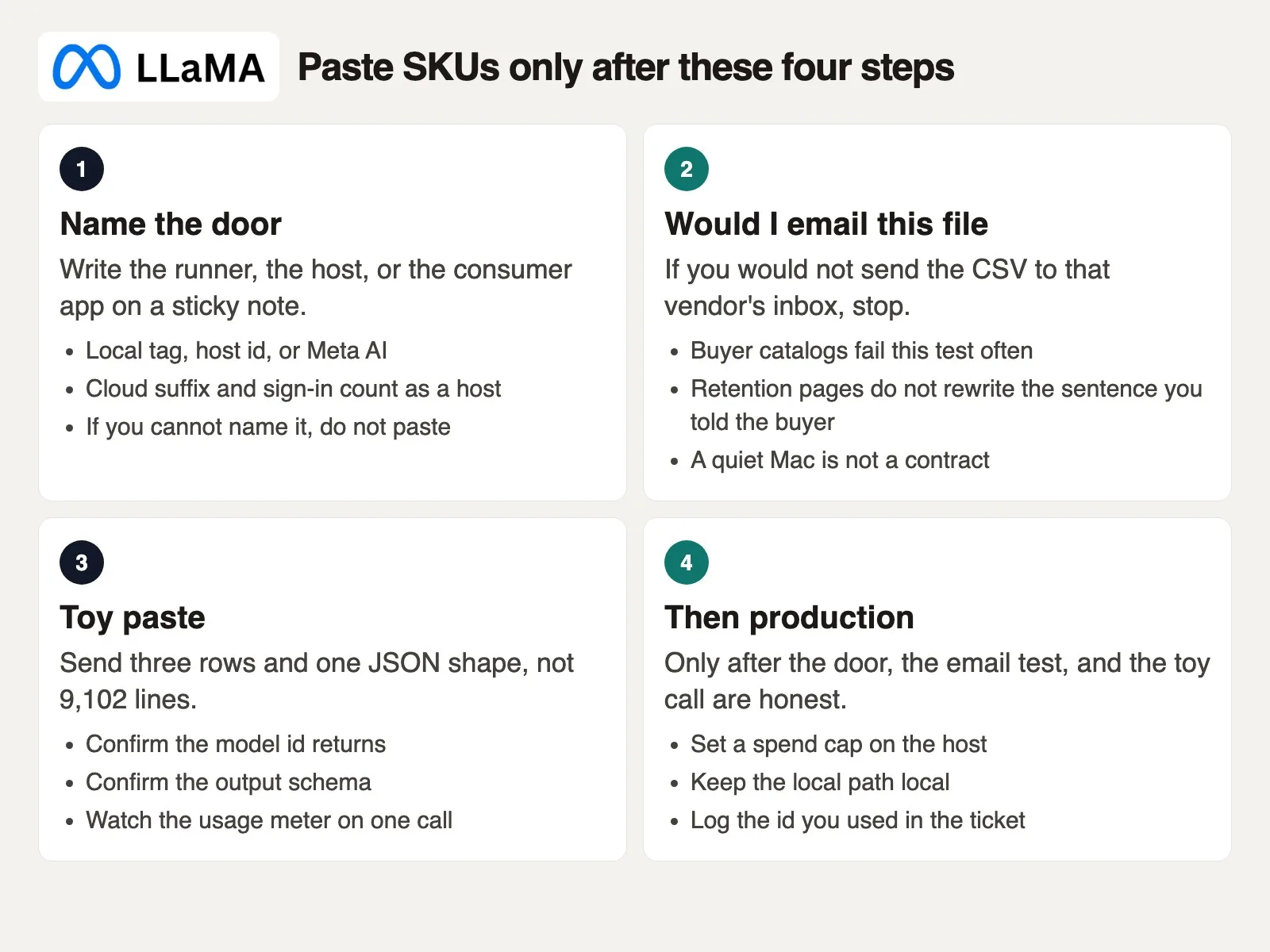
Here is that same morning laid out in order, so you can steal the sequence and skip the invoice entirely.
Early that morning, you open Terminal (the text window where you type commands), run ollama run llama4, and skip reading ollama ls first. Friday’s Slack thread still has your own line in it: nothing leaves the building, the remap stays on the Studio, send a sample shelf-title column by Monday. The CSV sits on the desktop, exported from a spreadsheet tab called remap_v3_use_this, with columns for sku, vendor_title, shelf_title, and pack_qty. You select all, copy, and paste. Titles come back loaded with extra adjectives and a small lecture about brand voice. You paste again with “JSON only, no lecture,” then a third time because pack quantity had drifted back into the title text. The CLI keeps the whole file in context on every single round, and the meter keeps moving while you go make coffee.
By late morning, mail arrives from the host: $47.20. Not a catastrophe by itself, but enough to make that buyer sentence false. The Studio itself never actually spun up. The local partial download was still incomplete the whole time. The cloud tag had quietly handled all three pastes instead. You could have used three sample rows, locked in a fixed output format, and then written a short script with a spending cap. Instead you used the whole catalog as the prompt, simply because the window happened to accept it.
Walk the four steps on the diagram before the next buyer file lands on your desk.
- Name the path. Write it on a sticky note: local Ollama tag
…, Groq id…, Bedrock id…, or Meta AI. A cloud suffix and anollama signinboth count as a hosted path. If you cannot fill in that blank, do not paste anything yet. - Would you email this file. 9,102 SKUs with vendor titles is a buyer’s catalog. If you would not send that exact CSV to the host’s support inbox, do not put it in the request body either. A vendor’s retention marketing does not rewrite the promise you already made to the buyer. Meta AI fails this same test just as badly as a public playground would.
- Toy paste. Three rows, one JSON shape,
max_tokenscapped at 200. Confirm the id actually responds and that the output is usable. Watch the usage line on that single call closely. If the id 404s, you are not in production yet, you are still chasing a catalog. Stay there until the string is confirmed real. - Then production. Set a spending cap on the host itself. Keep the local path genuinely local, using the checklist above. Log the model id in the ticket. If the job is simply “rewrite titles,” a $20 closed chat subscription may honestly be the whole job. Running Llama on your own box is for when the file truly cannot leave. Mixing local runners with cloud endpoints without tracking tokens is exactly how surprise invoices happen.
Hosted Llama is the right path when Scout will not fit, when you want a simple curl call without buying a graphics card, or when legal has already signed a Bedrock agreement. Self-host is the right path when the sentence you sent the buyer was “local,” and you are willing to live with fans and a smaller tag if that is what it takes. Meta AI is consumer chat, not a remap job you promised would stay on a Studio. Do not use a cloud toggle to quietly paper over a size problem covered in the earlier post on Llama sizes. On Monday, pick one path in writing. Run the toy curl call, or a three-row Ollama prompt, on a fake SKU rather than the real buyer file. If you are local, kill the wifi and run it again to prove it. If you are hosted, copy the live id and set a spending cap. Then move on to First useful Llama tasks and do your first real write, summarize, or light-code job on that named path, toy paste first. If all you ever needed was a thank-you email, skip this whole series and use the product chooser instead.
Series notes
This is Part 4 of Learn Llama (LL4). The earlier post covered sizes; the next one covers first useful tasks.
Sources
Research and further reading used for this article. Ids and prices checked in September 2026; re-check the live catalog before you rely on any of them.
- Meta: Llama 4 multimodal intelligence (Scout / Maverick family announcement)
- llama.com downloads and Llama FAQ (weight files versus products)
- Meta AI (consumer chat; Muse Spark as checked in September 2026, not a Llama 4 pull)
- Groq model docs and Groq deprecations (copy the live id; Groq shut down Llama 4 Scout on July 17, 2026)
- Together: Llama 4 Scout (example id
meta-llama/Llama-4-Scout-17B-16E-Instruct) - OpenRouter: meta-llama/llama-4-scout (router slug; pin a provider for sensitive prompts)
- Fireworks docs (copy
accounts/fireworks/models/...from their library) - AWS: Llama 4 on Bedrock serverless and Bedrock model cards for
meta.llama4-scout-17b-instruct-v1:0 - Azure AI Foundry and Vertex Model Garden (hyperscaler catalogs; ids change by region and offer)
- Ollama Cloud docs and Ollama FAQ (signin,
-cloudtags,disable_ollama_cloud/OLLAMA_NO_CLOUD) - LM Studio and llama.cpp (local runners; remote base addresses are still hosts)
- Hosted open models vs download to your machine (the general location split this Llama page sits on)
- Would you email this file: the paste test
Keep going
Same lessons in your feed
Short diagrams, hooks, and weekly tutorials on Substack, Instagram, X, and Facebook.



