

The number in a Llama model’s name, like “17B,” does not tell you whether it will fit on your computer. What has to fit is the model’s total size: all of its parameters (also called weights), the billions of numbers it learned in training, which must be loaded into your computer’s memory at once. Before you buy hardware, check that total, not the number in the name.
Imagine you just bought a $2,847 computer with 32 gigabytes (GB) of memory, because someone online said Meta’s Llama 4 Scout “is 17B and runs easily on a 32 GB Mac.” You download it, and within an hour the computer slows to a crawl, writing only a word or two per second. The “17B” was just the part of the model that works on each word. The whole model has 109 billion parameters, far more than 32 GB can hold, so the machine keeps shuffling pieces of it between memory and the much slower drive.
The 17 billion number on the invoice
Nobody invented 17B out of thin air. Meta’s Llama 4 launch post from April 2025 describes Scout as a 17-billion active-parameter model with 16 experts (smaller sub-models inside it, only some of which work on each word), and Maverick as a 17-billion active-parameter model with 128 experts, and Hugging Face’s launch note uses the same pair of numbers. The filename even carries it in the tag: Llama-4-Scout-17B-16E-Instruct, where 17B is the active count and 16E means 16 experts. You read the first part of that name and stop there, which is exactly the mistake that led to the purchase order.
Here is the invoice next to the card, the way the purchase request should have been written.
- What you bought: a $2,847 mini tower with 32 GB of DDR5 memory, a 12 GB graphics card (GPU, the chip that does the heavy math for AI), and a 2-terabyte (TB) disk. The reseller’s product code said “Scout 17B class.”
- What Scout actually is, according to Meta’s own model card: about 109 billion total parameters, 17 billion active, 16 experts, with a long context window (how much text it can hold in mind at once) listed at up to 10 million tokens, the chunks of text models read, each roughly three-quarters of a word.
- What you pulled while waiting: a Q4-class Scout GGUF file (GGUF is a compressed model format made for ordinary computers), a download tens of gigabytes in size, into 32 GB of unified memory that already had Slack and Safari open.
- What a comfortable Q4 Scout setup actually needs, as several blogs quote it: somewhere around 55 to 61 GB of working memory, before you even add a long prompt or open Chrome.
- What Maverick is on that same “17B active” headline: about 400 billion total parameters and 128 experts. A Q4 version is often quoted around 200 GB and up, so the $2,847 box never had a real chance.
Your purchase request quoted a blog, not the card. The blog put “17B” next to a laptop photo, but Meta actually described Scout running on a single H100 from NVIDIA, the company that makes most AI chips, an 80 GB datacenter graphics card, using a compression method called Int4. That is Meta’s own test setup (the standard rig it uses to measure the model) for serving the model on enterprise hardware, not the file you downloaded, and not a 12 GB gaming graphics card. Those sentences can all be true in the same week. They still do not describe the same machine.
A laptop with unified memory is often where this mistake gets its first rehearsal, because unified memory means the weights, the operating system, and the browser all share one pool. A 32 GB Mac can look roomy right up until a 50-plus GB model starts loading its layers into that pool. Activity Monitor’s memory pressure graph is the tell: turning yellow within minutes, with the first useful reply still missing, is the machine telling you the working set does not fit. Disk space was never the problem. The 2 TB drive on the invoice would have been perfectly fine. Memory, both the computer’s working memory (RAM) and the graphics card’s memory, was what the bill actually came for.
Rule of thumb: Put total parameters, active parameters, the quantization name (the compression level, such as Q4), and this machine’s memory size on the same line before money leaves the account. If you only have the 17B number, you do not have a spec.
Total weights vs the experts that fire
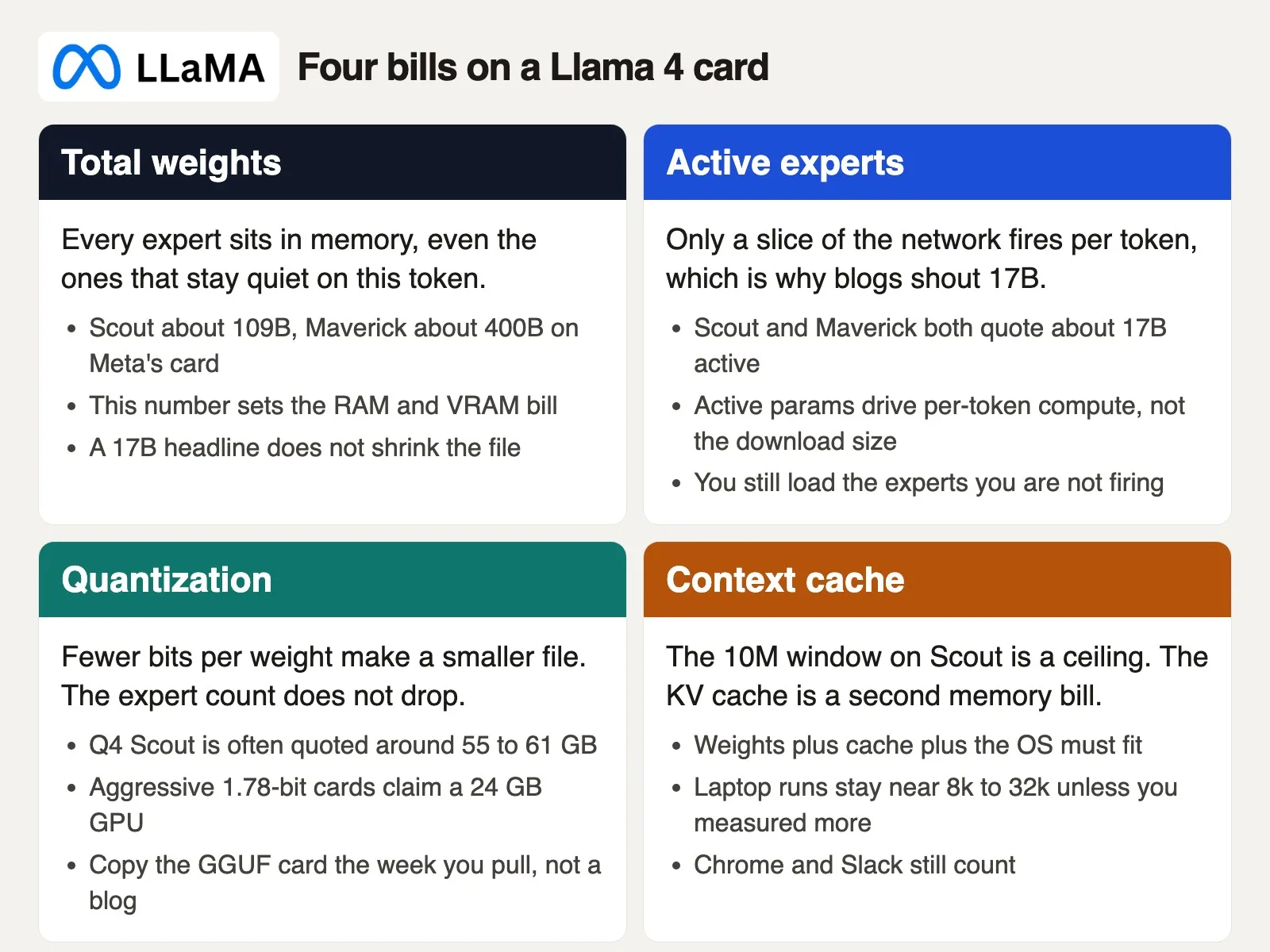
Llama 4 is Meta’s first Llama generation built as a mixture of experts, or MoE, instead of one dense network. A dense model, like the older Llama 3.x 8B that many people still keep in Ollama, uses its whole network for every single token. An MoE model instead keeps a roster of separate expert sub-networks plus a router that decides which ones to use. For each token, the router picks a small set of experts rather than running the whole roster. Meta’s own Maverick write-up describes it clearly: 128 routed experts plus one shared expert, with each token sent to the shared expert and to one routed expert, and dense and MoE layers alternating through the network. Scout uses 16 experts instead of 128. The launch post’s most important sentence is easy to skim past: while all the parameters sit in memory the whole time, only a smaller subset actually activates while the model is generating a reply.
Two numbers, two very different jobs.
Total parameters are every weight in the full roster. Scout has about 109 billion. Maverick has about 400 billion, though Hugging Face sometimes prints Maverick closer to 402 billion; treat those as the same class of model. This full pile is what the runner has to place somewhere: in system memory, in graphics memory, or spilled partly to disk if you force it to. Total parameters are what drive memory use.
Active parameters are the smaller slice that actually runs for any given token. Scout and Maverick both quote about 17 billion active parameters, which is why a blog can honestly say “Scout is 17B” without technically lying. Active parameters drive how much math the chip does for the next word, but they say nothing about whether a 32 GB Mac can hold the full roster in the first place.
Quantization changes how many bits each weight takes up on disk and in memory. A Q4 file stores roughly 4-bit values instead of the original 16-bit ones, so the file on disk shrinks noticeably. The number of experts does not shrink, though, and you still have to load all of them. Offloading can park some layers in system memory or on the solid-state drive, which is how a 24 GB graphics card can technically “run” Scout in a demo. A 32 GB Mac does a harsher version of the same trick: unified memory fills up, then the operating system’s swap kicks in. Swap is disk pretending to be memory, and it is slow on purpose. The fan gets loud, and the first reply either arrives late or never shows up in the meeting you meant to run it in.
Blogs disagree on the exact gigabyte counts, and they should, because that number is really a stack of several things: the compressed model file on disk, the running program’s own buffers, the key-value cache (often shortened to KV cache, the working memory that holds the conversation so far), and whatever else happens to be open. A cluster of local-AI write-ups put a Q4 Scout setup around 55 to 61 GB. Unsloth’s public file table lists a Q4_K_XL Scout near 65.6 GB on disk and a much smaller 1.78-bit version near 33.8 GB, with a claim that the smaller build fits a 24 GB graphics card. Meta, meanwhile, said Scout fits one H100 card at Int4. Those are different compression levels, different software, and different output quality, so do not treat any single blog as gospel. Open the model card for the exact file you plan to use, copy its listed size, and add headroom for the operating system on top.
Context length is the fourth bill you pay. Meta lists a 10-million-token window for Scout, built on a 256k training length plus extra techniques described in the launch post. A laptop never actually gets 10 million tokens in practice, because the key-value cache grows with every token you keep in the conversation. People who run Scout at home usually stay closer to 8,000 to 32,000 tokens unless they have specifically measured a longer window on their own machine. Treat 10 million as a research ceiling, not as a plan to paste an entire handbook and a year of support tickets into one prompt.
17B is the compute story. 109B or 400B is the memory story. Quantization only writes a smaller file to disk. The experts still have to live somewhere while the model runs.
Scout, Maverick, and the rest of the herd
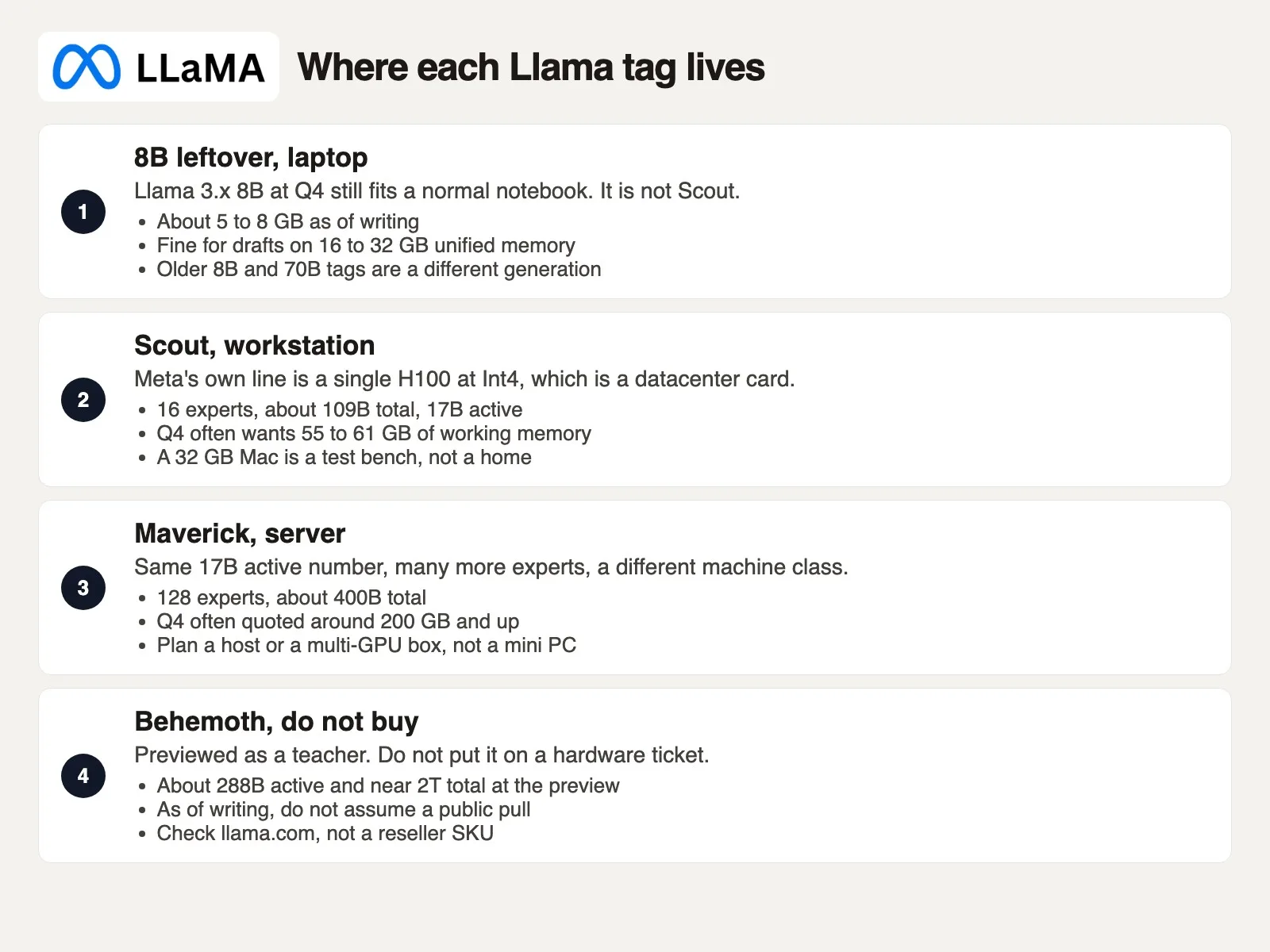
Llama 4 is not one size with a slider you turn up or down. It is a small herd: two public models you can download, one older model people still run, and one teacher model that was only previewed. Write down the exact tag you mean. Writing “Llama 4” on a hardware ticket and stopping there is how this whole mess starts.
Llama 4 Scout. The smaller total pile, a long context window on the card, 16 experts, about 17B active parameters out of 109B total. Meta positioned it as the model that fits a single H100 card once compressed to Int4. The Hugging Face repository (a project folder that keeps every version of its files) name looks like meta-llama/Llama-4-Scout-17B-16E-Instruct, though you should confirm the exact name the week you pull it. Instruct is the version tuned for chat, and you almost certainly want that checkpoint rather than the base model. Scout is a workstation conversation, and a 32 GB Mac is already a tight squeeze even at Q4 compression.
Llama 4 Maverick. The same “17B active” headline, but with 128 experts and about 400B total parameters. Meta’s own line describes a single H100 host, meaning a multi-GPU server chassis such as an NVIDIA DGX, not one consumer graphics card. Q4 write-ups often land around 200 GB and up. Even Unsloth’s smallest 1.78-bit Maverick file is still on the order of 122 GB on disk. If a purchase request says Maverick is comparable to Scout because both say “17B,” send it back for a rewrite. Hosted APIs, covered in the next post in this series, are how most teams will actually meet Maverick.
Llama 3.x 8B leftovers. Dense, older, and still genuinely useful. A Q4 8B file is commonly about 5 to 8 GB, which fits comfortably on a standard 32 GB machine with plenty of room left for Slack and browser tabs. An Ollama tag like llama3.1:8b will not suddenly grow 16 MoE experts just because you typed the word Llama. If the job is a short paragraph on this laptop this afternoon, a leftover 8B model is the local Llama that actually fits. Scout-level quality with a long context window is a different tier entirely.
Llama 4 Behemoth. Previewed as a teacher model: about 288 billion active parameters, 16 experts, and nearly 2 trillion total. Meta said it was still training when it previewed Behemoth in that April 2025 post. Do not assume you can download it today, do not put it on a purchase order, and do not trust a reseller who simply prints the name on a tower. Check the official llama.com download page yourself. If there is no file listed, there is no workstation to build for it.
The numbers below are hedged on purpose, because blogs disagree with each other. Confirm the exact model card, filename, quantization, and byte size the week you pull a file. Meta’s H100 line is a serving claim about their own hardware, not a promise about your Mac.
| Tag (checked September 2026) | Total / active / experts | Hedged working set | Confirm this week |
|---|---|---|---|
| Llama 3.x 8B Q4 | ~8B dense (no MoE roster) | ~5 to 8 GB | Ollama or GGUF card |
| Llama 4 Scout | ~109B / 17B / 16 | Meta: 1x H100 at Int4. Q4 often ~55 to 61 GB. 1.78-bit claims 24 GB | GGUF bytes + quant name |
| Llama 4 Maverick | ~400B / 17B / 128 | Meta: H100 host. Q4 often ~200 GB+ | GGUF bytes + GPU count |
| Llama 4 Behemoth | ~2T / 288B / 16 at preview | Do not size a box | llama.com download list |
Older 70B and 405B Llama 3.x tags are still floating around in the wild, and they are dense, or built on a different recipe entirely, not Scout. If someone forwards a Slack screenshot that says “we already run 70B,” ask which generation they mean. A 70B Q4 file and a 109B MoE Q4 file are both large downloads. Only one of them is actually Llama 4 Scout.
What a laptop can honestly hold
Start from the machine actually in front of you, not from the herd’s marketing name. A 32 GB Mac can hold a smaller 8B model at Q4 compression without breaking a sweat. It cannot hold a Q4 Scout file as a daily driver while a browser stays open. That is the honest laptop line today, and it will stay true regardless of which vendor’s blog you read next.
A laptop with 16 GB of unified memory should stick to a leftover 8B model, or another small dense tag, and treat Llama 4 as something you reach through a hosted service instead. A 32 GB machine is the tempting middle ground, and tempting is exactly how systems end up hitting severe memory pressure. 32 GB minus macOS, minus Chrome, minus Slack, is not actually 32 GB anymore. A 50 to 65 GB Q4 Scout file does not compress into that remainder just because you read the number 17B somewhere. You can try an aggressive 1.78-bit file as a lab experiment, and time a prompt of your own choosing. If the first reply takes a coffee break to arrive, you do not have a workstation. You have a demo.
Apple Silicon’s unified memory and a discrete NVIDIA graphics card are different shapes of the same underlying bill. On a Mac, the model’s weights live in the same pool as the rest of the desktop. On a Windows or Linux machine with a 12 GB or 24 GB card, the graphics card holds whatever fits in its own video memory, and the rest offloads to system memory instead. A $2,847 tower with 12 GB of video memory and 32 GB of system memory sits in an awkward middle position. Even adding those two numbers together like an optimistic salesperson, 44 GB is still under many Q4 Scout quotes, and it is nowhere close to Maverick. Dual 24 GB cards running a low-bit quantization do show up in forum screenshots occasionally, but that is a workstation you deliberately designed, not a mini PC you clicked to buy off a blog post.
Disk space fools people more often than it should. The file can download completely, and the progress bar can finish, but “it installed” is not the same claim as “it runs.” The disk might have hundreds of gigabytes free, yet Activity Monitor tracks memory pressure, not disk space, and that is the number that actually matters here. Watch memory pressure, graphics memory if you have a discrete card, and whether the runner reports how many layers it managed to offload. If the interface says the model is loaded while the machine is visibly paging to disk, the model is a lodger passing through, not a resident that actually fits.
A long context window makes a tight fit even worse. A 4,000-token system prompt (the standing instructions the AI always follows) plus a 20-page PDF is already a bigger working set than a simple “hi.” Scout’s 10-million-token window is a research ceiling, not a laptop plan. For a laptop, pick a short window on purpose, something like 4,000 or 8,000 tokens while you learn the tag, and only raise it after watching what happens to memory. If you genuinely need a whole document collection in one prompt, you are back to needing a hosted service or a machine that was specifically bought for this job.
A squeezed 1.78-bit Scout running on a 24 GB card can still hold a conversation. Hard multi-step math and exact quotes pulled from a PDF are usually the first things that get mushy once too many bits disappear. If the job is searching handbook language for a team wiki, an 8B model is often plenty for that. Sounding fluent in the first paragraph is not the same as being accurate, but if the machine cannot even hold the weights, you never get far enough to check accuracy at all. Take a different path instead: a hosted Scout or Maverick option, through Groq (yes, with a Q, not the unrelated Grok chatbot), Together, Fireworks, Bedrock, and similar services, keeps the prompt running on their graphics cards instead of yours. That path is covered in the next post in this series. Do not try to “fix” a 32 GB Mac by ordering a $2,847 tower that just reprints the same 17B number on a different sticker.
What to write on the hardware ticket
Your original purchase request had a dollar amount, a vendor name, and the word Scout. It did not have a quantization level, a total parameter count, a memory number for this specific machine, or a yes-or-no answer on whether the file even stays on that machine. Your finance team approved a vibe, not a spec. Write a ticket a skeptical colleague could actually reject with confidence.
Fill this out before you buy a box, before you pull a 60 GB file, and before you tell Slack “we have Llama 4 in-house.” Keep it next to the model card. If a line is left blank, you risk buying hardware that stalls out on day one.
# hardware-ticket.txt
# Fill before a PO or a GGUF pull. Confirm the card this week.

date:
requestor:
machine_name:
ram_gb:
gpu_name:
gpu_vram_gb:
unified_memory: yes/no
os_headroom_gb:     # leave room for OS, browser, Slack

model_family: Llama 4
model_tag:          # example: Llama-4-Scout-17B-16E-Instruct
source_repo:        # meta-llama/... or named GGUF repo
quant:              # Q4_K_M, IQ1_S, Int4, copy from the card
total_params_b:
active_params_b:
experts:
file_size_gb:       # bytes on the GGUF card, not a blog headline
context_tokens:     # window you will type
kv_cache_note:

will_this_stay_on_this_machine: yes/no
reason:
fallback_tag:       # leftover Llama 3.x 8B Q4, or a hosted id
po_amount:
Here is how to fill it out without guessing. Open About This Mac, or the free command on Linux, and write down ram_gb. If there is a discrete graphics card, write down the card name and its video memory from the vendor’s own control panel, not from a tweet. Open the Hugging Face or llama.com card for the exact tag you want. Write down the total, active, and experts numbers, plus the file size of the exact quantization you plan to download. If two blogs disagree with each other, put both numbers in the reason field and pick the larger one for your fit test. Set context_tokens to the window you will actually type, not Meta’s 10-million ceiling. Then answer will_this_stay_on_this_machine in one plain sentence you would be comfortable reading out loud in stand-up.
Here is a corrected hardware ticket, filled out after the fact: 32 GB unified memory, no discrete graphics card on the Mac, Scout Instruct at Q4, about 109B total parameters, file size in the tens of gigabytes, will this stay on the machine: no. Fallback: a leftover 8B model on the Mac, or a hosted Scout option. The $2,847 line item would have been a clear no. The 12 GB graphics card tower was a no for Maverick, and only a maybe-with-real-pain for a heavily compressed Scout, which is not what you told finance.
A “yes” answer usually looks boring on paper. “64 GB or 128 GB unified memory, Q4 Scout, short context window, measured load time, memory pressure stays green even with Slack closed.” Or: “This machine is honestly an 8B machine. Llama 4 lives on a hosted service until we have a real graphics budget.” Boring is exactly the point here. The interesting failure already happened once, in about eleven minutes, earlier this week.
On Monday, copy the template into a note. Fill it out for the machine sitting under your hands right now, and for one specific Llama tag you actually want, such as Scout Instruct, a leftover 8B model, or a hosted option, not simply “Llama 4.” If the stay-on-this-machine line comes back no, do not place a hardware order that quietly assumes 17B active equals 17B total. Read the next post in this series, Hosted Llama chat vs self-host, and decide which path the prompt itself will take. The licensing checklist from the earlier post in this series, on license and acceptable use, still applies once the file is real.
Series notes
This is Part 3 of Learn Llama (LL3). The earlier post covered the license; the next one covers hosted chat versus self-hosting.
Sources
Research and further reading used for this article:
- Meta AI: The Llama 4 herd (Scout, Maverick, Behemoth preview) (17B active, 16 vs 128 experts, ~109B and ~400B total, Scout on one H100 at Int4, Maverick on an H100 host, 10M context on Scout, Behemoth still training at the April 2025 preview)
- Hugging Face: Welcome Llama 4 Maverick and Scout (17B active out of ~109B / ~400B, on-the-fly Int4 note for Scout, Llama 4 Community License on the repos)
- llama.com Llama downloads (confirm which tags are pullable this week, including whether Behemoth is listed)
- Hugging Face meta-llama org (official Scout and Maverick repo names such as Llama-4-Scout-17B-16E-Instruct)
- Unsloth: Llama 4 how to run and fine-tune (dynamic GGUF disk sizes as of their table, including 1.78-bit Scout ~33.8 GB and the 24 GB GPU claim; treat as one vendor card, not gospel)
- Unsloth Llama-4-Scout-17B-16E-Instruct GGUF (example of Q4-class files in the 60 GB neighborhood; copy the file you load)
- Analytics Made Simple: Model size, quantization, and will my laptop run it? (dense 7B / 70B laptop grain; this page is Llama 4 MoE)
- Analytics Made Simple: Learn (related paths on this site)
Keep going
Same lessons in your feed
Short diagrams, hooks, and weekly tutorials on Substack, Instagram, X, and Facebook.



