

The first useful jobs for a Llama model are small ones you can check yourself: rewriting one messy email, summarizing a few pages while noting which page each point came from, or writing twelve lines of code that you then run. A confident answer that invents a number is worse than no answer at all.
Imagine you paste a 61-page supplier contract into a website that runs Llama and ask for a summary. Eleven seconds later you have six neat bullet points, and one says your supplier owes a $1.2 million penalty for late deliveries. You put that number on a slide for a vendor meeting. Then you open the real contract and find no such figure anywhere: the late-delivery credit is 2% of that week’s handling fee, and the model invented the round number.
The $1.2 million contract term that was not in the PDF
You put the summary on slide six for the steering committee, labeled “Llama summary (Scout).” Your speaker notes still showed a cropped Groq tab, with the llama logo but not the actual model string underneath it. The three bullets read like this:
# Playground output (hallucinated figure not in contract)
1. PalletLine owes a $1.2M SLA if they miss a dock window.
2. We can terminate for any late truck.
3. Credits apply automatically to the next invoice.

# Search the extracted text before any slide
# rg -n -i "1.2 million|1,200,000|1200000" PalletLine_MasterServices_2026Q3.txt
# PDF search after the meeting: 0 matches
That block is the claim that got presented, plus the one-line search that would have caught it beforehand. Fluency is not a citation, and it never was. The model’s context window (how much text it can take in at once, measured in tokens, the small chunks of text a model reads) was big enough to hold the whole contract, and it still invented a round number that simply sounded like real contract English.
In this example your supplier is a made-up fulfillment company called PalletLine, and the contract is a toy excerpt. The annual statement of work in the toy excerpt is $186,400. The late delivery credit, on page 9, is 2% of that week’s billed handling fee. Service credits cap at 8% of monthly fees, on page 7. Liability is capped at fees paid in the prior 12 months, on page 11. None of those sentences comes anywhere close to “$1.2 million.” The model simply rounded up from a vibe.
You also had a real problem that same morning, and it never got the attention it needed. The supplier’s truck arrived two hours late at your dock 4, and you paid the temp crew $840 in overtime while they waited. What you actually needed was a short email and a one-page brief for the steering committee, not a 61-page contract summarized badly. The playground made the second job look finished. The first job never even got a draft.
Hosts change their model tags over time. Groq shut down meta-llama/llama-4-scout-17b-16e-instruct on July 17, 2026, according to its deprecations page (checked October 5, 2026), so the incident above happened on a model id that no longer works there. To use Scout now, pick a host that still serves it, such as OpenRouter, which listed it through DeepInfra, Novita, and Google on October 5, 2026, or another host from the earlier post on hosted versus self-hosted access, such as Together, Fireworks, OpenRouter, or Bedrock. The failure mode does not care which Llama service you actually chose. It cares that you treated a fluent paragraph as if it were a contract clause.
Name the path, then give it a small job
The earlier post in this series already asked you to pick a room: a hosted API (a company’s online service that your tools send requests to), or a runner on your own machine. Say you picked a hosted room. Write it down before you touch the PDF at all: the host, the interface, the model id, and whether the prompt leaves your laptop. Then give that one path a single job that fits in an hour, using text you already hold in your hands.
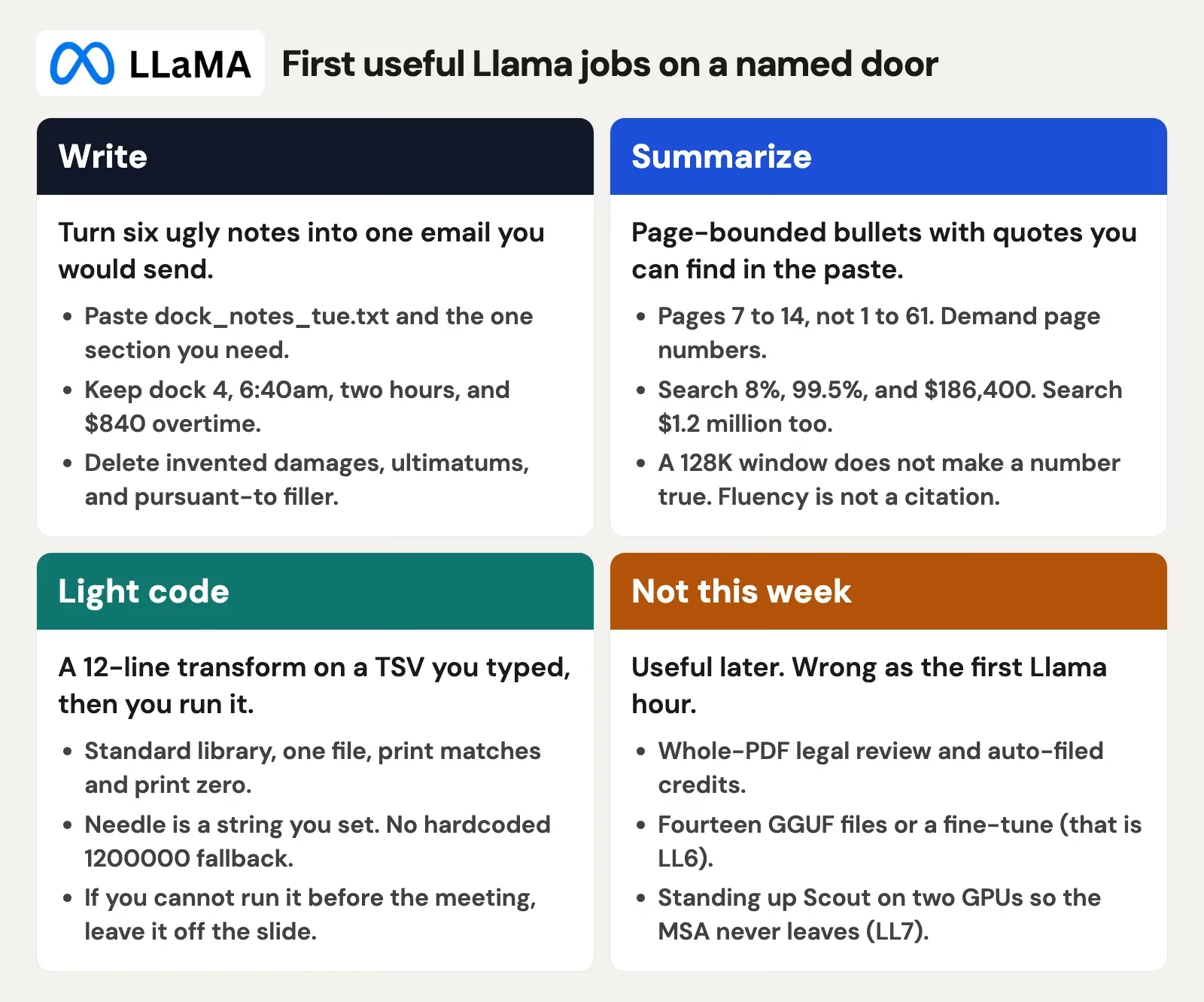
The four cards above are the tasting plate: one email, one page-bounded summary, one short code transform, and a whole pile of work you deliberately skip until those first three behave themselves.
# Named path, filled before any vendor file
Date: [today]
Host: OpenRouter, provider pinned to DeepInfra
Surface: openrouter.ai/chat
Model id copied this morning: meta-llama/llama-4-scout
Prompt leaves this machine: yes
Toy paste: clauses_toy.tsv (8 rows), not the 61-page PDF
Job today: [write one email | summarize pages 7 to 14 | 12-line transform]
Would I email this file to the host's support: [yes / no]
Fill in that last line honestly. A vendor master service agreement (MSA), the kind of contract that sets the overall terms with a supplier, is usually a no. The eight-row excerpt used in this post is labeled example text on purpose, so you can practice the whole loop without ever sending PalletLine’s real file to a host. If the actual work file has to stay on your own machine, use the local path from the earlier post instead: Ollama, LM Studio (LM is short for language model), or llama.cpp. A local Scout can invent $1.2 million just as easily as a hosted one.
Keep the job bounded no matter what: one email, pages 7 to 14, or twelve lines of Python you actually run yourself, not a PDF scraper nobody ever executed. If you need a lawyer, a finance sign-off, or a custom-trained model, wait; those come later in this series, once the basics are solid.
Rule of thumb: If you cannot paste the same sentence back into the source document and actually find it there, it does not go on a slide.
Write: one messy email, not the whole inbox
The actual writing job sat quietly in dock_notes_tue.txt, six lines of pure sticky-note energy:
Tue 6:40am dock 4
PalletLine truck 2 hours late
Temp crew overtime $840
Ask them to confirm the credit path in section 9
Do not invent damages
Reply-all: ops@palletline.example, dock leads on cc
That is a genuine Llama writing job: tone, order, a polite ask, and the $840 figure sitting right in the body so nobody has to go hunting through Slack for it. Leave “rewrite our vendor relationship” and demand letters for counsel to handle. If you paste the whole contract in first, the model is already working from the invented $1.2 million, so the email it offers starts with legal-sounding language and an unnecessary threat baked in. You do not send that draft. You also do not send anything else, because the meeting ate the whole hour instead.
Here is a prompt shape that stays small on purpose. Paste the six notes. Paste section 9 from the excerpt, the one about the 2% weekly handling credit. Tell the model: write one email, under 150 words, including dock 4, the two-hour delay, the $840, and a request for the section 9 credit path, with no dollar amounts beyond what is already in the notes or in section 9. Use the same named path, with the same Scout id you already copied earlier.
A usable draft looks something like this, after you edit two words yourself:
Subject: Dock 4 delay Tuesday morning, overtime $840, section 9 credit path
PalletLine ops, our dock 4 crew waited through Tuesday morning while the truck ran two hours late. We paid $840 in overtime to the temp crew to finish the unload. Please confirm how you would like us to request the late delivery credit under section 9 (2% of that week’s billed handling fee in our excerpt). Happy to send the dock timestamp and the overtime backup if that helps.
Check it like an actual human would. Does the dock number match, does the delay match, and does $840 match the notes? Does the 2% correctly point at section 9, which really is in the excerpt, with no $1.2 million anywhere and no “we hereby terminate”? If the model tacked on a legal caption or a 14-day ultimatum, delete it. The whole point is asking Llama to turn six ugly lines into one email you can actually stand behind.
Inbox-scale writing is a job for a later week. “Clean up the last 40 PalletLine threads” will blend dates together, invent apologies you never actually made, and drag the fake SLA figure (the service-level promise in the contract) right back in, simply because it is still sitting in the same playground chat history. Start a new chat, with a new toy paste, and send one message at a time. That sounds fussy until you have personally watched a model reuse a number you already told it was wrong.
Summarize: page-bounded, quote-checked
Summarization is the easiest task to fumble badly, so bound it until it becomes boring and fully verifiable. You do not ask Scout for “the service level agreement, or SLA.” You paste a specific page range. You demand quotes with page numbers attached. You then search the pasted text yourself for every number you plan to say out loud in the meeting.
The table below is a toy excerpt, eight rows, clearly labeled as an example. You could type an eight-row excerpt in about 12 minutes instead of uploading 61 ungrounded pages and hoping for the best. Annual spend of $186,400 is an ugly, specific number on purpose. Models tend to reach for round numbers like $1.2 million, and they are much easier to catch when they simply ignore an oddly specific number like $186,400 sitting right there in the paste.
| Page | Toy excerpt (example text) | What the $1.2M slide claimed | In the excerpt? |
|---|---|---|---|
| 4 | Term is 12 months starting 1 Oct 2026 | (not used) | Yes, unused |
| 7 | Service credits cap at 8% of monthly fees | Credits apply automatically to the next invoice | Cap is real. Automatic is not |
| 9 | Late delivery credit is 2% of that week’s billed handling fee | $1.2M if they miss a dock window | 2% weekly fee, not $1.2M |
| 11 | Liability cap is fees paid in the prior 12 months | $1.2M SLA pool | Cap exists. $1.2M does not |
| 14 | Uptime target 99.5% measured monthly | Terminate for any late truck | Uptime is real. Termination-for-late is not |
| 18 | Credit request window is 15 calendar days after the invoice | Credits apply automatically | You have to request. 15 days |
| 22 | Annual SOW spend: $186,400 (example) | $1.2 million | $186,400 only |
| 41 | Confidentiality survives 3 years after termination | (ignored) | Yes, unused |
Use a prompt that matches the table exactly. Paste only the rows for pages 7 to 14 if the steering committee actually asked about credits and liability. Say so explicitly in the prompt. Groq’s Scout card listed a 128K context window and an 8,192 maximum output while that id was documented, and Meta’s own Llama 4 Scout card advertised a much longer window than Groq actually served. Read the host’s own card, as covered in the earlier post on hosted versus self-hosted access, but bound the paste anyway. Invention is the real failure here, not truncation, on a simple five-bullet brief.
Use only the text I paste (toy excerpt, PalletLine MSA example, pages 7 to 14).
Return 5 bullets or fewer.
Each bullet must include one verbatim quote in quotation marks and a page number.
If you cannot quote it, write NOT IN EXCERPT for that bullet.
Do not invent dollar amounts. Do not convert % credits into a pool.
If I ask for an SLA dollar figure and it is not in the paste, say NOT IN EXCERPT.
Then do the one step that actually matters: open the PDF or TSV file (a plain text table, like a spreadsheet saved as text) directly and search for each quote and each number by hand. “99.5%” should hit page 14. “8%” should hit page 7. “$1.2 million” should hit nothing at all. If the model wrapped a real quote around a fake total, keep the quote and drop the total. If it cited page 9 for a sentence that actually lives on page 11, drop the whole bullet. Page numbers are easy to fake precisely because they look like care.
A full 61-page dump also fails for boring, practical host reasons. Groq’s Scout docs listed a 20-megabyte (MB) maximum file size and up to 5 images for multimodal input. A scanned contract turned into page images will not fit inside 5 pictures. Extracted text might technically fit inside 128K tokens and still be a bad idea in practice. You cannot quote-check 61 pages in the ten minutes before a meeting. You can quote-check eight rows. That is really the whole method.
Light code: a 12-line transform, then you run it
You can also ask the model for “a script that finds the SLA figure.” Scout returned about 90 lines of Python that imported a PDF library called pdfplumber, assumed a field named sla_amount existed, and hardcoded 1200000 as a fallback value “in case extraction fails.” Nobody ran that script. The laptop being used for the steering committee did not even have pdfplumber installed. That fallback would have quietly printed the invented number alongside a perfectly successful-looking exit code.
Light code for a first Llama hour means a transform on a file you already trust completely. Type the eight clauses into clauses_toy.tsv, with page number, a tab, and the text. Ask Llama for a short script that searches that file for a quote and prints matching page numbers. Run the script yourself. Read the output in the terminal (the text window where you type commands). If you cannot run it before the meeting starts, leave it off the slide entirely.
Ask for this exact shape: standard library only, one file, print the matches, and print zero clearly when there are none. Paste your file’s header so the model sees the page and clause columns. Tell it the search term is a string you will swap in yourself, not a dollar amount it should try to guess.
# Grain: one printed line per matching clause. Toy TSV only.
from pathlib import Path
needle = "1.2 million"
path = Path("clauses_toy.tsv")
rows = path.read_text().splitlines()[1:]
hits = 0
for row in rows:
    page, text = row.split("\t", 1)
    if needle.lower() in text.lower():
        hits += 1
        print(f"p.{page}: {text.strip()}")
print(f"matches={hits}. Zero means the quote is not in the excerpt.")
Here is what that script prints against the test excerpt:
matches=0. Zero means the quote is not in the excerpt.Change needle to 8% and you should see page 7, the service credits cap, come back. Change it to 186,400 and you should see page 22 instead. Change it to terminate for any late and you should see zero matches. That plain terminal output is what belongs in an appendix, not Scout’s original three bullets.
Run it on your own machine, whether that is Terminal, VS Code (a free code editor), or whatever you already have set up. If a hosted system offers code execution built in, that is a separate service with its own separate policy, so name it explicitly and treat it as its own path. This particular lesson is about local Python running against the TSV file: does the string exist somewhere in the eight rows you typed yourself.
When the model pads the script out with PDF libraries, regex patterns (text-matching rules) for every currency format imaginable, or a TODO: load remaining 53 pages comment, cut it straight back to the loop shown above. Twelve lines is a budget, chosen so you can actually read every single line before the meeting starts. If you cannot explain a line out loud, delete it. A fallback that quietly inserts $1.2 million is really just the slide reprinted in software form.
The first-hour loop to follow
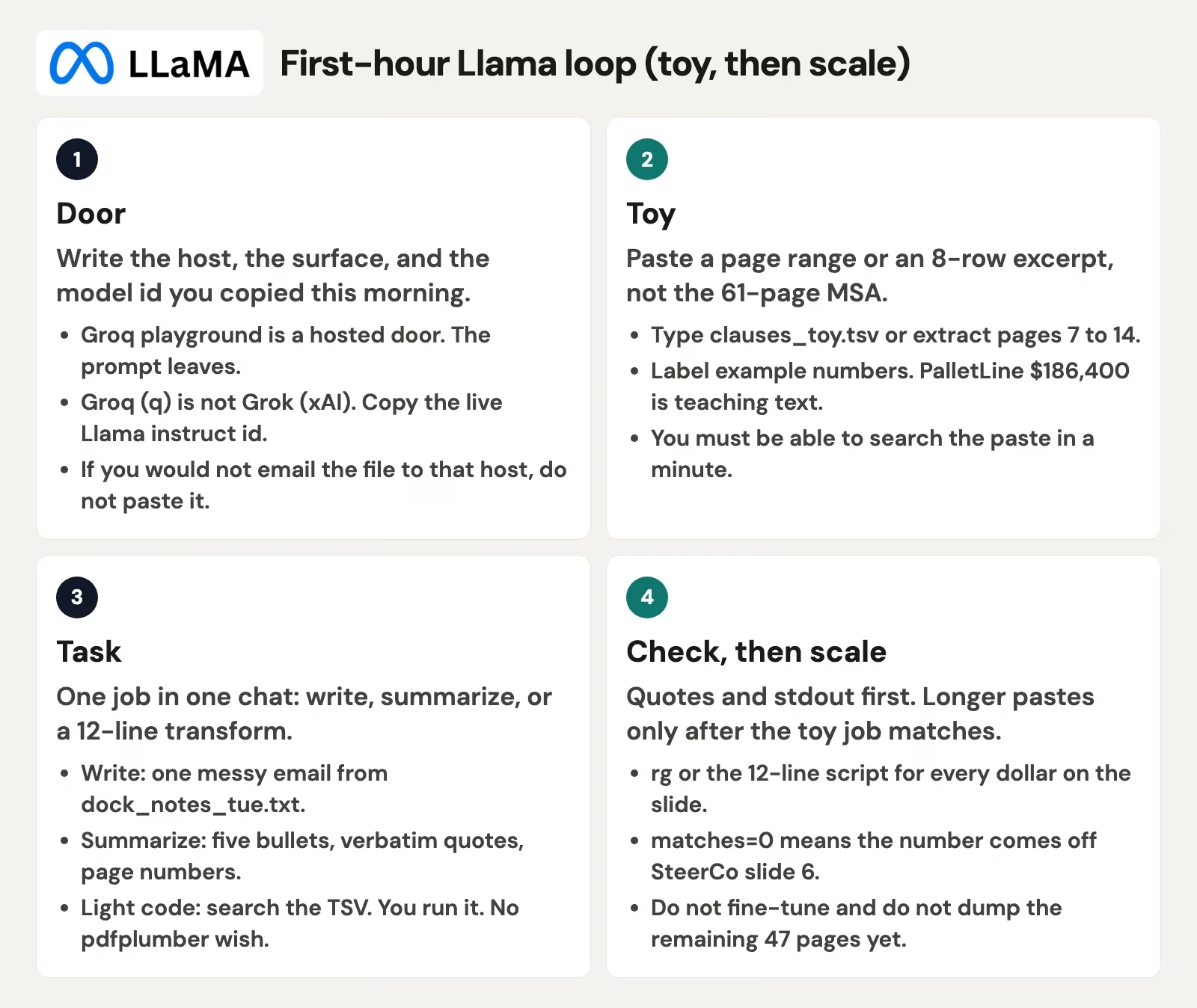
You had one hour before the meeting, and this loop fits neatly inside that hour: path, toy, task, check, then scale, in that exact order, with scale always coming last. Feeding an entire 61-page PDF in first leaves you with nothing left to check except unfounded confidence.
- Name the path. Your host’s playground (OpenRouter in this example), model id copied fresh from the picker (Scout here, or whatever your live Llama instruct tag currently is), and confirm the prompt leaves the machine. Write it on a sticky note on the laptop bezel.
- Make the toy. Type the eight clauses yourself, or extract pages 7 to 14 into a plain text file. Leave the other 47 pages closed entirely. Label the file “example” if you rebuilt the numbers for practice, the way this post does.
- Give it one task. Tuesday’s email from
dock_notes_tue.txt, or a five-bullet summary of pages 7 to 14 with quotes attached, or the 12-line search script. One chat per task, always. Do not stack a new task onto the already-poisoned $1.2 million thread. - Check everything. Search the excerpt for every quote and every dollar amount you plan to use. Run the Python script and read the output. If
matches=0comes back for a number that is sitting on the slide, that number comes off the slide immediately. Edit the email against the original six notes. Send only what you would send if Llama had been a new colleague who genuinely had not read the contract. - Scale only after a real match. Only once the toy summary correctly quoted page 9, the email kept the $840 figure intact, and the script printed zero for $1.2 million, you may paste a second page range in. You still do not paste all 61 pages into the process your team relies on every day. You still do not train a custom model on it. Those steps come later, in a different post, and they deserve a different hour of focus.
Leave whole-PDF risk review, auto-filed credits, and “what should we pay this year” for later. Collecting a stack of compressed model files is a project for a different week. Standing up Scout on two graphics cards so the contract never technically leaves the building, before you have even quote-checked eight rows by hand, is how a first useful hour quietly turns into an entire wasted quarter.
Set aside 45 minutes this week. Open your host’s playground, such as OpenRouter’s, or the local runner you already named earlier in this series. Copy the model id into the checklist above. Build an eight-row TSV from a public sample contract, or from this post’s toy table. Run the 12-line search for a number you already know is absent. Then ask for one email, or one page-bounded summary. Put the quotes side by side with the real PDF. Once that loop feels dull and routine, you are ready for the next post in this series, on fine-tunes and community variants without collecting a whole model zoo. You do not need a zoo to write a dock email.
Series notes
This is Part 5 of Learn Llama (LL5). The earlier post covered hosted versus self-host; the next one covers fine-tunes without the zoo.
Sources
Names, context windows, and deprecation dates move over time. Re-open these the week you actually work. PalletLine figures in this article are labeled example text.
- GroqCloud Playground (hosted chat environment; copy the model id from the picker, not from memory)
- GroqDocs: Models (live catalog checked September 2026; Llama ids change)
- GroqDocs: Llama 4 Scout (id
meta-llama/llama-4-scout-17b-16e-instruct; Groq card listed 128K context, 8,192 max output, 20 MB max file, up to 5 images while documented) - GroqDocs: Model deprecation (Groq shut down Llama 4 Scout on July 17, 2026; checked October 5, 2026)
- GroqDocs: Prompting (host-side prompt notes; still check quotes yourself)
- Meta AI: The Llama 4 herd (April 2025: Scout and Maverick as open weights; Meta’s context claims differ from host cards)
- llama.com (official Llama family hub; forwards to Meta’s developer downloads)
- Hugging Face: meta-llama (weight repos if your named path is a local runner)
- Hosted Llama chat vs self-host (path choice before this hour)
- Hosted open models vs download to your machine (prompt-leaves-the-machine test)
Keep going
Same lessons in your feed
Short diagrams, hooks, and weekly tutorials on Substack, Instagram, X, and Facebook.



