

Pick an AI tool by the thing you want at the end: a one-paragraph rewrite needs a chat window, not an agent that opens 62 files. ChatGPT, Claude, Gemini, and Grok each sell four different kinds of tool under one logo: a chat window, a general agent that clicks around the web, a work mode that reads a folder, and a coding agent that edits software.
Say your manager messages you to tighten one paragraph of partner_brief_v3.docx before a meeting. Paragraph 2 runs 87 words and still says the team “remains committed to the relationship.” The file sits in a folder called Partners/Q3_pack. It would take about eight minutes in a chat window. Instead you turn on the desktop work mode, point it at the folder, and watch it start planning to tidy up 62 files while paragraph 2 stays exactly as it was.
Update, October 2, 2026: On September 16, 2026, Anthropic merged Cowork into the main Claude app, rolling out to Pro and Max first and to other plans later. What Cowork could do, such as working through a folder of files, is now available from any Claude conversation, so you may no longer see a separate Cowork tab. The advice below still applies to that kind of task.
Four kinds of tool that get sold as AI
When you sign into one brand, you get more than a text box. The marketing still says “use our AI,” but under the login you get four separate jobs with four sets of permissions. The underlying model can be the same while the damage a mistake can do is very different. A chat only talks. A general agent clicks and browses. Work and Cowork read and change a folder of files. A coding agent works inside a code repository (a project folder tracked by git, which records every change). The logo does not tell you which one you opened.
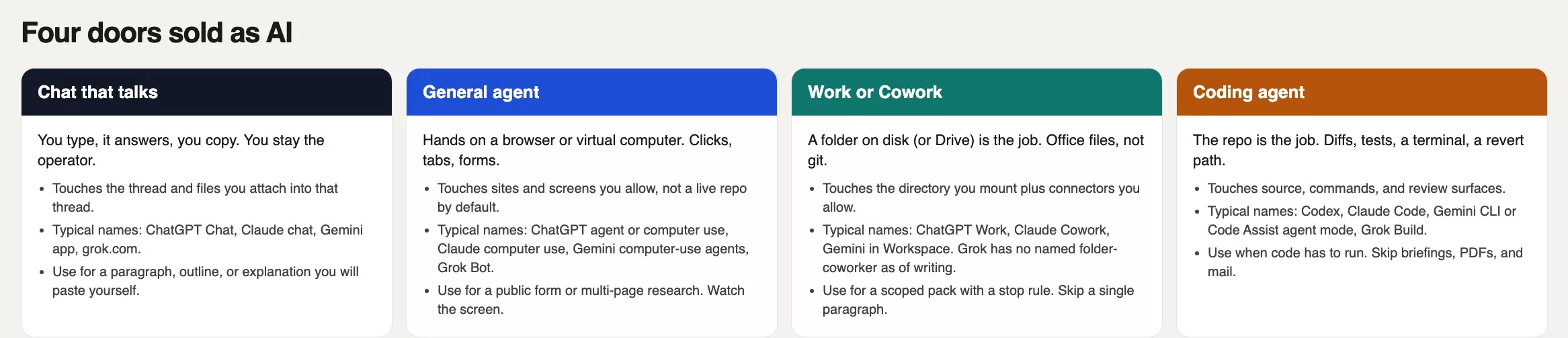
Rule of thumb: Name the result first, whether that is a paragraph, a filled form, a folder pack, or a passing test. Then pick the tool. If you pick the tool first, you get an 11-minute tidy-up you never asked for.
Vendors keep renaming these products. The table below is a field card for August 2026, not a purchase order, so if your screen disagrees with a cell, believe your screen. One vendor can appear in three or four rows, and mixing those names in a team meeting is how three people leave with three different plans.
| Kind of tool | Typical names in August 2026 | What they touch | Use / skip |
|---|---|---|---|
| Chat that talks | ChatGPT Chat; Claude chat (claude.ai / apps); Gemini app; grok.com and Grok in X | The thread, plus files you attach into that thread | Use for a paragraph, outline, or explanation you will paste. Skip a folder, a click path, or code that must run. |
| General agent | ChatGPT agent / computer-use features; Claude computer use (preview in Cowork and Code); Gemini computer-use style agents; Grok Bot and other cloud-computer agents (labels move) | A browser, forms, a virtual desktop or (with permission) your screen | Use for multi-page research or a public form you already chose. Skip one paragraph, a private HR folder, or a git repo. |
| Work / Cowork | ChatGPT Work (desktop); Claude Cowork (paid; desktop, web/mobile rolling); Gemini mostly via Workspace (Drive, Docs, Gmail, Sheets); Grok has no Cowork-style named folder product in August 2026 | A folder you mount, plus connectors you allow | Use for a scoped office pack with a stop rule. Skip it for 87 words, and skip it for “My Documents.” |
| Coding agent | ChatGPT Codex; Claude Code; Gemini CLI / Code Assist agent mode (confirm current consumer path); Grok Build | A repo, terminal, diffs, tests, sometimes a cloud sandbox | Use when the finish line is code you can review and revert. Skip briefings, PDFs, and mail. |
Chat: you stay in charge
Chat is the tool from the earlier post on writing and questions. You stay in charge, because the model sees only the thread plus the files you attach to it. It does not get a live folder, it does not click a checkout button, and it does not run git commit, the command that saves a change in a repo.
Use chat when the finish line is words you will paste, send, or read, such as a tighter paragraph, a subject line, or an outline you will type into a slide yourself. Size limits are annoying, but they also act as a speed bump. Skip chat when the work is “do this across 62 files,” “click through that vendor portal,” or “edit the service and run tests.” You can fake those jobs by pasting things in, but then you become the glue between the tool and your files, which is fine once and a bad plan for a weekly report. There is another failure: people paste a drive full of PDFs into a thread and then wonder why the model missed the spreadsheet. The spreadsheet never left the folder.
A general agent that clicks and browses
A general agent has hands on a computer, usually a sandboxed one that belongs to the vendor and sometimes yours. It can open tabs, fill in fields, download a file, and come back with a packed answer. ChatGPT ships this as agent or computer-use features. Claude ships computer use as a research preview inside Cowork and Claude Code, using connectors first and your screen only as a last resort, with a permission prompt. Gemini and Grok have computer-use or cloud-computer agents under labels that still change, so confirm the live button before you rely on one.
Use a general agent when the result lives out on the network. That might be a public form you already decided to submit, a comparison that needs ten product pages, or a demo you want clicked through like a real user. Watch the screen, approve any login yourself, and never put a password in the prompt. If the site is your bank, payroll, or an admin console with a delete button, stay in the chair and do the clicks yourself. Skip this tool for the one-paragraph rewrite, because a browsing agent will wander. Skip it for a code repo, and skip it for a private HR folder.
Work and Cowork read a folder
Work and Cowork are the office-file agents. ChatGPT Work and Claude Cowork both want a whole folder, not a highlighted paragraph. As of October 2, 2026, OpenAI’s help center says Work can open a local folder in the ChatGPT desktop app on eligible paid plans, and Anthropic’s help center says Cowork uses up your usage limit faster than chat. That is the trap in the story above. Gemini does this job less through one button and more through Workspace, meaning Docs, Drive, Gmail, and Sheets. Grok does not ship a named folder coworker in the Cowork or Work sense, and file jobs on grok.com stay closer to chat uploads. Check the vendor pages before you plan around any of these.
Use Work or Cowork when the result is a set of office files on disk or in Drive and you can name the folder. Good examples are a weekly readout built from three spreadsheets, or a first pass through a contract folder against your standard playbook. Mount one folder, and write a stop rule: no deletes, no email sends, and no renaming the live pack until you say so. The caution is the same as in the post on files and office work, only louder, because the agent can act while you sip your coffee. Skip this tool for a single paragraph, since you can copy the text into chat and paste the rewrite back. Skip it for a software repo, and skip it for “My Documents.” A 62-file pack is a scope, and it was the wrong one for 87 words.
A coding agent works in a repo
A coding agent’s job is software that runs. Codex, Claude Code, Gemini CLI, Google’s command-line coding tool (plus Code Assist agent mode, so confirm the current consumer path), and Grok Build all read the project files, edit them, run commands, and show you diffs, which are line-by-line lists of what changed. That is a different agreement from “make this briefing sound shorter.” The coding chooser is the right first map if you have never pointed an agent at git.
Use a coding agent when the result is code in a repo you can open in an editor, such as a failing test, a small change to a web service, or a cleanup you will review as a diff. Stay in plan mode, where the agent describes its steps before acting, until those steps look like work you would merge. Skip it for the briefing, and skip it for a one-line email. Skip it too if you do not have version control, because a coding agent without git is a confident intern with a marker and your only copy. Work mode can touch office files, but a coding agent should only touch source code you can revert.
Pick by the result you want

Start from the finish line. If you will paste text into Slack, that is chat. If a website has to be clicked or a form filled, that is a general agent, and you watch it work. If a deck, sheet, or folder pack has to exist on disk, that is Work or Cowork, and you mount one directory. If a test has to pass, that is a coding agent. Paste the picker below into the team note before anyone hits the shiny control.
# Artifact picker (paste into a team note)
# Names move. Confirm the live button the week you run this.

Wanted when I am done:
  [ ] A  words I will paste or send (paragraph, email, outline)
  [ ] B  a public site clicked, or a form filled
  [ ] C  office files on disk (deck, sheet, folder pack)
  [ ] D  code that runs in a repo (diff + tests)

If A: stay in Chat. Do not enable Work, Cowork, Agent, or Code.
If B: general agent / computer use. List allowed URLs. Watch the screen.
If C: Work or Cowork. Mount ONE folder. Write a stop rule.
If D: Codex, Claude Code, Gemini CLI, or Grok Build. Plan, then diffs.

Folder path (C only):
File count before start:
Stop if it: renames / deletes / emails / pushes  (circle one or more)
Owner watching the run:
Timebox minutes:
This checklist forces a count before the agent gets a path. With it, you would have written “A,” left the folder picker closed, and finished the rewrite before the meeting. A file count of 62 next to a job measured in 87 words is a mismatch you can see without a product diagram.
A worked example: 87 words, 62 files
The result you wanted was paragraph 2, but the thing you handed over was the whole pack. Everything after that is Work doing what Work is built for, which was not the job.
| Fact | What you needed | What Work started doing |
|---|---|---|
| Job in Slack | Tighten paragraph 2 before the meeting | A multi-file “Q3 pack” project |
| File in play | partner_brief_v3.docx, 87 words in para 2 | All 62 files in Partners/Q3_pack |
| Other stuff in the folder | Ignored, correctly, by a human | 14 PDFs, 9 decks, 1,184-row CSV, leftover screenshots |
| Minutes in | A rewrite, maybe 8 minutes in chat | 11 minutes of plan + 7 files staged to tidy |
| Paragraph 2 | Still “remains committed to the relationship” | Unchanged |
If you already hit run, stop the task and check the modified times. If seven files moved, put them back before you rewrite anything. Then do the job in chat: paste paragraph 2, paste the VP (vice president)’s constraint (“tighter, keep the date and the owner”), and paste the rewrite into the document by hand. If you later want the pack cleaned up, treat that as a second task for Work or Cowork, with a stop rule and a copy of the folder. Do not combine tone and file sorting in one agent run, because tone wants a small window and sorting wants a map of 62 names.
A fair pack job looks like this. Duplicate Q3_pack to Q3_pack_scratch, mount only the scratch copy, and tell the agent to propose a folder tree, not to delete or rename originals, and to write a plan first. Then approve the plan. That is a quiet Tuesday afternoon task, not something to start in a hurry before a meeting. An earlier post in this series covers when to watch, when to approve, and when to walk away, and this story needed watching plus a smaller tool.
Common mistakes
- Turning on Work or Cowork because the tooltip said it gets more done, when the result you want is one paragraph.
- Pointing a folder agent at
Documentsor a shared drive root. 62 files was already wide, and 6,200 is how you spend a day undoing names. - Asking a coding agent to “fix the briefing.” It will hunt for source code, and you will get a markdown (simple symbols that add headings and bold text) file in a repo you did not mean to open.
- Letting a general agent click a login, a pay wall, or an admin toggle while you refill your coffee.
- Treating Chat, Work, Agent, and Codex as one ChatGPT, or Chat, Cowork, and Claude Code as one Claude, in a team meeting.
- Skipping the file count. If you cannot say how many files are in the mounted folder, you do not have a scope.
Quick recap
- Four kinds of tool: chat, general agent, work or Cowork, and coding agent. They share a logo but can do very different amounts of damage.
- Pick by the result. 87 words stay in chat, a folder pack needs a mounted folder and a stop rule, and code needs a repo.
- In August 2026 the names were ChatGPT Chat, agent, Work, and Codex; Claude chat, Cowork, and Code; the Gemini app plus Workspace and a coding CLI; and Grok chat plus Grok Build. Re-check the labels.
- If Work is already renaming 62 files for a paragraph job, stop, restore the files, then paste the paragraph into chat.
How to practice this week
Take one real task, fill in the picker, and run only the matching tool. If you already have ChatGPT Work or Claude Cowork, try a scratch folder of 8 files, not 62, and a stop rule with no deletes. If you write code, open the repo in Codex or Claude Code for a test you can watch fail and then pass, and leave the briefing in chat. The next post is about watching, approving, or walking away. The series home is AI agents for everyone. If you are still unsure which vendor to start with, read Which AI product should I use? For accounts and free versus paid plans, see AI setup from zero. Broader paths are in Learn and Practical AI.
Series notes
This is Part 2 of AI agents for everyone. Previous: What an AI agent is. Next: Autonomy levels.
Sources
- OpenAI: ChatGPT Work announcement (Work as an office agent; Codex remains the coding agent)
- OpenAI Help Center (re-check Chat vs agent features vs Work vs Codex the week you write policy)
- OpenAI: ChatGPT for Mac (desktop surface where Work and Codex show up in August 2026)
- Anthropic: Claude Cowork (folder agent for knowledge work; paid plans; burns limits faster than chat)
- Anthropic Help: Getting started with Cowork
- Anthropic: Claude Code (repo, terminal, IDE)
- Anthropic: Getting started with Claude (chat surface)
- Google Gemini app and Workspace Gemini (office files often live in Drive / Docs / Gmail)
- Google: Gemini Code Assist agent mode (coding agent in IDEs; consumer paths have been in flux)
- Grok and xAI: Grok Build (chat vs terminal coding agent)
- AMS: AI agents for everyone
- AMS: AI for coding and building software
Keep going
Same lessons in your feed
Short diagrams, hooks, and weekly tutorials on Substack, Instagram, X, and Facebook.



