
Legal and Security teams are not the department of “no.” They are the people who get called when a vendor file, a loose spreadsheet, or a clever join turns into a real problem. Analysts and stewards sit right in the middle. This post gives you three tools. One is a plain sensitivity ladder. Another is a way to ask only for the access you need. The last is a calm intake card, so vendor requests stop arriving as panicked chat messages.
Say a “quick” vendor enrichment file lands in a shared Drive folder with emails, phone numbers, and a free-text notes column. Someone joins it to the customer table for a dashboard (a screen of charts that updates on its own) (a screen of charts that updates on its own), and Security finds out from a forwarded message and not from a request. Filling in an intake card would have taken four minutes.
You can move data faster than a policy meeting can, which is both a superpower and a hazard. The goal here is calm teamwork, without fear and without hiding the spreadsheet under the desk. You need shared language, a sensitivity ladder, and an intake card you can fill in before anyone’s heart rate climbs.
Personal data without the jargon fog
Different laws use different phrases, such as personal data, personal information, and personally identifiable information (PII). For everyday steward work, use this working definition.
Personal data is information that relates to an identified or identifiable person. If you can single someone out, either alone or by combining fields you already hold, treat it as personal until Legal says otherwise for a specific use.
That includes obvious fields such as name, email, phone number, and government ID. It also includes less obvious ones, such as device IDs, precise location, customer account numbers, and free-text tickets that mention people. It can cover employees, contractors, and prospects, and not only the customers in your CRM (the tool your sales team uses to track customers).
You do not need to memorize every law. You need to notice when a query (a request that asks a database for data) (a request that asks a database for data), an export, or a vendor request pulls people into the picture, and then slow down enough to use the right path.
Rule of thumb: If a reasonable person in your company could work out who a human is from the file, do not treat it as “just analytics data.”
The sensitivity ladder
Not every personal field carries the same risk if it leaks. A ladder helps you choose the form and the access without pretending that all columns are equal.
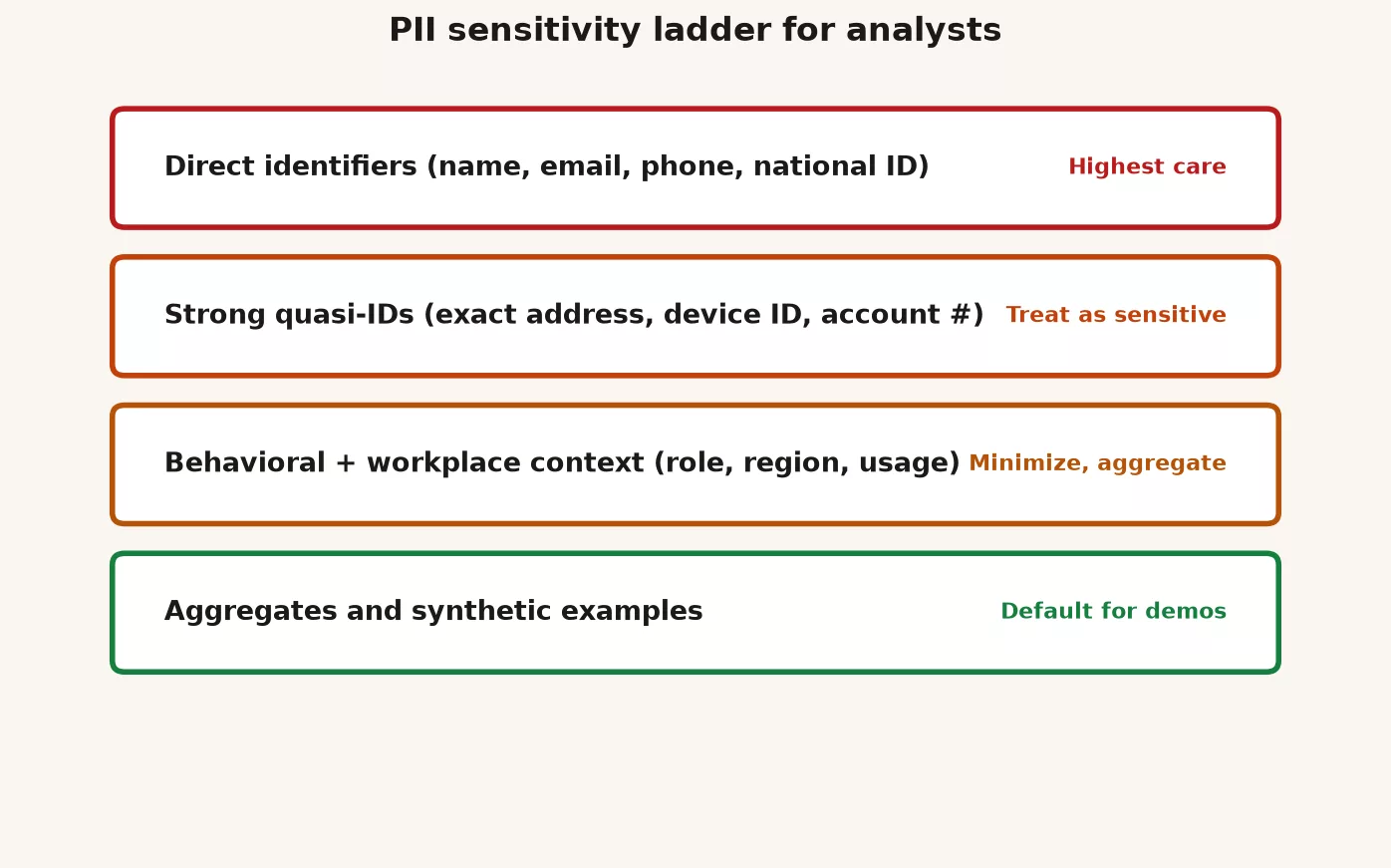
| Rung | Examples | Default steward posture |
|---|---|---|
| 1. Direct identifiers | Legal name, email, phone, government id, full account login | Minimize; ticketed access; never in open Slack screenshots |
| 2. Strong account keys | Customer id that maps 1:1 to a person in CRM; employee id | Treat as personal; join carefully; avoid public exports |
| 3. Quasi-identifiers | Birth date + ZIP + gender; rare job title + small office; precise GPS | Dangerous in combination; aggregate or coarsen |
| 4. Sensitive categories | Health, finance account details, auth credentials, children’s data, precise location history | Escalate early; special handling; often separate stores |
| 5. Operational events without easy id | Product usage counts by plan tier; error rates by version | Usually safer; still check for tiny segments |
| 6. Aggregates with safe cell sizes | Monthly revenue by region; ticket volume by theme | Preferred for sharing and AI pastes when purpose allows |
Moving down the ladder toward summary numbers is how you answer most “can we share this?” questions without a fight. Moving up needs a purpose, access control, and often a quick look from Legal or Security. Clean rooms, which are controlled spaces where two parties can match data without swapping raw identifiers, exist for cases with several parties. See Data clean rooms for the concept.
Least privilege is kindness to future you
The earlier post on access covered ladders of permission. Here is the version Legal and Security care about. Least privilege means each person and each automated service gets the minimum access needed for a defined job and for a defined time. It is not distrust of analysts. It limits how much can go wrong when a saved login key leaks, a laptop goes missing, or a vendor is given too much.
These habits make Security nod instead of flinch:
- Prefer role-based access over shared “analytics” superuser accounts.
- Use time-limited grants for investigations, such as “two weeks, then review.”.
- Keep write access to production separate from read-only analytics roles, so a mistaken query can read data but never change it.
- Keep personal credentials out of notebooks and out of dashboard connection strings that get checked into git, because anyone who can see the project’s history can copy them.
- Log who exported what when the platform allows it.
When you ask for broader access, bring the purpose and an end date. A request such as “I need prod for a vague project” is hard to approve. A request such as “I need read-only on fct_orders for 10 business days to validate the refund metric with Finance” is easy to reason about.
How to talk to Legal and Security without panic
These teams live on incomplete escalations, such as “Is this legal?” with no file, no purpose, and no audience. You reduce friction by arriving with a packet.
What to bring
- Purpose: one sentence on the decision or obligation.
- Data classes: the rungs of the ladder, and not “some customer stuff.”.
- Systems: the source, the warehouse, the dashboards, the vendor tools, and who already has copies.
- Audience: internal roles, outside parties, and regions if you know them.
- Form: row-level versus summary, and a list of identifiable fields.
- Clock: how long you need the data, and when it will be deleted or returned.
- Urgency: a real deadline versus a preference, and never a fake emergency.
What not to do
- Do not send a 2GB dump “for context” in the first email, because a small, specific request gets reviewed faster.
- Do not demand a same-hour legal memo for a curiosity query.
- Do not shop around until someone says yes, because asking several teams the same question erodes the trust that makes future approvals easier.
- Do not hide a vendor who already received data, because early honesty is cheaper.
Tone matters, because you are peers protecting the same company. “Help me scope this so we can say yes safely” works better than “Compliance is blocking growth.” Growth that ends in a breach is not growth.
Vendor and partner requests: the intake card
Vendors love to ask for “just a sample of prod.” Partners love to ask for “a full customer list to align accounts.” Use one card for every request that moves personal or sensitive data outside your normal controlled path.
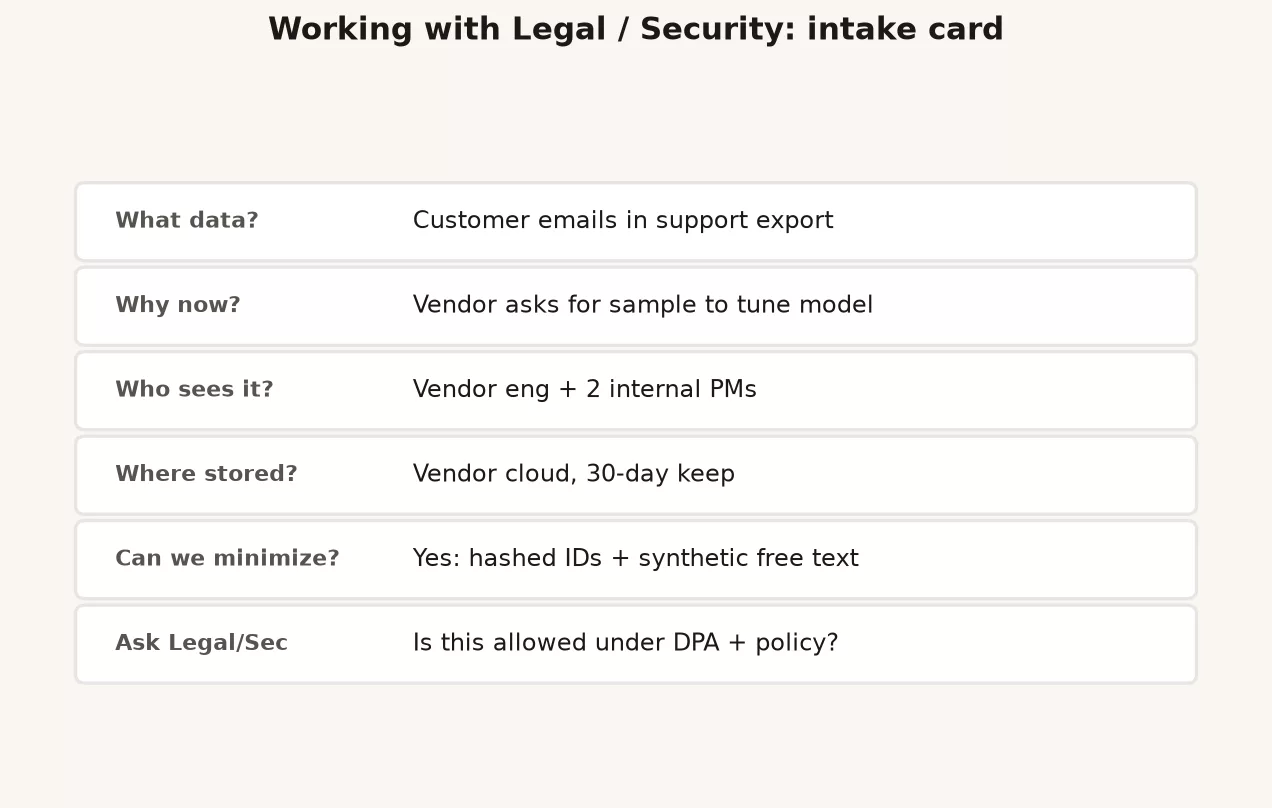
# Legal / Security intake card (vendor or partner data request)

request_id: REQ-2026-03-18-vendor-support-sample
date: 2026-03-18
requester: analytics.steward (analytics steward)
counterparty: Acme Support AI (vendor)
internal_sponsor: head of support

## Purpose (one sentence)
# Vendor will tune ticket routing model for our instance only.

## Data requested (be specific)
# Last 90 days of support tickets: ticket_id, product_area, theme_tag,
# free_text_body, customer_email, customer_phone

## Proposed minimization
# Drop email/phone; hash ticket_id; redact phone-like patterns in free text;
# exclude tickets tagged legal or HR; sample 5% stratified by product_area

## Lawful / policy basis (if known)
# TBD with Legal; existing DPA with vendor: [link or "none on file"]

## Destination and controls
# Vendor VPC region: [ ]; encryption in transit/at rest: [ ];
# subprocessors: [ ]; retention at vendor: 30 days then delete;
# training on foundation models: vendor says no (get in writing)

## Our clock
# Provide sample by 2026-03-25; vendor deletes by 2026-04-25; confirm in writing

## Alternatives considered
# Aggregate theme counts only; synthetic tickets; vendor sandbox with fake data

## Risk notes
# Free text may contain names, account numbers, health mentions

## Approvals needed
# [ ] Security architecture
# [ ] Privacy / Legal
# [ ] Data owner (Support)
# [ ] Procurement (if contract change)

## Decision
# pending | approved with conditions | rejected
# conditions:
# decision_by:
# date:
Filled-in cards train everyone. Empty chat messages such as “can we send them data?” train chaos.
Redaction checklist before you share
Use this before exports, screenshots, notebook shares, conference demos, and pastes into an AI chat. A later series goes deeper on AI privacy, but the checklist starts now.
| Check | Question | Fail action |
|---|---|---|
| Purpose | Does this share need row-level personal fields? | Switch to aggregates |
| Columns | Is every identifier required? | Drop or hash |
| Free text | Could bodies hold secrets or names? | Sample + redact or exclude |
| Tiny cells | Any group smaller than your policy minimum? | Roll up or suppress |
| Audience | Who receives the file, and can they forward it? | Watermark; link not attachment; contract path |
| Clock | When is the file deleted on both sides? | Write the date before send |
| Secrets | API keys, passwords, connection strings? | Never share; rotate if exposed |
| Screenshot crop | Does the image show sidebars, emails, or ids? | Recrop; use dummy data for demos |
Here is a SQL (the standard language for asking a database for data) sketch of a minimized support extract, as an example only:
-- Example minimized extract: no direct contact fields
SELECT
  MD5(CAST(ticket_id AS VARCHAR) || :pepper) AS ticket_token,
  product_area,
  theme_tag,
  DATE_TRUNC('week', created_at) AS week_start,
  CASE
    WHEN LENGTH(body) < 200 THEN 'short'
    WHEN LENGTH(body) < 1000 THEN 'medium'
    ELSE 'long'
  END AS body_len_bucket
  -- intentionally no email, phone, or raw body
FROM support.tickets
WHERE created_at >= CURRENT_DATE - INTERVAL '90' DAY
  AND COALESCE(sensitivity_tag, '') NOT IN ('legal', 'hr', 'security')
ORDER BY random()
LIMIT 5000;
If the vendor truly needs free text, that is a design problem. Solve it with Security and Legal. Do not just add the column back. Bring the intake card.
A worked example: the “quick” vendor sample
Support wants a vendor called Acme Support AI to improve ticket routing. The vendor asks for “a few months of real tickets with customer fields so quality is realistic.” You fill in the intake card. Security notes that the vendor’s data processing agreement allows processing for support features but forbids using customer content to train large foundation models. Legal wants free text redacted for payment card patterns and a 30-day maximum for the vendor to keep the data.
The outcome comes with these conditions:
- No email, phone, or external account numbers.
- Ticket IDs are replaced with scrambled stand-in codes, using a secret value (a pepper) that is stored only in the company’s secrets manager.
- The sample is 5% of tickets, chosen to reflect each product area, with legal and HR tags excluded.
- The vendor confirms in writing that it will not train foundation models on the data. It also confirms it will delete the data by day 30 and will attach a list of its subprocessors.
- You put a deletion confirmation check on your calendar for day 31.
Nobody panicked, and nobody blocked the project forever. The project simply got a safe shape. That is the job.
When to escalate immediately
Skip the leisurely intake form and call Security or Legal right away if you see any of the following:
- Data sent to the wrong customer, tenant, or personal email address.
- Credentials, keys, or passwords exposed.
- Ransomware, unexplained admin access, or requests to “please disable logging.”.
- Requests to destroy evidence or hide an issue from counsel.
- Children’s data, health data, or financial account data moving without a known approved path.
The incident habits from the earlier post still apply: contain the problem, log what happened, and communicate. Privacy and security incidents may come with legal deadlines, so your job is to give an early signal and not to be a lone hero.
Mistakes that come up again and again
| Mistake | Why it hurts | Better habit |
|---|---|---|
| Treating Security as the enemy | You get slower answers and less trust | Shared packet; shared purpose |
| “It’s hashed so it’s anonymous” | Reversible or linkable hashes still identify | Precise terms; ask privacy |
| Screenshotting prod with real emails | Side channels leak for years in slides | Dummy data for demos |
| Vendor “temporary” access that never ends | Standing privilege | Clock + confirmation |
| Pasting customer rows into public AI tools | You may create a new processor without a contract | Policy first; synthetic samples |
| Waiting until the board deck to involve Legal | Rushed yes/no under politics | Early lightweight intake |
How to practice this week
- Label three tables you use with the sensitivity level of their most sensitive column, so the right handling rule is obvious before anyone asks.
- Draft the intake card template in your team wiki, and fill one in from a past vendor request as a dry run.
- Replace one real-data demo screenshot with made-up or summary data.
- Book a 20-minute friendly chat with your Security or privacy contact and ask, “How do you want analysts to raise data-sharing questions?” Write down their preferred channel.
- Review the access on your own account, and drop anything you have not used in 90 days if policy allows.
Quick recap
- Personal data is about identifiable people, and not only about columns named
email. - Use a sensitivity ladder to choose the form and the access.
- Least privilege and written clocks make working with Security easier.
- Bring a packet with the purpose, fields, audience, form, clock, and alternatives.
- Vendor requests get an intake card and written confirmations, and never a Drive dump.
- Escalate early for true security and privacy incidents.
The whole stewardship series in one view
This series is the practice layer of governance, made of weekly habits for people who own a domain’s data without a fancy title. Program and architecture ideas live in Key Terms and related series. The table below shows the arc in one place.
| Part | Focus | Monday habit |
|---|---|---|
| H1 | Steward vs owner vs custodian (RACI in human words) | Name who decides, who does, who is consulted, who is informed for your top datasets |
| H2 | Catalogs and “where is the truth?” | One short card per critical table: purpose, grain, owner, consumers |
| H3 | Access, least privilege, “just give me prod” | Time-bound grants; prefer read-only; document why prod was needed |
| H4 | Handling a data incident (wrong number, first 24 hours) | Contain, log, check board, communicate on a clock |
| H5 | Retention, deletion, “we might need it someday” | Purpose + clock + exit; hot/warm/cold; five-question card |
| H6 | Legal/Security without panic; PII ladder | Intake card; minimize; escalate real incidents early |
If you only remember five lines from the whole series, make them these:
- Clear roles beat heroic chat threads.
- One named source of truth beats three “official” dashboards.
- Access is a risk control and not a status symbol.
- Wrong numbers that people trust deserve incident discipline.
- Keep less, share less sensitive forms, and partner early with Legal and Security, because data you never kept cannot leak and early partners say yes faster.
Where to go next
The next series on Analytics Made Simple is Practical AI for analytics people. It covers what models can and cannot do for analysis, how the amount of text, counted in tokens (small chunks of words), drives cost, and prompt patterns for data work. It also covers evals, retrieval (looking up documents to use in an answer) in plain English, agents and their controls, privacy when pasting into chat tools, AI for documentation, and a personal AI checklist. Your stewardship habits carry over directly. That includes minimizing data, using an intake process, and never pasting rungs 1 to 4 of the sensitivity ladder into tools without an approved path.
Keep building the craft underneath AI:
- Learn / Tutorials for the full path map.
- Data quality for checks that prevent quiet disasters.
- How data actually moves for freshness and observability.
- Metrics that matter for definitions worth defending.
- Data governance, master data management, and clean rooms for program and architecture language.
You do not need a chief data officer title to practice stewardship. You need named owners, honest catalogs, careful access, calm incidents, deliberate retention, and adults in the room when personal data moves. That is enough to make Monday better, and enough to make the next AI tool safer to use.
Your next step
Pick one dataset you plan to share or request this month and fill in the intake card from this series before you email anyone. Sending Legal or Security a complete card first usually turns a week of back-and-forth into one short review.
Series notes
This is Part 6 of Data stewardship at work, and the close of the series. The earlier posts covered roles, truth maps, access, incidents, and retention.
Sources
Research and further reading used for this article. The list draws on the US National Institute of Standards and Technology (NIST), the International Association of Privacy Professionals (IAPP), and the EU’s General Data Protection Regulation (GDPR).
- NIST Privacy Framework (privacy risk management outcomes organizations can map to roles and processes).
- NIST Privacy Framework 1.0 PDF (core structure and functions).
- IAPP: Glossary of privacy terms (shared definitions for personal data, PII-related terms, anonymization, pseudonymization).
- EUR-Lex: GDPR official text (personal data definition and principles; for counsel-led compliance, not self-diagnosis).
- NIST SP 800-53 (access control and least privilege control families used widely in security programs).
- NIST Cybersecurity Framework (identify, protect, detect, respond, recover language that pairs with privacy work).
- NIST: De-identification resources (limits of naive masking).
- Analytics Made Simple: Data governance
- Analytics Made Simple: Learn / Tutorials
Keep going
Same lessons in your feed
Short diagrams, hooks, and weekly tutorials on Substack, Instagram, X, and Facebook.



