
When you merge duplicate customer records, keep a written map of which records you combined and why, so you never lose the history behind them. Removing duplicates sounds like one button, but done carelessly it works like a paper shredder. Done well, it combines false twins while keeping the trail you may need later for audits, disputes, and learning why the twins appeared.
Say one real customer bought from you twice. They now appear as two email addresses and three records in your CRM (customer relationship management system, where sales keeps customer records), so they show up as five “new” customers depending on which export you open. A coworker says “just remove the duplicates.” Do it carelessly and you delete the only record that explained a refund dispute, merge two different people who share a last name, or make last quarter’s numbers impossible to reproduce.
This is the third post in the data quality series for people who ship numbers. The first post covered uniqueness as a quality dimension, and the second showed how to spot duplicate rates in a profile. Now we talk about keys, soft deletes, lineage (the trail that shows where a record came from and what happened to it), and validating a merge before you bless it.
First, decide whether these are duplicates or history
Not every repeated value is a bug. A repeated customer_id on an orders table is normal, since one customer can place many orders. Repeated full order rows might be a load bug. Two CRM contacts with the same email might be the same person, or they might share an inbox for a whole team.
Write down what one row should mean in a single sentence: “This table should have one row per ___.” Analysts call that the grain of the table. If you cannot finish the sentence, you are not ready to merge anything, and that sentence is more valuable than any fuzzy matching library (a package of ready-made code).
This is the same discipline you practice when modeling tables after spreadsheets, which the series on moving from spreadsheets to real data covers, and when joining carefully in the SQL (the standard language for asking a database for data) tutorials.
Natural keys versus surrogate keys
A natural key is an identifier that exists in the business world, such as an email, a government ID, an International Standard Book Number (ISBN) printed on a book, or an invoice number issued by finance. A surrogate key is invented by a system for convenience, such as an auto-increment id, a universally unique identifier (UUID) from the app database, or a warehouse hash key.
Both matter, because they answer different questions.
| Key type | Example | Good for | Common failure |
|---|---|---|---|
| Natural | Email, SKU, or an order number from the ERP system | Matching across systems and debugging by hand | It changes (people change email), it gets shared, or it has typos |
| Surrogate | crm_contact_id, uuid | Stable joins inside one system, and history tables | Different surrogate keys for the same real person across tools |
When people say “dedupe customers,” they usually mean that several surrogate keys point to one real-world entity. Your job is not only to pick a winner. It is to record that many system IDs now point to one canonical person or company for analytics.
A few rules of thumb follow from that.
- Use surrogate keys for stable internal joins and for history that changes slowly.
- Use natural keys, after cleaning them up, to propose matches across systems.
- Never assume natural keys are perfect, because email can be shared, phone numbers get recycled, and names are not keys.
Soft deletes beat silent shredding
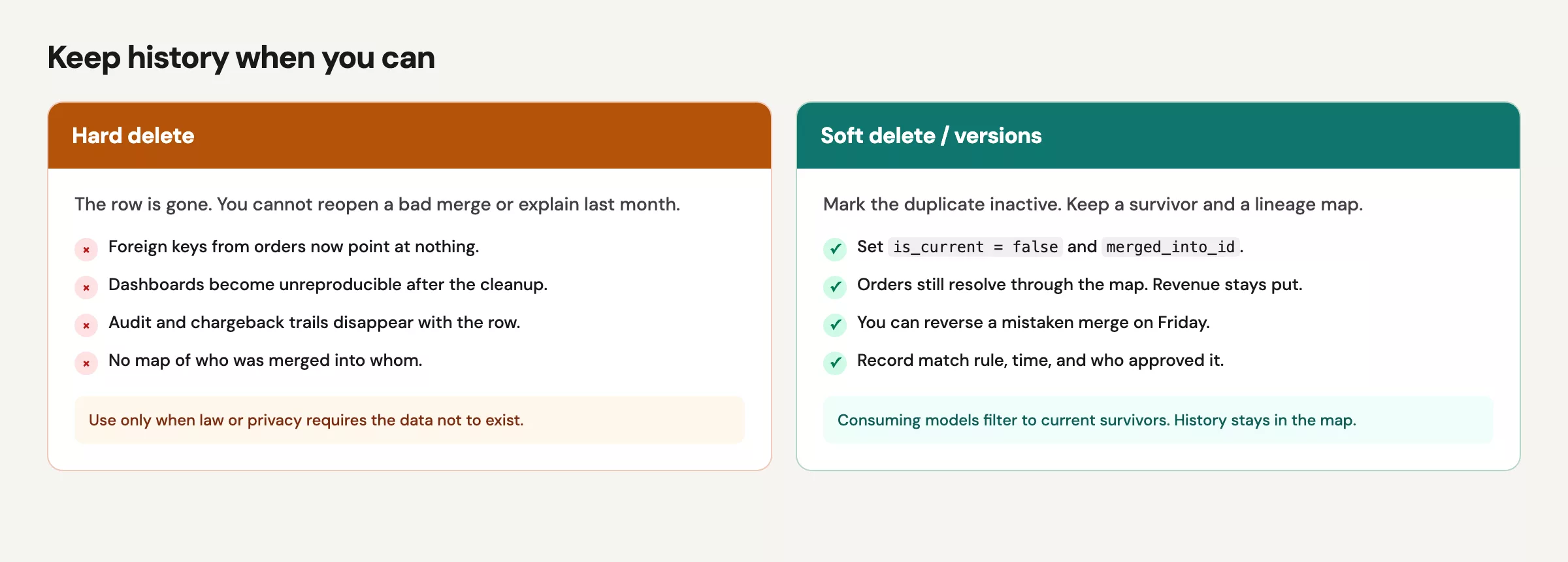
A hard delete removes the row. A soft delete keeps the row but marks it inactive with fields like is_current = false, merged_into_id = 123, or deleted_at = …. For operational apps, product rules may require hard deletes, for example for privacy requests or legal reasons. For analytics staging and dimension tables that you control, soft patterns usually win.
Here is why analysts should care.
- You can re-open a bad merge.
- You can explain last month’s dashboard (a screen of charts that tracks key numbers) when someone asks why a customer vanished.
- You keep the foreign keys on orders pointing at something that still exists.
- You leave a trail for audits, and for your future self on a busy Friday.
A soft delete is not an excuse to keep serving retired IDs in “active customers” metrics. Your downstream models should filter to current survivors, while the retired rows stay in a map or history table.
Lineage: the merge record you actually need
At a minimum, when two records become one for analytics, store these five things.
- survivor_id: the canonical key going forward
- merged_id: the key that should no longer be treated as separate
- match_rule: how you decided, such as exact email, manual review, fuzzy name and phone, or a vendor ID
- matched_at and matched_by: when it happened and who or what did it, whether a user or a job name
- confidence: how sure you are, if anything was fuzzy (exact versus probable)
A simple bridge table, which is just a small lookup table that links old IDs to new ones, beats a heroic one-off UPDATE that you cannot reverse.
-- Conceptual lineage table
-- customer_id_map
-- survivor_customer_id | source_customer_id | match_rule | confidence | valid_from | valid_to

SELECT
  survivor_customer_id,
  source_customer_id,
  match_rule,
  confidence,
  valid_from,
  valid_to
FROM customer_id_map
WHERE source_customer_id = 88421;
Here is what that query (a written request for data from a database) returns, shown as an image.
| survivor_customer_id | source_customer_id | reason |
|---|---|---|
| 12 | 12 | primary |
| 12 | 45 | same email |
| 33 | 33 | primary |
When an order still carries an old customer_id, you resolve it through the map.
SELECT
  o.order_id,
  o.amount,
  COALESCE(m.survivor_customer_id, o.customer_id) AS customer_id_resolved
FROM orders o
LEFT JOIN customer_id_map m
  ON o.customer_id = m.source_customer_id
 AND m.valid_to IS NULL;
Now uniqueness at the person level does not require rewriting every historical fact in place on day one. You can migrate carefully, and you can show your work.
A worked example: two CRM rows, one buyer
Suppose these three contacts exist.
| crm_id | full_name | created_at | lifetime_orders | |
|---|---|---|---|---|
| 101 | alex@example.com | Sample Customer | 2024-01-05 | 3 |
| 204 | alex@example.com | S. Customer | 2025-11-02 | 1 |
| 309 | alex+work@example.com | Sample Customer | 2025-12-01 | 2 |
And these are the orders.
| Key type | Example | Good for | Common failure |
|---|---|---|---|
| Natural | email, SKU, order number from ERP | Matching across systems; human debugging | Changes (people change email); shared values; typos |
| Surrogate | crm_contact_id, uuid | Stable joins inside one system; history tables | Different surrogates for the same real person across tools |
An exact email match says that contacts 101 and 204 are strong merge candidates. Contact 309 uses a plus-address variant, which may be the same person or may not. Do not automatically merge 309 without a rule you can defend.
Find exact-key collisions
SELECT
  lower(trim(email)) AS email_norm,
  COUNT(*) AS n_contacts,
  ARRAY_AGG(crm_id ORDER BY created_at) AS crm_ids
FROM crm_contacts
GROUP BY 1
HAVING COUNT(*) > 1;
Here is the output of that query.
| email_norm | n_contacts | crm_ids |
|---|---|---|
| ana@co.com | 3 | 12,45, 90 |
| lee@co.com | 1 | 33 |
Stage a survivor policy
A survivor policy is the rule for deciding which duplicate record wins. Here is a card that summarizes one.
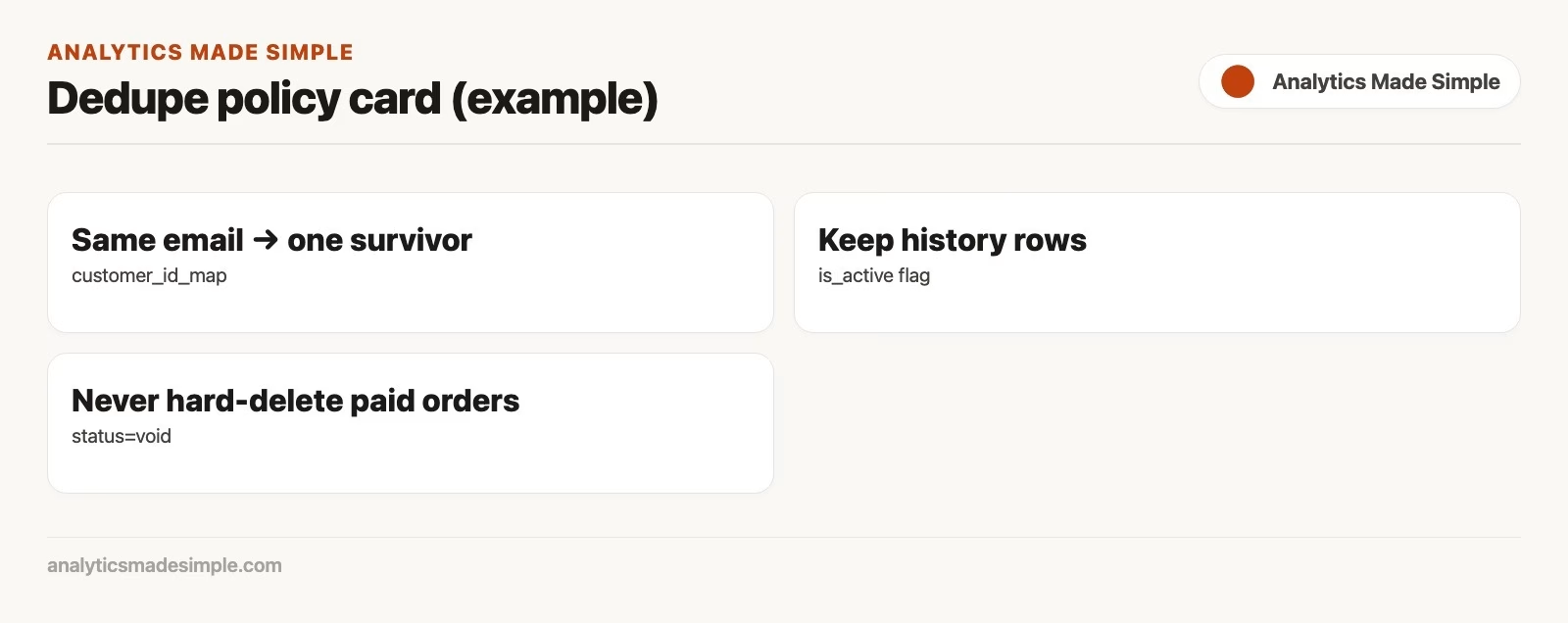
Policies should be explicit. Examples include earliest created wins, most complete profile wins, highest lifetime value wins, or manual review above a threshold. Document the policy in the map’s match_rule column.
WITH ranked AS (
  SELECT
    crm_id,
    lower(trim(email)) AS email_norm,
    created_at,
    ROW_NUMBER() OVER (
      PARTITION BY lower(trim(email))
      ORDER BY created_at ASC, crm_id ASC
    ) AS rn
  FROM crm_contacts
)
SELECT
  email_norm,
  MAX(crm_id) FILTER (WHERE rn = 1) AS survivor_crm_id,
  ARRAY_AGG(crm_id) FILTER (WHERE rn > 1) AS merge_candidates
FROM ranked
GROUP BY email_norm
HAVING COUNT(*) > 1;
In Python, the same idea works before you touch production-like tables.
import pandas as pd

contacts = pd.DataFrame(
    {
        "crm_id": [101, 204, 309],
        "email": ["alex@example.com", "alex@example.com", "alex+work@example.com"],
        "created_at": pd.to_datetime(["2024-01-05", "2025-11-02", "2025-12-01"]),
    }
)
contacts["email_norm"] = contacts["email"].str.lower().str.strip()

# Exact email candidates only
dup_emails = contacts.groupby("email_norm").filter(lambda g: len(g) > 1)
survivors = (
    contacts.sort_values(["email_norm", "created_at", "crm_id"])
    .groupby("email_norm", as_index=False)
    .first()[["email_norm", "crm_id"]]
    .rename(columns={"crm_id": "survivor_crm_id"})
)
merged = contacts.merge(survivors, on="email_norm")
merged["is_survivor"] = merged["crm_id"] == merged["survivor_crm_id"]
print(merged)
This Python code builds three sample contact records, makes a cleaned copy of each email in lowercase without spaces, and finds emails that appear more than once. For each repeated email it keeps the oldest record as the one to keep, which is the same rule as the SQL version above.
Validate before you merge
Before writing the map, compute impact metrics on a staging copy. Check these four things.
- Distinct customers before versus after, which should fall only as much as you expect
- Order counts and revenue before versus after, which should match if you only re-keyed and did not drop orders
- A sample of merges for human review, especially high-revenue ones
- That no survivor is also listed as a merged child in a way that creates a loop
-- Revenue should not disappear when resolving ids
WITH resolved AS (
  SELECT
    o.order_id,
    o.amount,
    COALESCE(m.survivor_crm_id, o.crm_id) AS crm_id_resolved
  FROM orders o
  LEFT JOIN staged_customer_map m
    ON o.crm_id = m.source_crm_id
)
SELECT
  (SELECT SUM(amount) FROM orders) AS revenue_before,
  (SELECT SUM(amount) FROM resolved) AS revenue_after,
  (SELECT COUNT(DISTINCT crm_id) FROM orders) AS customers_before_keys,
  (SELECT COUNT(DISTINCT crm_id_resolved) FROM resolved) AS customers_after_resolve;
If the revenue after diverges from the revenue before, you dropped or double-counted something, so stop. If customer counts barely move but you expected a big cleanup, your match rule may be too timid. If customer counts collapse by half, your match rule may be matching on last name alone. Both results are useful alarms.
Fuzzy matching: useful, dangerous, and optional on day one
Fuzzy tools compare strings that are close but not identical, such as “Sample Customer” versus “S. Customer,” addresses with abbreviations, or company names with “Inc.” on the end. They help when natural keys are weak. They also merge strangers who share a common name in a large city.
A few practical guardrails keep this safe.
- Start with exact normalized keys, such as email, an external account ID, or a tax ID where that is lawful and available, because exact matches are the ones safe to merge automatically.
- Put fuzzy candidates in a review queue with scores, and do not merge them automatically in production, because a wrong merge is much harder to undo than a missed one.
- Never fuzzy-merge on name alone at scale, because many different people share the same name.
- Record the confidence and the reviewer on every accepted fuzzy merge.
Enterprise master data management (MDM) platforms formalize all of this. You do not need a six-month program to keep a bridge table and a review spreadsheet for your top 200 collisions. Hands-on uniqueness beats ceremonial uniqueness.
Common mistakes
- Deleting duplicate rows in the fact table. Often what you need is a map and not fewer orders.
- Merging without a survivor policy. Choosing “keep the newest” over “keep the oldest” changes your lifetime value story.
- Updating in place with no backup. Build a soft map first and rewrite later if you need to.
- Ignoring shared emails and family plans. Natural keys can point many people at one value, which is the wrong direction.
- Changing IDs in one dashboard extract only. Next week’s extract brings the ghosts back.
- Skipping validation totals. If revenue moves when you only re-keyed, you have a bug.
- Treating plus-aliases and typos the same way. They need different rules and different confidence levels.
Quick recap
- Duplicates are a problem of grain and identity, and they are not a “delete button” problem.
- Natural keys propose matches, surrogate keys keep systems stable, and maps connect the two.
- In analytics, prefer soft retirement plus lineage over silent hard deletes.
- Validate with totals that should not change, and with samples, before you bless a merge.
- The next post standardizes categories and names, so that “US” and “usa” stop pretending to be different countries.
Identity work is quality work. It also touches the decision clarity from Analytics foundations, because you need to know what “one customer” means before you count them.
How to practice this week
- On one entity table, compute the duplicate rate for your best natural key and for the surrogate key.
- Write a one-page survivor policy that says which record wins and why.
- Build a tiny map table, even in a spreadsheet, for ten real collisions, and include the match rule.
- Recompute a metric with and without the resolution, and confirm that the totals which should not change did not change.
- If the merge queries feel rusty, skim the join refreshers in Python for analytics or on Learn.
Series notes
This is Part 3 of Data quality for people who ship numbers. Related: Analytics foundations, From spreadsheets to real data.
Sources
- Kimball Group, discussion of slowly changing dimensions and durable keys (dimensional modeling context): https://www.kimballgroup.com/data-warehouse-business-intelligence-resources/kimball-techniques/dimensional-modeling-techniques/
- PostgreSQL docs on window functions (ROW_NUMBER for survivor selection): https://www.postgresql.org/docs/current/tutorial-window.html
- pandas documentation,
DataFrame.duplicated: https://pandas.pydata.org/docs/reference/api/pandas.DataFrame.duplicated.html - pandas documentation,
DataFrame.merge: https://pandas.pydata.org/docs/reference/api/pandas.DataFrame.merge.html - DAMA NL dimensions of data quality (uniqueness in a broader framework): https://www.dama-nl.org/wp-content/uploads/2020/09/DDQ-Dimensions-of-Data-Quality-Research-Paper-version-1.2-d.d.-3-Sept-2020.pdf
Keep going
Same lessons in your feed
Short diagrams, hooks, and weekly tutorials on Substack, Instagram, X, and Facebook.



