
Downloading DeepSeek’s model files does not make DeepSeek’s website private: anything you paste into the website, or into its paid API (the service programmers use to connect their own apps), still goes to DeepSeek’s servers. Only running those downloaded files, called open weights, in a program on your own computer keeps your data on your machine. Decide which of these you are using before you paste anything sensitive.
Imagine your facilities team asks for a list of everyone who entered the building after hours, and you have a spreadsheet of 3,104 badge swipes with employee names in it. Earlier that morning you downloaded DeepSeek’s model files to your laptop, so in your head DeepSeek is now “local.” Then you paste the whole list into DeepSeek’s website in your browser and tell your team the data never left your laptop. It did, because that website runs on DeepSeek’s servers, not on your computer.
Three thousand badge IDs and a logged-in tab
The morning felt like homework that had already been done. Terminal (the Mac’s text window for typing commands) showed a DeepSeek-shaped name in the download list, the sticky note said local, and Expert Mode sounded like the serious model you would run if you “had the weights.” It is easy to treat those three things as one fact. They are three separate facts, and only one of them touches where your data goes.
The CSV (a plain-text table with commas between values) came from the badge vendor’s weekly export. A couple of sample rows show what it holds: B-10482, Ruiz, 2026-09-02 22:17, C-NORTH; and B-11007, Patel, 2026-09-01 07:04, LOBBY-2. Facilities wanted a short list, not a privacy review. You had used the same chat tab the day before on public code, so the tab already felt safe. That is how a habit turns into a leak: one paste is all it takes to move from public code to private records.
The command ollama pull downloads model files into Ollama’s local storage. If the library name exists that week (community names change, so confirm it with ollama list or the library page), you get a file Ollama knows how to load. That file might be a shrunken community conversion, or it might still be downloading. Either way it has nothing to do with the Expert Mode toggle on chat.deepseek.com. Expert Mode is the website’s label for its hosted, larger V4-Pro model, and Instant Mode is its label for hosted V4-Flash. Those labels depend on how the website routes you, so they do not change when you start a download by typing a command.
Watch the address bar. If it says chat.deepseek.com, your prompt is sitting on DeepSeek’s servers. If it is a localhost address and ollama ps shows a loaded model with a real size, you might be running locally. Pasting employee rows into a website is a cloud upload, and starting a download in another window does not make that remote tab private.
The first post on what DeepSeek is described someone who cloned an 865 gigabyte checkpoint when all they needed was a six-line public FAQ. This mistake runs the other way. You open a public cloud chat, pull a model in Terminal to convince yourself it is local, and upload 3,104 employee records to a company that hosts them overseas. The lab is the same and the wrong choice is the opposite. Public copy belongs in the chat. Private employee records need a verified offline runner or an enterprise agreement your legal team has signed.
Rule of thumb: An MIT license (a short license that allows almost any use) on a model card covers the files, and it does not move a website tab onto your laptop. Read the address bar before the CSV goes into the box.
Four ways to use DeepSeek
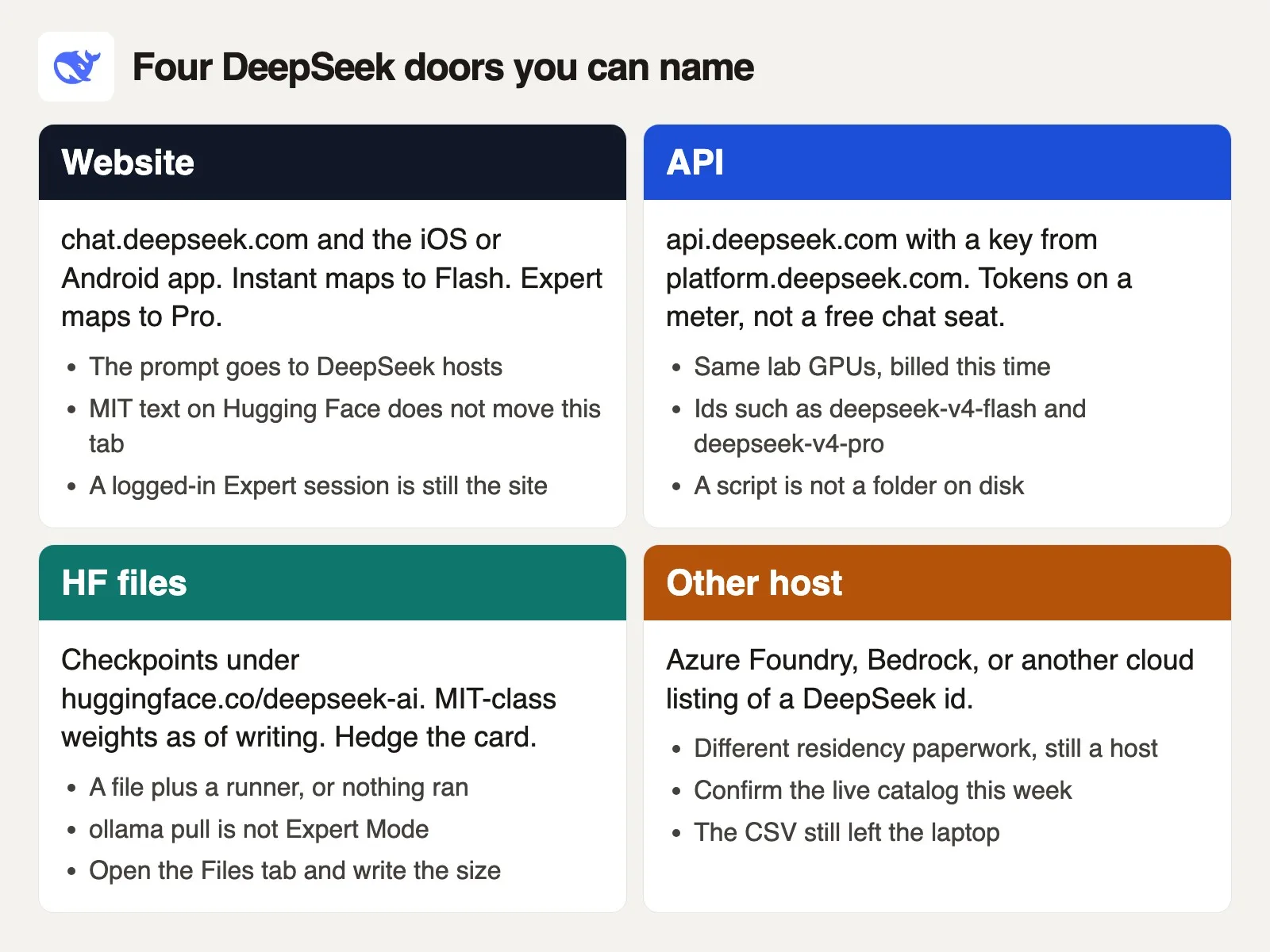
People say “we use DeepSeek” and mean four different things. Write down which one before a column of IDs leaves the spreadsheet. The diagram above is the map, and the small table further down is a lookup you can screenshot into a ticket.
The web address tells you where your data goes
The first way is the product itself: chat.deepseek.com, plus the iPhone and Android apps. You sign in and type. Instant Mode and Expert Mode are the consumer names for hosted V4-Flash and hosted V4-Pro, so check the toggle text on the day you use it. DeepSeek’s V4 preview announcement (24 April 2026) told people to try the models there. There is no official paid DeepSeek Plus or Pro plan for that chat in the way ChatGPT has Plus, and clone apps or browser “Plus” checkout pages are not the lab. The chat is hosted, so your prompt leaves your computer. Retention, training settings, and region are DeepSeek’s policies. The later post on DeepSeek privacy and work caution covers those in detail. For now, remember that a logged-in Expert tab is still the hosted website.
Use the website for writing, questions, a first look at how the model talks, or a rewrite you will edit, provided the text would be fine in an email to that vendor. Do not use the website as proof that you “run DeepSeek locally.” All you ran was a browser.
The API key is a second, separate account
The second way is the official API, which is the version developers call from code and pay for by usage. The documentation lives at api-docs.deepseek.com, and you create keys on platform.deepseek.com. The OpenAI-compatible base address is https://api.deepseek.com, and an Anthropic-compatible path exists too. The model names to copy, and then re-check, are deepseek-flash and deepseek-v4-pro. As of October 7, 2026, the docs say deepseek-flash runs DeepSeek-V4.1-Flash and the pro name runs DeepSeek-V4-Pro-0813; the older deepseek-v4-flash and deepseek-v4-flash-vision-exp names still work, but their models are retired and V4.1-Flash answers instead. The older deepseek-chat and deepseek-reasoner names were set to retire after 24 July 2026, 15:59 Coordinated Universal Time (UTC, the world’s standard time zone), so a code sample that still uses them is out of date.
The API runs on the same lab’s servers, with a usage meter attached. A chat login does not pay that meter, and a platform key does not log you into the website. Mixing them up leads to two kinds of trouble. One person pastes a key into a plugin and then blames “DeepSeek” for an invoice. Another pastes employee IDs into the chat and says “we used the API, so it is fine.” Both ways send your prompt to DeepSeek, and the meter only changes who gets billed.
Downloaded files are only half of a local setup
The third way is open weights, which means the trained model saved as a big file you are allowed to download. The checkpoints live under the Hugging Face organization deepseek-ai, and the V4 group is at huggingface.co/collections/deepseek-ai/deepseek-v4. The shelf includes Flash and Pro, base and instruct versions, dated cards such as DeepSeek-V4-Flash-0731 and DeepSeek-V4-Pro-0813, and an experimental vision card. The V4 cards mark the repository (a project folder that keeps every version of its files) and weights as MIT, a license that is short and permissive. Still, read the LICENSE file in the repository you clone, because older DeepSeek releases did not always use the same license. MIT covers those files and says nothing about chat.deepseek.com becoming your own process. The post on what “open” means for AI weights explains the vocabulary. The short version is that files are optional, and files without a program to run them do nothing.
Open the Files tab and write down the size. V4-Pro is a cluster-sized download, and the earlier post used the 865 gigabyte preview card as its scare number. V4-Flash is smaller and still not a casual laptop model at full precision. Community versions in Ollama that were shrunk with quantization (storing the numbers with less detail so the file is smaller) can come down to a few tens of gigabytes. A small download like that can genuinely run locally and still not be Expert Mode, because Expert Mode is a website label for hosted Pro. Your compressed community download is a different model with a similar first name.
Another company’s listing is still another company’s computer
The fourth way is a different company hosting a DeepSeek model. In September 2026, Azure AI Foundry listed DeepSeek-V4-Flash and DeepSeek-V4-Pro among other DeepSeek family models. Amazon Bedrock’s public model cards that same week still emphasized earlier lines (V3.2, V3.1, R1). Catalogs change, so copy the model name from the console you actually use. Cloud accounts have real security controls, such as access rules (IAM, the system that decides who may do what), region choices, and private network links. They are not a laptop with the wifi off. “It stayed in our Azure subscription” is a very different sentence from “it stayed on an offline laptop,” and an MIT license on Hugging Face does not change that. You rented a DeepSeek-shaped model in someone else’s data center. Your legal team may find the data-residency paperwork there better than the hosted Chinese product, so ask them, and do not invent a US-local story just because the logo matched.
Here is the lookup. Screenshot it, and keep it as a reference rather than a personality quiz.
| Door | You opened | Where the prompt goes |
|---|---|---|
| Website | chat.deepseek.com or the phone app | DeepSeek hosts |
| API | api.deepseek.com with a platform key | DeepSeek hosts, billed per token |
| HF files plus runner | Files tab, then Ollama, vLLM, or similar | Your machines if you stay local |
| Other host | Azure, Bedrock, or another listing | That cloud account |
Open weights are files plus a runner
A weight file is a huge pile of numbers. Hugging Face stores it, and Git Large File Storage (LFS), a tool for big files, or huggingface-cli download copies it to your disk. Nothing answers your questions until a runner loads those numbers into memory (RAM, or video memory called VRAM on a graphics card) and starts producing text. The runner might be Ollama, llama.cpp, vLLM, SGLang, or the transformers library on a machine you pay for. Until that load finishes, “we have the MIT weights” is an empty promise. A command running in the background does not turn a cloud browser paste into an offline session.
In this series, self-hosting means three checks pass together. The checkpoint is on your disk, the runner has loaded it, and your client points at that runner (usually the address 127.0.0.1, which always means your own machine) with cloud options turned off. If any one of the three fails, you are back on someone else’s server or talking to an empty port. The post on hosted models versus downloading them gives the general version. DeepSeek adds a wrinkle that Llama does not have as strongly: the lab also ships a polished free website with an Expert switch that shares the model’s first name. Downloading a model does not touch that switch.
Ollama makes the confusion worse because the command line (the text window where you type commands) looks like real work. ollama pull deepseek-v4 (or whatever name the library shows that week) can succeed while Chrome still holds the actual conversation. Some Ollama builds also offer a cloud option that keeps answering on localhost after you sign in, the same trap the Llama incident showed in an earlier post, with a different file and a different toggle. Do not assume DeepSeek is immune. Read the output of ollama ls, because a real local model has a size you can point at. A hyphen, a blank, or a tiny “virtual” line while text streams like a website means you are on a host until you prove otherwise. Set local-only mode if your Ollama version documents it, restart, and try again.
Hardware is the dull gate that decides what is realistic. V4-Flash has about 284 billion total parameters (the numbers the model learned) with about 13 billion active on each word, and V4-Pro has about 1.6 trillion total with about 49 billion active. Both use a mixture-of-experts design, which means only part of the model wakes up for each token (a small chunk of text), and both advertise a 1 million token context window (how much text the AI can keep in view at once) on the official API card. Those totals are why the Files tab looks like a cluster ticket. A shrunken community version can fit on a workstation and still be a step down from hosted Pro. That can be the right trade if the sentence you told facilities was “on this laptop.” It is the wrong trade if you needed Expert Mode quality and then used the website anyway, so pick one.
Here is a proof that stays honest, in five steps:
- Close every chat.deepseek.com tab, and sign out of the phone app if it is open on the same desk.
- Run
ollama ls(or the equivalent screen in your app), then write down the model name and its size. If the size is missing, stop, because that usually means nothing real is on your disk. - Load the model.
ollama psshould show it, and Activity Monitor (ortop) should show memory in use. - Turn on airplane mode and send three fake badge rows. If the answer never comes, you were never local.
- Only then decide whether 3,104 real IDs belong on that machine at all. A local runner is not a security policy, so disk encryption, who can reach the port, and cloud backups of your laptop are still your job. The later post on DeepSeek privacy covers the hosted product. Local does not skip your own security review.
One more fork catches people. You can download the MIT files and then upload them to a server you control or rent. That is the fourth way again, or a private cluster. The license allowed the copy, and the location is wherever you point your client. “Open weights” never meant your data vanished from the network.
The API meter is not the free chat
Two web addresses, two separate accounts, one lab. The website is a consumer product that has been free, with possible fair-use limits and no official Plus seat. The API is a developer product. You create an account on platform.deepseek.com, keep a key in an environment variable (a setting stored outside your code), and pay for tokens (pieces of words), or use a new-account credit if one is offered the week you sign up. Credits expire, so do not count on one. Putting badge IDs in the chat does not create an invoice, while sending them through chat.completions does. Neither path keeps sensitive CSV data on your laptop.
Pricing moves, so copy numbers from the live pricing page the week you ship, and do not treat this paragraph as gospel. That table lists Flash, Pro, and the experimental vision model, with separate rates for input that is already cached, input that is not, and output, and it splits peak from off-peak hours. The docs describe peak windows as 01:00 to 04:00 and 06:00 to 10:00 UTC, Monday through Friday, and off-peak costs half of peak. Limits on simultaneous requests differ by model. If you are wiring up a batch rewrite of public copy, the meter is the right choice: set a spend cap on the platform, run the tests from the earlier post on coding with DeepSeek, and use a model name you copied that day. If you just have a single FAQ to tidy, the website costs you less attention, and that is a comfort issue rather than a safety one.
Agents make the mix-up easier. DeepSeek markets the API as a backend (the behind-the-scenes software that does the work) for tools such as Claude Code, GitHub Copilot, and OpenCode. You point the tool at https://api.deepseek.com, choose deepseek-v4-pro or flash, and still run your tests, which was the whole point of that earlier coding post. The tool’s chat panel can look as if the model lives inside your project. In fact the text still went to api.deepseek.com unless you configured a local address. It is the same trap as a cloud browser tab, dressed in a terminal theme.
A production-sized job wants the meter on purpose. Chat fair-use limits are not a service guarantee, so you will get throttled or you will babysit a time window. The platform exists so you can send structured requests, log usage, and cap spending. Set the cap before the first batch, watch the first 20 calls, and only then scale up. Do not “test” 3,104 badge IDs in the free window because the API felt like paperwork. The free window still runs on DeepSeek’s servers, and the paperwork is how you notice that.
If your legal team has already signed with Azure or Bedrock, the fourth way may beat the API for data residency. Confirm that the model name is the DeepSeek release you think it is. A Foundry deployment (a running copy of a model set up for your account) named after V4-Flash is still Azure’s hardware, and a Bedrock listing for an older DeepSeek release is not V4-Pro Expert Mode. Copy the name, paste it into the ticket, and then send a three-row toy test before you send the badge dump.
Pick the way before the next paste
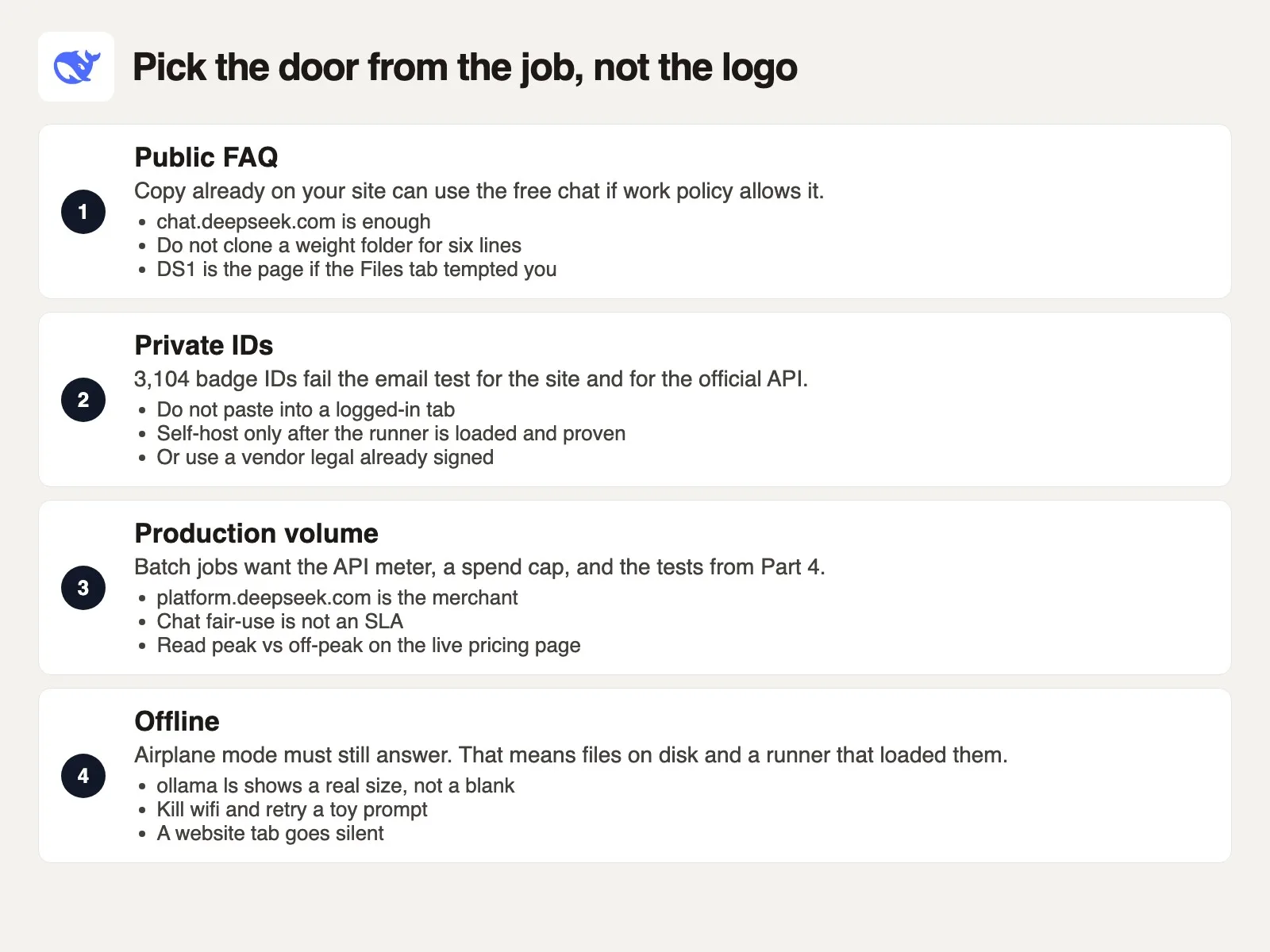
Choose the way from the job, and ignore the logo on the tab. The rows above work as a chooser. If the job involves private employee IDs, the row says to stop for public web chats and standard APIs. Self-host only after the runner is loaded and verified offline, or use an enterprise vendor your legal team already approved. Using the public-FAQ route for an ID job because open weights exist on Hugging Face is the core confusion of this whole post.
Here is the same rule as a small script, so you can see the logic written down. The failing case is your Monday morning. Run it in your head before the next CSV.
badges = 3104
site_tab_logged_in = True
ollama_pull_done = True
hf_checkpoint_on_disk = False
runner_loaded = False
job = "private_ids"  # public_faq | private_ids | production_volume | offline

def prompt_destination(job, site_tab, runner_ok, files_ok):
    if job == "private_ids" and not runner_ok:
        return "STOP: IDs cannot go to chat.deepseek.com or api.deepseek.com"
    if job == "public_faq":
        return "website OK if policy allows; skip the Files tab"
    if job == "production_volume":
        return "API meter with a spend cap; still a DeepSeek host"
    if job == "offline" and not (files_ok and runner_ok):
        return "STOP: airplane mode will fail until files plus runner exist"
    if site_tab and not runner_ok:
        return "website: Hangzhou lab hosts, not your laptop"
    return "name the door on a sticky, then toy paste three rows"

print("pull_done", ollama_pull_done, "badges", badges)
print(prompt_destination(job, site_tab_logged_in, runner_loaded, hf_checkpoint_on_disk))
What that code prints:
pull_done True badges 3104
STOP: IDs cannot go to chat.deepseek.com or api.deepseek.com
The download can be complete and the answer is still a stop. That is the whole lesson. A download in the background does not rewrite the web address, a MIT badge on Hugging Face does not rewrite it either, and Expert Mode does not mean the weights woke up on your drive.
Walk through this on Monday before any real paste:
- Name the way on a sticky note: website, API, Hugging Face files plus runner, or another host. If you cannot fill in the blank, do not paste.
- Name the job: public FAQ, private IDs, production volume, or offline. Badge IDs, payroll, member numbers, and anything you would not email to that vendor’s support inbox count as private IDs.
- Do a toy paste with three fake rows (
B-00001,B-00002,B-00003). Confirm the route answers. If you claim to be local, turn off wifi and run it again. - Then go to production, or stop. Use the website for public copy if policy allows, the API for volumes of text that can leave your building, and a local runner only when the five checks above are green. Use a cloud listing only when legal pointed you there and you copied the live model name.
The everyday failure is simple. Yesterday’s browser tab is still logged in, and the new job looks like the old job until you read the columns. Yesterday was a code refactor, and today is 3,104 employee records. Close the tab when the job changes, or open a fresh window and read the address like a shipping label. The next post in this series, DeepSeek privacy, region, and work caution, covers where processing happens, which settings to check, and why work IDs need a colder read even when you know which way you are using it. If you only needed the general hosted-versus-download map, go back to the post on hosted models and downloads. If you only needed a thank-you email, skip the Files tab and use the product chooser.
Series notes
This is Part 5 of Learn DeepSeek. Previous: coding. Next: privacy, region, and work caution.
Sources
Research and further reading used for this article. Model names, prices, and cloud catalogs were checked in September 2026, so re-check the live page.
- DeepSeek homepage (lab, product entry)
- DeepSeek Chat (hosted web chat with Instant and Expert modes, checked September 2026)
- DeepSeek platform (API keys and billing)
- DeepSeek API docs (first call, model ids, thinking mode)
- DeepSeek: Models and pricing (Flash / Pro / vision ids, peak windows; copy live numbers)
- DeepSeek: V4 Preview Release (24 April 2026: V4-Pro, V4-Flash, 1M context, open weights link, legacy id retirement)
- Hugging Face: deepseek-ai (org for checkpoints)
- Hugging Face: DeepSeek-V4 collection (Flash, Pro, dated drops, vision exp)
- Hugging Face: DeepSeek-V4-Pro-0813 (MIT license and run-locally notes, checked September 2026)
- Amazon Web Services (AWS) Bedrock: DeepSeek model cards (listings change; confirm the catalog this week)
- On this site: what DeepSeek is, products and open models
- On this site: hosted models versus download to your machine and what open means for AI weights
- On this site: Learn and Which AI product should I use?
Keep going
Same lessons in your feed
Short diagrams, hooks, and weekly tutorials on Substack, Instagram, X, and Facebook.



