

When you use DeepSeek’s official chat app or its API (the service programmers use to connect their own apps), what you type is sent to servers in mainland China, according to DeepSeek’s own privacy policy. That region matters for work: employee records and customer details need a written company rule before they go into any AI tool, and a quick paste from your phone skips that rule.
Imagine your coworker in HR asks you, early one morning, for a list of employees leaving the dental plan. Your laptop is stuck installing an update, so you open the benefits spreadsheet on your phone and paste it into the DeepSeek app. It gives you a clean list in 11 seconds, you share it with the team, and nobody asks where those employee records were just sent.
Twenty-eight member IDs before your first meeting
The file lived in Downloads next to benefits_export_v2.csv from last Thursday. It is easy to grab whatever export sits in Downloads, even one that was refreshed after payroll closed. A header row comes first, then 28 rows of data. The columns, in order, are member ID, last name, first name, date of birth, plan code, the last four digits of the Social Security number, employer group, coverage start, dental rider, and dependent count.
You did not paste names. You did not paste dates of birth. You did not paste the last four digits of anyone’s Social Security number. You told yourself that made it just keys, the way a product code is just a product code with no name attached: M-10482 through the 28th row. The dental rider flag was Y on every line, which is why the roster needed cleaning in the first place: 28 people, one product, one month-end cut.
The Android app was the official listing from the Play Store, whale icon, signed in with the same email you use on chat.deepseek.com, with history turned on. The training-adjacent toggle (the label moves between builds; you might see something like “Improve the model for everyone,” or on some builds a separate data-for-experience switch) was still at the factory default. It is easy to leave a mobile app at its default settings without ever checking the data-sharing toggles, especially if you had only used it before for public marketing copy.
That is the trap this post is for. A phone chat that already helped with public copy feels like a stapler, and a stapler does not store the paper in another country. The 28 IDs are keys into a benefits system, and anyone who also holds the export can join those keys back to names, dates of birth, and last-four digits in the same file. The model does not need the rest of the row to turn the paste into a people problem.
A quick Slack reply can look like smooth competence: a numbered list, two callouts, a cheerful “ready for standup.” The thread gets four thumbs up. But the sensitive employee records were already sent across an unvetted cloud endpoint (the web address a program sends its requests to) before that reply went out, and deleting the chat afterward does not undo the paste.
Rule of thumb: If a column in your export points at a person in an HR or benefits system, treat it as a no-paste into official DeepSeek chat, the apps, and the official API. An ID without a name is still an ID.
Who runs the servers, in plain English
DeepSeek the consumer product is run by Hangzhou DeepSeek Artificial Intelligence Co., Ltd., registered in China. The English privacy policy names that company as the controller, the legal term for whoever decides what happens to your data. Older copies also mentioned a Beijing affiliate, and corporate group language moves over time. The useful sentence for a Monday paste is simpler: the official website and the official apps are a hosted service run by that lab, not a model file sitting in your pocket.
Four places a prompt can go. They share a logo in conversation, but they do not share a residency story, meaning where the data physically lives once you hit send.

Official chat and apps. chat.deepseek.com, the iOS app, and the Android app are one account surface. Instant Mode maps to the V4-Flash model, and Expert Mode maps to V4-Pro. There is no official DeepSeek Plus checkout for consumer chat in the ChatGPT Plus shape, so copycat Android apps and browser “Plus” screens are not the lab. Using the official mobile client still sends your prompt data off the phone. A smaller screen does not mean the app is running locally on your device.
Official API. api.deepseek.com and the console at platform.deepseek.com give you keys, model names, and a pricing page. The live cards list deepseek-flash (which also reads images) and deepseek-v4-pro, with peak and off-peak rates; copy the current numbers from the pricing doc the week you draft, because they change. A key does not move the metal, which means it does not change which country the servers sit in. If the lab’s privacy page says it collects, processes, and stores personal data in mainland China to provide the service, treat the API as that same service unless a separate enterprise contract in your hands says otherwise. Without a signed data processing agreement, the contract that spells out exactly how a vendor may handle your data, standard consumer privacy terms govern the upload, and most operational teams do not hold that kind of contract.
Self-host the files. Hugging Face’s deepseek-ai page publishes weight files, the raw model data you can download and run yourself, and those cards currently carry a permissive license; re-read the license the week you pull the files, since terms can change. A file plus a runner (Ollama, llama.cpp, vLLM, or a box you rent and control) can keep the prompt on hardware you chose, but “can” is doing a lot of work in that sentence. If the runner’s own cloud toggle is on, you are back in someone else’s logs, and if you log prompts to a shared disk, you built a second copy of the problem. Self-hosting is an option, not a blessing on benefits_export_v3.csv.
Other cloud listing. Amazon Web Services (AWS) Bedrock, Microsoft Azure, and similar catalogs have listed DeepSeek-branded models at various times, and listings appear and vanish. If a US-region host is on the menu the week you draft, that host’s access rules, region, and logging story are what matter, not the whale on the model card. Confirm the details on that console yourself. Do not assume “DeepSeek on Bedrock” is the Android app with a nicer flag, and do not assume it is automatically approved for member IDs either. Your signed data agreement, your region lock, and your ticket with security are the documents that decide that, not the listing itself.
An earlier post in this series walked the same four objects as product doors; this one is the privacy half of that map. If you already know the website is not a downloadable model file, you still need the next sentence: the site and the official API send prompts to the lab. The files do not, unless you pointed your own runner at a host that forwards them elsewhere.
What the privacy policy actually says
The English page DeepSeek publishes lives at cdn.deepseek.com/policies/en-US/deepseek-privacy-policy.html (last updated 10 February 2026 on that copy). An older copy of the page also sat under chat.deepseek.com/downloads/, and paths move, so if that link is broken the week you read this, start at chat.deepseek.com, open the footer, and open Privacy. Do not trust a random search result with a similar whale icon.
This is not legal advice. Read the live text with counsel if your job is to approve a vendor for your company. The rest of this section translates what the page said when this tutorial was written, plus the matching lines in the Terms of Use and the model-mechanism note, with everything checked in September 2026.
Who is the controller. Hangzhou DeepSeek Artificial Intelligence Co., Ltd., with a registered address in China. Contact on the English page: privacy@deepseek.com. The policy says it does not cover personal data collected by apps that other developers build on top of the open platform, so if you wrap the API in an internal bot, you inherit a second set of rules to check.
What they collect when you type. Under “User Input,” the English policy lists text input, voice input, prompts, uploaded files, photos, feedback, chat history, and other content you provide, which includes employee IDs, roster exports, and spreadsheet snippets pasted into the app. They also collect account fields (email or phone, password, date of birth where asked), device and network data (device model, operating system, network address, identifiers), logs of the features you use, an approximate location worked out from that network address, and cookies on the web. Payment fields apply to the open platform, not the consumer app, in the copy this post is based on.
Where it sits. The storage section is the line people quote, because it is plain: the personal data they collect from you may be stored on a server outside the country where you live, and to provide the service, they directly collect, process, and store your personal data in mainland China. The supplement written for European users repeats that same storage sentence. If you needed a story about your data staying in the US, this page does not give you one.
Sensitive data they ask you not to send. Quote close to the source: the service is not designed or intended to process sensitive personal data, and the listed examples include health information, children’s data, precise location, genetic or biometric data, and several other categories. They say they do not ask for it, and you should not provide it, about yourself or about anyone else. A benefits roster with member IDs, dates of birth, the last four digits of a Social Security number, and a dental rider flag is not a grocery list, and you do not need a lawyer to feel the overlap with “health information” and “other people’s data.” You do need a lawyer if you are writing the official company memo. The policy’s own warning is already reason enough to stop the early-morning paste.
Training, improvement, and the toggle. The policy lists “improve and develop the services, and train and improve our technology” among its uses. The rights section includes a right to opt out of having your personal data used for training models or improving technology. The Terms of Use describe a setting labeled “Improve the model for everyone.” The Chinese product copy many people see inside the app is closer to a phrase that translates as “data used to improve the experience.” Labels drift by build and by language, so check the live wording in Settings the week you draft anything about it. On an Android or iOS client, data controls live under Settings, then a data or privacy row; on the web, they live under your avatar or sidebar, then Settings, then a data tab. Turn the improvement switch off if you plan to use the product at all for anything you would not want printed on a postcard, then remember what that switch does not do.
The toggle is not a residency toggle. It does not keep your prompt on your phone. It does not rewrite the storage sentence above. It does not make member IDs an approved input. It is an opt-out from a training or improvement use, as the lab describes it, and you cannot check what happens on their servers from an app store listing. Treat the switch as basic hygiene, not as a vault.
History is a separate control. You can copy or delete your chat history in Settings, according to the policy, but deleting a thread from the app does not prove the lab has no copy, and it does not unsend a Slack message. If you delete your whole account, the policy says you cannot reactivate it or get the content back. That is a blunt tool, not a time machine for 28 IDs.
Law and requests. The Terms say the agreement is governed by the laws of mainland China. The privacy page says the company may access, preserve, and share personal data with law enforcement and other parties when they believe in good faith that doing so is necessary to comply with the law, a legal process, or a government request, among other listed cases. How that interacts with the laws in your own country is a question for counsel. The practical takeaway is more direct. Sending other people’s benefits keys to a foreign server without a company agreement in place creates legal risk you did not need to take on. That is a different bet than pasting the same keys into a US work account covered by a signed data agreement.
The model-mechanism page at cdn.deepseek.com/policies/en-US/model-algorithm-disclosure.html points back at the privacy policy for its collection rules and repeats that users can opt out of training. Read it if you want the lab’s own wording on how it removes identifying details from data. Do not read it as a green light to paste the last four digits of a Social Security number.
Work data, personal data, and regulated data
The useful picture is a ladder, not a gut feeling. Public text sits on the bottom rung. Messy work notes sit one rung up. Member IDs sit higher still. A government-issued device is a different kind of stop, because someone already wrote the rule for you before you ever opened the app.
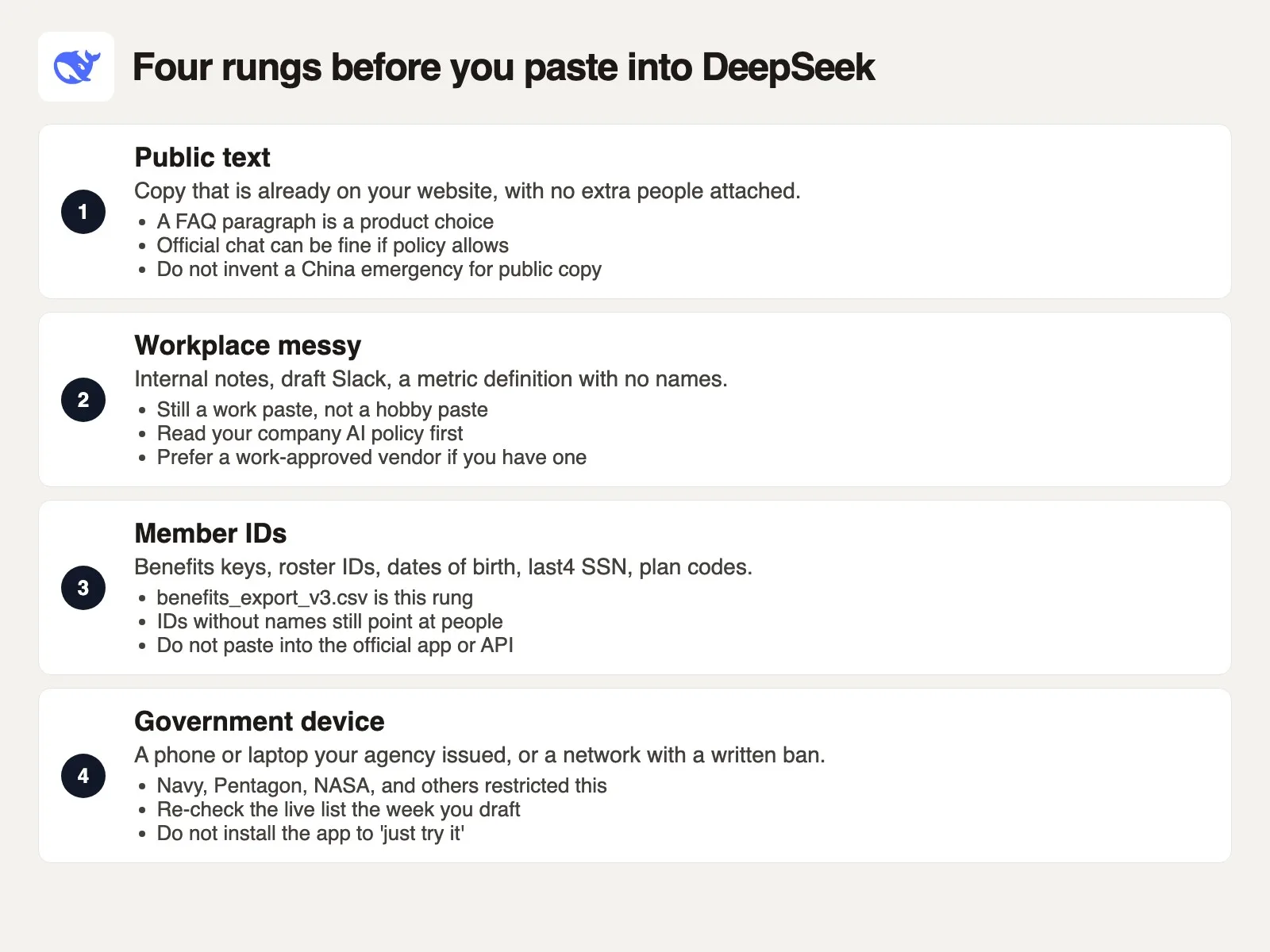
Public text. This is a paragraph that is already on your company website, with no extra people hiding inside it, such as a public retirement-plan marketing blurb that contains no employee data at all. Official chat can be a reasonable choice for that kind of job if your company allows consumer AI tools at all, and you are not required to invent a national-security scenario over a FAQ that any stranger can already load. A later post in this series argues with teams who stall for days over “China risk” while a genuinely sensitive file sits in the very same chat. Hold that thought. The ladder still starts at public.
Workplace messy. A draft status note, a metric definition, a rough SQL sketch (a draft request for a database) with toy rows you made up: none of it names a real member, patient, or customer. This is still work, though, and your company may already have an approved chat tool, such as Claude at work, ChatGPT Business, or Gemini on a Workspace account. If that exists, use it. If it does not, you are making a vendor decision from a personal account. DeepSeek’s consumer app is free, with fair-use limits that can kick in, and free is not the same as approved. Read the one-pager from security if your company has one. If it does not, you still do not get to run a benefits export through a personal phone just because the work laptop was busy updating.
Member IDs, benefits rows, anything health-adjacent. This is the danger zone. The policy explicitly says the service is not designed for sensitive personal data and tells you not to provide it. Your own privacy program, if your company has one, will use terms like protected health information or member-identifiable data, but the plain version of the rule is the same either way: don’t put the roster in a chatbot. Default door: do not paste into chat.deepseek.com, the iOS or Android apps, or the official API. Here are the alternatives, roughly in order of how often each one is actually available:
- Do not paste at all. Clean the 28 IDs in the spreadsheet, in a small program on your own computer, or by eye. Twenty-eight rows is a coffee break, not a job for a model.
- If you need model help with the shape of the file, invent 28 fake IDs (
M-TOY-01and so on) and keep the real keys in a CSV file (a plain text spreadsheet) that never leaves your computer. - If the job really is “I want DeepSeek-class answers, and the prompt must not go to a server in China,” self-host the files on hardware you control, with logging you can explain to someone else. That is a real project, not a tap on your phone before a meeting.
- If a US-hosted listing exists the week you need it, and security has already approved that listing for this kind of data, use that console’s region lock, and confirm it yourself rather than guessing from a headline.
Government device. Several agencies and governments restricted DeepSeek on official devices after the consumer app first drew attention in early 2025. Documented examples from that period are easy to find. The US Navy told members not to use it in any capacity, including personal use tied to work tasks. Pentagon networks blocked the domains, and NASA and congressional staff rules appeared in the same news cycle. Italy’s data protection authority ordered a block over privacy-policy answers it called insufficient. Australia, Taiwan, and other governments published device or download limits. Those lists move, and Italy later opened a separate track about how the tool handles wrong answers. Do not freeze a headline from early 2025 as permanent law. Do check your agency’s current bulletin before installing the app on a government phone. If the bulletin says no, the answer is no, and curiosity is not an exception.
Personal hobby use of public questions on your own phone is not what this post is trying to ban. Asking “what is a window function” (a database feature for running totals and rankings) with no file attached is nothing like a benefits export. The lab still stores that prompt in mainland China if you used the official chat, and you may decide that is fine for a programming question about made-up rows, or you may decide it is not. Either decision is a decision. Treating the Android app like a paper notepad that never leaves your kitchen is the actual mistake.
An earlier post on this site, on caring about privacy and running things yourself, walks through the three-lane choice for privacy-minded AI use: closed products, hosted open models, and local runners you control yourself. DeepSeek sits in more than one lane depending on which door you use. Official chat and the official API are a closed, hosted product from a lab in Hangzhou, even though the underlying model files are published elsewhere. The files themselves are the local lane, if you run them yourself. A listing on a US cloud platform is a hosted lane with a different landlord. Name the lane you are in before you paste.
What to send your team before standup
A responsible follow-up message posted to #benefits-ops soon after should acknowledge the data sensitivity and replace the pasted keys with an anonymized reference before the team’s next meeting.
Subject line in the thread: roster cleanup stays in Sheets. Body, lightly edited so you can steal it:
- I pasted 28
member_idvalues frombenefits_export_v3.csvinto the official DeepSeek Android app this morning. That app is hosted chat from a lab in China, the same family as chat.deepseek.com. I should not have done that. - Please do not paste that Slack list anywhere else. The two “malformed” flags were wrong; use the CSV as the source instead.
- I deleted the chat in the app, which is hygiene, not a guarantee, and I turned off the model-improvement toggle in Settings. I will confirm the live label with a screenshot in this thread.
- Going forward: public site copy can still use the app if policy allows it. Benefits rows, member IDs, last-four digits, dates of birth, and plan codes cannot. The 28 rows get cleaned in Sheets, or with the script in the next message.
You then dropped a tiny checker so the next rushed morning would fail closed on its own. The script does not “secure DeepSeek.” It refuses to bless a paste when the CSV header still contains the columns that caused the problem.
from pathlib import Path
import csv

BAN_COLUMNS = {
    "member_id",
    "ssn_last4",
    "dob",
    "last_name",
    "first_name",
    "email",
    "phone",
    "plan_code",
    "employer_group",
}

def columns_in(path):
    with Path(path).open(newline="", encoding="utf-8") as handle:
        reader = csv.DictReader(handle)
        return set(reader.fieldnames or [])

def paste_ok(path):
    hits = columns_in(path) & BAN_COLUMNS
    if hits:
        print("Do not paste. Banned columns present:")
        for name in sorted(hits):
            print(" ", name)
        return False
    print("No banned columns in the header. Still ask whether the rows are public.")
    return False if "benefits" in Path(path).name.lower() else True

if __name__ == "__main__":
    paste_ok("benefits_export_v3.csv")
Run that against an employee file and it prints every sensitive column in the header, then returns False. The filename check is petty on purpose: a file named benefits_*.csv should not get a cheerful green light just because someone deleted the header names and left the same 28 keys sitting in column A. If you want a toy file to test the script, keep M-TOY-01 style IDs and skip the real export entirely.
Here is a default door by data class. This is a lookup for a Monday morning, not a policy from your general counsel.
| Data class | Default door |
|---|---|
| Public copy already on your site | Official chat or API is a product choice if work allows consumer tools |
| Messy work notes, no people | Prefer the approved work vendor; DeepSeek consumer is still a vendor decision |
| Member IDs, benefits rows, health-adjacent fields | Do not paste into chat.deepseek.com, the apps, or the official API |
| Government-issued phone or laptop | Follow the live agency ban. Do not install the app to try it |
As a next step this week, about 20 minutes, open Settings in whichever DeepSeek client you use and screenshot the data-control row, the training or improvement toggle, and the history controls. If you do not have an account, skip the screenshot and write one sentence in your team channel: member IDs stay in the spreadsheet. If you do have an account, turn the improvement switch off, delete any thread that should not have existed, and pin the data-control policy in your team channel so a teammate does not make the same mistake before their own next meeting. Then read When DeepSeek is the wrong tool, before anyone spends a week arguing about public FAQ copy while a real intake file sits in the same chat.
Series notes
This is Part 6 of Learn DeepSeek. Previous: hosted vs open weights. Next: when DeepSeek is the wrong tool.
Sources
Research and further reading used for this article, with vendor pages and policy text checked in September 2026:
- DeepSeek: Privacy Policy (English, cdn.deepseek.com) (last update 10 February 2026 on that copy; mainland China storage sentence; sensitive personal data warning; training opt-out right; if the path moved, use the footer on chat.deepseek.com)
- DeepSeek: Terms of Use (English) (controller in Hangzhou; “Improve the model for everyone”; China governing law on the copy dated 27 March 2026)
- DeepSeek: Model Mechanism and Training Methods (points at the privacy policy; training opt-out language)
- DeepSeek Chat (official consumer web client paired with mobile apps)
- DeepSeek API docs: pricing (live model ids and rates; copy the numbers the week you draft, since they change)
- Hugging Face: deepseek-ai (open-weight files; check the current license terms before you pull)
- Reuters: Italy’s Garante blocks DeepSeek (30 January 2025) (one documented regulator action; re-check status the week you draft)
- TechRadar: US Navy DeepSeek restriction (January 2025) (agency device and use limits; lists move)
- TechCrunch: countries and agencies that restricted DeepSeek (roundup of early 2025 device and download limits; not a live registry)
- Analytics Made Simple: I care about privacy and running things myself (three lanes: closed products, hosted open models, local runners)
- Analytics Made Simple: Hosted open models vs download to your machine (the general hosted-versus-file split this DeepSeek page specializes)
- Analytics Made Simple: Hosted DeepSeek vs open weights (the four product doors this page treats as residency doors)
- Analytics Made Simple: When DeepSeek is the wrong tool (next part: protected health information, government devices, and when cheap API or self-host still wins)
Keep going
Same lessons in your feed
Short diagrams, hooks, and weekly tutorials on Substack, Instagram, X, and Facebook.



