
For everyday jobs like turning a meeting recording into notes, a $20-a-month Claude or ChatGPT subscription is often easier and better than running Llama, Meta’s free AI model, on your own computers. Running your own model only pays off when the job, the privacy rules around the data, and the time your team can spend maintaining it all line up.
Imagine your team buys two expensive graphics cards, the chips that run AI models fastest, so you can run Llama on your own machine and turn meeting transcripts into notes. Six weeks later you are still fixing setup problems, the notes are days late, and the summaries list people who were never in the meeting. Then someone pays $20 for a month of Claude, pastes in the same transcript, and gets accurate notes back that afternoon, while the graphics cards sit on a folding table heating the room.
Six weeks for meeting notes
Imagine your team decides to own its meeting-notes bot. The pitch sounds good: run Llama 4 Scout, Meta’s free model, on your own hardware, so meeting transcripts never leave the building. But your team does analytics, not building the computers that run software for everyone (servers), and nobody has ever fitted two big graphics cards into one computer. Until now, someone simply pasted the meeting transcript into a doc after the Monday meeting, pulled out the decisions, owners, and dates, and posted them before lunch.
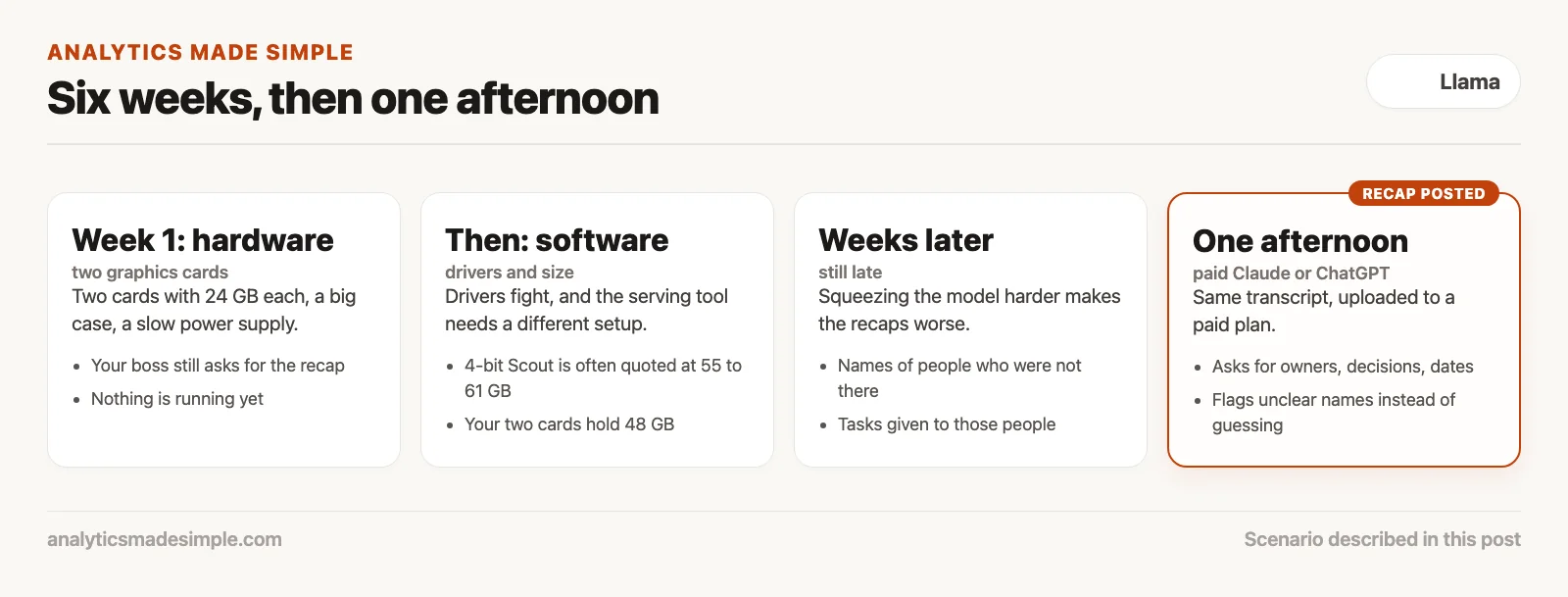
The first week goes to hardware: two graphics cards with 24 GB of memory each, a case big enough for both, and a power supply that takes days to arrive. Meanwhile, your boss still asks every Monday where the recap is.
Then come the software problems: driver versions that fight each other, and a serving tool that turns out to need a different setup. There is also a size problem. Llama 4 Scout is a mixture-of-experts model: on Meta’s own model card, it has about 17 billion active parameters (the numbers a model learned in training) but about 109 billion in total. Memory use depends on the total, because every part has to be loaded even if only a few work on each token (each small chunk of text it writes). A compressed 4-bit version is often quoted at around 55 to 61 GB, more than the 48 GB on your two cards. So you compress it even further to make it fit, and the recaps get worse: names of people who were not at the meeting, and tasks assigned to them.
Weeks later, the notes are still late. Then someone spends one afternoon with a paid Claude or ChatGPT plan. They upload the same transcript, ask for attendees, decisions, owners, and due dates, and tell the model to flag unclear names instead of guessing. The recap is posted that afternoon, from the same transcript, with no hardware on the floor.
The lesson is specific. Llama 4 is not a bad model family. Meeting notes are a paste-and-organize job, and the transcripts already lived safely in your company’s shared drive. If your legal team had said transcripts must never leave the building, the hardware project would have made sense. But nobody had written that requirement down. “We should have our own model” was the only reason given.
What the $20 seat already includes
Vendor pages checked in September 2026 show Anthropic selling Claude Pro at $20 a month, or $17 a month if you pay $200 up front for the year. OpenAI sells ChatGPT Plus at the same $20 a month. Both companies also sell heavier individual tiers, Claude Max starting from $100 and ChatGPT Pro at $100, $200, and $500 (OpenAI’s Pro help page, checked October 7, 2026), plus team seats in roughly the same price neighborhood. Re-check claude.com/pricing and chatgpt.com/pricing yourself the week you actually buy, since taxes sit on top and plans change often.
What you are really paying for is a window that already accepts a long paste, a PDF, or a caption file, plus enough usage that a working afternoon does not simply die on a free-tier wall. A simple meeting notes job fits that managed window perfectly. So does a vendor PDF you plan to verify against the original source, since the fluency trap covered in the earlier post on first useful Llama tasks still applies here just as much.
Claude Pro on a notes afternoon
Claude Pro, in the pages checked, includes the paid Claude apps plus Claude Code, Claude Cowork, Claude Design, and Claude Science. You get more usage than the free tier (Anthropic lists the current limits on its pricing page, and they change often), Projects, Research, and access to more Claude models. Names move over time, and the model picker has included Claude Haiku, Claude Sonnet, Claude Opus, and Claude Fable at various points, so confirm it the day you open the tab. You need none of the extra infrastructure surfaces for this job. You need a Project called Ops notes, one file upload, and a prompt that clearly names the output shape you want back.
If seven people share the exact same notes job, look at Claude Team rather than buying seven separate personal Pro seats. Team adds central billing and, as Anthropic states it, no training on your content by default. A personal Pro seat is still not a policy waiver on its own. Security still owns the actual paste rules for sensitive material.
ChatGPT Plus on the same job
ChatGPT Plus is the matching $20 individual seat from OpenAI. In the pages checked you also have a cheaper ChatGPT Go tier below it and heavier ChatGPT Pro tiers above it. Plus is the one worth comparing against Claude Pro for a transcript recap, since it offers higher limits than the free tier, file uploads, and Projects of its own. For notes specifically, stay in the regular chat interface. Do not open the coding-focused agent (an AI that can take actions on its own, not just write text) tool just because someone in Slack said the word “agent.” Plan names live in the earlier post on ChatGPT’s Free, Go, Plus, Pro, Business, and Enterprise tiers without the hype, and the actual notes loop is covered in the post on ChatGPT for email, meetings, and workplace writing.
Pick whichever seat produces a first draft you can actually stand to edit. Opening a managed assistant when someone on the team already has a seat is practical, not lazy. ChatGPT Plus would have been a perfectly fair afternoon too, in this exact scenario. A closed chat already includes login, a file picker, enough context for a 40-minute huddle, and an interface a senior executive can comfortably watch without ever opening a graphics driver control panel. What it does not include is a permanent source of record, a license to paste payroll data, or truly unlimited volume. Thousands of tickets a day will eventually hit the wall. That is a genuine volume problem, and it is one of the few real reasons Llama earns the extra setup work. Until that volume actually shows up, meeting notes and messy PDFs should start on a closed chat. Verify every quote against the original file. You still press Send in Slack yourself either way.
Rule of thumb: If you would already store the file in Drive, and you need a recap this afternoon, buy the seat. Build the box only when a written requirement says the model itself (its weights, the huge file of numbers it learned in training) truly has to live here.
When Llama is the right stubborn choice
Llama is not a consolation prize by any means. Open weights exist so you can run a named model under a named license, on a machine or a host you personally chose, and adapt it whenever the job genuinely calls for that. It is easy to skip past the practical requirements and get seduced instead by the romance of self-hosting. If you cannot point at one of the three lines below, written as a plain sentence the vice president would actually sign off on, you are not solving a real problem. You are simply shopping for graphics cards so the team can say “we run Llama.”
Private weights on your box
Some transcripts genuinely cannot leave the building: customer health details, unreleased financial figures, a merger data room, a workforce file with home addresses attached. A consumer Claude or ChatGPT window is the wrong choice here no matter how good that week’s model happens to be. Hosted Llama is also the wrong choice if the prompt still travels out to Groq, Together, Fireworks, OpenRouter, Amazon Bedrock, Azure AI Foundry, or Google Vertex Model Garden. Local means a runner you fully control, such as Ollama, LM Studio (a free app for running AI models on your own computer), llama.cpp, or vLLM, with the cloud toggle switched off and a model id you can point at directly. That is the same idea covered in the earlier posts on hosted models and on hosted versus self-host. Write the data classification on the brief before you buy the second graphics card. If the Zoom file was already sitting in Google Drive and people had been quoting it over email, “transcripts never leave the floor” was really just a slogan attached to a file that had already left. If legal genuinely bans consumer AI for that data class, listen to that, then size the box using the earlier post on Llama sizes instead of hoping 48 GB will somehow hold a 55 GB compressed file.
Volume where a $20 seat is the expensive one
A Pro or Plus seat is genuinely cheap right up until the job becomes a firehose. Fifty recaps a month fit comfortably for a long time. Two thousand support tickets a day, each one turned into a three-line summary, will burn through weekly limits and then usage credits at API (a way for programs to send requests to an online service) rates fairly quickly. At that point a hosted Llama id, copying the host’s own model string directly, with Groq spelled with a Q and not Grok the xAI product, can become the genuinely cheaper option. You still send the prompt off your own box either way. You still need a real retention story. You do not need two graphics cards sitting under a folding table for this. Count one full week of real volume before anyone celebrates “we self-host to save money.” Electricity, idle cards, and a person who can resurrect a broken driver after a Windows update all sit on that same bill too.
A fine-tune you can describe in one sentence
Sometimes the closed chat simply will not hold a format you truly must have: a claims team that needs a fixed data format across 40,000 labeled examples, or a tone that has to match a regulated legal letter exactly. That is a genuine case for fine-tuning, meaning extra training on your own examples. It is not “we downloaded fourteen GGUF copies named uncensored” (GGUF stands for a compressed model file format), the exact mistake covered in the earlier post on fine-tunes and community variants, which already said to pick one Instruct tag, keep the Llama 4 Community License in view, and never collect a whole zoo of files. If a prompt plus three gold examples gets you most of the way there already, what you actually have is a prompt you simply have not written yet. The required shape in this story was attendees, decisions, owners, and dates, and Claude Pro produced that directly from a prompt, without needing any custom labeled dataset at all.
The two-card bill nobody put on the project brief
Say your plan budgets “two used 4090s” and a weekend of setup time. The real bill has four separate layers, and only the first one ever shows up on an actual receipt.
Cards and chassis. Launch price on one GeForce RTX 4090 was $1,599. Two cards start at $3,198 at that number alone, a price which by September 2026 you often cannot even hit anymore. Add a motherboard, a 1,600-watt-class power supply, memory, a processor, and a case, and you are into several thousand dollars total before you even run the first setup command. Confirm live prices yourself, and do not treat a 2022 launch page as an actual purchase order.
Power and heat. Each card’s total graphics power draw is 450 watts, according to the RTX 4090 specifications from NVIDIA, the company that makes most of the graphics chips AI runs on, so two cards together are 900 watts of graphics budget before the processor even joins in. For a single-card system, NVIDIA already recommends at least an 850-watt power supply. Electricity itself is a real cost, and a smaller one than the calendar cost that follows it; do not invent a utility bill figure from a random blog post. The project room genuinely gained a few degrees of heat, and someone opened a window in August because of it. The “notes bot” quietly became a space heater with its own project tracker id.
Calendar time. Six weeks passed for seven people, even though only two of them actually lived inside the driver settings the whole time. The other five still waited on notes and still retyped decisions by hand during that stretch. Do not invent a payroll total for this either. Week six still had “where are Tuesday’s notes” showing up in Slack. That single sentence is really the bill.
Fit. 24 GB plus 24 GB comes to 48 GB total. If the compressed model file you actually wanted is quoted at 55 to 61 GB, you did not buy a working Scout workstation. You bought yourself a reason to compress the model harder than you should have. Aggressive compression artifacts are exactly how hallucinated attendees end up in a recap. The earlier post on Llama sizes exists specifically so you size the file to the machine before the folding table shows up. This project sized its hardware to hype instead of to its actual requirements.
Set the $20 seat next to that whole stack. Seven Claude Pro seats billed monthly come to $140 before tax, or $119 if everyone is on the annual $200 Pro plan instead. Seven ChatGPT Plus seats also come to $140. Claude Team Standard runs $20 per person per month on annual billing in the pages checked, the same rough neighborhood, with admin controls included. That is the entire notes budget. The graphics card stack is what you spend once one of the three genuinely stubborn reasons above is real. Nobody factored power draw, driver updates, weekend maintenance, or compression losses into the original project brief. The brief simply said “own our notes bot.” The room got warmer. The notes stayed late anyway.
A one-page chooser for Monday
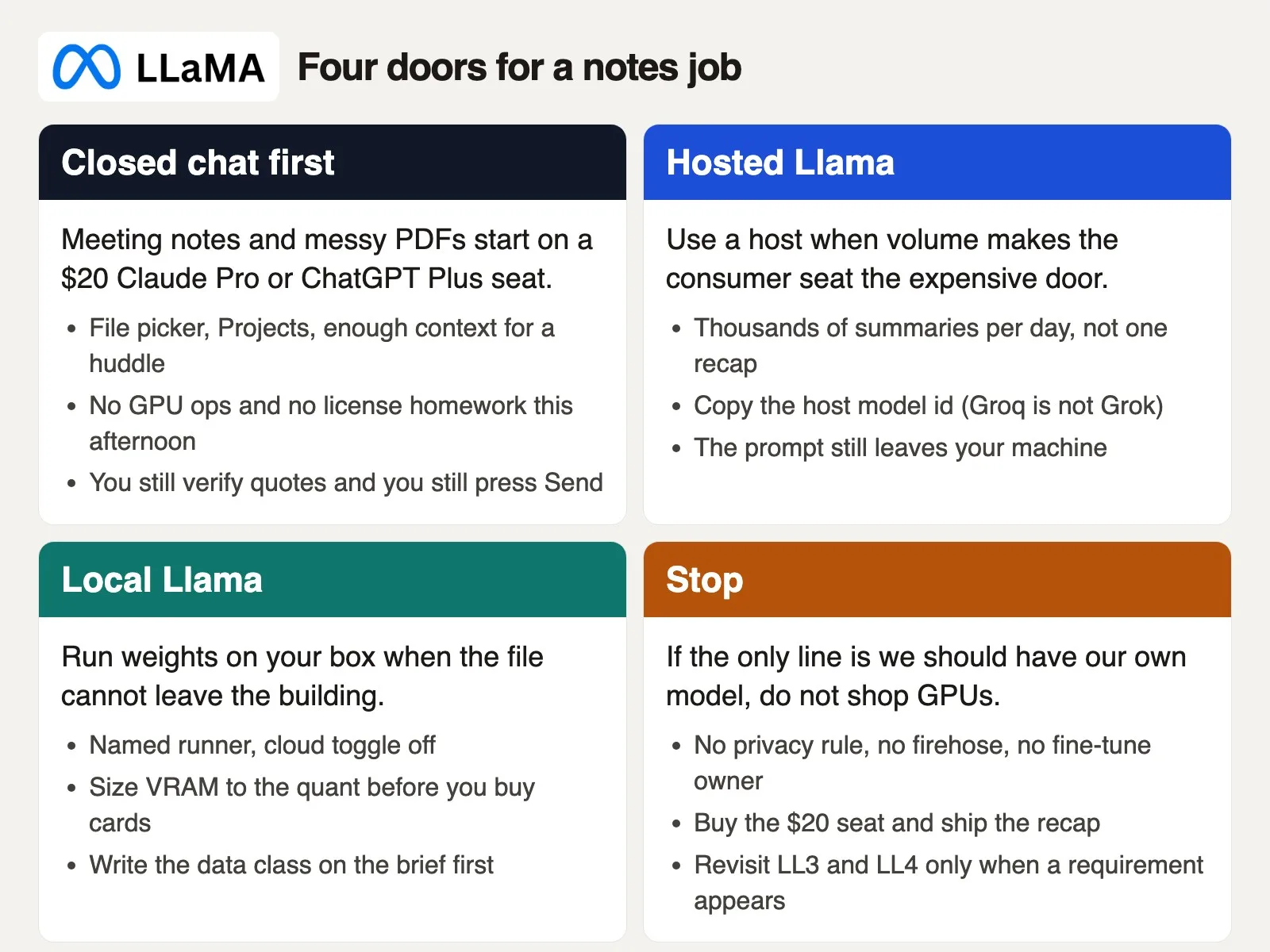
Paste this short card into Slack before anyone opens a hardware retailer’s website. Closed chat first for notes and messy PDFs. Hosted Llama once volume makes the $20 seat the genuinely expensive door. Local Llama when the file truly cannot leave. Stop entirely when the only requirement on the table is that the team simply wants a model of its own.
This lookup is meant as a default path, not a permanent rule. Change it after two weeks of real measured volume, or once a written privacy rule appears. Do not change it just because a hallway conversation said “open source feels safer” while the file is still sitting in Drive the whole time.
| Job | Default door (checked September 2026) |
|---|---|
| Meeting notes, Zoom recap, action list | Claude Pro or ChatGPT Plus today |
| Messy vendor PDF you will verify | Closed chat, then quote-check the file |
| Transcripts that cannot leave the building | Local Llama, cloud toggle off, named runner |
| Thousands of summaries per day | Hosted Llama, copy the host model id |
| Format a prompt cannot hold, labeled examples ready | One Instruct tag and a real fine-tune owner |
| “We should have our own model” with no requirement | Stop. Buy the $20 seat. Revisit sizing and hosting only if a requirement appears. |
Paste this ten-line card into the thread that is about to become a hardware project. Fill in the blanks during the meeting itself, not after the power supply has already shipped.
AMS Llama vs $20 seat (fill in Slack)
1. Job: notes / PDF / firehose / other: ____
2. Can this file leave the building? Y/N: ____
3. Volume: under 50/day or thousands: ____
4. Need a custom model, not a prompt? Y/N: ____
5. If 2=Y, 3=low, 4=N -> Claude Pro or ChatGPT Plus today
6. If 2=N -> local Llama, name the runner, cloud off
7. If 3=thousands -> hosted Llama, paste the host model id
8. If 4=Y -> one Instruct tag, one owner, no 14-file zoo
9. GPU shopping only after 5-8 fail in writing
10. Owner: ____  Review Friday: ____
A realistic evaluation card would have ended the folding table project on line five alone: job notes, file already in Drive, volume just one huddle a day, no custom model needed, door Claude Pro, owner the Analytics Lead.
This week, do the job actually in front of you. If it is notes or a messy PDF, open Learn Claude or Learn ChatGPT and run one file through a paid seat. If the file truly cannot leave, go back to the earlier posts on hosted versus self-host and on Llama sizes, and size the runner to the compression level you actually need. If all you needed was a format, reread the fine-tunes post before you start collecting files. This series stops here. Llama stays the right choice when privacy, volume, or genuine extra training on your own examples (fine-tuning) is the actual line on the brief. Meeting notes were never that line.
Your next step
Count how many documents your team pasted into AI tools last week, and mark any that were files that must not leave the company. Then match that count to the one-page chooser above and write down which row applies. One week of real numbers settles the open-model question faster than any debate about hardware.
Series notes
This is Part 7 of Learn Llama (LL7), and it closes the planned Llama track. The earlier post covered fine-tunes without the zoo.
Sources
Plan names, model names, and prices move. Confirm on the vendor page the week you act. Series recap for this Llama path:
- Analytics Made Simple: Meta Llama from scratch (this series, parts 1 to 7)
- What Llama is: a family, not one chatbot app
- License and can I use this at work?
- Llama sizes, laptop vs server
- Hosted Llama chat vs self-host
- First useful Llama tasks
- Fine-tunes and community variants without the zoo
- Analytics Made Simple: Learn Claude from scratch (closed-chat path for notes and PDFs)
- Analytics Made Simple: Learn ChatGPT from scratch (the other $20 seat)
- Analytics Made Simple: AI products chooser
- Anthropic: Claude pricing (Pro $20 monthly / $17 annual in pages checked, Max, Team, included products)
- OpenAI: ChatGPT pricing (Plus, Go, Pro, Business. Confirm live.)
- Meta: The Llama 4 herd (Scout and Maverick cards, April 2025)
- llama.com (downloads, license, current tags)
- NVIDIA: GeForce RTX 4090 (24 GB, 450 W total graphics power, launch starting price $1,599, 850 W system recommendation for one card)
Keep going
Same lessons in your feed
Short diagrams, hooks, and weekly tutorials on Substack, Instagram, X, and Facebook.



