

GLM is a family of AI chat models made by Zhipu, a Chinese AI company that also runs its own chatbot website. The family has been renamed several times (ChatGLM, GLM-4, GLM-5), so two people can both say “GLM” and mean very different models. Before you trust advice about it, ask which version the person actually used and when.
Imagine a coworker tells you GLM fixed a stubborn spreadsheet formula for them in seconds. You download a free copy of “ChatGLM” to run on your own laptop, paste in the same formula, and get a confident answer that doesn’t work. Your coworker was using the newest GLM-5 on Zhipu’s website, while you downloaded a version from 2023 that happens to share the name. Same name, different model, and nobody said which one.
One lab, several name tags
Zhipu AI (智谱) is the lab. Its international website and API (the way other programs connect to its models, as opposed to chatting in a browser) go by Z.ai. GLM stands for General Language Model, and it names a whole family of downloadable model files and hosted products, so you cannot point at one chatbot in a screenshot and call it GLM. The lab’s own English about page describes ChatGLM as a public chat model from 2023, with ChatGLM-6B as the small open file that many people downloaded. ChatGLM2 and ChatGLM3 followed, and people still say “ChatGLM” in team chats today.
Two consumer chat sites sit on top of that family. chat.z.ai is the international chat, and chatglm.cn is 清言 (Qingyan), the version aimed at China. Both are hosted, which means your prompt leaves your laptop and travels to the lab’s servers. Neither one is a downloadable file. Many older tutorials show screenshots from a GitHub group called THUDM (the Tsinghua University research group that first released ChatGLM), while the current GLM-5 code lives at github.com/zai-org/GLM-5. If a project page still says THUDM/chatglm3-6b, you are reading about the older line.
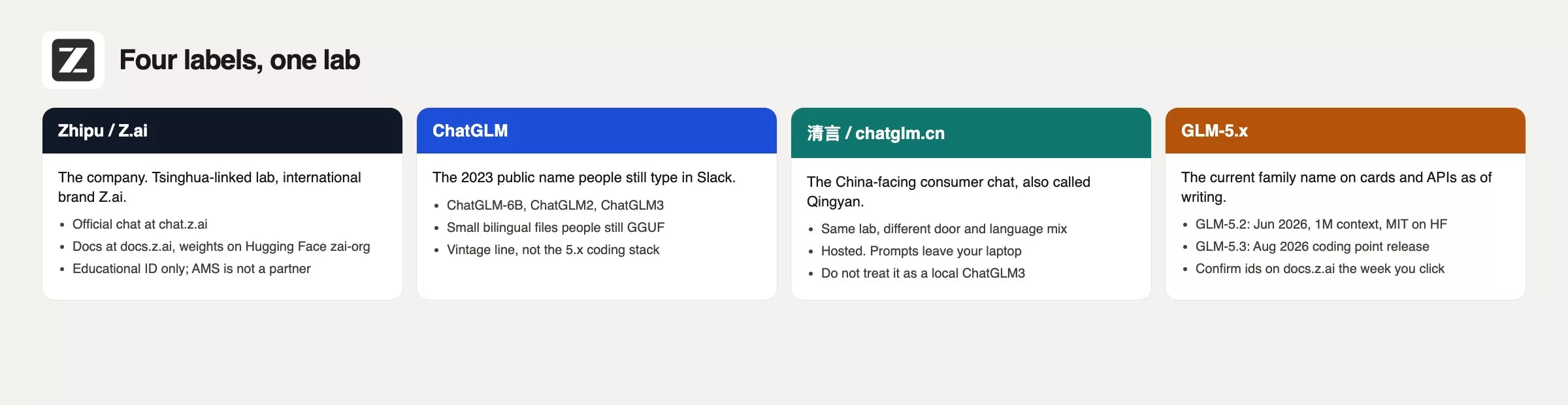
You will also see names such as CodeGeeX, AutoGLM, and ZCode around the same lab. This series starts with the GLM language family itself, so write down the name of the tab you will actually type into.
Rule of thumb: If the filename still says ChatGLM3, you are not using the GLM-5 generation. Read the filename out loud before you compare quality with a coworker.
What you can click in 2026
That team channel mixed three different products into one word. Split them apart before you paste any work, and before you tell your legal team that you run ChatGLM locally.
| Way in | What you open | Where the prompt goes | Start here when |
|---|---|---|---|
| Consumer chat | chat.z.ai, or 清言 at chatglm.cn | Z.ai / Zhipu’s servers | You want public drafts, bilingual chat, or a first look at current GLM names in the menu |
| Open GLM-5.x weights (the downloadable model files) | Hugging Face zai-org/GLM-5.2 (MIT), plus the GitHub GLM-5 repo | Your machine if you actually run the file; a hosting company if you only rent its graphics chips | You need the license text and a copy you control. This is not laptop-sized. The earlier post on hosted versus local explains why. |
| API or coding plan | docs.z.ai, api.z.ai, GLM Coding Plan, ZCode | Their servers, billed by usage or by seat | You want coding tools, editor plugins, or GLM-5.3 while its weights may still lag. Confirm the model name in the request. |
Hosted chat is the honest first hour. You log in, read the model name in the picker, and try a public paragraph. The coding plan is a different kind of purchase, because Z.ai’s subscribe page lists paid tiers meant for use inside coding tools. So do not paste a work repository (a project folder of code, tracked with its full history) into a free chat tab and call that the plan.
Open weights are the third route: the model’s weights, the billions of numbers it learned in training, are published as a file you can download and run yourself. The Hugging Face page for GLM-5.2 lists the MIT license, and MIT means a very permissive open license that allows most uses. The file itself is a huge checkpoint (the page lists a 753B-class size, meaning roughly 753 billion adjustable numbers), so it needs serious hardware or a host. A ChatGLM3-6B file in GGUF format is a different animal. GGUF is short for a file format built to run models on ordinary computers. If you wanted something local on a laptop, you picked the 2024 toy on purpose, so say that, and do not grade it against a coworker’s hosted GLM-5 coding session.
Where the prompt goes still follows the earlier post on hosted versus downloaded models. A website that serves GLM does not keep your text on your laptop. A model file on your disk can stay local until the same app offers a cloud switch and you turn it on. Write “hosted” or “local” on the ticket next to the model name. It takes two seconds.
What GLM-5.2 offers
Z.ai’s docs date GLM-5.2 to 16 June 2026. The product page positions it for long tasks, with a context window of one million tokens (small chunks of text the model reads and writes) and up to 128 thousand tokens of output. Weights are public on huggingface.co/zai-org/GLM-5.2 and on the lab’s ModelScope mirror, and the Hugging Face page names the MIT license. The code for the line is at zai-org/GLM-5. Chat is on chat.z.ai, and the API examples in the docs use the model name glm-5.2 against https://api.z.ai/api/paas/v4/chat/completions. These details come from the vendor pages checked in August 2026.
The docs also publish tables of scores on standard coding tests (benchmarks), including Terminal-Bench 2.1 and SWE-bench Pro. Those numbers come from the vendor, and the footnotes describe the vendor’s own test setup. Open the GLM-5.2 guide the week you evaluate it, and do not copy a tweet that says it beats Claude into a strategy deck. You can say that Z.ai publishes those benchmarks and point at the page. Re-run anything you plan to spend money on.
A million-token context window is the amount of text the model can look at in one go, provided the host really gives you that window. A local copy squeezed onto a laptop with 16 gigabytes of memory will not. If you want the whole repository in view at once, you need the hosted GLM-5.2 or a machine that can hold it, not a 6B ChatGLM3 file from 2024.
GLM-5.3 is a coding follow-on
GLM-5.3 appeared in Z.ai’s release notes on 18 August 2026, with a blog post dated 14 August 2026. The docs say it uses the same base model as GLM-5.2, and the gains come from extra training afterward. They describe stronger coding, a 50% gain over GLM-5.2 on their in-house Z.ai Code Bench, and claims on Terminal Bench 3.0 and related agent tests (tests of an AI that takes actions on its own, like running commands, to finish a multi-step task). Again, these are the vendor’s numbers. Read the GLM-5.3 guide, which also discusses cybersecurity testing. A coding model is not a substitute for a professional security tester.
Availability is the part team chats get wrong. The docs say GLM-5.3 is offered to GLM Coding Plan users and through the API, with reasoning always on (thinking.type: enabled, with effort set to low, high, or max). Open weights for 5.3 may arrive later, because the lab says a safety review comes first. Check the zai-org page on Hugging Face before you tell someone to download 5.3. If the repository is not there, you have a paid seat and not a file, so hedge that sentence in the ticket.
Model names move, too. The docs show glm-5.3 for the new line and keep glm-5.2 for the MIT-licensed flagship. Confirm the name on the release notes the morning you ship anything to a client, because a channel titled ChatGLM will not tell you.
The 14-month-old file is a different product
ChatGLM3-6B, and the GGUF copies people made of it in 2024, is a small bilingual chat model from the generation after ChatGLM-6B and ChatGLM2. It was a fair laptop experiment when a 6B model was the biggest thing you could finish downloading. GLM-5.2 is a 2026 flagship with a million-token window and MIT-licensed weights that expect serious hardware or a host. Comparing the two as “ChatGLM versus my coworker’s ChatGLM” is how teams lose an entire morning.
The team’s channel name froze while the lab kept moving. The same thing happens with Llama, Qwen, and DeepSeek, which is why this site gives each family its own opening post. If your company wiki still links the old THUDM page and a 2024 file, add a line with the last date someone checked, the file name, and whether the live work happens on chat.z.ai. Fourteen months is long enough for two GLM-5 point releases and a rename of the public chat.
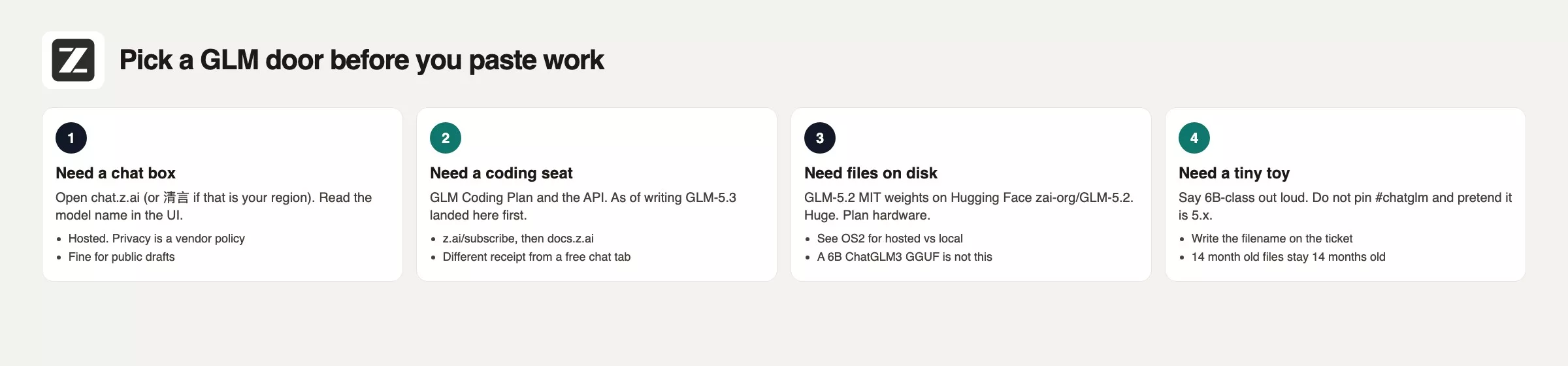
Worked example: settling the conflicting #chatglm thread
Say you need a failing test in test_invoice_tax.py explained, followed by a patch that does not invent helper functions. One engineer uses a GLM-5 coding session on z.ai. Another uses the pinned ChatGLM3 file. Here is how the thread looked once the labels were written down.
| What a teammate said in chat | What was true | What the ticket needed |
|---|---|---|
| “We’re on ChatGLM” | The channel name dates from 2024. One engineer was on chat.z.ai or the coding plan, another on a ChatGLM3 file | The product route plus the model name, not the channel title |
| “Local, so it’s private” | Her downloaded file was local. Her coworker’s session was hosted | A location for each, following the earlier post on hosted versus local. Two privacy stories were in one thread |
| “It should match their coding” | A 6B-class chat file from 2024 against the current GLM-5 coding stack | Stop the comparison, or put both on the same route |
| “I’ll grab the GLM-5.3 weights tonight” | Vendor pages checked in August 2026 show 5.3 arriving through the plan and API first | Confirm a Hugging Face page exists, or accept that you have a seat, not a wish |
Here is a small decoder you can paste into the ticket. It does not score quality, it only names which route a label points to.
# GLM name decoder. Paste the Slack label, tab title, or HF id.
# This is a checklist, not a quality score.

def decode_glm_label(label: str) -> list[str]:
    s = label.strip().lower()
    notes = []
    if any(x in s for x in ("chatglm3", "chatglm2", "chatglm-6b", "chatglm3-6b")):
        notes.append("Vintage ChatGLM file (2023-2024). Not GLM-5.x.")
    if "chatglm.cn" in s or "qingyan" in s or "清言" in s:
        notes.append("清言 consumer chat. Hosted. Same lab, not a GGUF.")
    if "chat.z.ai" in s or s in {"z.ai", "zai"}:
        notes.append("International chat/brand. Read the model id in the UI.")
    if "glm-5.2" in s or "glm_5.2" in s:
        notes.append("GLM-5.2 era. MIT weights: huggingface.co/zai-org/GLM-5.2")
    if "glm-5.3" in s or "glm_5.3" in s:
        notes.append("GLM-5.3 coding line. Confirm Coding Plan/API vs a file.")
    if "coding plan" in s or "zcode" in s:
        notes.append("Paid coding seat. Different receipt from a free chat tab.")
    if not notes:
        notes.append("Unknown. Open docs.z.ai and the HF card before you paste work.")
    return notes

print(decode_glm_label("THUDM/chatglm3-6b Q4 GGUF"))
print(decode_glm_label("glm-5.3 coding plan"))
Running those two prints gives a vintage ChatGLM note for the first label and a Coding Plan note for the second. That difference is the whole source of friction in the thread. Put both lines in the ticket, then either agree on a shared route for the failing test or state clearly that the cloud session is not local. Do not keep arguing inside a channel named after 2024.
Mistakes to watch for with the #chatglm channel
- Treating “ChatGLM” as the current product name because the team channel is old.
- Comparing a 2024 ChatGLM3 file against a coworker’s z.ai coding session.
- Calling 清言 or chat.z.ai “local” because an older file from the same lab runs on a laptop.
- Promising “we’ll download GLM-5.3 tonight” when the public route is still a plan or an API.
- Copying Z.ai’s coding benchmarks into a board deck as if we had measured them ourselves.
- Skipping the hosted-versus-local check and telling legal that the prompt stayed on your Mac when it went to api.z.ai.
Sticky note: name in the app versus file date
Open chat.z.ai, or 清言 if that is the product you are allowed to use. Write the model name you see in the app on a sticky note, and next to it write “hosted”. If you already have a ChatGLM3 file, add its filename and the file date. Run the decoder on both strings. Do not paste invoices or private tests into either route until the note exists. If the job is only a thank-you email, the AI products chooser is faster than downloading a 753B-class file.
Old name versus live product
- GLM is Zhipu’s (Z.ai’s) family. ChatGLM is the older public name. 清言 and chat.z.ai are hosted chats.
- In vendor pages checked in August 2026, GLM-5.2 is the MIT-licensed flagship with a million-token window, and GLM-5.3 is the August 2026 coding follow-on whose weights may still lag its API.
- Pick a route (chat, weights, or coding plan) and write down the model name. A 14-month-old ChatGLM3 file is not that route.
Series notes
This is Part 1 of Learn GLM. The next posts cover the current live products and how to use them with care at work. The next one is GL2, a map of what GLM-5.2-era models can do, so re-check the live names that week.
Sources
These official pages were used for names, dates, and routes. Re-check them the week you click, because plan names move.
- Z.ai chat (international consumer chat)
- 清言 / chatglm.cn (China-facing consumer chat)
- Zhipu AI about (lab history, ChatGLM 2023 public line)
- Z.ai docs home
- GLM-5.2 guide (1M context, API id, vendor benches)
- GLM-5.3 guide (coding follow-on, Coding Plan, thinking always on)
- Z.ai release notes (5.2 dated 2026-06-16, 5.3 dated 2026-08-18)
- GLM-5.2 blog and GLM-5.3 blog
- Hugging Face zai-org/GLM-5.2 (MIT weights, checked August 2026)
- GitHub zai-org/GLM-5
- GLM Coding Plan
- Open-source AI explained series and hosted versus local
Keep going
Same lessons in your feed
Short diagrams, hooks, and weekly tutorials on Substack, Instagram, X, and Facebook.



