
When you paste data into a chat tool, you are deciding to send it to another company’s computers. Never paste secrets, full customer tables, or health data into a consumer chat. Use a synthetic sample instead, which means made-up rows that still show the model what the data looks like.
It starts innocently. You have a messy export, a cryptic column name, and a deadline, and the chat window is already open. So you paste twenty rows of “real” customers to let the model “see the shape.” Then you ask it to draft a join, which is the step that combines two tables.
A paste is a processing decision
When you put rows into a chat product, you are usually sending them to another organization’s systems. Depending on the product, the plan, and your settings, that organization may store them, log them, review them for abuse, and sometimes use them to improve its models. That is not “just brainstorming.” Your content has left your laptop, and it is now covered by the vendor’s terms, its retention rules, and its security, along with the outside companies it works with.
You do not need a law degree to act carefully. You need a working definition of personal data, which is any information that relates to a person who is identified or could be identified. That covers names, emails, phone numbers, account ids that map one to one to people, free-text tickets that mention customers, precise location, and employee identifiers. It also covers many combinations of “harmless” fields. The official definitions live in the General Data Protection Regulation (GDPR), a European privacy law, and in privacy glossaries. Both are linked in the Sources. Your company’s policy may be stricter than this post, and if it is, follow the policy.
Rule of thumb: If you would not paste the same rows into a public Slack channel that outside vendors can read, do not paste them into a consumer chat tool either.
Not legal advice. This article is about everyday habits and risk awareness for analysts. Data protection rules vary by country, by contract, and by industry. When the purpose, the vendor, or the kind of data is unclear, ask your own legal, privacy, or security team, and do not treat a blog post as counsel.
What never to paste
Start with a hard “no” list, because a short list of things that never go into a prompt is easier to follow than case-by-case judgment. If the content includes any of the items below, stop and redesign the prompt with synthetic data or totals. Otherwise, use only an approved internal tool that has a clear data path.
- Direct identifiers: legal names, emails, phone numbers, postal addresses, government ids, and full account logins.
- Secrets: passwords, API keys (passwords that let programs use a service), access tokens (temporary digital passes), private certificates, and connection strings that contain credentials.
- Financial and payment detail: full card numbers, bank account numbers, and payroll lines tied to named people.
- Health data, children’s data, and other highly sensitive categories, unless you have an explicit, approved path for that tool.
- Raw customer support text that may contain any of the above, even if the column is only named “notes.”
- Full production dumps pasted “for context.” A model rarely needs a million rows to understand how a table is laid out.
- Secret business plans mixed with personal data. That is a double hazard, since it holds company secrets and information about people.
Also handle quasi-identifiers with care. These are details that look harmless alone but point to one person when combined. Examples are a rare job title plus a small office, or a birth date plus a postal code. Device ids and exact locations belong here too. The rule of thumb from the earlier stewardship post applies here: share totals instead of row-level detail whenever the purpose allows.
The paste risk ladder
Not every paste carries the same amount of harm if it goes wrong. A ladder helps you choose what to paste, since a snippet of a CSV (a plain spreadsheet-style text file) file can be harmless or serious depending on what is inside it.
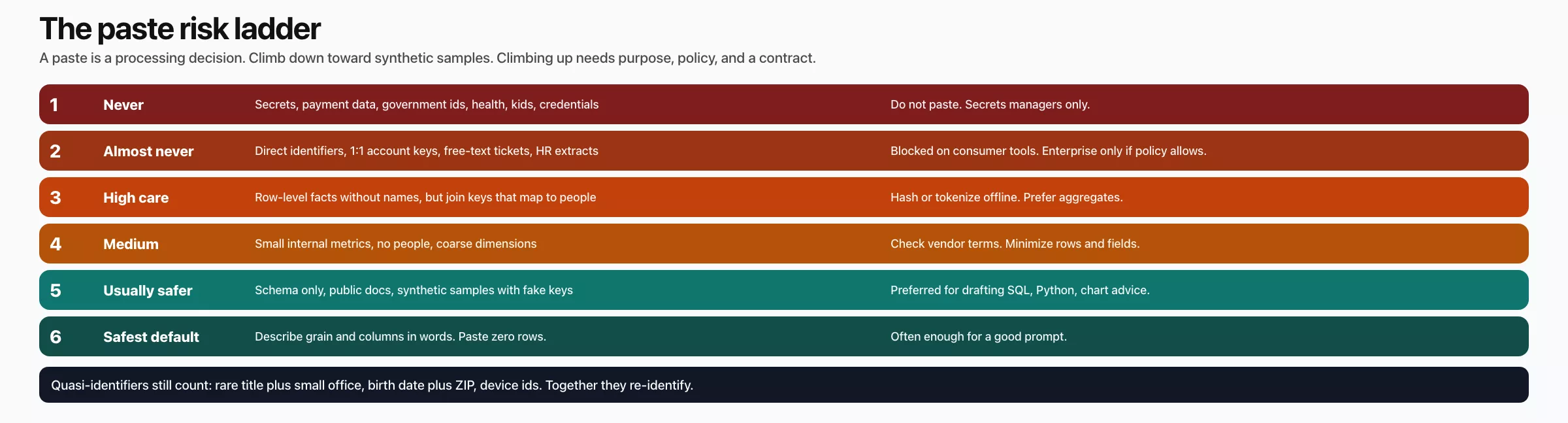
| Rung | What you might paste | Default posture for chat tools |
|---|---|---|
| 1. Never | Secrets, payment data, government ids, health, children’s data, raw credentials | Do not paste. Use secrets managers and approved secure channels only. |
| 2. Almost never | Direct identifiers, 1:1 account keys, free-text tickets, employee hr extracts | Blocked on consumer tools. Enterprise path only if policy and contract allow. |
| 3. High care | Row-level business facts without names but with join keys that map to people | Prefer hashing/tokenizing offline first, or redesign to aggregates. |
| 4. Medium | Small internal metrics tables with no people, coarse dimensions | Check vendor terms and company AI policy; minimize rows and fields. |
| 5. Usually safer | Schema-only (column names, types, fake keys), public docs, synthetic samples | Preferred for drafting SQL, Python, and chart advice. |
| 6. Safest default | Describe grain and columns in words; paste zero rows | Often enough for good prompts (see the earlier post on prompt patterns). |
Stepping down the ladder is how you keep your speed without turning every prompt into a privacy incident. Stepping up needs a clear purpose and a policy that allows it. It often needs an approved enterprise product, too, with retention and training controls you can point to.
Consumer tools versus approved enterprise tools
Analysts often mix up three different kinds of tools:
- Personal consumer chat accounts, which means free or personal paid plans that you open in a browser.
- Company-provided enterprise AI, which comes with one company login for many tools, admin controls, and written terms for how data is handled.
- Internal tools, such as models your company hosts itself on a private network, or notebook agents connected only to approved datasets.
The same model family can sit in all three categories under different contracts. So your paste rules should follow the path your data takes, and they should ignore the brand logo on the screen. If your legal team has not approved a path, treat it like a consumer tool and paste only the table layout and synthetic rows. If your security team has approved an enterprise workspace with “no training on our content” and logging controls, you should still paste as little as you can. Approval is not a license to dump the warehouse into a prompt. The earlier posts on tokens and on retrieval (looking up documents to use in an answer) already argued for small, relevant context, and privacy agrees for different reasons.
Synthetic samples that still teach shape
Models draft better SQL (the standard language for asking a database for data) and pandas code when they can see realistic structure. That means what one row stands for, which values are blank, and which columns link one table to another. They do not need your real customers to learn any of that. Synthetic samples are invented rows that match the real types, spreads, and relationships without belonging to real people.
A good synthetic sample follows these habits:
- It uses fake names and emails from clearly fake domains (
example.com,example.test). - It uses artificial ids that do not collide with production ids, if that matters for your demos.
- It keeps one row meaning one thing, such as one row per order.
- It includes a few blanks, typos, and edge cases you care about, such as refunds, zero amounts, or an unknown region.
- It stays small. Five to 30 rows often beat 5,000 for prompt quality, and they use far fewer tokens, which are the small chunks of text that models are billed by.
Some habits only pretend to be synthetic. One is scrambling real emails with a public recipe and calling them anonymous. Another is hiding only the name column while leaving the phone number and address. A third is sampling real rows and changing one letter of the last name. All three are still personal data problems dressed up as cleanup.
Worked example: invent a tiny orders sample
Suppose you want help writing a weekly revenue query. Instead of pasting production data, paste a description of the tables plus a few toy rows.
# Prompt sketch (safe shape)

I need SQL for weekly net revenue.
Grain: one row per order_id.
Tables (names exact):
- orders(order_id, customer_id, order_date, amount, status, region)
- customers(customer_id, plan_tier)

Rules:
- status in ('paid','refunded'); refunds subtract
- filter tenant is not in these tables; assume single tenant sandbox
- do not invent columns
- show SQL first, then explain joins

Sample rows (SYNTHETIC, not real people):
order_id,customer_id,order_date,amount,status,region
o-1001,c-9,2026-03-01,40.00,paid,east
o-1002,c-9,2026-03-02,-40.00,refunded,east
o-1003,c-12,2026-03-03,15.50,paid,west
o-1004,c-15,2026-03-03,0.00,paid,west
You can generate those rows in a notebook without ever touching a production extract:
import pandas as pd

orders = pd.DataFrame(
    [
        {"order_id": "o-1001", "customer_id": "c-9", "order_date": "2026-03-01",
         "amount": 40.00, "status": "paid", "region": "east"},
        {"order_id": "o-1002", "customer_id": "c-9", "order_date": "2026-03-02",
         "amount": -40.00, "status": "refunded", "region": "east"},
        {"order_id": "o-1003", "customer_id": "c-12", "order_date": "2026-03-03",
         "amount": 15.50, "status": "paid", "region": "west"},
        {"order_id": "o-1004", "customer_id": "c-15", "order_date": "2026-03-03",
         "amount": 0.00, "status": "paid", "region": "west"},
    ]
)

# Sanity: refunds present, grain is order_id
assert orders["order_id"].is_unique
print(orders.to_csv(index=False))
This builds a tiny made-up orders table in Python, with a refund, a zero-amount order, and two regions. A small fake table like this lets you test your logic and share examples without ever touching real customer data.
After the model returns SQL, you still run the checklist for AI-written SQL on your real systems. That means stating what one row means, checking the joins and the filters, and comparing small-window totals. A synthetic paste improves the draft, but it does not replace verification.
The pre-paste checklist card
Before any paste that goes beyond a single line, run through this card. If any answer fails, redesign the prompt.
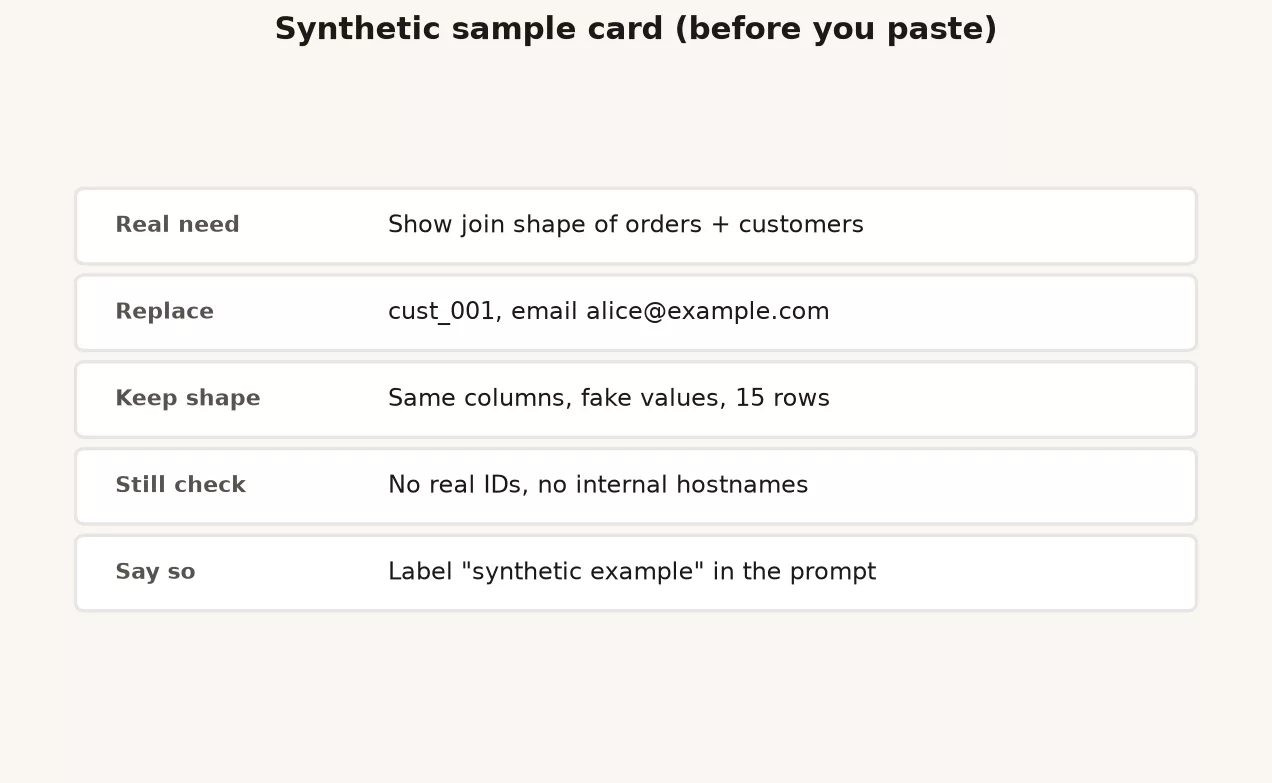
# Synthetic sample card (pre-paste)

purpose: draft weekly revenue SQL for finance review
tool_path: company enterprise chat / personal consumer / unknown
policy_ok: yes | no | unclear (if unclear, stop)

## Data form
[ ] schema names only (no rows)
[ ] synthetic rows I invented
[ ] aggregates only (cell sizes safe)
[ ] real row-level data  <-- if checked, STOP unless approved path

## Identifiers
[ ] no names, emails, phones, addresses
[ ] no government / payment / health fields
[ ] no secrets or connection strings
[ ] join keys are fake or irreversible for this purpose

## Minimization
row_count: ____ (prefer <= 30 for examples)
columns_dropped: ____ (list removed PII columns)
time_window: ____ (prefer short)

## Retention awareness
[ ] I will not paste the same sensitive file "just one more time" into new tools
[ ] I know whether this product may use content for training (yes/no/unknown)

## After answer
[ ] I will verify SQL/Python on real systems myself
[ ] I will not paste model output that re-includes sensitive samples into tickets| Card field | Pass criteria |
|---|---|
| tool_path | Named and approved for this data class, or restricted to schema/synthetic |
| policy_ok | Yes from written policy or privacy contact; never “probably fine” |
| Data form | Not real row-level personal data on unapproved tools |
| Identifiers | All four boxes true |
| Minimization | Small row count; unused sensitive columns removed |
| After answer | Human verification planned; no re-broadcast of sensitive samples |
Screenshots, charts, and “just one column”
Screenshots of dashboards often show filters that reveal tiny segments, customer names in hover text, or employee performance. Charts can be safer when they show coarse totals, but a scatter plot of individuals is still data about people. “Just one column” of emails is still a dump of personal data. Models that read images have the same paste problem, because the pixels are content too.
When you want help with a chart, describe the axes and paste synthetic numbers. You can also invent a tiny table that keeps the teaching point, such as spikes, seasonality, or a misleading axis, without any production labels. The visualization series on this site already teaches chart honesty with toy data, and AI help can follow the same habit.
LLM-specific risks that make pastes worse
Privacy is not the only reason to paste less. The Open Worldwide Application Security Project (OWASP) publishes a Top 10 list for applications built on large language models, and several items on it make careless pastes worse. They include leaking sensitive information and agents that are given too much power. They also include risks in plugins from outside vendors, and prompt injection, which means hidden instructions that trick a tool into doing something you did not ask for. If you paste secrets “so the model can call the API,” you may cause a data leak even if the SQL answer looks brilliant.
The thinking from the earlier post on agents and tools helps here. Give every tool the least access it needs, have a person approve anything that changes something, and never leave standing credentials in prompts. Privacy and security are the same Monday habit seen from two directions.
A worked scenario: a request for ticket samples
Say you need a prompt that sorts support tickets into themes. The temptation is to paste 50 real tickets, but there is a safer path:
- List the theme labels you already use internally, such as billing, shipping, bug, and how-to.
- Write 12 synthetic ticket bodies that never mention real customers, addresses, or order ids from production.
- Ask the model to draft a scoring guide and three worked examples, using only those synthetic tickets.
- Test the prompt on a private set of tickets with known answers, inside company systems, as the earlier post on evals described. Do not paste more real tickets into a consumer chat.
- If you need more realistic quality, use the stewardship intake card and your security team’s process, and never a personal ChatGPT session.
The outcome is that you still ship a better prompt. The difference is where the real personal content lives, which is inside controlled systems and not in a free-form paste history.
Common mistakes
| Mistake | Why it hurts | Better habit |
|---|---|---|
| “I only pasted ten rows” | Ten rows of emails is still personal data | Count people, not only file size |
| “I hashed the emails” | Reversible or linkable hashes still identify | Invent ids; do not decorate real ones |
| Using personal AI accounts for work data | Contract and retention may not match company policy | Approved path or synthetic only |
| Pasting secrets “temporarily” | Logs keep temporary forever enough | Never in prompts; use secret stores |
| Assuming enterprise = dump anything | Minimization still applies | Schema and samples first |
| Skipping verification after a safe paste | Wrong numbers still ship | SQL/Python checklists still run |
How to practice this week
- Write your team’s one-page paste policy in plain English. It needs three parts: a never list, the approved tools, and synthetic data as the default.
- Take one recent real paste, working from memory and never pasting it again, and turn it into a synthetic sample that would have been enough.
- Fill in the checklist card for your next AI-assisted SQL task before you open the tool.
- Ask your security or privacy team, “Which AI tools are approved for which kinds of data?” Then write the answer where the team can find it.
- Review the chat history in any personal tool you used for work. Work data kept there falls under personal-account terms. Delete what your policy requires, and stop the habit.
Quick recap
- A paste is a decision to send data to another company, with vendor and policy consequences.
- Never paste secrets, payment data, government ids, or highly sensitive personal data into unapproved chat tools, because once pasted, you cannot control where that text is stored.
- Use the risk ladder, and step down toward table layouts, totals, and synthetic samples.
- Synthetic samples keep the structure and the edge cases without belonging to real people.
- Run the pre-paste card, and verify the output on real systems afterward. A safe paste can still return wrong numbers.
- This is everyday hygiene and awareness and it is not legal advice, so escalate the unclear cases.
What comes next
The next post turns AI toward documentation and data dictionaries. You will draft definitions quickly and then verify them like a steward, so catalogs do not turn into confident fiction. After that, the final post builds a personal AI checklist across SQL, charts, Python, and stakeholder email, and closes the series with a full recap.
Related reading: Learn hub, Data stewardship, Data quality, What are large language models?.
Your next step
Before you paste anything into a chat tool this week, run it past the sensitivity ladder: is it public, internal, confidential, or restricted? Write the rung in the first line of your prompt notes. Naming the rung each time is what turns the rule into a habit.
Series notes
This is Part 7 of Practical AI for analytics people. Next: AI for documentation and data dictionaries.
Sources
- EUR-Lex: GDPR official text (high-level personal data definition and principles; for counsel-led compliance, not self-diagnosis).
- European Commission: What is personal data? (plain-language overview of personal data).
- IAPP: Glossary of privacy terms (shared definitions for personal data and for hiding or masking identities).
- NIST Privacy Framework (how organizations can manage privacy risk).
- NIST: De-identification resources (why simple masking often fails to hide who someone is).
- OWASP Top 10 for Large Language Model Applications (risks such as leaking sensitive information, prompt injection, and giving tools too much power).
- NIST AI Risk Management Framework (govern, map, measure, manage language for AI risk).
- Analytics Made Simple: How to Check AI-Written SQL.
- Analytics Made Simple: Data stewardship at work.
Keep going
Same lessons in your feed
Short diagrams, hooks, and weekly tutorials on Substack, Instagram, X, and Facebook.



