
AI can draft a data dictionary in minutes, but you still have to check every definition against a trusted source before it becomes the official entry. A data dictionary is a list that says what each table and column in your data means, so people can use the data correctly.
Imagine you ask an AI tool to describe the fifty columns in your sales table, and it finishes in four minutes. The definitions sound official: “customer_id uniquely identifies a customer across systems,” “revenue is total sales,” “active means the account is in good standing.” You paste them into the data catalog, the shared place where people look up what your data means, without checking. Three months later, finance and marketing are still arguing about weekly revenue, because the catalog’s wording describes a table that works differently. Writing documentation fast without verifying it is how a catalog turns into a museum of confident fiction.
What a data dictionary is for
A data dictionary answers practical questions. What does this table mean? What does one row stand for? What does this column measure? Who owns it, and what must you never use it for? It is not a novel about company history. It is not a dump of every raw table tagged “important” either. It is a search entry for people who need to decide or build something. They should not have to ask the one veteran on Slack who remembers how it all works.
These are the minimum fields that actually get maintained:
| Field | Why it matters | Example |
|---|---|---|
| Object name | Exact qualified name | analytics.certified.weekly_order_facts |
| Purpose | One sentence decision use | Weekly net revenue for Finance packs |
| Grain | What one row means | One row per order_id × week_end_date |
| Key columns | Join and filter honesty | order_id, customer_id, amount, status |
| Definitions | Metric formulas in plain English | Net = paid amounts minus refunds |
| Owner / steward | Who answers and who maintains | Owner: Finance lead; steward: orders analyst |
| Freshness | When it is safe to trust | Monday 08:00 America/New_York |
| Sensitivity | Paste and access posture | No email; customer_id is strong key |
| Do not use for | Prevents wrong confidence | Not for real-time fraud; not incomplete current week as final |
| Last reviewed | Certification is a clock | 2026-03-01 by orders steward |
Even if your catalog tool offers fifty optional fields, fill these ten first. AI is excellent at drafting the prose around them. It is terrible at knowing which of two “revenue” columns your CFO trusts.
The only routine that stays honest: draft, verify, publish
Treat AI documentation like a junior teammate who types fast and makes up details when unsure. Because of that, the routine is a loop, and it has no one-shot publish button.
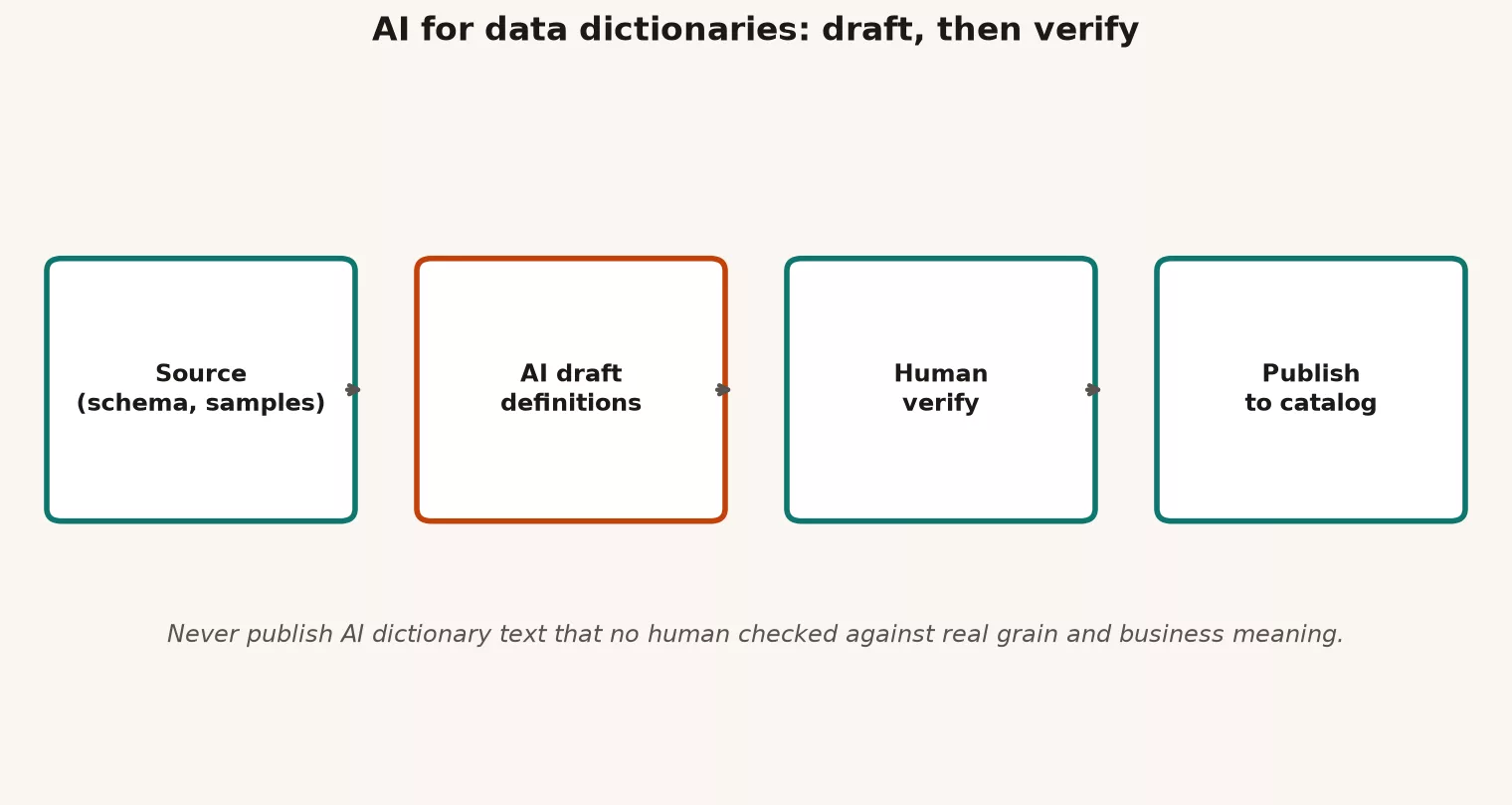
- Gather the source: collect the table layout (names and types), a few made-up or non-sensitive sample values, links to your existing metric definitions, and any known do-not-use rules. Prefer the database’s own catalog tables and dbt YAML files (dbt is a tool that runs a team’s database queries as one managed project, and YAML is a simple text format for settings and notes) over pasting real production rows, as the earlier post on privacy explained.
- Draft: ask the model for a structured card for each table and each critical column, and make it mark its guesses as uncertain.
- Human verify: check what one row means, the formulas, the owners, the sensitivity, and the do-not-use rules against reality. Use SQL counts (quick queries in the language for asking a database questions), the named owners, and the wording Finance uses.
- Publish: only after verification, and keep the status at experimental until a steward, the person responsible for that data, signs off with a review date.
- Revisit: when pipelines or metrics change, run the draft again on what changed and verify again. Dictionaries go stale on the same schedule as code.
Rule of thumb: If you would not defend the definition in a meeting with Finance, it is not ready for the catalog, however polished the AI’s wording sounds.
Prompt patterns for dictionary drafts
The prompt recipe from the earlier post on prompts still applies. Give the model a role, a task, some limits, and an output shape. Then add a rule against inventing things. For dictionaries, add a request for explicit uncertainty and hooks for verification.
# Dictionary draft prompt (schema + synthetic only)

You are helping draft a data dictionary card for analytics engineers.
Use ONLY the schema and notes I provide. Do not invent tables or columns.
If something is unclear, write UNCERTAIN: and a question instead of guessing.

## Object
name: analytics.certified.weekly_order_facts
columns:
  - order_id (string, not null)
  - week_end_date (date, not null)
  - customer_id (string, not null)
  - amount (numeric)
  - status (string: paid | refunded)
  - region (string)

## Notes from humans (authoritative when present)
- Grain intended: one row per order_id x week_end_date
- Net revenue for Finance packs uses paid minus refunds
- Do not use for real-time fraud
- Owner: finance_analytics_lead; steward: orders_domain_analyst
- No email or phone in this table

## Output format (YAML)
- purpose
- grain
- column_defs: list of {name, definition, sensitivity, conf: high|med|low}
- do_not_use_for: list
- open_questions: list
- last_reviewed: null  # human must set

Refuse any column not listed above.
Notice that the output forces conf and open_questions. That is how you stop the model from sounding equally sure about order_id, which is obvious, and about a subtle status rule, which is easy to get wrong.
A column-level prompt for messy names
Older data warehouses are full of names like amt_1, flg_x, and cust_key2. AI can propose candidate meanings for them, but you still have to prove which one is right.
# Column meaning candidates (not truth)

For each column, propose up to 2 candidate definitions with confidence.
Require a verification SQL idea for each candidate (counts, distincts, joins).
Do not claim a candidate is correct.

columns: amt_1, flg_x, cust_key2
related tables (names only): orders, order_payments, customers
business words we use: gross merchandise value, net revenue, is_test_order
Then you run the verification SQL on a warehouse path that your role is allowed to use. If the results are sensitive, the model never sees the real result set. You only feed back a text note such as “candidate A failed: amt_1 includes tax” to help with the next draft.
The verify checklist and what counts as a pass
Verification means more than reading the AI text and nodding along. It is a short set of checks, and if any critical row fails, the card stays experimental.
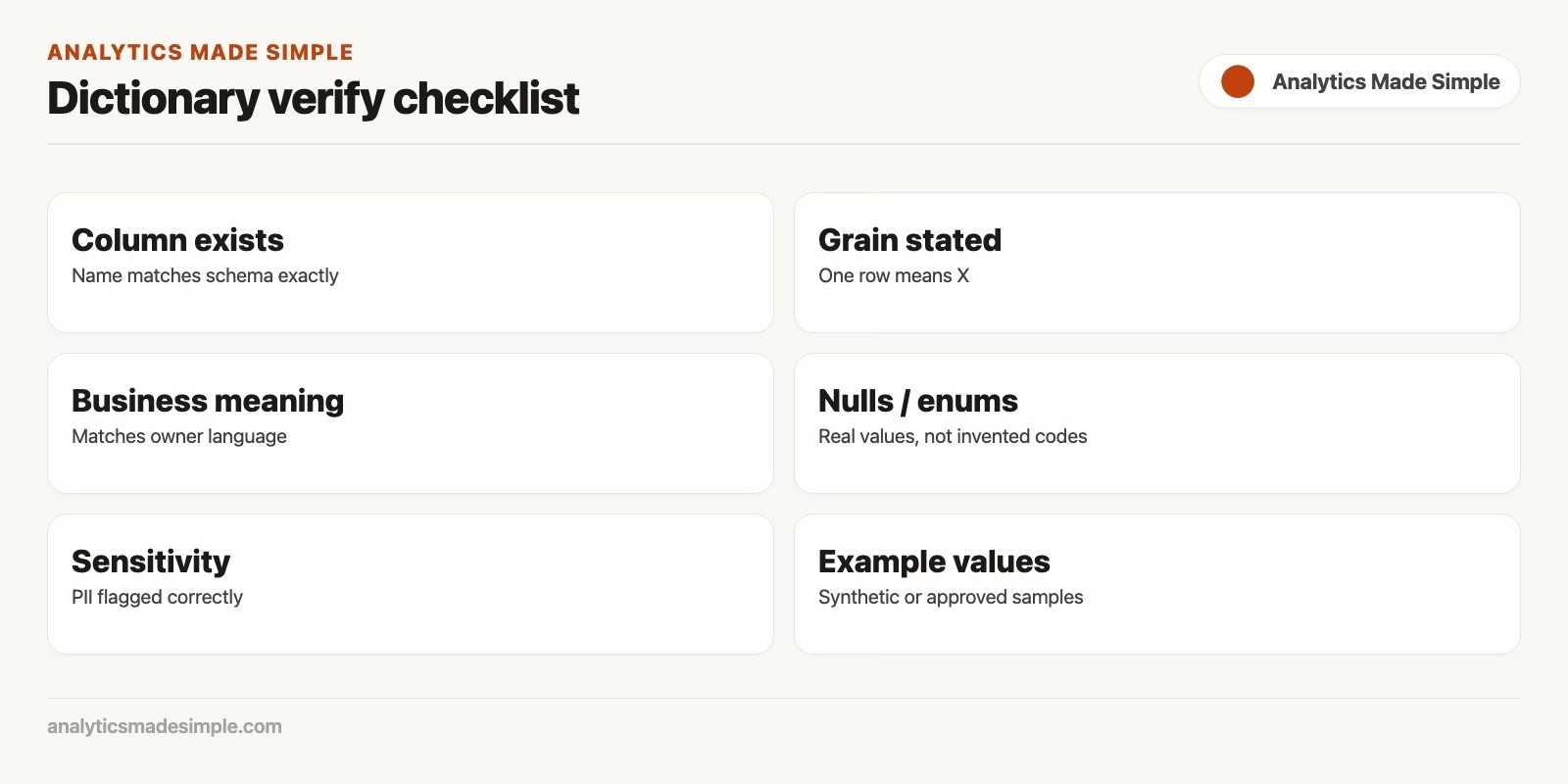
| Check | How | Pass criteria |
|---|---|---|
| Name exactness | Compare card to information_schema / dbt manifest | Every column on the card exists; no extras |
| Grain sentence | Say “one row means…” then test duplicates on keys | Primary key or uniqueness holds on sample window |
| Metric formula | Reconcile one week to a trusted report or prior notebook | Totals match within agreed tolerance |
| Status / enum values | SELECT DISTINCT on real data | Card lists real values; unknown values documented |
| Joins | Spot-check fan-out with counts before/after join | No silent row multiplication on documented joins |
| Sensitivity | Scan column list against PII ladder | Flags match; paste guidance correct |
| Owner / steward | Message the named humans | They accept the role (not a ghost name) |
| Do not use for | Ask one consumer what they almost misused it for | At least one concrete anti-use captured |
| Freshness claim | Compare max date / job success to SLO text | Card matches reality this week |
| Open questions | None left as fake certainty | UNCERTAIN items resolved or still listed as open |
This is the dictionary twin of the checklist for AI-written SQL. Speed is allowed, but shipping fiction is not.
A worked example: the weekly_order_facts card
You feed the model the column-list prompt above (each column’s name and type), and it returns polished YAML, a simple text format for structured notes. Then you verify it with this query:
-- Grain check: should be unique on order_id + week_end_date
SELECT order_id, week_end_date, COUNT(*) AS n
FROM analytics.certified.weekly_order_facts
WHERE week_end_date BETWEEN DATE '2026-02-01' AND DATE '2026-02-28'
GROUP BY 1, 2
HAVING COUNT(*) > 1
LIMIT 20;

-- Enum check
SELECT status, COUNT(*) AS n
FROM analytics.certified.weekly_order_facts
WHERE week_end_date = DATE '2026-02-28'
GROUP BY 1
ORDER BY n DESC;

-- Finance reconcile sketch (toy window)
SELECT
  ROUND(SUM(CASE WHEN status = 'paid' THEN amount
                 WHEN status = 'refunded' THEN amount
                 ELSE 0 END), 2) AS net_amount
FROM analytics.certified.weekly_order_facts
WHERE week_end_date = DATE '2026-02-28';
These three queries check what the AI wrote about the table. The first lists any order that appears twice in the same week, the second counts each status value so you can spot one the description missed, and the third adds up net revenue so you can compare it with Finance’s figure.
Suppose the query finds zero duplicate pairs and the statuses match the card. Suppose net_amount also matches Finance’s known number for that week to within $0.01. The owners confirm, you set last_reviewed, and you publish. Now suppose net_amount is double what Finance reports. You do not edit the catalog to make it sound better. You open an investigation, because maybe refunds are stored as positive amounts with a flag, and the AI’s formula was wrong. You fix the definition (or the model), verify again, and then publish. The catalog text is a product of the truth, and it can never be the source of it.
An example of a published card after verification
object: analytics.certified.weekly_order_facts
purpose: "Weekly net revenue inputs for Finance packs and Growth review."
grain: "One row per order_id x week_end_date."
owner: finance_analytics_lead
steward: orders_domain_analyst
columns:
  order_id: "Checkout order identifier; stable join key to order system of record."
  week_end_date: "Week ending Sunday in America/New_York; not transaction timestamp."
  customer_id: "Customer account key; strong identifier; not an email."
  amount: "Signed order amount in USD; refunds negative when status=refunded."
  status: "paid | refunded only in certified table; other statuses excluded upstream."
  region: "Shipping region bucket used by Finance packs (east/west/central)."
definitions:
  weekly_net_revenue: "Sum of amount for the week; refunds already signed negative."
sensitivity:
  pii_direct: false
  notes: "customer_id is a strong account key; treat as personal in joins to CRM."
do_not_use_for:
  - real_time_fraud
  - incomplete_current_week_as_final
  - customer_email_outreach (no email here; do not join casually for marketing)
freshness_slo: "Monday 08:00 America/New_York"
last_reviewed: "2026-03-01"
reviewed_by: orders_domain_analyst
draft_tool: "enterprise AI draft v0; human verified"
status: certified
This is the finished catalog card, written in YAML, a plain text format for structured notes. It says what the table is for, what one row means, who owns it, and what each column holds, and every line on it was checked against the queries above before it was published.
The draft_tool line is optional honesty. It reminds future readers that AI helped with the typing and that humans signed off. That signal to the team matters more than the file format.
Where AI helps most, and where it wastes your time
| Task | AI fit | Human must own |
|---|---|---|
| Turning schema into first-pass prose | High | Exact names and types as source |
| Suggesting column meanings from messy names | Medium | Verification SQL and owner sign-off |
| Writing consumer-facing plain English | High | Business vocabulary match |
| Choosing system of record vs curated truth | Low | Truth map and org politics |
| Declaring certified status | None | Steward + checks + clock |
| Bulk documenting every raw table in month one | Tempting, harmful | Scope to certified assets first |
The earlier post on stewardship warned against catalog theater, where everything is tagged and nothing is trusted. AI makes that theater cheaper to stage, so resist it. Document the few objects that drive decisions, and use AI to make those few entries excellent.
Privacy while you document
Dictionary work still runs into the paste rules from the privacy post. These habits keep you safe:
- Prefer the database’s catalog tables, dbt docs, and made-up examples over real customer rows in your prompts.
- If you must show what values look like, use totals or fake samples that keep the same shape.
- Mark sensitivity on the card, so that future pastes and access reviews start from the truth.
- Never paste credentials that appear in connection notes “for context,” because a chat is copied and kept far more widely than a password vault.”
Documenting personal data fields is allowed and necessary. Sending those fields to an unapproved chat tool so it can write the documentation is a different activity altogether.
Tie dictionaries to quality and metrics
A definition without a test is only a hope. When you mark a card as certified, do three things:
- Link the metric wiki, or a spec in the style of the metrics series, for any business number named on the card.
- Point to the quality checks or scorecard that protect what one row means and the null rules.
- If freshness fails again and again, remove the certified status the same week you notice, because a badge without a clock teaches people to be cynical.
AI can draft the test descriptions too, and the same rule applies: draft first, then verify by running them.
Common mistakes
| Mistake | Why it hurts | Better habit |
|---|---|---|
| Publish AI text as certified | Fiction with a badge | last_reviewed only after checks |
| Document every table in week one | Empty fields, cynicism | Certified decision assets first |
| No grain sentence | Every total becomes ambiguous | Force “one row means…” |
| Invented columns in the draft | Readers chase ghosts | Schema-only prompts; refuse extras |
| Skipping owner confirmation | Orphan definitions | Named human accepts role |
| Pasting prod samples to “improve prose” | Privacy risk without quality gain | Synthetic shape samples |
| Never revisiting after pipeline changes | Silent drift | Re-verify on schema or metric change |
How to practice this week
- Pick one certified table you use every week, or one that should be certified, so the practice improves something people already rely on.
- Export the column names and types only, and draft a card with AI using the structured prompt.
- Run the verify checklist, and log every UNCERTAIN item you resolve, so the next person can see what was checked and why.
- Publish or update the catalog entry with a review date and your name.
- Add one do-not-use rule that would have saved you from a real argument in the past.
- Put a 90-day revisit on your calendar, because dictionaries without a clock die.
Quick recap
- Dictionaries exist to answer questions about meaning, what one row is, ownership, and misuse quickly.
- AI is a drafting partner, and the order is source, draft, human verify, publish.
- Force a structured output with uncertainty markers, and forbid invented columns.
- Verify with SQL, owners, sensitivity, and reconciliation checks before you certify anything.
- Keep your paste habits clean while you document, and link the quality tests and metric specs.
- A few excellent cards beat hundreds of empty ones.
What comes next
The final post in the series is a personal AI checklist. It stretches the AI-SQL habits to charts, Python, and stakeholder email, adds a weekly hygiene pass, and recaps the whole series. You leave with a Monday system and not only ideas.
Related: Learn hub, Data stewardship, Data quality, Metrics that matter.
Your next step
Pick ten columns from a table you know well and ask an AI tool to draft their definitions. Then verify each one against the data and the people who own it, and mark anything uncertain. Publishing only what you verified keeps your data dictionary from turning into confident fiction.
Series notes
This is Part 8 of Practical AI for analytics people. Previous: privacy when pasting data into chat tools. Next: the personal AI checklist (Part 9).
Sources
- National Institute of Standards and Technology (NIST) AI Risk Management Framework (map and measure thinking that pairs with human verification of AI outputs).
- NIST AI RMF 1.0 publication (core functions for managing AI risk in organizations).
- Open Worldwide Application Security Project (OWASP) Top 10 for LLM Applications (overreliance and sensitive information disclosure risks when trusting generated text).
- ISO/IEC 11179-1:2023 Metadata registries (formal metadata registry concepts many enterprises map dictionaries toward; heavy, useful for program language).
- W3C: Data Catalog Vocabulary (DCAT) 3 (interoperable catalog concepts for datasets and distributions).
- International Association of Privacy Professionals (IAPP): Glossary of privacy terms (sensitivity language when dictionary fields describe personal data).
- NIST Privacy Framework (privacy risk outcomes that documentation and data inventories support).
- Analytics Made Simple: How to Check AI-Written SQL.
- Analytics Made Simple: Data governance.
- Analytics Made Simple: Data stewardship at work.
Keep going
Same lessons in your feed
Short diagrams, hooks, and weekly tutorials on Substack, Instagram, X, and Facebook.



