If you want an AI to read a long contract or report for you, Kimi K3.1 Pro is worth trying, as long as you first test it on a document whose answers you already know. It is the newest model from Moonshot AI, it can read a very long document in one go, and you can try it free in the Kimi app with a usage cap, according to Moonshot’s pricing page (updated October 26, 2026).
Imagine you have a 180-page supplier contract and the board pack from last quarter, and you want to ask an AI which clauses let either side walk away and whether the numbers in the pack add up. A model that reads all of it at once sounds perfect. The risk is the same as with a new colleague: it can sound sure about a page it never really read. This guide shows you how to find that out in fifteen minutes, before anything rides on the answer.
This guide covers what the model is, what each Kimi plan gives you, what the pay-per-use option costs for a long report, where your documents go, and the three-question test. What is Kimi? covers the company and its earlier models.
What the new Kimi model is
Kimi K3.1 Pro is an upgraded version of Moonshot’s Kimi K3 model, trained further to do better at coding, office and finance work. Moonshot’s K3.1 Pro tech blog (October 23, 2026) gives it a one-million-token context window.
A token is the small chunk of text an AI model reads and writes, roughly three quarters of an English word, so a million tokens is about 750,000 words. The context window is how much text the model can hold in mind in one conversation. Our plain guide to tokens and context windows explains both in more depth. The Next Web reported the launch the next day, describing K3 as a model of nearly 3 trillion parameters, the internal numbers a model learns during training.
A faster version, K3.1 Pro Highspeed, came out at the same time. The tech blog (October 23, 2026) says it answers two to three times faster. On the pricing page (checked October 29, 2026) Highspeed costs $4 per million input tokens, where the standard K3.1 Pro costs $2.
Moonshot also says it will publish the model’s weights, the files you would need to run it on your own servers, by November 4, 2026. As of October 29 they were not on Hugging Face, the site where most open models are shared, and Moonshot had not named a licence. Check Moonshot’s Hugging Face page for the files and the licence before you plan anything around them.
What Moonshot says it is better at
Moonshot’s own tests put K3.1 Pro close to the best closed models on coding and ahead of its earlier models on office and finance work. A benchmark is a fixed set of test questions used to score models against each other, and these are the company’s own benchmarks, not an independent test, so treat them as a reason to try it rather than a reason to trust it.
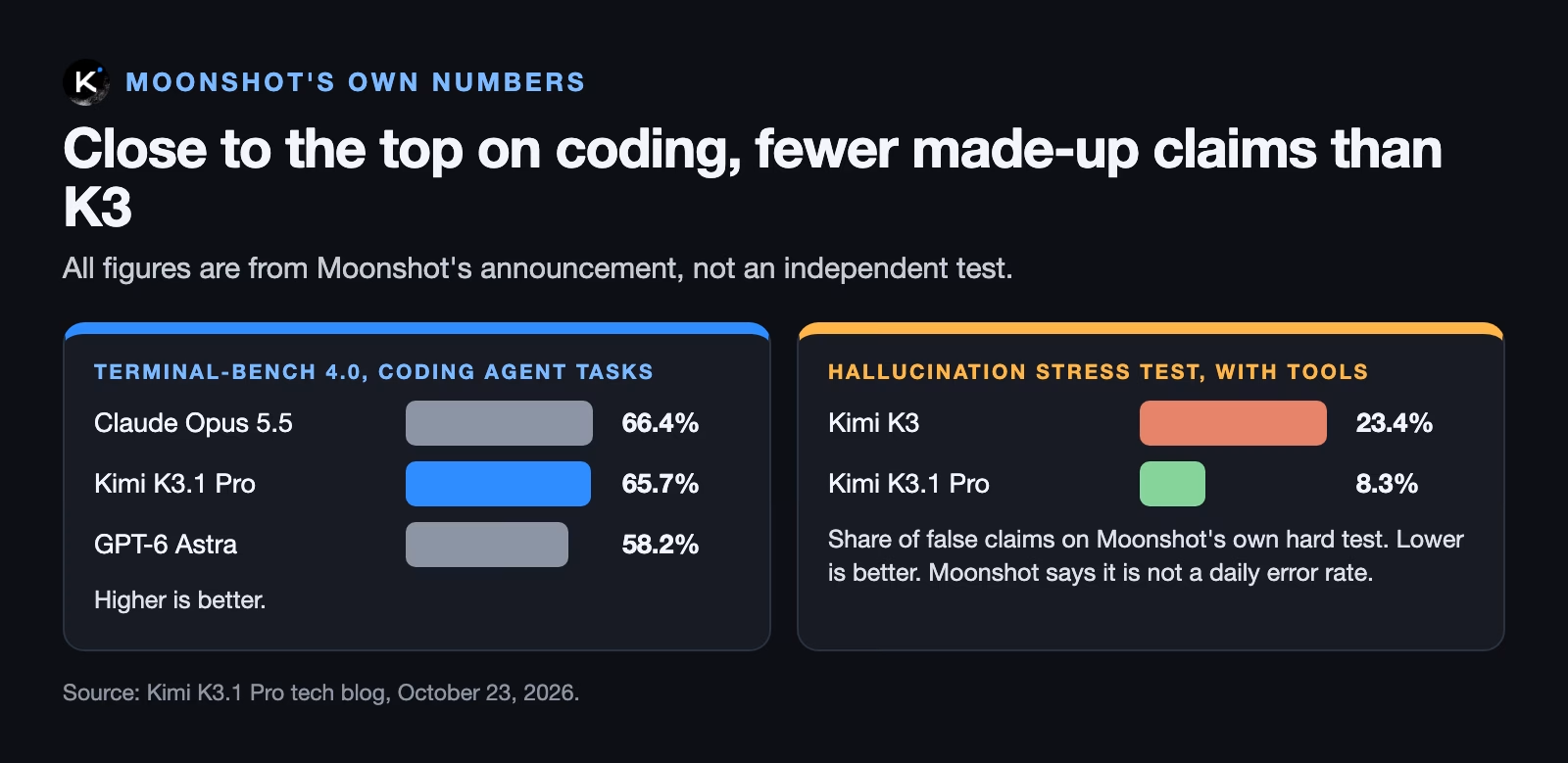
Two of those numbers matter for document work. On a coding-agent test called Terminal-Bench 4.0, the tech blog (October 23, 2026) reports 65.7% for K3.1 Pro against 66.4% for Claude Opus 5.5. On Moonshot’s own hard test for made-up facts, the share of false claims fell from 23.4% for K3 to 8.3% for K3.1 Pro when it could search the web. Moonshot calls that test a deliberately difficult stress test and says it is not a typical daily error rate.
Read that last point twice. Fewer made-up claims is good news, and it is still not zero, which is why the test later in this guide exists.
What it costs on each Kimi plan
The free plan gives you a limited amount of K3.1 Pro, and the full million-token chat is only on the two most expensive plans. Moonshot’s Kimi K3.1 Pro pricing page (updated October 26, 2026) lists the plans below, with monthly prices shown for annual billing: Free at $0, Plus at $15, Pro at $31, Max at $79 and Ultra at $159.
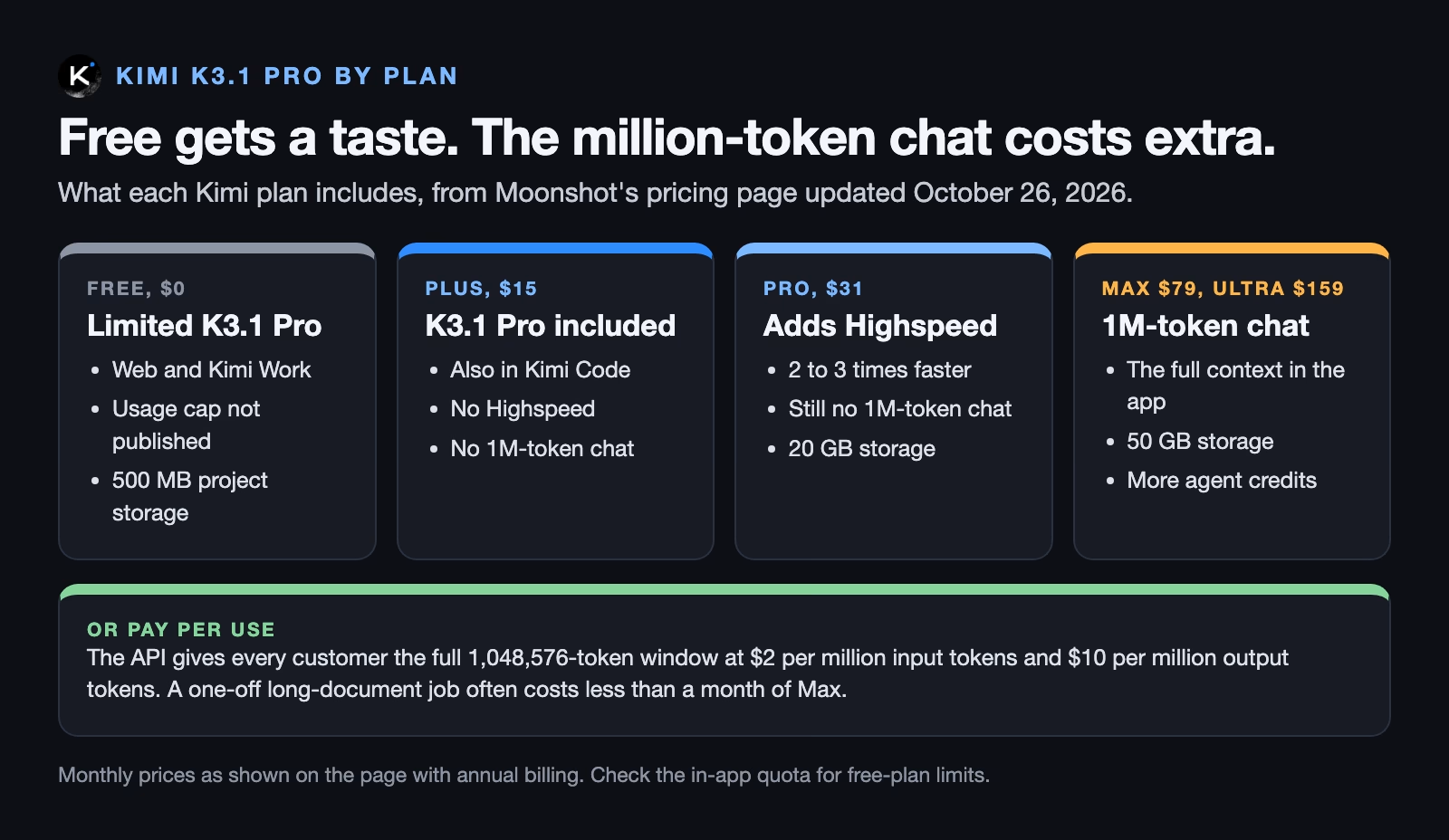
The free plan does not say how much use you get; the pricing page (checked October 29, 2026) only writes “limited usage”. It also lists project storage, the space for files you keep in Kimi: 500 MB on Free, 20 GB on Plus and Pro, and 50 GB on Max and Ultra. The in-app quota indicator is the place to check. If you hit the limit halfway through a test, that tells you something too: the free plan is for a taste, not for a weekly workflow.
The pay-per-use API
The API, the way programs and paid tools talk to the model directly, gives every customer the full window. The pricing page (checked October 29, 2026) lists these rates per million tokens:
| Model | Input | Cached input | Output |
|---|---|---|---|
| kimi-k3.1-pro | $2.00 | $0.20 | $10.00 |
| kimi-k3.1-pro-highspeed | $4.00 | $0.20 | $20.00 |
Cached input is text the model has already read in the same session, which the pricing page (checked October 29, 2026) charges at a tenth of the normal input price. That matters for long documents, because every follow-up question normally sends the whole document again.
Here is the arithmetic for a 200-page report. At about 500 words a page that is 100,000 words, or roughly 133,000 tokens at three quarters of a word per token. Ten questions with short answers look like this:
| Ten questions on a 133,000-token report | Input | Output | Total |
|---|---|---|---|
| Whole report sent with every question | 10 × 133,000 tokens × $2 per million = $2.66 | 10 × 500 tokens × $10 per million = $0.05 | about $2.71 |
| First read full price, nine cached reads | $0.27 + (9 × 133,000 × $0.20 per million) = $0.51 | $0.05 | about $0.56 |
So a careful afternoon with one long report costs well under a dollar through the API if caching works, and under three dollars if it does not. The Max plan, the cheapest one with the million-token chat in the app, is $79 a month on the pricing page (checked October 29, 2026). If you read long documents once a month, the API or a tool built on it is the cheaper path; if you do it daily, a plan starts to make sense.
Where you can use it
You can use K3.1 Pro in four places today, plus the downloadable weights once they arrive. The tech blog (October 23, 2026) lists kimi.ai, the phone apps, the Kimi Work desktop app, Kimi Code for programming, and the Kimi API, where the model is called kimi-k3.1-pro. DataCamp’s guide (October 26, 2026) adds that OpenRouter, a site that resells many AI models through one account, lists it too.
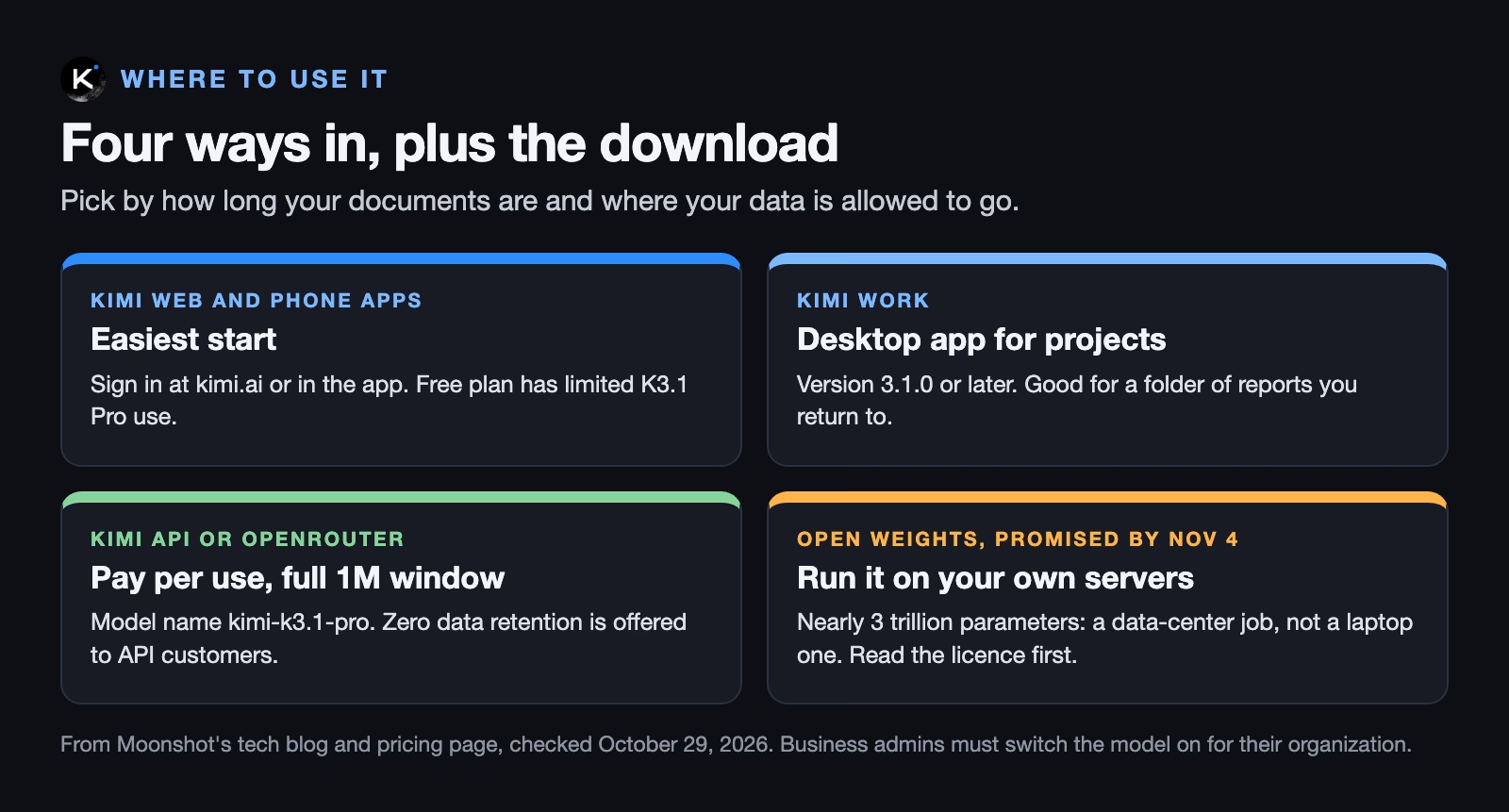
If you use Kimi through work, your company’s Kimi administrator has to switch K3.1 Pro on first. Moonshot says it is off by default for business accounts at launch.
Where your documents go
Every way of using K3.1 Pro today sends your document to Moonshot’s servers or to a reseller’s, because the model is far too big to run on a laptop. Moonshot is based in China. The tech blog says API customers can ask for zero data retention, meaning the request is not stored after the answer comes back; that option is described for the API, not for the free app.
Before you upload a contract or a board pack, check two things: what your employer allows, and what the specific Kimi product you are using says about storage. Our guide on how to upload documents to AI tools safely has a checklist that works for any provider.
The known-answer test
The fastest way to learn whether a model reads your long document properly is to ask it questions you can already answer. You are not grading the model in general. You are checking it on your kind of document, at your length, in your language.
Pick a document you know well and are allowed to upload. A public annual report works if your own files are off limits. Then ask three kinds of question.
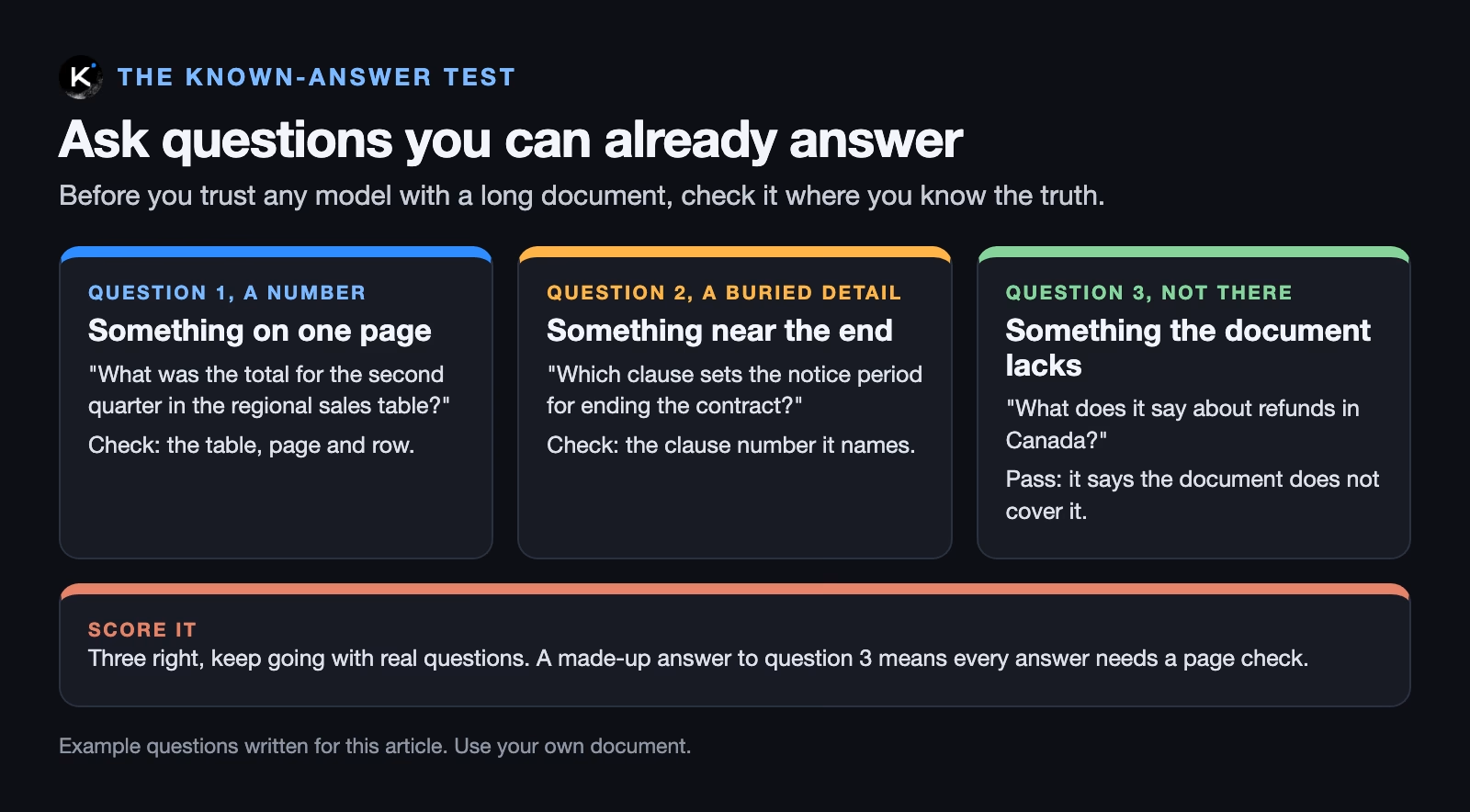
- A number from one table. Pick a figure from the middle of the document and ask for it in words. Check the answer against the page.
- A detail buried near the end. Long-context models are often weakest in the middle and the end of a long text. Ask about a clause or footnote from the last fifth of the document and ask it to name the section.
- Something the document does not cover. Ask about a topic you know is missing. A good answer says the document does not cover it. A confident made-up answer is the failure you most need to see.
Ask every question in the same chat, after uploading the document once. That matches how you would really use the model on a real job.
Make it show its work
Add one line to each question: “Quote the sentence you are relying on and give the page or section.” This changes the job from trusting the answer to checking a quote, which takes seconds. If it cannot produce a quote, or the quote is not in the document, you have your result.
A worked example: a 180-page contract
Let’s go back to the supplier contract. Suppose you know three things about it because you negotiated it: the notice period for ending the deal is 90 days, the price review happens every January, and there is nothing in it about data stored outside the country.
You upload the contract to Kimi and ask the three questions, each with the “quote and page” line. Here is how to score what comes back:
| Question | What you know | Pass looks like | Fail looks like |
|---|---|---|---|
| Notice period to end the deal | 90 days | “90 days” with a quote from the termination section | A different number, or no quote |
| When prices are reviewed | Every January | “Each January” with the clause number | A guess such as “annually” with no section |
| Data stored outside the country | Not covered | “The contract does not address this” | A confident clause that does not exist |
Two right and one wrong is not a pass for contract work. It means every answer from this model on this kind of document needs a page check, which may still be worth it as a way to find the right page faster. Three right, with quotes you could find, means you can move on to questions you do not already know the answer to, still spot-checking one in five.
Run the same three questions in the AI tool you already use. If both pass, pick on price, privacy rules and speed. If only one passes, the choice makes itself.
Common mistakes
- Trusting a summary of a document you have not checked. A summary has no page numbers to verify. Ask specific questions first.
- Testing on a short document. A 10-page memo tells you nothing about a 180-page contract. Test at the length you plan to use.
- Assuming the free plan has the full window. The million-token chat is on Max and Ultra in the app, or on the API.
- Uploading files you are not allowed to share. Check your employer’s rules first. A public report is a fine test document.
- Reading Moonshot’s test scores as independent results. They are the company’s own tests.
- Planning around the downloadable model files before they exist. Wait for the files and the licence on Hugging Face.
How to try it this week
- Sign in to kimi.ai and check that K3.1 Pro is the selected model, so you know which model you are testing.
- Pick a long public document you know, such as your company’s annual report, so a wrong answer is easy to spot.
- Write three questions: one number, one late detail, one topic that is not covered.
- Add “quote the sentence and give the page” to each question.
- Score the answers with the table above, then run the same test in your current AI tool.
If you work with long documents every week, compare the API cost for one month of your real questions with the Max plan before you pay for either. For the bigger question of when to load a whole document versus searching it in pieces, read our guide on how to give an AI your company’s knowledge.
Quick recap
- K3.1 Pro reads about a million tokens at once and launched on October 23, 2026.
- The free plan is limited; the full window is on Max, Ultra or the API.
- The API costs $2 per million input tokens and $10 per million output tokens, with cheaper cached reads.
- Moonshot’s test scores are its own.
- Test it with three questions you already know the answers to, and ask for a quote and a page every time.
- Weights were promised by November 4, 2026; check Hugging Face for the files and the licence.
Sources
- Moonshot AI: Kimi K3.1 Pro tech blog (October 23, 2026: context window, benchmarks, hallucination test, availability, weights date, cyber changes)
- Moonshot AI: Kimi K3.1 Pro pricing (plans and API prices, page updated October 26, 2026; checked October 29, 2026)
- The Next Web: Moonshot releases Kimi K3.1 Pro (October 24, 2026: launch, size of K3, weights timing)
- DataCamp: Kimi K3.1 Pro benchmarks, pricing and access (October 26, 2026: OpenRouter listing, access routes)
- Hugging Face: moonshotai (where the open weights and licence are due to appear)
Keep going
Same lessons in your feed
Short diagrams, hooks, and weekly tutorials on Substack, Instagram, X, and Facebook.