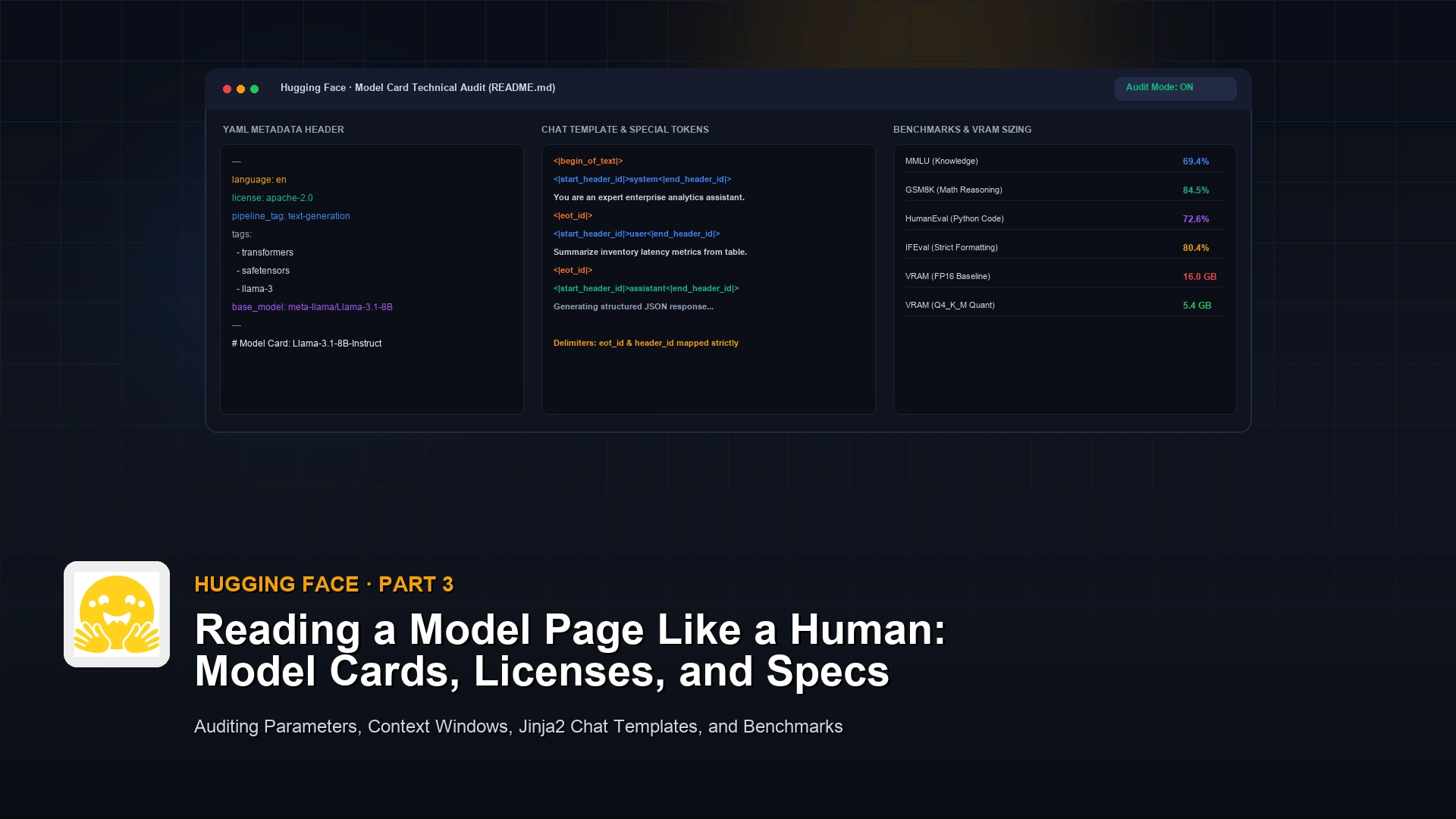
Before you download a model from Hugging Face, check four things on its model card, the page that describes the model: the license, how much memory it needs, the chat format it expects, and how it scores on independent tests. Read the card like a spec sheet, not an advert.
Say everyone at work is excited about a new open model with record scores. You read its page before your team commits. The license forbids commercial use, its test scores came from questions it may have seen while training, and it needs more graphics memory than any computer you own.
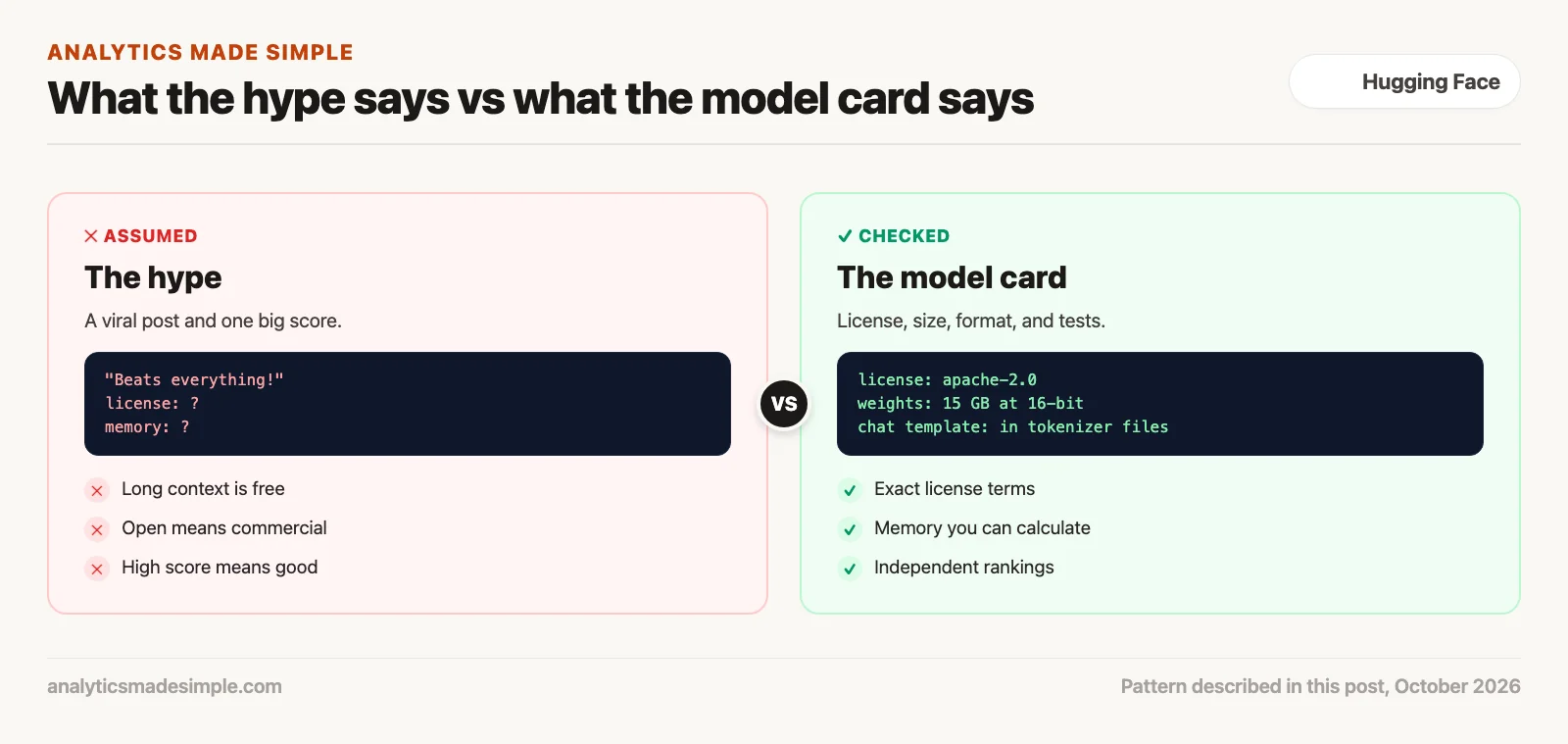
Hype claims vs what the model card actually says
Social media posts and press releases routinely stretch the truth about AI models. They highlight flashy scores on standard tests while glossing over hardware needs and license limits. The model card on Hugging Face is where the marketing stops and the real, physical computing constraints begin.
When a team adopts a model without checking its page carefully, they usually hit one of four walls. They run out of graphics memory because they didn’t budget for the memory a long conversation needs while running. Their software uses the wrong chat format and the model starts rambling or answering its own questions. They discover their commercial product violates the license. Or accuracy quietly craters because the scores on standard tests were inflated by test questions the model had already seen during training.
What the hype assumes
That a huge context window, the amount of text a model can read at once, runs free on regular hardware. That open weights, model files anyone can download, automatically come with commercial rights. That a high score on a standard test means the model is actually good. That any generic chat format will work, without checking the model’s own special tokens, the markers it uses to separate parts of a conversation.
What the model card actually shows
The exact memory needed for both the weights, the model’s learned numbers, and the running conversation cache (a short-term memory the program keeps to work faster). The specific commercial-use terms, spelled out. The model’s own chat template, pulled straight from its files. Independent, blind-tested rankings instead of self-reported scores.
Figure 1 shows the gap between what a viral post claims and what the model card actually documents.
Four steps to check a model before you trust it
Checking a model page takes a routine, not a guess. Before you put a model into a real pipeline (a chain of automatic steps), run through four steps in order: read the file header, do the hardware math, pull the chat template, and question the benchmarks.
Run this checklist on every model you’re considering, and you’ll catch license problems and memory shortfalls before you’ve written a single line of downstream code.
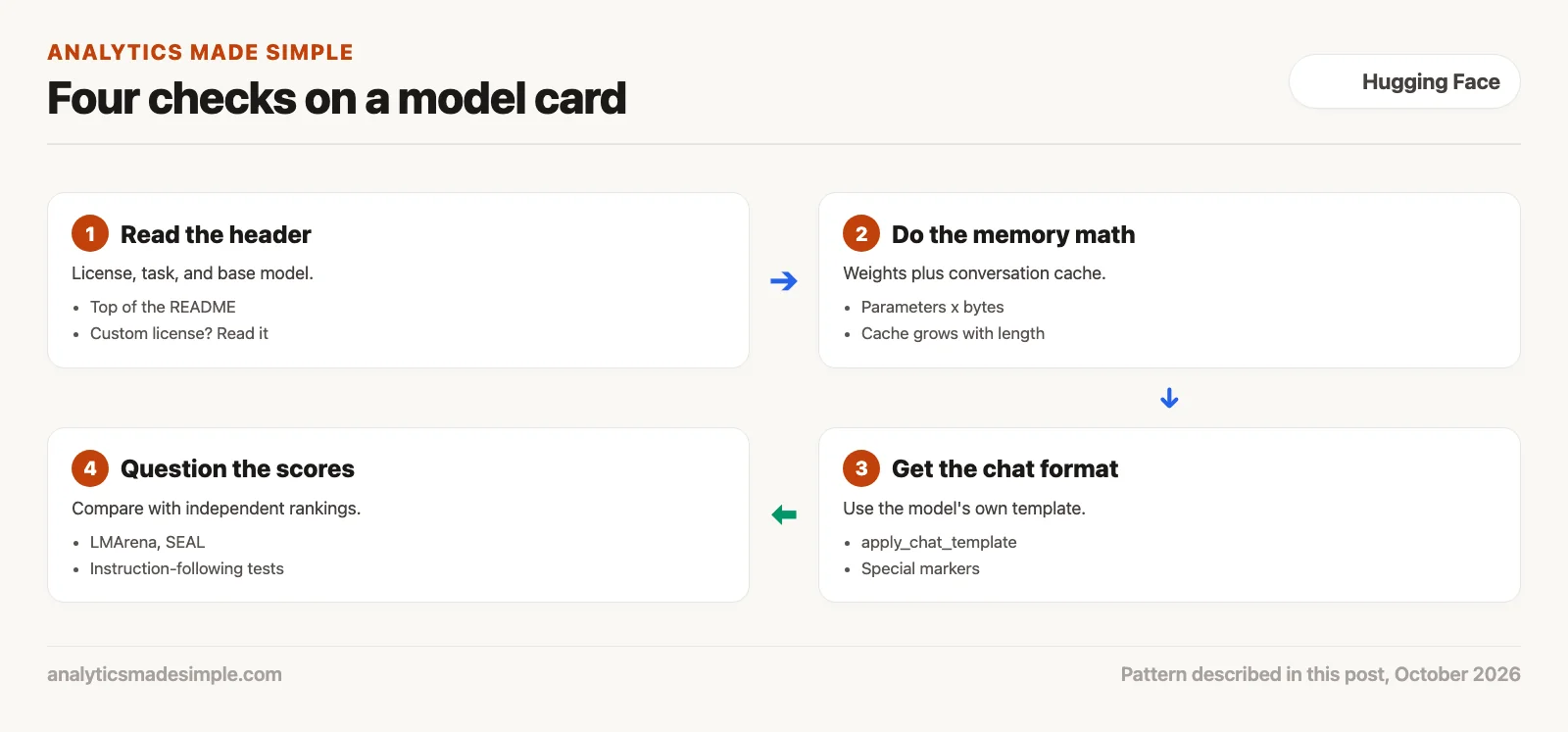
- Read the file header: check the block of settings at the very top of the model’s main documentation file, called the README. Confirm the exact license string, such as apache-2.0, mit, llama3.1, or cc-by-nc-4.0. Check the task type and base model listed there to confirm what the model actually descends from.
- Do the hardware math: multiply the number of active parameters, the model’s learned numbers, by the bytes each one takes up. That gives you the raw weight size. Then add the memory used by the running conversation, which grows with how much context you plan to hold. Check whether that fits on one graphics card in your workstation or needs several linked server machines.
- Pull the chat template: open
tokenizer_config.jsonor the code sample on the model card to find its exact special tokens. Modern chat models need specific markers between turns, like<|im_start|>,<|im_end|>, or<|start_header_id|>. Use the wrong ones and the model stops following instructions properly. - Question the benchmarks: compare the reported scores against independent, outside rankings such as Arena (formerly LMSYS Chatbot Arena) or Scale’s leaderboards. Trust scores from tests that check whether a model actually follows instructions, called IFEval. Trust those more than a multiple-choice benchmark, a standard test that every model takes and that a model could simply have memorized: the Massive Multitask Language Understanding test (MMLU).
Figure 2 walks through this same four-step loop, from reading the file header to checking independent benchmarks.
Anatomy of a model card, section by section
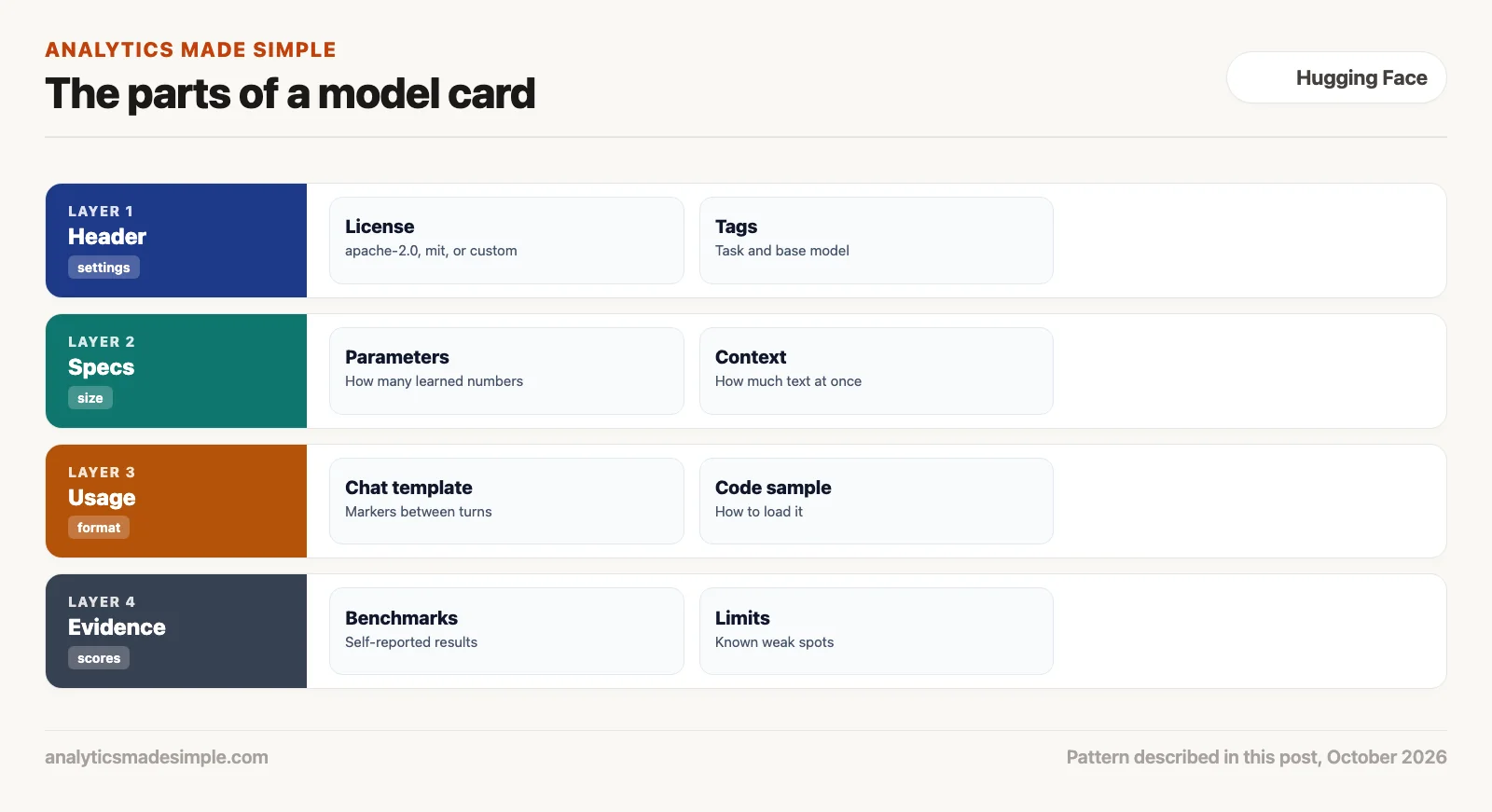
A well-written model card on the Hugging Face Hub breaks into four parts: the settings block at the top, the technical specs, the usage and formatting notes, and the benchmark and license disclosures.
Figure 3 breaks down these four parts, showing where the machine-readable settings end and the plain-English documentation for engineers begins.
Understanding the file header
Every standard Hugging Face model card starts with a settings block, written in a plain text settings format called YAML, wrapped between two lines of triple dashes. That’s not decoration. Hugging Face’s own systems read it to power search filters, its API, and community leaderboards.
---
language:
  - en
license: apache-2.0
tags:
  - text-generation
  - transformers
  - safetensors
  - roleplay
base_model: Qwen/Qwen3.5-9B-Base
pipeline_tag: text-generation
---
When you read that header, always check the license field first. If it’s listed as other or custom, scroll to the bottom of the card and read the full custom agreement. Meta’s Llama 4 license, for example, requires companies with more than 700 million monthly active users to request a separate license from Meta, while models built by academics often block commercial use altogether.
Chat templates and special tokens
A foundation model doesn’t understand plain English sentences the way you’d expect. It understands sequences of tokens. During the later stages of training, called instruction tuning and direct preference optimization (DPO), a model’s creators teach it to recognize specific tokens that mark where the system’s instructions end, where your message begins, and where its own answer should start.
If your app sends plain text without those markers, the model will often make up both sides of the conversation or ramble without stopping. Most modern model pages include a ready-made chat template inside tokenizer_config.json that formats your messages automatically.
from transformers import AutoTokenizer

tokenizer = AutoTokenizer.from_pretrained("Qwen/Qwen3-Coder-30B-A3B-Instruct")

messages = [
    {"role": "system", "content": "You are a helpful assistant for a small bakery."},
    {"role": "user", "content": "List three ways to keep bread fresh."},
]

# Format the conversation exactly the way this model was trained to read it
prompt = tokenizer.apply_chat_template(messages, tokenize=False, add_generation_prompt=True)
print(prompt)
It needs pip install transformers jinja2 and only downloads the small files that split text into tokens. Run on October 3, 2026, it printed.
<|im_start|>system
You are a helpful assistant for a small bakery.<|im_end|>
<|im_start|>user
List three ways to keep bread fresh.<|im_end|>
<|im_start|>assistant
The output shows the exact markers this model expects, <|im_start|> and <|im_end|>, around each turn. Using apply_chat_template saves you from building those strings by hand. Llama models use different markers, which is why you take the template from each model’s own files.
Sizing hardware: how much memory you actually need
A common planning mistake is underestimating how much memory it takes to actually serve a model to real users. The parameter count sets the base storage size, but the memory used while running is mostly driven by the cache that holds the ongoing conversation.
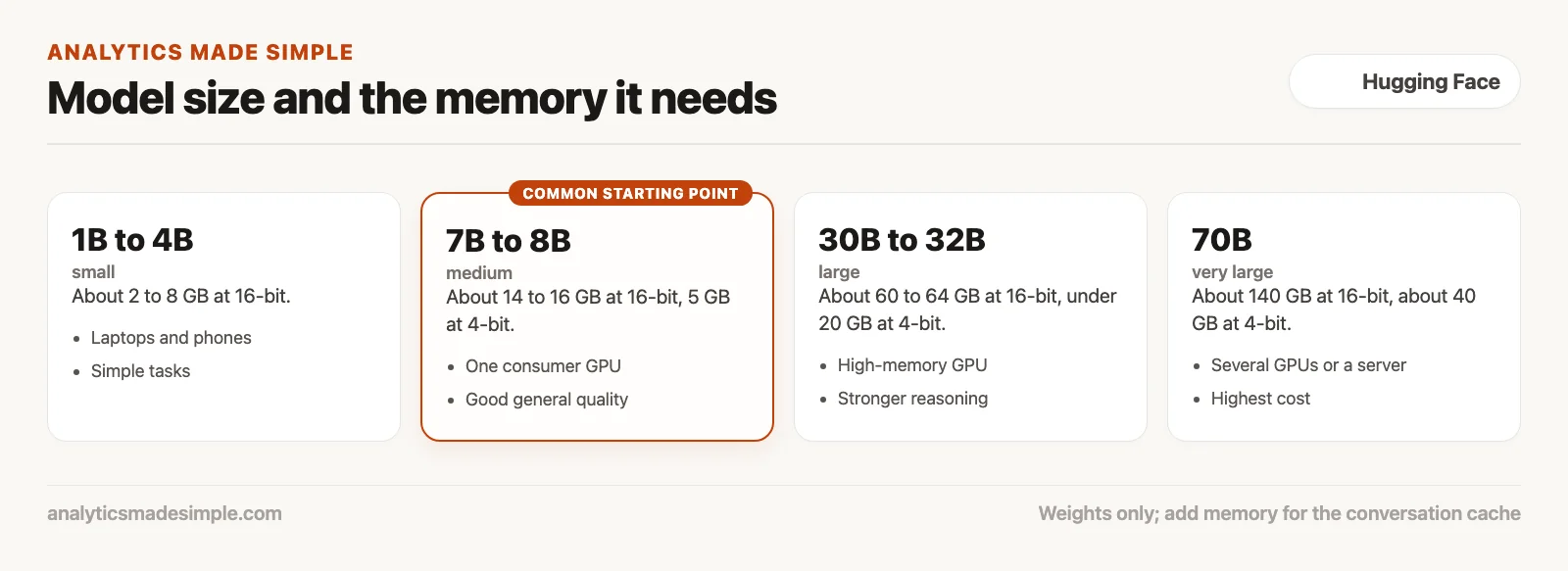
Figure 4 lays out four common model size tiers, showing their weight footprint at each precision level and which hardware tends to fit each one.
The VRAM math, step by step
To work out how much graphics memory (VRAM) a model actually needs, engineers use a simple two-part formula.
| Precision Tier. | Bytes Per Parameter. | 7B Model Weights. | 70B Model Weights. |
|---|---|---|---|
| 16-bit Float (FP16 / BF16). | 2.0 bytes. | 14.0 GB to 16.0 GB. | 140.0 GB. |
| 8-bit Quantization (INT8). | 1.0 byte. | 7.0 GB to 8.5 GB. | 70.0 GB. |
| 4-bit Quantization (Q4_K_M). | 0.55 to 0.65 bytes. | 4.8 GB to 5.4 GB. | 42.0 GB. |
Beyond the raw weights, you also need memory for the running conversation cache, known as the key-value cache. Its size depends on the model’s design. For Qwen3-Coder-30B-A3B-Instruct, the script below works out about 0.79 GB per conversation at 8,000 tokens and about 3.15 GB at 32,000 tokens, at 16-bit precision. Multiply by the number of people chatting at once.
Quantization formats: which one matches your setup
When you read model cards, you’ll run into several different compressed file formats. Knowing which one matches your setup saves you from painful compatibility problems.
Three formats cover most of the open-model world, and each one fits a different situation.
- The GPT-Generated Unified Format (GGUF): The standard file for running models on a regular processor (CPU) or a mix of processor and graphics card. GGUF packs the weights, the tokenizer (the part that splits text into chunks), and the architecture settings into one self-contained file. It’s the native format for llama.cpp, Ollama, LM Studio, and Jan. For most desktop setups, the medium four-bit version,
Q4_K_M, is the sweet spot between speed and barely noticeable quality loss. - Activation-aware Weight Quantization (AWQ): It shrinks a model’s numbers and is built for high-volume server graphics cards running tools like vLLM and TensorRT-LLM. Instead of treating every weight the same, AWQ protects the small share of weights that matter most while storing the rest at four bits. Four-bit weights take about a quarter of the space of 16-bit weights, with a small loss in quality.
- ExLlamaV2 (EXL2): A format built for speed on consumer graphics cards. EXL2 can use different numbers of bits for different parts of the model, so you can tune the file to fit your hardware.
Checking a model’s config file in Python
Instead of scrolling through long web pages, engineers often check a model’s architecture with code, by pulling the small config.json file straight from the Hub. This script reads the model’s design without downloading the large weight files.
# check_model_config.py
import json
from urllib.request import urlopen

model_id = "Qwen/Qwen3-Coder-30B-A3B-Instruct"
url = f"https://huggingface.co/{model_id}/raw/main/config.json"
config = json.load(urlopen(url))

layers = config["num_hidden_layers"]
q_heads = config["num_attention_heads"]
kv_heads = config["num_key_value_heads"]
head_dim = config.get("head_dim") or config["hidden_size"] // q_heads  # some models list it directly

print(f"Model:               {model_id}")
print(f"Layers:              {layers}")
print(f"Query heads:         {q_heads}")
print(f"Key-value heads:     {kv_heads} (grouped {q_heads // kv_heads} to 1)")
print(f"Max positions:       {config['max_position_embeddings']:,}")

# Memory the conversation cache needs per token, at 2 bytes per number (16-bit)
per_token = 2 * layers * kv_heads * head_dim * 2
for tokens in (8_000, 32_000):
    print(f"Cache for {tokens:,} tokens: {per_token * tokens / 1e9:.2f} GB per conversation")
Run on October 3, 2026, it printed.
Model:               Qwen/Qwen3-Coder-30B-A3B-Instruct
Layers:              48
Query heads:         32
Key-value heads:     4 (grouped 8 to 1)
Max positions:       262,144
Cache for 8,000 tokens: 0.79 GB per conversation
Cache for 32,000 tokens: 3.15 GB per conversation
In plain words, the script reads the model’s small settings file without downloading the weights. Qwen3-Coder-30B-A3B-Instruct has 32 query heads sharing 4 key-value heads, a design called grouped-query attention that keeps the conversation cache eight times smaller than if every head had its own. The script reads the size of each head from the file when the model lists it, because for this model that size is not simply the hidden size divided by the number of heads. The last two lines turn that into memory per conversation.
Decoding a model’s name
Model names on Hugging Face follow a pattern that tells you a lot before you even open the page. Learning to read that pattern lets you filter out the wrong checkpoints at a glance.
- Base vs instruct. A model page named
Qwen3.5-9B-Baseis a raw base model, trained only to predict the next word. It won’t answer your questions; it just keeps writing.Qwen3.5-9B, with no suffix, has gone through extra training to hold a conversation. Other labs mark the chat version instead, with-Instructor-it. - Quantization tags (GGUF, AWQ, EXL2). Files tagged
-GGUF,-AWQ, or-GPTQare pre-shrunk versions built for one specific program that runs models. GGUF files run locally on a regular processor or a home graphics card, through tools like llama.cpp and Ollama. AWQ files and the Generalized Post-Training Quantization format (GPTQ) are both built for fast server graphics cards running vLLM. - Context tags (-32k, -128k). These tell you the creator stretched the model’s positional math beyond its original training window, so it can read longer documents in one pass.
- Mixture of experts (MoE). Models like
Qwen3-Coder-30B-A3B-Instructhold many specialized sub-networks inside one model. The total parameter count is about thirty billion, but only about three billion are active for any single word it generates (the A3B in the name), so it runs much faster than a thirty-billion-parameter model built the normal way.
Three checks before you adopt a model
Before you bring any new open model into your organization this week, run these three checks.
- Read the license first. Open the model card, read the settings block at the top, and confirm the license actually allows the commercial use you have in mind. If it’s a custom license, search the text for user-count thresholds and attribution rules.
- Verify the chat template. Load the model’s tokenizer in Python and run
apply_chat_templateon a sample two-turn conversation. Print the result and confirm the special tokens line up correctly. - Work out your memory budget. Add your expected number of simultaneous users and average conversation length to your weight calculation. Leave at least twenty percent of your graphics card memory free, so the system doesn’t crash when it runs out.
Series notes
This is Part 3 of Learn Hugging Face from scratch. Previous: Hub navigation. Next: Spaces demos.
Sources
- Hugging Face, Model cards.
- Hugging Face, Chat templates.
- Arena (lmarena.ai), independent model rankings from blind comparisons.
- Jeffrey Zhou and others, Instruction-Following Evaluation for Large Language Models (IFEval), 2023.
- Ji Lin and others, AWQ: Activation-aware Weight Quantization, 2023.
- Meta, Llama 4 Community License, checked October 5, 2026.
Keep going
Same lessons in your feed
Short diagrams, hooks, and weekly tutorials on Substack, Instagram, X, and Facebook.