
Kimi is a family of AI chat assistants from Moonshot AI, a company based in Beijing. It is best known for a huge context window, which is how much text it can hold in mind during one conversation. A bigger window lets you paste in a whole report, but it does not make Kimi read the right part of it.
Imagine you paste a 410-page sales document into Kimi and ask one narrow question, such as how far the seller promises to stay away from its competitors. Kimi answers in seconds and sounds completely sure. The answer actually comes from a different company’s file that you pasted into the same chat last week, because you never started a fresh conversation. The fix is a few plain habits, which this post walks through: one file per chat, one clear question, and a page number you check yourself.
How Moonshot names the Kimi family
Moonshot AI is the lab, and Kimi is the family it ships. You will see both names on one blog post, the way xAI and Grok share a sentence. Groq, spelled with a q, is a different company that runs other people’s models for them, which is called inference (running a trained model to get answers). If someone on your team says “put it in Kimi,” ask which one they mean before you upload a confidential file.
The main entry point is a chatbot: open kimi.com or kimi.ai, or use the iOS, Android, and HarmonyOS apps. You type, attach a file if you need to, and get a reply. Moonshot also ships Kimi Work (desktop) and Kimi Code (terminal, the text window where you type commands) as extra rooms off the same account. Day one is the hosted chat box, which means the prompt leaves your laptop.
The second path is files. Moonshot publishes open-weight checkpoints on Hugging Face under moonshotai. A weight file is a pile of numbers plus a license card, and you can run it on hardware you control or send it to a host that already has GPUs (graphics processing units, the chips that run AI models). The filename is not a location, and a separate AMS post on hosted models versus downloads covers that fork in detail. K3’s published size, about 2.8 trillion parameters (the learned numbers inside the model) using a mixture-of-experts design, will not fit on a 16-gigabyte (GB) laptop. If your plan was “download Kimi like Llama 8B,” you wanted the website instead.
The third path is the API at platform.kimi.ai, where apps call a model ID and you pay in tokens (small chunks of text, about three-quarters of a word each). A consumer seat on the website, if you have one, does not refill that wallet: same family name, different merchant, different contract. Confirm the ID on the model list the week you wire anything, because Moonshot retires old strings.
Rule of thumb: Say “Kimi chat,” “Kimi weights,” or “Kimi API,” where weights means the downloadable model files. If you cannot pick one, you are not ready to paste in a confidential file.
Chat, Hub, and a bill
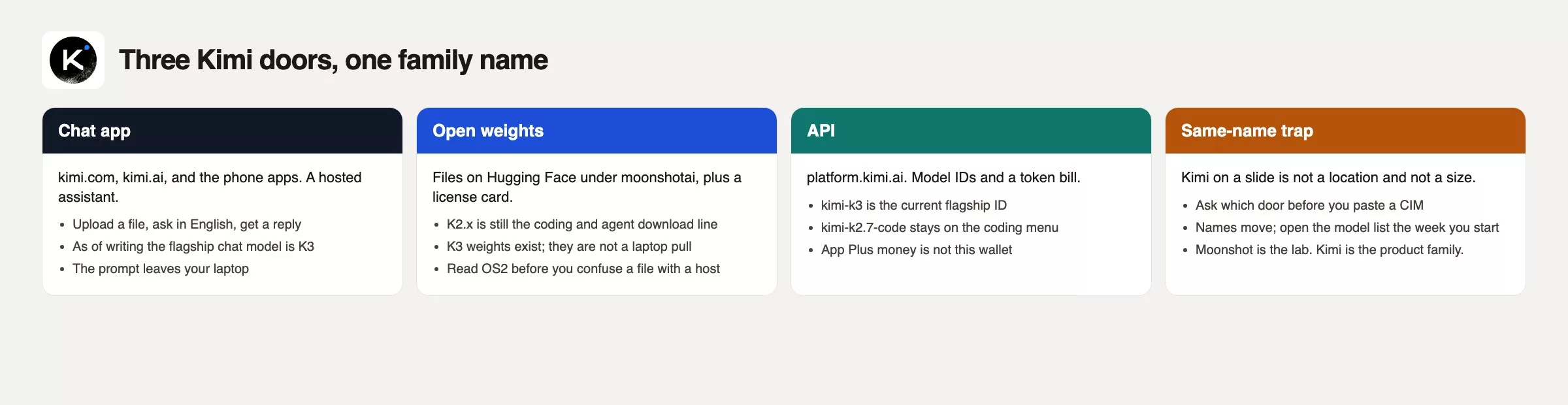
People collapse those three into one logo because the marketing is one word. Your Monday job is to keep them apart. Chat is for a person with a question. Weights are for a team that has a reason to run, or rent, a checkpoint. The API is for software. Mixing them is how you get a surprise invoice or a privacy story you cannot defend.
| Path | What you open | What you get | What you do not get |
|---|---|---|---|
| Chat app | kimi.com, kimi.ai, phone apps; Kimi Work / Kimi Code as extra rooms | A hosted assistant, file upload, and long-context chat, with K3 as the current flagship. | Local privacy, a laptop-sized model, a shared receipt with the API |
| Open weights | Hugging Face moonshotai cards (K2.x line, K3 files) | A checkpoint plus a license you must actually read | A consumer chat app, a 7B-style pull, “open” as a blank check |
| API | platform.kimi.ai model list | IDs such as kimi-k3 and kimi-k2.7-code, token billing | The consumer app’s history, unlimited dumps because the window is large |
Licenses differ by card. K2-era checkpoints have used a Modified MIT-style grant (MIT stands for a well-known, permissive open-source license family). K3 ships under its own Kimi K3 License on the Hub. This is for educational identification only: Analytics Made Simple (AMS) is not a Moonshot partner. Open the card the week you download.
If the job is a 12-line thank-you, the everyday writing path you already use, ChatGPT or Claude, one account, is enough. Kimi earns a look when you have long documents and you already accept a Chinese lab’s hosted product, or when the team has a real reason to run Moonshot’s own weights. Region, work policy, and data class belong in a later post on where to run these tools, plus the open-weights-versus-hosted comparison elsewhere on this site. Do not skip them just because the window number looks large.
The window is a suitcase, not a filing cabinet
A context window is the most text, measured in tokens, that the model can see in one go: this prompt, often the earlier turns in the thread, hidden system instructions, and room for the reply. As of October 2, 2026, Moonshot’s K3 model card advertises a 1-million-token window, and Moonshot’s pricing page lists the remaining K2.x models at about 256,000 tokens. Those numbers describe capacity, not attention, which is what the model actually uses on that pile, and closing the tab still drops all of it.
Our earlier post on tokens, context windows, and cost treats context as a suitcase: you pack for a trip, and a 410-page company sale report is closer to a whole closet. Scanned PDFs, tables, headers, and prior messages all spend tokens, so the middle of a long paste gets thin and files that share a thread get mixed together. The earlier deal’s context was still lingering in the conversation window, so the model attended to a pile with two deals sitting in it.
Long PDF dumps fail for ordinary reasons even when the app accepts the upload.
- The extractor misses text in images, headers, or two-column layouts, so “page 12” in the model is not page 12 in Preview.
- The question is vague (“summarize this”), so the model writes a fluent tour of the first chapters and never opens the customer master service agreement (MSA).
- Two files sit in one thread: similar logos, similar filenames, one leftover cite.
- You asked for a clause. You needed a quote plus a page you can open with your own eyes.
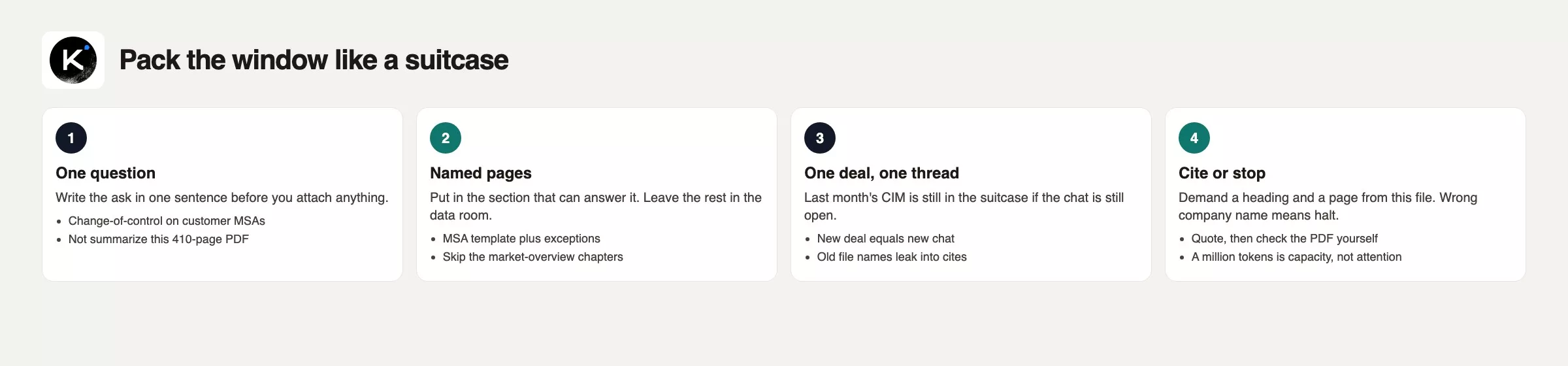
A later post in this series will go deeper on what long context actually buys. The usable habit starts here: question first, named pages second, new deal equals new chat. A million tokens makes a bigger suitcase, not a librarian.
Where K3 and the K2.x line stand
Read this block as a snapshot dated August 2026. Re-open Moonshot’s pages before you budget or train anyone on a model ID.
Kimi K3 is the current flagship product model. Moonshot’s tech blog (16 July 2026) describes a 2.8-trillion-parameter mixture-of-experts model with native vision and a 1-million-token context window. It went live that week on kimi.com, Kimi Work, Kimi Code, and the API as kimi-k3. Weights followed on Hugging Face as moonshotai/Kimi-K3 around 27 July 2026. Official API list pricing on that blog was $0.30 per million tokens for cache-hit input, $3.00 for cache-miss input, and $15.00 for output. Hedge those numbers and open platform.kimi.ai the week you buy, since vendor pricing pages change without warning.
Moonshot’s blog already hedges rank: K3 still trails the strongest closed models they name (Claude Fable 5 and GPT 5.6 Sol) on overall performance. That is their sentence, not an AMS leaderboard. If you need a bake-off, run your question about the company sale report on your files and score the cites yourself.
K2.x remains the open-weight coding and agent line (agent meaning an AI that can take actions, not just write text) on Hub cards and the API menu: K2.5, K2.6, and K2.7-Code. As of October 2, 2026, Moonshot’s pricing page lists about 256,000 tokens of context for those models. The older kimi-k2 preview IDs were discontinued on 25 May 2026. After the K3 launch, Moonshot closed kimi-k2.5 and the older moonshot-v1 8k/32k/128k models to new users and then retired them on 31 August 2026, so calls to them now fail.
How to use the names in a team note: K3 is what you pick in the app and as kimi-k3 when you want the current flagship. K2.7-Code is what you pick when the job is a long coding agent and the card still lists it. “Kimi” alone is not a version. Write the ID.
Worked example: 410 pages, wrong page 12
Northpark is a made-up deal with realistic detail. Its CIM (the confidential sales document a seller gives serious buyers) has a pretty map on page 12, and the customer MSA template sits in the legal appendix, pages 188 to 240 of the PDF, so you only need one clause from it. The trouble starts when the whole book gets uploaded into a thread that still has Riverline_CIM_redline.pdf from 11 June sitting in it. The model quotes a change-of-control paragraph that was true for Riverline and stamps it “page 12,” because that is where the map sits in Northpark. Two truths get glued together into one useless answer.
The fix is boring and it fits in a note you can paste before the next upload.
# Window pack (one deal, one thread)
Deal: Northpark WMS
Question (one sentence): What is the change-of-control language on customer MSAs?
Must-have pages: MSA template (PDF 188-240), exceptions schedule
Do not paste: full 410-page CIM, data-room zip, Riverline files
Thread: NEW chat. Old deal = old chat. Filename check: Northpark_* only
Cite rule: quote the heading + page from THIS file, then I open Preview
Stop if: the answer names Riverline, a different buyer, or a page that is a map
Owner: Deal Lead
Verify: legal reads the quote against the PDF before it hits the memo
What that checklist does: it names the suitcase before the zipper closes. If the only file in the thread is the MSA appendix, a “page 12” cite is either right or obviously wrong. If the thread still holds 410 pages plus Riverline, you cannot tell. The million-token number was true; packing two distinct deals into one prompt window and asking for a single sentence is what invites the confusion.
What the suitcase still held
- Hearing “million tokens” as “it read every page with equal care.”
- Leaving last month’s CIM in the same chat because starting over felt wasteful.
- Calling the website, the Hub repo, and the API “Kimi” as if they shared a disk and a bill.
- Pulling K3 weights onto a laptop because Llama 8B taught you that open weights (model files anyone can download) are small.
- Pasting a blog’s “Kimi beat X” chart into a buy deck, instead of using your own files. Moonshot’s own blog already hedges overall rank.
- Wiring
moonshot-v1-128kfrom an old code snippet, even though that model was retired on 31 August 2026. - Skipping the chooser when the job is a 12-line thank-you, then blaming Kimi for a messy first hour.
One PDF, one question, tick the quote
Open kimi.com or kimi.ai on the work identity you intend to keep, and start a new chat. Pick one PDF you already understand, something 15 to 40 pages long, not 410, and write the one-sentence question first. Attach only the pages that can answer it, or say “use section 4 only” if the product forces a whole-file upload. Demand a quote plus a page, then open the PDF yourself and tick the quote. If it cites a heading you cannot find, the window was packed wrong.
Then write three lines in the team note: which path you used (chat, weights, or API), the model ID or app version as of this week, and “new deal equals new chat.” Do not download K3 for this drill. If you still need the wider map, start with Learn. The next post in this series goes deeper on what long context actually promises, without the mythology.
New deal, new chat
- Moonshot AI builds Kimi. Chat, weights, and API are three paths with one family name.
- K3 (July 2026) is the flagship product model, and K2.x is still the open-weight coding and agent line; confirm IDs on platform.kimi.ai.
- A million-token window is a suitcase. Last month’s PDF is still in it if the thread is still open.
- A 410-page dump that accidentally cites page 12 of an older deal doc proves the point: pack the question and the named pages. New deal, new chat. Verify the quote in Preview.
Series notes
This is Part 1 of Learn Kimi. Pair with context-window habits from Practical AI on Learn.
Sources
- kimi.com and kimi.ai (consumer chat)
- Moonshot: Kimi K3 tech blog (16 July 2026: 2.8T, 1M context, native vision, product lineup, API list prices, own hedge vs closed flagships)
- Kimi API platform and the model list (
kimi-k3,kimi-k2.7-code, K2.5/K2.6, moonshot-v1 sunset,kimi-k2retired 25 May 2026) - moonshotai/Kimi-K3 on Hugging Face (weights, Kimi K3 License)
- moonshotai org (K2.5, K2.6, K2.7-Code cards; read each license)
- AMS: Tokens, context windows, and cost (suitcase intuition)
- AMS: Hosted vs download and Open-source AI explained
Keep going
Same lessons in your feed
Short diagrams, hooks, and weekly tutorials on Substack, Instagram, X, and Facebook.



