

An AI chat has a limited amount of working memory, and it is measured in units called tokens, which are small pieces of words. Think of that memory as a suitcase and not as unlimited storage. If you cram in too much, the model can quietly cut things off, forget the middle, or burn money on a question that needed two tables and a one-line filter.
Say you paste a whole database layout into a chat, then last quarter’s CSV (a plain-text table with commas between values) export, then three Slack threads “for context.” After all that, you ask for a careful answer. The model may quietly cut off part of what you pasted, forget the middle, or invent a column you swear you included. It may also burn a surprising amount of money on a question that needed two tables and a one-line filter.
That does not mean you are bad at AI. You are treating a limited working memory like a warehouse. Analysts already know that RAM (the fast working memory inside a computer) and a disk (its long-term storage) are different things. Tokens and context windows are the same idea with friendlier branding.
Tokens: not words, not characters
Models do not “read” your prompt as a sequence of English words. They break text into tokens, which are common chunks of characters that the model was trained to handle. A short English word is often one token, while a rare name, a long identifier, or dense code can split into several. Numbers and punctuation get their own pieces, and the exact splits differ by model family. You do not need to memorize any tables. You need one working idea: the length you see on screen is not the length the model bills for or fits.
A rough rule many teams use for English prose is that a token is about three-quarters of a word, so 100 words is on the order of 130 tokens. Code, JSON (a plain-text format programs use to pass structured data), and CSV files can be denser. A header line with 50 columns can cost more than a chatty paragraph about the same table, which is why pasting “just a little data” sometimes costs more than the question itself.
Vendors publish their prices per million tokens for input and output, and they publish context size limits for each model. Those numbers change, so your habit should not depend on this month’s price list. Instead, measure roughly and keep the suitcase intentional. Prefer small, verified pieces over dumping the whole lake into the chat.
The context suitcase
A context window is the maximum amount of tokenized text the model can consider at once for a conversation turn. In many products that includes your prompt, the earlier messages, and the room reserved for the reply. Think of a suitcase, and not an infinite cloud drive.
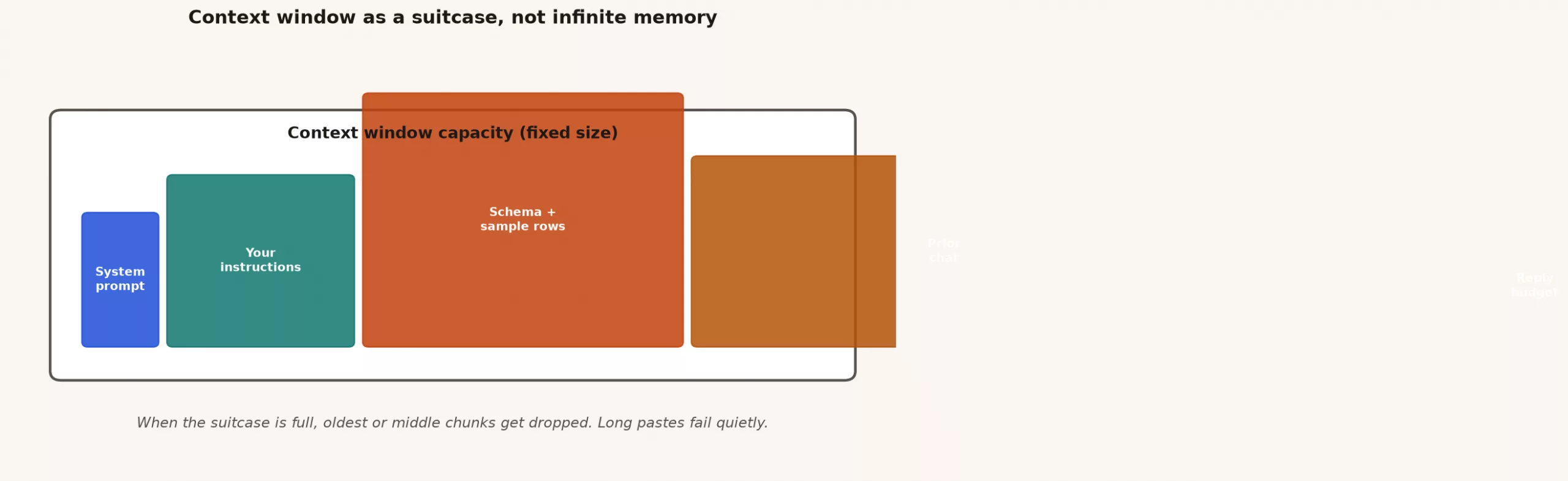
Several things compete for space in the suitcase:
- System and product instructions that you never see but that still take up room.
- Your prompt, meaning the question and its constraints.
- Table layouts and documents that you pasted or that the product looked up for you.
- Sample data or full extracts.
- Chat history in sessions with many turns.
- Reply budget, so that the model has room to actually answer.
If you fill the suitcase with history and a giant CSV, the model has less room for a careful answer. Some products cut off older messages, and some summarize them without telling you. Others show an error, and some keep accepting your paste while the quality falls off a cliff. From your side it feels like “the model got dumber,” when often the suitcase just got messy.
Why long pastes fail
Analysts love completeness, but models punish completeness that has not been prioritized. Long pastes fail in four repeatable ways.
1. A hard limit is hit
You go past the window, and the tool rejects the message, strips the end, or drops the early history. The column definition you needed happened to sit in the part that fell off.
2. Attention slips
Everything fits, but important details in the middle get ignored. Research and practice both suggest that models can underuse the middle of a long context compared with the beginning and end. Suppose your critical note about what one row means sits between two walls of table-definition text. The model then latches onto the last table it saw.
3. Noise becomes “fact”
You paste three conflicting metric definitions from Slack, and the model blends them into one confident hybrid. Completeness without curation is not honesty. It is a blender.
4. Cost without lift
You pay for every token of the 40 unused tables in the layout dump, even though the answer would have been better with two tables and one sample query.
This is the same discipline you already use when writing SQL (the standard language for asking a database for data). You do not SELECT * from the whole warehouse into your head, and instead you pick the columns you need. The SQL series and the Python series already train that habit, and context is just another place to use it.
Relative cost intuition (not a price sheet)
Exact prices change by vendor and model, but the relative shapes stay useful for planning. Treat the table below as a teaching scale and not as a quote:
| Input | Relative size | Tip |
|---|---|---|
| One clear question | Small | Prefer this |
| Table schema (20 cols) | Medium | Send only needed tables |
| Full CSV paste (5k rows) | Huge | Sample 20 rows instead |
| Entire chat history | Grows fast | Start a new thread for new tasks |
| “Regenerate with more detail” | Multiplies | Tighten the ask once |
| Artifact | Relative size | What it buys you | When it is worth it |
|---|---|---|---|
| A clear question of one to three sentences | Tiny | Goal and success criteria | Always |
| Constraints and refuse rules | Small | Fewer invented columns | Almost always for data work |
| Two relevant tables plus their keys | Medium | A grounded SQL draft | The default for query help |
| The full warehouse layout dump | Large | Rarely better than a focused subset | Only if you will filter hard |
| A 20-row sample with headers | Medium | Shows what one row means, plus dirty values | High value for cleanup and joins |
| A full CSV extract with thousands of rows | Huge | Often noise, and a privacy risk | Rarely; prefer totals or samples |
| A long chat history | Grows every turn | Continuity, and also confusion | Reset when the thread drifts |
| A long generated answer | Output cost | Prose or multi-query dumps | Ask for structure and cap the scope |
Input tokens and output tokens are both billed when you use an API (the way software talks to the model directly). Chat products hide the meter, but the economics still shape their limits and quality. A habit that saves money often saves quality too, because smaller, sharper context works better.
Worked example: one question, three suitcase packs
The business question is: “Revenue by region for last month, excluding test accounts, matching the Finance definition.”
Pack A: the dump (usually bad)
Here is our entire schema export (200 tables)...
Here is orders_raw for 18 months (CSV)...
Here are Slack notes about revenue...
Write SQL for revenue by region last month.
This pack can fail in several ways. The model may pick the wrong table, define test accounts from a random Slack message, or take the region from the shipping address instead of the billing region. On top of that, the cost is huge, and you get a confident answer that you cannot audit.
Pack B: focused table layout (better)
Task: draft SQL for net revenue by region for last calendar month.
Use ONLY these objects. If something is missing, say what you need.
Do not invent columns.

Table fct_orders(
  order_id, order_ts_utc, customer_id, region_code,
  gross_amount_usd, discount_usd, is_test
)
Table dim_region(region_code, region_name)

Finance rule: net = gross_amount_usd - discount_usd
Exclude is_test = true
Region from fct_orders.region_code
Return region_name, net_revenue_usd
Order by net_revenue_usd desc
This pack is mostly medium to small. It spends tokens on the contract and not on digging through history.
Pack C: focused plus a tiny sample (often best)
Keep Pack B, then add a few sample rows that show a test account and a discount:
order_id,order_ts_utc,customer_id,region_code,gross_amount_usd,discount_usd,is_test
1001,2026-01-05T12:00:00Z,c9,US-E,100.00,10.00,false
1002,2026-01-06T09:00:00Z,test_bot,US-W,50.00,0.00,true
1003,2025-12-28T18:00:00Z,c2,EU,80.00,0.00,false
The sample teaches what one row means and shows the traps, and you do not need 50,000 rows for that lesson. After the model drafts the SQL, you run it in your warehouse or notebook (a document that mixes code and its results) and verify it. Checking the answer is still your responsibility, as the first post in this series explained.
Here is the shape of output you would expect after a correct run, using toy numbers:
| region_name | net_revenue_usd |
|---|---|
| US East | 420150.25 |
| US West | 301992.10 |
| EU | 188440.00 |
If the draft SQL forgot is_test, checking against a known dashboard tile should catch it. Good context design makes the draft better, and your checks are what make the answer real.
Chunking: how analysts already think
Chunking means splitting the work so that each model call has a suitcase matched to one job. You already chunk pipelines and notebooks, so apply the same cuts here.
Chunk by task
- Call 1: clarify the question and list the missing inputs.
- Call 2: draft SQL for one metric using one slice of the table layout.
- Call 3: after you paste in real results, draft the narrative and the risks.
Do not ask one prompt to discover the tables, write five queries, plan the strategy, and write the board memo.
Chunk by object
If you must document twenty tables, process them in groups of two or three with a stable template, then merge the outputs yourself. Models are better at consistent small tasks than at “summarize the enterprise.”
Chunk by retrieval, not by dump
When the pile of material is large, such as a wiki, a metric catalog, or runbooks, the long-term pattern is to retrieve the relevant chunks first and then generate the answer. That family of ideas is called RAG (retrieval-augmented generation) and it usually relies on vector search, which finds text by meaning instead of exact words. You do not need a production system to benefit from the mindset: search first, paste second. For architecture intuition, see Getting up to speed on vector databases. Later posts in this series return to retrieval. For now, retrieving by hand, where you pick the two tables yourself, is already a win.
Reset the thread
When the history is polluted with wrong assumptions, start a new chat with a clean pack. Continuity is not free, because it costs tokens and sometimes steers the model toward yesterday’s mistake.
Practical packing rules
- Put the task and constraints at the top and the bottom. Important rules should not live only in the middle of a wall of table definitions.
- Prefer certified definitions over digging through old Slack threads. The metrics series habit still applies: one written definition beats three half-remembered ones.
- Use samples instead of extracts. Ten honest rows beat ten thousand opaque ones for drafting, and SQL or Python can do the heavy lifting.
- Name what one row means in the prompt. Saying “one row per order” prevents many bad joins before they start.
- Budget the reply. Asking for “only SQL” or “a 5-row plan” cuts down on rambling output and on the pain of skimming it.
- Watch privacy. Token cost is not the only cost, because personal data in the context is a risk cost too. Prefer synthetic or redacted samples.
Quality and stewardship still sit under all of this, and a tiny suitcase packed with the wrong definition is still wrong. When the definition itself is the hard part, pair your packing discipline with the data quality, metrics, and stewardship series. Questions about how data moves belong with data pipelines. More learning paths live on the Learn page.
Common mistakes
- Pasting every table “just in case.” More layout than the question needs crowds out the parts that matter.
- Using a CSV as context: uploading a full extract when a profile or a sample would teach the model more.
- Letting threads run forever: a week-old chat that still thinks refunds are included.
- Hidden system bloat: stacking plugins, retrieval, and huge custom instructions until your own content is squeezed out.
- Assuming the model “remembers the warehouse.” It only sees what is in this suitcase, plus what it learned in training, which is not your data.
- Optimizing only for prompt length and never for structure. A short vague prompt is worse than a medium precise one.
- Ignoring the size of the output. Asking for a “full report” when you needed a filter list wastes tokens on both sides.
Practice: repack one real prompt
Take a recent AI chat that went sideways and copy its final prompt pack into a document. Highlight four colors: question, constraints, table layout or data, and leftover history. Delete everything that did not serve the question, and keep at most two tables or one file profile. Then add a one-line refuse rule: “If a column is not listed, do not invent it.”
Rerun the same question with the repacked suitcase and compare the results. Did the draft need fewer fixes? Did you notice lower delay or lower cost in API usage? Even in a chat window you can note the subjective quality. Save the before and after packs as a team example.
The next post in this series turns packing into prompt patterns for data work: a role, a spec, an output shape, and refuse rules that keep SQL and explanations honest.
Quick recap
- Tokens are chunks the model reads, not English words, and code and CSV can be surprisingly expensive.
- Context is a suitcase in which the prompt, table layouts, samples, history, and reply budget compete for space.
- Long pastes fail through hard limits, neglect of the middle, mixed-up “facts,” and cost without quality.
- Spend tokens on the task, the constraints, the relevant tables, and tiny samples, and not on the whole lake.
- Chunk by task and by object, retrieve before you paste, and reset dirty threads.
- Smaller, sharper context is usually cheaper and more accurate, and verification still sits with you.
Your next step
Take one long prompt you use often and count its tokens with a tokenizer (the part that splits text into small chunks) tool. Then cut anything the task does not need, such as old history or unused columns, and compare the answers. Seeing the same answer from a smaller prompt shows you where your token budget was going.
Series notes
This is Part 2 of Practical AI for analytics people. The next post covers data prompts with a stack.
Sources
- OpenAI, tokenizer and tokens guide: https://platform.openai.com/docs/concepts/tokens
- OpenAI, pricing overview (input/output token billing patterns): https://openai.com/api/pricing/
- Anthropic, context windows and prompting documentation: https://platform.claude.com/docs/en/build-with-claude/prompt-engineering/overview
- Liu et al., “Lost in the Middle: How Language Models Use Long Contexts” (long-context position effects): https://arxiv.org/abs/2307.03172
- Google, Gemini API long-context and token documentation (product docs evolve; use current limits): https://ai.google.dev/gemini-api/docs/long-context
- The US National Institute of Standards and Technology (NIST) AI Risk Management Framework, or RMF (risk thinking still applies when context includes sensitive data): https://www.nist.gov/itl/ai-risk-management-framework
Keep going
Same lessons in your feed
Short diagrams, hooks, and weekly tutorials on Substack, Instagram, X, and Facebook.



