
Grok can do three different jobs for you: draft a message, explain an idea, or brainstorm options. Keep each job in its own prompt, put the facts and the forbidden words in the brief, and spend two minutes checking the result before anyone else sees it.
Say you asked Grok to make a vendor update “punchy,” then posted it in your team’s rollout channel. The draft called the hold Plan B, but the customer contract says Plan Beta. Fourteen people read the wrong name before anyone caught it, because punchy copy with the wrong product name is still wrong. Grok did what you asked, and you never gave it the facts.
Three jobs: draft, explain, brainstorm
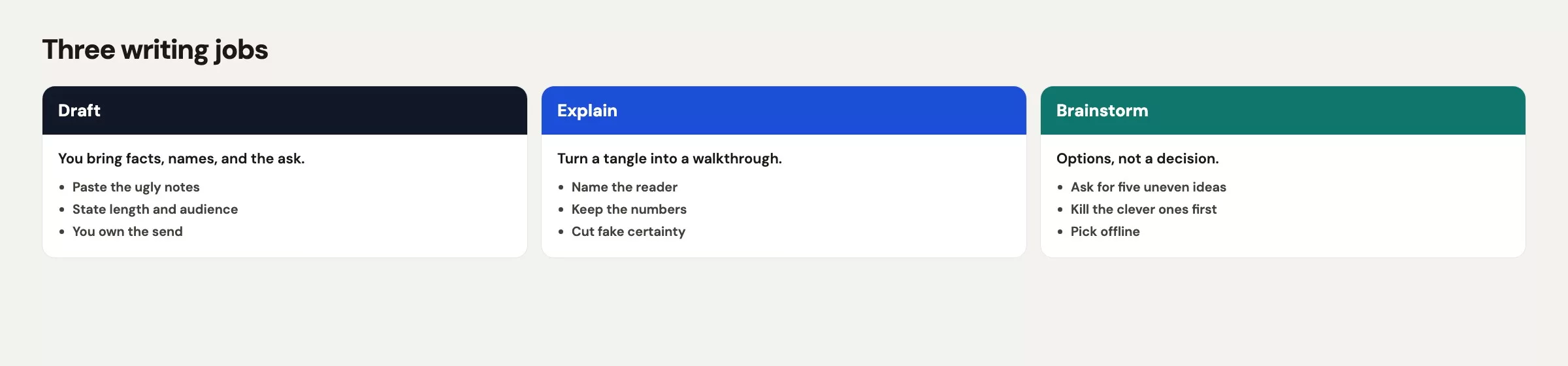
Grok is good with words and poor at knowing which words matter most. If you split your requests into three jobs, you stop asking for “a professional email” and start asking for one specific kind of help.
Draft means Grok writes something you will send or paste, such as an email, a Slack message, a one-pager, or meeting notes that will leave the room. You bring the facts. Grok brings structure, cuts, and a first pass at tone, while you stay responsible for every name, date, dollar amount, and promise.
Explain means Grok helps a person understand something you already know, or something sitting in a document you can point at. “Explain our hold to a vendor who has 90 seconds” is an explain job. “Explain why our revenue dropped 12% last week” is a different kind of request, unless you already have the 12% and your definition of revenue in hand.
Brainstorm means Grok makes options, angles, outlines, or titles so you can pick one. The output is a menu of choices, which means it is not a decision and it is not a forecast. If Grok ranks the ideas, treat the ranking as a suggestion with no data behind it, unless you supplied the data.
Keep the three jobs in separate prompts, and often in separate chat threads (a later post in this series covers threads). Mixing them is how a “rewrite this paragraph” chat drifts into strategy advice with invented numbers. If your work is code in a repository (a shared folder of code with its full change history), spreadsheets with live formulas, or images, you are using the wrong tool, and a better prompt will not fix that. The post on when Grok is the wrong tool covers those cases.
| Job | Prompt ingredients | What you still own |
|---|---|---|
| Draft | Audience, ask, facts only, length, forbidden words, format | Names, SKUs, numbers, dates, promises, send |
| Explain | Who they are, what they already know, one analogy max, unknown flags | Whether the explanation matches the real process |
| Brainstorm | How many options, constraints, “label guesses”, no ranking as truth | The pick, the kill list, any claim you repeat outside chat |
The chat apps on grok.com, iOS, Android, and X all handle these three jobs. Plan names, model pickers, and “think harder” toggles change often, so check the labels the week you roll this out. The three jobs stay the same even when the button names change.
Draft with constraints
A blank “make this better” prompt invites Grok to fill the gaps with fluent filler, and constraints are how you stop that. You are not writing a novel-length prompt. You are handing over a brief, the way you would to a sharp intern who has never met the customer.
Put these six things on the page before you paste any source text:
- Audience: one main reader, their role, and how much time they have.
- Ask: one outcome you want, such as a decision, a date, a confirmation, or a yes or no.
- Facts only: the facts you already believe, plus the line “do not add facts.”
- Length: a sentence count or word cap, because “under 160 words” works better than “keep it short.”
- Forbidden words: internal nicknames, banned phrases, and anything legal would object to.
- Format: a subject line plus body, bullets, or a single Slack paragraph. Say which.
Here is a skeleton you can paste. Swap the brackets for your own details, and keep the “do not add facts” line even when the thread seems obvious.
Draft an email.
Audience: [role, time budget]
Ask: [one outcome]
Facts you may use (do not add others):
- [fact 1]
- [fact 2]
- [fact 3]
Forbidden: [internal nicknames, slogans, promises I did not list]
Length: [e.g. under 160 words]
Format: subject line, then body I can paste into mail.
If a needed fact is missing, ask me. Do not invent it.
Notice what the skeleton leaves out: “make it punchy,” “make it executive,” “sound innovative.” Those adjectives are how Plan B ended up in an outside message. If you want energy, name the kind you want, such as “direct, no jokes, no ‘excited to partner.’” If you want warmth, name the relationship, for example “we have worked with this contact for 11 months and she already knows about the delay.”
Paste your source material after the brief, never instead of it. A 40-message Slack export with no brief is just a pile, and Grok will squeeze the pile into something that looks decided. Your job is to decide first and then ask for wording.
One more constraint saves apologies later: tell Grok where the draft will live. A message that goes to the vendor is different from one that stays inside your team channel. External drafts should forbid internal ticket numbers, colleague names the vendor does not already know, and slang, while internal drafts can keep the slang as long as you still check the product names.
Explain like a colleague
Explain jobs go wrong when Grok writes a blog post for a stranger. You want a colleague at a whiteboard, someone who assumes the right amount of knowledge and flags anything they are guessing.
Start with the reader’s job, then the topic. “Explain cart abandonment to a new finance hire who knows Excel and has never opened Shopify” is a good explain prompt. Plain “explain cart abandonment” gets you a generic lecture with a definition you already have on your wiki.
Give Grok the definition your team uses, even if it is ugly. For example: “In this team, abandonment means checkout started and no order within 24 hours. It does not include guest carts that never reached checkout.” If you skip that, Grok will pick a definition from the public web that will not match your dashboard (a screen of charts that updates as new data comes in), and your meeting will turn into an argument about the explanation instead of the number.
Ask for a length that fits the moment. A quick huddle needs six sentences, while a new-hire document can take 400 words and a small example. Ask Grok to show one worked example with made-up but clearly labeled toy numbers, and to mark any step it cannot confirm from what you pasted.
Explain [topic] to [role] who already knows [X] and does not know [Y].
Use our definition: [one sentence].
Length: [e.g. 8 sentences or a 1-page outline].
Include one toy example with labeled fake numbers.
Do not cite policies or product limits unless they appear in my notes.
If you are guessing, write GUESS in front of the sentence.
The GUESS flag does most of the work here. Fluent models hide uncertainty inside confident verbs, and a visible label makes the draft usable. You can then delete the guess, replace it with a link, or go ask a person who knows. What you should never do is ship the guess with the label stripped off.
Use one analogy or none. “Think of the hold like a paused purchase order” can help your vendor contact, but a second analogy in the same paragraph usually confuses the first. If the real object is a purchase order, just name the purchase order.
If you cannot point at the sentence in a document, a ticket, or your own notes, Grok should not present it as how your team works.
Brainstorm without fake certainty
Brainstorming is where Grok feels most generous, with twenty subject lines, twelve names for a dashboard, or eight angles for a Friday note. That generosity is useful until someone pastes the top-ranked option into a deck as if Grok had measured it.
Set a count first, for example “give me 8 subject lines, not 40.” A long list is harder to judge and easier to rubber-stamp. Ask for variety along a dimension you care about, such as length, formality, or whether the product name and date appear, so you can scan for the one that fits the relationship.
Require labels on anything speculative by asking Grok to tag each option “Fact-based” or “Guess.” Fact-based means the option only uses facts you pasted. Guess means Grok added a benefit, a motive, or a market claim of its own. In our hold example, “we are pausing to protect quality” is a Guess unless you actually said that, while “hold through 22 June, PO-1844 stays open” is Fact-based if those lines were in your brief.
Do not ask Grok which idea will “perform best” unless you plan to test it. There is no click-through data inside the chat, so a ranking without a metric is just taste. Taste can be yours, but it should not wear a number.
Brainstorm 8 options for [deliverable].
Constraints: [tone, length, words to avoid].
For each option:
- one-line text
- tag Fact-based or Guess
- one risk if I used it as-is
Do not rank them. Do not predict results.
Stop after 8.
Brainstorming works well for titles, outlines, “what might we be missing,” and “argue against this plan in 6 bullets.” That last one is underrated, because Grok will attack a draft if you ask it to. You still decide whether the attack is fair, and you do not owe the model a revision for every bullet.
Stop when you have enough to choose. Regenerating for a prettier list can eat an afternoon while the product name is still wrong. Pick an option, then move to a draft job with that angle locked in as a fact.
A review pass you will actually do
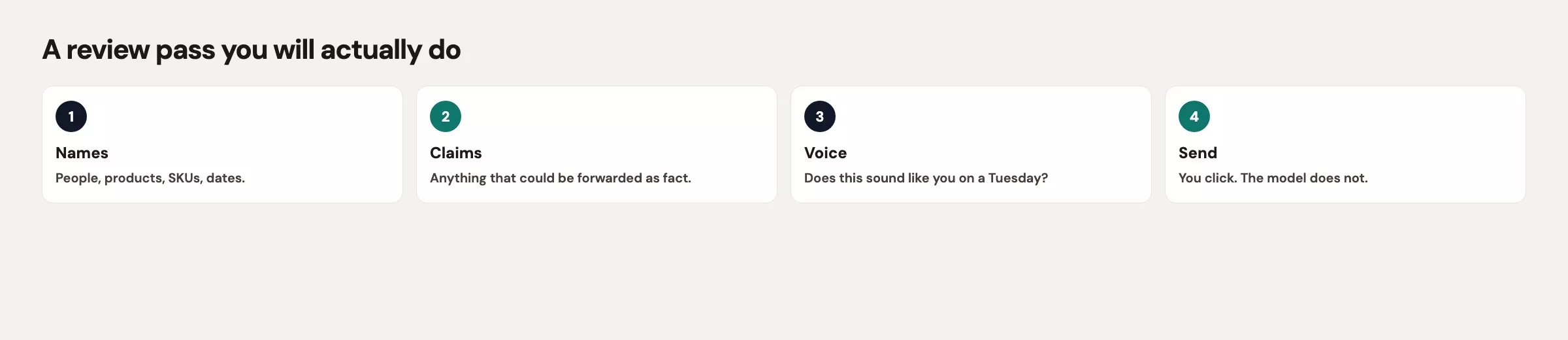
The review pass has to fit in two minutes, or you will skip it. It has six checks and no scoring rubric. If any check fails, edit the text in your mail client or Slack, and do not roll the dice on another generation.
- Names and product codes. Every product, person, and plan name matches the official source, such as the contract, the wiki, or the ticket. Plan B versus Plan Beta is exactly this check.
- Numbers and dates. Check dollars, percents, IDs, and time zones, and replace “this week” with a calendar date.
- Promises. Look for words like indefinitely, ASAP, always, never, guaranteed, and “we’ll make it right.” Delete them or swap in a date you control.
- Tone. Read it out loud, and if you would not say the sentence to your contact on a call, rewrite it yourself.
- Privacy. Make sure the draft has no extra employees, no extra sites, no extra money, no customer list, and no file that was not required. The privacy and work caution post helps if you are unsure.
- Send path. Copy the text into your real mail or Slack, because Grok does not send it for you. Do not paste a draft into a public X compose box just because you were already in Grok on X.
Print this on a sticky note if you have to. The usual failure is not that Grok writes badly, but that it writes a clean paragraph that is 94% right. Humans skip text that looks 94% right, and the remaining 6% is the product name, the dollar amount, or the word indefinitely.
When a check fails, prefer a human edit over a new prompt. A new prompt can fix the product name and quietly change the date at the same time. Once the structure is good, you are acting as a copy editor, so there is no need to become a prompt engineer.
Worked email: a vendor hold
Picture yourself leading a warehouse scanner rollout with a vendor called ScanGrid. Site 12 is on hold through 22 June, and purchase order PO-1844 is still open at $47,200. This is not a cancellation. Your contact at the vendor has been on a weekly call with you for 11 months. Internal Slack still says Plan B, while the statement of work says Plan Beta, and you need an email your contact can forward without a side thread about names.
Your first prompt was “make this punchy for the vendor,” and Grok returned the text below. Do not send it.
Subject: Pausing Plan B to stay ahead of the curve

Hello, we are hitting pause on Plan B indefinitely so we can double down on quality. We will come back stronger. Excited to keep partnering through this exciting next chapter.
In four sentences, that draft used the internal nickname, invented the word indefinitely, invented a quality story you never stated, and promised a comeback. It had zero dollars, zero dates, and no purchase order number. It was punchy and useless.
So you switch to a constrained draft job, with the facts, the forbidden words, and the length all written into the brief.
Draft an email.
Audience: your ScanGrid customer success contact. She already knows Site 12. She has 90 seconds.
Ask: confirm the hold window and that PO-1844 stays open.
Facts you may use (do not add others):
- Customer-facing name is Plan Beta (never Plan B)
- Site 12 warehouse scanner rollout on hold through 22 June
- PO-1844 remains open at $47,200; this is not a cancellation
- Next check-in Thursday 10:00 a.m. Eastern
- Other sites are not in this hold
Forbidden: Plan B, indefinitely, ASAP, excited, partnering, quality story I did not provide
Length: under 160 words
Format: subject line, then body.
If a needed fact is missing, ask me. Do not invent it.
Grok’s second pass came out close, but you still run the six-check review. You change “we will resume on 22 June” to “we will decide next steps on 22 June,” because “resume” is a promise you do not own. You then send it from your work mail, not from the chat box.
| Check | Punchy draft | Reviewed send |
|---|---|---|
| SKU / name | Plan B | Plan Beta |
| Date | none | through 22 June; Thursday 10:00 a.m. Eastern |
| Money | none | PO-1844 open at $47,200 |
| Promise | indefinitely; come back stronger | hold window plus a decision date |
| Scope | sounds like the whole program | Site 12 only |
The email you send looks like this, and it is boring on purpose.
Subject: Plan Beta Site 12 hold through 22 June (PO-1844 stays open)

Hello, Site 12 Plan Beta is on hold through 22 June. This is not a cancellation. PO-1844 stays open at $47,200.

Other sites are not part of this hold.

Can you confirm you have that window on your side? Next check-in is Thursday 10:00 a.m. Eastern. We will decide next steps on 22 June.
Grok helped with the structure and with keeping the ask in the last paragraph, and you supplied every fact. That split is the whole lesson of this post. If your contact forwards the email, nobody has to explain why Slack said Plan B.
Common mistakes
| Mistake | What happens | Do this instead |
|---|---|---|
| Prompt is only “make it punchy” | Wrong SKU, invented promise | Audience, ask, facts, forbidden words |
| Mixing draft, explain, and brainstorm | A rewrite grows fake strategy | One job per prompt, often per thread |
| Accepting a ranked brainstorm as data | A Guess becomes a slide | Tags plus you pick, no predicted “performance” |
| Fixing facts with a new generation | SKU is fixed, date also changes | Edit the good draft yourself |
| Sending from the wrong surface | Work text sits on a personal or public account | Copy out; match account to data (see privacy post) |
| Skipping the two-minute review | 94% right text ships the 6% that hurts | Names, numbers, promises, tone, privacy, send path |
Quick recap
- Use Grok for three jobs: draft, explain, and brainstorm, and do not blend them into one pile.
- Put audience, ask, facts, length, forbidden words, and format in every draft prompt.
- Force a
GUESSlabel on explanations, and allow at most one analogy. - Brainstorm with a count and Fact-based or Guess tags, and make the final pick yourself.
- Review in two minutes: names, numbers, promises, tone, privacy, and sending from your own client.
- The vendor email works because Plan Beta, 22 June, and $47,200 came from you, not from punchy adjectives.
Practice this week
Today, pick one real message you already owe someone, not an imaginary announcement. Run it as a draft job with the skeleton above, then run the six-check review on paper or in a note. Send it only if you could read it aloud to the recipient without wincing at a name.
If you do not owe anyone an email, take a paragraph you already published inside your company and ask Grok for an explanation aimed at a new hire. Keep your own definition in the prompt, and delete any sentence you cannot trace to a source.
The next post covers how to verify Grok’s live answers before you send them. Writing habits fail in a new way once Grok starts citing the live web and X, so treat those answers as leads to check. The full path, including the later Build and Imagine posts, is on the Grok on Analytics Made Simple hub.
Series notes
This is Part 12 of the Grok series (everyday stretch). The previous post covers the xAI Console and API, and the next covers live answers and how to verify them.
Sources
Research and further reading used for this article:
- grok.com (consumer chat where these three jobs live)
- xAI: Grok product page (chat, live search, and apps; checked in August 2026)
- xAI: Grok website / apps FAQ (files, history, billing hedges; UI labels move)
- Analytics Made Simple: Grok.com, apps, and Grok inside X (which chat surface to open)
- Analytics Made Simple: privacy and work caution (what not to paste into a draft prompt)
- Analytics Made Simple: when Grok is the wrong tool (code, production data, and jobs chat should not own)
- Analytics Made Simple: Grok series (hub for this tutorial path)
- Analytics Made Simple: Learn (other paths on this site)
Keep going
Same lessons in your feed
Short diagrams, hooks, and weekly tutorials on Substack, Instagram, X, and Facebook.



