

When Grok answers with fresh information from the web, do not pass the answer on until you have opened its sources yourself and checked the dates. A live answer blends what the AI already knew with what a quick search found, and it can mix up old and new facts.
Imagine you ask Grok about a usage limit, and it says a new one just started. You change your setup before the meeting ends. Later, you click the source: an old forum post with a cropped screenshot. You had not opened the link, or the official xAI documentation.
What “live” actually means in Grok chat
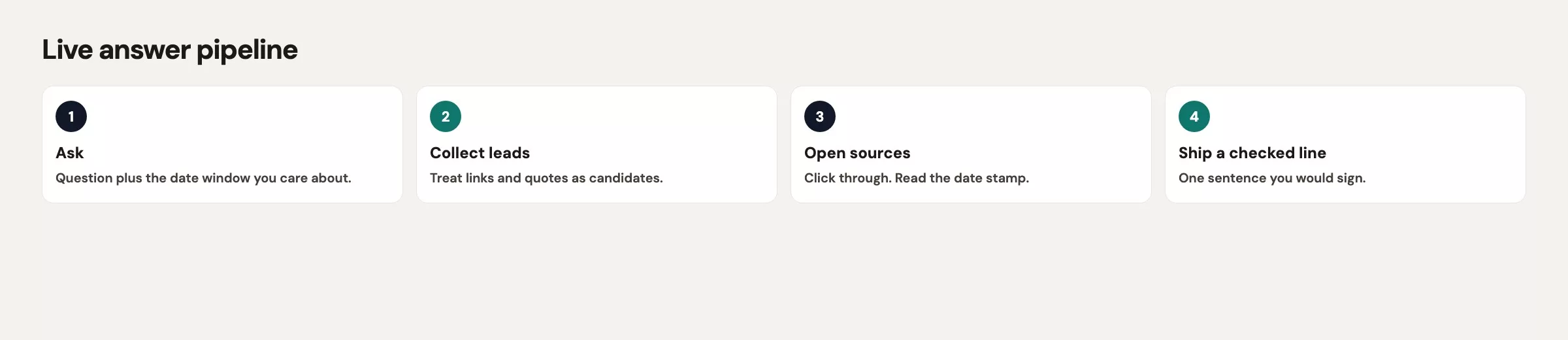
Grok chat is not running on one clock. xAI documents a knowledge cutoff for its frontier text models, and the developer model page for Grok 4.7, the current model, lists a cutoff of May 2026 (checked October 8, 2026). The chat apps can also search the public web and public X posts, and those are different layers of information. A single sentence can mix a fact from training, a searched page, and a guess, in that order, without marking where one ends and the next begins.
xAI’s own Grok page describes real-time web search and live X integration, and the help text for Grok on X says the product may decide whether to search public X posts and the web. The API (the connection programs use to send requests to a service) has its own separate Web Search tool. Buttons and labels in the consumer apps keep moving, so you do not need to memorize a toggle name. What you do need is the habit of assuming that any “current” claim arrived through some kind of search, and that a person still has to open the source.
Live search is a lookup step followed by a rewrite. The rewrite is where limits, plan names, and numbers get rounded into something that sounds like a policy. A citation tells you where the model looked, but it does not promise that the page says what the paragraph says, that the page is the official record, or that the page is from this year.
A single paragraph can carry three different clocks:
- Training cutoff: what the model saw when it was built. It is out of date by design, which is fine for stable concepts and bad for quotas.
- Live web or X: what a search pulled today. That can be a docs page, a blog, a forum, a post with 40 likes, or a mirror of a docs page from last winter.
- Your Console or Settings screen: what is true for your account right now. It is the only clock that can confirm a limit that applies to you.
The chat on grok.com or in the apps is the right place for this verify habit, while the Console and the API are a different wallet with a different set of documents. Mixing up “Grok said in chat” with “we should change production retries” is how ticket #4419 gets its number.
Ask for sources, then open them
Default prompts hide the trail. If you ask “What is the current API rate limit for grok-4.7?”, you get a confident number and maybe a footnote shaped like a link. A rate limit is the cap on how many requests you can send in a minute. Change the prompt so that the trail is what you are asking for.
Question: [claim you need checked]
Answer with:
1) a one-sentence claim
2) URLs you used, with page titles and visible dates
3) whether each URL is official docs, vendor blog, forum, or social
4) anything you could not confirm
Do not infer a numeric limit if the page does not state one.
If sources disagree, list the disagreement. Do not average them.
Then open the URLs. Read the heading and the date, and check that the quote Grok used exists as a real sentence and not just a general impression. If a link returns a 404 error, the claim is unsupported even when the prose was smooth. If the link is a cached copy or a screenshot host, treat it as weaker than the original page.
Official docs beat blogs, blogs beat forums, and forums beat a post someone screenshotted. For xAI products, start at docs.x.ai, the consumer FAQ, and console.x.ai for usage tied to your account. For how Grok behaves on X, X’s own help pages matter more than a third-party roundup.
Ask Grok not to invent URLs, because models will happily complete a docs path that looks right. If you have not loaded the page, you do not have a source. A link that only looks like a docs address is how a 2025 forum clone gets to wear a 2026 jacket.
A citation is a lead. The real answer is the page you opened, or the screen you own, and not the paragraph that pointed at it.
Dates, versions, and plan names
Live answers fail first on time and on product names. Quotas, weekly usage pools, SuperGrok versus X Premium versus API credits, and Imagine versus chat are all labels that move. When these notes were checked in September 2026, xAI’s FAQ described a shared weekly usage pool for paid consumer products, rolling out in June 2026, with Extra Usage Credits and Auto Top Up as paid add-ons. That paragraph will be wrong the week they change it, so hedge in anything you send with a phrase such as “per the FAQ I opened today.”
When Grok states a limit, ask for four timestamps:
- The date on the source page, either published or last updated, whichever is visible.
- The model or product version named on that page.
- The plan name on that page, copied exactly.
- The date you opened it, which is today. Write it in your message if you plan to share it.
Watch for names that have been collapsed together. “Grok” can mean the chat app, Grok inside X, Grok Build, Imagine, or an API id such as grok-4.7, and “Plus,” “Premium,” “Heavy,” and “SuperGrok” get swapped freely in casual posts. If the source says SuperGrok and your team pays for API credits, you are reading the wrong bill, because chat subscriptions and API credits are separate systems.
Watch for collapsed dates as well. “Last year” in a March 2025 post is not last year in the second half of 2026. “Now” in a model’s answer often means “in the snippet I retrieved,” and if the snippet has no date, the word “now” is decoration.
Plan names inside your own company have the same problem. If a vendor changelog says Enterprise and Grok summarizes it as “all plans,” that is a failed check. Copy the plan word from the vendor page into your note, and do not let Grok promote a tier.
Numbers and screenshots
Numbers travel well in a team chat because they look like work: “10 RPM,” which means requests per minute, “23%,” “$5 top-up,” “500k context.” Each one needs a level of detail and a time window. Ten requests per minute for whom? Twenty-three percent of what, over which days? Dollars on which product, and context length on which model id?
If Grok quotes a percentage from a screenshot, read the screenshot like a hostile auditor would. Look for cropped axes, missing footnotes, or a chart titled “usage” that really counts requests started and not requests billed. Ask for the page the screenshot came from. If there is no page, the screenshot is a rumor with pixels.
Screenshots of Settings and Console screens also go stale when the interface moves. A red arrow on a Usage tab in a 2025 blog may point at a control that now lives under Billing, so find the screen again in your own account and do not follow the arrow on someone else’s image.
For any number that might change production, confirm it at the official place it lives:
- API limits and errors: your live Console plus the current docs, then a single safe test request if policy allows.
- Consumer usage: Settings, then Usage on grok.com, and not a tweet about someone else’s bar.
- Vendor product behavior: the vendor changelog or status page, then your own account settings.
- Internal metrics: your warehouse or dashboard. A dashboard is one screen of charts. Never trust a model’s restatement of a CSV you did not attach. A CSV is a plain text file where each line is a row and commas separate the columns.
If you cannot run the confirm step, do not post the number as news. You can post “Grok retrieved this URL, and I have not confirmed it yet,” which is an honest sentence. The sentence “the new limit is 10 RPM” is not allowed until a page you opened says so for the product you use.
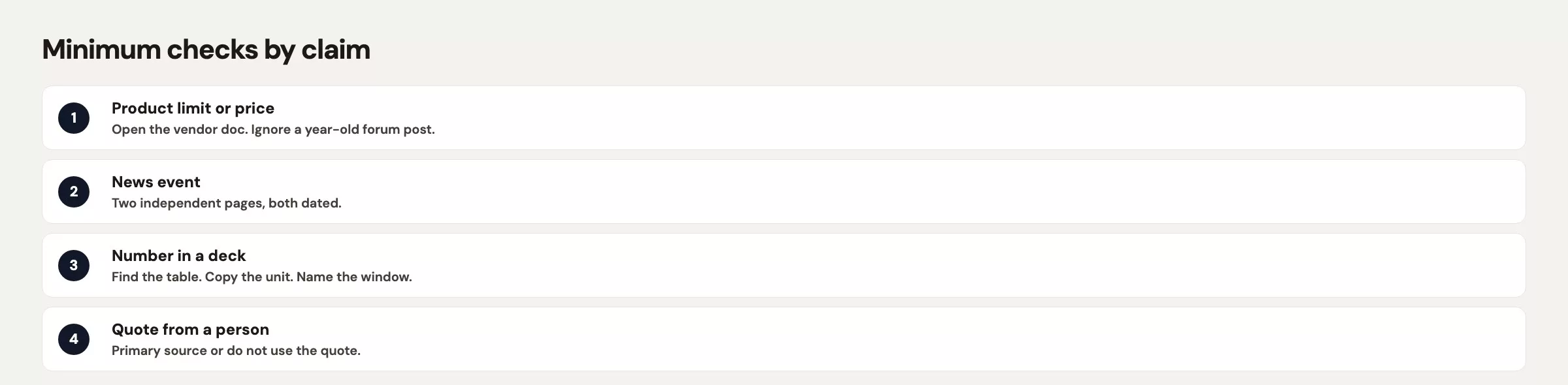
| Claim type | Minimum check |
|---|---|
| Policy or limit (API, chat, Imagine) | Open current official docs. Match model id and plan name. Confirm on your Console or Settings if it applies to you. |
| Numeric metric (percent, dollars, counts) | Name the grain and the window. Find the number on the system of record. Reject screenshots without a parent page. |
| Vendor changelog / “required this week” | Open the vendor post. Copy the effective date and the plan word (Enterprise vs all). Do not let Grok promote the tier. |
| UI screenshot (“click here”) | Re-find the screen today. UI labels move. Do not follow a year-old arrow. |
| Social post or forum | Treat as a pointer only. Find a primary page. Note like count and date so the channel sees the weakness. |
A worked check with a vendor rumor
Say you are an analytics engineer. You did not post the 10 RPM rumor, but you are the person who has to unwind ticket #4419. The same afternoon, a second rumor shows up. Grok says your event vendor, Liftline, now requires HMAC secret rotation “this week for all plans.” (HMAC is a way of signing messages with a shared secret so the receiver can tell they were not forged, and rotation means replacing that secret.) Your on-call document still says rotation is optional, so you have two rumors, one afternoon, and a team that likes to look fast.
You run the source prompt on both claims and then open everything.
Two claims to check. Do not merge them.
A) grok-4.7 API is hard-capped at 10 requests per minute for all Console keys.
B) Liftline requires HMAC secret rotation this week for all plans.
For each: one-sentence claim, URLs with titles and dates, source type,
and what you could not confirm. No invented URLs. No averaged limits.
The trail for the first claim is a forum post dated 12 March 2025 and an X post with 40 likes quoting that forum. Neither is docs.x.ai. You open the Grok 4.7 developer page and the API overview, and on the pages you opened that day you do not find a universal 10 RPM hard cap stated for every grok-4.7 key. You also open Console usage for your team, and there is no new banner. You post in the team chat: “Forum, 2025, not docs. I am not changing retries. If we see a 429, paste the error body, not a Grok summary.”
The overnight 429 errors on #4419 turn out to be a different bug. Someone had lowered the retry ceiling to 10 per minute “to match the new cap,” and then a scheduled backfill burst sat in a queue. The cap was homemade, and the forum post was only a costume.
The second claim is closer to real, which makes it more dangerous. Liftline had published a changelog on 4 August 2026 saying HMAC rotation is required for Enterprise tenants, effective 1 September 2026. Grok’s paragraph had dropped the word “Enterprise” and moved the date to “this week.” You copy the plan word and the effective date into your message, link the changelog, and ask the one person who owns your Liftline account. Your workspace is not on the Enterprise plan, so there is no rotation this week. You add a calendar note for 1 September in case you ever upgrade.
| Piece | Grok’s paragraph | After you opened sources |
|---|---|---|
| API cap | 10 RPM, all grok-4.7 keys, now | 2025 forum plus a 40-like post; not in current docs you opened |
| Ticket #4419 | (not mentioned) | Homemade retry ceiling, then a backfill 429 |
| Liftline HMAC | All plans, this week | Enterprise only, 1 September 2026, changelog dated 4 August 2026 |
| What you posted | A ready-to-paste rumor | Links, dates, plan words, and “do not change retries” |
That message takes about four minutes to write, while the retry change takes the rest of the evening to unwind. Verifying is cheaper than looking fast.
Mistakes that come up again and again
- Pasting a live answer into a team chat as if it were a change log. Post the URL and the date you opened it, or do not post the claim.
- Trusting a citation you have not clicked, since a footnote shape is not a loaded page.
- Mixing chat subscription limits with API limits, which are billed separately and documented separately.
- Letting Grok drop the plan name, so Enterprise becomes everyone, or move a date, so “1 September” becomes “this week.”.
- Changing production retries, flags, or webhooks from a forum screenshot. Ticket #4419 is that habit with a number attached.
- Using Grok on X as the official record for a vendor you pay. X is a stream of posts from anyone, and your vendor’s changelog is the record.
Quick recap
- Live Grok answers mix a training cutoff, a search, and a rewrite, so treat citations as leads.
- Ask for URLs, titles, dates, and source type, and then open them.
- Copy plan names and effective dates from the page, and do not let the model promote a tier or move a week.
- Numbers need a level of detail, a time window, and an official place to confirm them, and screenshots need a parent page.
- In the worked check, a 2025 forum post was not an API cap, and the Liftline HMAC rule was Enterprise-only on 1 September, not “all plans this week.”.
- Do not change retries from chat, because ticket #4419 is the bill for that.
How to practice this week
Pick one claim that is already sitting in a channel this week and run the source prompt on it. Open every URL, and write down the four timestamps if the claim has a limit. Post a correction only if you opened a primary page, and if you cannot confirm, say that you cannot confirm.
If your team has no rumor handy, try a safe drill. Ask Grok for the current way to check SuperGrok usage, then open the FAQ and the Settings screen yourself and compare the button names. Note in your write-up that the labels were checked on the day you looked. That drill costs nothing and trains the click.
The next post in this series is Grok threads and projects: habits that survive a messy week. Verifying gets harder when the same chat holds a rewrite, a rumor, and a CSV, so the post teaches you to name the job, split the chat when it changes, and keep payroll-adjacent files out. The hub is the Grok series.
Series notes
This is the verify post in the Grok series. It pairs with the everyday writing jobs and the thread habits elsewhere in the series.
Sources
Vendor pages checked in September 2026. Labels and limits change, so re-open the page before you rely on one.
- xAI: Grok product page (real-time web search and live X integration).
- X Help: About Grok (Grok may search public X posts and the web).
- xAI docs: Web Search tool (API-side live web retrieval; different from chat UI).
- xAI docs: Grok 4.7 (model card, including the knowledge cutoff; checked October 8, 2026).
- xAI: Grok website / apps FAQ (usage pool, Extra Usage Credits, Settings paths; labels move).
- xAI API (live web and X search as a billed API capability, separate from chat subs).
- Analytics Made Simple: privacy and work caution (do not paste secrets into a “verify this” prompt).
- Analytics Made Simple: Grok series (hub for this tutorial path).
Keep going
Same lessons in your feed
Short diagrams, hooks, and weekly tutorials on Substack, Instagram, X, and Facebook.



