
If you only type to Grok and read the reply, skip this page. You need it only when a program you built will talk to Grok by itself, with nobody pressing Send.
Imagine you put a little program on a public page so a teammate can try it, and the secret password is still in the file. Forty minutes later the bill is $184. The program kept trying again after each slow-down message, thousands of times, while nobody was looking.
That password is what people call an API key. An API is how one program asks another program to do something. The website where you create the key, and where you set a spending limit, is called the Console. Make one key, set a cap so a runaway bill cannot grow in silence, try one small request, and never paste the key into a public page or a chat.
Who needs the Console
You need the Console when a program will call Grok without anyone clicking Send. A daily Slack message that defines a warehouse term from a readme file counts, and so does an editor plugin on a laptop that is not Grok Build. A backend that sorts incoming support tickets counts too. A backend is the part of an app that users do not see. A notebook that scores 200 rows overnight counts too. A notebook here is a file where notes and small programs sit together. Those are apps, and apps need a key, a spending cap, logging, and someone who owns what happens when a call fails.
You do not need the Console to chat on grok.com (the earlier post on Grok.com, the apps, and Grok inside X covers that). You also do not need it for the Outlook add-in from the earlier Outlook post, for Imagine in the consumer studio, or for Grok Build under a chat plan that includes it. Build can sign you in through a browser the first time you launch it.
A headless Build (one that runs with no window) can read a key from a setting named XAI_API_KEY. That is a reason to be careful, and it is no reason to create a key for a quick team demo. If the caller is you, stay in the app. If the caller is a process running on its own, keep reading.
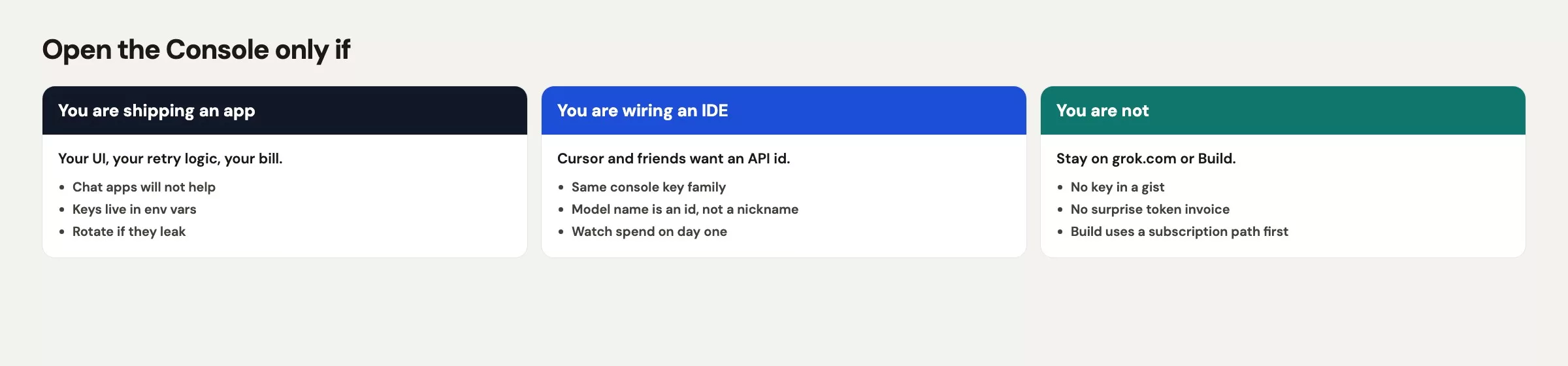
Your colleague needed a demo for a lunch-and-learn, and a grok.com thread would have been enough. A public gist with a live key is how you buy a $184.20 lesson. The test for whether you need the Console has nothing to do with whether you type Python. Ask instead whether the work still has to run at 2 a.m. after you close your laptop. If the answer is no, you wanted chat.
Keys, the base address, and your first request
Sign up or log in at console.x.ai, open API Keys, and create one key. Name it for the environment where it will run, such as shipments-dev and not just key, so you can tell later which one to switch off. Copy it once and store it in an environment variable, which is a named setting kept outside your code. Never commit it to a repository, the project folder that keeps every past version of every file, and never paste it into grok.com “for safekeeping.” Work secrets also follow the rules in the earlier post on privacy and work caution.
export XAI_API_KEY="xai-..."The base address the software talks to (the web address that receives your requests, called the base URL) is https://api.x.ai/v1, according to the xAI docs checked in August 2026. The first request in those docs uses the Responses API: a POST /v1/responses call with a model name and an input string. A second style called Chat Completions also exists. This post uses Responses because that is the snippet xAI shows first, and if the live docs have moved, follow the live page instead of the path printed here.
For a toy prompt, we want a one-sentence definition of what one row means (analysts call this the grain) that a new analyst can paste into a readme file. One row is one shipment, and the columns are ship_date, units, and region. The task is small enough to read, and a wrong answer is easy to spot. If the model says “one row is a customer,” you caught it.
curl https://api.x.ai/v1/responses \
  -H "Authorization: Bearer $XAI_API_KEY" \
  -H "Content-Type: application/json" \
  -d '{
    "model": "grok-4.7",
    "input": "One row is one shipment. Columns: ship_date, units, region. Write a one-sentence grain definition a new analyst can paste into a README."
  }'
If $XAI_API_KEY is empty, you will get an authentication error and no sentence. A chat-plan password gives the same error, because Console keys start with xai- (checked August 2026) and nothing else works as a key. Your Microsoft login is not a key, and neither is your SuperGrok login cookie.
Spend a minute on the boring Console settings before you write any loop. Set a monthly credit limit you would not mind explaining to your boss, and create a separate key for each environment. If the vendor offers lists of allowed network addresses or key expiry dates, turn on whatever you can live with. A gist with a live key would still have been a mistake with a $5 cap, but it would have been a $5 mistake. The $184.20 in 40 minutes came from a retry loop, no cap, and a public secret together.
Calling the API from Python
You can call the same service with xAI’s own software development kit (SDK), which is a ready-made library for a programming language. Many teams already use the OpenAI Python library, and the xAI docs checked in August 2026 show that it works if you point base_url at https://api.x.ai/v1 and pass the xAI key. Install it with pip install openai, and pin exact versions in real apps so an update cannot surprise you. The snippet below is the smallest path that prints text.
import os
from openai import OpenAI

client = OpenAI(
    api_key=os.getenv("XAI_API_KEY"),
    base_url="https://api.x.ai/v1",
)

response = client.responses.create(
    model="grok-4.7",
    input="One row is one shipment. Columns: ship_date, units, region. Write a one-sentence grain definition a new analyst can paste into a README.",
)

print(response.output_text)
Two details tend to bite. First, base_url must be the xAI address, because if you leave the OpenAI default, you will bill the wrong vendor or fail to sign in. Second, the method is client.responses.create in this snippet, which matches the curl command. Older examples online still show chat.completions.create with a messages list, and both styles worked on this API family in the docs checked in August 2026. Pick one, log the request id, and do not mix snippets from three blogs in one file.
Do not put the key in the Python file. The os.getenv call reads it from the environment for exactly this reason, and if it returns None, your program should stop with a loud error on startup. A retry loop that sends Authorization: Bearer None 12,041 times is how you get a different kind of alert.
Chat subscriptions and API money are separate
Here is a way to say it so finance can hear it. A SuperGrok or paid X subscription pays for a person using the chat apps, and xAI has also used it to turn on some consumer features, such as the Outlook add-in and Grok Build eligibility (checked August 2026). Since October 12, 2026, those chat plans are sold as one X Subscription that also covers Cursor, according to xAI’s announcement (checked October 13, 2026). API credits pay for the tokens your code spends in the Console, where a token is a small chunk of text the model reads or writes. The two do not refill each other. Buying $25 of API credits will not unstick Imagine on a phone, and paying for SuperGrok does not authorize curl.
xAI’s Grok 4.7 model page, checked October 8, 2026, lists $2 per million input tokens and $6 per million output tokens for prompts under 200,000 tokens. A token is a small chunk of text, often part of a word. That is a vendor list price and not a quote for your team. Batch jobs, caching, image work, and video work all carry extra charges, and your team’s live rate card is in the Console. Budget from that card, then add a cap that pages a human.
Retries act like a billing feature whether you meant them to or not. A 429 response code means the service wants you to slow down, so a while True loop that ignores it speeds up your spend. The 12,041 calls in our story did not come from 12,041 users. They came from one script that refused to sleep. If you need retries, limit them to three, wait a few seconds and then longer each time, and log the request id. If you do not know how to do that yet, you are not ready to share code publicly, and you might not be ready for a key.
Imagine endpoints cost extra
Text models and Imagine models may share a Console login, but they do not share one bill or one address. According to the xAI quickstart checked in August 2026, image generation uses model names such as grok-imagine-image-2.0 and a different path, /v1/images/generations. Video is another family again. If you put grok-4.7 in an image request, or an Imagine name in the Responses model field copied from above, you get a 400 error and then a confused Slack thread.
Consumer Imagine at grok.com/imagine can stay on the chat-plan side. You only need the Imagine API when your app, and not you, has to render still images. A pipeline is a series of steps that run one after another. One that stamps labels on 200 product photos overnight is a real example. A poster for a lunch-and-learn is not, so posters go through the studio. Apps that produce images go through the Console, on purpose, with a cap.
The xAI docs on Imagine capabilities and the Image 2.0 news post list the current names, so re-check them before you build. You only need the split from this section: a different endpoint, one address a program calls to do one job, a different meter, and one more place to leak a key inside a render job that keeps retrying.
A worked mini request
You are going to run the toy prompt once, using a key that never leaves your machine, with no loop. Afterward you revoke the key if this was only a lesson.
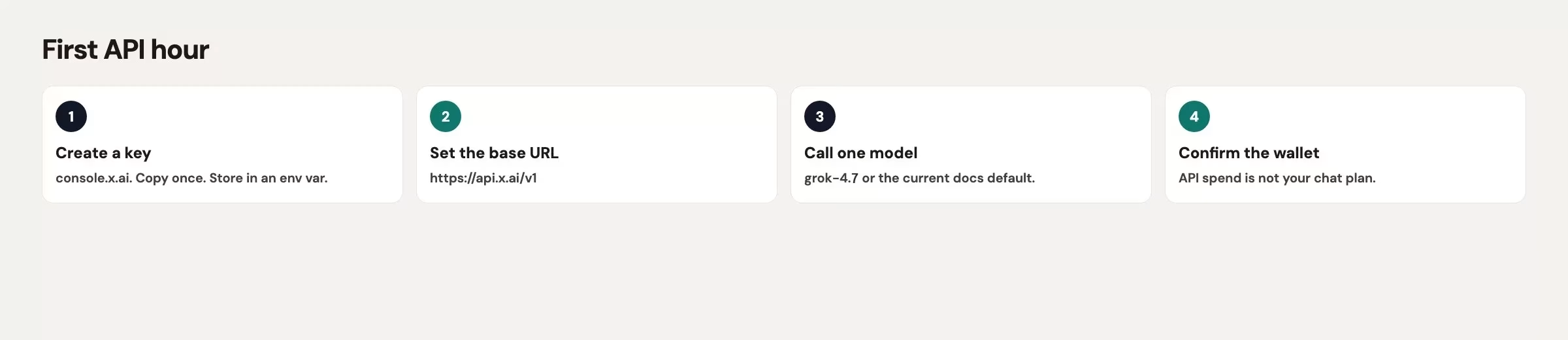
- Create a key named
grain-lessonin the Console. Load $5 of credits, or whatever the minimum is this week, and not $200. - Export
XAI_API_KEYin that terminal (the text window where you type commands) window only. Confirm it withecho ${#XAI_API_KEY}, which prints a length and not the secret. - Run the
curlcommand from above exactly once, so you confirm the setup works before you build anything on it. - Read the text and ask whether one row means one shipment. If the sentence slips in customers or revenue, the model drifted, but you still learned how the plumbing works.
- Run the Python snippet once, and confirm you get a sentence and not a stack trace about
base_url. - Revoke
grain-lessonif you have no app. If you do have one, move the key into a server-side secret store the same day.
The table shows what that toy request should look like when it works. The body is made up but the shape is real, and your wording will differ. The grain sentence must still say shipment and not customer.
| Field | Toy value |
|---|---|
| HTTP | 200 |
| model | grok-4.7 |
| output_text | One row means one shipment leaving the warehouse, with the calendar ship date, the unit count, and the region on that row. |
If you get a 401 error, the key is missing, cut off, or from the wrong product. If you get a 429 on the very first call, wait, and do not wrap the curl in a bash until loop. If you get a sentence about customers, you still have a working connection, so fix the prompt and skip the retries you would add to chase a better answer.
That is the whole first app: one request, one check, and one secret that dies if it was only homework. The 12,041-request version is the same homework with the word “once” removed.
Common mistakes
| Mistake | What you see | Fix |
|---|---|---|
| Key in a gist, chat, or screenshot | Spend alerts, or a stranger’s script on your wallet | Revoke now. Env var or a secret store. Never xai- in git |
| Retry loop on 429 | Thousands of requests, one user | Cap retries. Sleep. Log. Then stop |
| Expecting SuperGrok to auth curl | 401 with a chat login | Console key, separate credits |
Wrong base_url | Auth errors or the wrong vendor’s bill | https://api.x.ai/v1 (standard endpoint) |
| Imagine id on a text call (or the reverse) | 400, or a weird empty image | Text ids for Responses. Imagine ids for image routes |
| Minting a key for a huddle note | A secret with no app | Use grok.com. No app, no key |
Practice this week
If you have no app, skip the key. Write one sentence in a document: “We would need the API if ___ ran without a person clicking Send.” If the blank stays empty, you are done with this product map. If the blank is a real bot, run the six-step mini request on a $5 cap, then revoke the key or store it like a production password, because it is one.
The product map ends here, and the next post in the series covers everyday work: Grok for writing, explaining, and brainstorming. That is the writing habit worth building before anyone needs curl. If your next idea is to put Grok on every intern laptop with one shared key, reread the story at the top of this post first.
Quick recap
- Open the Console only when software is the caller.
- Keep the key in
XAI_API_KEY, use the base addresshttps://api.x.ai/v1, and take the model name from the docs (grok-4.7when checked October 8, 2026). - Make your first call with the Responses API via
curl, then try the OpenAI-style Python library withbase_urlset. - Chat plans and API credits are separate wallets.
- Imagine API names and paths are extra meters.
- Send one request, read the grain sentence, then cap or revoke the key.
- Never share a key in a gist, because 12,041 retries is a loop and not traffic.
Series notes
This is Part 11 of the Grok series (product map close). Next: writing, explaining, and brainstorming in everyday chat.
Sources
Research and further reading used for this article:
- xAI Console (sign up, API keys, credits)
- xAI API (live models, pricing entry, builder landing)
- xAI docs: Grok 4.7 (API id and list price, checked October 8, 2026)
- xAI docs: Imagine capabilities (separate image/video ids and routes)
- xAI: Imagine Image 2.0 (consumer vs API family)
- xAI docs: Grok Build overview (when a chat-plan agent is enough and a key is optional)
- Grok FAQ (plan vs product questions)
- Analytics Made Simple: Learn (related paths on this site)
Keep going
Same lessons in your feed
Short diagrams, hooks, and weekly tutorials on Substack, Instagram, X, and Facebook.



