

Give every Grok chat a clear name, and start a new one when the job changes. Chat history, memory, and projects are three different drawers, so a single chat titled “Untitled” that holds everything you have ever pasted will eventually hurt you.
Imagine you paste a short paragraph about why shoppers leave full baskets into Grok and ask it to tighten the wording. Two days later you are still in the same chat, sixty messages in, and you have also dropped in a screenshot of a salary chart “just for tone.” The chat is still called “Untitled.”
That is how a small writing job turns into a junk drawer. History kept every joke, every peek at a spreadsheet, and every “while you are here” question. Memory, if you switched it on, may save a summary of it all that you would not have chosen. A project folder is not a locked safe, and it does not keep old versions of your files. Salary numbers do not belong in a paragraph-rewrite chat on grok.com or anywhere else.
History, memory, and projects are different things
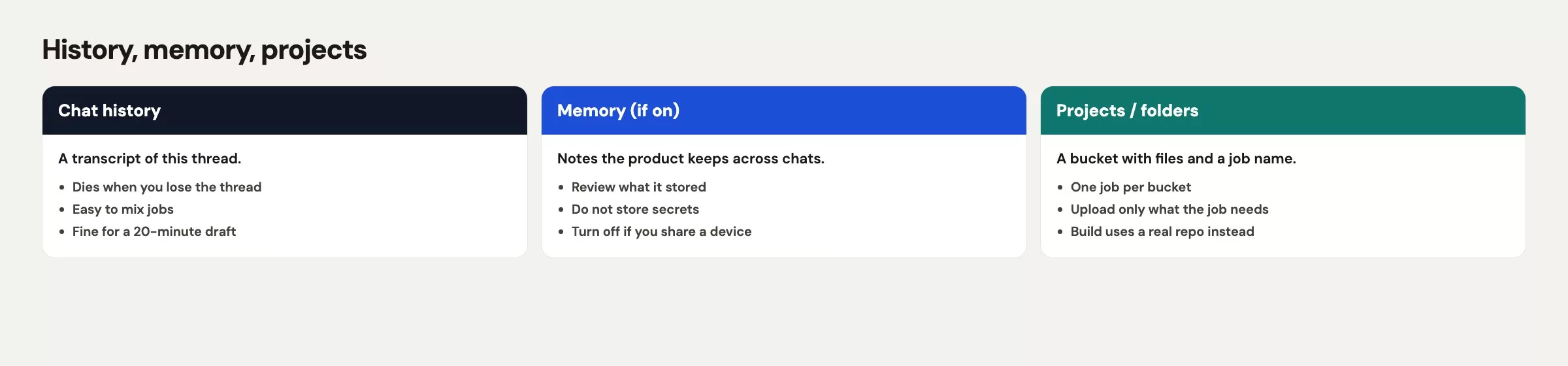
People often talk about these three layers as if they were one brain, and they are not. The labels on grok.com, iOS, and Android keep moving, and Grok on X does not always share the same history as the website, so check your Settings the week you start. The differences below stay useful even when the menu names change.
History is the list of your past conversations. On grok.com you open it from the history control in the corner, and on iOS it sits behind your profile picture. You can reopen a chat and keep talking, and the context is that chat’s messages until the product cuts or summarizes them. It is a log, not a promise that every file is still attached, and it does not mean Grok on X can see a chat you had on grok.com.
Memory, when it is turned on, recalls a few chosen facts across chats. It is not a word-for-word archive of everything you said. Think of it as a sticky note the product wrote to itself, which can be incomplete, out of date, or too eager to guess. Look under Data Controls or a similar group in Settings, and expect the rollout to differ by region, including the EU and UK. Do not put a secret in a chat and hope memory will remember the salary band but forget that it was sensitive. If your employer’s policy says so, turn memory off on work accounts, and delete chats you should never have started.
Projects on grok.com are named folders that hold related chats and files. The xAI help page notes that some people on grok.x.ai do not see Projects, so use grok.com in a normal Chromium browser (Chrome, Edge, or Brave) if you want them. A project is still just a chat product. It is not Grok Build, which is the coding tool covered later in the series, and it is not a shared drive with audit trails like Google Drive. It is also a poor place to park payroll, student records, or a production .env file (the private settings file that holds a program’s passwords and keys).
Grok Studio has been retired, and the help page says to use Grok Build instead. Everyday writing still happens in ordinary chat, so there is no need to hunt for Studio to organize your week.
Files you upload live inside the chat, and the website also has a files manager at grok.com/files. Deleting a chat does not mean the model never saw the file, because retention, training, and review follow the product’s current policy and your Data Controls. A good test is this: if you would not paste it into a ticket that an outside contractor might read, do not upload it.
Name the thread like a ticket
Untitled is how turn 60 happens. A week later you will not remember that the cart paragraph lived in a chat that also argued about email subject lines. Name the chat before your second message, the way a support team names a ticket, using the team or area, the job, and a short noun.
A few patterns work well:
WK34-exec-summaryfor a dated writing job with a ship date.scangrid-hold-emailfor one outgoing message, like the one in the earlier post on everyday writing jobs.stores-visits-questionsfor questions about one specific file.dash-name-brainstormfor a list of name ideas with no files attached.
Names like Grok, help, new chat, q3, misc, or just a recipient’s first name do not work, because they collide by Friday. If the product auto-titles from your first line, edit the title anyway. First lines usually start with “can you”, which is a poor label for finding anything later.
Put the job in your first message too, in one sentence: “This thread is only for tightening the cart-abandonment paragraph for the Friday ops note. No other docs.” Both you and the model need that fence. If memory is on, a named job is also less likely to leak into a later chat as “this person works on compensation,” which is untrue if you only almost pasted a screenshot.
Keep one chat for one main reader. If Tuesday’s paragraph is for an executive note and Thursday’s is for a vendor, those are two chats even when the topic feels similar, because the audience changes which words are off limits. Mixing audiences is how last quarter’s backup plan ends up in this quarter’s email.
Files you should and should not upload
Grok chat on the web, iOS, and Android accepts many file types, including PDF, Word documents, spreadsheets, slide decks, plain text, CSV (a plain table of comma-separated values), common images, and some audio and video. When checked in October 2026, the Grok FAQ listed up to about 100 files per message on the web, 20 on Android, and 150 megabytes per file. Those numbers will move, so treat them as rough. The rule that should not move is your own: if a file has people, money, students, health details, or secrets in it, keep it out of consumer chat unless your employer has approved a path for it.
These are safe enough for practice and for many internal drafts:
- A paragraph you wrote, pasted as text, with names already removed.
- A toy CSV you built for the question (10 rows, made-up store names).
- A public help article saved as a PDF, or a screenshot of a public docs page.
- An outline with placeholders instead of real customer emails.
These are a hard no, even if the upload button accepts them:
- Payroll, pay bands, offer letters, and performance ratings.
- Student work with names, grades, or ID numbers, and school emails that include other families’ data.
- Customer exports with emails, phone numbers, ticket text, or health-related notes.
- API keys (passwords that let one program talk to another),
.envfiles, single sign-on screenshots, and invoice PDFs with account numbers. - A “small slice” of a warehouse export that still has an employee_id column.
If Grok needs to see the shape of your data, build a toy version. Eight rows with the columns store, visits, add_to_cart, and made-up store names is enough for an explanation or a brainstorm. If you need Grok to see the real 842 rows, you have probably outgrown everyday chat. That is a job for your data warehouse (the central database your company reports from), or a carefully limited Build task later, or a “do not use Grok” job as described in the post on when Grok is the wrong tool.
After the week is over, delete what you can. On the web, grok.com/files is where you clean up. Deleting is good hygiene, but it is not a time machine and it is not a legal hold. Do not upload something on the theory that you will delete it later, because you will forget.
Split when the job changes
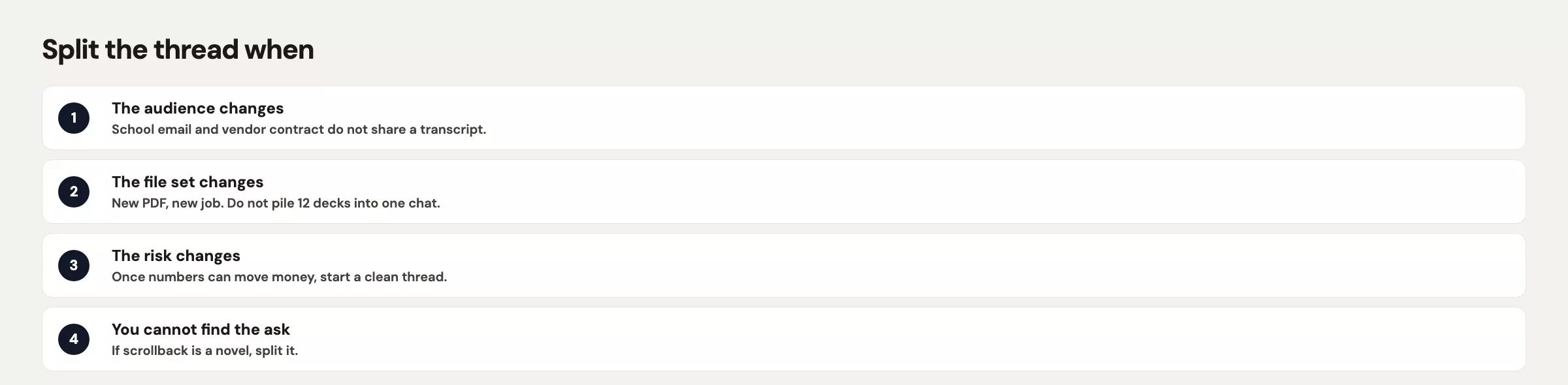
Splitting feels fussy on Tuesday morning and feels obvious at turn 60. Use a hard rule so you do not have to argue with yourself.
Start a new chat when any one of these is true:
- The audience changed, for example from an executive note to a vendor to a new hire.
- The job type changed, such as from drafting to explaining, brainstorming, or checking whether a rumor is true.
- The level of detail in the data changed, such as from one paragraph to a table to a claim that needs a live web search.
- The sensitivity changed, for example from public docs to anything with a person’s name or a dollar amount in it.
- The chat is summarizing itself badly, contradicting an earlier fact, or repeating a product code you already corrected.
- You would not want a coworker to scroll from message 1 to now during a screen share.
When you split, carry over a three-line brief instead of the whole transcript: your goal, the facts that are still true, and the words that are off limits. Pasting all 59 turns into the new chat rebuilds the junk drawer with extra steps. If a file still belongs, attach it again in the new chat, because an old upload may not stay attached and may not be the version you mean.
Do not split by mood. Opening a new chat because the last one got snarky is optional, and you can fix a snarky tone by saying “plain tone, no jokes” in your next message. Split by job. A pay-band screenshot, on the other hand, cannot be unseen.
| Put it here | Not here |
|---|---|
| A named thread for one job (draft, explain, or brainstorm) | Untitled, or a thread that already shipped a different audience |
| A grok.com Project as a bucket of related named threads | A dump of every Q3 file “so Grok has context” |
| Toy tables and scrubbed paragraphs | Payroll, ratings, student records, keys, customer extracts |
| Your wiki, Drive, or git for the source of record | Chat history treated as the official copy of the email you sent |
| Grok Build (later in this series) for a sandbox folder | Everyday chat asked to “edit the repo” |
| Memory off, or tightly reviewed, on work accounts | Hoping memory will recall salary bands and forget they were sensitive |
A worked week with four threads
Say you are a product analyst, and in week 34 you owe four things. There is a Friday ops note, a look at store-visit counts, a name for a new dashboard (a page of charts that updates from your data), and a side question from a manager about how paid time off shows up on a pay stub, which is the trap. You use Grok on grok.com with a work account, and memory is off because your company’s policy says so.
On Monday you open WK34-exec-summary. Your first message says: “This thread is only the Friday ops note for leadership. The reader has 90 seconds. No files with people.” You draft the cart paragraph there and then stop, which keeps the opening scene of this post contained.
On Tuesday you open stores-842-visits-questions. You do not upload the warehouse export. Instead you build a 10-row toy CSV with made-up store names and the same columns: store, visits, add_to_cart. The number 842 is the real count you already know from the dashboard, so it stays in your own note and is never sent as 842 identified rows. You ask Grok to explain a dip in visits for a new hire, and you run the live-answer checks from the previous post on anything that smells like an outside benchmark (a number you compare against, such as last year’s rate).
On Wednesday you open dash-name-brainstorm with no files. You ask for eight names, tag each answer as fact or guess, pick one, and leave. The whole thing takes eleven minutes.
On Thursday a manager asks you to explain the paid-time-off accrual line so it sounds less legal. You almost drop a pay-stub screenshot into WK34-exec-summary, because that chat is already open. The pay band of $118,400 is visible in the same PDF export that someone used as a template. You do not upload it, and you do not start a fourth Grok chat for payroll. You write three sentences yourself from your HR system’s help page and ask HR to confirm the wording. That question was never a Grok job.
The bad version of Thursday is the opening scene of this post. It has turn 60, a screenshot pasted in, a title that still says Untitled, and a history that now holds a pay band next to a cart-abandonment metaphor. Even with memory off, that chat is both a retention problem and a screen-share problem. Your split rule keeps you out of that version.
| Thread | Job | Files | Split or stop |
|---|---|---|---|
| WK34-exec-summary | Draft Friday ops note | None (paste scrubbed text) | Stop when the note ships |
| stores-842-visits-questions | Explain toy table to a new hire | 10-row fake CSV | Do not attach the real extract |
| dash-name-brainstorm | Brainstorm 8 names | None | Stop after the pick |
| (none) | PTO stub wording | Pay stub never uploaded | HRIS plus HR, not Grok |
If you would not want the first message and the last message on the same screen in a meeting, split the thread or do not start it.
Mistakes that make threads hard to find
- Leaving the title as Untitled, then hunting on Friday for “the cart one.”
- Treating history, memory, and projects as the same brain, when they are a log, an optional sticky note, and a folder.
- Uploading the real export because the toy CSV felt fake, when fake is the whole point.
- Pasting one more question into a chat whose draft already shipped, which is how payroll lands next to a metaphor.
- Using grok.x.ai and then wondering where Projects went, when the help page points to grok.com.
- Assuming that deleting a chat means the model never saw it. Hygiene still matters, and so does not uploading in the first place.
- Turning on memory for a work account “so it knows our product codes,” then finding out it also remembers a pay band from a screenshot.
Quick recap
- History is a log, memory is an optional sticky note, and projects are folders. None of them is a vault or a code repository (a project folder that keeps every version of its files).
- Name the chat like a ticket, and fence the job in your first message.
- Upload toy tables and scrubbed text, and never payroll, student records, keys, or customer exports, because uploads leave your control the moment you send them.
- Split when the audience, job, level of detail, or sensitivity changes, or when a screen share would embarrass you.
- In a week with three Grok chats, one HR question stays out of chat and no $118,400 screenshot ever gets uploaded.
- Labels move, so check grok.com, Data Controls, and grok.com/files the week you start.
How to practice this week
Limit yourself to three named chats this week, and title each one before your second message. Put a one-sentence job fence in message one. If a fourth job shows up, either open a fourth chat or do it without Grok. Delete one old Untitled chat you no longer need, and take a look at grok.com/files if you are on the web.
The next post in the Grok series is Grok at home, school, and work: four realistic weeks. It uses the same model with different stakes and a hard stop in each setting, and the chat habits from this post carry over.
Series notes
This is a habits post in the Grok series. It pairs well with the live-answer check and the everyday writing jobs covered earlier in the series.
Sources
Vendor help pages checked in September 2026. Re-open the live page before you rely on a menu name or a limit.
- xAI: Grok website / apps FAQ (history location, file types and size hedges, grok.com/files, grok.com vs grok.x.ai for Projects, Studio retired)
- xAI consumer FAQ (where you can use Grok; conversation history on app and grok.com)
- grok.com (consumer chat and Projects)
- xAI: Grok product page (chat apps versus other tools)
- Analytics Made Simple: privacy and work caution (training toggles, work vs personal accounts, sanitizing before paste)
- Analytics Made Simple: when Grok is the wrong tool (payroll, production data, jobs chat should not take)
- Analytics Made Simple: Grok series (hub; Grok Build comes after the everyday posts)
- Analytics Made Simple: Learn (related paths on this site)
Keep going
Same lessons in your feed
Short diagrams, hooks, and weekly tutorials on Substack, Instagram, X, and Facebook.



