
You can use the same Grok chat at home, at school, at your job, and when you manage people, but the risk is very different in each place. In all four, one rule holds: check every number and every citation before anything leaves the chat.
Picture a Sunday evening. You paste a messy note into Grok and get back a polite email for your child’s teacher: the field trip is on 8 September, $18 in cash is due Friday, and your child has a dairy allergy. You read it, it looks right, and you send it. That went fine, because the stakes were low.
Now the model is the same, and even the household login is the same, but the job is different. Everyday Grok does not know that one task is simple admin and another is graded schoolwork. You have to draw that line yourself, and you have to say it out loud to a kid, a teammate, or yourself.
Same model, different stakes
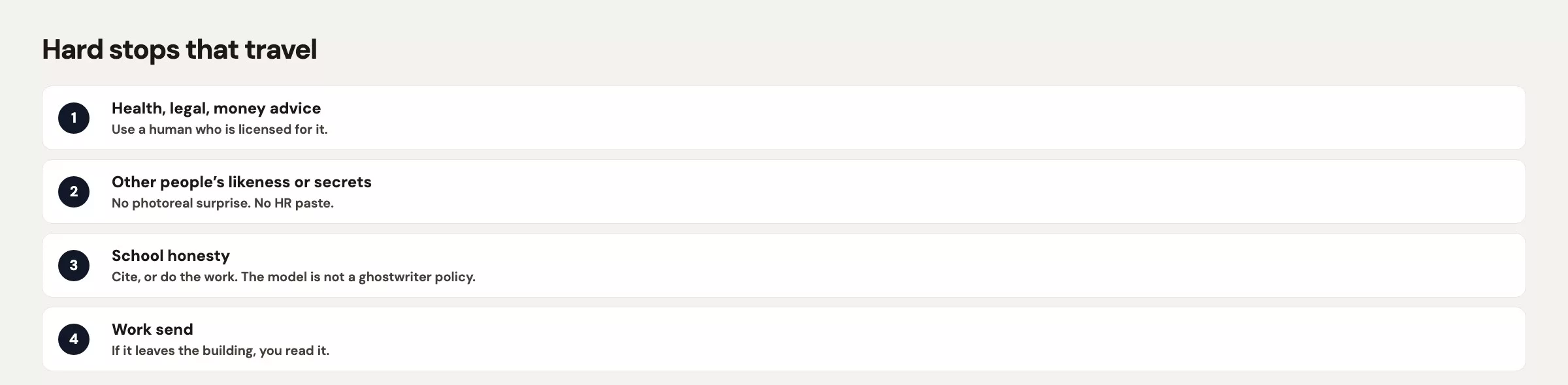
Stakes are not a mood. They are what happens if the output is wrong and you send it anyway. Here is how the worst case changes from one setting to the next.
At home, the worst case is an awkward email, a wrong pickup time, or $18 in the wrong envelope. You can fix all of those. They still deserve a review pass, but they do not deserve a student record pasted into the prompt.
At school, the worst case is that your child’s name is on work they cannot explain, or on a citation they never opened. That is a question of honesty and not of style. Teachers can spot cloned proofs, and so can classmates.
In an analyst job, the worst case is a number that was never in the warehouse showing up in a Friday note. Leadership repeats it, and you spend Monday walking it back. That costs you tickets, your reputation, and sometimes a customer.
For a people manager, the worst case is that a rating, a pay figure, or the text of a complaint ends up in a consumer chat log. That is far worse than an awkward email, because it is a record you can never fully take back. The line to stop is drawn earlier here than anywhere else in this post.
The model does not climb that ladder for you. Grok will happily rewrite a proof, a performance improvement plan outline, and a packing list in the same friendly voice. Your job is to notice which week you are in, and to refuse the jobs that belong on a higher rung than you are allowed to take.
The home admin week
Keep this week on a personal account, a personal phone, and a personal grok.com login. School directories, other children’s allergies, and the parent-teacher group roster never go into a work Grok thread, and they never go into Grok on a public X account. Name the thread like a ticket, for example field-trip-8-sep-teacher, so you can find it and delete it later.
On Monday you need a packing list. You already know the trip is to a farm on 8 September, so you ask Grok for a list in two columns, one for the kid’s bag and one for the adult’s bag, capped at 12 items. You add the dairy-allergy card yourself, because Grok cannot know what your child actually needs. When you review the list, check that it gives no medical advice, no “give an allergy pill if” line, and no other child’s name.
On Tuesday you write the email from the opening scene. This is a draft job and not a brainstorm, so you tell Grok the audience is the teacher, who will give it about a minute. You give it the facts: the date, the $18 in cash due Friday, the dairy allergy, and that you can chaperone until early afternoon. You forbid other students, any medical detail beyond the dairy allergy, and jokes. Then you run the six-check review from the earlier post on writing, and you send it from your real mail account.
On Wednesday you sort out the calendar. There are three overlapping practices and a dentist appointment at 4:15 p.m. on Thursday. Paste the times you typed yourself, and skip the screenshot of the school portal with 28 other families visible. Ask Grok to propose one schedule, then tap it into the real calendar yourself. Grok does not get calendar access in this tutorial, and you should not hand a consumer chatbot your whole family calendar “to be helpful.”
Thursday brings a recipe scaled from 4 servings to 7, which is harmless, but check the units anyway. Models will double the salt with the same confidence they double the pasta. On Friday you write a short thank-you note in your own words, starting from a Grok outline. That is the whole week.
Here is where you stop. Do not ask Grok to diagnose a rash, to draft an angry letter to a neighbor with legal threats, or to “fill in” a form that asks for a Social Security number, and do not upload the class list. Also stop if your child is standing next to you asking Grok to do tonight’s graded work. That belongs to the school week, and the answer there is no.
The school week: citations and honesty
Your child is in a geometry class. The honest uses of Grok look like a tutor who is not allowed to hold the pencil when it is time to turn in the work.
Some requests are fine. You can ask, “Explain similar triangles like I am in 10th grade, then give me two practice problems with the answers hidden until I ask.” You can say, “I tried this proof and got stuck at step 3. Ask me a question, but do not write the proof.” You can also type a vocabulary list yourself and ask to be quizzed on it. Through all of this, the student writes the submitted work in their own file, with the chat closed.
Other requests are not fine. Do not ask “Write the proof for problem 14,” and do not ask it to make the writing “sound like a student.” Do not have it generate a bibliography for a history paper and paste in sources nobody opened, which is the same failure as trusting a live answer without checking it, only now with a grade attached. If Grok cites a page, your child opens the page. If the page is weak, your child drops the citation. Teachers are not fooled by four web addresses that lead to error pages.
Here is a household rule you can actually say out loud on a school night:
- Chat can explain and quiz, but chat cannot be the text you hand in.
- If the assignment says unaided, the app stays closed, and that includes take-home tests.
- Any source Grok names gets opened, dated, and quoted in the student’s own words, or it does not go in.
- If two students could paste the same three sentences, rewrite from a blank page.
The cloned proof happens when the fourth rule is skipped. Grok is not secretly giving each household its own unique writing, so popular problems get popular answers. Identical wording is a gift to the teacher and a problem for your child.
Parents, do not “help” by generating the essay in your own thread and handing it over, because it is still your child’s name on model text. Use Grok to draft the email to the teacher. Do not use it to ghostwrite the lab report.
The lines to hold are exam answers, full essays for turn-in, fake citations, uploading other students’ work to “compare,” and putting special education or medical PDFs into consumer Grok. School honesty policies vary, so when the syllabus is silent, default to tutor mode and not author mode.
The work week for an analyst
This week you are the analyst. Your dashboard (a screen of charts that tracks key numbers) says 2,186 sessions and a 4.1% add-to-cart rate for the week ending 14 August, and leadership wants a paragraph on Friday. Grok can help you write, but Grok cannot be the warehouse.
On Monday you ask for an outline only. Your prompt says the audience is the operations lead, who has 90 seconds, and that Grok must not invent metrics. You paste the two numbers you already pulled. Grok returns a skeleton with gaps marked [cause: you fill], and you keep those gaps empty on purpose.
On Tuesday you write an explanation for a new hire. In your team’s definition, add-to-cart counts sessions with at least one add event, and it does not count users or orders. You put that definition in the prompt so Grok does not grab a public blog’s version. You use a toy table of 8 rows with fake campaign names and no customer emails.
On Wednesday someone in Slack says “industry add-to-cart is usually 8%.” That is a live-answer job and not a drafting job, so you open a new thread, ask for sources, and read them. You will likely find a vendor blog that measures something different. In the Friday note you write “unconfirmed, different definition” instead of 8%. If you skip this step, you end up with a ticket like #4419 and a bad week, or without even the ticket.
On Thursday you draft the paragraph with limits. You forbid industry benchmarks you did not confirm, causes you did not check, and the word “significant” used as a substitute for 4.1%. Then you do a review pass on names, numbers, promises, tone, privacy, and where the message is going. The 2,186 and the 4.1% should still match the dashboard after the rewrite. If they do not, undo what Grok “helped” with.
On Friday you send from your own note and not from the chat history, because a chat log is not the official record of anything. The dashboard screenshot in the deck, with the date visible, is the official record.
The lines to hold this week are these: do not upload a warehouse extract with user ids, and do not ask Grok to “find the revenue bug” in production SQL (the standard language for asking a database for data) you pasted from the live system. Do not treat a model-invented 8% as a KPI (key performance indicator, a number the team is judged on), and do not send a draft that promises a fix date nobody owns. If you need an agent (an AI that takes actions on its own, step by step) that works inside a code folder, that is Grok Build, which comes next in this series. Use it in a sandbox, with review.
The work week for a people manager
You run one-on-one meetings for five people. Grok can help you structure your time, but it cannot hold the file on a person.
On Monday you ask for an agenda template: 25 minutes, three numbered topics, and a 5-minute buffer, with no names in the prompt. You fill in the names in your own document.
On Tuesday you have a tense conversation coming, so you describe the situation in labels and not in gossip. For example: “A teammate missed two consecutive Friday notes. I need an opening sentence that is direct and not sarcastic.” You do not paste last year’s ratings, and you do not paste the Slack argument. If your policy says no, you do not name the person in a consumer model at all. You write the specifics yourself after the skeleton.
On Wednesday you rewrite a job posting for clarity. A posting is public, so that is fine, but strip out any salary bands that are not public. A figure like $118,400 from an earlier near-miss does not belong in the chat either.
On Thursday you ask for 8 ways to kick off a retrospective and tag each idea as fact-based or a guess, then you pick one. There are no files involved. On Friday you almost ask Grok to summarize a complaint email so you can “reply faster.” Stop right there. Complaint text, investigation notes, health mentions, and performance scores stay in the HR system. If you need help writing, draft from what you remember of the process (acknowledge, give a timeline, point to HR), and do not paste in the email.
The line to hold is any prompt that would make a reasonable HR partner wince: ratings, pay, investigations, medical details, immigration status, or “compare these two people.” If you need a coach, use a human with a duty of care, because Grok is not that. The privacy post is not optional this week.
Rules that travel across all four weeks
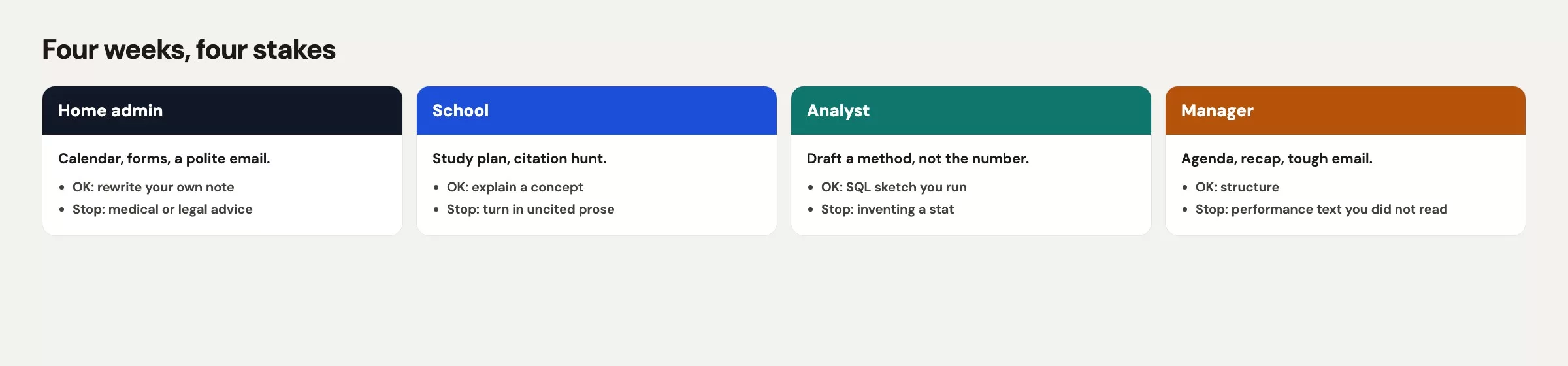
The four weeks share the same rails. Write them once on a sticky note if your household or team follows a shared pattern. People should not share logins, but they can share rules.
- Match the account to the data. Use personal Grok for personal admin, and use a work account only where policy allows. Never use Grok on X for a school allergy or a one-on-one.
- Keep one named thread per job, and start a new one when the audience or the confidentiality changes.
- Remember that drafting, explaining, and brainstorming are different prompts. Any live claim gets a verify pass before it goes to Slack or Google Classroom.
- You send the message and Grok does not. Review names, numbers, promises, tone, and privacy.
- If you cannot point to the sentence in a document, a dashboard, or your own notes, it does not ship.
- A stop means stop, and it does not mean “paste a smaller screenshot.”
| Context | OK use | Hard stop |
|---|---|---|
| Home admin | Field-trip email, packing list, calendar sketch, recipe scale | Other families’ data, medical diagnosis, legal threats, SSNs |
| School | Explain, quiz, stuck-at-step-3 questions, sources you then open | Submitted proofs/essays, fake citations, unaided exams, IEP uploads |
| Analyst | Outline, definition-locked explain, draft from numbers you pulled | Invented KPIs, prod extracts with people, promising fix dates you do not own |
| Manager | Agenda skeleton, tone pass on a public job post, retro kickoff ideas | Ratings, pay, complaints, health, “compare these two people” |
If the output needs your name, your child’s name, or your company’s name, you still do the part that can get someone in trouble.
Mistakes that come up in all four weeks
- Using one household login for the parent-teacher email and the geometry proof, with no spoken rule. Draw the line before Sunday night.
- A parent ghostwrites the lab report right after a successful admin email. The stakes are different, but the app is the same.
- An analyst pastes 2,186 and lets Grok “round” it to 2.2k and add an 8% comparison figure. The precision dies and the rumor lives.
- A manager uses “summarize this complaint” as a writing shortcut. That paste is the incident.
- Copying school citations from chat without opening the link, which is the verify problem again with a grade attached.
- Assuming Grok Build will be a safer place for payroll next week. Build is a folder agent and not an ethics upgrade. Use a sandbox first, and still send no pay files.
Pick the week that matches your life
Pick one week that matches your actual life for the next five days, and do not try to play all four. If you are a parent, run the home admin week and say the school rule out loud once. If you are an analyst, write the Friday paragraph with gaps that Grok is not allowed to fill. If you manage people, generate one agenda with no names in the prompt.
Write your stop rule on a line at the top of the first thread: “Stop if this needs a grade, a KPI I did not pull, or a file about a person.” That one sentence is the whole post in miniature.
Next in this series is Install Grok Build and survive first run. Everyday chat stays in the browser. Build is an AI coding tool you run by typing commands that works in a project folder and shows you changes to review. Start in a sandbox and not on a real project on your desktop. The hub for all of this is the Grok series.
Quick recap
- The same model faces four different levels of stakes: embarrassment, honesty, customer numbers, and files about people.
- At home, field-trip emails and lists are fine, while other families’ details, diagnoses, and Social Security numbers are not.
- At school, use Grok as a tutor and a quizmaster, do not submit its proof, and open every citation.
- As an analyst, the 2,186 and 4.1% come from your dashboard, and Grok writes the sentences around them.
- As a manager, use Grok for agendas and tone, and never for ratings, pay, or complaint text.
- The routine is the same everywhere: the right account, a named thread, a review, a verify pass, and a stop rule. Then move to Grok Build only if you need a folder agent.
Your next step
Pick one of the four settings in this post that matches your life, home, school, or work, and decide which kind of task you will and will not give Grok there. Write it down as two short lists. Deciding in advance is much easier than deciding mid-task when you are in a hurry.
Series notes
This closes the everyday stretch of the Grok series. Related: the earlier posts on checking live answers and keeping your threads organized.
Sources
- grok.com (consumer chat used in all four weeks).
- xAI: Grok product page (chat versus Build and Imagine; do not mix surfaces).
- xAI: Grok website / apps FAQ (accounts, files, and history; screen labels change, so check the live page).
- xAI: Grok Build (next section of this series; folder agent, not everyday chat).
- Analytics Made Simple: privacy and work caution (work vs personal, training toggles, sanitizing pastes).
- Analytics Made Simple: when Grok is the wrong tool (graded work, production data, people files).
- Analytics Made Simple: Grok.com, apps, and Grok inside X (pick a surface before a school or work week).
- Analytics Made Simple: Grok series (hub for everyday through Build and Imagine).
Keep going
Same lessons in your feed
Short diagrams, hooks, and weekly tutorials on Substack, Instagram, X, and Facebook.



