GPT-6.1 Terra is OpenAI’s new middle model: cheaper than its top models and, by OpenAI’s own tests, close to them on everyday work like filling in forms, reading screens and routine coding. Whether it is good enough for you depends on your tasks, and the way to find out is to price one real job and run a few of your own prompts through it side by side.
Imagine your team uses AI to turn each week’s sales call notes into a short summary for managers, and the bill has crept up every month since spring. A model that costs half as much sounds like an easy win. It is only a win if the summaries stay just as good, and nobody on your team wants to be the person who swapped in a cheaper model and missed a key customer complaint.
This guide covers what Terra is, where you can use it in ChatGPT, what it costs next to OpenAI’s other models, the two price switches that catch people out, and a side-by-side test you can run in under an hour. For the general method of pricing AI work, see our guide on how to work out what an AI task really costs.
What OpenAI’s new middle model is
Terra is the mid-priced model in OpenAI’s current line-up, built to be fast and cheap enough for routine work. BleepingComputer’s launch report (October 26, 2026) quotes OpenAI calling it “a fast, efficient model that combines detailed visual reasoning and precise computer use”, and lists filling out forms, editing videos, reading technical drawings and repetitive desktop work as the target jobs.
Computer use means the AI operates apps and web pages for you: it looks at the screen, clicks, types and moves through steps, the way you would. Visual reasoning means it can make sense of images such as a chart, a screenshot or a scanned form. Those two skills are what ChatGPT Work and Codex lean on, which is why Terra appears there first. An AI agent, the kind of tool those two modes are, is an AI that carries out a series of steps toward a goal instead of answering one question.
OpenAI’s line-up now has four sizes. From cheapest to most expensive: Luna for simple, high-volume jobs, Terra for everyday work, Sol for harder reasoning, and Astra as the flagship. OpenAI still recommends Sol or Astra for the most complex coding and in-depth research, according to BleepingComputer (October 26, 2026).
What OpenAI says it is good at
All the performance figures so far come from OpenAI, not from an independent test. They are benchmarks, fixed sets of test tasks used to score models against each other. DataCamp’s summary (October 2026) and BleepingComputer report these claims from the launch post:
- About as good as GPT-6 Astra on everyday agent tasks, at about a tenth of the price per token, according to BleepingComputer. A token is a small chunk of text a model reads or writes, roughly three quarters of a word, and API prices are set per million of them.
- Finishes tasks more than three times faster on average than Astra and GPT-6.1 Sol, OpenAI says in the same report.
- On OpenAI’s internal test of prompts designed to trip models into factual errors, the error rate at low effort fell from 53.6% for the older GPT-5.6 Terra to 16.7%, and to 4.3% at maximum effort, as reported by BleepingComputer (October 26, 2026).
- On Terminal-Bench 4.0, a test of coding agents working in a terminal (the text window where programmers type commands), 50.3% at maximum effort against 21.5% for GPT-5.6 Terra, according to DataCamp.
Effort, in this context, is a setting that controls how long the model thinks before it answers. Higher effort is slower and uses more tokens, so it costs more per answer.
The fair reading: Terra is a big step up from the previous Terra, and OpenAI pitches it as close enough to the top models for most daily work. Whether it is close enough for your work is a separate question, and the rest of this guide is about answering it.
Where you can use it in ChatGPT
Terra is available in ChatGPT Work and Codex, not in regular Chat, and not on the Free plan. OpenAI’s announcement on X (October 26, 2026) says it is rolling out to all Plus, Pro, Enterprise and Edu users in ChatGPT Work and Codex, and to developers through the API as gpt-6.1-terra.
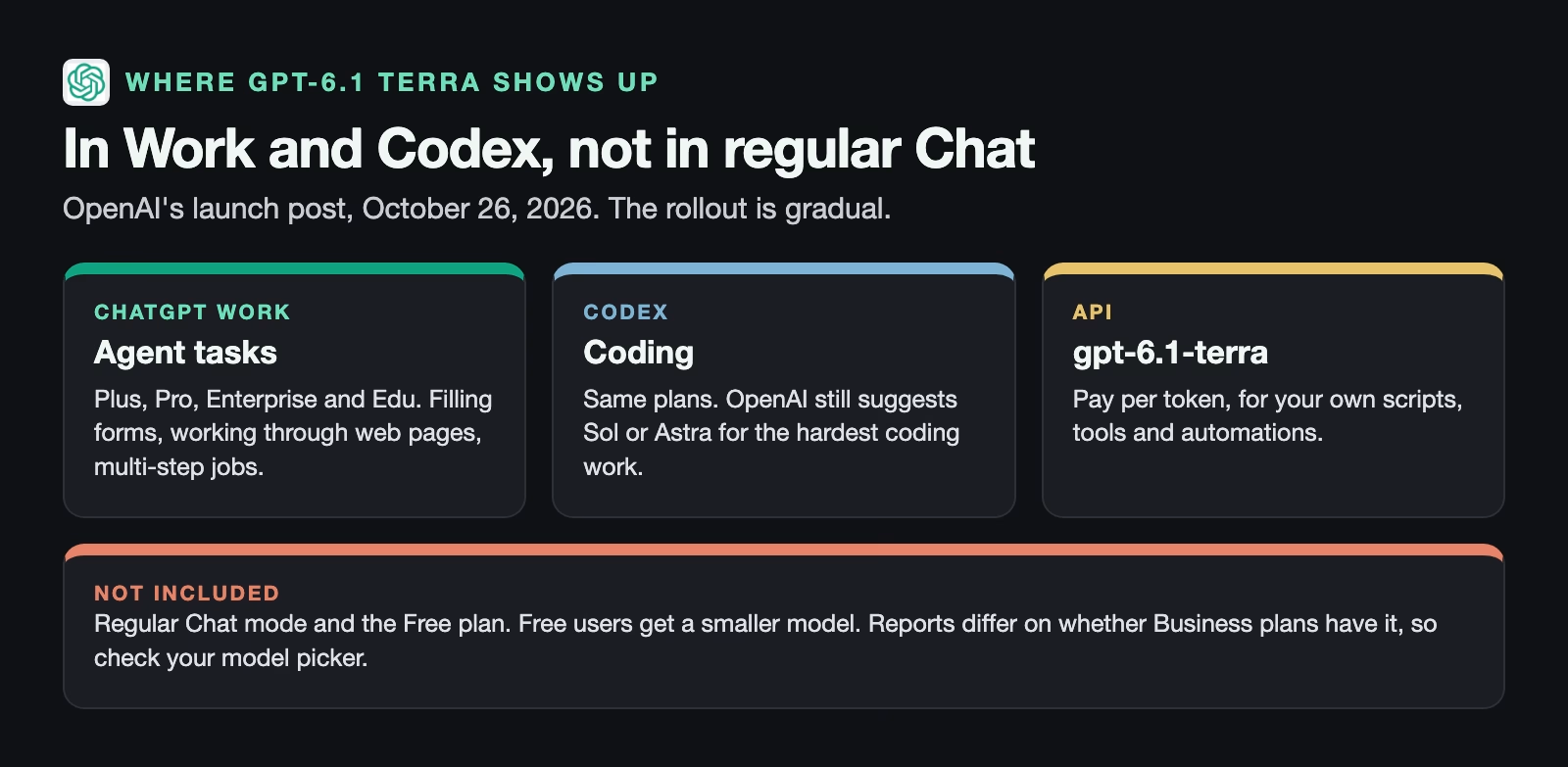
ChatGPT Work is the mode where ChatGPT carries out multi-step tasks for you, with your approval at key points. If it is new to you, read what ChatGPT Work mode is for first. Codex is OpenAI’s coding tool. The API, short for application programming interface, is how your own scripts and tools talk to the model and pay per use.
Two practical notes. The rollout is gradual, so Terra may take days to appear in your model picker. And reports disagree about Business plans: some list Business, while OpenAI’s own post does not. Open the model picker in ChatGPT Work and look for it rather than relying on a list.
What it costs next to OpenAI’s other models
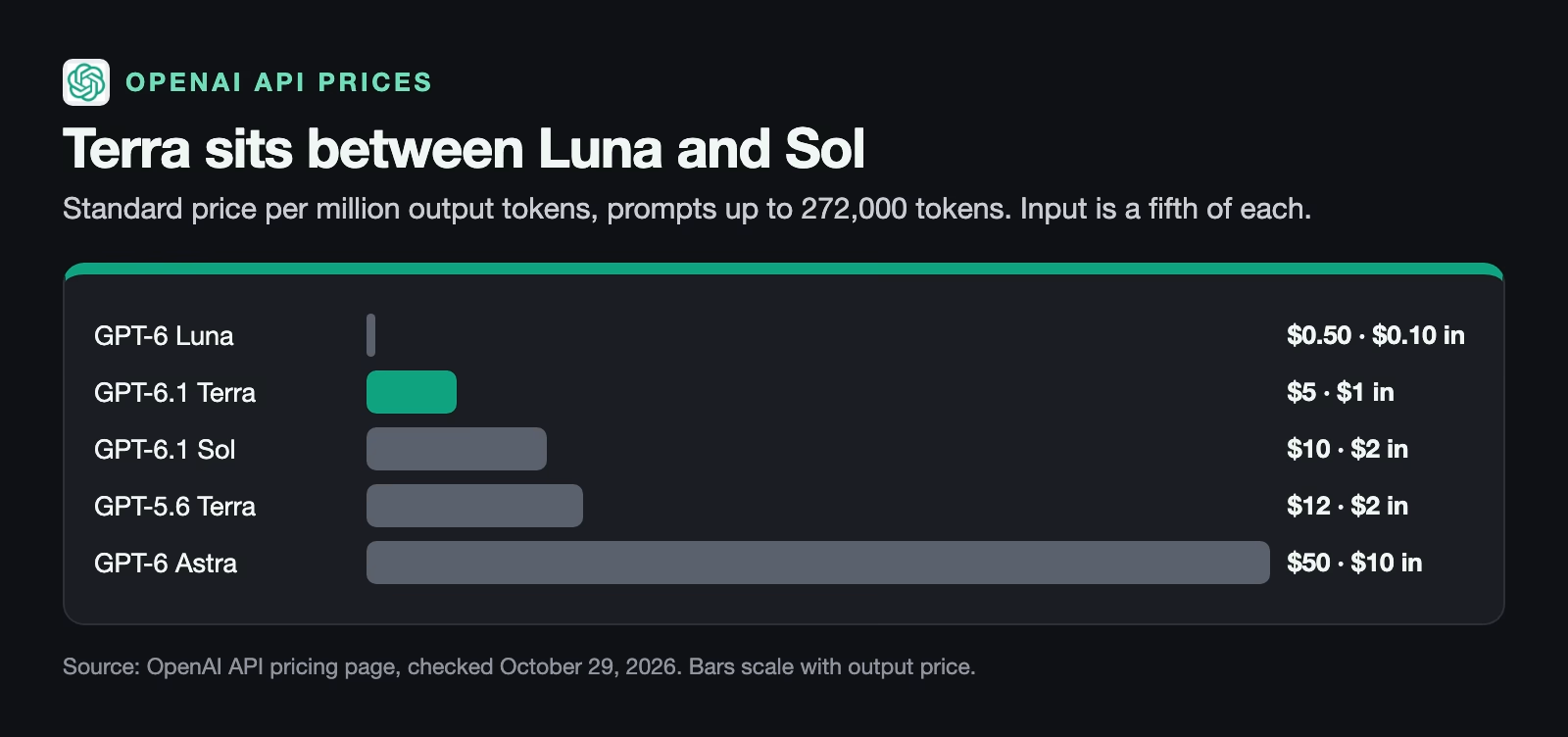
If you pay a flat ChatGPT subscription, Terra does not change your bill; it can only change how far your usage limits go. The price matters when you or your company pay per use through the API. OpenAI’s API pricing page (checked October 29, 2026) lists Terra at $1 per million input tokens and $5 per million output tokens, half the price of GPT-6.1 Sol.
Per-token prices are hard to feel, so price a real job instead. Take the call-notes example: each run reads about 40,000 tokens of notes (roughly 30,000 words) and writes a 3,000-token summary. Across 1,000 runs, a busy month for a sales team, the cost at standard prices looks like this:
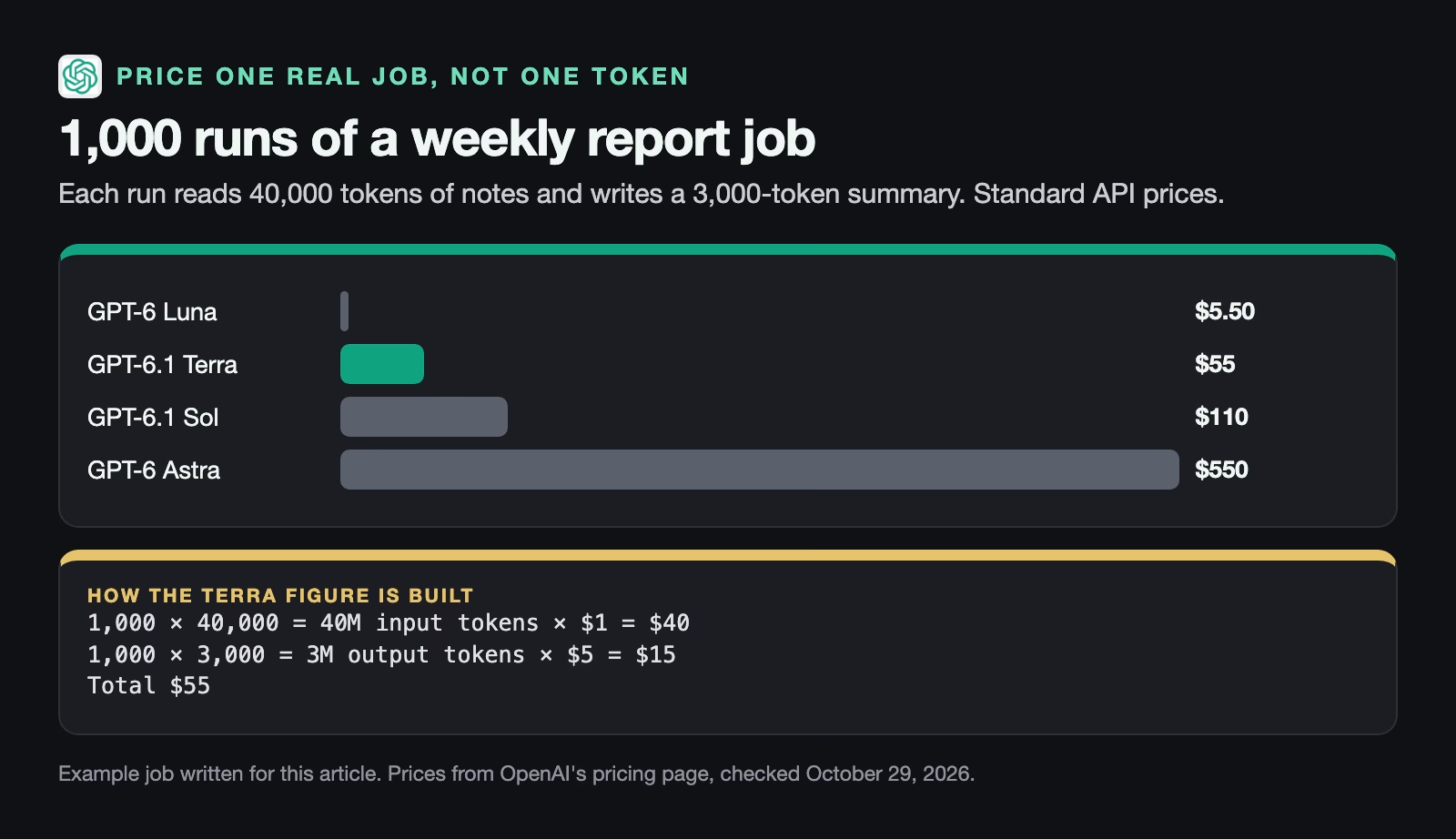
The same 1,000 runs cost $550 on Astra, $110 on Sol and $55 on Terra, all from the prices on OpenAI’s pricing page (checked October 29, 2026). Luna is ten times cheaper again at $5.50, which is why it is always worth asking whether a small model would do. For a summary that managers act on, though, the cheapest model is rarely where you start.
Two price switches that catch people out
Terra’s price changes in two situations, and both are easy to miss when you estimate a budget. The pricing page (checked October 29, 2026) sets them out:
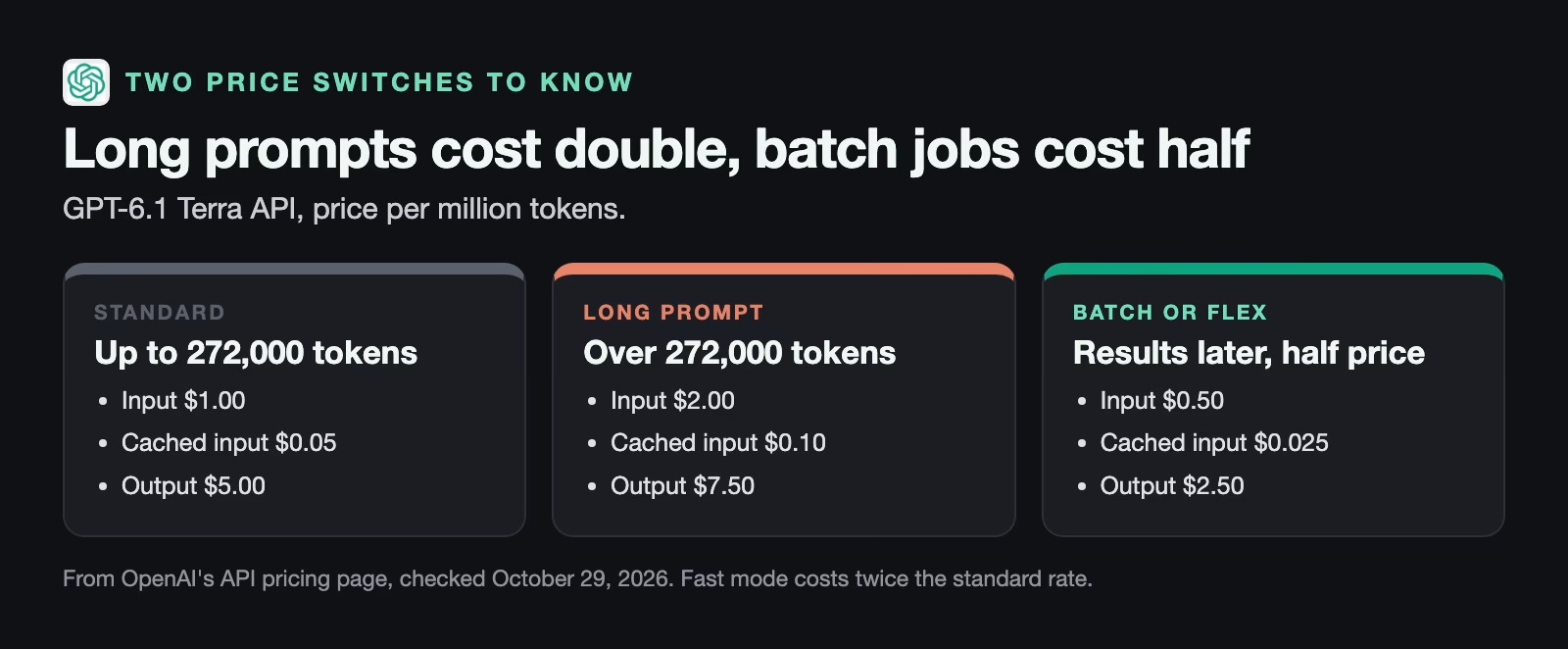
Long prompts cost more. A prompt over 272,000 tokens, about 200,000 words, moves to the long-context rate: double for input and one and a half times for output. On the pricing page (checked October 29, 2026) that takes Terra from $1 to $2 for input, from $0.05 to $0.10 for cached input, and from $5 to $7.50 for output. A huge contract or a year of meeting notes in one request can cost far more than your estimate if you priced it at the standard rate.
Batch jobs cost half. If you do not need the answer right away, OpenAI’s Batch and Flex options process requests later at 50% of the standard price: $0.50 per million input tokens, $0.025 for cached input and $2.50 for output on the pricing page (checked October 29, 2026). Cached input is text the model already read in a recent request, charged at a lower rate. The other direction exists too: Fast mode returns answers sooner at twice the standard price, which is rarely worth it for a report nobody reads until Monday. A weekly summary that nobody reads until Monday morning is a perfect candidate.
How to test whether Terra is good enough
The only test that counts is your own work, scored by someone who knows what a good answer looks like. Published test scores tell you a model can do a kind of task; they do not tell you it handles your customers, your jargon or your format.
Here is a test you can run in under an hour inside ChatGPT Work, no code needed.
- Pick five real tasks from last month. Use tasks you already know the right result for, such as summaries that a manager already checked. Five is enough to spot a pattern without eating your afternoon.
- Run each one twice: once with the model you use now and once with Terra. Keep the prompt identical, so the only thing that changes is the model.
- Hide which is which. Paste each pair into a document labelled A and B, and shuffle the order, so your own expectations do not decide the result.
- Score each answer on what matters for that task. For a summary: did it catch every decision, every number and every complaint? Did it invent anything?
- Count. If Terra ties or wins on four or five tasks, switch for that kind of work. If it loses on two or more, keep the bigger model for that job and try Terra on something simpler.
| Week | Current model (Sol) | Terra | Result |
|---|---|---|---|
| 1 | Caught all 4 decisions | Caught all 4 decisions | Tie |
| 2 | Caught 3 complaints | Caught 3 complaints, shorter | Terra wins |
| 3 | Caught the refund request | Missed the refund request | Sol wins |
| 4 | Correct numbers | Correct numbers | Tie |
| 5 | Correct next steps | Correct next steps | Tie |
Run the test at the effort setting you would really use. If you only get acceptable answers from Terra at maximum effort, price it at maximum effort too: it uses more tokens, and some of the saving goes with them.
A worked example: the weekly call-notes summary
Let’s go back to the sales team. You pick five weeks of call notes where a manager already wrote down what the summary should have caught, then run each through your current model, GPT-6.1 Sol, and through Terra, at medium effort.
Suppose the blind scoring comes out like the table above: Terra ties on three weeks, wins on one because its summary is shorter and easier to read, and loses on one by missing a customer’s request for a refund buried in a long call.
Four out of five is a pass on the rule above, but the miss is the kind that matters. So you switch to Terra and add one line to the prompt: “List every request for money back, a discount or a cancellation, even if mentioned in passing.” You rerun the losing week and the refund now shows up. You keep spot-checking one summary a week for a month.
The money side: at 1,000 runs a month, moving from Sol to Terra takes the bill from about $110 to about $55. If the summaries are not urgent, running them as a batch halves that again to about $28.
That is the pattern worth copying: test on known answers, fix the specific weakness with the prompt, then watch it for a while before you stop checking.
Common mistakes
- Reading OpenAI’s test scores as independent results. They are the company’s own. Your five-task test matters more.
- Looking for Terra in regular Chat. It is in ChatGPT Work and Codex.
- Pricing per token instead of per job. Multiply by real input and output sizes and real volume.
- Forgetting the 272,000-token line. Very long prompts cost double for input.
- Testing at one effort level and running at another. Price and quality both change with effort.
- Switching everything at once. Move one kind of task at a time, starting with the least risky.
Try it this week
- Open ChatGPT Work and check whether GPT-6.1 Terra is in your model picker.
- Choose five tasks from last month with known good results.
- Run the blind A and B test above and score each pair.
- If you pay through the API, price one month of that task on Terra and on your current model, using real token counts from your usage page.
- Switch only the tasks that passed, and spot-check one result a week for a month.
If your team builds its own automations, the same test works through the API by changing the model name to gpt-6.1-terra in one place and comparing outputs. For a refresher on which ChatGPT mode suits which job, read which ChatGPT mode to use: Chat, Work or Codex.
Quick recap
- GPT-6.1 Terra launched on October 26, 2026 as OpenAI’s mid-priced model.
- It is in ChatGPT Work and Codex for Plus, Pro, Enterprise and Edu, and in the API as
gpt-6.1-terra. - API price: $1 per million input tokens and $5 per million output tokens, half of GPT-6.1 Sol.
- Prompts over 272,000 tokens cost more; Batch and Flex cost half.
- Test it blind on five tasks you already know the answers to before you switch.
Sources
- OpenAI API pricing (per-token prices for GPT-6.1 Terra, Sol, Luna, Astra and GPT-5.6 Terra, long-context rates, Batch and Flex; checked October 29, 2026)
- OpenAI on X: GPT-6.1 Terra is rolling out (October 26, 2026: plans, ChatGPT Work, Codex, API name)
- BleepingComputer: OpenAI launches GPT-6.1 Terra (October 26, 2026: target tasks, OpenAI quote, speed and benchmark claims)
- DataCamp: GPT-6.1 Terra benchmarks, pricing and access (October 2026: summary of OpenAI’s benchmark claims)
- OpenAI: Introducing GPT-6.1 Terra (October 26, 2026 launch post)
Keep going
Same lessons in your feed
Short diagrams, hooks, and weekly tutorials on Substack, Instagram, X, and Facebook.