When someone asks you for access to “prod,” the live database your company runs on, the safest answer is to hand over the smallest thing that answers their question. That might be sample data, a summary table, or a saved query that shows the table without its sensitive columns. “Just give me prod” usually describes a deadline feeling, not an access policy.
Say a message lands late on a Friday: “Need prod access to customers for a quick pull. Board deck tomorrow. I only need to look, not change anything.” You have two bad instincts. You can say yes and hope nothing leaks. Or you can say no, and then watch the person pull the same rows through a personal dashboard (a screen of charts that updates on its own) login you never knew about.
Least privilege means giving a person only the access their task needs, and nothing more. It is a habit, not a personality trait. You match the need to the smallest safe slice of data. Use samples when the question is about shape, and summed-up data when it is about trends. Use live data only when the work truly needs real customer names or emails. Write access stays off unless someone makes a specific case. Data stewardship (the day-to-day care of a data set’s meaning and quality) is how that habit survives a real deadline.
What people mean when they say “prod”
“Prod” is short for production, meaning the live systems your customers touch. The word is vague on purpose, so ask which of these the person really wants:
- The live operational database the product runs on (online transaction processing (OLTP))
- The production warehouse, which holds full history for analysis
- A production business intelligence (BI) workspace, meaning the dashboard tool, with customer-level rows in it
- Production secrets, service accounts, or a way to change data
- Yesterday’s certified analytics table, which happens to be “live enough”
Many “prod” requests are really “I need a complete, current, trustworthy table for analysis.” That usually points to a certified warehouse table from your data pipeline (a chain of automated steps that moves and cleans data) series, not a login to the database that runs checkout. Heavy analysis on the live database can slow the product down, even when privacy is no worry. Say that in your first reply.
Rule of thumb: Grant the data product that answers the question, not the environment with the scariest name.
The least privilege ladder
Think of access as a ladder with six rungs. Climb only as high as the task requires, and default to the lowest rung that still gives a correct decision.
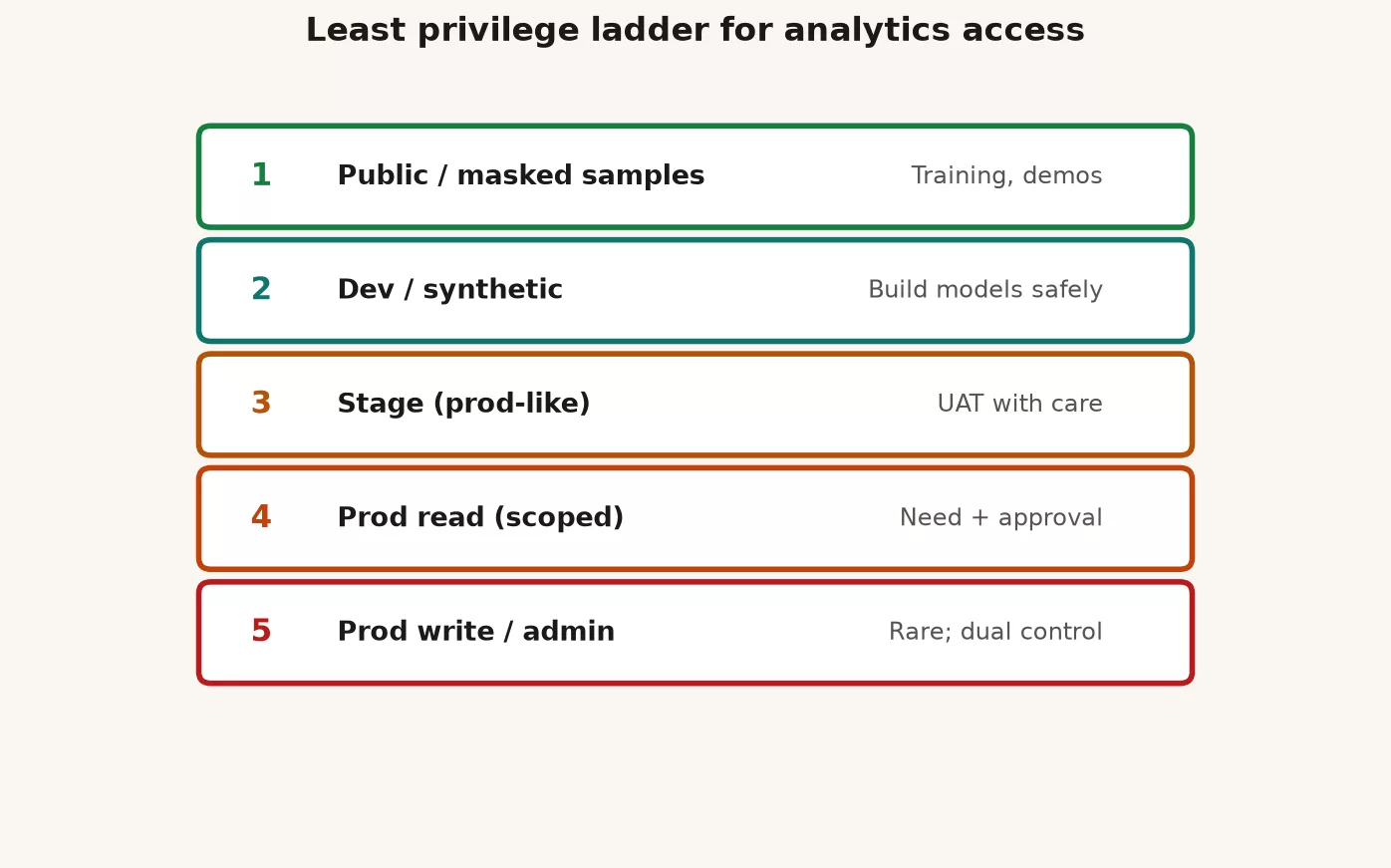
Rung 1: synthetic or public samples
Use samples for learning a table’s shape, testing joins, demos, onboarding, and vendor trials. They contain no real people. If an analyst is learning SQL (the standard language for asking a database for data) patterns, they do not need yesterday’s customer emails. Keep a small sample pack next to the catalog card for the domain, the short profile page that says what a data set holds.
Rung 2: masked or summarized analytics
This rung gives trends, funnels, and regional totals without letting anyone work out who an individual is. It is enough for most growth questions and many board charts. If the metric is already defined the way the series on metric definitions describes, a certified summary table is often all you need.
Rung 3: pseudonymous row-level analytics
Here each row is one customer, but the ID is scrambled (hashed) and there are no direct contact fields. That is enough for cohort work, churn models, and many quality investigations. It is still sensitive. Joining tables can unmask people, and very small groups can be picked out by their mix of traits. Once a row can be linked to a person, it counts as PII, short for personally identifiable information. Write the sensitivity on the catalog card.
Rung 4: identified production read in the analytics area
This rung exposes named customers, emails, tickets, or payment references in a warehouse or a controlled BI model. Justify it by task, such as fixing a support case, reviewing fraud, or filing a contractual report. Prefer views that show only the columns needed, and put an end date on the grant when the task is temporary.
Rung 5: operational production read
Now you are inside the systems that run the product. A slip here can do real damage. A heavy query can lock tables, the same login may sit next to secrets, and extra load can slow real customers. Reserve this rung for engineers and for rare emergency support, always with an audit trail.
Rung 6: production write and admin
This means inserting, updating, and deleting rows, managing grants, and deploying jobs. Use two-person approval where possible, and never hand it out “for convenience” on a shared analyst account. Custodians, the people who run the systems, work here under written procedure. Stewards rarely need it for stewardship alone.
Security groups such as the Open Worldwide Application Security Project (OWASP) and the U.S. National Institute of Standards and Technology (NIST) repeat two ideas. Give each job the least access it needs. Split duties so no single account can do everything quietly. You do not need to become a security engineer to apply the ladder in your tickets.
Who decides: a responsibility chart for access
The earlier post on stewardship roles used a chart with four letters. R means responsible (does the work), A means accountable (signs off), C means consulted, and I means informed. Here is how it applies to access.
| Task | Steward | Owner | Custodian | Security / Legal |
|---|---|---|---|---|
| Confirm business need and data product | R | C / A for sensitive domains | I | C when PII or regulated |
| Approve identified PII access | C | A or co-A with policy | I | C or A per policy |
| Implement grant / role | I | I | R / A | C |
| Time-box / revoke | R (track) | I | R (apply) | I |
| Break-glass emergency | C | I | R | I / audit after |
Stewards should not be silent yes-machines. Their job is to turn “prod” into a specific rung and a specific object. Owners accept the leftover risk for sensitive domains, and custodians apply the technical controls without inventing a business reason. If your company has a formal access tool, feed it honest tickets instead of box-ticking for show.
Need, ask, and avoid: the access matrix
Train requesters, and yourself, to talk in terms of needs. The matrix below is a teaching tool you can paste into an intake form.
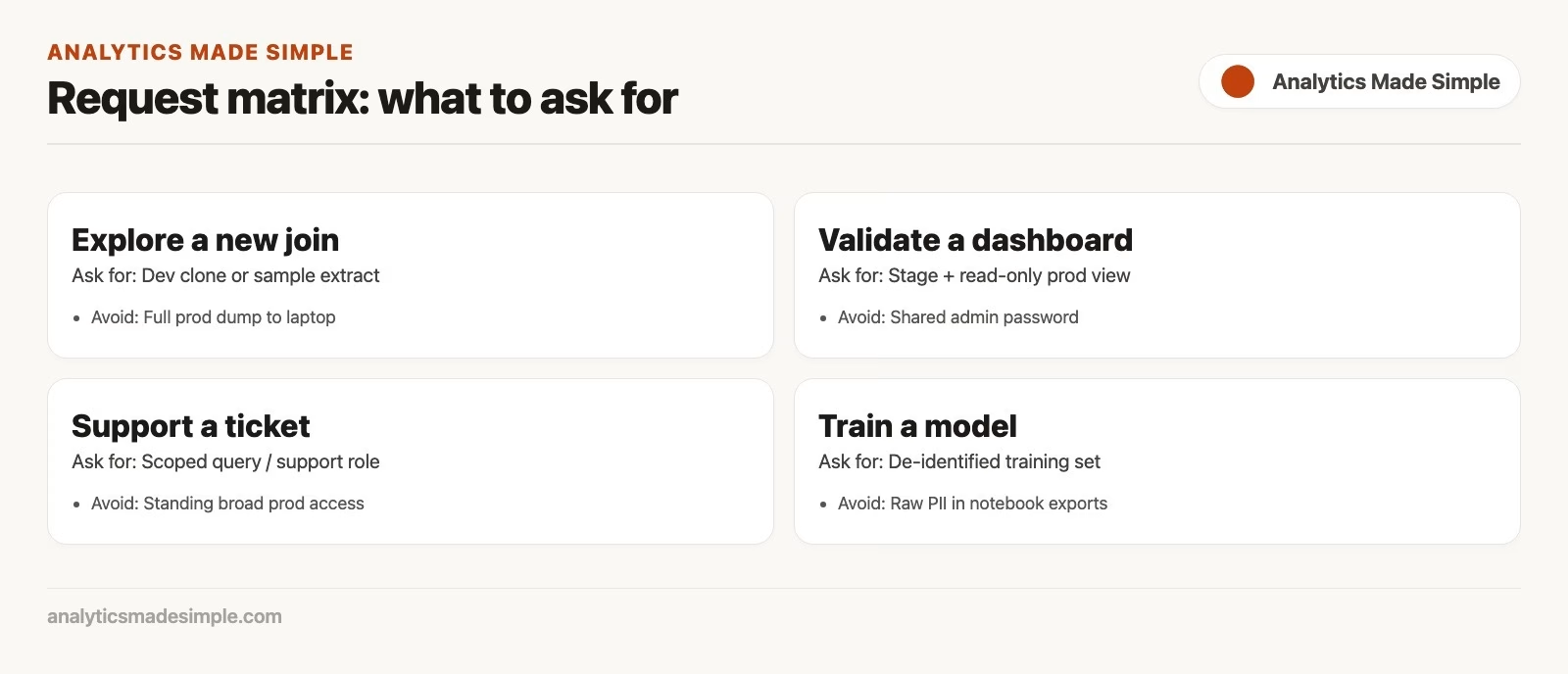
| Real need | Ask for | Avoid |
|---|---|---|
| Learn table shape / write a first query | Synthetic sample or narrow sandbox | Full prod dump |
| Board chart on weekly revenue | Certified aggregated metric table or locked dashboard | Customer email export “to double-check” |
| Debug a join bug in a model | Pseudonymous rows + documented grain | OLTP write user |
| Support a single customer complaint | Support tool or time-boxed identified view for that ID | Warehouse read on all customers |
| Build a churn model | Feature table with hashed IDs, approved retention | Unlogged CSV on a laptop |
| Partner measurement across companies | Clean room or contracted aggregate exchange | Emailing raw customer lists |
| Fix a bad load | Custodian runbook + restore rights for eng | Shared admin password in a channel |
| Ad-hoc executive curiosity | Existing dashboard with filters | New permanent prod role “just in case” |
When the ask and the need do not match, rewrite the ticket before you grant anything. That one step saves months of leftover privileges nobody remembers giving.
Three requests on a Monday
Take a company with customers and orders. Catalog cards exist for analytics.certified.weekly_order_facts (no email) and analytics.restricted.customer_contact (email, phone). The steward is the orders domain analyst. The owner is the finance analytics lead for revenue, and the support lead owns the purpose of the contact data.
Request A: “prod for a board revenue check”
The real need is to check weekly net revenue against last week’s pack. The ask was “warehouse prod, all tables,” which is far too wide. A better grant is read access to the certified weekly facts plus a link to the metric definition. That sits on rung 2 or 3, not rung 5, and it leaves out the contact table entirely.
Request B: “a list of emails for churned users in the EU”
The real need is an outreach campaign. That is a marketing purpose, not analytics debugging. Send it to the approved marketing tools, where the legal basis for contacting people is already checked. If analytics has to help, use an approved export job with logging, suppression lists, and a retention limit. Stewards should not quietly turn into a customer relationship tool.
Request C: “I need to remove bad test orders in prod”
The real need is to clean up a mess in the live system. That job belongs to custodians with a written runbook, not to an analyst who is curious. Prefer fixing it in the app’s admin screen, which leaves an audit trail, or with a controlled script that two people review. That is rung 6. The steward is consulted about side effects on analytics but is not responsible for the delete itself.
Here is a ticket template you can require, even as a form-like paste in chat:
ACCESS REQUEST
Requester:
Team:
Deadline:
Business question (one sentence):
Decision this unlocks:
Data product requested (table/view/dashboard):
Columns needed (list):
Row filter needed (time range, region, customer id):
Sensitivity (none / pseudonymous / identified PII):
Environment (analytics warehouse / BI / OLTP / other):
Duration (hours/days; default 7 days if blank):
Why lower rungs fail (sample / aggregate / masked):
Will data leave the platform? (no / yes + where):
Owner notified? (yes/no):
And here is a sketch of what the custodian might set up in the warehouse. It is illustrative, so treat it as a pattern:
-- Illustrative only: patterns, not a copy-paste for every cloud
-- 1) Prefer role per purpose, not per person forever
CREATE ROLE analyst_orders_certified_read;
GRANT SELECT ON analytics.certified.weekly_order_facts
  TO ROLE analyst_orders_certified_read;

-- 2) Identified contact data in a separate role
CREATE ROLE support_customer_contact_read;
GRANT SELECT ON analytics.restricted.customer_contact
  TO ROLE support_customer_contact_read;

-- 3) Time-box by process: calendar reminder + scheduled revoke job
-- (Platform-specific: temporary grants, access reviews, SCIM)
-- Steward tracks; custodian applies REVOKE when the ticket ends.

-- 4) Never grant accountadmin-equivalent to shared human users
-- for "speed." Use break-glass with logging instead.
Quality still matters when access is tight. People ask for broader access when the certified tables are wrong or late. The real problem is then quality or the pipeline, dressed up as an access request. Keep those checks healthy with the habits in the series on data quality.
Masked views and column discipline
Suppose ten people need customer-level rows but only two need email. Do not grant the wide table to all ten. Publish a view instead. A view is a saved query that shows only the columns you choose:
CREATE VIEW analytics.certified.customer_analytics AS
SELECT
  customer_id_hash,
  signup_week,
  region_code,
  plan_tier,
  is_churned
FROM analytics.restricted.customer_full;
-- email, phone, legal_name intentionally omitted
Document the view on its catalog card. Mark it Certified only if its freshness and row meaning are honest. “Masked” does not mean “harmless,” because a location plus a rare plan tier can still point to one person. That is why the sensitivity notes belong on the card.
Time limits, reviews, and leftover keys
Permanent access is how companies wake up with 400 “temporary” roles. These defaults work well:
- Project access lasts 7 or 30 days, and renewing it takes an explicit request.
- Role-based access for stable jobs gets a quarterly review by the steward and the person’s manager.
- Emergency “break-glass” access lasts hours, not weeks, and opens a ticket automatically.
- Service accounts (logins used by programs, not people) belong to a team, get rotated, and never share a human password.
Stewards can keep a simple register, and a spreadsheet is fine at small scale. List who has access, to what, at which rung, until when, and the ticket link. Custodians automate the expiry where they can. Owners get involved when the domain is regulated or shown to executives.
Clean rooms, partners, and “can we just send the file?”
Sharing data across companies is where good intentions leak customer lists. Suppose the real need is measuring audience overlap or campaign lift with a partner. Prefer a contracted pattern such as data clean rooms, which are shared spaces where two companies compare data without seeing each other’s raw rows. Approved summary swaps also work. A CSV sent by email is not a clean room. Stewards should spot this pattern early and pull in Legal and Security as consulted parties before the first sample leaves.
Vendors count as partners too. Shipping full customer tables to a vendor’s trial on someone’s laptop is still an access decision. Use samples from rung 1 until procurement and the data processing agreement (DPA) say otherwise. A DPA is the contract that limits what a vendor may do with your data.
Common mistakes
- Granting an environment instead of an object: “all prod” when one view would do.
- Shared personal credentials: three people share one login, and nobody can tell who did what.
- Permanent temporary access: no expiry and no review, so the role lives forever.
- Security as a pure blocker: no lower-rung options are offered, so people find shadow access on their own.
- The steward as a free export service: identified pulls repeat with no purpose and no logging.
- Ignoring dashboard access keys: the warehouse is locked while a dashboard extract stays wide open.
- Skipping catalog sensitivity: people cannot choose a lower rung if the cards do not say what is PII.
- Write rights for debugging: a read would have been enough, but deleting was muscle memory.
Quick recap
- Ask what “prod” means: the live database, the warehouse, the BI tool, or a way to write.
- Climb the ladder only as high as the decision requires.
- Rewrite asks into needs, and use the ask-for and avoid columns of the matrix.
- The steward frames the request, the owner accepts sensitive risk, the custodian implements, and Security and Legal are consulted on PII and partners.
- Put time limits on grants, prefer masked views, and log exports. Treat clean rooms as a controlled way to share, not a free file transfer.
Practice: one hour this week
Take one domain and inventory who can read the identified tables, counting both people and service accounts. For each one, ask three questions: is it still needed, is it the right rung, and does it have an expiry date? Pick five leftovers to revoke or put a time limit on. Then publish the access request template in your team channel. If three requests this month asked for email “just in case,” offer a masked view instead.
Later posts in this series cover incidents, retention, and working with Legal and Security without panic. Good access habits make those days calmer. For broader skills, browse the Learn hub. Keep the guides on governance and master data management close when unified customer records and policies are the real issue.
Series notes
This is Part 3 of Data stewardship at work. The previous post covered catalogs and truth maps, and the next one covers retention.
Sources
- OWASP, access control and least privilege principles: https://owasp.org/www-community/Access_Control and A01 Broken Access Control
- NIST SP 800-53 Rev. 5 (access control and audit families): https://csrc.nist.gov/publications/detail/sp/800-53/rev-5/final
- NIST Privacy Framework (data processing permissions and risk): https://www.nist.gov/privacy-framework
- NIST SP 800-122 (guide to protecting confidentiality of PII): https://csrc.nist.gov/publications/detail/sp/800-122/final
- DAMA International, data security and stewardship context in DMBOK: https://www.dama.org/cpages/body-of-knowledge
- CIS Controls (account management and access control hygiene, high-level): https://www.cisecurity.org/controls
Keep going
Same lessons in your feed
Short diagrams, hooks, and weekly tutorials on Substack, Instagram, X, and Facebook.