
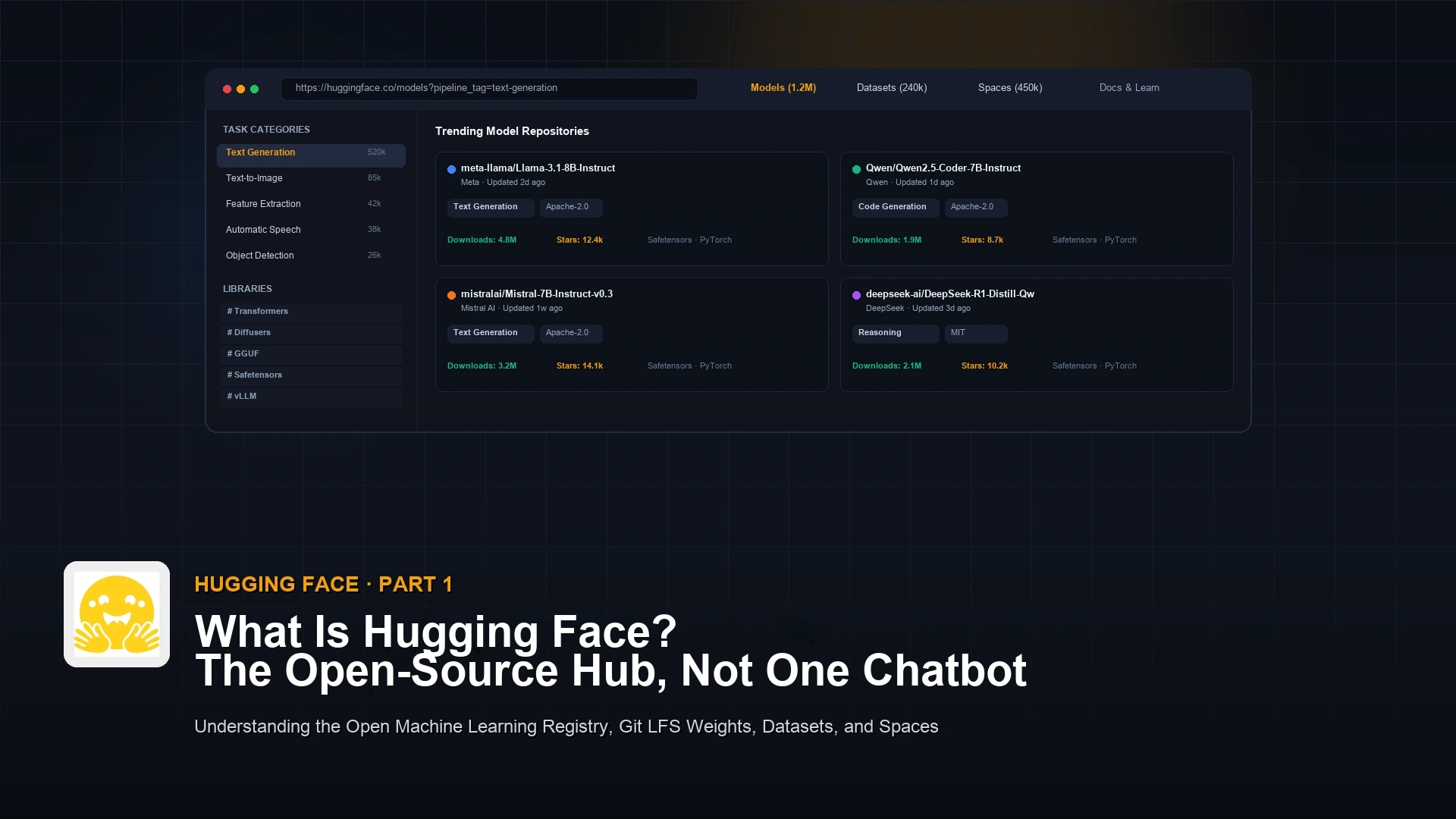
Hugging Face is not one free chatbot. It’s an open hub where people publish, track, and download AI models and datasets, the way developers share code packages online.
Say a coworker tells you Hugging Face is “free ChatGPT” and suggests you cancel your paid AI tools. You open the site and find millions of models, datasets, and demos instead of one chat box. That is because Hugging Face is not one company’s app. It is a shared library where many different teams publish their own AI models.
The monolith illusion: one app vs an open library
Hugging Face is not an AI model. It’s the platform where open AI models live, get built together in public, and get shared. Understanding that difference is the biggest shift you make when you move from just chatting with AI to actually building with it.
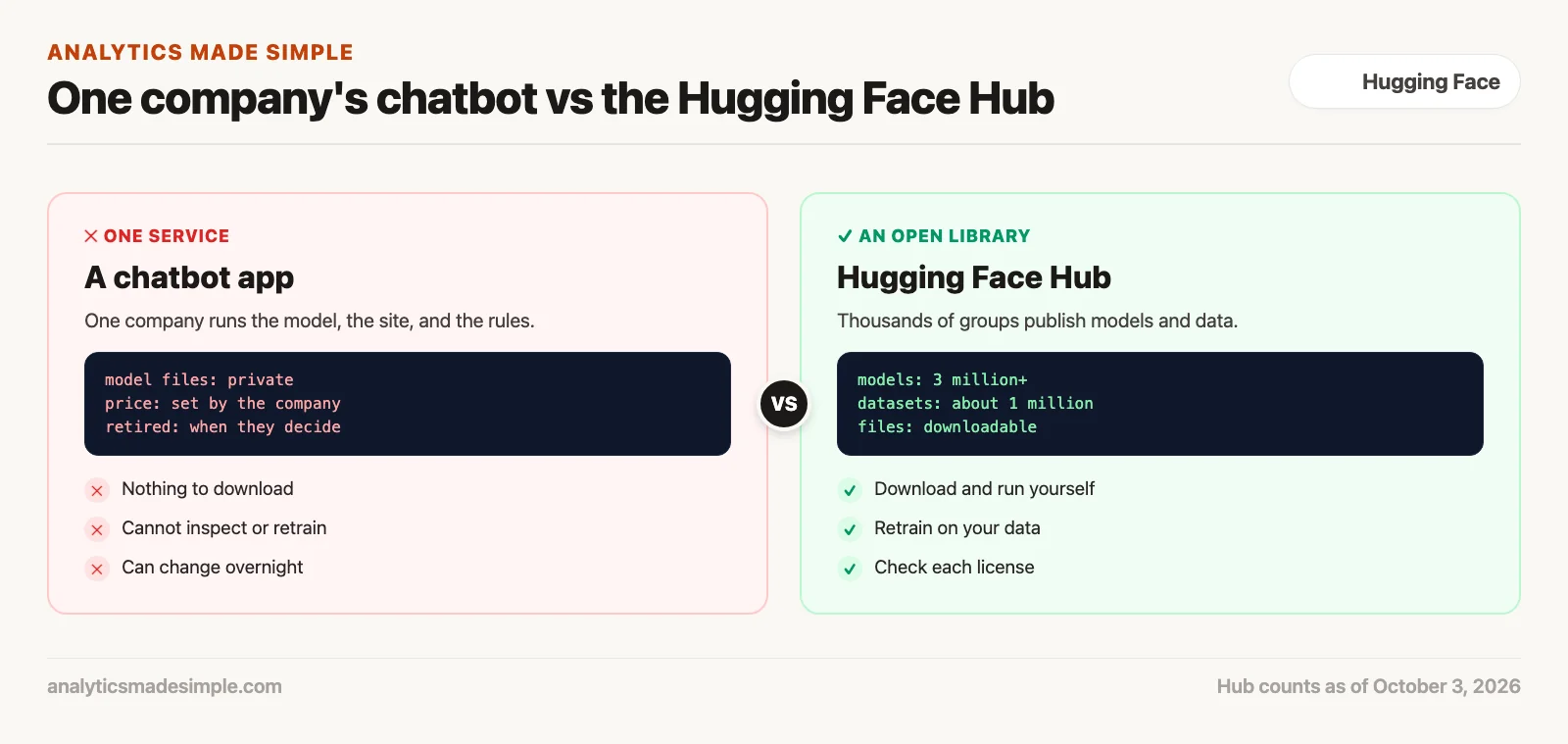
When you log into ChatGPT or Claude on the web, you’re using one company’s closed service from top to bottom. That company owns the computers, trains the model, runs the website, sets the safety rules, and decides when to retire old versions. It bills you a flat monthly fee or charges by usage. You never see the model’s internal numbers, you can’t check how it splits text into pieces, and you can’t move it onto your own private servers.
What a chatbot service really is
A closed service run by one company. The model’s internal numbers stay locked away on private servers. You can’t change how it works, check it for bias, or run it on your own machines. If the company changes its pricing or shuts the model down, your workflow can break overnight.
What Hugging Face really is
An open, shared library anyone can browse. As of October 3, 2026, its model listing shows more than 3 million models, covering text, images, audio, and robotics. You can download the raw files, run them on your own computer, retrain them on your own data, and skip the per-use fees.
Hugging Face swaps that closed setup for an open library built on public code repositories. Search for a text-writing model and you won’t find one chatbot answering your question. You’ll find thousands of separate groups, including Meta, Google, Microsoft, Alibaba, Mistral AI, the Allen Institute for AI, and independent researchers, each publishing their own model built for a specific job.
Figure 1 shows the difference between talking to one company’s chatbot and browsing the open Hugging Face library.
The four pillars of the Hub
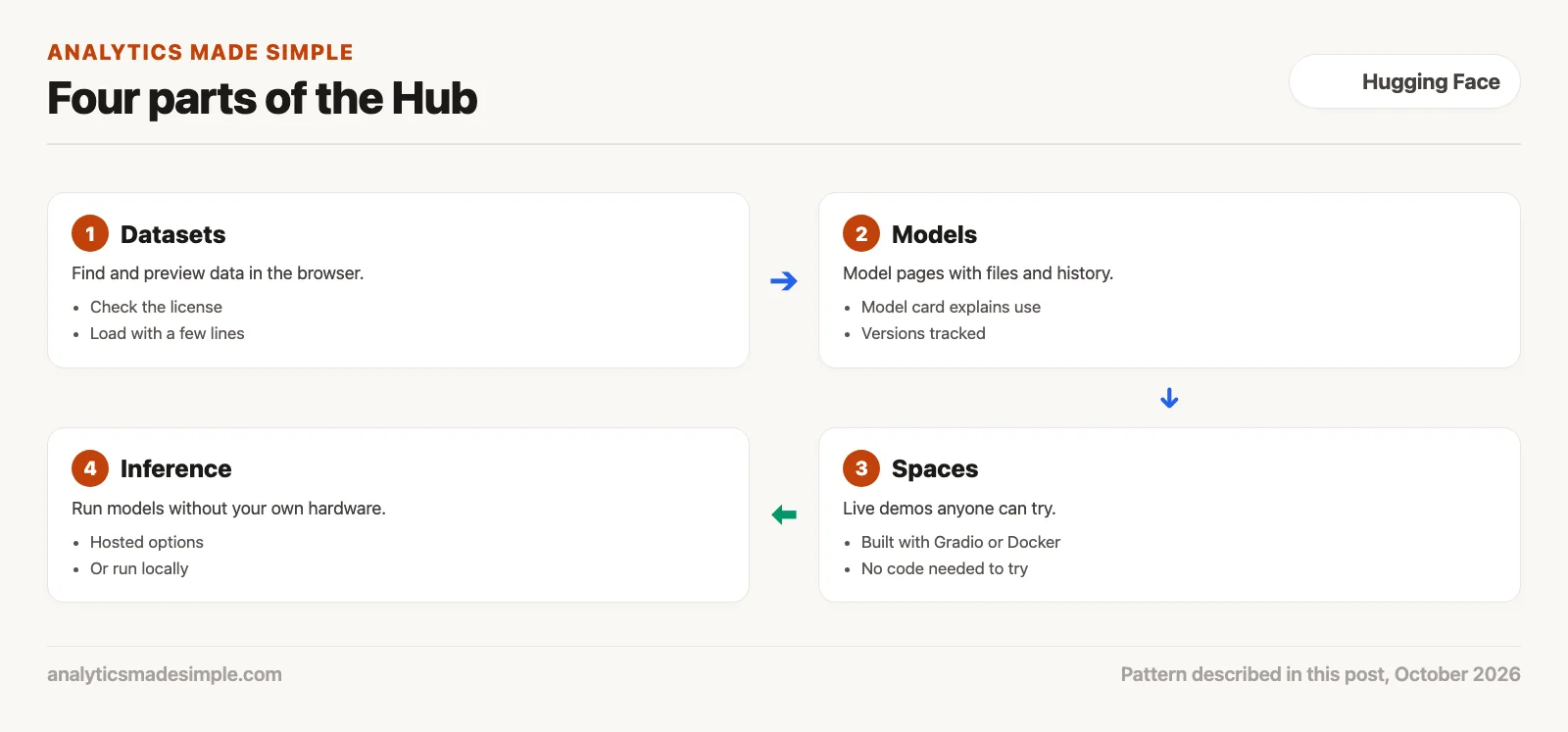
The Hugging Face platform has four main parts: models, datasets, spaces, and the infrastructure that actually runs a model (called inference). Each part solves a different problem, from finding data, to testing an idea live, to running it for real users.
Here’s how the four pieces fit together, so the sheer size of the site doesn’t overwhelm you:
- The Model Hub. The main list of models, more than 3 million as of October 3, 2026. Every model has its own page that tracks its version history, community suggestions, open questions, and the actual files. It covers writing text, understanding images, turning speech into text, predicting from spreadsheets, and combining several of those at once.
- The Datasets Hub. The data side, with about a million datasets as of October 3, 2026, according to its dataset listing. Instead of making you download huge zip files blindly, it lets you preview the data right in your browser, see where it came from, check its license, and pull it in with a lightweight Python tool.
- Hugging Face Spaces. A playground for live demos. Spaces lets developers turn code and models into working web apps. The Spaces documentation lists three ways to build one: Gradio, plain web pages, or Docker, a way of packaging an app so it runs the same anywhere. That means a non-technical coworker can try a model right in their browser without writing a single line of code.
- Running the model (inference). Downloading forty gigabytes of model files to a laptop usually isn’t practical. Hugging Face also offers ready-to-use serverless access, private cloud servers on Amazon Web Services (AWS) and Google Cloud (GCP, Google’s cloud computing service), and built-in links to run models locally with tools like Ollama, vLLM, and llama.cpp.
Figure 2 shows how these four pieces connect, from preparing data all the way to running a model live.
Anatomy of a model repository: what’s actually inside
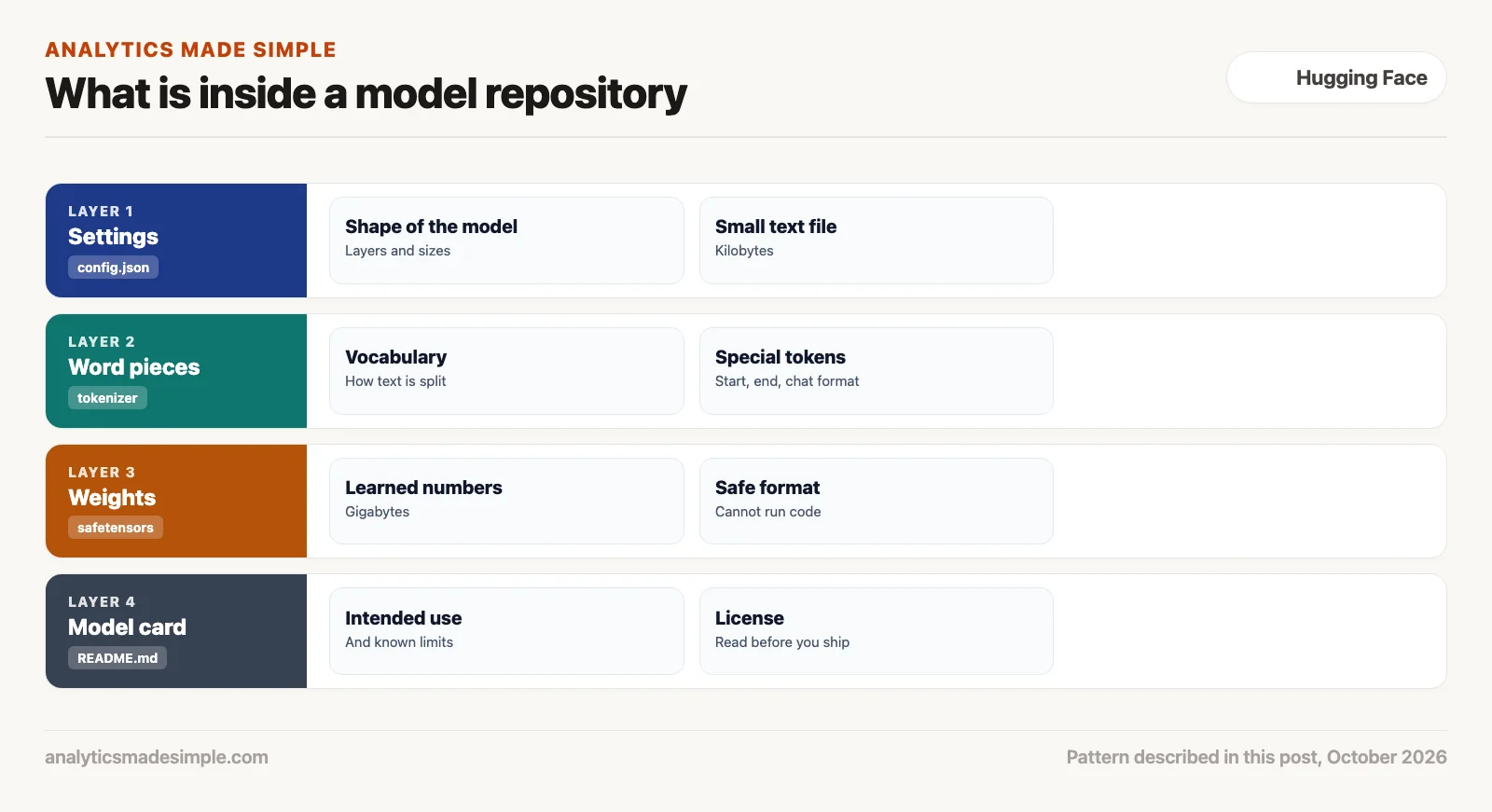
A common mistake is thinking an open model is a program you install, like a desktop app. It’s actually a folder of text files: a dictionary of word pieces, some documentation, and the raw math values, called weights, that make the model work.
Open a well-known model page, such as google/gemma-4-31B-it or Qwen/Qwen3.5-9B, and you’ll find four parts that work together whenever the model runs:
| File Name | Primary Purpose | Typical Size | Format |
|---|---|---|---|
config.json | Structural hyperparameters, hidden dimensions, layer count, attention heads | < 10 KB | JSON text |
tokenizer.json | Subword vocabulary dictionary, byte-pair merge rules, token IDs | 2 MB to 10 MB | JSON text |
tokenizer_config.json | Special token mappings (BOS, EOS, system prompt wrappers, padding) | < 50 KB | JSON text |
model.safetensors | Trained neural network weights (mathematical floating-point matrices) | 4 GB to 140 GB+ | Safetensors binary |
README.md | Model card: intended use, benchmark results, training details, legal license | 10 KB to 50 KB | Markdown text |
Figure 3 breaks down those four layers: the settings file, the word-splitting rules, the math values, and the documentation.
Safetensors vs. pickle: a safer way to save models
In AI’s early days, tools like PyTorch and TensorFlow often saved models using Python’s own save format, called pickle (you’d see it show up as pytorch_model.bin). That created a real security problem. Opening a pickle file can run arbitrary Python code on your computer, so downloading an untrusted model could hand an attacker control of your machine.
To fix that, Hugging Face built Safetensors, an open format made only for storing numbers. A Safetensors file holds nothing but number data and basic labels, so it can never run code on your computer, no matter what. It also loads faster: tools like vLLM and llama.cpp can read the numbers straight from disk into the graphics chip’s memory without first copying everything through the computer’s main processor (CPU).
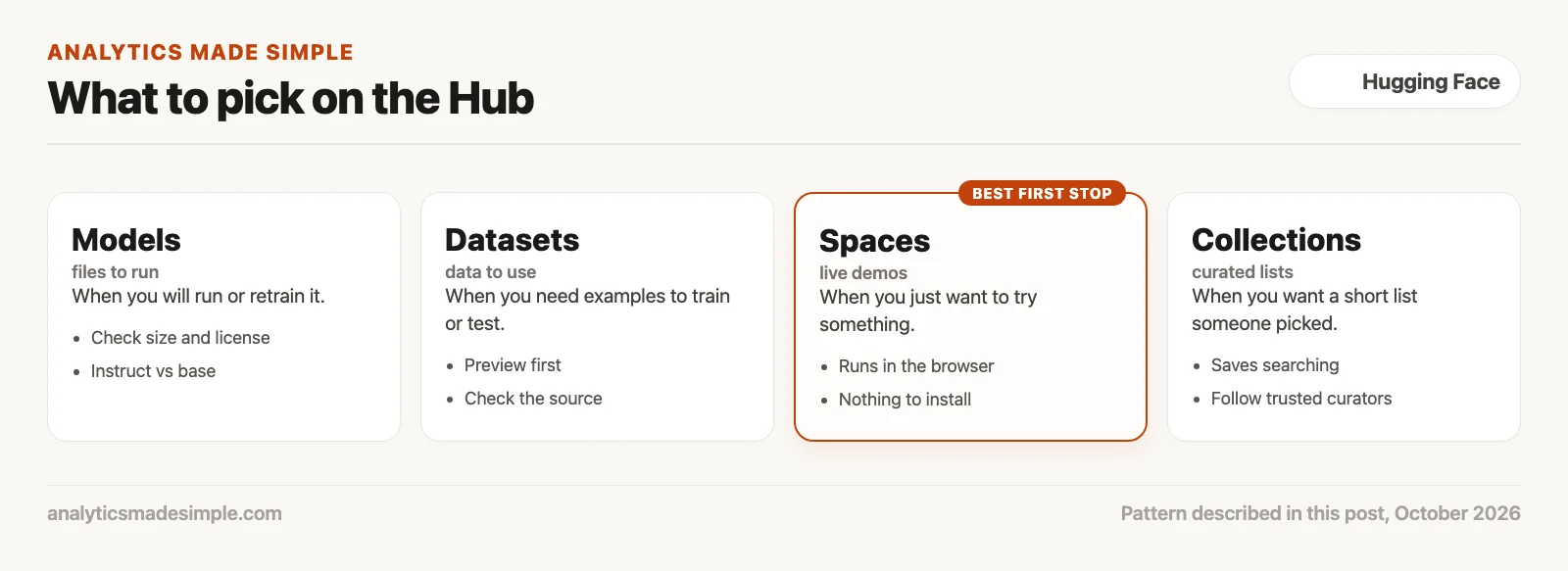
Models vs. datasets vs. spaces: what to pick
Picking the right thing on the Hub matters. A common rookie mistake is downloading a fifty-gigabyte model when the team actually just needed a live demo or a ready-made dataset.
Figure 4 compares the Hub’s main asset types: their format, when to use each one, and who typically uses them.
Hands-on: inspecting and calling the Hub in Python
You don’t need a powerful graphics card or a complicated server setup to work with the Hub. The official Python tool, huggingface_hub, gives you simple, direct access to model details, dataset previews, and remote AI calls over standard web requests.
Below is a short script that connects to the Hub, checks a model’s details without downloading its huge files, and sends one quick test question to an open model.
# hub_inspection.py
import os
from huggingface_hub import HfApi, InferenceClient

# Optional free Hugging Face User Access Token (from huggingface.co/settings/tokens)
HF_TOKEN = os.getenv("HF_TOKEN")

api = HfApi(token=HF_TOKEN)

# 1. Inspect model repository metadata without downloading multi-gigabyte weights
model_id = "google/gemma-4-31B-it"
info = api.model_info(model_id)

print("=" * 60)
print(f"Repository: {info.id}")
print(f"Author:     {info.author}")
print(f"Downloads:  {info.downloads:,} in the last 30 days")
print(f"Likes:      {info.likes:,}")
print(f"Pipeline:   {info.pipeline_tag}")
print(f"Tags:       {info.tags[:5]}")
print("=" * 60)

# 2. Optional: send one test question through Hugging Face's hosted inference.
# This needs a token; without one, the script stops here.
if not HF_TOKEN:
    print("Set HF_TOKEN to also send a test question. Metadata check done.")
else:
    client = InferenceClient(api_key=HF_TOKEN)
    prompt = "Explain why Safetensors is safer than pickle for model files, in two sentences."
    response = client.chat.completions.create(
        model=model_id,
        messages=[{"role": "user", "content": prompt}],
        max_tokens=150,
        temperature=0.2,
    )
    print("\nModel response:")
    print(response.choices[0].message.content)
Install the library first with pip install huggingface_hub. Run without a Hugging Face access key on October 5, 2026, it printed the following. Download and like counts change every day.
============================================================
Repository: google/gemma-4-31B-it
Author:     google
Downloads:  9,872,605 in the last 30 days
Likes:      4,023
Pipeline:   image-text-to-text
Tags:       ['transformers', 'safetensors', 'gemma4', 'image-text-to-text', 'conversational']
============================================================
Set HF_TOKEN to also send a test question. Metadata check done.
In plain words, the script asks the Hub for the model’s details: who published it, how often it was downloaded, and its tags. It does not download the model files themselves. If you set a free access key in HF_TOKEN, it also sends one question to the model through Hugging Face’s hosted service and prints the answer.
Why enterprises rely on the Hub
More companies are choosing Hugging Face, and it’s not just because open models are cheaper to run. Downloadable model files give a team control that no outside AI vendor can match, because the company owns the actual files instead of renting access to someone else’s server.
Four reasons keep showing up when engineering teams choose to standardize on the Hub:
- Keeping data private and passing audits. In healthcare, defense, finance, and legal work, sending customer data to an outside company’s servers can break rules like the U.S. health privacy law (HIPAA), SOC 2, and the EU’s data privacy law (GDPR). With Hugging Face, a team downloads the model once, checks that the file hasn’t been tampered with, and runs it inside its own private network, with no data leaving the building.
- No surprise shutdowns. Outside AI vendors often retire older model versions with little warning, forcing teams to rewrite prompts and fix broken output. Keep a copy of an open model’s files yourself, and that model never changes. It will answer the same way five years from now.
- Fine-tuning for your own data. You can nudge a commercial model’s answers with clever prompts, but real expertise in a narrow topic usually needs retraining on your own examples. Hugging Face gives direct access to both lightweight adapters, called LoRA, and full model files, so a company can build a specialist model that beats a general one at its own job.
- Costs you can predict. Outside AI vendors typically charge by usage, so the bill grows with every extra request. If your app processes millions of invoices or sensor readings a day, that adds up fast. Running an open model like Qwen3.5 9B or Gemma 4 on your own reserved servers turns that variable bill into a fixed, predictable cost.
Mistakes people make when starting out
Hugging Face offers a lot of freedom, and that freedom trips up beginners in a few predictable ways during their first weeks on the platform:
- Assuming downloadable model files mean zero running cost. Downloading an open model is free, but running it still needs compute power. An eight-billion-parameter model, for example, needs about sixteen gigabytes of fast memory just to run. If your team doesn’t have strong graphics cards or budget for cloud hardware, plan your running costs before you commit.
- Ignoring the license. Not every model on Hugging Face uses a permissive license like Apache 2.0 or MIT (a short, very permissive open-source license). Many popular models use custom community licenses, such as Meta’s Llama Community License, or block commercial use outright. Always check the model’s documentation page before you ship it in a product you sell.
- Downloading the whole repository (a project folder that keeps every version of its files) by accident. Running a plain
git cloneon a model page downloads every historical version and branch, and can fill up your hard drive fast. Use thehuggingface_hubPython tool or Git’s large-file clone flags (LFS) instead, so you pull only the specific version and file size you actually need. - Confusing a plain base model with the chat-ready version. Download a base model like
Llama-3.1-8Binstead ofLlama-3.1-8B-Instruct, and it will just keep writing text instead of answering you like an assistant. A later post in this series covers how to read model names and tags so you grab the right one every time.
Where to start this week
Want to start exploring open AI models today without getting lost in the details? Take these three steps:
- Make a free Hugging Face account. Visit huggingface.co, set up a profile, and create a read-only access key under Settings. That access key lets you use the Hub’s tools without hitting the limit set for anonymous visitors.
- Try three trending spaces. Open the Spaces tab and search for document reading, code writing, or audio transcription tools. Test them right in your browser to see how open models perform, with nothing to download.
- Read your first model page. Look up
meta-llama/Llama-3.1-8B-Instructon the Model Hub. Read through its documentation to see its specs, how much text it can handle at once, and its license terms.
Series notes
This is Part 1 of Learn Hugging Face from scratch. Next: accounts, organizations, stars, and collections.
Sources
- Hugging Face, Hub documentation and Spaces overview.
- Hugging Face, Safetensors documentation.
- Hugging Face, huggingface_hub client library.
- Meta AI, The Llama 3 Herd of Models, 2024.
- Hugging Face, Transformers on GitHub.
Keep going
Same lessons in your feed
Short diagrams, hooks, and weekly tutorials on Substack, Instagram, X, and Facebook.



