Use Chat for quick, conversational jobs that you will finish yourself. Use Work when a job has many steps, several files, and a finished file at the end. Use Codex for software. Picking the right one takes about five seconds and saves you hours of supervising an agent you did not need.
Say it is late on a Friday and you have two tabs open. In Chat you need a subject line and three bullets for a client note. In Work you still have a half-built “Q3 narrative deck,” which the agent started when you typed “make something leadership-ready” without a clear goal. Chat finishes in two minutes. The Work tab has twelve slides, three connected apps, and a metrics tab you have not checked. You feel busy, but you are not done. The difference is not intelligence. It is the tool you picked and whether the job really needed it.
This is the last post in the ChatGPT Work tutorial. The earlier posts covered what Work is for, a first agentic task with approvals, and multi-step jobs with checkpoints, steering, usage habits, and a result checklist against workslop (polished output that looks finished but is empty or wrong). Here we lock in the chooser: when Work beats Chat, when Chat is enough or even better, which wrong choices burn time or trust, and where to go next on this site, which is Codex and then Custom GPTs. Foundations stay in Learn ChatGPT from scratch. Product orientation stays in the ChatGPT product map. Human-led Chat skills stay in the ChatGPT everyday tutorial.
Menus change, but the logic for choosing should not. Re-check OpenAI Help in the week you write team policy.
The short answer, then the table
OpenAI’s own split is simple enough to write on a sticky note. Chat is for fast conversational help and everyday questions. Work is an agent for longer multi-step work and finished deliverables such as docs, sheets, presentations, reports, and Sites. Codex is for software development and technical work. If you remember only that triangle, you will already make better Friday-afternoon decisions than most of the internet.
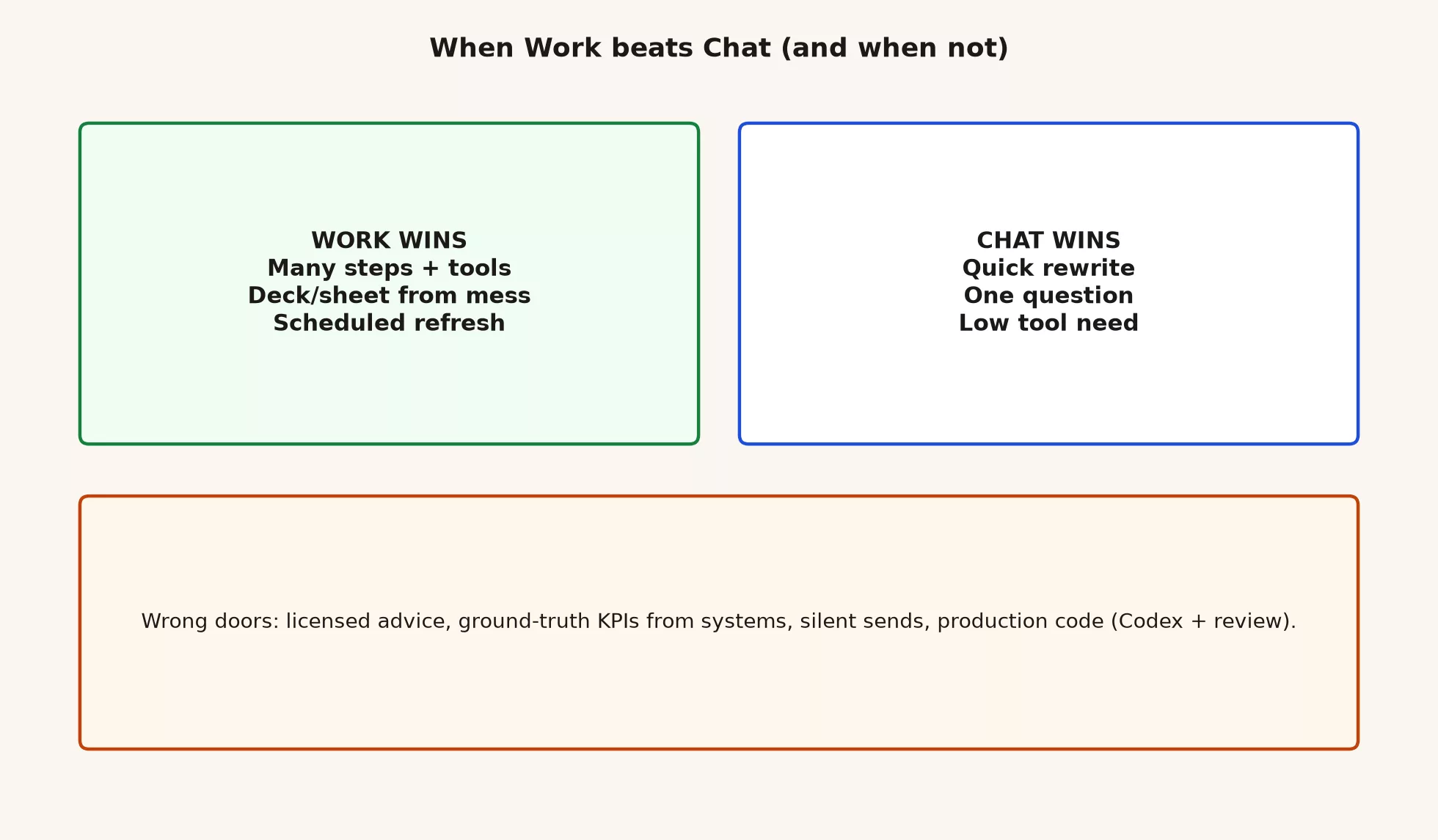
Work wins when the cost of coordinating many steps, files, tools, and in-between files is higher than the cost of supervising an agent. Chat wins when the whole job fits in a few tight turns and you will paste the result yourself. Codex wins when the result is code, tests, or repo work and not a status deck.
A decision table: Work, Chat, or neither
Use this table before you open a mode. If two rows conflict, pick the safer option and the smaller set of tools.
| Situation | Prefer | Why |
|---|---|---|
| One question, one rewrite, or one outline | Chat | You need few tools, so a full agent loop is extra overhead |
| Cleaning up an email, agenda, or meeting notes | Chat (everyday skills) | A human sends it, and clear structure beats agent sprawl |
| Studying, explaining, or being quizzed on a topic | Chat | Learning is a conversation and does not need a deliverable factory |
| Many files that must become one deck, sheet, or report | Work | Assembling something in many steps is what Work is built for |
| A job that needs connected apps and in-between files | Work | Tools and checkpoints matter |
| A scheduled refresh or a monitoring-style task | Work, if the product offers it for you | It is long-running project work and not a one-off chat |
| Software, tests, or exploring a repo | Codex | Work is the wrong tool for code, and mistakes can reach much further |
| A trusted KPI from the warehouse or a reporting tool | Neither alone | Query the official source of truth. AI can help write SQL that you still check. |
| Legal, medical, or financial advice as an authority | Neither | Use a licensed human and your policy, and keep AI to drafts only where allowed |
| Sending mail, changing the CRM, or publishing live | An action a human owns | It needs approvals and your own email client, and never a silent agent send |
When Work is the better pick
Work earns its keep when three things stack up: sequence, files, and tools.
Sequence
You can list four or more steps that a careful junior colleague would need. Examples are taking stock of your sources, defining metrics, building a table, drafting slides, reconciling numbers, and packaging the result. If those steps would thrash in Chat, because you keep pasting and re-pasting and lose track of which file version is current, then Work’s plan-and-act loop is the better container. The goal, plan, act, and checkpoint loop from the earlier posts is the operating system for that case.
Files
You need a real file that someone else will open, such as a PPTX slide deck, an XLSX spreadsheet, a DOCX Word document, a multi-section report, or sometimes a Site. Chat can draft text that you paste into a template. Work is built to produce and edit those files from instructions and source material. If the finish line is a file in a shared folder, with you still doing the upload, Work fits the job.
Tools
Sometimes the job needs more than the model’s memory of what you pasted. It may need attachments, allowed apps, browser research that you supervise, or repeated file reads. Chat can do some of that in a lighter form. Work is for when tool use is the center of the job and not a side quest.
Here are some concrete examples where the answer is “yes, use Work.”
- Three PDFs and one CSV that become a six-slide status deck plus a metrics tab, which is the shape of the worked example in the earlier post
- A messy export folder that becomes a cleaned sheet with documented filters and a one-page summary doc
- A weekly pack that reuses the same structure and sources, with you still approving the numbers
- Research that becomes a structured report with an explicit source list you can open
When Chat is the better pick, or simply enough
Chat wins when speed and tight back-and-forth matter more than multi-step tools. The skills from the everyday tutorial, such as structuring a draft, splitting long documents into chunks, study loops, and email and meeting writing, live here on purpose. You stay in the thread, you copy the result, and you send it from your real email client.
These are concrete examples where you should stay in Chat.
- A subject line and three bullets for a note you will send yourself
- Rewriting a paragraph in a clearer tone with limits you set
- Outlining a document before you write it
- Explaining a concept and then quizzing you on it
- Turning raw notes into an agenda you will paste into the calendar invite
- A one-off SQL sketch that you will run and verify in your warehouse tool
Using Work for those jobs is like calling a moving company to carry a backpack. You pay in usage and waiting, and you get a false sense that a “project” is underway.
Wrong choices to close off on purpose
Some jobs look like agent work but should not be unsupervised agent work, or should not be decided by AI at all. Here are six of them.
1. Licensed or regulated advice, as if the model were the professional
Legal conclusions, medical decisions, tax positions, and similar high-stakes advice are not “finished deliverables” that you ship from Work without the right human. Drafts for a licensed person to review may be allowed under your policy, but acting as the authority is not. If your company has a lawyer, use them.
2. Key numbers invented from vibes
Revenue, retention, pipeline, service-level results, and headcount costs are the kind of numbers leadership will quote. Those numbers must come from the official source your company controls, such as your finance system or data warehouse. Work can help assemble a deck from an export that you attach, but it must not invent the export. Pair it with the checking habits on this site and, for SQL, how to check AI-written SQL.
3. Silent sends and live system changes
Email, calendar invites, CRM updates, closing tickets, and public posts should stay actions that a human owns. The exception is when your organization has an approved connector policy, limited permissions, and a forced approval step. The rule from the everyday series still holds, which is to draft here and send from the real client. The approval discipline from the earlier post is not optional theater.
4. Production code and repo work in Work
If the result is software, use Codex. Work can discuss code in the abstract, but it is the wrong primary tool for exploring a repo, running tests, and shipping changes. The next series on this site is built for that kind of judgment, with review, tests, and no trust in green checkmarks alone.
5. “Handle my inbox” or “fix everything” prompts
Open-ended prompts are how scope and privacy risk grow. Older agent safety guidance warned against vague requests like handling everything in email, and stressed confirmations, limited apps, and stopping when something looks wrong. The same habit applies in Work: give it a narrow goal, use minimal tools, and interrupt early.
6. Treating a personal plan as a policy waiver
Paid access proves you can log in. It does not prove that your legal and security teams approved customer files, payroll exports, or a particular connector. Use the company workspace when one exists, and escalate when it does not. A product being available is not the same as a data processing agreement.
| Wrong choice | What people hope | What to do instead |
|---|---|---|
| AI as a licensed professional | Instant authority | A human professional, plus an optional AI draft |
| AI as the data warehouse | An instant KPI | Export or query the official source, then assemble |
| AI as a silent sender | Inbox zero by magic | A draft plus a human send, or approved workflows only |
| Work as a coding tool | Shipping code from an office agent | Codex, with review and tests |
| A vague mega-prompt | One shot and done | A goal block, a plan, and checkpoints |
| A personal paid plan as company policy | Skipping IT | The organization’s workspace, or an explicit exception |
Downgrade and upgrade rules
The modes are not moral rankings, because they are just tools. Moving between them in the middle of a job is normal.
Move from Work down to Chat when
- You discover the job is really a rewrite or a short outline.
- Usage is tight and the remaining work is language and not tools.
- The agent keeps expanding scope, and you need a tight, human-led draft instead.
To do it, copy the verified pieces, such as a metric table you already checked or an outline you like. Then open Chat and finish with clear structure limits, and leave the half-wrong multi-app run behind.
Move from Chat up to Work when
- You have pasted the same files three times and lost track of versions in the thread.
- You need a real deck or sheet package and not prose you can paste.
- You can write a clean WORK_GOAL block and can accept the cost of supervising.
To do it, do not continue vaguely. Start Work with a full goal block, attach your sources, demand a plan, and switch off any extra apps.
Leave both for Codex when
The success test is passing tests, a clean diff (the list of lines changed), or a repo change you can review. Office agents are not a substitute for the discipline that coding agents need.
A Monday chooser you can reuse
MODE_CHOOSER (30 seconds)
1. Done looks like: [words in a thread | file deliverable | code change]
2. Steps if a junior did it: [1-2 | 3+ with tools]
3. Sources: [paste only | files/apps needed]
4. Blast radius: [draft only | can touch shared systems]
5. Authority: [I own the send/number | someone licensed must]

If 1 = words and 2 = 1-2 and 3 = paste → Chat
If 1 = file and 2 = 3+ and 4 = draft/approved only → Work + checklist
If 1 = code → Codex + review
If 5 = licensed authority or 4 = live write without policy → stop / escalate
Print it and put it near your laptop hinge. The best agent feature is still the five seconds before you click the mode.
What this Work series covered
The ChatGPT Work tutorial was about supervised agentic office work. It was never about turning every message into a project.
| Order | Focus |
|---|---|
| 1 | What Work mode is for, and what it is not |
| 2 | A first agentic task with approvals |
| 3 | Multi-step jobs, steering, usage, a result checklist, and spotting workslop |
| 4 (this post) | When Work beats Chat, and when it does not, plus the series close |
Across those posts, the durable loop looks like this.
- Choose the right tool with a real goal, whether that is Chat, Work, or Codex.
- Minimize the tools and data for that job.
- Plan before long runs, and approve important actions on purpose.
- Checkpoint and steer, and restart when sources or definitions are wrong.
- Run the result checklist before anyone else sees the file.
- Keep human ownership of sending, sharing, and any number you quote.
We did not turn you into an unsupervised agent operator, an Enterprise admin, or a prompt influencer. We built judgment that keeps working when the interface renames a button next quarter.
What to learn next
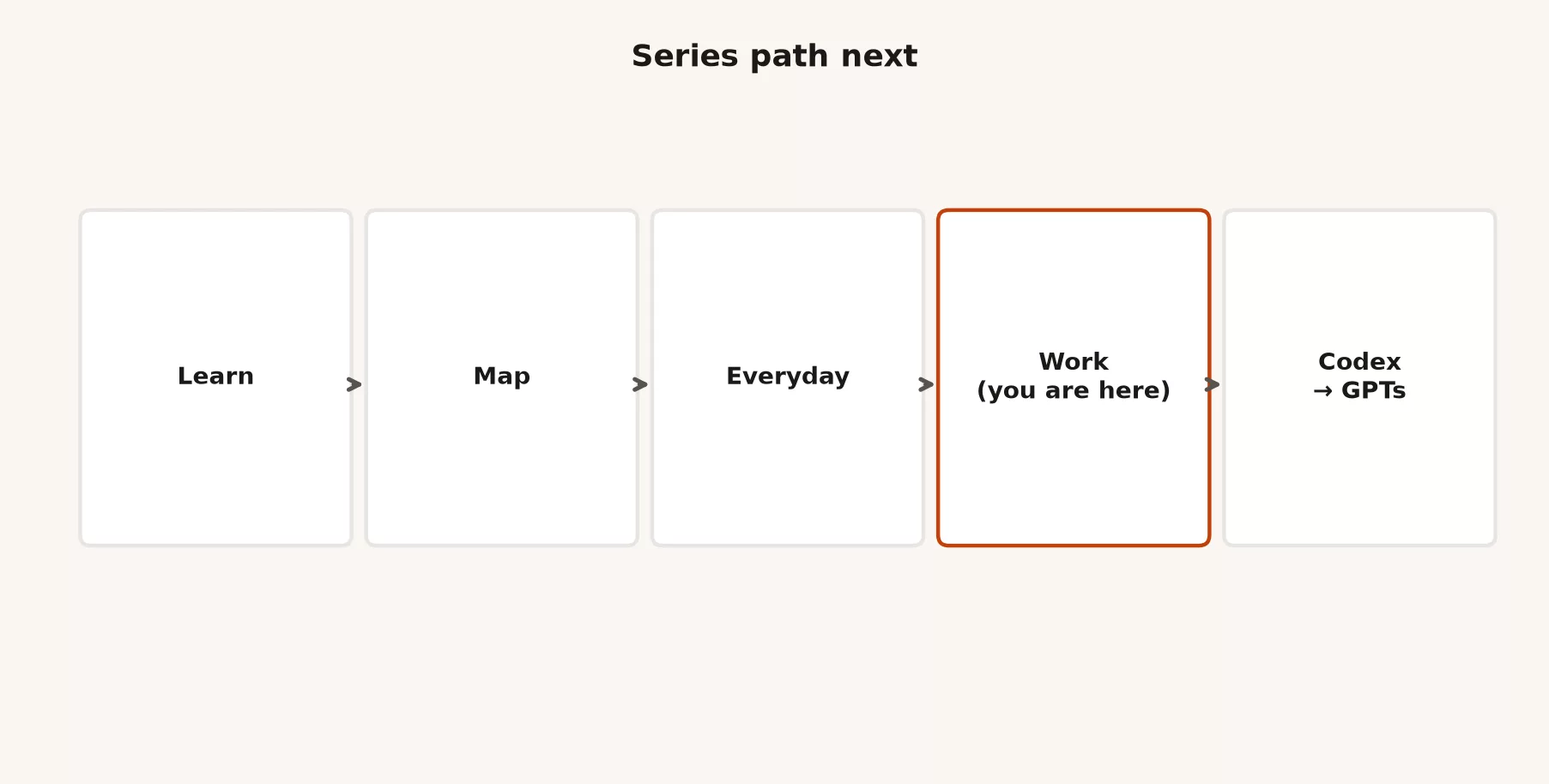
When you finish this series, continue in this order unless your job forces a different path.
- ChatGPT Codex and coding tutorial: open coding features, exploring a repo safely, skills and tasks as the product offers them, review and tests, and git-friendly habits. It never ships on green checkmarks alone.
- Custom GPTs tutorial: build a simple GPT for a repeating task with instructions, knowledge files, and light actions, and share it with a team without chaos. It also covers when a GPT is the wrong solution.
If product names still blur, keep the ChatGPT product map bookmarked. Orientation and first-week safety still live in Learn ChatGPT from scratch. Everyday Chat skills, where no agent can change your files, stay in the everyday tutorial. Wider curriculum paths sit on Learn. A clean deck that cites a wrong number is still a wrong number, so the verification posts on this site remain relevant after the series ends.
Worked micro-scenarios for chooser practice
Scenario A: “Make this email less cold”
Use Chat. It is one rewrite, and you send it yourself. Opening Work here is overhead, and it invites tool creep that you do not need.
Scenario B: “Turn these four exports into a board appendix by Monday”
Use Work. It is a multi-file result with definitions and reconciliation, so you need a goal block, a plan, checkpoints, and a result checklist. You still own the numbers that finance will challenge.
Scenario C: “Why is this pytest failing in our API package?”
Use Codex, or whichever coding tool your company approves. Do not use Work, and do not build a status deck with a code snippet as wallpaper.
Scenario D: “What was our NRR last quarter, exactly?”
NRR means net revenue retention, the share of last period’s revenue you kept after cancellations and upgrades. Go to the official source first. Chat or Work can help format a narrative after you attach a trusted export, but neither should invent that number from a vibe.
Scenario E: “Build a repeating weekly status GPT for the team”
That is a Custom GPTs conversation, covered in the next series, and not a one-off Work run. Work can produce this week’s pack. A GPT is for a repeating pattern of instructions and knowledge, once you know the workflow is stable.
How to practice this week
- List five real tasks from your last five workdays.
- Run each one through the MODE_CHOOSER, and write Chat, Work, Codex, or Stop next to each.
- Redo one past task in the mode you should have used, and compare time and stress and not only polish.
- For one Work-shaped task, force a plan and a full result checklist even if you already trust the output.
- Note one wrong choice you have made before, such as the silent-send fantasy, a KPI from chat, or a personal plan on company files, and write the replacement rule in one sentence.
Questions people ask
If Work can do something Chat can do, should I always use Work?
No. Prefer the smallest tool that finishes the job safely. Work costs more supervision and usually more usage, and Chat is not a junior mode. It is the right tool for tight conversational work.
Can Custom GPTs replace Work?
Not as a full substitute. A Custom GPT is strong for a repeating pattern of instructions, a knowledge pack, and lighter actions. Multi-step agentic office runs with deep tool use still belong to Work. The Custom GPTs series will cover when a GPT is the wrong solution, including people who try to stuff an entire company into one bot.
What if my company blocks Work but allows Chat?
Follow the policy, because Chat skills still pay their way. If multi-step agentic work is truly required, ask for an approved path. Do not build a shadow setup on a personal account with customer data.
Is Scheduled Tasks the same as Work?
Scheduling is a way for some long-running or repeating work to stay alive over time, and the product packaging keeps moving. Treat scheduled agentic work with the same goal, approval, and checklist discipline as interactive Work. A recurring wrong job is worse than a one-off wrong job.
Quick recap
- Chat is fast conversational help, Work is for multi-step deliverables, and Codex is for software work.
- Work beats Chat when sequence, files, and tools stack up.
- Chat beats Work for rewrites, study, and everyday workplace writing that you will send yourself.
- Avoid the wrong choices: licensed authority, invented KPIs, silent sends, production code in Work, vague mega-prompts, and a personal plan as policy.
- Move down or up between modes on purpose, because modes are not status symbols.
- The series loop is to choose, minimize tools, plan, approve, checkpoint, run the checklist, and keep the send in human hands.
- Next come the Codex tutorial and then Custom GPTs, while the product map, Learn, and Everyday stay as the foundation shelves.
Series notes
This is Part 4 of the ChatGPT Work tutorial and the final post in the series. Related: ChatGPT product map, Learn ChatGPT from scratch.
Sources
Research and further reading used for this article:
- OpenAI Help: ChatGPT Work and Codex (Chat vs Work vs Codex; Work for multi-step work and finished deliverables; Codex for software development)
- OpenAI Help: Creating and editing documents, spreadsheets, and presentations with ChatGPT Work (Work deliverables from instructions, sources, and templates)
- OpenAI Help: ChatGPT release notes (ChatGPT Work launch notes: apps and files, follow progress, change direction, approve actions, scheduled tasks)
- ChatGPT Work product page (goals, plans, iteration, review before work begins)
- OpenAI Help: ChatGPT agent (agent mode directed to Work for multi-step tasks; safety habits around apps, vague prompts, and supervision)
- OpenAI: Introducing ChatGPT agent (control and interrupt themes in agentic ChatGPT product history)
- OpenAI: Enterprise privacy (business data and admin themes for workplace deployments)
- Analytics Made Simple: ChatGPT Work tutorial (this series)
- Analytics Made Simple: Learn ChatGPT from scratch (orientation and safety foundations)
- Analytics Made Simple: ChatGPT product map (Chat vs Work vs Codex and related splits)
- Analytics Made Simple: ChatGPT everyday tutorial (human-led Chat skills)
- Analytics Made Simple: Learn (curriculum hub)
Keep going
Same lessons in your feed
Short diagrams, hooks, and weekly tutorials on Substack, Instagram, X, and Facebook.