

A long ChatGPT Work job can go wrong quietly. It reads your files, makes choices along the way, and hands back something that looks finished, so the mistakes hide inside a polished result. This post shows how to run a multi-step job so you catch those mistakes before the file leaves your desk.
Say you ask Work to turn three PDFs, a CSV (a plain spreadsheet-style text file) export, and last week’s notes into a six-slide status deck for the leadership meeting. Halfway through, the agent (the AI doing the steps for you) asks whether it may pull last quarter’s revenue from a connected spreadsheet you barely remember approving. You are busy in a chat thread, so you tap Yes. When you finally open the deck, it looks complete. The chart is wrong, the customer name on slide 3 belongs to a different account, and the risks slide invents a service-level agreement (SLA, the written promise about a vendor’s uptime) that appears in none of your PDFs. Nobody lied to you. The run was long, fluent, and under-checked.
The earlier posts in this tutorial covered what Work is for and how to approve a first task step by step. This one stays in Work and goes longer, with checkpoints, mid-run corrections, usage habits, and a final checklist that catches workslop, which is polished, fluent output that is wrong. If you are unsure which ChatGPT mode fits a job, keep the ChatGPT product map open. Everyday habits for plain Chat, such as structure, verification, and never auto-sending, live in the ChatGPT everyday tutorial. Account and safety basics are in Learn ChatGPT from scratch.
Button labels and plan menus change often, but the loop you will learn here does not. Treat the official Help Center pages as the source of truth for buttons and quotas in the week you train a team.
What a multi-step job actually is
In plain Chat, a job is usually one request and one reply, such as rewriting an email, outlining a document, or explaining an error message. You stay in the thread and copy out the useful parts. If the answer is wrong, the damage is limited to some words on a screen.
In Work, a job is a goal that needs a sequence of steps. The agent gathers context, opens files, uses connected apps, drafts in-between files, revises them, and leaves finished documents, sheets, or decks. OpenAI describes Work as longer, more involved work across files and apps, where you can follow progress, answer questions, change direction, and approve the important actions. That makes it closer to office work handed to a fast assistant than to a longer chat bubble.
Multi-step does not mean dumping everything into one paragraph and walking away. It means you accept that the agent will make a plan, use tools, and leave partial results behind. Your role changes from writing every sentence to stating the goal, approving the path, and checking the outcome.
The loop: goal, plan, act, checkpoint, done or steer
Run every non-trivial Work job through the same five steps. Keep it boring on purpose, because a boring routine is what stops the bad afternoon in the story above.
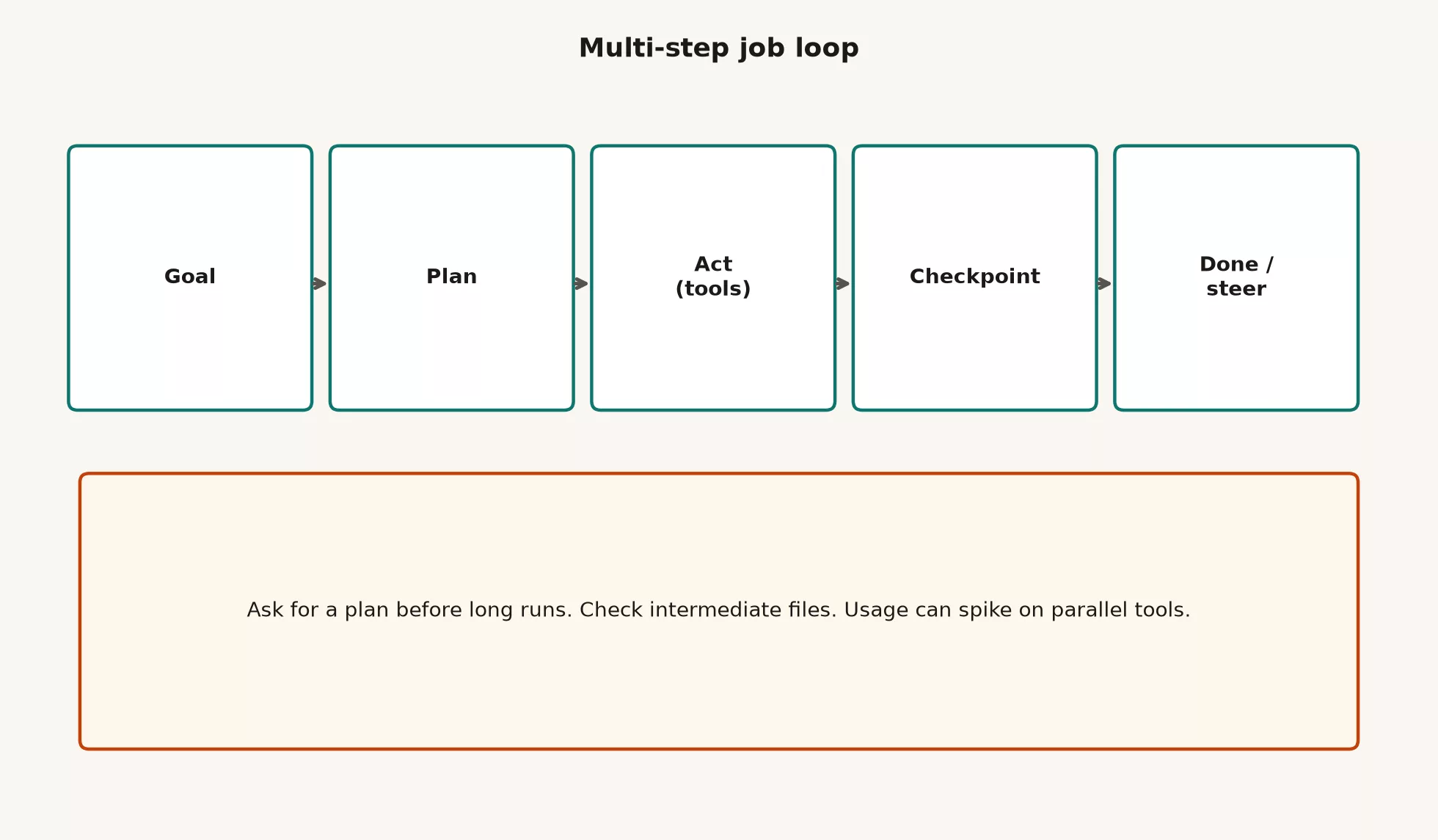
1. Goal
Before any tool runs, write the outcome, the audience, the limits, the allowed sources, and what is out of scope, all in one block. If you cannot finish the sentence “done looks like…”, you are not ready for a long run, because the agent will invent its own definition of done.
WORK_GOAL (paste as the top of the job)
Outcome: [what file or artifact must exist when we stop]
Audience: [who will read or use it; what they already know]
Sources allowed: [files you attach / apps you enable / URLs you name]
Sources forbidden: [guessing, web unless I say so, other clients]
Constraints: [length, format, tone, deadline, brand rules]
Must include: [exact sections, metrics, dates]
Must not: [send email, edit live systems, invent numbers]
Success test: [how I will check this before anyone else sees it]
Open questions for me: [list anything missing before you act]
Here is that block filled in for the status deck job:
Outcome: 6-slide PPTX status deck + 1 tab sheet of metrics
Audience: leadership sync; 10 minutes; no deep methodology
Sources allowed: three PDFs attached, CSV export attached, notes.txt
Sources forbidden: inventing SLA language; pulling other accounts
Constraints: North America only; as-of date on every chart; plain English
Must include: progress vs plan, top 3 risks with owners, next 2 weeks
Must not: send calendar invites; email anyone; change shared drive files
Success test: I can recompute the 3 headline numbers from the CSV
Open questions: confirm whether "pipeline" means open ops or weighted $
2. Plan
For anything longer than a small tidy-up, ask for a plan first. Work often lets you review a plan before it starts, showing the context, a few questions, and a list of steps for you to approve. Even when the screen does not force this, you can type: “Propose steps only. Do not create files yet.”
A usable plan names the tools, the in-between files, and the points where the agent will stop and ask you. A vague plan such as “research, draft, polish” tells you nothing, so reject it and ask again.
| Plan quality | What you see | What you do |
|---|---|---|
| Weak | “I’ll analyze the docs and make a great deck.” | Stop. Demand steps, sources, and stop rules. |
| OK | Numbered steps, named files, one approval gate before write. | Edit scope; approve if sources match. |
| Strong | Steps + intermediate checkpoints + explicit “I will ask you before X.” | Approve, then watch the first real write. |
3. Act, with tools
This is the stage where Work earns its cost. It reads attachments, uses the apps you enabled, browses the web when allowed, and drafts sheets and slides. Keep the list of enabled tools short, because every extra connected app is more data the agent can touch and one more way a confused step can wander off.
While it works, you are not an audience member. You are the supervisor of a very fast junior analyst. Watch which files it opens and which apps it calls, and stop it if it starts “helpfully” reaching into a second client folder you never named.
4. Checkpoint
A checkpoint is a deliberate pause. Insert one yourself if the agent does not, and use these good places to stop:
- After source inventory (“list every file you will use and what each contributes”)
- After metric definitions (“write the formula for each headline number in plain English”)
- After first draft structure (slide titles or doc outline only)
- Before any high-impact action (share, send, overwrite, publish)
- After final package (files closed, checklist ready)
A checkpoint is something you can inspect, such as a bullet outline, a table of metric formulas, or a list of files. If the agent only says “looks good so far,” you do not have a checkpoint, because there is nothing to check.
5. Done or steer
At each checkpoint you choose to continue, stop, or steer. Steering is normal. A long job with no mid-course correction is how a wrong definition gets polished into something leadership will quote.
Steering mid-run without chaos
OpenAI’s guidance for ChatGPT agents has long said you can interrupt, clarify, take over sensitive browser steps, or stop a task. Work keeps the same idea of a person in control, so follow progress, answer questions, change direction, and approve important actions. Use that power early, because it is much cheaper to redirect at step two than after the wrong deck is finished.
What good steer messages look like
A bad steer is “Make it better.” The agent will polish, and polish does not make anything more true. A good steer is specific, limited in scope, and says what not to do when that matters.
STEER (mid-run)
Stop creating new slides.
Keep slides 1-3 as drafted.
On metrics: pipeline = open opportunities in USD, weighted, as of 2026-07-01.
Remove any SLA claims not present in the three PDFs.
Do not open additional apps.
Show me the revised metric table only, then wait.
If the agent is in the middle of using a tool and something feels off, stop the run instead of stacking five corrective paragraphs on top of it. A clean stop followed by a corrected goal beats a long argument with a confused half-finished job.
When to restart instead of steer
Restart when the agent used the wrong set of sources, mixed in another client’s files, or misread the main metric for more than one step. Steering a contaminated in-between sheet often leaves residue behind, such as old columns, old chart series, and old footnotes. A restart costs usage, but shipping contaminated work costs trust, and trust is the more expensive thing to lose.
| Signal | Steer | Restart |
|---|---|---|
| Tone or slide order off | Yes | No |
| One number formula wrong, rest solid | Yes (recompute + replace) | Maybe if many dependents |
| Wrong client files mixed in | No | Yes |
| Agent invented sources | No for narrative polish | Yes after scrubbing claims |
| Scope doubled without ask | Hard scope cut | If files already sprawled |
Usage: multi-step jobs are not free chat
Agent runs burn more of your allowance than a quick Chat rewrite. Older agent-mode help pages counted each request you started against a monthly limit, and Work is newer, so limits can differ by plan and by rollout. The lasting habit is to treat a long job as a line in a budget, not as endless coffee.
- Batch small rewrites in Chat; save Work for multi-step deliverables.
- Ask for a plan first so you do not pay for three wrong full drafts.
- Disable apps you do not need for this run (less tool thrash, less risk).
- Prefer one well-scoped job over five overlapping experiments.
- On team plans, assume someone owns spend; do not be the surprise invoice.
If you train a team, put the usage rule on the same one-page guide as the approval rule. People who think Work is just Chat with better polish will spend their limit on subject-line rewrites and have nothing left for the real deck.
Workslop detection for multi-step outputs
Workslop is fluent, well organized, and wrong. It has nothing to do with an AI writing in a lively voice, because tone is a style choice while workslop is a problem of truth and fitness. Agents make it easier to ship because each step can polish the mistake before it. A misread PDF becomes a cell, the cell becomes a chart, and the chart becomes a bold claim in an email subject line.
These fast detectors work without redoing the whole job:
- Empty sections that look full. A risks slide with three vague bullets and no owners is one example.
- Method with no method. “We analyzed the data” with no filter, no definition of what one row means, and no date is not a method.
- Perfectly round numbers where the source is messy, unless you know the source was rounded.
- Citations that point nowhere. Footnotes without pages, or “internal research” with no file, fall into this group.
- Scope inflation. You asked for a status update and got a strategy, a market view, and a product roadmap.
- Consistency breaks. Slide 2 says 12% and the appendix table says 9% for the same filter.
Plain test: If the only review you did was asking whether this sounds like something we would send, you reviewed the outfit and not the body.
Analysts already know a cousin of this risk from AI-written SQL (the standard language for asking a database for data), where the clauses look confident but count the wrong thing. It is the same checking muscle, and the tutorial on checking AI-written SQL is a good companion.
Worked example: a multi-step status package
Here is a compact version of the deck job, so the loop feels concrete.
The goal block you write
Ask for a six-slide deck and one metrics tab for a ten-minute leadership slot. Allow only the three PDFs, the CSV, and your notes, with no email and no extra apps. Success means three headline numbers recompute from the CSV.
The plan you demand first
- List the sources and the metrics available in the CSV columns.
- Propose metric definitions and wait for your yes.
- Build the metrics tab only, then stop at a checkpoint.
- Draft slide titles only, then stop at a checkpoint.
- Fill the slides from approved metrics, with no new metrics.
- Package the files and run the result checklist with you.
Where you steer
At step 2 the agent proposes “pipeline equals total open opportunities, unweighted,” where pipeline means the sales deals still in progress. You steer it to weighted US dollars, as of the export date printed in the CSV file name. At step 4 it suggests a competitive landscape slide, and you cut it because it is out of scope. Those two corrections prevent hours of pretty, wrong work.
The result check you do
You recompute the weighted pipeline from the CSV filter and fix one client’s spelling. You delete a bullet that compared your numbers to an industry benchmark (an outside figure used for comparison) without any source, and you attach the deck to the meeting agenda yourself. The agent never sent anything, which is a success and not a limitation.
| Mistake | What happens | Fix |
|---|---|---|
| Goal is a vibe | Agent invents success criteria | Write outcome + must/must-not |
| No plan gate | Usage burns on wrong path | Plan only, then approve |
| All apps on | Scope and privacy wander | Enable only this job’s tools |
| Approve while distracted | High-impact Yes you did not mean | Pause notifications for approvals |
| Review only the final PDF | Intermediate wrongness is hidden | Checkpoint intermediate files |
| Polish before numbers | Workslop gets prettier | Numbers first, design second |
| Silent restart loops | Same bad goal, more spend | Rewrite goal, then re-run once |
Practice with one real job
Try this on a real task you own, and use only files you are allowed to use.
- Pick one real multi-step job you own, such as a status deck, a folder tidy-up with a summary, or a sheet built from messy notes.
- Write a full goal block, force a plan, and approve it only after you have edited it, so the run follows your plan and not the agent’s guess.
- Add at least two checkpoints. Steer once on purpose, even if the draft is fine, so you practice the muscle.
- Run the five-point result checklist and write down what failed, then fix it before anyone else sees the file.
- Note roughly how long it took and whether Chat would have been faster. Keep that note for the later post that compares Work with Chat.
Do not practice with high-impact sends, live writes to your customer system, or customer secrets on a personal setup nobody has approved. Building skill does not require a compliance incident.
How this fits the wider ChatGPT path
This tutorial has covered when Work is the right mode, how to supervise a first task, and now how to run a long job with steering and a final check. The next post closes the tutorial with a decision table for when Work beats Chat and when it does not, plus the path into Codex and Custom GPTs (ChatGPT versions with their own saved instructions).
- Learn ChatGPT from scratch for accounts, plans, memory and Projects basics, privacy, and judgment
- The ChatGPT product map for the split between Chat, Work, Codex, and related modes
- The ChatGPT everyday tutorial for human-led Chat skills without agent risk
- The ChatGPT Work tutorial, which is this series
- The Learn page for the wider curriculum hub
Common questions
Should every Work job use the full loop?
Use a shortened loop for tiny tasks, but keep the goal and the final checklist. The full plan-and-checkpoint version is for jobs with many files, anything with numbers leadership will quote, and anything that can touch shared systems.
Is interrupting rude to the agent?
No. Interrupting is part of the job, and the product expects you to clarify, redirect, and stop. Waiting politely while the agent digs a deeper hole is how workslop grows.
Can I trust in-between files if the final looks good?
Not automatically, because final polish can hide errors from earlier steps. If a chart depends on a metrics tab, check the tab. If a summary depends on extracted quotes, check the quotes against the PDF.
What if usage runs out mid-project?
Save your goal block, your plan, and any verified in-between files outside the chat if you can. Finish the last mile in Chat or by hand if you need to. Do not lower the checklist because the meter is empty, and look up the current limits for your account type in OpenAI’s Help Center.
Quick recap
- A long Work job follows five steps: goal, plan, act, checkpoint, then done or steer.
- Write your success tests before any tool runs, and reject a plan that is only a mood.
- Steer with specific limits, and restart when the sources or a core definition were wrong.
- Treat usage as a budget, because Work is not free chat.
- Before anyone else sees the file, check the numbers, the names and dates, the scope, the citations, and whether a careful person would send it.
- Workslop is polished and wrong, so catch it before the meeting. The next post covers when Work beats Chat, then Codex and Custom GPTs.
Result checklist to run before anyone else sees the file
When the agent says it is done, you are not done. Run this checklist in order. Skip steps only for truly disposable drafts, and even then run a shorter version so your own standards do not slip.
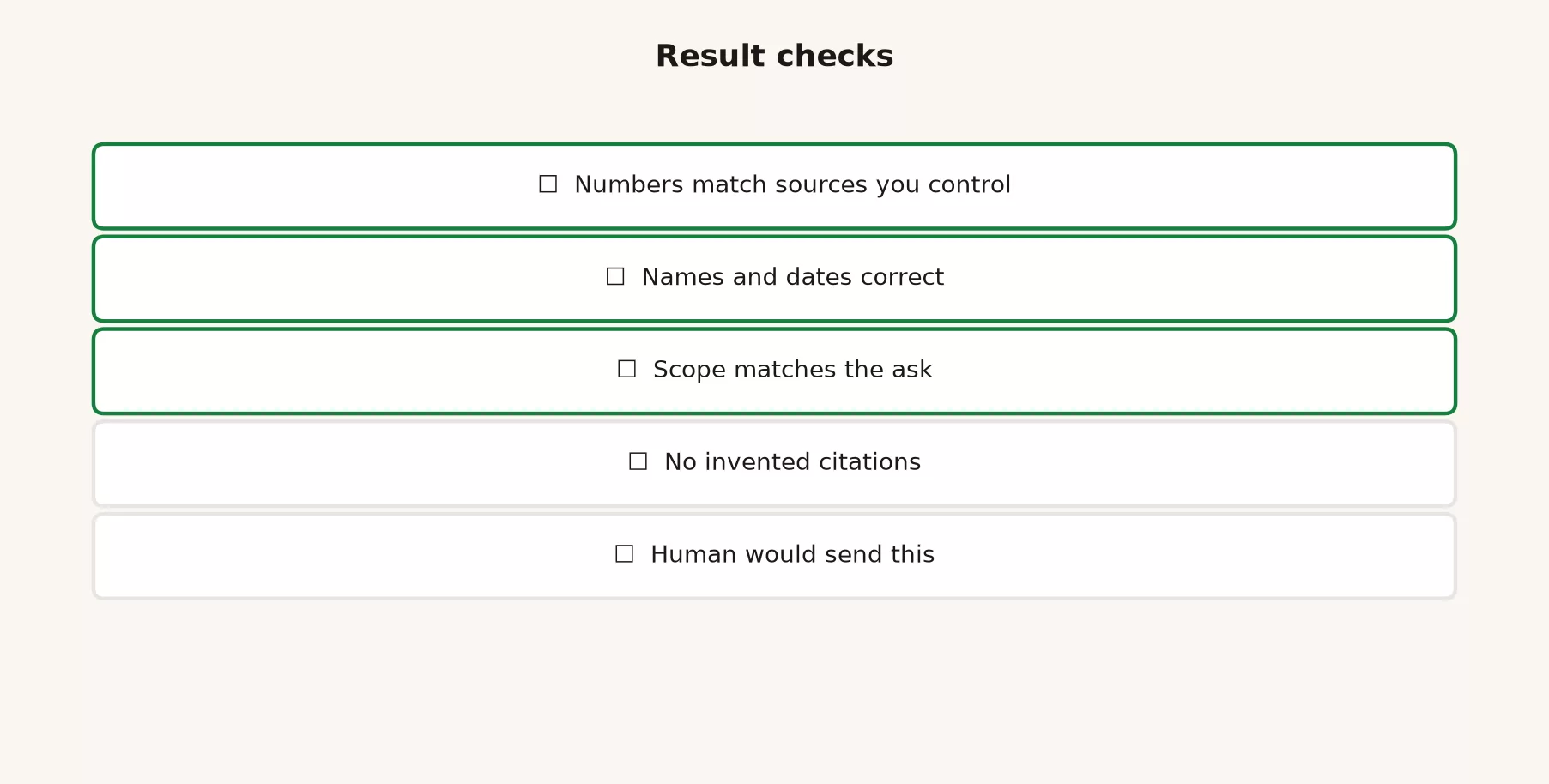
1. Numbers match sources you control
Pick the numbers that would change a decision and recompute at least three of them from the CSV, the export, or the official system you already trust. Do not just reread the agent’s summary of the numbers. Open the cells, open the PDF page, and open the sheet tab yourself.
NUMBER_CHECK
1. Row count of source filter vs rows implied in the summary
2. Sum of amount (or count) vs warehouse / finance total for same filter
3. One rate = numerator / denominator with the definition written out
4. As-of date and timezone if the metric moves daily
5. Units and currency (thousands? millions? local currency?)

If any fail: quarantine the deliverable. Do not "fix the narrative" first.
2. Names and dates are correct
Check people, companies, products, ticket IDs, file names, “as of” dates, and meeting dates. Near-miss names are a classic multi-step error, because the agent saw a similar name two files ago and carried it forward with confidence. Search the draft for every proper noun you care about, and when the stakes are high, compare it with the source spelling letter by letter.
3. Scope matches the ask
If you asked for six slides and got fourteen, that is not a free gift. Extra scope usually means thinner attention and invented sections. If you asked for North America and the chart includes Europe, the Middle East, and Africa, stop and fix it, because scope errors are cheapest to catch on titles and filters before the meeting.
4. No invented citations
Ask for a source behind every claim that sounds like a fact. A line such as “according to industry benchmarks” with no real source is decoration. A line such as “per page 4 of the PDF” is something you can verify. If the agent cannot point to an attached file, a web address you allowed, or a sheet cell, treat the claim as untrusted.
5. A careful human would send this
This last one is a social test. Would you put your name on the email that attaches this file, and would you defend every number if Finance joined the call? If the honest answer is “mostly, if nobody digs,” you still have workslop risk, so either fix it or label the file a draft with your open questions written on it.
| Check | Pass looks like | Fail looks like |
|---|---|---|
| Numbers | Three recomputes match source | Pretty chart, untraceable cells |
| Names / dates | Exact match to source spelling | Near-miss client, wrong quarter label |
| Scope | Deliverable matches goal block | Extra regions, extra claims, extra apps |
| Citations | Claims map to files you own | Vague “research shows” |
| Human send | You would defend it live | You hope no one asks |
Sources
Research and further reading used for this article:
- OpenAI Help: ChatGPT Work and Codex (Chat vs Work vs Codex product split; Work as multi-step work and finished deliverables)
- OpenAI Help: Creating and editing documents, spreadsheets, and presentations with ChatGPT Work (deliverable creation and editing from instructions and sources)
- OpenAI Help: ChatGPT release notes (ChatGPT Work introduction: longer tasks, apps and files, follow progress, change direction, approve actions, scheduled tasks)
- ChatGPT Work product page (goal to plan, side-by-side iteration, review approach before work begins)
- OpenAI: Introducing ChatGPT agent (agentic control themes: permission for consequential actions, interrupt, steer mid-task; historical product context as surfaces evolved toward Work)
- OpenAI Help: ChatGPT agent (agent mode retired in favor of Work for multi-step tasks; usage and safety notes still useful for agentic habits)
- Analytics Made Simple: ChatGPT Work tutorial (this series)
- Analytics Made Simple: Learn ChatGPT from scratch (orientation and safety foundations)
- Analytics Made Simple: ChatGPT product map (modes and product orientation)
- Analytics Made Simple: ChatGPT everyday tutorial (Chat skills without agent risk)
- Analytics Made Simple: Learn (curriculum hub)
Keep going
Same lessons in your feed
Short diagrams, hooks, and weekly tutorials on Substack, Instagram, X, and Facebook.



