

Anthropic, the company behind Claude, now offers two specialist tools beside its regular chat: Claude Design for making visuals and slides, and Claude Science for lab and research work. Use regular chat when you only need words.
Imagine you ask the chat for a slide deck, and it hands you paragraphs you still have to paste into slides. Or you ask for help with a lab result, and you get a summary instead of a place to do the analysis. The specialist tools are built for those jobs. Chat is not.
Update, October 2, 2026: On September 16, 2026, Anthropic merged Cowork into the main Claude app, rolling out to Pro and Max first and to other plans later. What Cowork could do, such as working through a folder of files, is now available from any Claude conversation, so you may no longer see a separate Cowork tab. The advice below still applies to that kind of task.
This is part of the Claude product map, which matches each Claude tool to a job. Neither tool replaces regular chat, and neither one checks your brand rules or your science for you.
The map so far, plus two new specialties
Hold onto the core rule from the earlier posts in this series.
- Chat is conversation and drafting with you in the loop on every paste.
- Claude Code is software work in repos, terminals, and code editors.
- Claude Cowork is non-coding knowledge work on the folders and tools you choose to connect.
Design and Science sit beside that core rather than above it, because they are specialized workbenches for visual production and scientific research work. Most office workers will touch Design occasionally, when a deck or a mockup is due. A smaller set of researchers and lab-adjacent roles will live in Science day to day. Plenty of people need neither one yet, and that is fine.
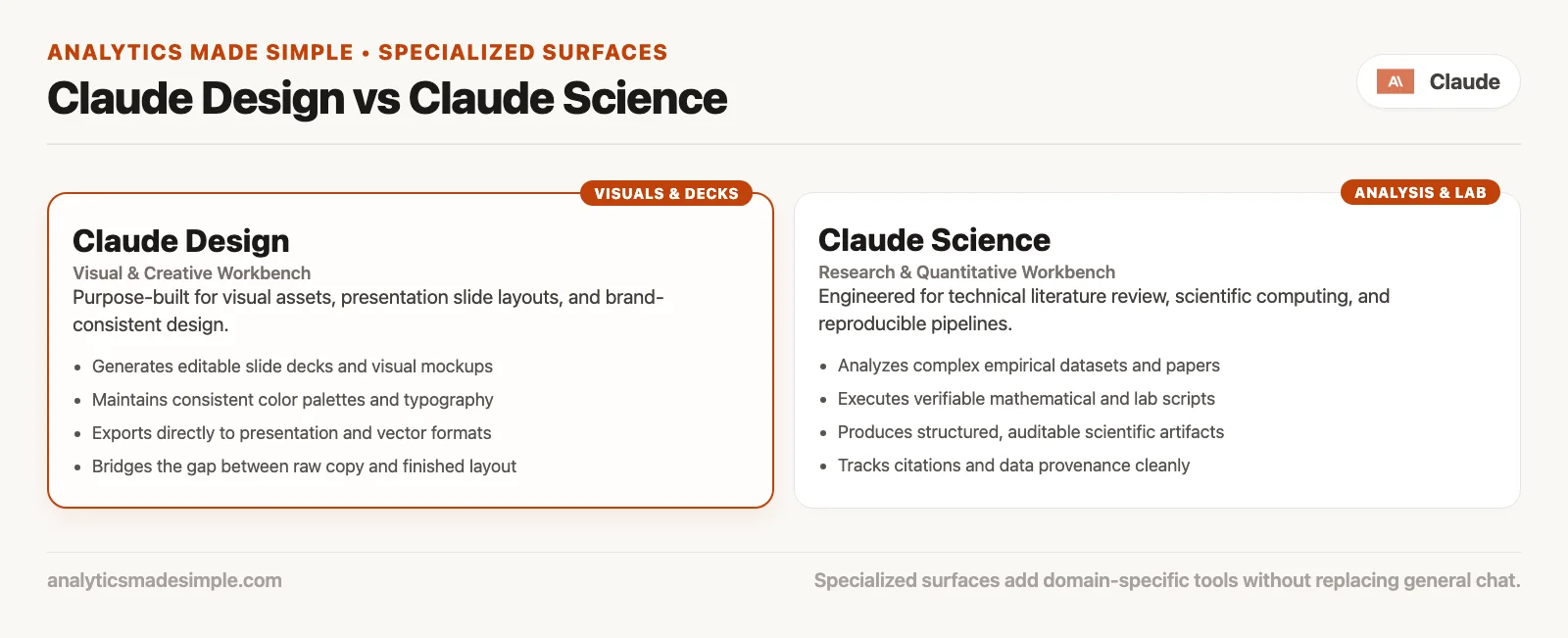
Claude Design: visual work for teams
Claude Design is Anthropic’s product for collaborating on polished visual work: designs, prototypes, slides, one-pagers, marketing collateral, and related pieces. Anthropic Labs announced it as a research-preview style product powered by a vision-capable model. That just means the model can read and reason about images and layouts, not only text, so it’s aimed at people who need more than a text outline of a deck.
In plain English: you describe or import what you need, Claude builds a first visual version, and you refine it with comments, direct edits, and conversation. Then you export it or hand the work to another tool. Designers can explore more directions before lunch. Non-designers can get something shareable without opening five apps and fighting slide masters from 2014.
What Design is good for
- Pitch decks and presentations: it turns an outline into on-brand slides. It can then export as a PowerPoint file or a PDF, depending on which paths the product supports that week.
- Product mockups and wireframes: it produces feature flows a product manager can share, then refine with design partners or hand toward implementation.
- Interactive prototypes: it turns a static idea into something clickable for feedback, without a full engineering sprint.
- Marketing collateral: it gives you landing-page style layouts, campaign visuals, and social-ready assets as a first pass.
- Brand-consistent exploration: when a design system or brand kit is available, the outputs can stay closer to your real house style.
Brand systems and import paths
A useful part of Design is that it can learn a brand. Onboarding reads your design files or codebases once you grant access, and teams with more than one brand can set up multiple systems. Design can also import from prompts, documents such as Word, PowerPoint, or Excel files, images, or captures from existing sites. The exact import menu moves around as the product changes, but the idea behind it stays stable. Start from something real, such as a brand PDF, an existing deck, or a live product URL, whenever consistency actually matters.
Export and handoff
Design is only half useful if the work dies inside a proprietary preview screen. Anthropic’s announcement describes several export paths: PDF, PowerPoint, a standalone HTML page (HTML is the format a browser reads), Canva-oriented flows, and shareable internal links. There’s also a handoff bundle toward Claude Code for when a prototype should become real product software. That handoff is the bridge between looking right in a design tool and living in the repo. Design does not replace Code’s engineering loop. It is often the sketch that Code goes on to build.
Who can open Design
Claude Design has shipped in research-preview or beta-style access for Pro, Max, Team, and Enterprise subscribers. It uses each plan’s usage limits, plus extra usage options where the plan supports them. Enterprise accounts often have admin toggles, and some organizations leave the feature off by default. Rules change. Always re-check claude.com/product/design and your admin settings the week you actually care. Free users should not plan a whole visual workflow around a paid beta tool. A workflow is the series of steps a task goes through.
What Design is not
- It won’t automatically follow brand law, so pretty slides can still be off-message or legally wrong.
- It doesn’t replace accessibility review, print production, or final art direction on high-stakes campaigns.
- It also isn’t Claude Code, because shipping a production UI still needs engineering judgment, tests, and review from a person. The UI is the part of a program you see and click.
- And it isn’t Cowork’s folder agent. An agent is a program that can take actions, such as opening files, across several steps. If the job is cleaning a directory of CSVs, plain text files where each line is a row and commas separate the columns, into a workbook, Cowork is the closer fit, since Design is built for visual composition, not file cleanup.
Claude Science: a research workbench
Claude Science is Anthropic’s AI workbench for scientific research work. The June 2026 announcement frames it as an app that connects to tools and packages researchers already use. It produces artifacts you can audit later, and it gives flexible access to computing resources. Think less “chat about biology” and more one environment. The literature, the analysis, the figures, and the compute jobs all live together there, with a history you can inspect afterward.
Scientific work is fragmented by default, and that’s exactly why this matters. PubMed sits in one tab, a notebook tool in another, a statistics program somewhere else, and a remote server terminal sits open on top of that. A server is a computer that stays on and answers requests. The terminal is the text window where you type commands instead of clicking. File formats each want their own custom pipeline (a chain of automated steps that moves and cleans data) too. Science tries to pull those stages into one research environment, where the assistant can help plan, run, and document each step. Reviewer-style checks on citations and calculations are built into the product too.
What Science is good for
- Multi-step research workflows that mix literature review, data, and analysis code in one place.
- Domain tooling, meaning preconfigured skills and connectors for fields such as genomics, proteomics, structural biology, and cheminformatics, along with related areas Anthropic’s materials call out by name.
- Auditable outputs is a plain way of saying the figures and manuscripts come paired with the code, environment notes, and history that produced them. That way, someone else can check and reproduce the work later.
- Compute management means the work can run on a laptop, a remote Linux server, a shared high-performance computing cluster, or an on-demand compute partner. A human still approves new resources before they get touched, according to the product materials.
- Rich scientific views, such as molecule structures and data tracks, rendered with a trail back to how they were made. That trail matters.
Who can open Science
Claude Science launched in beta for Pro, Max, Team, and Enterprise users, with the earliest desktop support built for macOS and Linux machines. Team and Enterprise accounts often need an admin to turn the product on. There are research-lab oriented Team offerings and program details, and they change often. Verify what is currently true on claude.com/science and Anthropic’s announcement page before you build a lab policy around it.
What Science is not
This is the line worth pinning to the lab whiteboard.
- It is not a replacement for peer review, because journals, committees, and independent replication still sit outside the product entirely.
- It doesn’t guarantee truth either: auditable artifacts make checking easier, but they don’t make wrong methods right.
- It also isn’t general office Cowork. Expense folders and status decks belong in Cowork’s territory, while Science is built around research tooling and scientific compute instead.
- Data governance rules still apply, so sensitive human data, protected health records, and proprietary sequences still need institutional policy, consent, and secure infrastructure choices behind them.
- People sometimes call Science “Claude Code with a lab coat,” but that undersells it. There is real overlap, since both run code and manage environments. Science’s product bet is domain skills, scientific artifacts, and research compute rather than general software shipping.
Design and Science side by side
| Claude Design | Claude Science | |
|---|---|---|
| Primary job | Visual drafts: decks, mockups, prototypes, collateral | Research workbench: analysis, literature, figures with history |
| Typical user | PMs, marketers, founders, designers, AEs | Scientists, lab analysts, research software adjacent roles |
| Signature outputs | Slides, layouts, interactive prototypes, brand-consistent visuals | Analyses, scientific figures, manuscripts, compute job trails |
| Export / handoff | PPTX, PDF, HTML, Canva-style paths, handoff toward Claude Code | Auditable artifacts with code and environment context; compute on your infrastructure |
| Access (mid-2026) | Beta / research preview on Pro, Max, Team, Enterprise | Beta on Pro, Max, Team, Enterprise (macOS/Linux emphasis) |
| Hard limit | Pretty does not equal approved brand or accessible final art | Not peer review; not automatic scientific validity |
Chooser: which surface fits this job?
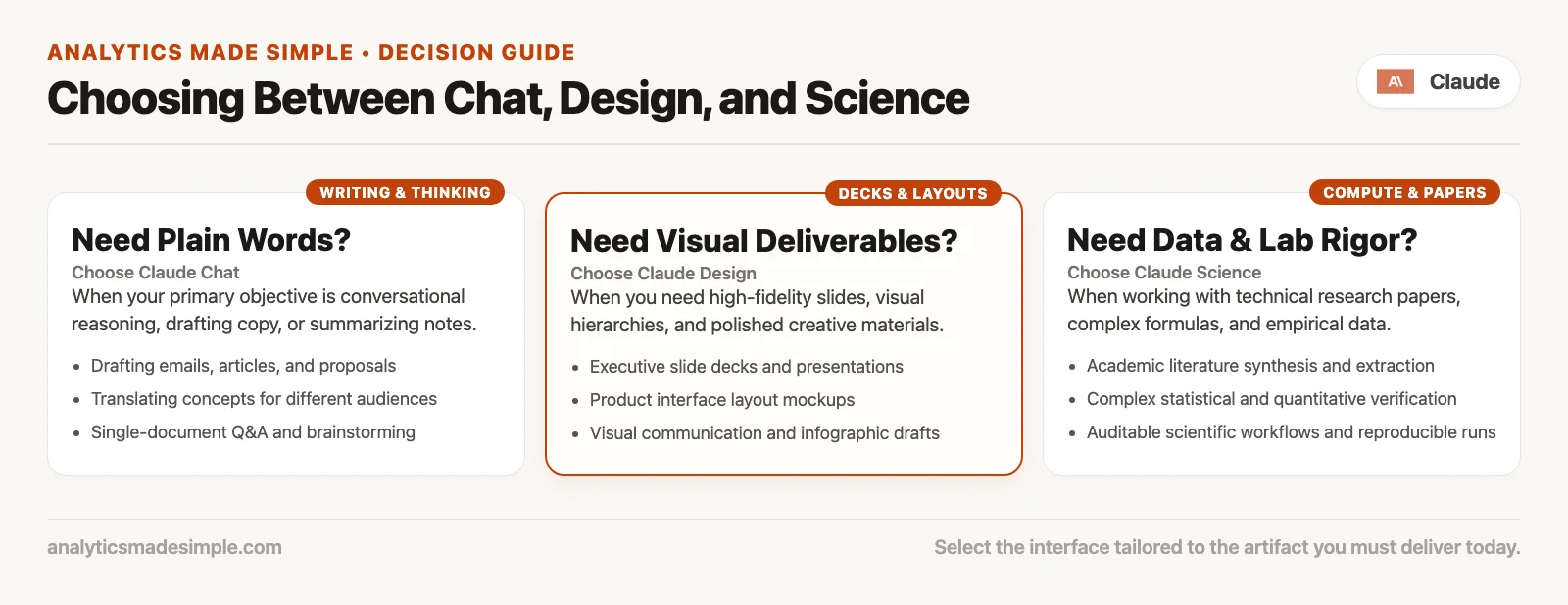
Pick the tool that matches the job. Design fits a visual or a deck. Science fits lab tools and compute. Chat fits words and thinking only. Use that path before you open five different product doors at once.
- When the job is words and thinking only, stay in chat to outline the deck, critique the abstract, or rewrite the email.
- When the job is software that ships in a repo, use Claude Code.
- When the job is multi-step office files and folders, use Claude Cowork.
- When the job is a visual or a deck that needs to look like real design work, use Claude Design.
- When the job needs scientific tools, packages, compute, and auditable research artifacts, use Claude Science.
Borderline cases exist and that’s normal. A scientist preparing a conference poster might draft the analysis in Science, then compose the layout in Design, then paste talking points into chat. A founder might sketch a UI in Design and implement it in Code. A finance lead might stay in Cowork for the workbook and never touch Science at all. The map is a chooser, not a loyalty program.
Worked scenarios
Scenario A: a founder’s pitch next week
You have a messy outline in a doc, three competitor screenshots, and a logo. Chat can help you sharpen the narrative first. Design can then turn that narrative into a first visual deck, with export to PowerPoint for offline edits. Code is irrelevant here, unless you are also shipping a demo app alongside the pitch. Cowork might help if the supporting research is sitting in a folder full of PDFs you need summarized into a brief first. A sequence that works for many people: chat for the story, Design for the slides, a human for the investor-specific claims.
Scenario B: a product manager’s feature flow
You need a clickable path through a new settings page. Design is the right first tool for mockups and interactive prototypes here. When engineering picks it up, a handoff toward Claude Code, or a normal ticket with the frames attached, beats pasting screenshots into a chat thread. That’s a real time saver. Chat still helps you write the product requirements doc that goes with it. Cowork might organize the research interviews if those files already live in a folder.
Scenario C: a lab analysis pipeline
You need to run a multi-step omics analysis and produce figures with a methods history attached. You also need to keep the large data files on lab machines. Science is built for that. Chat alone will thrash you through endless copy-paste of partial scripts. Code can help if you are building a production pipeline for other teams to use, but day-to-day research iteration is what Science markets itself toward. Design only comes into play when you need a polished poster layout, not when you need a differential expression table.
Scenario D: weekly marketing metrics
You have CSVs sitting in a folder and need a four-slide update every Monday. Cowork is the closer fit for wrangling files into a recurring deliverable like that. Design can restyle a deck template when a brand refresh matters more than the data. Science is the wrong aisle entirely, unless those “metrics” are actually scientific assays in disguise.
Plans, betas, and usage reality
Both Design and Science sit on paid plans, Pro and above in the mid-2026 announcements. Both are still often labeled beta or research preview. That has a few practical effects worth knowing before you build a habit around either one.
- The interface and export options will keep moving, so prefer the official product pages over screenshots you find in random threads.
- Usage still comes out of your plan’s pool, plus extra usage where it’s enabled. Heavy visual generation and long research agent runs are not free side dishes.
- Team and Enterprise admins may gate these features entirely, so if Design is missing, check your org’s settings before you blame your browser.
- Platform support matters for Science, since early access leans toward macOS and Linux. Windows lab machines may need a different path until support widens.
Do not upgrade five seats to a top-tier plan just because a Science beta logo looks shiny. Upgrade when a named weekly job actually fails on Free or light Pro usage. Or upgrade when your lab’s policy requires a paid seat with admin controls behind it.
Common mistakes to avoid
| Mistake | Why it hurts | Better move |
|---|---|---|
| Treating Design outputs as the official, final version of product specs | Visuals drift; engineering still needs tickets and code as the real record | Use Design for exploration; let Code and docs carry the truth |
| Shipping Science figures without a methods review | Pretty plots can still rest on wrong assumptions | Trace the code, check the inputs, get independent validation where the stakes are high |
| Confusing Science with general business analytics or dashboards | It’s the wrong tool family for routine dashboard work | Use Cowork or chat for office metrics; save Science for research workflows |
| Skipping the brand review on Design exports | Off-brand decks show up in customer meetings | Add a human brand pass; lock in brand systems in Design where available |
| Assuming beta features are permanent | Your process ends up depending on a preview that can change | Document workarounds and re-check the product pages every quarter |
| Ignoring admin and data policy | Sensitive files can end up on the wrong surface | Apply least privilege and follow institutional rules first |
Where this fits in the bigger picture
- Learn Claude from scratch covers everyday chat, Projects, privacy, and judgment.
- The Claude product map, which this post belongs to, covers chat versus agentic tools, then Code, Cowork, Design, Science, and eventually models and the API. Agentic means the work runs in several steps instead of one reply. An API is a way for one program to ask another program for data or an action.
- Deeper tutorials on Code and Cowork are worth your time once you live in those surfaces daily. Design and Science get lighter map-level treatment until you have a real weekly job that needs them.
Most readers should leave this post able to ignore Science with confidence and open Design only when a visual deliverable is the actual bottleneck. Specialists working in research environments can reverse that emphasis without any guilt.
Quick recap
- Claude Design handles visual work such as decks, mockups, prototypes, and collateral, plus brand systems. It also handles export as PowerPoint or PDF and other formats, and handoff toward Claude Code.
- Claude Science is a research workbench with tools, packages, compute, and auditable artifacts, in beta on Pro, Max, Team, and Enterprise; it is not peer review.
- Chat still wins for pure words, Code handles software, and Cowork handles office folders, while Design takes on visuals and Science stays reserved for scientific research loops.
- Betas keep moving, so re-check the official pages. Usage still meters against your plan, and humans still own brand and scientific validity either way.
How to practice this week
- Write down one real job on your plate right now, in one sentence, with one clear success artifact in mind.
- Map it with the chooser: chat, Code, Cowork, Design, or Science.
- If it is Design-shaped and you have Pro or above, try one low-stakes visual, such as an internal deck draft. Export it, then do a human brand pass on it.
- If it is Science-shaped and you are in a research role with beta access, try a non-sensitive public dataset exercise first. Inspect the artifact history it leaves behind.
- If neither fits, stay in chat or Cowork and skip the beta tourism for now.
Series notes
This post is part of the Claude product map series. Earlier posts covered everyday chat, Claude Code for software, and Claude Cowork for office and knowledge files. The next post in the series covers the models chooser: Haiku, Sonnet, Opus, and how to switch between them without the hype. A later post covers the API and Console for teams that build apps calling Claude on behalf of other users.
Sources
Product details change. Re-check these the week you enable a feature.
- Anthropic: Introducing Claude Design by Anthropic Labs (visual work, brand systems, export, handoff to Claude Code, Pro/Max/Team/Enterprise access)
- Claude Design product page
- Anthropic: Claude Science, an AI workbench for scientists (tools, packages, compute, auditable artifacts, beta access)
- Claude Science product page
- Claude Cowork product page (for contrast with office-file agent work)
- Claude Code product page (for contrast with software work and Design handoff)
- Claude pricing (confirm paid plan inclusions)
- Analytics Made Simple: Learn Claude from scratch
- Analytics Made Simple: Learn hub
Keep going
Same lessons in your feed
Short diagrams, hooks, and weekly tutorials on Substack, Instagram, X, and Facebook.



