

A Claude Code mod is a small piece of code that changes how Claude Code itself looks and behaves. It can add a panel beside the chat, stop a risky command before it runs, or add your own slash command. Mods are powerful because they run inside Claude Code with your permissions, so you should only install ones you trust.
Imagine you use Claude Code every day and keep wishing it did one small thing differently. Maybe you want to see how much of the conversation’s memory is used up, or you want it to stop and ask before any command that deletes files. Until October 2026 you had to live with it or bolt on an outside script. Now you can describe the change and have Claude write a mod for you. That is the whole idea.
Claude Code is Anthropic’s coding assistant that works in your terminal, the text window where you type commands. If it is new to you, start with what Claude Code is and when to use it. This post explains mods, shows real examples, and covers the safety checks to do before you install one, using Anthropic’s documentation checked on October 8, 2026.
What is a mod?
A mod is a plugin with event handlers inside it, according to the mods overview (checked October 8, 2026). A plugin is a package you install into Claude Code that can add skills, commands, and tools. An event handler is a small function that Claude Code calls when something happens, such as Claude about to run a tool, you sending a message, or the screen being drawn.
Each time an event happens, the handler gets three choices. It can watch the event and let it continue unchanged, rewrite the event before it continues, or answer the event itself so Claude Code’s normal behavior never runs. That third choice is what makes mods different: a mod can refuse a command, reply to a slash command without asking Claude, or swap in its own drawing for part of the screen.

Anthropic’s documentation calls these handlers hooks, which is confusing, because Claude Code already had a feature called hooks. To keep them apart, the docs now call the older kind settings hooks. A settings hook is a shell command you list in a settings file. A mod’s hook is a function that runs inside Claude Code.
Mods arrived on October 1, 2026, in Claude Code version 2.1.287, according to the Claude Code changelog (checked October 8, 2026). They are on by default from that version in the terminal. They work in the terminal and in the Code tab of the Claude Desktop app.
How mods differ from skills, settings hooks, and MCP
Claude Code now has four ways to change what it does, and they overlap. The short version: use a mod only when you need Claude Code itself to look or act differently, and pick one of the simpler tools otherwise.

A skill is a file of instructions Claude reads, so it changes what Claude knows, as the earlier post on Claude Code skills explains. MCP (Model Context Protocol) is a standard way to connect Claude to outside tools and services. A settings hook runs a script you already have when an event happens, which is enough to block or log something.
A mod is the only one of the four that can draw on the screen. That matters. It can also share information between its own handlers, so one handler can count something and another can show the count. That is the reason to reach for a mod, and also the reason to be careful with one: it sits inside the program you are typing into.
Real examples of mods
You already use mods if you run a recent Claude Code. Some of Claude Code’s own features are built as mods, and you can see them by typing /plugin and opening the Installed tab, where they are listed under Built-in.
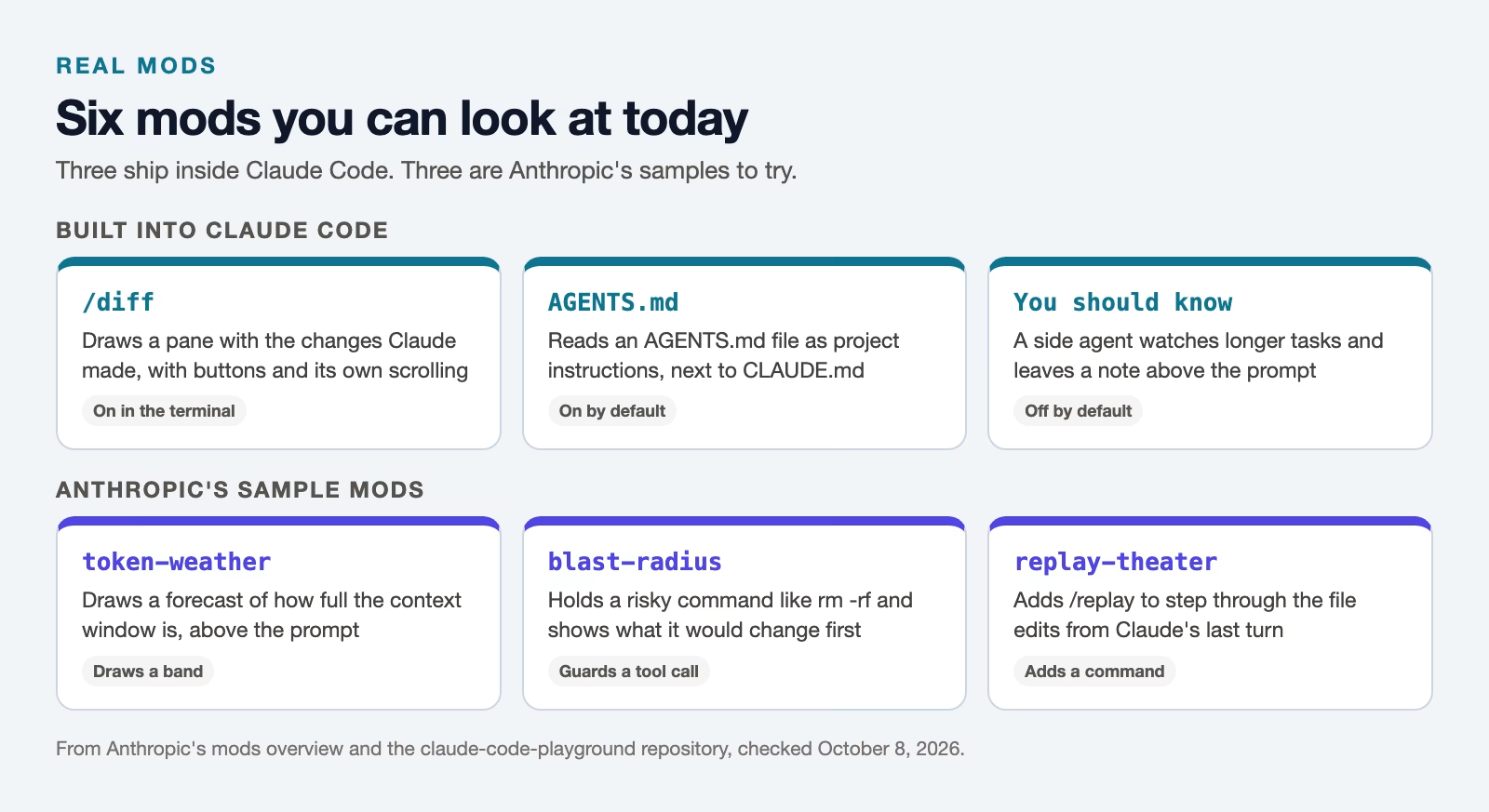
The built-in ones include the /diff command, which draws a pane showing the changes Claude made, and the feature that reads an AGENTS.md file as project instructions. Another built-in mod, called You should know, runs a second AI agent (an AI that works through steps on its own) in the background on longer tasks and puts a short note above the prompt when it spots something you might miss. That one is off by default.
Anthropic also shares three sample mods in a repository, which is a project folder stored on GitHub, called claude-code-playground. token-weather draws a forecast of how full the context window is (the amount of conversation Claude can hold at once). blast-radius holds a risky command, such as a forced push or rm -rf, and shows what it would change, with buttons to go ahead or cancel. replay-theater adds a /replay command that steps through the file edits from Claude’s last turn.
People outside Anthropic have started sharing mods too. Treat those like any download from a stranger, which the safety section below covers.
How to get a mod: ask Claude, install one, or write your own
There are three ways to get a mod, and the easiest is to describe what you want. In a Claude Code session, type something like “make a mod that shows the current git branch above the prompt”. Claude writes the mod using a built-in skill made for this, and Claude Code asks whether to turn on hot reloading for the session, which loads the mod and picks up each later change.
That mod lives in a temporary folder for that one session. To keep it, copy its folder somewhere of your own and start Claude Code with claude --plugin-dir followed by that folder’s path. Plugin dir is short for plugin directory, the folder that holds the mod.
To install a mod someone else made, use the same command you use for any plugin, /plugin install followed by the plugin’s name, an @ sign, and the marketplace’s name. A marketplace is a list of plugins, often a GitHub repository, that you add to Claude Code once. The earlier post on choosing plugins and connectors for Claude Code covers marketplaces in more detail.
A small mod, line by line
The third way is to write a mod yourself, and the smallest useful one is short. This is Anthropic’s own first example from the create a mod guide. It counts how many tools Claude uses and adds the count next to the spinner, the animated word Claude Code shows while it works. You need no extra installs, because Claude Code loads JavaScript and TypeScript files directly.
A mod is a folder with three files. The first, .claude-plugin/plugin.json, names the plugin. The second, hooks/hooks.json, points to the code file. The third is the code, which Anthropic calls the hooks module.
{
  "description": "The first-mod hooks module",
  "modules": ["./register.js"]
}
That small hooks.json file has one job. Its modules line tells Claude Code which file holds the mod’s code, here register.js, and having that line is what turns an ordinary plugin into a mod. The code file itself comes next.
// The count, shared by the two hooks below
let calls = 0

// Claude Code calls this once when the mod loads
export function register(on) {
  // Runs each time Claude is about to use a tool
  on('tool.call', async ($, e, next) => {
    calls += 1
    // Ask Claude Code to draw the interface again, so the new count shows
    $.ui.invalidate('ui.render')
    // Let the tool run as usual
    return next(e)
  })

  // Runs each time Claude Code draws the spinner
  on('ui.render', { component: 'Spinner' }, async ($, e, next) => {
    // Keep Claude Code's spinner, with the count added after its word
    return next({ ...e, props: { ...e.props, suffix: ' · tool calls: ' + calls + '…' } })
  })
}
Here is what each part does, in plain words. The register function runs once when the mod loads, and each on(...) line asks Claude Code to call a function when an event happens. The tool.call handler adds one to the count each time Claude is about to use a tool, asks for the screen to be redrawn, and then calls next(e), which lets the tool run as usual.
The ui.render handler runs each time Claude Code draws the spinner. It keeps the normal spinner but adds the count after the word, so while Claude works you see something like the line below.
✻ Thinking · tool calls: 3…To try it, save the three files in a folder named first-mod and start Claude Code from the folder above it with the command below. If you edit the code while the session is open, Claude Code reloads the mod on its own.
claude --plugin-dir ./first-modIs it safe to install a mod?
A mod is safe only if you trust whoever wrote it, because mods are not sandboxed, meaning nothing walls them off from the rest of your computer. The mods overview is direct about it: a mod runs with your permissions, so it can read and write your files, start programs, and make network requests.

It can also see every prompt you type and every tool Claude uses, read API keys kept in your settings or environment, and approve a tool call before Claude Code would ask you. An API key is a secret password that lets a program use a paid service on your account, so a mod that can read one can spend your money.
Before you install a mod, look at what it does without running it. Download its folder, then run Claude Code’s own checker on it, as below. The hooks: line lists the events the mod listens to, and the calls: line lists what it asks Claude Code to do.
claude plugin validate ./first-mod

  ❯ ./register.js hooks: tool.call, ui.render{component=Spinner}
  ❯ ./register.js gating hook without .catch: tool.call
  ❯ ./register.js calls: $.ui.invalidate

✔ Validation passed with warnings
That output is the real result for the small example above, run on Claude Code 2.1.295. It listens for tool calls and draws the spinner, and it only asks Claude Code to redraw the screen. The warning says the tool-call handler could block a tool and has no error handler, which is fine for a counter but worth fixing in a mod that guards commands. Be much more careful with a mod whose calls: line includes $.fs.write (writes files), $.process.run (starts programs), $.http.fetch (talks to the internet), or $.env.get (reads environment variables, where keys often live).
Mistakes happen. If something seems off after you install a mod, start Claude Code with claude --safe-mode, which turns off every mod you installed for that session. If the problem goes away, a mod caused it, and you can disable that one from the /plugin menu.
What companies can control
Companies can decide which mods run on their staff’s computers. An administrator can switch on a setting called allowManagedModsOnly so that only the company’s own mods run and anything a person installs is refused, according to Anthropic’s admin guide (checked October 8, 2026).
By default, team and enterprise accounts get a built-in guard that runs before any personal mod. It stops personal mods from changing the company’s managed rules and instructions, and it keeps a mod from approving a command that a deny rule refuses. It does not stop a mod from reading files or reaching the internet on its own, so the review step above still matters.
If you use Claude Code at work and a mod will not load, this policy is the likely reason. Ask your administrator before trying workarounds, because the setting usually exists for a good reason.
Recap
- A mod is code that runs inside Claude Code and can watch, change, or take over what it does, including what it draws.
- Use a skill, settings hook, or MCP server first. Pick a mod when you need a pane, a band above the prompt, your own command, or to rewrite an event.
- Built-in mods like
/diffshow what is possible, and Anthropic’s samples are a safe place to start. - Mods run with your permissions, so check any mod with
claude plugin validatebefore you install it.
Try it this week: ask Claude Code for one tiny mod that shows something you check often, such as the current git branch, then read the code it wrote before you keep it.
Sources
- Claude Code Docs: Mods overview (definition, what mods can do, built-in and sample mods, safety)
- Claude Code Docs: Create a mod (asking Claude for a mod, the first-mod example, validate and test)
- Claude Code Docs: Manage mods for your organization (allowManagedModsOnly, the built-in guard, what it does not cover)
- Claude Code changelog (mods added in 2.1.287 on October 1, 2026)
- anthropics/claude-code-playground: sample mods (token-weather, blast-radius, replay-theater)
- anthropics/claude-code: built-in mod source (diff, agents-md, sec-default)
Keep going
Same lessons in your feed
Short diagrams, hooks, and weekly tutorials on Substack, Instagram, X, and Facebook.



