
RAG is a way to make an AI answer from your own documents. The system first finds the pages that match your question, then has the AI answer using only those pages. The AI still does the writing, but your documents supply the facts.
Imagine you ask your company’s AI helper for the mileage rate for a work trip, and it confidently gives a number that was never in the travel policy. A bigger, smarter AI will not fix that. Handing it the right policy page first will.
The name RAG is short for retrieval-augmented generation: retrieve the right pages, add them to the question, then generate the answer.
What RAG actually is: separating reasoning from knowledge.
Retrieval-Augmented Generation, or RAG, is a pattern with two jobs. The system searches an outside document store for facts related to a question. It drops those exact passages into the prompt. Then it tells the model to answer using only what it was just given.
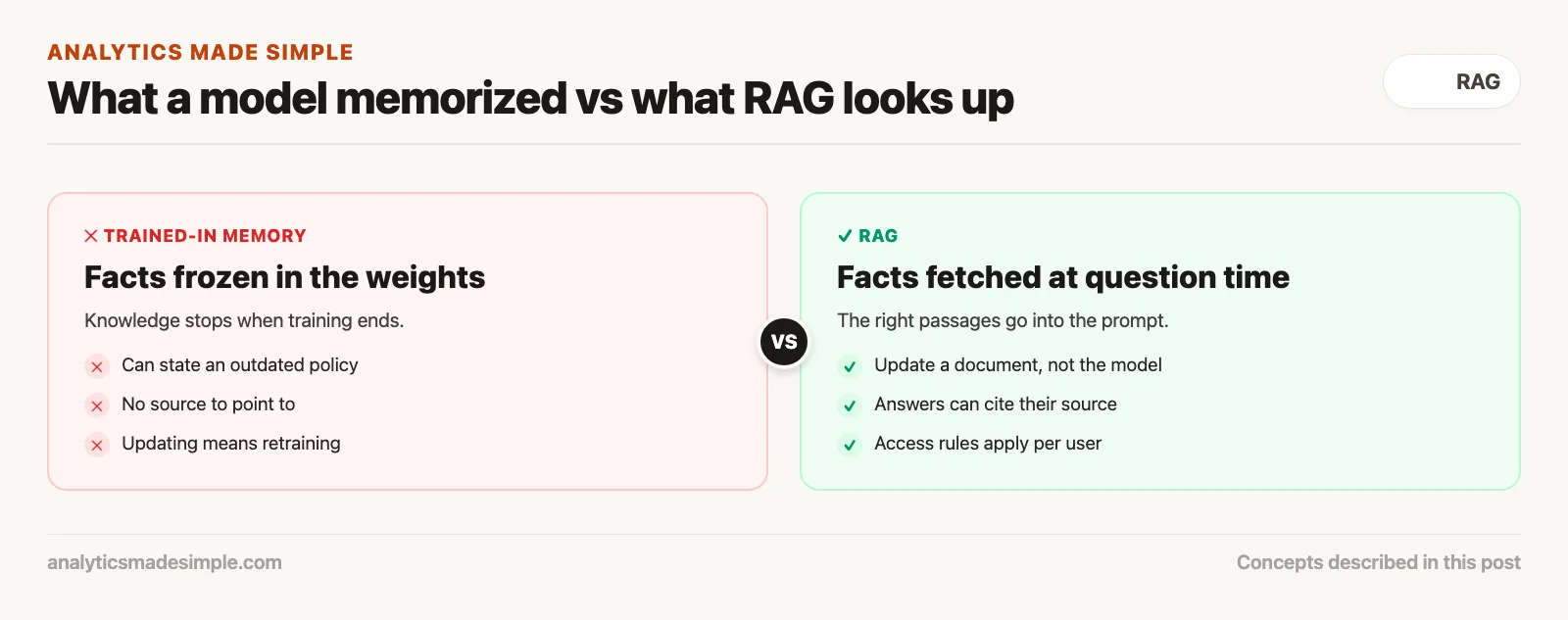
To see why RAG matters, it helps to know about two kinds of memory a model can have. When a model is trained, it reads a huge amount of text and adjusts billions of internal numbers, called weights, through countless rounds of math. Those weights are its parametric memory. The model learns how language works, how sentences connect, and how to follow complex instructions.
But parametric memory is frozen. Once training ends and the weights are saved, the model’s knowledge stops updating right there. It has no idea what happened five minutes ago, and it does not know your company changed its travel policy yesterday. Parametric memory is also a black box: you cannot open a weights file and check whether the model actually knows section 4.2 of your handbook. It generates words based on patterns in what it has seen before, which is exactly why it can sound confident even when it is wrong about your internal documents.
RAG adds a second kind of memory: non-parametric memory. Instead of making the model memorize your documents, RAG leaves them where they already live, in an outside database. When someone asks a question, the system searches that database first, pulls out the exact, current passages that answer it, and pastes those passages into the model’s prompt. The model is no longer reciting facts from memory. It is reading an open book placed in front of it.
The advantages of this split show up right away:
- No retraining wait: When your company updates a policy, adds a new product sheet, or signs a client agreement, you do not spend weeks retraining the model. You add the document to the search database, and it becomes searchable within seconds.
- Facts you can check: Because the model answers using passages it was just handed, the system can attach footnotes, file names, page numbers, and links to every claim it makes.
- Security by role: A model’s trained-in knowledge has no built-in security boundary. If it learned executive salary data during training, anyone who can talk to the model might coax that data out. With RAG, document access is checked at the database level before the prompt is even built. An intern asking about pay policy simply never sees salary documents in their search results.
- Lower cost: Storing text in a database costs pennies per gigabyte. Running repeated retraining cycles can cost tens of thousands of dollars in special computing chips.
The three moving parts: retrieval, augmentation, and generation.
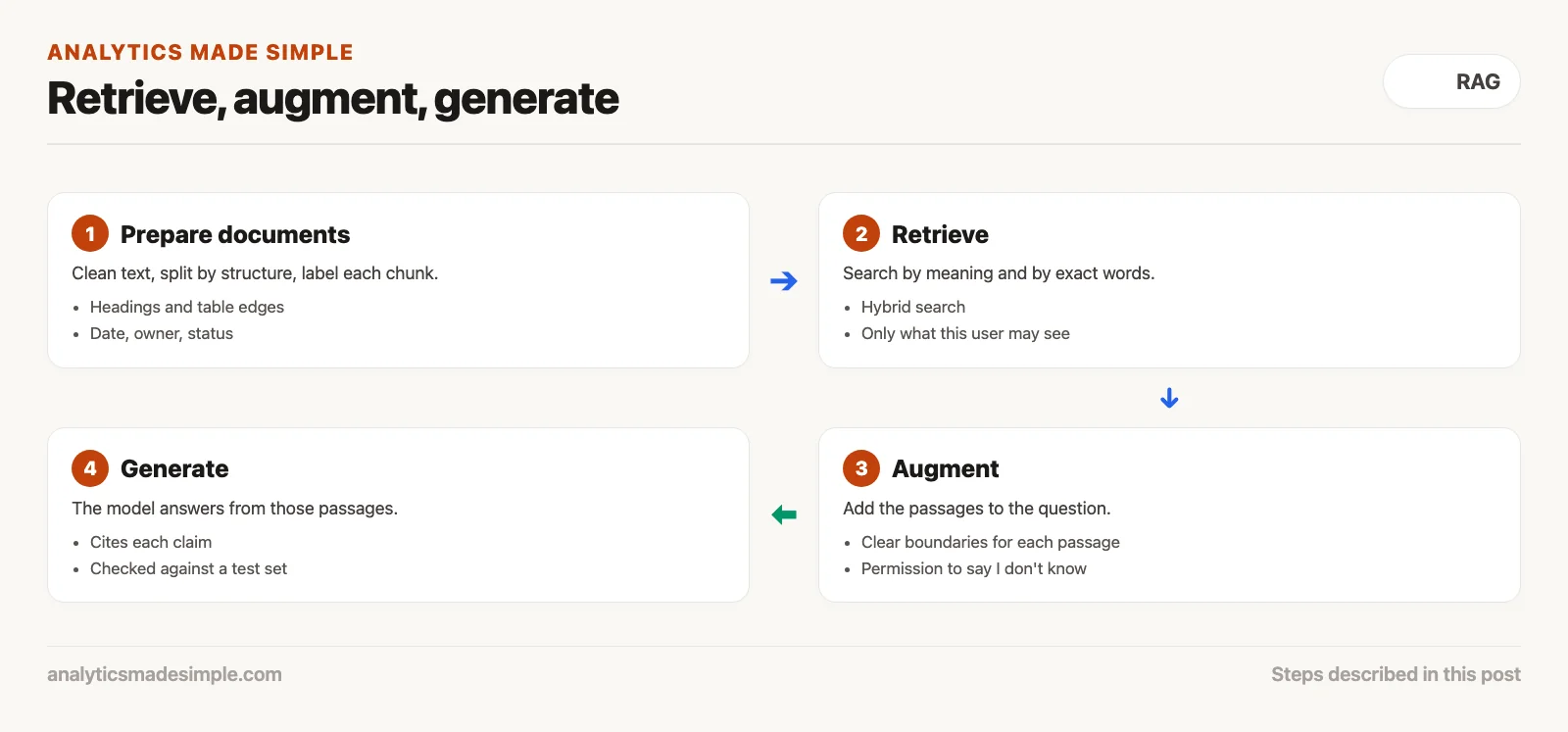
Every RAG setup runs three steps in order. Retrieval pulls relevant passages from an indexed store. Augmentation adds that verified text to the prompt. Generation writes a grounded answer with citations.
Enterprise RAG systems can add many extra tweaks, but the core rhythm never changes: retrieval, augmentation, generation.
The first step is retrieval. Before your question reaches the model, the system treats it as a search. It looks across databases, document folders, manuals, or support tickets to find the handful of paragraphs most relevant to the question. This step has to be fast, usually returning strong candidates in under 200 milliseconds.
The second step is augmentation. Here, the application builds a temporary, custom prompt for the model. It combines your question with the retrieved snippets and wraps them in instructions that set clear rules, something like: “You are an internal operations assistant. Answer using only the document snippets below. If they do not contain enough information, say you do not know instead of guessing.”
The third step is generation. The finished prompt goes to the model. Because it now has the exact source text in front of it, it does not need to guess. It translates, summarizes, and explains the retrieved passages in plain English, while sticking to the rules set in the step before.
This loop changes what the model is for. Instead of treating it as a lookup book, you are using it as a reasoning engine. You supply the facts. The model supplies the explanation.
Vector embeddings and semantic search in plain English
The engine that makes modern RAG work is semantic vector search: search based on meaning instead of exact words.
Traditional databases search by matching exact words. If an employee searches for “dinner per diem in Cook County,” but the policy document says “travel meal reimbursement allowance in Chicago,” a plain keyword search returns nothing, because not one word overlaps.
Vector embedding models fix this gap. An embedding model is a small neural network trained to read a piece of text and output a list of numbers, called a vector. A typical embedding model might turn one paragraph into 1,536 numbers. Those numbers act as coordinates in a shared space.
In that space, distance stands in for meaning. Related ideas land near each other, no matter what words were used to express them. The phrase “meal expense limit” and the phrase “food allowance per diem” end up sitting right next to each other. When someone asks a question, the system turns it into a vector too, then measures the angle between that vector and millions of stored document vectors to see which ones are closest in meaning.
The short Python example below shows this idea in a few lines of code. It ranks documents by meaning instead of by matching words:
import math

def cosine_similarity(vec_a: list[float], vec_b: list[float]) -> float:
    dot_product = sum(a * b for a, b in zip(vec_a, vec_b))
    norm_a = math.sqrt(sum(a * a for a in vec_a))
    norm_b = math.sqrt(sum(b * b for b in vec_b))
    if norm_a == 0 or norm_b == 0:
        return 0.0
    return dot_product / (norm_a * norm_b)

# Simulated 4-dimensional semantic embeddings for corporate documents
# Dimension axes: [Finance/Expense, Travel/Logistics, Engineering/Code, Human Resources]
document_corpus = {
    "Doc 1: Expense Policy 2026": [0.92, 0.88, 0.05, 0.31],
    "Doc 2: Travel Booking Guide": [0.65, 0.95, 0.02, 0.15],
    "Doc 3: PostgreSQL Migration": [0.08, 0.01, 0.98, 0.04],
    "Doc 4: Remote Work Equipment": [0.78, 0.20, 0.35, 0.82]
}

# User query: "How much can I spend on dinner during business travel?"
query_vector = [0.89, 0.91, 0.04, 0.22]

results = []
for doc_name, doc_vec in document_corpus.items():
    score = cosine_similarity(query_vector, doc_vec)
    results.append((doc_name, score))

results.sort(key=lambda x: x[1], reverse=True)

print(f"{'Document Title':<30} | {'Cosine Similarity Score':<25}")
print("-" * 58)
for title, score in results:
    print(f"{title:<30} | {score:.4f}")
Running this script measures how closely the question lines up with each document chunk in the company’s knowledge base. Here is the output it produces:
| Document | Similarity score | What happens next |
|---|---|---|
Doc 1: Expense Policy 2026 | 0.9934 | Used in the prompt (top match) |
Doc 2: Travel Booking Guide | 0.9612 | Used in the prompt (second match) |
Doc 4: Remote Work Equipment | 0.7185 | Left out (score too low) |
Doc 3: PostgreSQL Migration | 0.0961 | Left out (not related) |
Notice that the top two documents score above 0.96 even though their titles and wording are different, while the unrelated engineering document scores close to zero. That is how RAG finds the right passage in a huge pile of documents in a fraction of a second.
From naive hacks to production systems: the 4 RAG tiers.
Production RAG setups grow through four stages. First comes a simple pass. Then a stronger hybrid pipeline (a chain of automated steps that moves and cleans data). Then a modular setup made of separate services. Last is a version that can try more than one lookup on its own.
Not every RAG system is built the same way. When teams first try RAG in a hackathon or a quick prototype, they usually build what the field calls naive RAG. In a naive system, documents are cut into arbitrary chunks of around 500 characters, turned into vectors, and searched with plain similarity matching. The top three chunks get pasted into the prompt.
Naive RAG looks great in a demo but often breaks in real use. Business documents have tables, headers, arguments that span pages, and specific jargon that simple vector search handles poorly. If a chunk cuts a financial table in half, the model sees numbers with no column headers. If someone searches for an exact part number like 9402-B, vector search may return a general manual instead of that specific part.
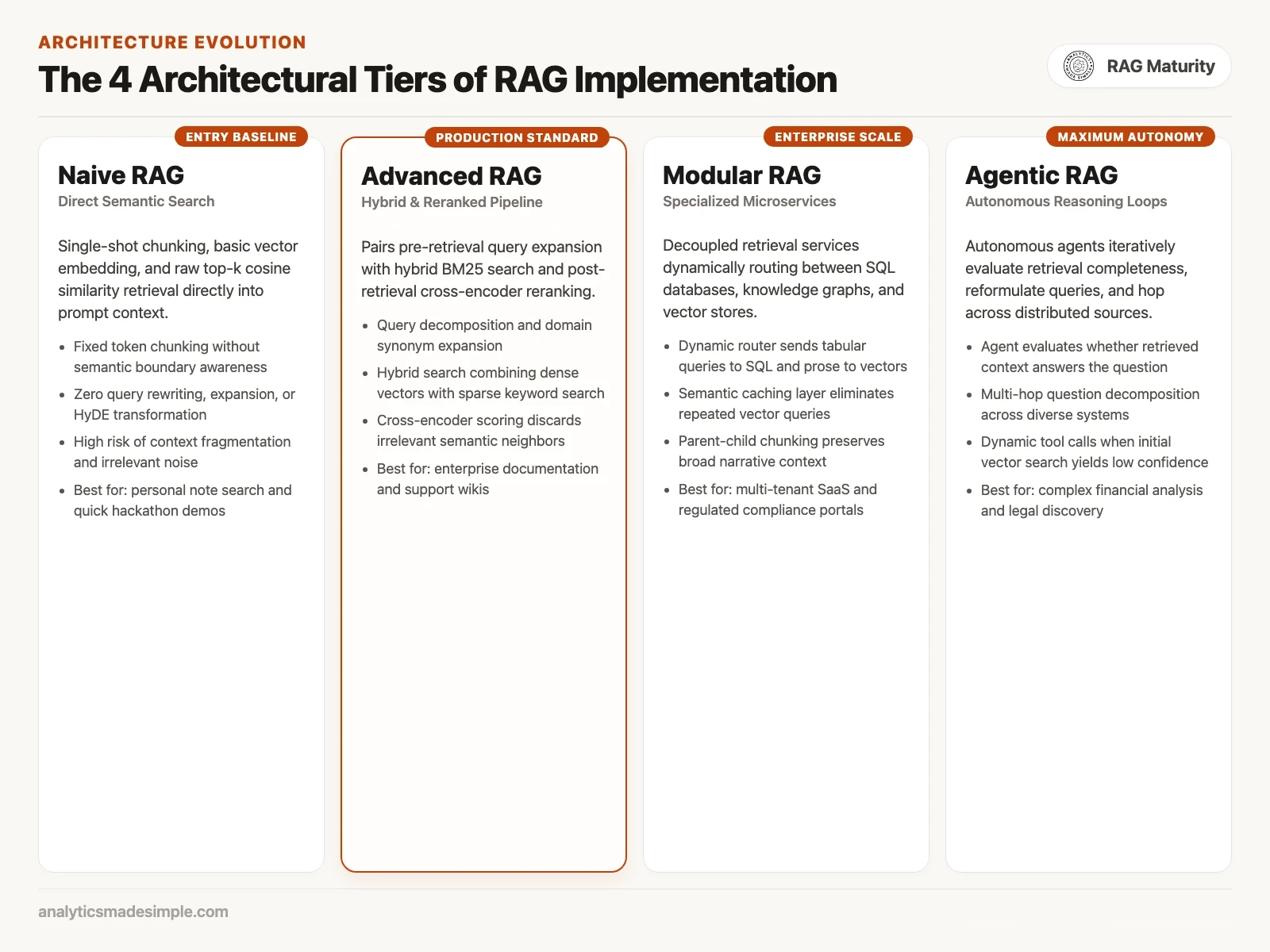
To fix these problems, engineering teams move through four levels of RAG maturity:
Here is what each level offers, and what it costs you:
- Tier 1: Naive RAG (basic prototyping): Uses fixed-size chunks and a single vector lookup. It is the fastest and simplest option and needs no extra setup, but it splits context up easily and returns false matches. Good for personal note search or quick prototypes.
- Tier 2: Advanced RAG (production standard): Adds query rewriting before the search, fixing pronouns and expanding shorthand, plus hybrid search, which blends vector matching with traditional keyword matching. It then uses a reranker model to rescore the candidates, so subtle context is not missed. This is the standard setup for company knowledge portals and IT help desks.
- Tier 3: Modular RAG (composable services): Splits retrieval into separate services. A router looks at the incoming question and decides whether to query a vector index, a regular database, or a knowledge graph. It also caches common answers so they return instantly without calling the model again. This tier fits multi-customer products and regulated healthcare platforms.
- Tier 4: Agentic RAG (self-directed reasoning): Lets an agent (an AI tool that takes several steps on its own to finish a task) judge whether what it retrieved is actually enough. If the first pass lacks enough evidence, the agent rewrites the question, checks other document sources, or calls outside tools. It is slower, two to five seconds per turn, but it can reason across complex records like audits or legal discovery.
The life of a query: what happens before you see an answer.
In a production RAG system, every question passes through four stages. First the question is cleaned up. Then the search runs, with security checks. Then the results are reordered. Last, you get an answer with citations you can verify.
When someone types a question into a company AI tool and hits enter, several systems work together before the first word appears. Knowing this sequence helps you find slow spots and debug wrong answers.
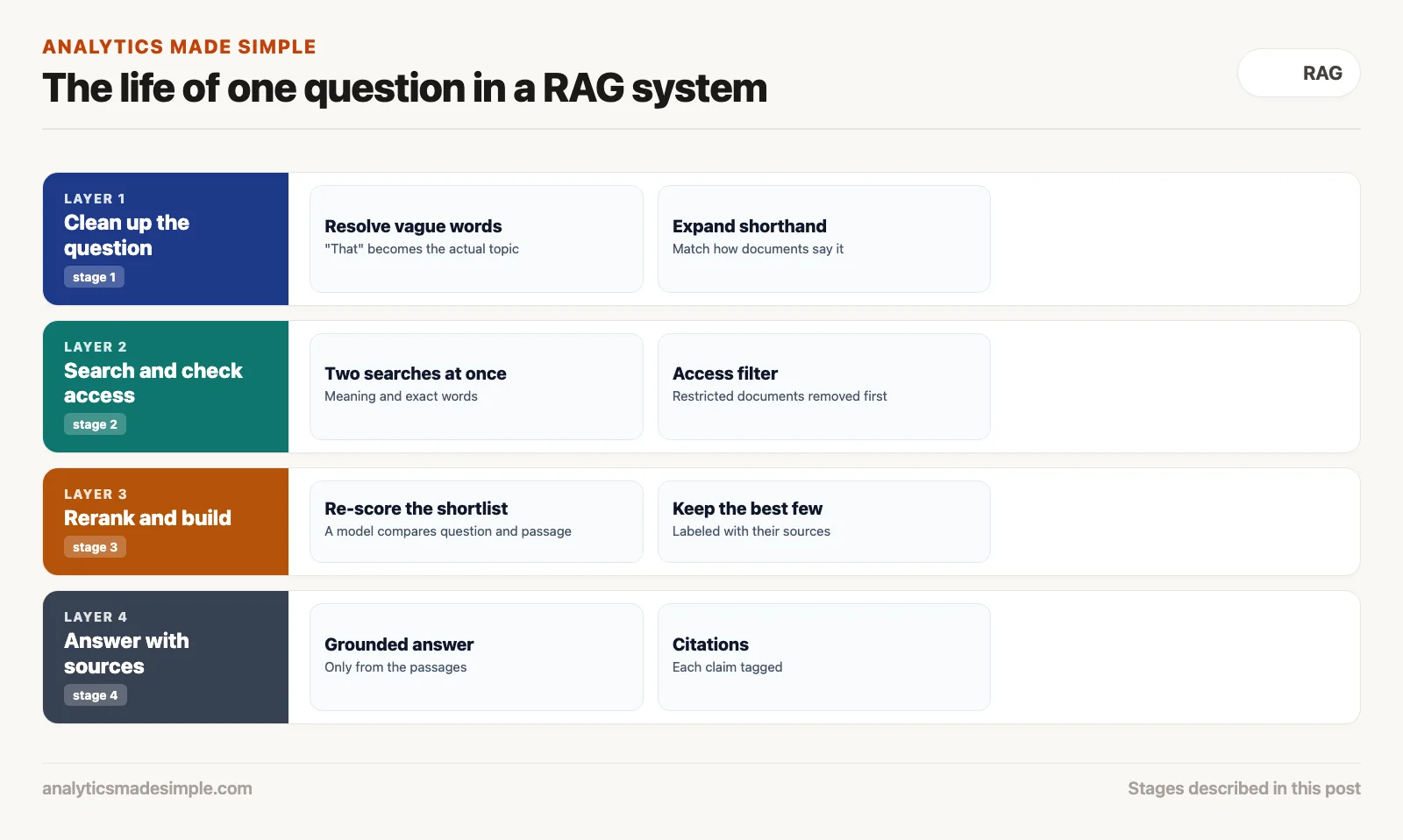
Here is what happens, step by step, across those four stages:
- Stage 1: front-door cleanup: The raw question arrives from the browser. If someone typed “What is our policy on that in Chicago?”, a small model or a simple rule resolves the word “that” using earlier messages in the conversation, turning the question into a clearer search for the Chicago meal policy.
- Stage 2: hybrid retrieval and security checks: The rewritten question goes to two search engines at once. One measures similarity by meaning across millions of chunks. The other runs a traditional keyword search to catch exact terms. This stage also applies security rules: chunks tagged for executives only are excluded before scoring even starts.
- Stage 3: reranking and building the window: The combined search returns roughly 25 strong candidate chunks. A second model, built to compare a question against each candidate directly (such as BGE-Reranker-Large), reranks them for accuracy. The top five passages are kept, and repeated or weak ones are dropped. The system then wraps these five passages in a clearly tagged template, so the model knows exactly where each one starts and ends.
- Stage 4: grounded generation and sourcing: The finished prompt goes to the model. It reads the context, writes the answer, and tags each statement with the document and page it came from. The application checks those tags against the real documents and shows the answer next to verified source links.
Common failure modes and why bad RAG feels like a broken search engine.
RAG breaks down in a few predictable ways. Chunking can cut important context apart. Chunking means splitting a document into pieces before search. Retrieval can pull in noise that confuses the model. Or a team can neglect to keep its index clean and its permissions correct.
Badly built RAG frustrates everyone who uses it. If you have used a company bot that answered with the wrong handbook section, or said it could not find something you know is on the shared drive, you have run into one of these common failures.
- Chunks cut apart: When documents are split by a fixed character or word count, related pieces get separated. A table of quarterly commission rates might have its header in one chunk and its numbers in the next. When someone asks about a specific quarter, they get the numbers with no header, so the model cannot tell which column means what.
- Lost in a crowded prompt: If a RAG system stuffs twenty long passages into one prompt, the model’s attention gets stretched thin. Facts buried in the middle often get missed, while less relevant text near the end can lead the model to make things up.
- Old, duplicate documents: If your database holds seven old drafts of the same travel policy, search can easily pull an outdated one, because its wording happens to match the question closely. Without clear rules for retiring old versions, stale facts creep back into answers.
- No permission to say “I don’t know”: If the prompt does not clearly tell the model to admit when it lacks an answer, it falls back on what it learned in training and invents plausible-sounding details that may contradict your actual policy.
Practical checklist: how to prepare your documents for retrieval on Monday.
A RAG project starts with careful groundwork. Pull clean text out of the files. Split them on boundaries that respect the structure. Put a clear label on every chunk. Then keep a real set of test questions to check accuracy.
If you are planning to build or improve a RAG system for your team, do not start by arguing over which model scores highest on a benchmark, a standard test used to compare tools. Start by checking the quality of your source documents. Work through this checklist before writing any search code:
- Clean text extraction: Check how your PDFs get turned into text. Scanned pages, multi-column layouts, and merged spreadsheet cells need dedicated extraction tools rather than a basic text pull.
- Chunk by structure: Split documents along real boundaries, such as headings or table edges, rather than a fixed number of characters. Keep an overlap of 50 to 100 words between chunks so context is not lost at the seams.
- Add metadata to every chunk: Never store plain text alone. Attach details such as document ID, title, date, department, whether it is current or retired, and who is allowed to see it. That lets the system filter before it even runs a search.
- Use hybrid search: Do not rely on meaning-based search alone. Combine it with keyword search, so people can find results both by describing an idea and by typing an exact part number.
- Build a small test set: Collect twenty-five real questions employees actually ask, along with the exact passage that answers each one. Run this check weekly to catch it early if search quality starts slipping as your document library grows.
The next post in this series covers the mechanics of document chunking, comparing fixed-size, recursive, and semantic strategies so your data stays structured and ready for vector search.
Sources and reference reading
- Lewis and colleagues introduced Retrieval-Augmented Generation for Knowledge-Intensive NLP Tasks at the 2020 Conference on Neural Information Processing Systems (NeurIPS), archived at https://arxiv.org/abs/2005.11401
- Gao and colleagues published Retrieval-Augmented Generation for Large Language Models: A Survey as a 2023 preprint, available at https://arxiv.org/abs/2312.10997
- Pinecone Systems published an architecture guide titled What is Retrieval-Augmented Generation (RAG)? in 2024, available at https://www.pinecone.io/learn/retrieval-augmented-generation/
- Qdrant Vector Database published documentation on Hybrid Search and Reranking in Production RAG in 2024, available at https://qdrant.tech/articles/hybrid-search/
- Hugging Face maintains the Massive Text Embedding Benchmark (MTEB) Leaderboard, available at https://huggingface.co/spaces/mteb/leaderboard
Series notes
This is Part 1 of RAG from scratch. Next: document chunking.
Keep going
Same lessons in your feed
Short diagrams, hooks, and weekly tutorials on Substack, Instagram, X, and Facebook.



