

Claude Cowork is the Claude tool for multi-step office work on your own files, such as renaming, totaling, and drafting, while you do something else. Use plain chat when you only need words back. Say you have a messy folder of receipt screenshots, three half-finished notes from last week’s client calls, and a status deck due Monday. Chat can draft the email, but it cannot rename the files, pull totals into a spreadsheet, and drop a first-pass deck into the same folder while you are in another meeting. That gap is why Anthropic built Cowork.
Cowork sits alongside Claude’s chat and Claude Code as a third way to work with the same underlying model family. Earlier posts in this series drew the line between plain chat and the tools that can take action for you. They also looked closely at Claude Code, which is built for software work. This post maps Cowork instead: an agent, meaning an AI that carries out tasks for you instead of only replying, built for everyday, non-coding knowledge work. You pick the folders and tools it can touch. It plans and runs multi-step tasks, and you still review the real deliverable before anyone else sees it. If you are new to Claude itself, start with the Learn Claude from scratch series first, then come back here once the everyday habits feel normal.
Update, October 2, 2026: On September 16, 2026, Anthropic merged Cowork into the main Claude app, rolling out to Pro and Max first and to other plans later. What Cowork could do, such as working through a folder of files, is now available from any Claude conversation, so you may no longer see a separate Cowork tab. The advice below still applies to that kind of task.
Cowork in one sentence
Claude Cowork is Anthropic’s agent for non-coding knowledge work. You give it a goal. You choose which folders and tools it may use. Then it plans and runs multi-step work: reading files, editing them, creating new ones, and calling the tools you enabled. What comes back is something to review, not just a paragraph in a chat thread.
Anthropic describes it the same way: hand off a task, let it work across the files and tools you allow, then come back to polished work for sign-off. It is the same Claude family as chat and Code, doing a different job. Chat is conversation and drafting. Code is software work in repos, terminals, and code editors. Cowork handles office-style files and multi-step knowledge tasks, so you do not need a developer workflow to get there.
Rule of thumb: Code is for software. Cowork is for office files and knowledge tasks. Chat is for conversation. Pick by the artifact you need, not by which logo looks newest this week.
How a Cowork task feels
In chat, you are the operating system. You paste a PDF, ask a question, and copy the answer into Word. You open Excel yourself, rebuild the table, export a chart, and paste that chart into slides. Cowork flips this loop when the real job is “turn this folder into the deliverable.”
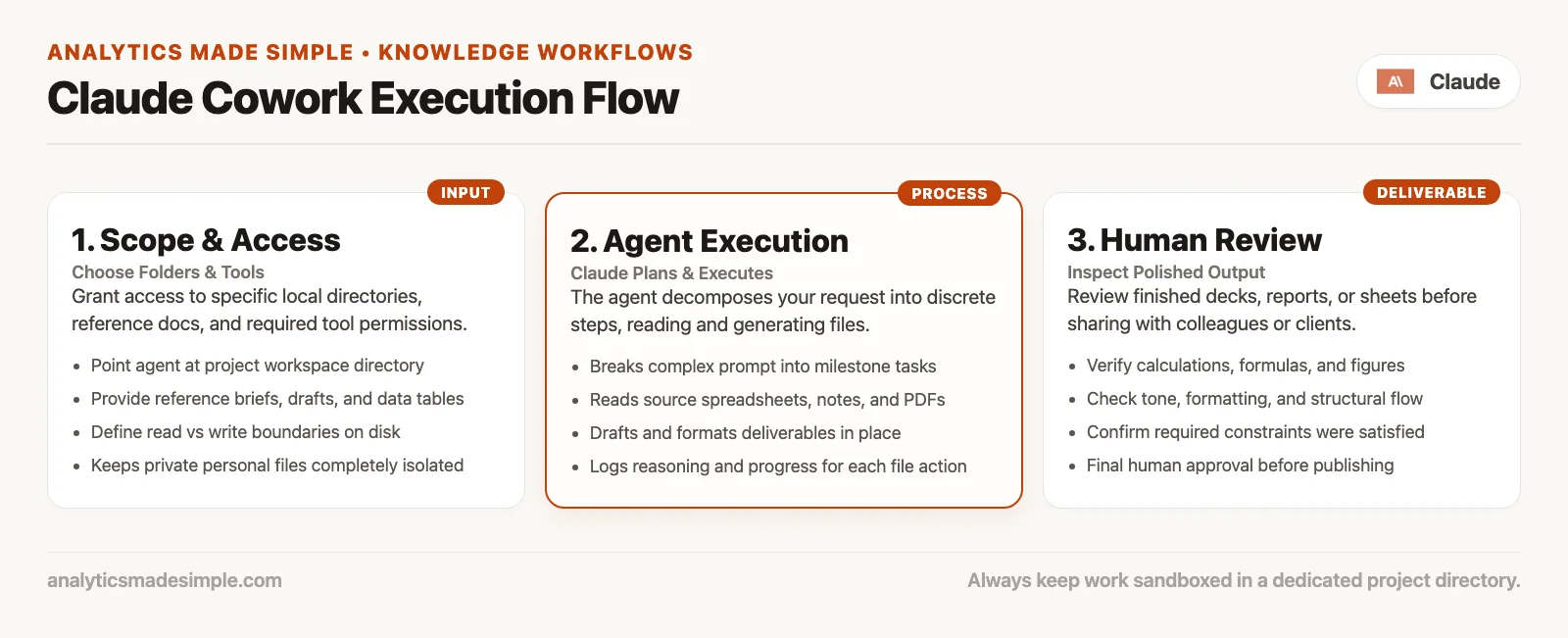
The flow in practice looks like this:
- You choose access. That means folders on your machine, since desktop works best for local files, plus any tools or connectors you allow. Claude is not supposed to roam your whole disk by default.
- You state the outcome. “Build a one-page Q2 spend summary from these CSVs and screenshots” works better than a forty-step micro-script. Outcome language is what lets the agent do its own planning. (CSVs are plain spreadsheet-style text files.)
- Claude plans and acts. It can open files, rename them, draft documents, fill spreadsheets, and do research, using the tools you enabled. You watch the steps, redirect it, or stop it.
- You review. Numbers, names, tone, and policy still need a human. Treat the output as a first pass from a very fast junior colleague, not as audited truth.
That last step is not optional theater. An agent can actually touch your files, so a wrong assumption does more damage here than it would in a chat window. A chat error is a bad paragraph you can just delete. A Cowork error can be a wrong spreadsheet already emailed to finance, because you trusted a filename instead of checking the numbers first.
Which surface for which job
Keep this table in your head. It will save you more time than any feature tour.
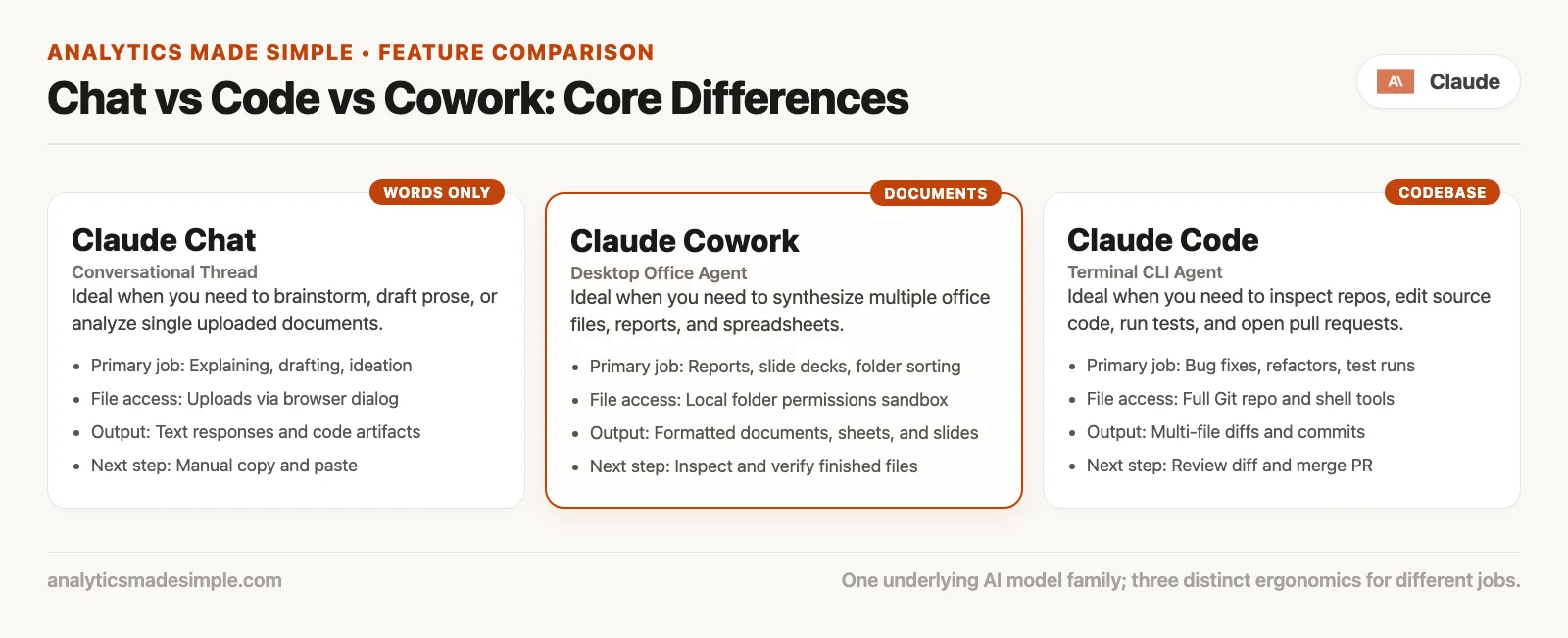
| Tool | Primary job | How it touches work | What you do next |
|---|---|---|---|
| Chat (claude.ai and apps) | Answers, drafts, thinking with you | You upload or paste; you copy results out | Edit the reply; move text yourself |
| Claude Code | Software work | Repo, terminal, code editor, tests, pull requests | Review diffs; run tests; ship carefully |
| Claude Cowork | Non-coding knowledge work | Folders and tools you choose; multi-step office tasks | Review the deliverable (deck, sheet, folder, brief) |
The same underlying model family can power all three. What changes is the tool itself: permissions, defaults, and what “done” looks like. People get frustrated when they force chat to act like a file agent, or force Cowork to act like a pair-programming session in a code project. Use the surface that matches the artifact you actually need.
When chat is still the right tool
Stay in chat when you need a conversation more than a change to a file: brainstorming titles, rewriting a paragraph, explaining a concept, checking the tone of a short email, or studying a topic with uploads you control tightly. Chat cannot act on your files by itself, so it goes wrong in smaller ways than an agent can. It is also usually cheaper on your usage meter for the same amount of thinking.
When Code is the right tool
Open Claude Code when the job is software: multi-file rewrites, failing tests, continuous integration (CI), package layouts, and pull request (PR) descriptions grounded in the actual repo. Cowork can touch code files in some workflows. But Code is the tool built for engineering loops. If your success metric is green tests and a clean PR, that is Claude Code’s job, not Cowork’s.
When Cowork is the right tool
Open Cowork when the success metric is an office deliverable sitting in a folder or a connected system: organized documents, an expense table built from receipts, a research brief with sources you will check, a weekly metrics deck skeleton, or renamed contract packs sorted by control area. If you keep saying “I’ll copy this into Excel after,” that is a Cowork-shaped job.
Where Cowork runs
Product details move fast. Anthropic positions Cowork across desktop, with web and mobile in beta, under paid plans. Those specifics were current on Anthropic’s site, checked in September 2026. Treat the live product page as the real source the week you turn it on.
Desktop is strongest for local files
If your work lives in folders on a Mac or Windows machine, with supported Linux paths as the product rolls out further, the desktop app is the natural home. Local folder grants are the whole point. Claude can read and write inside whatever you allow, so you stop being the paste bridge for every single step.
Web and mobile beta
Web and mobile beta paths let you start or steer tasks away from your desk, which is useful for “kick this off and check later.” They are not a reason to ignore desktop when the files only exist on your laptop. Cloud-side work and local-folder work do not carry the same risk, and they do not offer the same power. Know which one you actually started.
Scheduled and unattended runs
Anthropic’s own materials for Cowork emphasize multi-step work that can keep running while you are elsewhere. That includes scheduled jobs that repeat on their own, such as a weekly deck, a folder cleanup, or a prep brief. This is genuinely useful, and it is also exactly how a bad standing instruction multiplies unattended. Schedule only the tasks you would trust a junior colleague to run alone, after a dry run you actually reviewed.
Plans, usage, and hitting the limit
Cowork is included on paid consumer paths such as Pro and higher tiers like Max, plus Team and Enterprise seats where admins enable it. Free chat is not the place to expect full Cowork. Confirm the live pricing and inclusion table before you buy a plan “for Cowork only.”
Two usage facts matter more than the list price:
- Cowork uses more capacity than ordinary chat. Agentic runs coordinate tools and sub-steps behind the scenes, so a short chat rewrite and a twenty-minute folder job are not the same cost at all.
- Limits are shared with other Claude work on your plan. A heavy Cowork day can leave chat and Code feeling tight, and that is metering doing its job, not the model getting worse.
If you plan to hand off multi-hour agent work daily, budget for Max or Team usage patterns, not “Pro chat vibes forever.” Check Settings, then Usage, when the product feels slow or starts returning capacity errors. The Learn Claude from scratch series covers plan ladders in everyday language if you want the fuller walkthrough, and it is always worth re-checking prices on claude.com when money is actually on the line.
Plugins, skills, and connectors (map level)
Cowork is not only “folder plus prompt.” Anthropic has been building a customization layer so Claude shows up already equipped with role-shaped tools:
- Skills: packaged domain knowledge and preferred workflows, such as how you want finance tables labeled or how legal wants redlines summarized.
- Connectors: bridges into tools you already use, like drive systems, chat platforms, or CRM-style sources where they are available.
- Plugins: bundles of skills, connectors, and sometimes specialized sub-agents, so a role such as marketing ops, finance, or legal starts with less digging through old prompts.
At the map level, three things matter most. More connectors mean more can go wrong if permissions are too broad, so grant the smallest access that gets the job done. Plugins do not replace your judgment on numbers that will land in a board deck, because you are still the one who signs off on them. And if you are on Team or Enterprise, ask IT before you install a plugin that can touch customer data, since enterprise admins can already limit which marketplaces, budgets, and features are open to you.
Deep how-to for install order, your first real folder task, and quality control lives in an upcoming Claude Cowork tutorial series covering setup, folders and spreadsheets, plugins, autonomy levels, how to avoid sloppy agent output, and team notes. This product-map post only places the piece on the board.
Good first jobs (and bad first jobs)
Good first jobs
Pick tasks where wrong output is annoying rather than career-ending, and where the folder is self-contained.
- Rename and sort a sandbox Downloads sample into clear names and subfolders.
- Turn a pile of receipt images into a draft expense table with the columns you specify.
- Build a first-pass research brief from a folder of PDFs you own, with citations you will open yourself.
- Assemble a four-slide weekly metrics skeleton from CSVs you already trust, then fix the story in review.
- Draft a meeting prep brief from notes you already gathered, not from a secret CRM (customer relationship management system, where sales keeps customer records) dump on day one.
Bad first jobs
- Your entire home directory as the sandbox, “just to see.”
- Live payroll, HR, or regulated client files without policy sign-off first.
- Unattended changes to shared drives that the whole team treats as the one accurate copy.
- Anything that needs a licensed human, such as a legal opinion, medical advice, or financial advice to a client, with zero expert review.
- “Rewrite our repo and open a PR” when you actually meant Claude Code.
A worked example (mental, not a screenshot tour)
Imagine you own a folder called q2-expense-sandbox/ with forty receipt photos, two CSV card exports, and a notes file listing the categories you care about, such as travel, software, and meals. In chat you would upload three files, get a partial table back, lose track of which receipt was which, and spend an hour fixing it in Excel yourself. In Cowork, you point at the folder and ask for a single workbook instead: one row per receipt, columns for date, merchant, amount, category, a confidence flag for any blurry photo, and a second sheet that pivots the totals by category.
What you still do by hand: sample ten rows against the actual photos, fix merchant names that the receipt-scanning software mangled, and decide whether that cloud-hosting charge belongs under software or infrastructure in your chart of accounts. What you no longer do: rename forty files by hand and retype amounts from phone photos into a blank sheet. That is the trade Cowork is offering. A later tutorial will walk through a real first run in more detail; here the point is just the shape of the job.
Review outputs like a grown-up
Anthropic’s own safety notes for Cowork say the product takes real actions on your files and tools, so you choose what it can access, and steps like deleting something or making a high-impact change are supposed to ask you first. Enterprise admins can tighten these limits further, but your own review habit still matters more than any toggle list.
Use a short review loop after every run that actually mattered:
- Scope check: Did it only touch the folder and tools you meant for it to touch?
- Sample the data: Spot-check rows, totals, and names against the original sources.
- Story check: Would you actually defend this slide or memo in a meeting?
- Policy check: Is there personal data, client secrets, or regulated content in here that should not have left your environment the way you ran the task?
- Stop rule: If the task needs a true number, check it against the actual system where your company keeps official records, such as a billing platform, electronic health records (EHR), or a ledger, before you send anything out.
This is the same judgment call taught near the end of the Learn Claude series, just applied to a higher-impact tool. More capability calls for a clearer stop rule, not a looser one.
Common mistakes and better moves
| Mistake | What happens | Better move |
|---|---|---|
| Pointing Cowork at your whole disk | Surprise renames and hard-to-audit changes | Sandbox folder first; expand access slowly |
| Treating agent output as audited truth | Wrong totals in leadership decks | Sample sources; keep humans on numbers that matter |
| Using Cowork for deep software delivery | Awkward engineering loops | Claude Code for repos, tests, pull requests |
| Ignoring usage burn | Hitting limits mid-week | Reserve Cowork for multi-step file jobs; keep short asks in chat |
| Installing every plugin on day one | Permission sprawl | One role plugin, fewest connectors, IT policy on Team/Enterprise |
| Scheduling unreviewed standing tasks | Repeated bad work at scale | Dry run, then schedule only stable jobs |
How this fits the wider Claude series
If you are building Claude skill in order:
- Learn Claude from scratch: plans, first sessions, Projects, everyday jobs, privacy, work connectors, judgment.
- Claude product map (this series): chat vs everything else, Code, Cowork, Design, Science, models, and the API (the way one program asks another for data), only if you build apps.
- Claude Code tutorial and Claude Cowork tutorial: deep install steps, loops, skills, and review habits for each agent surface.
You do not need every surface. Plenty of people live happily in chat plus occasional Code. Cowork is for the people drowning in folders, decks, and multi-tool prep work who want an agent that can finish a job, not only advise on it.
Try it this week
- Create a throwaway sandbox folder with copies of non-sensitive files only.
- Write one outcome sentence describing what file should exist when you are done, so you can tell when the job is finished.
- Run Cowork, or schedule a deeper try after you enable Pro if you are still on Free.
- Review with the five-point loop above, and note one thing that went wrong and one that went well.
- Decide whether next week’s real job belongs in chat, Code, or Cowork before you open the product at all.
Quick recap
- Cowork is the agent for non-coding knowledge work: folders and tools you choose, multi-step tasks, deliverables for review.
- Chat is for conversation, Code is for software, and Cowork is for office and knowledge files.
- Desktop is strongest for local folders; web and mobile beta help you steer work from elsewhere.
- Pro includes Cowork, and agent runs burn more usage than plain chat does.
- Plugins and connectors expand both power and risk, so start small.
- Review every non-trivial output, and expect deeper setup and quality-control guidance in the coming Cowork tutorial series.
Series notes
This post is part of the Claude product map series, which sorts chat from Claude Code, Cowork, Design, and Science, plus the different Claude models and the API for people who build their own apps. Part 4 covers Claude Design and Claude Science next, so visual work and research workbenches do not get mixed up with chat or Claude Code.
Sources
Product details change. Re-check these the week you enable a feature.
- Claude Cowork product page (capabilities, plans, chat vs Code vs Cowork FAQs, desktop and web/mobile notes)
- Anthropic Support: Getting started with Cowork
- Anthropic Support: Using Cowork safely
- Claude pricing (Pro, Max, Team; confirm Cowork inclusion and usage notes)
- Claude blog: Cowork for enterprise (admin, spend, access themes)
- Analytics Made Simple: Learn Claude from scratch (everyday chat foundation before product map deep dives)
- Analytics Made Simple: Learn hub (related paths on this site)
Keep going
Same lessons in your feed
Short diagrams, hooks, and weekly tutorials on Substack, Instagram, X, and Facebook.



