

Use the default model your Claude plan gives you, which is often Sonnet, for most work. Switch to a bigger model such as Opus or Fable only when a clear, specific prompt still fails, because bigger models use up your limits faster and are not more trustworthy. Imagine you open Claude to tidy a messy status update, and the model menu shows Haiku, Sonnet, Opus, and Fable. A coworker says Opus is smarter, but you just need one good paragraph before your next meeting.
This is the last post in the Claude product map series that deals with choosing tools, and it follows the ones that covered chat versus agent-style products, Claude Code, Claude Cowork, and Design and Science. By now you know where to work. This post answers a smaller and noisier question, which is which engine label to pick inside a given product, without treating model names like sports teams. If you are still learning everyday Claude from zero, start with the companion series the beginner series on Claude, then come back here when the model menu starts to feel like a second job.
How the model family is organized
Names change. The job does not.
Anthropic ships models under marketing names that keep changing. Version numbers change, and so does which plan can see which model, so a screenshot from last quarter can already be wrong. Treat every specific name in this post as a July 2026 teaching snapshot and not as a permanent product guide. Before a real purchase or a hard deadline, open the live model selector on claude.ai and read the current docs on platform.claude.com and claude.com.
What stays stable is the shape of the family, which has five layers:
- A fast, light tier for high volume and low-stakes drafts.
- An everyday default that handles most writing and coding work.
- A heavier tier for complex reasoning, multi-step work the AI does on its own, and hard judgment calls.
- A top widely released tier for long-running, hardest-available work.
- Occasional limited or restricted models that are not on the normal menu for most users.
If you learn that ladder once, new names map onto it easily. If you memorize only brand names, every release week restarts the anxiety.
The family snapshot (Oct 2026)
Here is a plain-English map using the names many people see in mid-2026 product talk. Confirm everything against the live selector, because the labels may have moved.
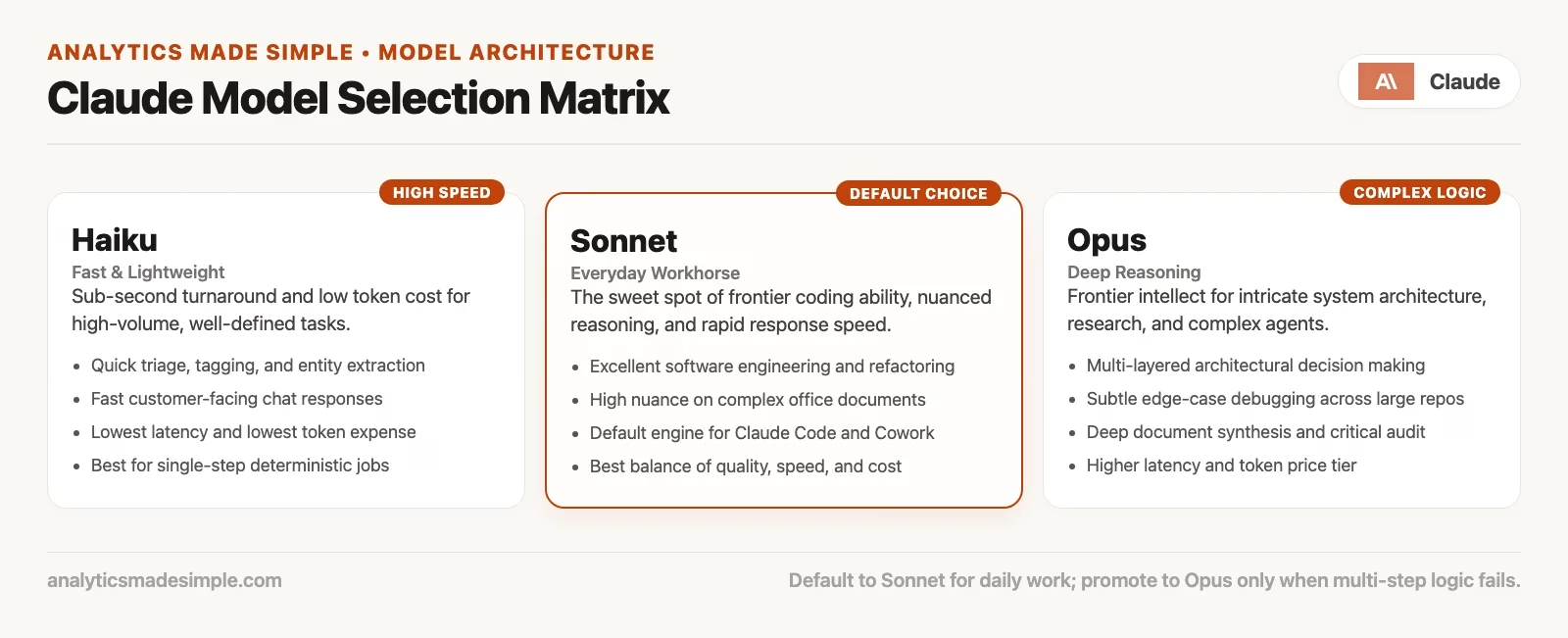
| Label (checked October 8, 2026) | Plain job | Good first uses | Usually skip when |
|---|---|---|---|
| Haiku 5.5 | Fast and light | Quick rewrites, short answers, high volume of small tasks, cheap experimentation | You need deep multi-step judgment, large messy context, or careful long planning |
| Sonnet 5.5 | Everyday default on many plans | Status emails, docs, light coding, research digests, most Project work | You already failed quality after a clear prompt and a second structured try |
| Opus 5.5 | Complex work and agents | Harder reasoning, multi-file agent jobs, denser tradeoff writing, sticky bugs | You only need a two-paragraph rewrite and still have plan limits left for the week |
| Fable 5.1 | Most capable widely released tier; long-horizon | Heavy agent runs, long projects, work that stays coherent across many steps | You have not yet tried the default with clear goals, constraints, and examples |
| Claude Mythos Preview | Limited (Project Glasswing partners only) | Whatever the limited program allows for invited or restricted cohorts | You assume it is a normal chat dropdown for every Pro user (it is not everyday menu for most people) |
Read the table as intent, not as a promise that every account sees every row. Your plan tier, your region, the product you are in (chat, Claude Code, Cowork, or the API, which is how your own programs use Claude without the chat window), and rollout timing all filter what appears. Fable sitting “above” Opus on capability does not mean you should live there, and Mythos being “most interesting in the lab” does not mean you failed as a professional because you never got access.
Haiku: speed and volume
Haiku-class models earn their keep when speed and volume matter more than depth. They are good at turning a bullet list into cleaner bullets, renaming twenty ticket titles into one consistent style, and drafting a first pass of a meeting note that you then edit. You can also run a pile of low-risk rewrites on Haiku and save the heavier models for the one analysis that needs them.
Haiku is a poor place to argue with a 40-page vendor contract about legal nuance, or to ask for a multi-hour plan the AI carries out on its own that spans a code repository (a project folder that keeps the full history of its files) and three data sources. You can still start there to sketch an outline, and you move up when the outline is weak after a fair try.
Sonnet: the workday default
On many plans, Sonnet-class is the default for a reason. It is the “open the laptop and do the job” engine, and it handles writing, rewriting, explaining, light code, setting up a Project, and turning notes into a plan. If you keep only one rule from this post, make it this one: do most of your work on the default (often Sonnet) until quality fails after a clear prompt.
People waste hours hopping to Opus because a first draft felt “meh,” when the prompt they wrote was “make this better.” “Better” is not a brief. Sonnet given a role, goal, constraints, audience, and an example of the tone you want often beats Opus given a shrug of a prompt, and that pattern shows up again and again on real teams.
Opus: when the work gets sticky
Opus-class is for tasks that need more working memory and judgment, such as multi-step runs where the AI works on its own, dense tradeoffs, harder debugging, and long chains of “if this, then that” reasoning. In Claude Code or Cowork, the heavier models often show up when the AI, working on its own, has to hold a plan across many tool calls.
Opus is not a truth serum, and a polished wrong answer on Opus is still wrong. You still check the SQL (the standard language for asking a database questions), the numbers, the citations, and the changes to your files. Paying for a heavier model buys capacity and often better performance on hard tasks, but it does not buy a trustworthy source of record for your business numbers.
Fable: top of the widely released menu
Fable-class, in this snapshot, is the most capable model many people can actually select without special program access. It suits long-running work, heavy agents, and projects that need to stay coherent across a lot of steps. Use it when the default and the mid-high tier have already failed after honest prompts, or when you know from earlier runs that the job is long and brittle.
Do not treat Fable as a personality upgrade for rewriting LinkedIn posts. That is how weekly limits disappear while the post still needs a human voice pass.
Mythos and limited programs
Claude Mythos Preview, which Anthropic offers only to partners in its Project Glasswing security program, sits outside the normal story of “everyone on Pro can pick this after lunch.” Access can be restricted, invited, regional, or gated by an enterprise contract. That makes it interesting for research chatter but useless as a baseline for how your team should work next week, since nobody on the team may be able to open it.
If you do get limited access, treat it like a lab. Log your tasks, compare the results against Sonnet, Opus, and Fable on the same brief, and write down whether quality improved enough to justify the hassle of a rare model. Do not rebuild your whole workflow around a model your new hire cannot open on day one.
The default-first rule
Here is the decision rule we recommend for everyday work:
- Start on the product default, which is often Sonnet-class on consumer and many team plans, because the default handles most work and costs less of your limits.
- Write a clear prompt that gives a role, goal, constraints, audience, output format, and one short example if tone matters, because a clearer prompt usually fixes the answer before a bigger model would.
- Iterate once or twice with specific feedback, such as “cut the adjectives” or “use our metric definition: active means a login in the last 28 days.”.
- Only then upgrade the model, and only if quality still fails for a reason that looks like capability and not like ambiguity.
- If a higher model still fails, fix the inputs, the tools, or the job definition before climbing again.
That order protects your plan limits and your attention. Hopping between models is a fun hobby, but it is a bad default for a 20-minute writing task.
Rule of thumb: Upgrade the model when a clear prompt fails. Upgrade the prompt when a vague prompt fails. Fix the data when both models invent numbers you never supplied.
When to switch models
Use this flow when you feel the itch to “just try Opus.”
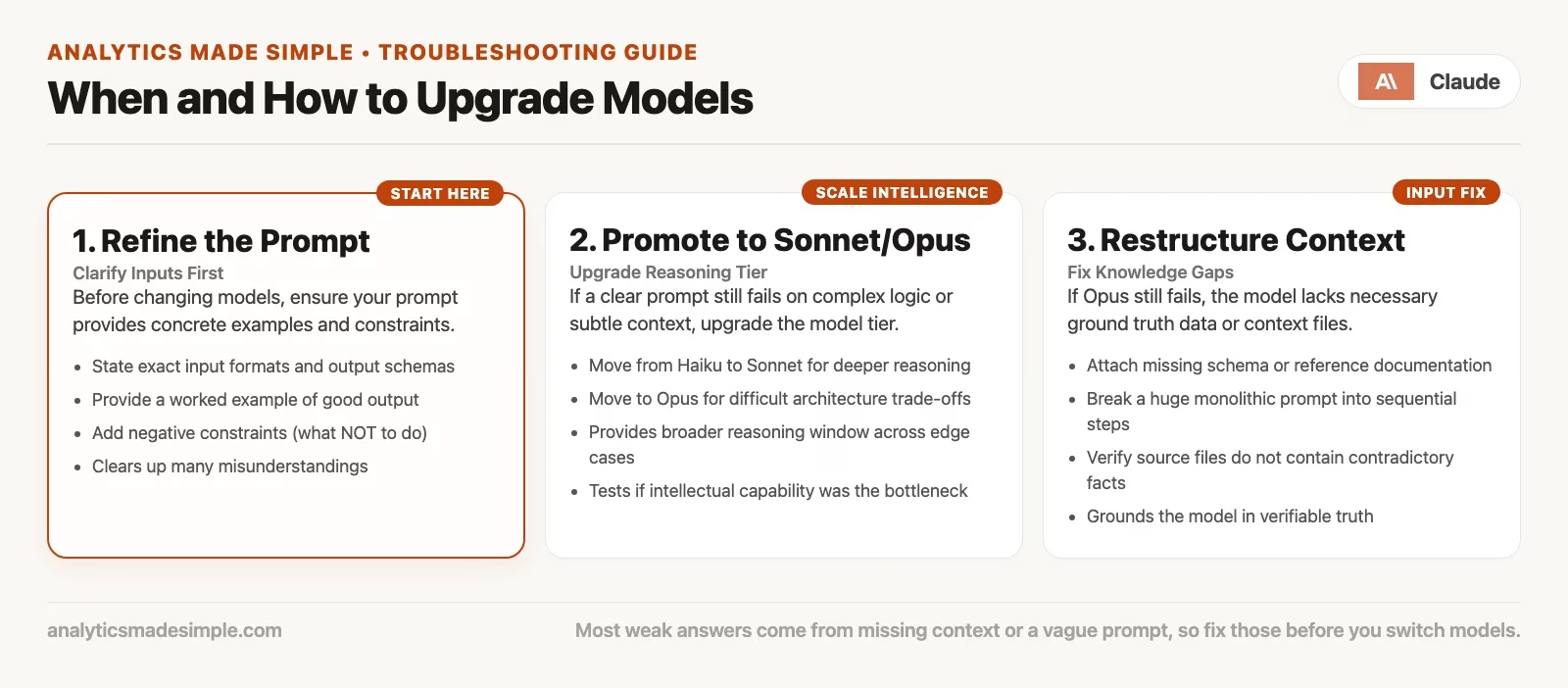
Signals that upgrading might help
- The task needs many steps held at once, such as plans an AI agent (a tool that works on its own) carries out, multi-file refactors, or a long research summary with structure.
- You gave a role, constraints, and examples, and the default still misses logical branches or drops requirements.
- The failure looks like a “shallow plan” or “loses the thread,” and not like “I forgot to paste the schema (the layout of the data).”.
- You are in Claude Code or Cowork and the agent keeps taking shortsighted paths on a hard problem.
Signals that upgrading will not help
- Your prompt was one sentence with no goal or constraints.
- You asked for a number that lives in a warehouse you never connected or pasted.
- You want legal, medical, or tax conclusions that a licensed human owns.
- You need the true figure from your finance or reporting system, and no heavier model can replace that system.
- You are polishing the tone of a paragraph that already works, where Haiku or Sonnet is enough.
A worked week (a toy example, but a realistic one)
Imagine you are an operations lead with Pro-level access and a normal week.
| Task | First model | Upgrade? | Why |
|---|---|---|---|
| Rewrite Friday status from bullets | Sonnet (default) | No | Clear brief; one edit pass |
| Rename 50 Jira titles to a style guide | Haiku | No | Volume + pattern; spot-check sample |
| First draft of a Project brief from notes | Sonnet | Maybe | Upgrade if structure stays shallow after a second structured prompt |
| Multi-file bug hunt in a small repo | Sonnet, then Opus in Code | Yes if stuck | After repro steps and file list still fail |
| Long agent: clean a folder of reports into one pack | Opus or Fable in Cowork-class surface | Start higher only if prior weeks proved it | Long-horizon; still review every deliverable |
| “What was Q3 revenue exactly?” | Any model | N/A | Wrong tool; open finance system / certified dashboard |
Notice the last row of the table. Choosing a model well includes knowing when the choice is irrelevant.
Effort, thinking, and other dials
Beside the model name, some Claude screens show effort, thinking, or “how hard to try” controls. The names and placement change, but the idea is stable: you can ask the same model to spend more effort on a hard problem, or keep it light for a quick rewrite.
Here is practical guidance for using those controls:
- Use light effort with the default model for rewrites, formatting, and short questions and answers.
- Raise the effort on the default before you jump a whole model tier, when the screen offers that control.
- Combine higher effort with a higher model only for hard jobs that already failed at lighter settings.
- Watch your usage. Heavier settings and heavier models often use up shared plan capacity faster, and chat, Claude Code, and Cowork may share one pool depending on your plan, so treat it as a budget and not a free firehose.
If you cannot find an effort control, nothing is wrong with your account, because not every screen shows every control. Prompt quality still does most of the work.
When both controls exist, a useful habit is to keep a sticky note of three recent tasks and the settings that worked, such as “Status rewrite: Sonnet, light” and “Multi-file bug: Opus, higher effort.” After two weeks you will stop guessing from social media and start guessing from your own log. The log is boring, but it saves money and frustration.
Model tier is not plan tier
People often mix up two separate ladders:
- The plan ladder runs from Free to Pro, Max, Team, and Enterprise, and it covers usage capacity, features, and admin controls.
- The model ladder runs from Haiku to Sonnet, Opus, Fable, and the limited Mythos-class models.
Paying for a higher plan can give you more usage and more products (Claude Code, Cowork, and higher rate limits), but it does not make every answer safe to hand to a board. Depending on the week’s product rules, you might see Opus on a Free plan or use Haiku on Max. Match your capacity plan to how much you use the tools, and match your model to how hard the task is after a clear prompt.
API pricing on the platform.claude.com pricing docs is a third ladder entirely, where you pay for tokens (small chunks of text, about three-quarters of a word each) in and tokens out on a Console account. The next post in the series covers that split. For now, remember only that the chat model picker and API model IDs are related cousins and not the same invoice.
Prompt quality still beats model vanity
Here is a before-and-after pair you can steal. The model is the same in both cases, and only the brief changes.
Weak:
Make this status update better:
- sales mixed
- eng delayed feature
- hiring 2 roles
Stronger (still on Sonnet):
You are my ops writing partner. Turn these notes into a 120-word Friday status
for a non-technical VP.

Constraints:
- No invented metrics.
- One paragraph + three bullets max.
- Flag unknowns as "TBD: owner will confirm".
- Tone: calm, specific, no hype adjectives.

Notes:
- Pipeline: qualitative "mixed"; do not invent %.
- Eng: Feature X slipped one sprint; new target date next Fri if QA passes.
- Hiring: two IC roles open; both in final panel stage.

Output format:
1) Paragraph
2) Bullets
3) Risks (only if present in notes)
If the stronger prompt still produces fluff or invented numbers on Sonnet, try a higher model. If it invents a “down 12%” you never wrote, though, the fix is not Fable. The fix is a firmer constraint and a human check against the spreadsheet.
Product surface still matters more than the badge
Model choice sits inside a product from the earlier posts in this series:
- Chat: you ask, Claude answers, and you copy or edit the result, so model choice shapes answer quality.
- Claude Code handles software work in a repository, terminal (the text window where you type commands), or code editor. Model choice shapes the agent’s planning and edit quality, and you still review the changes.
- Claude Cowork handles office files and multi-step knowledge work. Model choice shapes how deep the plan goes, and you still review the deliverables.
- Design and Science are specialized workbenches. Pick them for the class of job first, and then pick a model if the screen offers one.
A common mistake is staying in chat with Fable when the real need is Claude Code changing the repository, or Cowork sorting a folder. That is a heavy model on the wrong product. Flip it around: pick the right product, keep the default model, and state a clear goal, which is often cheaper and better.
The opposite mistake also happens, when you open Claude Code or Cowork on a heavy model for a job that was really a two-message chat. For example, “Turn these three bullets into a polite Slack update” is a job for chat with Sonnet or Haiku, and you do not need a folder grant, a terminal, or Fable. Match the product to the verb of the job (write, edit a repository, wrangle files, design, or do science), then match the model to the difficulty after a clear prompt.
Common questions
Should I always pick the newest name?
No. Newest often means “marketed this month” and not “best for your Tuesday.” Prefer the default until quality fails, and then move one step up the ladder you can actually select on your plan.
My teammate swears Opus fixed their writing
Ask what the prompt looked like before and after. Plenty of “Opus magic” is really “they finally wrote a brief.” Reproduce their strong prompt on Sonnet first, and if Sonnet matches, keep the brief and save the heavier model for harder work.
What if my plan only shows two models?
Use the same rule on a shorter ladder: start with the default, and upgrade once quality fails after a clear prompt. The five-name snapshot is a teaching map, and it does not mean every account displays five rows.
Mistakes to avoid
- Letting fear of missing out (FOMO) on new models run your morning. Opening the picker before you write the brief is backwards.
- Using Opus for every email. You will hit your limits mid-week, right when you need the heavy model for a real emergency.
- Assuming a higher model means your data is allowed. Policy and product settings govern data, and the marketing name on the badge does not.
- Trusting fluent wrong answers more on expensive models. Fluency rises with skill, and so can confident mistakes, so verify whatever ships.
- Ignoring shared plan pools. Chat, Claude Code, and Cowork can share capacity, so a Fable agent marathon can starve your afternoon writing.
- Chasing Mythos gossip while skipping Projects and good files. For most knowledge work, good context design beats a rare model.
- Copying API model IDs into chat advice for non-builders. Builders need the Console docs, and most readers need only the on-screen selector.
- Never re-checking the live list. The names in this post will age, and the default-first rule will age more slowly.
Twenty-five-minute practice
- Open your live model selector and write down the names you actually see today. A screenshot is optional.
- Map each name onto the ladder of light, default, hard, top, and limited. If a name is new, put it where the on-screen description points and note that you are unsure.
- Pick one real task from this week and run it on the default with a strong prompt that has a role, goal, constraints, and format.
- Score the output from 1 to 5 for usefulness, and rerun it on one higher tier with the same prompt only if the score is 3 or below.
- Write one sentence in your notes: “Upgrade helped” or “Upgrade did not help because ___.” Keep that log for a month, since patterns beat social media takes.
Your next step
Use the default model for one week of normal work, and note each time an answer falls short. For those cases only, rerun the same prompt with more effort or a larger model. Keeping that short log tells you when an upgrade is worth its cost and when the prompt was the real problem.
Series notes
The product map so far has covered these topics in order:
- Chat versus agent-style products.
- Which jobs fit Claude Code.
- Which jobs fit Claude Cowork.
- Design and Science and their niche uses.
- This post: the model chooser without hype (Part 5).
- Coming next: the API and Console, only if you build apps.
The everyday skills (your first half hour, Projects, privacy, and judgment) live in the beginner series on Claude. After the product map closes, the deeper how-to material continues in the Claude Code tutorial and Claude Cowork tutorial series, and you do not need the API to finish those paths.
Quick recap
- Treat model names as a snapshot: Haiku is light, Sonnet is the default, Opus is for hard jobs and agents, Fable is the top widely released tier, and Mythos is limited.
- Start on the default, and upgrade only when a clear prompt still fails for capability reasons.
- Try the effort or thinking controls on the default before you burn the top tier on a soft brief.
- Pick the right product first, and then pick a model inside it.
- A heavier model does not make its answers reliable on its own, so verify numbers, SQL, and anything that ships.
- Re-check claude.ai and the platform docs the week you care, because the shape of the ladder lasts longer than the labels.
Next: the final post in the map explains the API and Console for builders, why Pro chat is not free unlimited API use, and when most readers should ignore the whole topic until they ship software.
Sources
Product names and plan access change. Prefer live pages over any snapshot in this article.
- Claude product overview: https://claude.com/product/overview
- Claude plans and pricing (verify before you buy): https://claude.com/pricing
- Claude Platform (Console / API home): https://platform.claude.com/
- Claude Platform model and API pricing docs: https://platform.claude.com/docs/en/about-claude/pricing
- Claude Platform docs index (models, API, builders): https://platform.claude.com/docs
- Anthropic company site: https://www.anthropic.com/
- Anthropic news and announcements (release notes age; check dates): https://www.anthropic.com/news
- Anthropic engineering notes on products and agents (context for chat vs agent surfaces): https://www.anthropic.com/engineering
- Usage limit best practices (session and weekly style limits): https://support.claude.com/en/articles/9797557-usage-limit-best-practices
- Analytics Made Simple, beginner Claude series: https://analyticsmadesimple.com/series/learn-claude/
- Analytics Made Simple, Learn hub: https://analyticsmadesimple.com/learn/
- Analytics Made Simple: How to check AI-written SQL before you ship it: https://analyticsmadesimple.com/tutorials/how-to-check-ai-written-sql/
Keep going
Same lessons in your feed
Short diagrams, hooks, and weekly tutorials on Substack, Instagram, X, and Facebook.



