
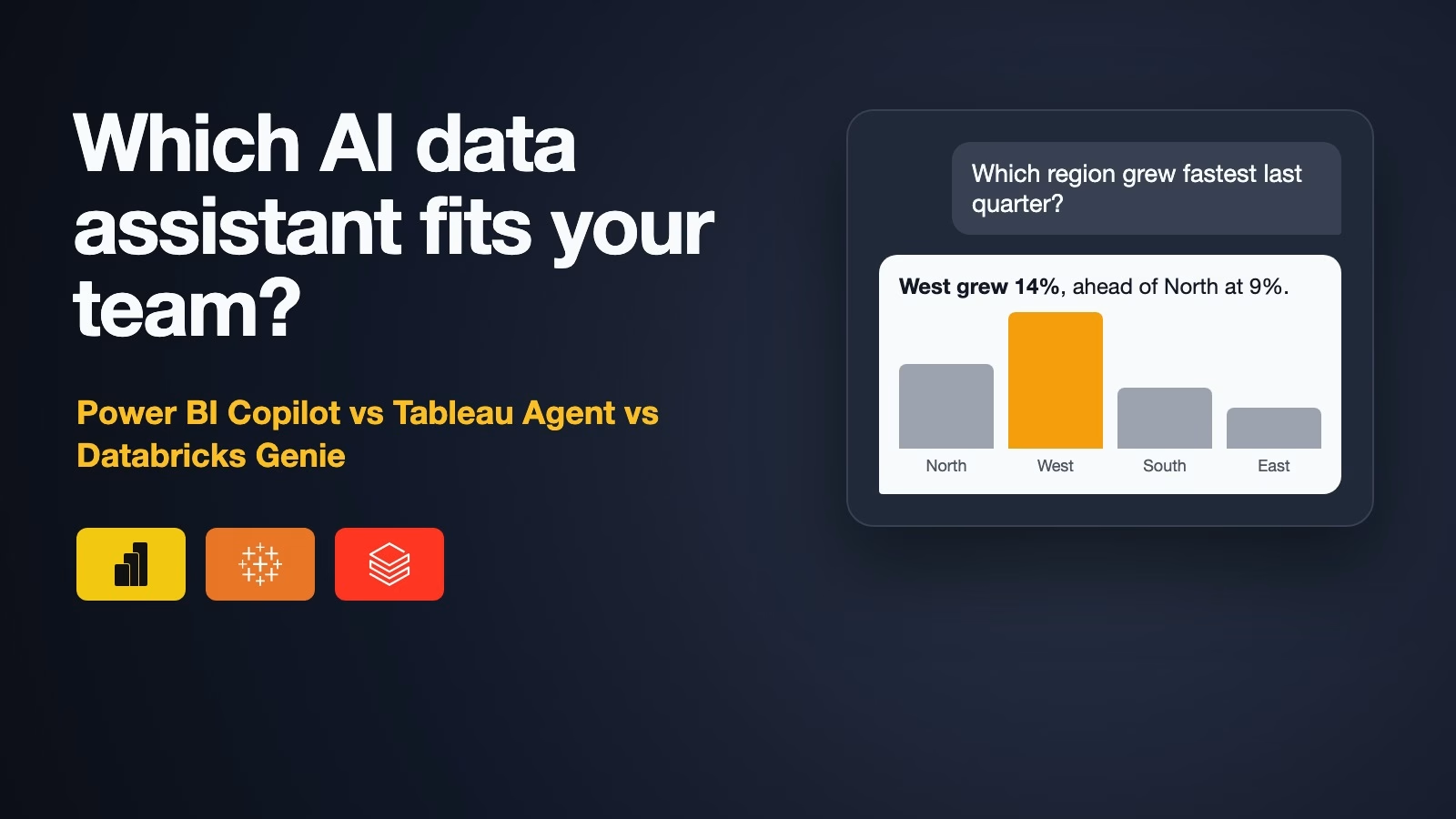
The best AI analytics assistant for your team is usually the one built into the data tool you already pay for. Pick Power BI Copilot if your company runs Power BI on Microsoft Fabric, Tableau’s own assistant if you use Tableau Cloud, and Databricks Genie if your data already lives in Databricks. Whichever you pick, it only answers well after someone tidies up the data it reads, so budget time for that before you judge it.
Imagine your manager saw a demo where someone typed “Which region grew fastest last quarter?” and got a chart in seconds. Now they want the same for your team, and they have asked you which tool to buy. You have a mix of reports, a few spreadsheets, and a data warehouse, the central database where company data is collected, that only two people understand. This post explains what each assistant needs before it works, where each one fits, and how to test one on your own data in a week.
What these assistants actually do
All three let you ask questions about your company’s data in plain English and get back numbers, charts, or short summaries. They sit inside a BI tool, short for business intelligence: the software your company uses for reports and dashboards. Behind the chat box, each one turns your question into a query, the precise instruction a database needs. Then it runs the query and shows you the answer.
That middle step is where things go right or wrong. The assistant has to guess which table holds “revenue,” whether “last quarter” means the calendar or your fiscal year, and whether returns are subtracted. It does much better when someone has already written those rules down in a semantic model, a layer that gives each number one agreed name and definition. The guide to semantic layers explains that idea in more depth.
What each one needs before it works
The biggest surprise for most teams is the plan you need. None of these is a switch you flip on a basic licence. The table shows what each vendor’s own pages required when we checked on October 14, 2026.
| Power BI Copilot | Tableau Agent | Databricks Genie | |
|---|---|---|---|
| Plan you need | Fabric capacity F2 or higher, or Premium P1 or higher. Pro or PPU alone is not enough | A Tableau Cloud site with Tableau+, or Tableau Server 2025.3 or later | Data in Unity Catalog and a pro or serverless SQL warehouse |
| Who can use it | People with access to reports on that capacity | Creator or Explorer roles | People with consumer access or Databricks SQL |
| Setup by the data team | Prepare the semantic model; admin setting on | Admin turns on AI in Tableau | Build a Genie Agent with up to 50 tables, instructions and example queries |
| Still in preview or beta | Full-screen Copilot and Copilot in apps | Dashboard features | Not stated on the overview page |
| Usage cost | Draws on your Fabric capacity | Part of the Tableau+ edition | Free for people through January 31, 2027; warehouse billed as usual |
Read the “Still in preview or beta” row carefully. Parts of each product are still labeled preview or beta, which means the vendor is still changing them and support is limited. That matters if you plan to roll it out to a whole department.
When your reports are in Power BI
Copilot is Microsoft’s assistant inside Power BI. Business users can ask questions about an open report in a side pane, or use a full-screen version that searches every report and dataset they can see. Report authors can ask it to build report pages or write DAX, the formula language Power BI uses for measures.
The catch is the licence. Microsoft’s Copilot overview (checked October 14, 2026) lists the capacity you need as “Paid Fabric capacity (F2 or higher) or Power BI Premium (P1 or higher).” The same page adds that “A Power BI Pro or Premium Per User (PPU) license alone isn’t sufficient.” Fabric capacity is computing power your company rents from Microsoft. Everyone in its workspaces shares it. The same page says trial capacities are not supported.
Microsoft is direct about data preparation too. Its overview says that without it, “Copilot can misinterpret the data and return generic or inaccurate results.” It also notes that a question unrelated to your data is answered from the AI model’s general knowledge, not your numbers, so watch which one you are getting.
When your company uses Tableau
Tableau Agent is Salesforce’s assistant inside Tableau. In a worksheet, it can suggest questions, build a chart from a description, pick a chart type, write and explain calculated fields, and filter and sort. Tableau’s help page for Tableau Agent (checked October 14, 2026) lists its dashboard features as beta.
On Tableau Cloud, the same page says you need a site with Tableau+, Tableau’s premium edition, with AI in Tableau turned on, and a Creator or Explorer role. A Viewer licence will not do. It also explains what leaves your site: Tableau Agent indexes field names, descriptions, and up to 1,000 sample text values, and the page says “no customer data is ever used to train the model.” On Tableau Server, the copy you run yourself, it connects to an AI provider your company chooses instead.
When your data lives in Databricks
Genie is Databricks’ assistant, and it now comes in three parts. Databricks’ Genie overview (updated September 18, 2026) names Genie One for business users who ask questions, Genie Agents where the data team sets up trusted data and rules, and Genie Code for developers. It also has iOS and Android apps.
The setup is more hands-on. The Genie Agent setup page (updated October 9, 2026) says the data “must be registered to Unity Catalog,” Databricks’ system for tracking tables and who may see them. It also needs “a pro or serverless SQL warehouse,” the computing engine that runs queries written in SQL, the standard language for asking databases questions, and each agent holds up to 50 tables, views, or metric views. The data team adds example queries and instructions to each agent, which is extra work but also why Genie can be precise about your terms.
Cost is the other headline. The Genie overview says use of Genie One and Genie Agents by people is free through January 31, 2027. The SQL warehouse that runs the queries is still billed as usual.
What about Snowflake?
If your data warehouse is Snowflake, its assistant is now called Snowflake CoWork. Snowflake’s CoWork overview (checked October 14, 2026) says it answers questions over tables and documents, draws charts, schedules reports by email, and keeps Snowflake’s existing access rules. It reads tables through semantic views, Snowflake’s version of a semantic model, so the same preparation advice applies.
Why they get numbers wrong, and how to stop it
Every one of these tools can return a confident, wrong number. It happens for the same few reasons, and most are fixable before launch.
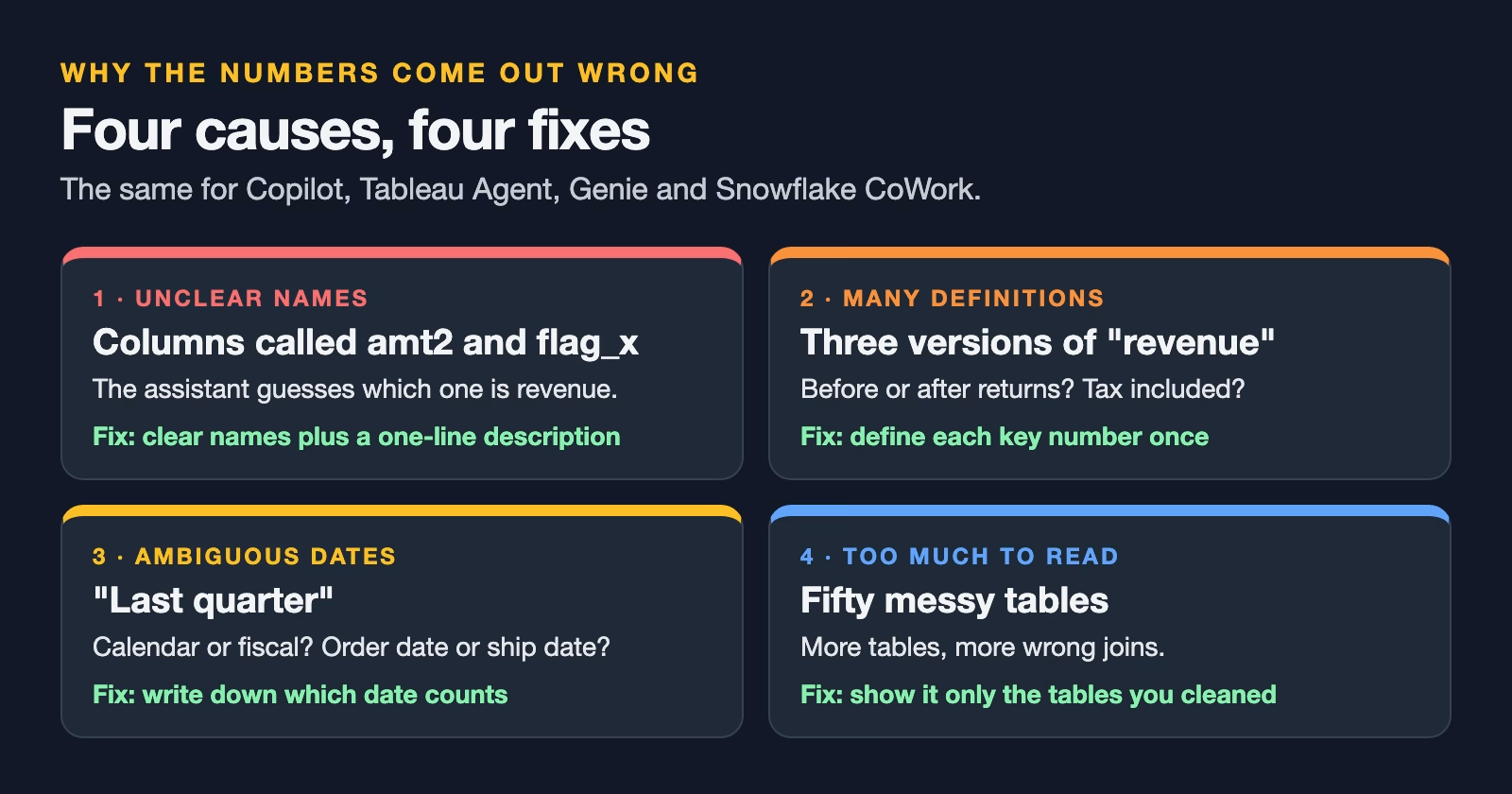
The fixes are dull, which is why teams skip them. Give each table and column a clear name and a one-line description. Define your key numbers once, such as revenue, active customer, and churn, and write down which date counts. Add a handful of example questions with their correct answers, which Microsoft calls verified answers and Databricks calls example queries. Then limit what the assistant can see to the tables you have cleaned. Five tidy tables beat fifty messy ones.
How to choose
Start from where your data and reports already are. Moving data to a new platform just to get an assistant is rarely worth it, because the assistant is the smallest part of the cost.
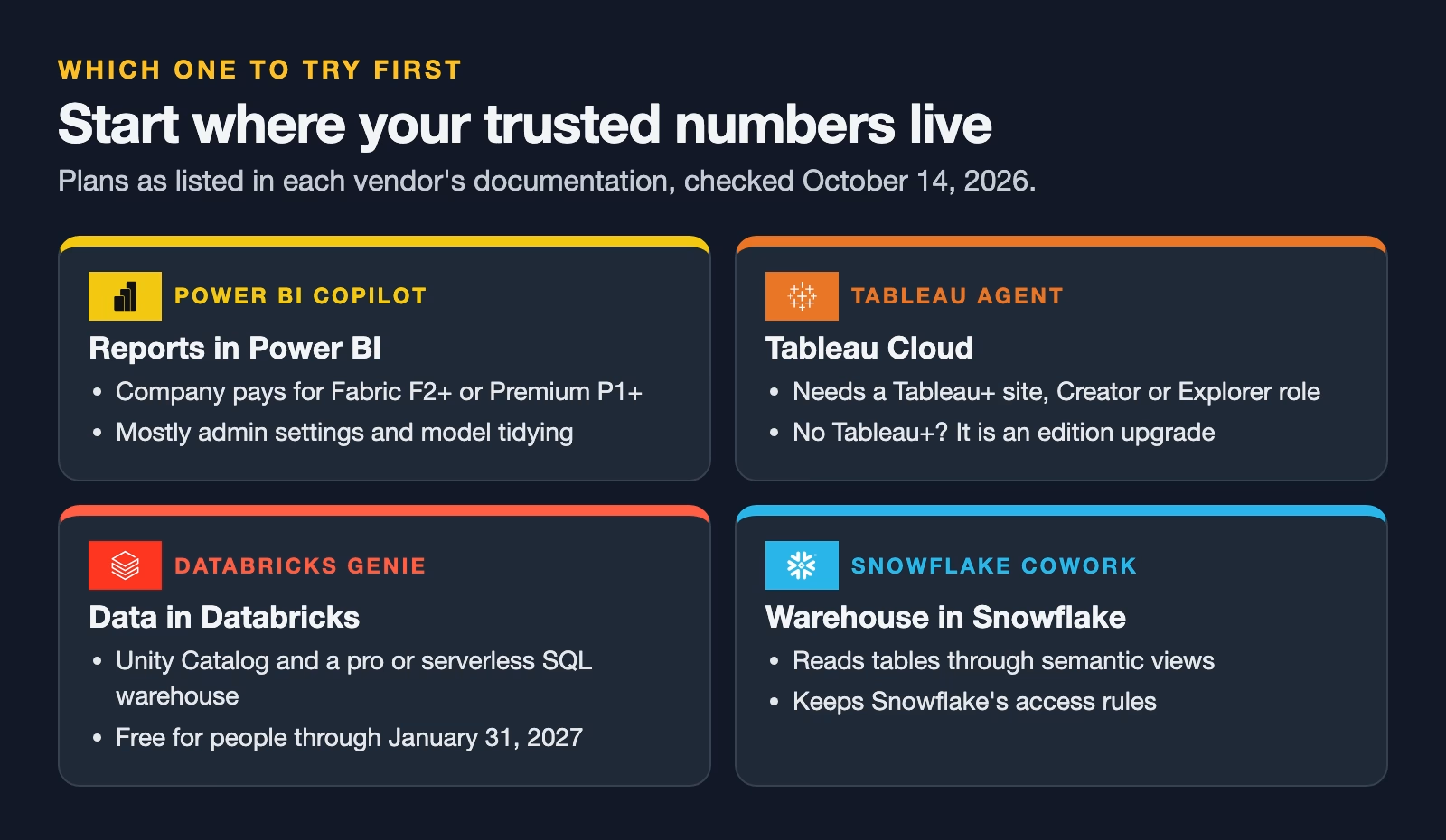
If your reports are in Power BI and your company already pays for Fabric or Premium capacity, Copilot is the natural first test, because you mostly need admin settings and model preparation. If you use Tableau Cloud, check whether your site has Tableau+. If not, the assistant is part of an edition upgrade, a bigger conversation with Salesforce. If your data team works in Databricks, Genie is free to try until the end of January 2027, apart from the compute it uses, which makes it the cheapest experiment of the three right now.
If you use more than one, pick the tool where your most trusted numbers live. An assistant on a clean, well-defined dataset will beat a cleverer one sitting on top of a mess.
Test it on your own data in a week
A demo uses data that was prepared for the demo. Yours was not. Before anyone buys seats, run a small test that you can repeat later.
- Write 20 real questions your team asked in the last month, with the correct answers from an existing report.
- Ask the assistant all 20 without any setup, and record each answer as right, wrong, or “could not answer.”
- Spend two days on preparation: clear names, descriptions, three key definitions, and five example questions.
- Ask the same 20 again and compare.
Keep the questions and answers in a shared sheet. When the vendor ships an update, or when you try a second assistant, run the same 20 again. A fixed set of questions with known answers is the only fair way to compare two tools, or one tool before and after a change. It also gives you something concrete to show the people who will pay for it.
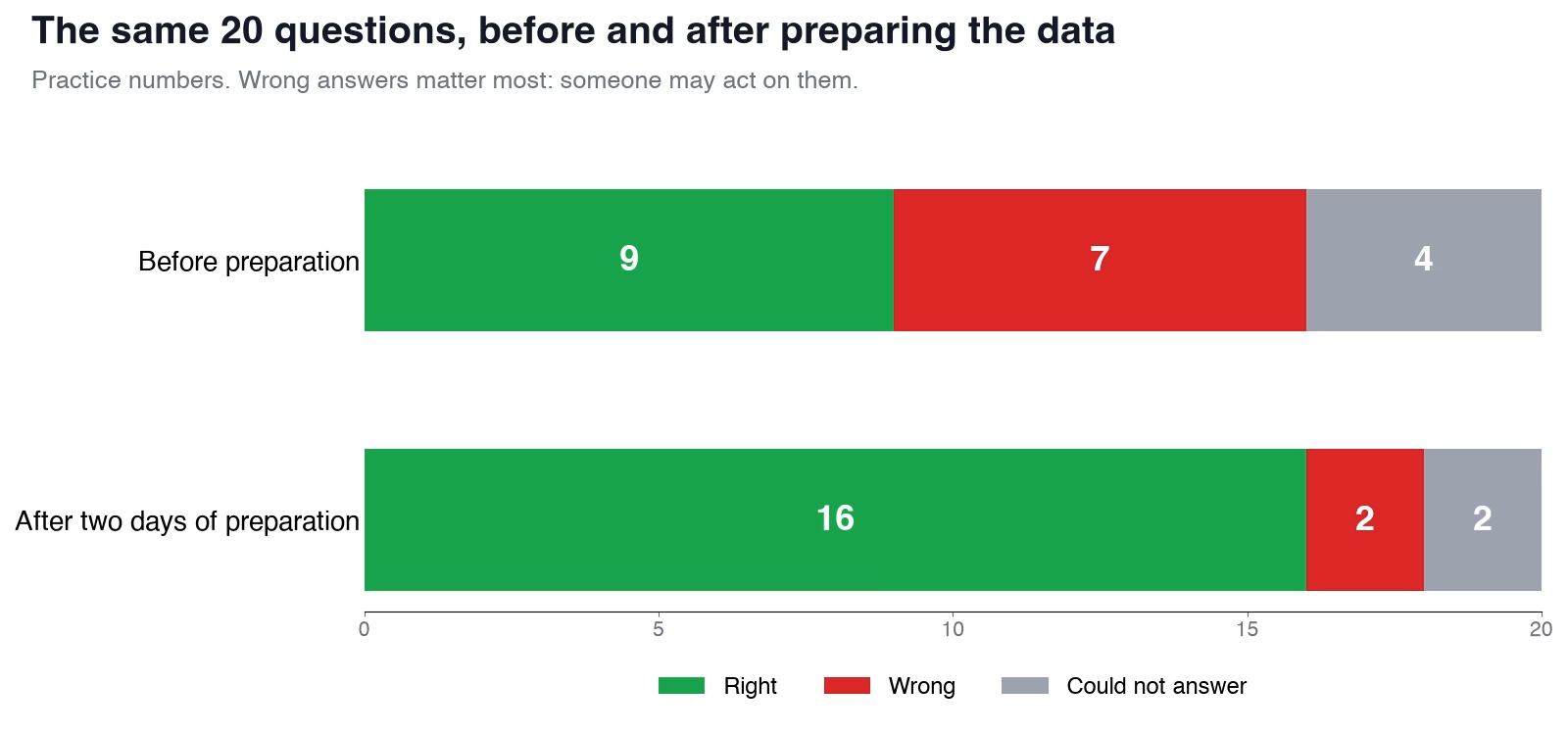
The practice numbers in that chart show the pattern to look for. Wrong answers are worse than refusals, because someone may act on them. If preparation cuts wrong answers sharply, the tool is worth a wider pilot. If wrong answers stay high after preparation, the data needs more work before any assistant will help. Checking AI-written queries against known answers is a skill of its own, and the guide on how to check AI-written SQL covers it.
What to do this week
Find out which plan your company already has: Fabric or Premium capacity for Power BI, Tableau+ for Tableau Cloud, or a pro or serverless SQL warehouse for Databricks. Then write your 20 test questions with their answers. Those two facts decide which assistant to try first and give you a fair way to judge it. If your team is new to Power BI, start with building the data model before the charts, which is the same preparation these assistants depend on.
Sources
- Microsoft Learn: Copilot for Power BI overview (capacity requirements, preview status, data preparation)
- Tableau Help: Tableau Agent in web authoring (Tableau+ requirement, site roles, data sent, beta features)
- Tableau Help: About Tableau+ (features included with the Tableau+ bundle)
- Databricks: Genie overview (Genie One, Genie Agents, Genie Code, free usage through January 31, 2027)
- Databricks: Create and manage a Genie Agent (Unity Catalog, SQL warehouse, 50-table limit)
- Snowflake: Overview of Snowflake CoWork (features and governance)
Keep going
Same lessons in your feed
Short diagrams, hooks, and weekly tutorials on Substack, Instagram, X, and Facebook.



