
To check whether Google’s AI answers are taking your website traffic, compare two numbers for each page: how often Google showed it, and how often people clicked. Search Console, Google’s free report for site owners, has both. If a page is shown as often as before but clicked much less, and Google lists it among pages that appeared in its AI answers, the summary at the top of the results is probably answering the question for you. Google Analytics, Google’s free tool that counts visitors to your site, then shows how many people chat apps like ChatGPT send your way.
Imagine you run the website for a small software company, and the monthly report says visits from Google are down by almost a third since summer. Your manager wants to know whether to blame AI, fix the site, or both. The good news is that two free Google tools most websites already use can answer that, one page at a time. This post shows where to look, gives you a practice spreadsheet that sorts pages by what went wrong, and explains what to do about each one.
Why AI answers can cut your clicks
Google now answers many questions on the results page itself. An AI Overview is the AI-written summary at the top of some results, and AI Mode is a separate chat-style search that answers in full paragraphs with a few links. When the summary is good enough, the searcher never clicks through to your page.
The size of the effect is still being measured, but two studies point the same way. A Pew Research Center analysis of 900 US adults’ browsing in March 2025, published July 22, 2025, found people clicked a normal result link on 8% of searches with an AI summary and 15% without one.
A preprint posted August 18, 2026, a study shared before peer review, ran a week-long test with 1,100 US Chrome users. Sending their searches to AI Mode cut clicks to publishers’ sites by 18.8 percentage points compared with normal Google results. The authors note it was a short test of an early AI Mode design, so treat it as a sign of direction, not a forecast for your site.
What the two free tools can tell you
You need both tools because each one sees a different half of the story. Search Console is Google’s free report on how your site appears in Google Search. GA4, or Google Analytics 4, is Google’s free tool for measuring what visitors do once they reach your site.
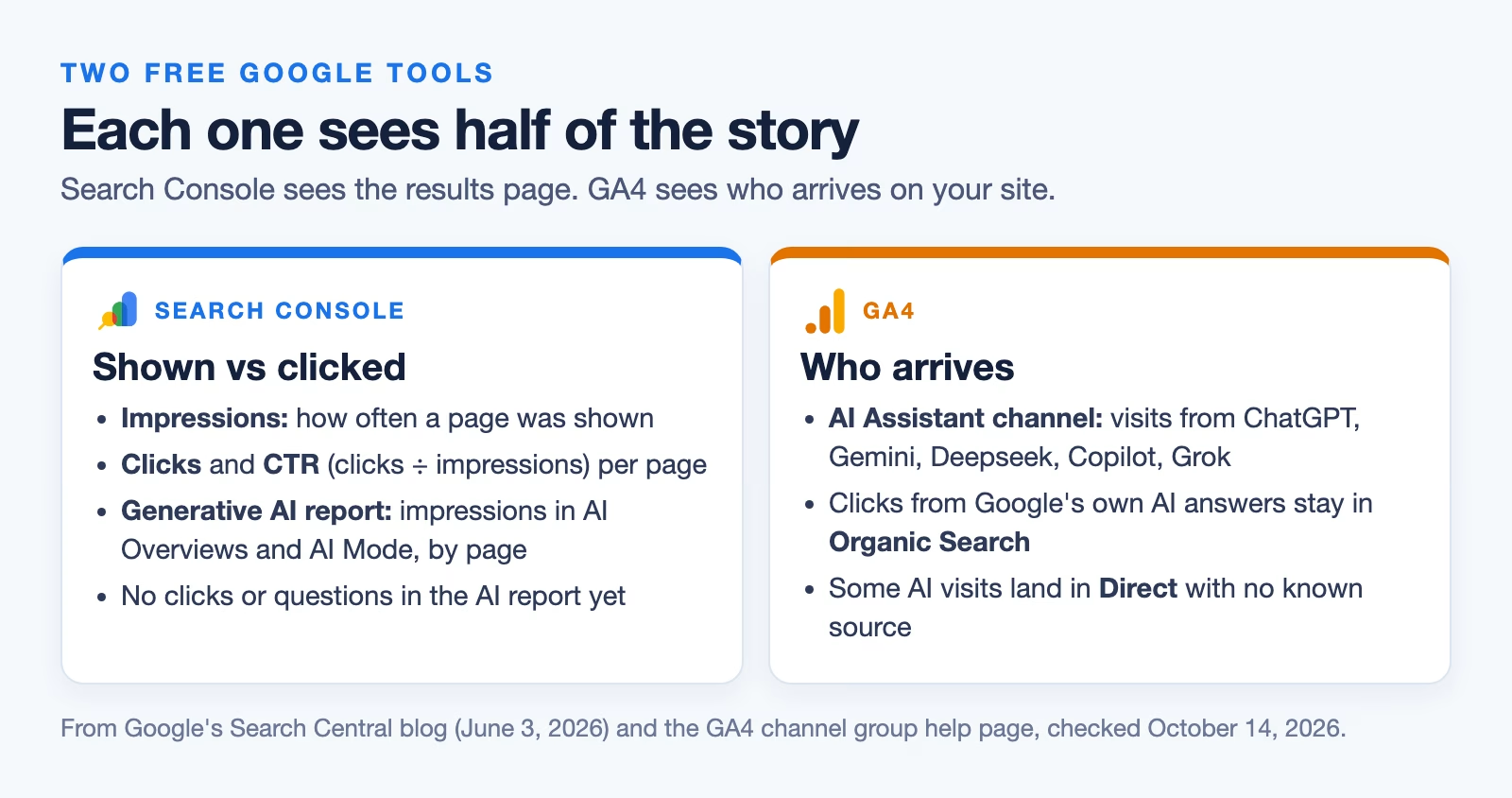
Search Console counts impressions, how often your page was shown in results, and clicks, how often someone clicked through. Dividing clicks by impressions gives the click-through rate, or CTR. That ratio is the number AI answers move, because your page can still be shown while fewer people click.
Since June 2026, Search Console also has a Generative AI report. According to Google’s announcement of June 3, 2026, it shows “How often URLs from your site appeared in generative AI features in Search and Discover,” broken down by page, country, device, and date. Google’s note on the same page says it reached all websites worldwide on August 31, 2026. It shows impressions only. It has no clicks and no list of the questions people asked, so you cannot read lost clicks straight from it.
GA4 sees the other side: people who arrive from AI chat apps. It has a channel, a bucket for visits that came from similar places, called AI Assistant. Google’s GA4 help page on channel groups (checked October 14, 2026) says it covers visits “from sources like ChatGPT, Gemini, Deepseek, Copilot, or Grok” and “excludes Google’s AI Overviews and AI Mode.” Clicks from Google’s own AI answers still count as Organic Search.
Step 1: Pull two matching periods
Pick two stretches of the same length, one before the drop and one after. Use 28 days each and the same days of the week, so a holiday or a weekend does not skew the comparison. In the Performance report, choose Search results, turn on Total clicks and Total impressions, set the date to Compare, and open the Pages tab. Export it to Google Sheets.
Then open the Generative AI report for the later period and note each page’s AI impressions next to it. You now have six numbers per page: impressions and clicks before, impressions and clicks after, and AI impressions after.
Start with your top 20 or 30 pages by clicks. Small pages bounce around from week to week, and a page that went from 12 clicks to 6 tells you very little. If your site has fewer pages than that, use them all and widen the periods to 90 days each. Longer periods smooth out the noise, at the cost of noticing a change later.
Step 2: Sort each page into a cause
This is the part that turns a scary total into a to-do list. For each page, ask two questions. Is it still being shown about as often? And are people clicking much less?
| Page | Impressions before | Clicks before | Impressions after | Clicks after | Shown in AI features | CTR | Likely cause |
|---|---|---|---|---|---|---|---|
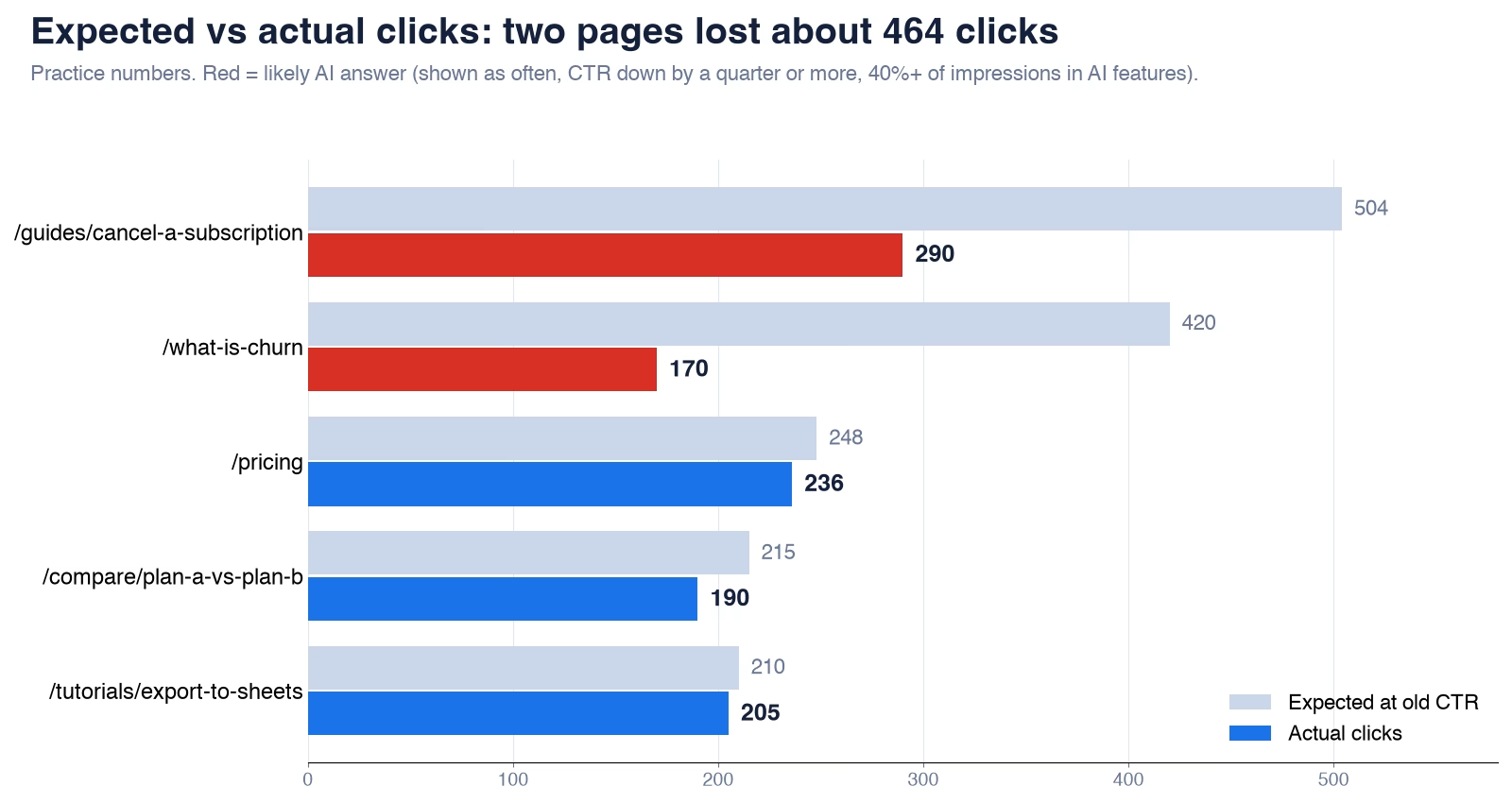
| /guides/cancel-a-subscription | 12,000 | 480 | 12,600 | 290 | 56% | 4.0% to 2.3% | AI answer |
| /what-is-churn | 8,000 | 400 | 8,400 | 170 | 82% | 5.0% to 2.0% | AI answer |
| /pricing | 3,000 | 240 | 3,100 | 236 | 6% | 8.0% to 7.6% | Steady |
| /compare/plan-a-vs-plan-b | 4,000 | 200 | 4,300 | 190 | 49% | 5.0% to 4.4% | Steady |
| /tutorials/export-to-sheets | 5,000 | 250 | 4,200 | 205 | 14% | 5.0% to 4.9% | Ranking or demand |
These are made-up practice numbers for five pages. Overall, clicks fell from 1,570 to 1,091, a drop of about 31%. But the pages fell for different reasons.
The subscription guide and the churn definition were shown slightly more often than before, yet clicks almost halved, and most of their impressions were in AI features. That pattern points to an AI answer. The question is easy to answer in a paragraph, so the summary does it. The export tutorial lost 16% of its impressions with almost no change in CTR. That is a ranking or demand problem, not an AI one. The pricing page and the comparison page barely moved.
The spreadsheet does this sorting for you. Paste the six columns into A to F and copy these formulas down.
Columns: A page, B impressions before, C clicks before,
         D impressions after, E clicks after, F AI impressions after

G2  CTR before          =C2/B2
H2  CTR after           =E2/D2
I2  impressions change  =D2/B2-1
J2  expected clicks     =D2*G2
K2  clicks lost         =J2-E2
L2  AI share            =F2/D2
M2  verdict             =IF(I2<-0.1,"Ranking or demand",IF(AND(H2<G2*0.75,L2>=0.4),"AI answer","Steady"))
The “expected clicks” column asks what the page would have earned at its old CTR. The gap between that and the real clicks is the estimate of what the AI answer took. In the practice numbers, the two AI-answer pages lost about 464 of the 479 missing clicks. The 25% fall in CTR and the 40% AI share in the verdict are starting points. Adjust them for your own site.
Step 3: Check what AI chat apps send you in GA4
AI answers take clicks, but AI chat apps also send visitors. In GA4, open Reports, then Acquisition, then Traffic acquisition, and look for the AI Assistant row. Change the main column to Session source to see which apps sent visits, and add Landing page to see which pages they reached.
One gap is worth knowing. Some apps do not pass on where a visitor came from, so part of their traffic lands in Direct, the bucket for visits with no known source. Expect GA4 to undercount AI visits, not overcount them.
If an app you care about is missing, you can make your own channel group. In GA4, open Admin, then Channel groups under Data display, and copy the default group. Add a new channel with this rule, and drag it above Referral so it is checked first.
Channel name:  AI chat apps (all)
Condition:     Session source  matches regex
Value:         chatgpt|openai|perplexity|claude|gemini|copilot|grok|deepseek
What to do about each kind of page
Each cause needs a different fix. Treating them all the same wastes your time.
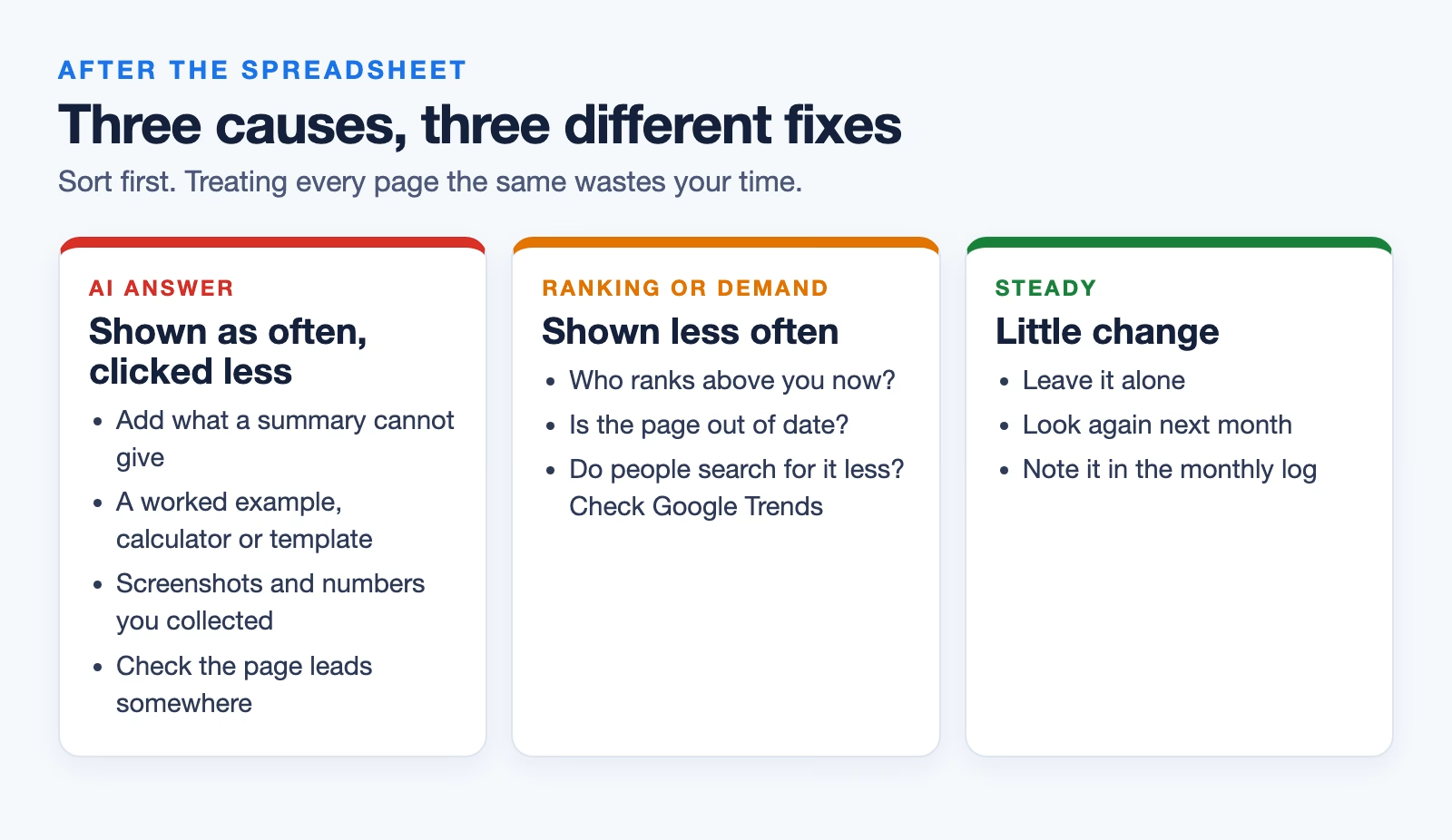
For pages losing clicks to AI answers, give people a reason to click that a summary cannot. Short definitions and simple answers are the most exposed. Add what the summary leaves out: a worked example, a calculator, a template to download, real screenshots, or numbers you collected yourself. Then check whether those pages lead to anything that matters to you, such as a sign-up. A page that loses clicks but was never part of a purchase may not be worth much effort.
For pages losing impressions, the usual search work applies. Check whether a competitor now ranks above you, whether your page is out of date, or whether people simply search for the topic less, which Google Trends can show. For steady pages, do nothing yet, and look again next month.
How to keep an eye on it each month
Put a short check in your calendar for the first week of each month. It takes about twenty minutes once the spreadsheet exists.
- Export the last 28 days and the 28 days before from Search Console, and paste them into the sheet.
- Read the verdict column and note any page that moved into “AI answer.”
- In GA4, check the AI Assistant channel’s sessions and its top landing pages.
- Write one line in a log: total clicks, clicks lost on AI-answer pages, and AI Assistant sessions.
After three months you will have a trend instead of a guess. That log is also the most useful thing to bring to your manager, because it shows how much of the drop has a cause you can act on.
What to do this week
Export two matching 28-day periods from Search Console, add the AI impressions from the Generative AI report, and paste them into a sheet with the formulas above. Sort your top 20 pages by clicks lost. Pick the two worst “AI answer” pages and add one thing to each that a summary cannot give. If you want a refresher on reading a before-and-after comparison fairly, the guide on measuring whether AI saves your team time uses the same logic.
Sources
- Google Search Central: Introducing Search Generative AI performance reports in Search Console (June 3, 2026; impressions, pages, countries, devices, dates; rolled out to all sites August 31, 2026)
- Google Analytics Help: Default channel group (AI Assistant channel definition and exclusion of AI Overviews and AI Mode)
- Pew Research Center: Google users are less likely to click on links when an AI summary appears (8% vs 15% click rate, March 2025 browsing data)
- Wang and others: AI in Search Reduces Publisher Referrals Without Improving User Experience (preprint) (AI Mode cut publisher click-through by 18.8 points)
Keep going
Same lessons in your feed
Short diagrams, hooks, and weekly tutorials on Substack, Instagram, X, and Facebook.



