An AI harness is the program wrapped around an AI model that lets it actually do things: open files, run checks, and keep going until a job is done. The model only writes text. The harness turns that text into action, and it decides what the model is allowed to touch.
Imagine you ask a chat assistant to fix a bug. It writes a fix, and you copy it into your files, run it, see an error, and paste the error back. You are the loop. A harness runs that loop for you: it applies the change, runs the test, reads the result, and tries again.
Why some teams move so much faster
Picture yourself leading platform engineering at a large financial services firm. You notice a big gap between two groups of developers. A few senior engineers use an autonomous terminal tool, a text window where you type commands instead of clicking, and finish a full database migration in forty minutes. Other engineers do the same kind of work in a plain chat window, and it takes them three days.
You pull together a small group to figure out why. A few engineers on that group assume the fast tool must run on a special, custom-built model, something only a vendor could train, so they want to license a commercial agent (an AI that can take actions, like editing files or running commands, not just write text) product or wait for one to ship. That assumption is worth testing before you spend the budget.
So you spend one afternoon writing an eighty-line Python script instead. A script is a small file of instructions the computer runs from top to bottom. The script calls a language model API, a way for one program to ask another program for data or an action. It wraps that call in a simple loop. It defines four tools in JSON, a plain text format of labeled values that programs pass to each other. Those tools read a file, edit a file, and run a shell command. Then the script feeds the test runner’s output straight back into the conversation. You point this script at a failing billing service, and the team watches it work. It reads the error log, opens the broken Python file, makes a small edit, runs the tests, confirms they pass, and commits the fix on a clean branch.
That one demonstration answers the question. The extra speed was never locked inside a secret model. It came from the harness wrapped around an ordinary one. You do not need to wait on a vendor or worry about being stuck with one. Once your team understands how the loop connects prompts, tools, and the machine running the code, you can build, adjust, and review your own agent setup to match your own security rules and codebase.
A model has no memory of its own
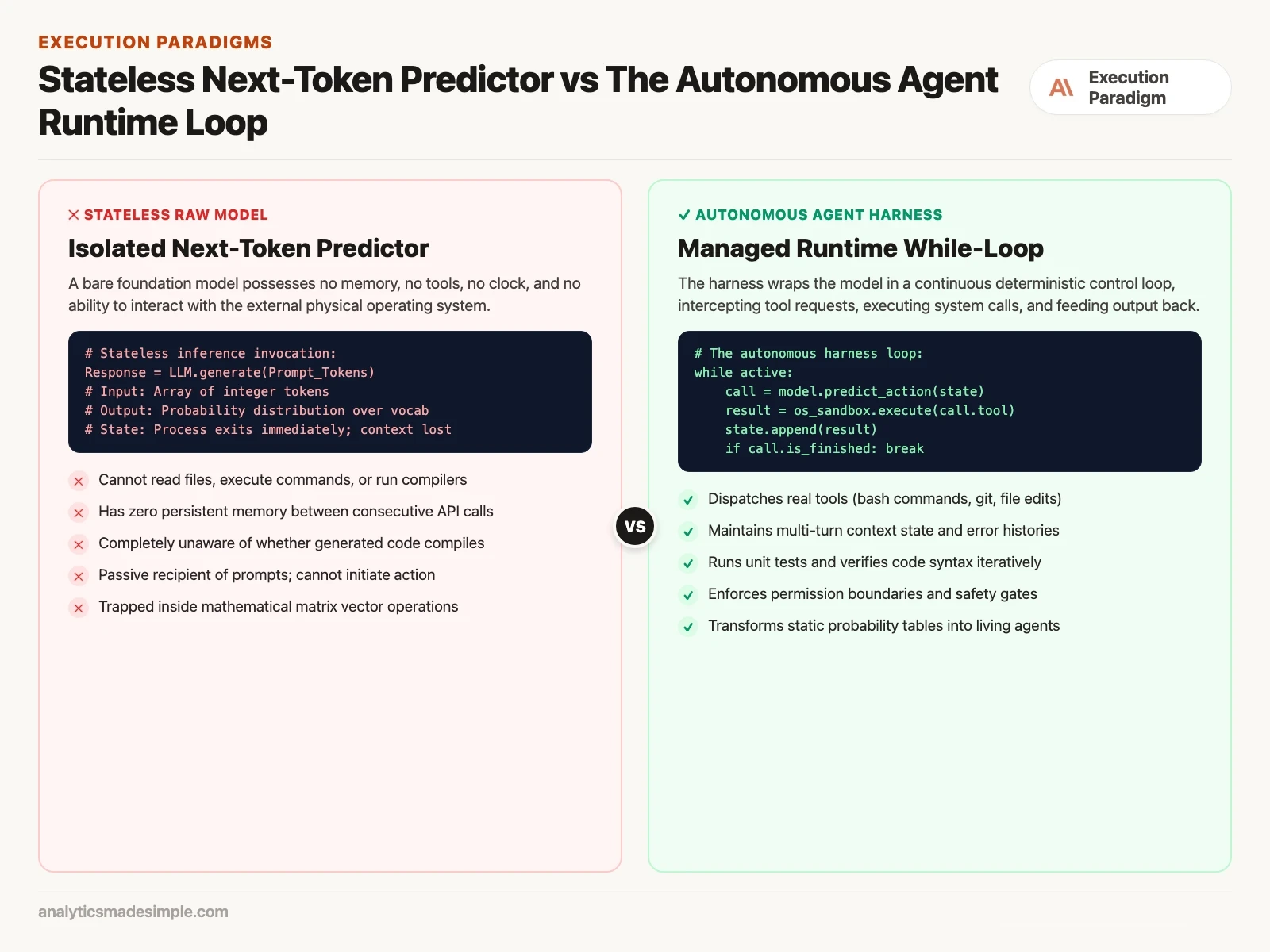
Before you can see what a harness adds, it helps to be plain about what a raw language model actually is. It does not matter whether you are calling a small open-weight model on your laptop or a huge cloud model like Claude or GPT (OpenAI’s name for its AI models). Underneath, the network is a calculator for the next word, nothing more.
When you call the model’s API, you send it a list of tokens (the small chunks of text it reads and writes in). The network passes those tokens through many internal layers of math, and at the end it produces a probability for every word in its vocabulary. It picks one, adds it to the list, and repeats until it decides to stop. Once that call finishes, the model forgets everything. It does not remember your name, it does not know what time it is, and it has no idea whether the code it just wrote will actually run.
Left alone in a plain chat window, a model cannot do anything but talk. It cannot open a file on your computer, it cannot type git status, it cannot read a compiler warning, and it cannot check whether its own advice actually fixed your problem. To turn that passive word predictor into something that can act on your codebase, you need a bridge between what it predicts and what your computer can run. That bridge is the harness.
The five parts inside every harness
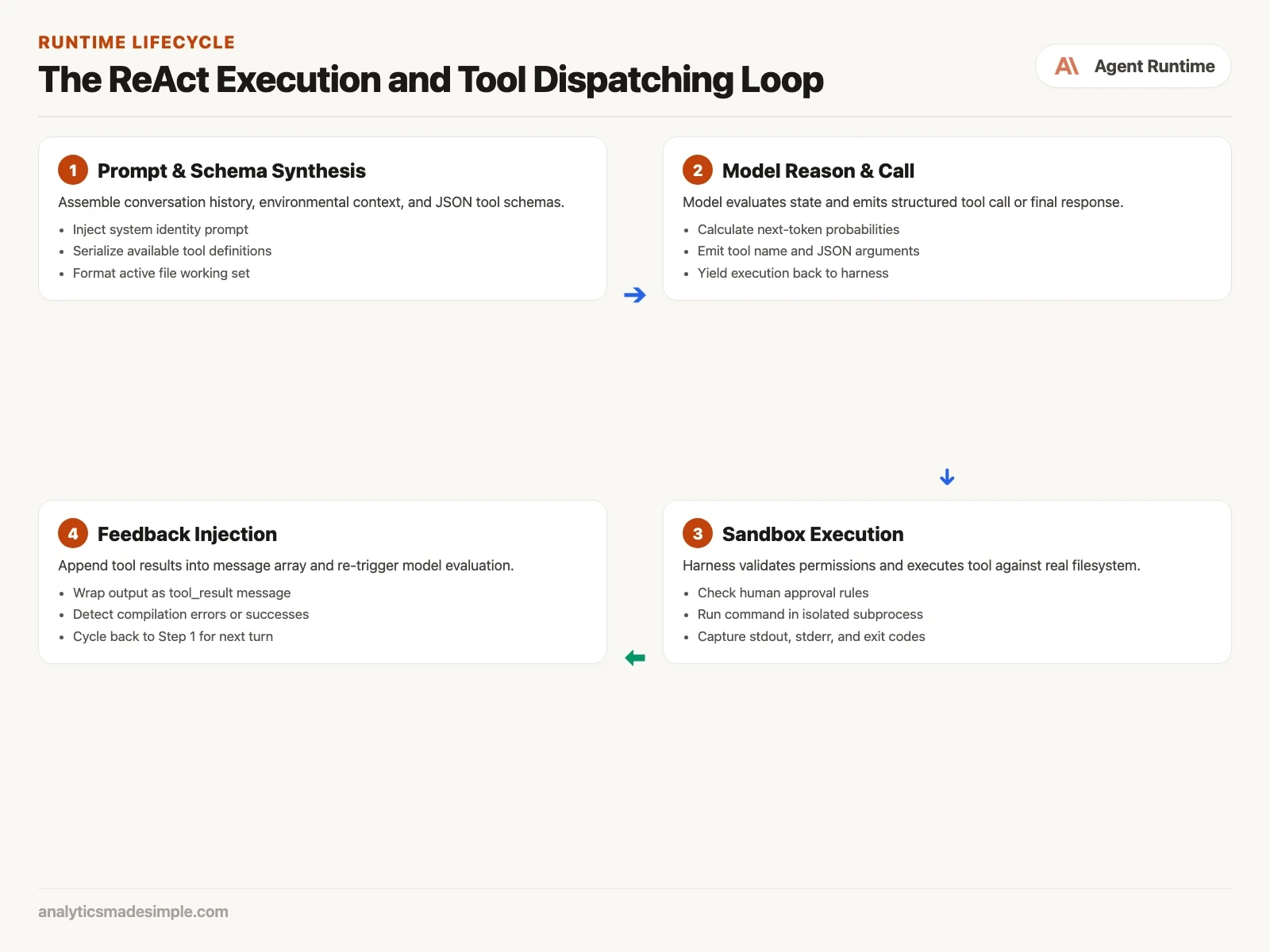
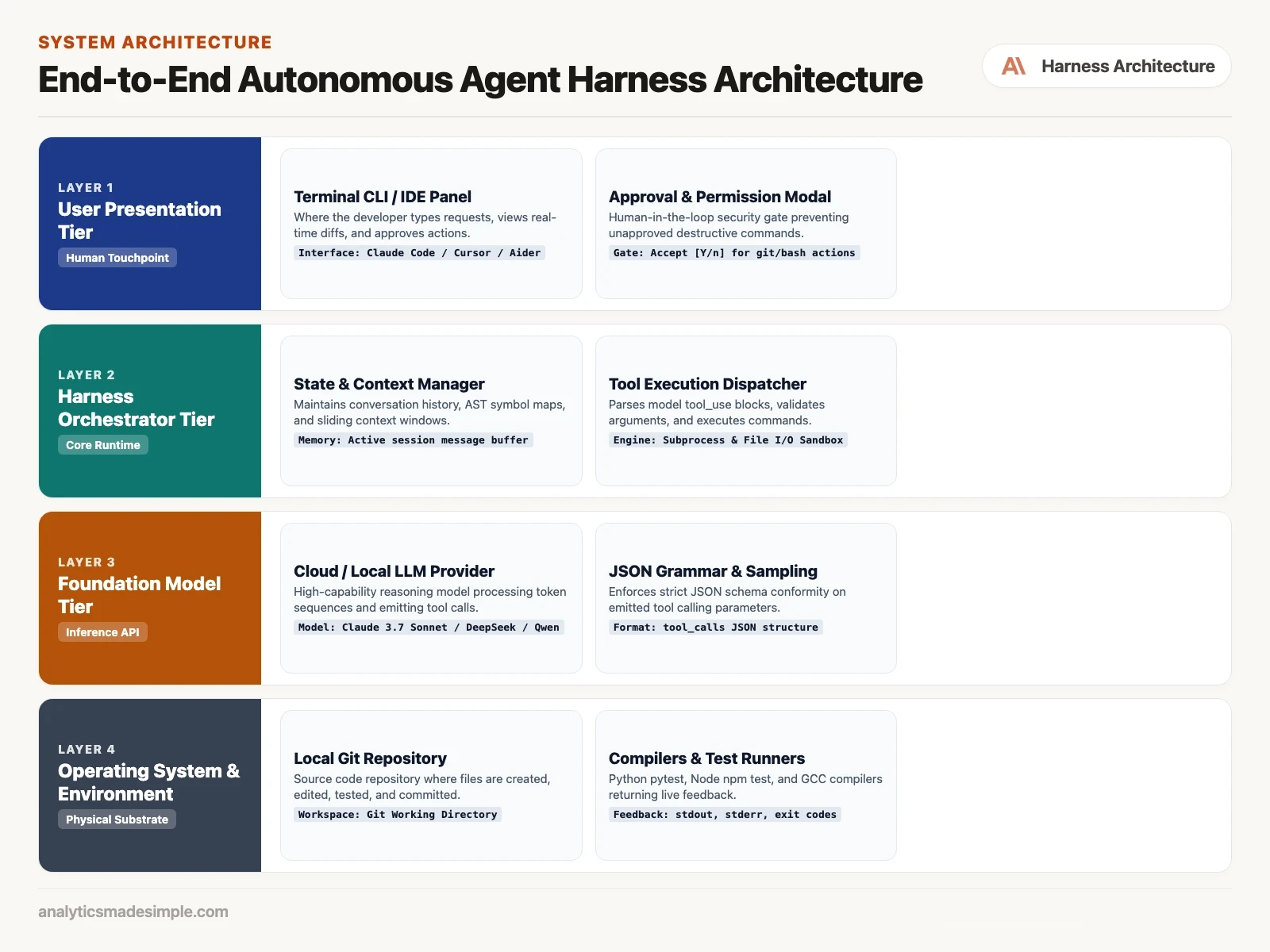
Open one up and every agent harness, from an open-source tool like Aider to a commercial product like Claude Code, turns out to be built from the same five pieces working together.
- 1. The history buffer. A running record of everything said so far: system instructions, your request, each tool call, and each result. It manages the token budget, trimming or summarizing older turns as the conversation grows.
- 2. The tool schemas. A list of JSON definitions that spell out exactly which functions the agent may call, such as
read_file,edit_file, orrun_bash, along with each one’s required arguments and types. - 3. The while loop. The engine that keeps sending the current history back to the model, checks whether the reply is plain text or a tool request, and decides when to stop.
- 4. The executor and sandbox. The part that takes a tool call, checks it against your security rules, actually runs it against real files or a real compiler, and captures the output, errors, and exit code.
- 5. The feedback step. The part that wraps up a tool’s result into a message, adds it to the history, and sends the model back into another turn without waiting for you to click anything.
The loop that makes an agent feel independent
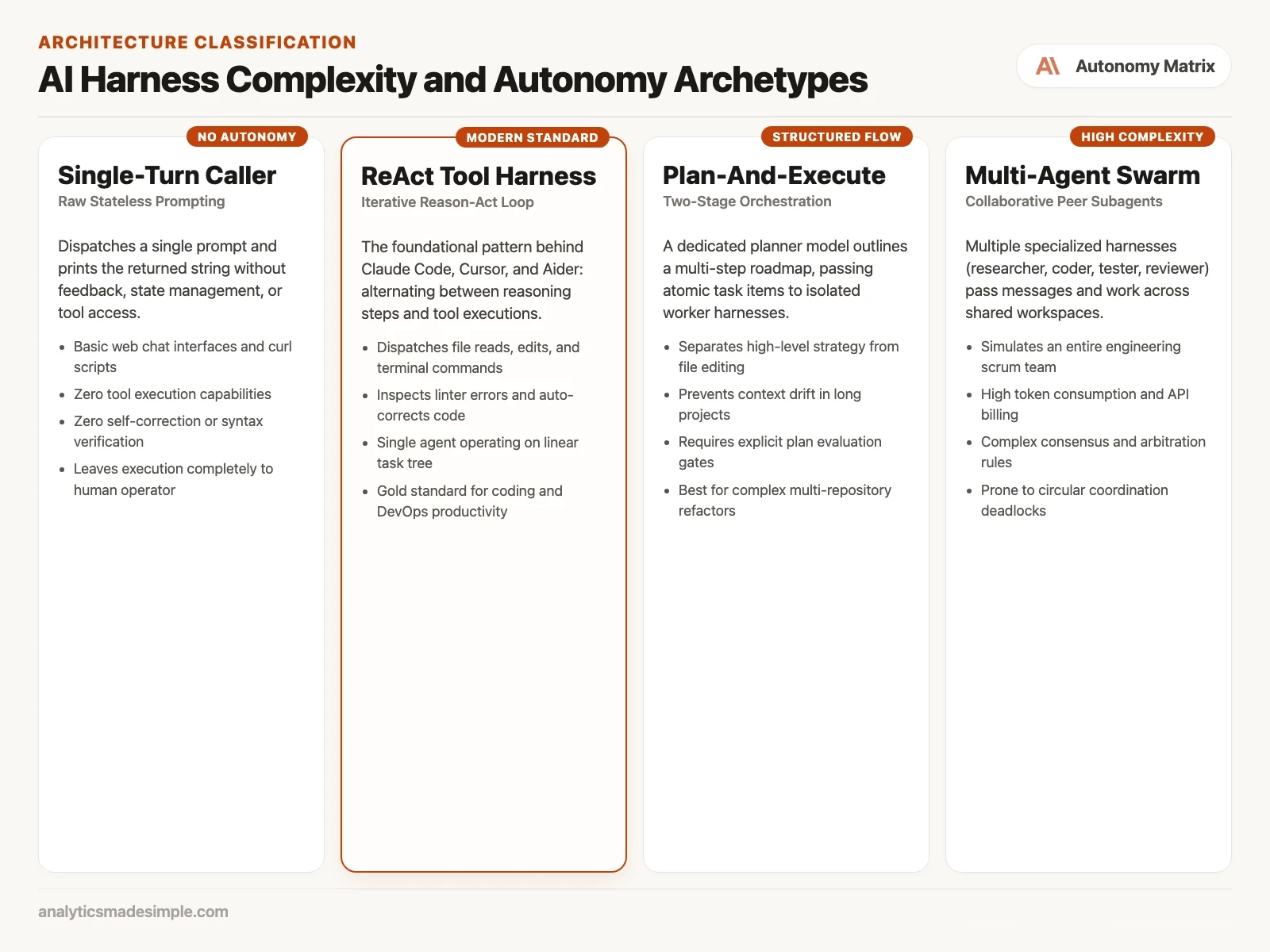
So what actually makes the agent feel like it is thinking on its own? The pattern behind most modern coding agents is called ReAct, short for reason and act. In a ReAct harness, the model does not try to solve the whole problem in one guess. Instead, it keeps cycling between thinking, acting, and watching what happened.
Say you tell an agent: “Fix the failing authentication test in our user service.” Here is what happens, step by step:
- Look around: the harness sends your instruction and the tool schemas to the model, which reasons, “I need to see what test is failing,” and calls
run_bash(command="pytest tests/test_auth.py"). - Run it and report back: the harness runs pytest in a subprocess and captures the error, “AssertionError: Expected 200 OK but received 401 Unauthorized at auth_service.py line 42,” then feeds that output back into the message history.
- Look closer: the model reads the failure and reasons, “I need to see lines 35 to 50 of auth_service.py,” then calls
read_file(path="auth_service.py", start_line=35, end_line=50). - Make the change: the harness returns that slice of code, the model spots an expired session check, and it calls
edit_file(path="auth_service.py", target="token.is_valid()", replacement="token.is_valid(allow_grace_period=True)"). - Check the fix: the harness applies the edit, the model immediately reruns pytest, and this time the result comes back “1 passed in 0.14s.”
- Wrap up: the model sees the passing result, decides the job is done, and writes a plain reply, “I found the expired session check on line 42 and added grace period handling. The test suite now passes.” Because no further tool call was made, the loop stops there.
Notice what actually happened there. The model did not guess the fix in one shot. It gathered information, tried something, checked the result against a real test run, and adjusted when the first attempt was not enough. The harness supplied the hands, the eyes to read a file, and the ability to run a command, and the while loop supplied the patience to keep going until the test passed.
A minimal harness in plain Python
To make this concrete, here is a small, complete example. It runs a ReAct loop against the standard OpenAI client (it also works against a local server such as llama-server or Ollama), and it gives the model two real tools: reading a file and running a shell command.
import os
import json
import subprocess
from pathlib import Path
from openai import OpenAI

# 1. Initialize client pointing to local or cloud endpoint
client = OpenAI(
    base_url=os.environ.get("OPENAI_BASE_URL", "http://localhost:8080/v1"),
    api_key=os.environ.get("OPENAI_API_KEY", "not-needed")
)

# 2. Define real tool execution functions
def tool_read_file(path: str) -> str:
    try:
        return Path(path).read_text()
    except Exception as e:
        return f"Error reading file: {e}"

def tool_run_bash(command: str) -> str:
    # Security caution: Run only in safe development environments
    try:
        res = subprocess.run(command, shell=True, capture_output=True, text=True, timeout=30)
        return f"Exit: {res.returncode}\nSTDOUT:\n{res.stdout}\nSTDERR:\n{res.stderr}"
    except Exception as e:
        return f"Command failed: {e}"

# 3. Map schemas for the model
tools = [
    {
        "type": "function",
        "function": {
            "name": "read_file",
            "description": "Reads the text content of a local file.",
            "parameters": {
                "type": "object",
                "properties": {"path": {"type": "string"}},
                "required": ["path"]
            }
        }
    },
    {
        "type": "function",
        "function": {
            "name": "run_bash",
            "description": "Executes a shell command and returns stdout and stderr.",
            "parameters": {
                "type": "object",
                "properties": {"command": {"type": "string"}},
                "required": ["command"]
            }
        }
    }
]

# 4. The Autonomous Harness Runtime Loop
def run_agent_harness(user_instruction: str, max_turns: int = 8):
    messages = [
        {"role": "system", "content": "You are an autonomous software engineering assistant. Use available tools to solve tasks. When finished, emit your final summary without tool calls."},
        {"role": "user", "content": user_instruction}
    ]

    print(f"=== Starting Agent Harness for: '{user_instruction}' ===")

    for turn in range(max_turns):
        print(f"\n[Turn {turn + 1}] Invoking model...")
        response = client.chat.completions.create(
            model="qwen3.5-9b",
            messages=messages,
            tools=tools,
            temperature=0.1
        )
        choice = response.choices[0]
        msg = choice.message
        messages.append(msg)

        # Check if the model emitted tool calls or completed its work
        if not msg.tool_calls:
            print(f"\n[COMPLETED] Agent finished with message:\n{msg.content}")
            return msg.content

        # Dispatch tool calls
        for tool_call in msg.tool_calls:
            fn_name = tool_call.function.name
            fn_args = json.loads(tool_call.function.arguments)
            print(f"[ACTION] Dispatching tool: {fn_name}({fn_args})")

            if fn_name == "read_file":
                output = tool_read_file(fn_args["path"])
            elif fn_name == "run_bash":
                output = tool_run_bash(fn_args["command"])
            else:
                output = f"Unknown tool: {fn_name}"

            # Inject execution output back into context
            messages.append({
                "role": "tool",
                "tool_call_id": tool_call.id,
                "content": output
            })
            print(f"[OBSERVATION] Output captured ({len(output)} chars)")

    print("\n[HALT] Maximum turn limit reached without final resolution.")
    return None

if __name__ == "__main__":
    run_agent_harness("Check disk space using df -h and summarize free capacity.")
Read through that loop slowly and notice what is missing: there are no hardcoded rules about what to fix or how. All the reasoning comes from the model responding to what it just observed, and all the reliability comes from plain Python enforcing the turn limit and keeping the conversation intact.
Two hard problems: growing context and failing tools
The basic loop above looks simple, and it is, but a harness you would actually trust in production has to solve two harder problems first.
1. The conversation keeps growing: in a ReAct loop, the message history grows with every single turn. If the agent runs a command that prints a 500-line error log, or reads a 2,000-line source file, all of that text stays in the history for every turn after it. Over eight turns, that can easily add up to 40,000 tokens, which drives up your bill and risks running out of context space entirely. A production harness has to trim aggressively: cutting long command output down, reading files in small slices instead of whole, and summarizing older turns once the history gets long.
2. Tools fail, constantly: in a real codebase, a file will not exist, a command will exit with an error, a network call will time out, or a tool’s arguments will arrive malformed. A fragile harness crashes on the first one of these and the whole session ends. A better one catches every failure, turns it into a plain message, and hands it back to the model as an observation. The model reads the error, understands that its last move did not work, and tries something else on its own.
Common questions about AI harnesses
Is an AI harness the same thing as LangChain or AutoGen?
No, they are related but not the same thing. LangChain, AutoGen, and CrewAI are code libraries that give you a pre-built harness to start from. “Harness” is the general idea behind all of them: the loop and the runtime (the software environment the code runs in) that wraps around a model. You can use one of those libraries, or you can write your own harness in fifty lines of plain Python, as shown above.
Why does a model sometimes call a tool that does not exist?
If the tool list’s format is not enforced strictly, a model can invent a function name that sounds plausible from its training, such as calling execute_shell when your actual tool is named run_bash. Production harnesses guard against this with strict checks on the tool list’s format or grammar-constrained output, so an invalid call gets rejected before it runs.
How does a harness stop an agent that gets stuck in a loop?
Every serious harness sets hard limits: a maximum number of turns, usually 10 to 25, a cap on total tokens spent, and a check that stops the run if the agent repeats the exact same tool call three times in a row.
Can you run an autonomous coding harness against a local, open-weight model?
Yes. As long as the local model supports tool calling, such as Qwen3.5, Qwen3-Coder, or Ministral 3 (current releases as of October 2026, per their model cards), and you serve it through an OpenAI-compatible server like llama-server or Ollama, you can point the same harness at your own machine with nothing running in the cloud.
Your next step
Copy the minimal harness from this post, add one tool of your own, such as a function that lists the files in a folder you choose, and give it a task that needs that tool twice. Read every step the loop prints. Watching the model ask for the tool, get the result, and decide what to do next is the quickest way to understand what a harness really does.
Series notes
This is Part 1 of AI harnesses from scratch. Next: chat box vs agent vs IDE vs terminal.
Keep going
Same lessons in your feed
Short diagrams, hooks, and weekly tutorials on Substack, Instagram, X, and Facebook.