
Flint is a free AI model for writing and fixing code that you can download and run on your own computer, so your code never leaves your machine and there is no monthly bill. It comes from Recursive, a new AI lab led by Richard Socher, and was released on October 21, 2026. On a well-equipped Mac it answers fast, but it needs a lot of memory, and you can also try it free in the cloud first.
Imagine you have a small project at work, and you would like an AI coding assistant to read it, find a bug and suggest a fix. The usual tools send every file to a company’s servers and charge by the month or by the word. Your manager is not keen on the code leaving the building. A model like Flint is the other route: the AI runs on the laptop in front of you, and the only cost is the hardware you already own.
This guide explains what Flint is, what “40 billion parameters, 2.5 billion active” means for speed and memory (parameters are the numbers inside a model that hold what it learned), whether your computer can run it, three ways to try it, how to connect it to a coding assistant, and a one-hour test to run before you trust it with real work.
What is Flint?
Flint is a language model, the kind of AI that reads and writes text, trained by Recursive specifically for coding agents. A coding agent is an AI tool that does more than chat about code: it opens files in your project, runs commands, edits code and checks the result, asking you along the way. The Flint model card (checked October 22, 2026) says it is built to investigate codebases, fix bugs, implement features and write tests.
Three facts matter most for everyday users.
It is open weight. The weights are the files that hold everything the model learned. Recursive publishes them on Hugging Face, a public website for sharing AI models, under the Apache 2.0 license, a permissive license that lets you use, change and run the model in a business without paying Recursive.
It is built for local use. Recursive’s launch post (October 21, 2026) describes it as a fast coding model for your own hardware, with over 125 tokens per second on an M4 Pro MacBook Pro. A token is a chunk of text about three quarters of a word, so that is roughly 90 words a second, faster than you can read.
It reads text only. Flint takes text in and writes text out. It cannot look at a screenshot or a diagram.
Recursive says a small team built Flint from scratch in under four months, with help from its own automated research system, which it calls the Eureka Machine. That is the company’s description; the part you can check is how well the model does on your own work.
What “40 billion parameters, 2.5 billion active” means
More parameters usually means a more capable model, and also a bigger file and a slower one. Flint has 39.8 billion parameters in total, but the model card says only about 2.5 billion are used for each token it writes.
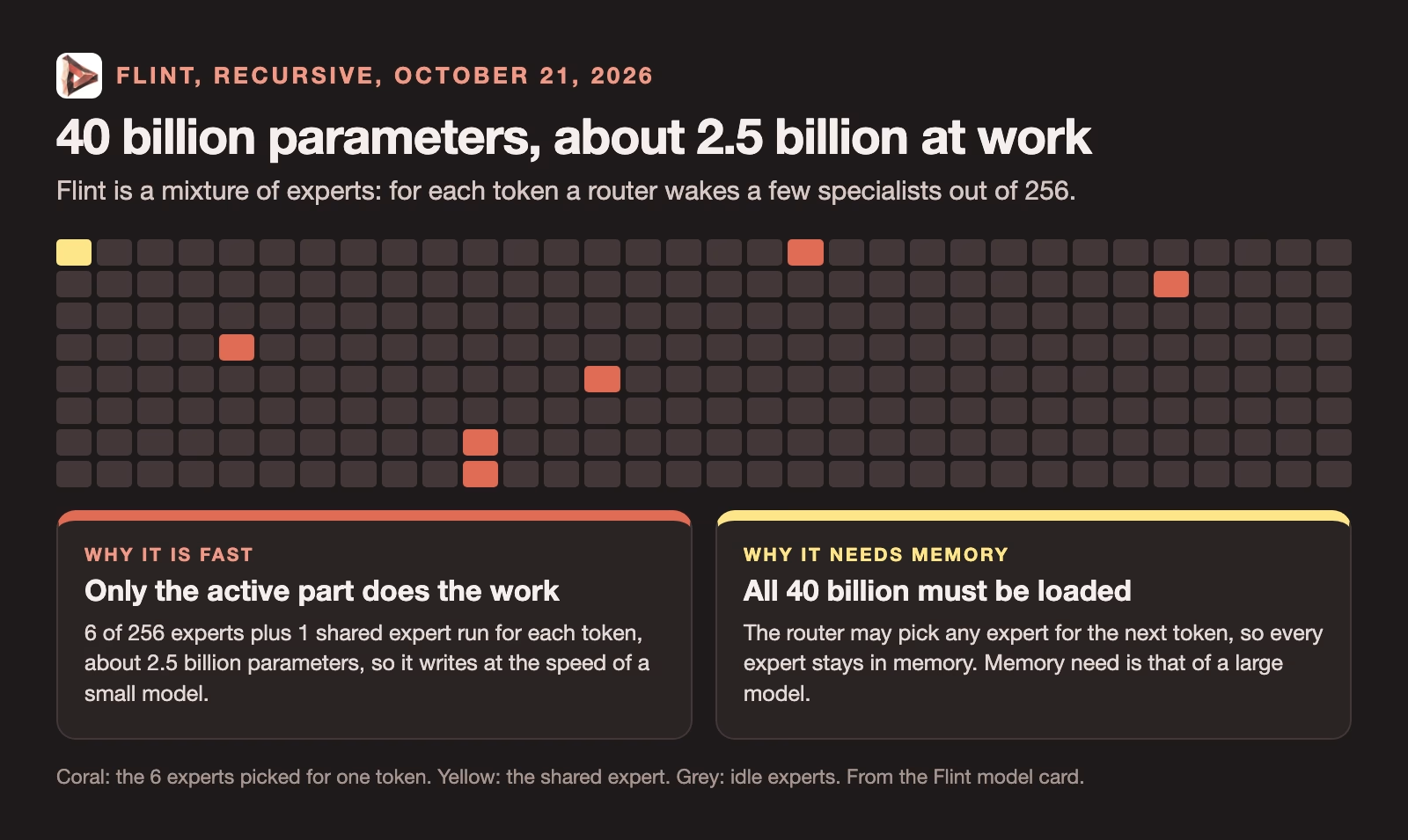
That trick is called mixture of experts. The model is split into many small specialist parts, called experts, and for each token a router picks the few that fit. Flint has 256 experts in most of its layers and uses 6 of them, plus one shared expert that is always on.
The result has two sides you need to understand before you download anything.
Speed comes from the active part. Because only about 2.5 billion parameters do work for each token, Flint writes about as fast as a small model. That is where Recursive’s speed claims come from.
Memory comes from the total. All 40 billion parameters still have to sit in memory, because the router might need any expert on the next token. So Flint needs the memory of a large model even though it runs at the speed of a small one.
Can your computer run Flint?
Recursive’s own Mac guides ask for an Apple Silicon Mac with an M4 Pro, M5 Pro or M5 Max chip and at least 48 GB of unified memory, the memory that the processor and graphics chip share on Apple computers. The rec engine page (checked October 22, 2026) also asks for about 30 GB of free disk space.
Those numbers make sense once you see the file sizes. The full-precision model on Hugging Face is about 80 GB. Smaller versions use quantization, which stores each number with fewer bits, much as a compressed photo keeps the picture in a smaller file. A 4-bit version is about a quarter of the full size.
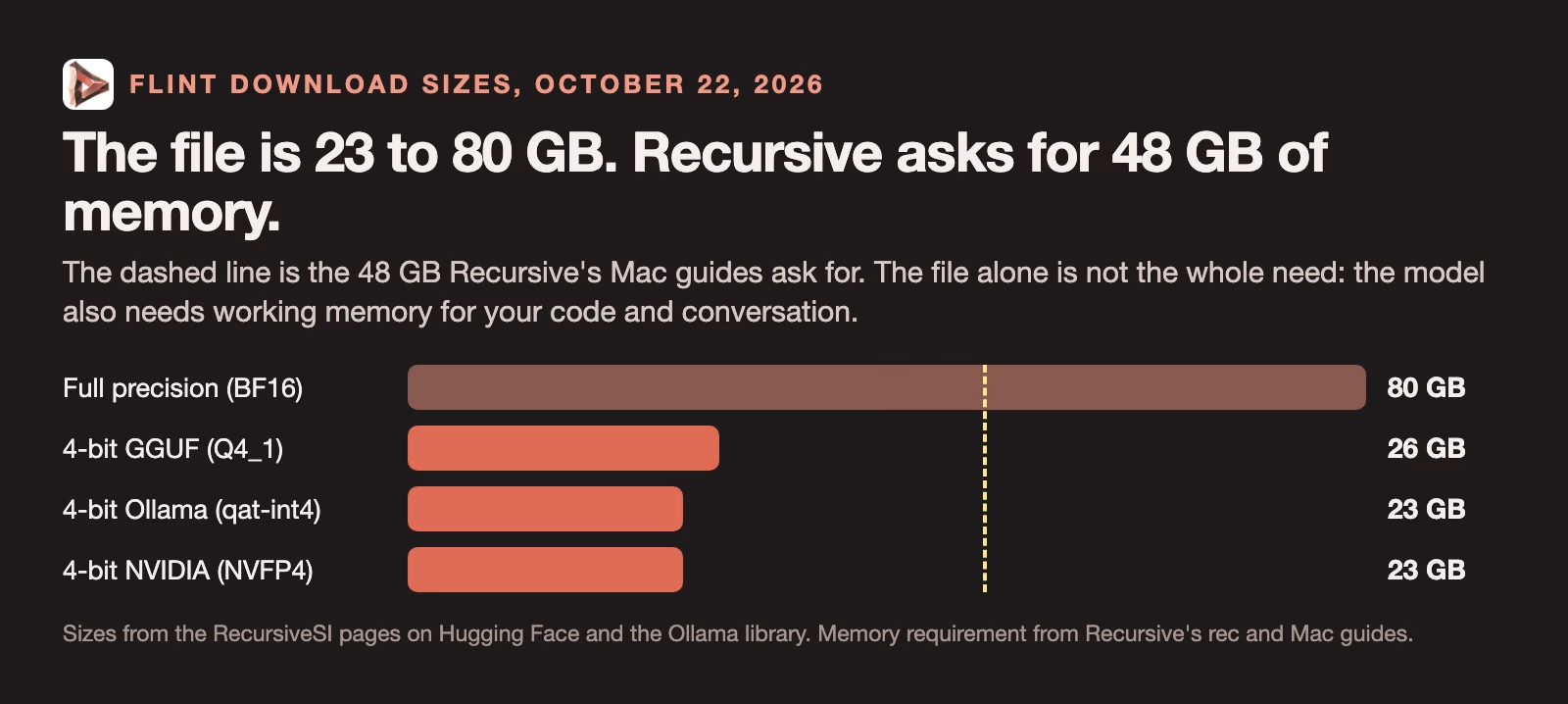
Notice that the smallest file is 23 GB, but the guides still ask for 48 GB. Recursive’s troubleshooting page (checked October 22, 2026) explains why: the file size does not include the memory the model needs while it works, such as the cache that holds your conversation and code. Long contexts, meaning more of your project in memory at once, need more of it. A 32 GB or 36 GB machine may load a 4-bit file, but it will be tight once your project grows, and your other apps need memory too.
On a Windows or Linux computer, you need an NVIDIA graphics card (NVIDIA makes most of the graphics chips used for AI) with enough memory of its own, or one of NVIDIA’s RTX Spark machines, where Recursive reports over 150 tokens per second on a 64 GB model. A laptop with 16 GB of memory cannot run Flint; for that, use the free cloud option below.
Is Flint good at coding?
By Recursive’s own tests, Flint is strong for its size and not the best model you can run locally. The model card (checked October 22, 2026) reports 54.9% on Terminal-Bench 2.1, 89.7% on SWE-bench Pro v2 and 74.2% on SWE-bench Verified. These are benchmarks, fixed sets of coding tasks that models are scored on, mostly real bug fixes from open-source projects.
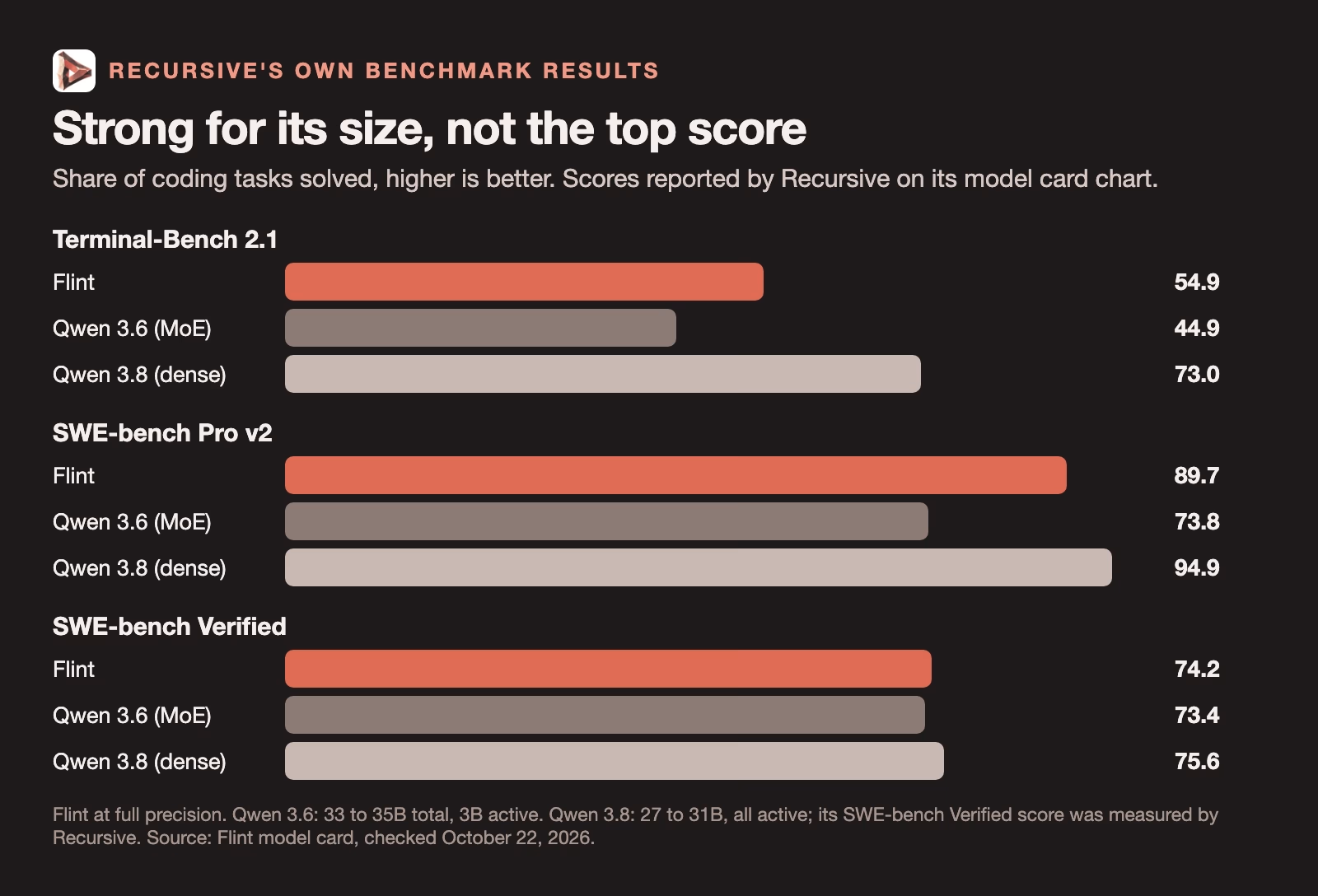
The chart shows Flint at full precision next to two models from its own comparison: Qwen 3.6, a mixture-of-experts model with 33 to 35 billion parameters and 3 billion active, and Qwen 3.8, with 27 to 31 billion. Flint beats Qwen 3.6 on all three tests.
Read that chart with two cautions. First, the scores are Recursive’s own, run with its settings, and some of the comparison scores, such as Qwen 3.8 on SWE-bench Verified, were measured by Recursive rather than by each model’s maker. Second, the comparison that matters is speed against quality. Qwen 3.8 is a dense model, where every parameter works on every token, and it scores higher than Flint on all three tests. Recursive’s answer is speed: its launch post says Flint is over five times faster than dense models of 25 to 40 billion parameters with similar coding scores. If you want fast answers on your own machine, Flint is a good trade. If you want the best possible answer and can wait, it is not the obvious pick.
Three ways to try Flint
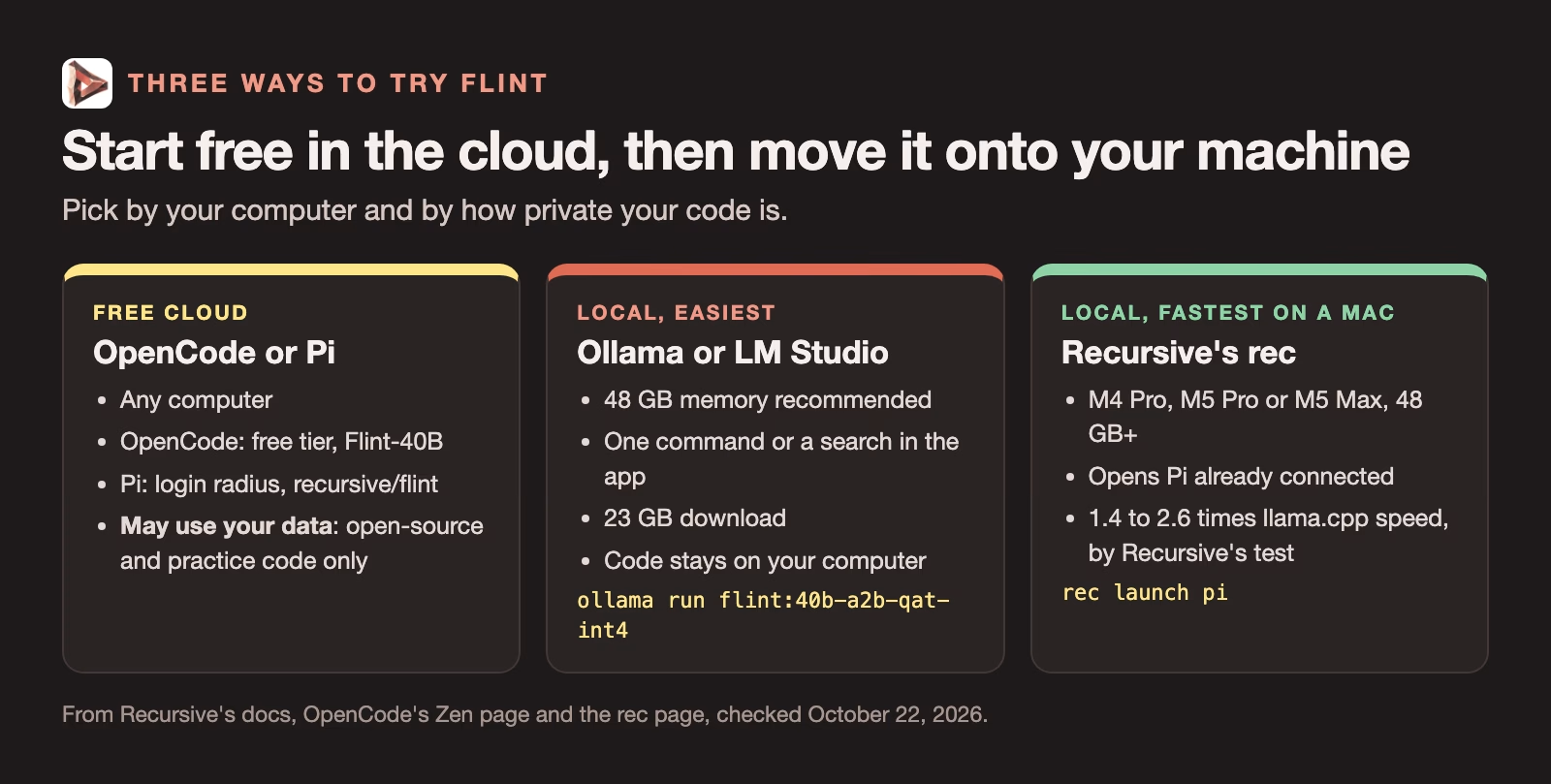
You do not need a powerful computer to find out whether you like Flint. Start in the cloud, then move it onto your machine if it earns a place.
Free in the cloud, with a data catch
OpenCode, an open-source coding assistant that runs in your terminal, the text window where you type commands, lists a free model called Flint 40B Free. In its model picker, choose the free tier and then Flint-40B. OpenCode’s Zen page (checked October 22, 2026) says that during the free period, collected data may be used to improve the model, and that data is kept for 30 days. Pi, another coding assistant, offers a free hosted Flint through a provider called Radius, and Recursive’s Pi guide (checked October 22, 2026) says Pi labels it “Flint (free, trains on data)”.
So use the free cloud versions for open-source code, tutorials and practice projects only. Do not paste in your company’s private code, passwords or customer data.
On your own computer with Ollama
Ollama is a free app that downloads and runs open models on your computer with one command. It is the easiest local route if you are new to this. After installing Ollama, open a terminal and run the command below. It downloads the 23 GB model the first time, so start it on a fast connection.
# Download Flint (about 23 GB the first time) and start a chat
ollama run flint:40b-a2b-qat-int4
When the chat prompt appears, ask it something small to confirm it works, then type /bye to leave. LM Studio, a desktop app with a point-and-click interface, also lists Flint; search for recursivesi/flint in its model library and pick a version that fits your memory.
On a recent Mac with rec
Recursive also ships its own engine, called rec, tuned for M4 Pro, M5 Pro and M5 Max Macs. The rec page (checked October 22, 2026) reports 1.4 to 2.6 times the speed of llama.cpp, the most common open-source engine, on an M4 Pro with 48 GB. It installs with one line, and then rec launch pi starts the model and opens the Pi coding assistant already connected to it.
# Install rec (Apple Silicon M4 Pro, M5 Pro or M5 Max, 48 GB memory or more)
curl -fsSL https://raw.githubusercontent.com/recursive-oss/rec/main/install.sh | bash

# Check your Mac meets the requirements before the download
rec doctor

# Start Flint and open the Pi coding assistant, connected to it
rec launch pi

# Stop the model server when you are done, to free the memory
rec stop
The install line downloads and runs a script from the internet, so read it first if your company has rules about that. The rec doctor command checks that your Mac meets the requirements before it downloads 23 GB you cannot use.
How to connect Flint to your own coding assistant
Every local route above also starts a small web server on your computer that speaks the same language as OpenAI’s API, the standard way programs send requests to an AI model. That means most coding assistants can use Flint by changing three settings: the address, the model name and the key.
| Route | Address (base URL) | Model name | Key |
|---|---|---|---|
| Ollama | http://127.0.0.1:11434/v1 | flint:40b-a2b-qat-int4 | ollama (any text) |
| LM Studio | http://127.0.0.1:1234/v1 | flint (after lms load --identifier flint) | Only if you turned on authentication |
| rec | http://127.0.0.1:11500/v1 | flint | Printed by rec auth token |
Before you point a coding assistant at it, check that the server answers. With Ollama running, this request asks Flint for a one-line reply. The address 127.0.0.1 means “this computer”, so nothing leaves your machine.
curl http://127.0.0.1:11434/v1/chat/completions \
  -H "Content-Type: application/json" \
  -d '{"model": "flint:40b-a2b-qat-int4",
       "messages": [{"role": "user", "content": "Reply with one short sentence."}],
       "max_tokens": 4096}'
If you get back a reply inside a field called choices, the server works. If the request fails, open the Ollama app first, because the server only runs while Ollama is open.
Recursive recommends a few settings when you connect it yourself: temperature 1.0, top-p 0.95 and top-k 20, which control how varied its word choices are, and a large output budget, because Flint always reasons through a problem before it answers and that reasoning counts toward the output. If answers stop halfway, the output limit is too small.
A one-hour test before you trust it
Benchmarks tell you how a model does on someone else’s tasks. Before Flint touches your real work, give it an hour on yours, on a copy of a project and not the original.
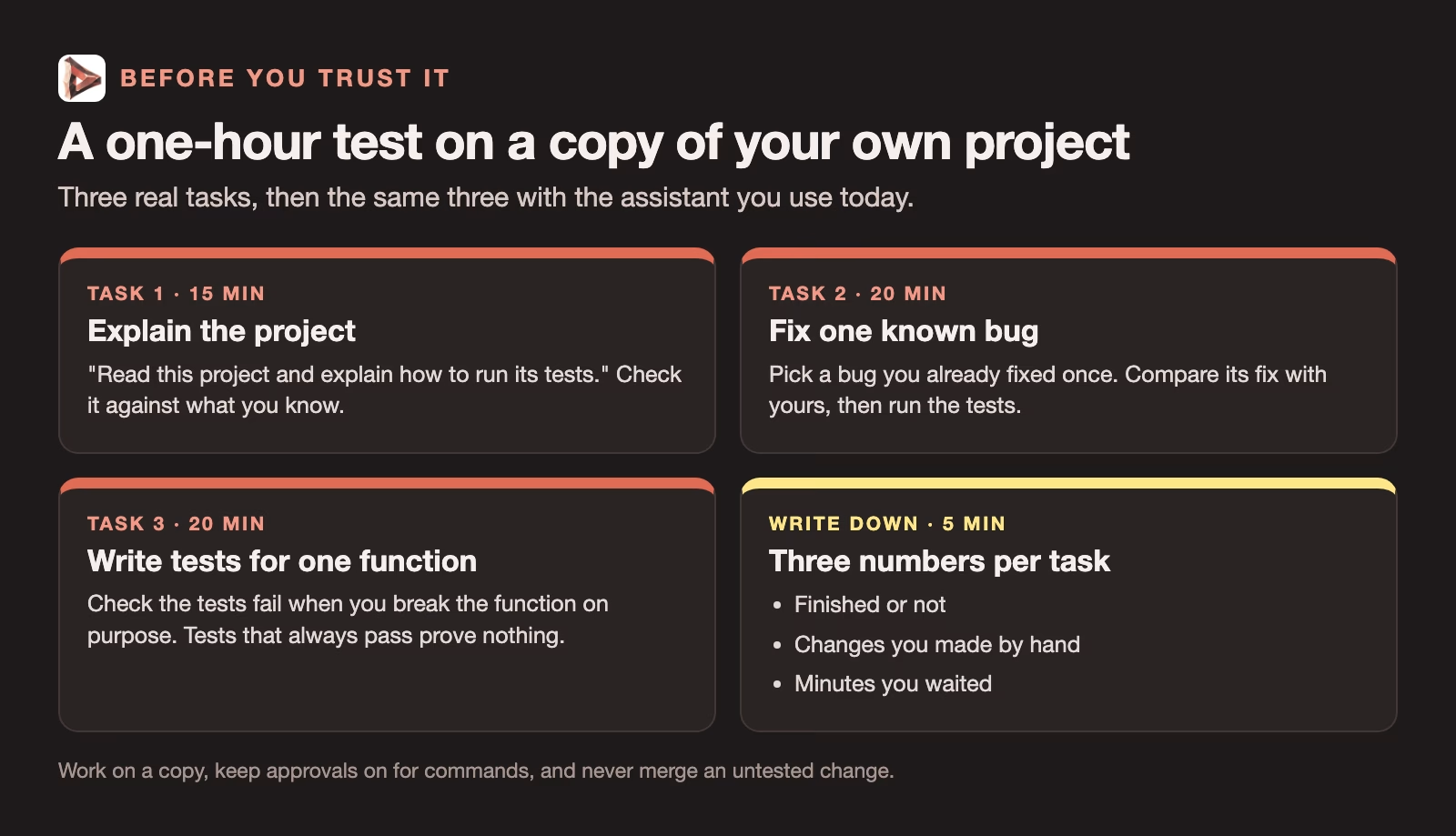
Plan about 15 minutes for the first task, 20 minutes each for the bug fix and the tests, and the last 5 minutes for your notes. Keep a short note for each task: did it finish, how many changes did you make by hand, and how long did you wait. Then run the same three tasks with the coding assistant you already use. That comparison, on your own code, is worth more than any chart.
Two habits from earlier guides apply here. A coding agent should ask before it runs commands on your computer; how to make an AI agent ask before it runs commands shows how to set that up. And never merge a change you have not tested, which how to use DeepSeek for coding without trusting untested changes covers step by step.
When Flint is the right choice
Flint makes sense when three things are true: your code cannot leave your machine, you have a computer with 48 GB of memory or more, and you want answers fast enough to keep working without waiting. A developer at a company with strict rules about where code goes is the clearest fit.
It makes less sense if you have a 16 GB laptop, if you need the strongest possible model for a hard problem, or if you need the AI to read screenshots. In those cases a hosted assistant, or a larger local model you are willing to wait for, is a better choice. If running models locally is new to you, start with why run an AI model on your own computer, and for the memory math in more depth, the guide to what hardware you need to run AI on your own computer.
Quick recap
- Flint is Recursive’s open-weight coding model from October 21, 2026: about 40 billion parameters, 2.5 billion used per token, Apache 2.0 license, text only.
- It is fast because few parameters work at once, but it needs memory for all of them: Recursive asks for 48 GB on a Mac.
- Try it free in OpenCode or Pi first, but only with code you do not mind sharing, because the free cloud versions may use your data.
- Run it locally with
ollama run flint:40b-a2b-qat-int4, or with Recursive’s rec engine on a recent Mac. - Give it a one-hour test on a copy of your own project before trusting it.
Sources
- Richard Socher on X: Introducing Flint (October 21, 2026 announcement)
- Recursive: Introducing Recursive Flint (October 21, 2026: speed claims, context, runtimes, license)
- Hugging Face: RecursiveSI/flint model card (parameters, experts, benchmarks, settings, Apache 2.0; checked October 22, 2026)
- GitHub: recursive-oss/rec (requirements, install, commands, local API; checked October 22, 2026)
- Recursive docs: Getting started (local and cloud options; checked October 22, 2026)
- Recursive docs: Ollama (model name and local API address; checked October 22, 2026)
- Recursive docs: LM Studio (download and server settings; checked October 22, 2026)
- Recursive docs: Pi (free Radius option labeled trains on data; checked October 22, 2026)
- Recursive docs: Troubleshooting (memory beyond file size; checked October 22, 2026)
- OpenCode Zen (Flint 40B Free and its data policy; checked October 22, 2026)
- Ollama library: flint (download sizes and context window; checked October 22, 2026)
Keep going
Same lessons in your feed
Short diagrams, hooks, and weekly tutorials on Substack, Instagram, X, and Facebook.