Every workflow follows the same basic pattern. Something triggers it, actions change data in other systems, and conditions decide which path the data takes next. Get a condition wrong and an action can fire twice, which is why idempotent actions matter: an idempotent action produces the same result no matter how many times it runs, so a retry never charges a card or sends an email a second time.
Say you set up a workflow that copies support tickets into Slack, a team chat app, and you filter only on the sender’s email domain. Internal tickets from your own staff slip through into a channel your customers can read, and you spend an afternoon apologizing. One missing condition caused it. Routing rules belong in the design from day one, not bolted on after something breaks.
The grammar of workflow automation
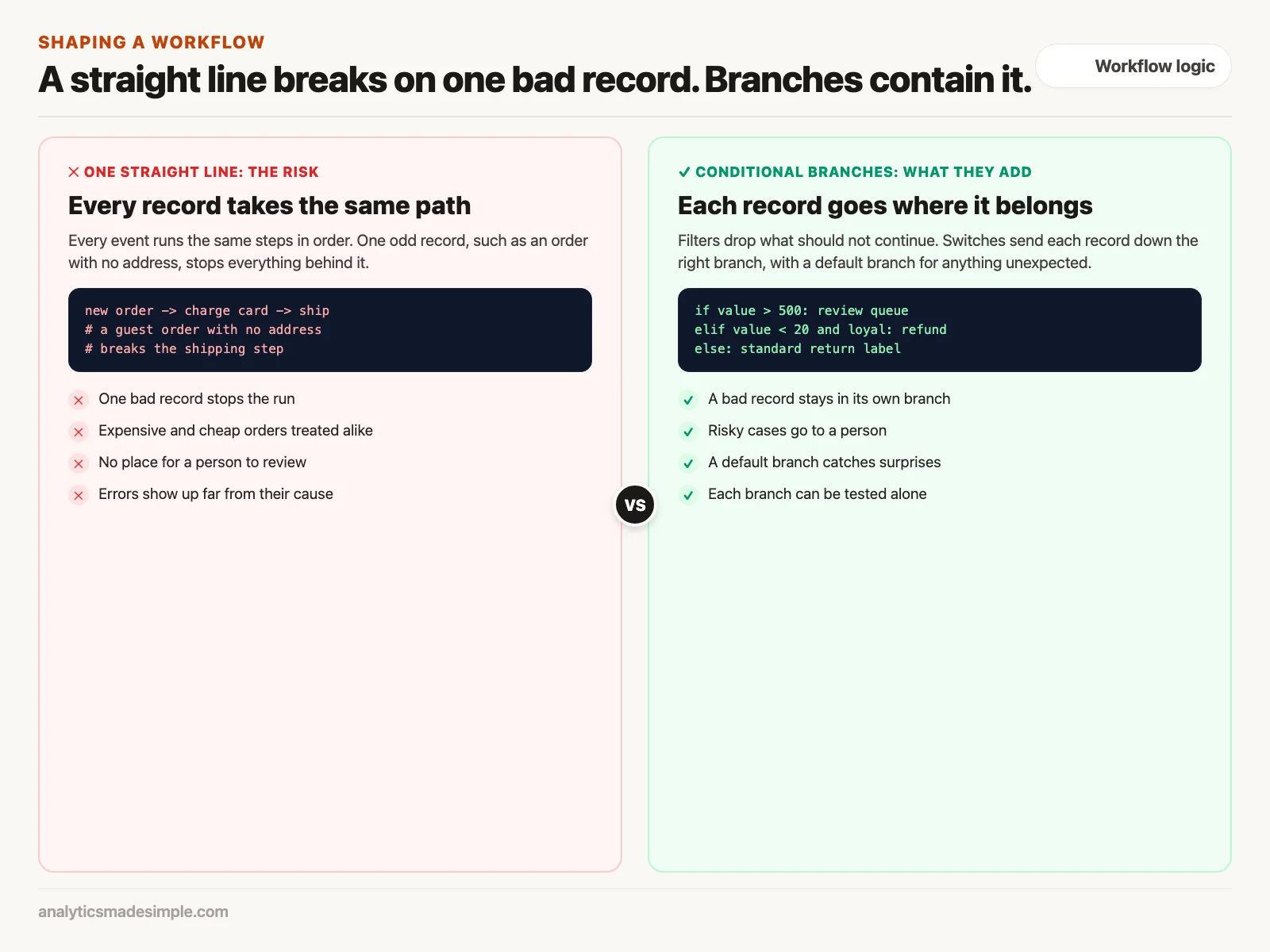
A trigger wakes a workflow up. Filters and switch nodes then decide whether the data should keep moving and which branch it should follow. Actions make the real change, such as updating a record or sending a payment. A workflow that only runs in a straight line breaks easily, because one bad record stops everything behind it. A workflow built with several branches keeps a single error contained in its own path and protects the money and data moving through the rest of the system.
The anatomy of triggers: how workflows awaken
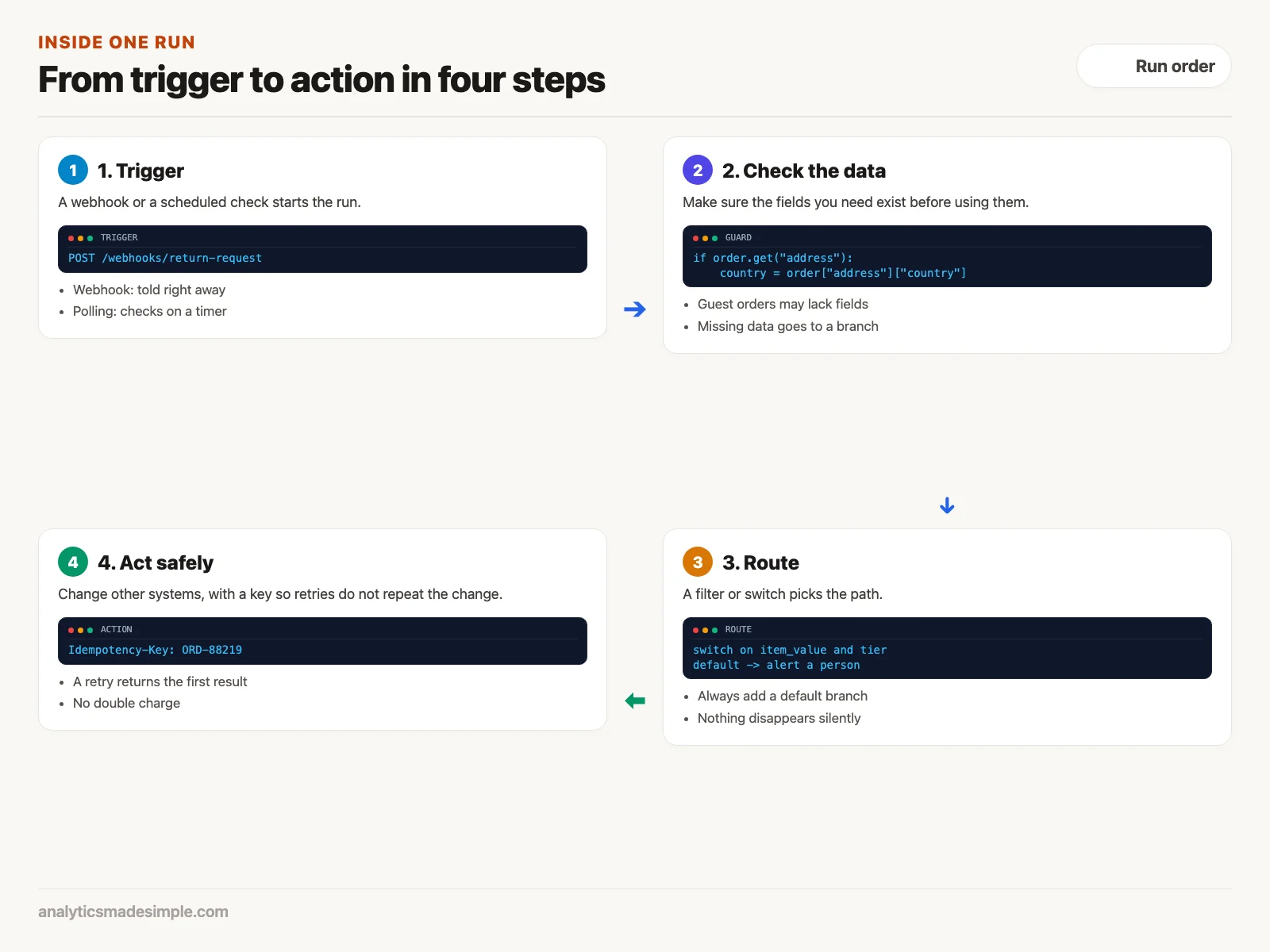
A workflow cannot start on its own. It needs a trigger, the part of the system that watches an outside service and turns an event out there into a data packet in here. Triggers come in two families: ones that poll on a schedule and ones that wait for a webhook.
A polling trigger checks in on a set schedule, the way you might refresh an inbox every few minutes. It might query the Salesforce API (the published way other software asks Salesforce for data) every fifteen minutes, asking for every lead created since the last check. To avoid processing the same lead twice, the platform has to remember where it left off, usually by storing the last timestamp or record ID it saw.
Polling works fine for older systems that have no other option, but it costs you in three ways. It eats into your API rate limit, the cap a vendor sets on how many requests you can make per minute. It runs up cloud computing charges even when nothing happened. And it is slow by nature: a lead that arrives one second after a polling check sits untouched until the next one runs.
A webhook trigger works the other way around. You give a source service, such as Stripe or Shopify, a web address hosted by your automation platform. The moment something happens there, its server sends an HTTP request straight to that address, with the details attached. HTTP stands for Hypertext Transfer Protocol, the shared language browsers and servers use to talk. Your workflow wakes up instantly, finishes in well under a second, and uses no resources between events.
The anatomy of actions: mutations and idempotency
If triggers are a workflow’s senses, actions are its hands. An action node takes the data assembled by the steps before it and makes a change somewhere else. That might mean writing a row into a database, charging a card, spinning up a server, or posting an alert into an engineering Slack channel.
The single biggest hazard when you set up an action node is ignoring idempotency. An operation is idempotent if running it five times leaves the system in exactly the same state as running it once. Reading data is naturally idempotent; asking for a customer’s profile ten times in a row changes nothing about that customer.
Writing or changing data is a different story. It is almost never idempotent unless you make it so. Say an action node charges a card through the Stripe API, the way outside software talks to Stripe. A network hiccup can drop the connection right after Stripe charges the card, before its confirmation reaches your automation platform. The platform reads that as a failure and tries again, and without a safeguard, the customer gets charged twice for the same order.
Modern platforms fix this with an idempotency key, a unique code you attach to the request. Pass the order’s own ID as that key. If the same request arrives twice, the destination service recognizes the second one as a repeat, and it hands back the original receipt instead of charging the card again.
Conditional routing: filters, switches, and boolean trees
Once a workflow can react to events, the next question is what it should do with each one. That decision usually comes from one of two building blocks: a filter or a switch.
A filter node works like a bouncer at a door who checks one thing. Does the customer’s email end in a corporate domain? Is the order marked paid? If the answer is yes, the workflow keeps going. If the answer is no, it stops cleanly right there, logs itself as skipped, and does not throw an error. A switch node handles more than a yes-or-no question. It looks at one value and sends the data down one of several paths. A support ticket, for example, might get scored for tone. Praise goes to a marketing folder, routine billing questions go to a helpdesk queue, and threats to cancel go straight to a customer success lead with a high-priority Slack alert.
Hands-on code: writing a resilient conditional routing node in Python
Here is that same decision logic written out in Python instead of dragged onto a screen. The function below takes in a return request, also called an RMA (return merchandise authorization), checks it against a few business rules, and sends it down the right path. Figure 3 shows the three rules.
from dataclasses import dataclass
from typing import Optional, Dict, Any

@dataclass
class ReturnRequest:
    rma_id: str
    order_id: str
    item_value: float
    reason: str
    customer_tier: str
    prior_returns_count: int

def evaluate_and_route_rma(rma: ReturnRequest) -> Dict[str, Any]:
    # Rule 1: Fraud and High-Risk Flagging
    if rma.item_value > 500.0 or rma.prior_returns_count >= 3:
        return {
            "action": "ROUTE_TO_FRAUD_QUEUE",
            "reason": "High item value or frequent return history",
            "priority": "HIGH",
            "requires_human_signoff": True,
            "shipping_label_type": None
        }

    # Rule 2: Low-Value Economic Friction Elimination
    if rma.item_value < 20.0 and rma.customer_tier in ["VIP", "LOYAL"]:
        return {
            "action": "INSTANT_REFUND_NO_RETURN",
            "reason": "Item cost lower than return shipping fee",
            "priority": "LOW",
            "requires_human_signoff": False,
            "shipping_label_type": None
        }

    # Rule 3: Standard Return with Carrier Ground Label
    return {
        "action": "GENERATE_STANDARD_RETURN_LABEL",
        "reason": "Standard compliant return claim",
        "priority": "NORMAL",
        "requires_human_signoff": False,
        "shipping_label_type": "USPS_GROUND_ADVANTAGE"
    }

# Example execution with varied customer payloads
sample_return = ReturnRequest(
    rma_id="RMA-9042",
    order_id="ORD-88219",
    item_value=14.50,
    reason="Wrong color received",
    customer_tier="VIP",
    prior_returns_count=0
)

result = evaluate_and_route_rma(sample_return)
print(f"RMA Routing Decision: {result['action']} (Reason: {result['reason']})")
Running it prints RMA Routing Decision: INSTANT_REFUND_NO_RETURN (Reason: Item cost lower than return shipping fee), because the $14.50 item from a VIP customer matches rule 2.
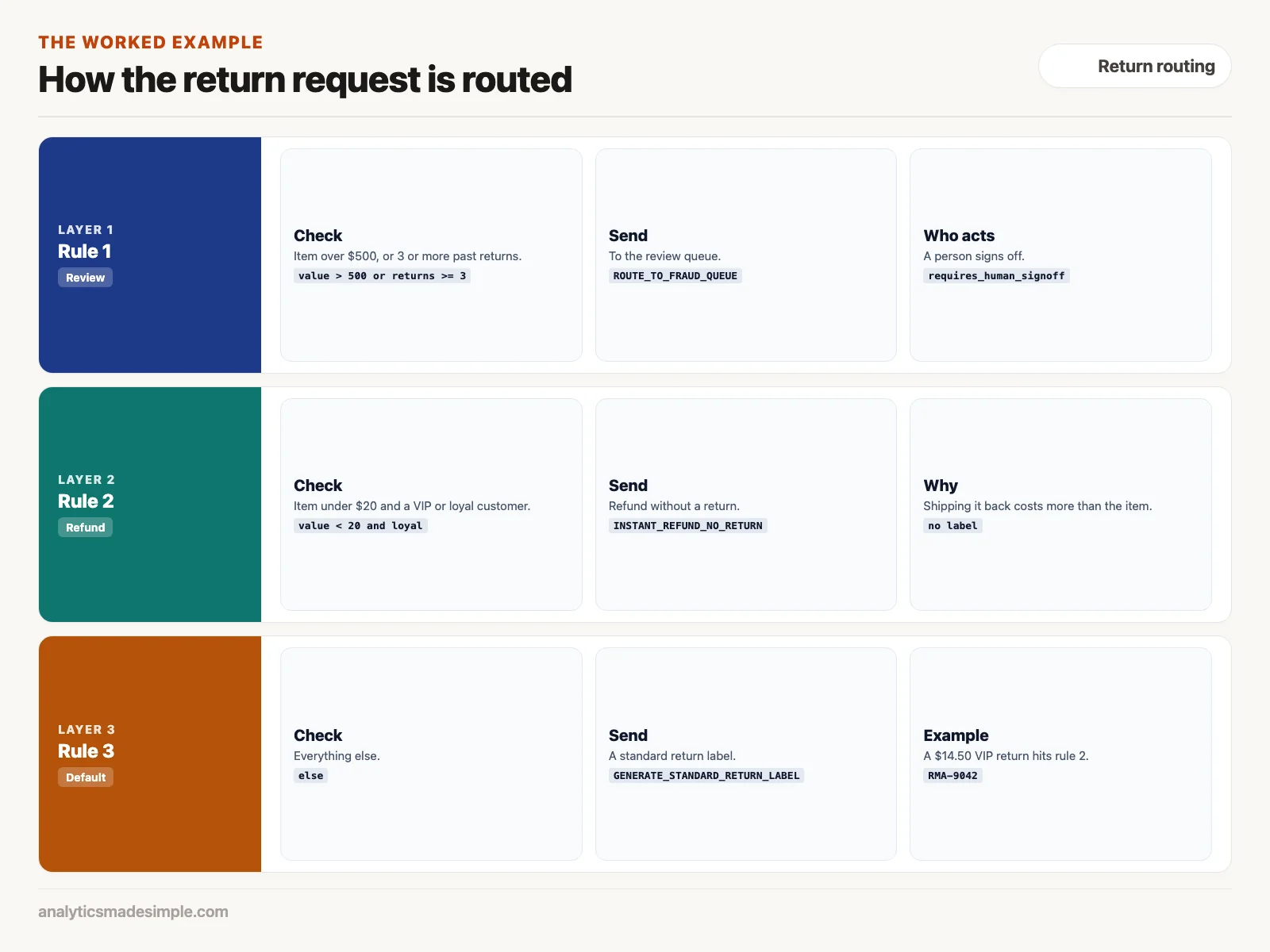
Notice how clear boundaries protect the business on both ends. Cheap items from loyal customers get refunded instantly, without burning money on freight. Pricey or suspicious claims get pulled aside for a person to look at instead. Visual tools like n8n, Make, and Zapier build this same logic with decision diamonds you drag onto a canvas, but underneath, the math is identical to what you just read.
The logic primitives scorecard: choosing the right building block
Different jobs call for different building blocks, from a plain filter to a full sub-workflow you can reuse elsewhere. The table below lays out where each one earns its keep.
| Logic Primitive | Trigger Mechanism | Complexity | Resource Overhead | Ideal Production Use Case |
|---|---|---|---|---|
| Instant Webhook | Push (Event-Driven) | Low | Near Zero Idle | Real-time notifications, orders, payments, and form submissions |
| Polling Sweep | Pull (Cron Interval) | Low | High API Burn | Legacy ERPs, FTP folders, and databases lacking webhook support |
| Filter Gate | In-Memory Predicate | Very Low | Microseconds | Discarding spam form entries or non-billing transaction events |
| Multi-Branch Switch | In-Memory Evaluator | Moderate | Low | Dynamic routing based on tier, price, geography, or department |
| Sub-Workflow Node | Child Process Call | High | Moderate | Reusable business logic, compliance verification, and batch loops |
Common logic failure modes and how to prevent them
When a workflow breaks in production, the automation software itself is rarely the problem. The real cause is almost always a logic edge case nobody thought through. Three of them show up again and again.
The first is a runaway loop. It happens when an action in a workflow accidentally sets off that same workflow’s own trigger. Picture a workflow that fires whenever a customer record changes in Salesforce, formats the phone number, and saves it back. If nothing filters out edits made by the automation’s own account, that save triggers the workflow again, and it formats the number and saves it again. Within minutes it has run thousands of times, and your API quota and your database locks are both in trouble.
The second is blindness to missing data. Engineers tend to build and test conditions against tidy sample data. A rule that checks order.customer.address.country == 'US' works fine until a guest checkout goes through with no address at all, at which point the address value does not exist and the whole workflow throws an error and stops. Always check that a parent value exists before you dig into a field inside it.
The third is a silent drop. In a switch node with several conditions, it is easy to forget to build a catch-all for anything that does not match. If a transaction shows up with a status of “under review” instead of the “paid” or “failed” your rules expect, it fails every condition and simply disappears with no error and no record. Always wire an alert, or a dead-letter queue (a holding spot for messages nothing else claims), to the default branch of every switch node so nothing vanishes without a trace.
What to do Monday morning
Here is where to start hardening your own workflows this week:
- Audit your switch nodes. Go through every multi-branch decision in your live workflows and confirm each one has an active default path that sends anything unexpected into a channel someone actually watches.
- Add a loop breaker. Check every workflow that writes data back into the same system that triggered it, and add a filter early on that stops the run if the edit came from your own automation account.
- Add idempotency keys to money-moving actions, so a retried step cannot bill a customer twice. Find every action node that bills a customer, creates an invoice, or changes inventory counts. Check whether the destination service supports an idempotency header, then map your own transaction ID to it.
- Get ready to build. The next post takes these building blocks and puts them together into a full, working client-onboarding workflow inside Zapier.
Series notes
This is Part 2 of Automation platforms from scratch. Previous: what platforms are for. Next: Zapier from zero.
Sources
- Hohpe, G., & Woolf, B., Enterprise Integration Patterns: Designing, Building, and Deploying Messaging Solutions (Addison-Wesley Professional, 2003), enterpriseintegrationpatterns.com.
- Richardson, L., & Ruby, S., RESTful Web Services (O’Reilly Media, 2007), read it at O’Reilly.
- Stripe API reference: idempotent requests.
- n8n documentation: the Switch node and the Filter node.
- Zapier Help Center: add branching logic to Zaps with Paths.
Keep going
Same lessons in your feed
Short diagrams, hooks, and weekly tutorials on Substack, Instagram, X, and Facebook.