
An automation platform moves data between the apps you already use, on its own. When something happens in one app, called a trigger, the platform runs a set of steps, called actions, to update the others. You stop retyping data between browser tabs, and you stop writing a separate script for every pair of apps.
Say your marketing team keeps new leads in one app, sales tracks deals in another, and you copy new signups across by hand every morning. On a busy Monday you miss a few from the weekend, and those leads sit untouched for days. An automation platform would copy each signup the moment it arrives, so nothing waits for you to remember.
Why automation platforms exist
Tools such as n8n, Zapier, and Make replace two older habits: retyping data by hand, and writing a one-off script to connect two specific apps. The platform listens for events and reacts to them. It handles the repetitive work: receiving a signal from one app, reshaping the data to fit the next app, keeping passwords and access keys safe, and trying again when a step fails.
Why companies end up with apps that do not talk
Companies use many separate apps because each is good at its own job, but nobody designed them to work together. Most are software as a service, or SaaS: software you rent and use in a browser instead of installing it.
Years ago, a large company often bought one big system from a vendor such as SAP, a German maker of business software, or Oracle, and put every department into it. Setup was slow and costly, but every department’s numbers lived in the same database, so they matched.
Cloud software split that single system into pieces. Product teams might track work in Jira, support in Zendesk, marketing in HubSpot, accounting in QuickBooks Online, and HR in Rippling. Each app suits the team that uses it. But each keeps its own customer records, in its own format, behind its own login. Without something linking them, a person does the linking by hand.
Why one-off scripts break
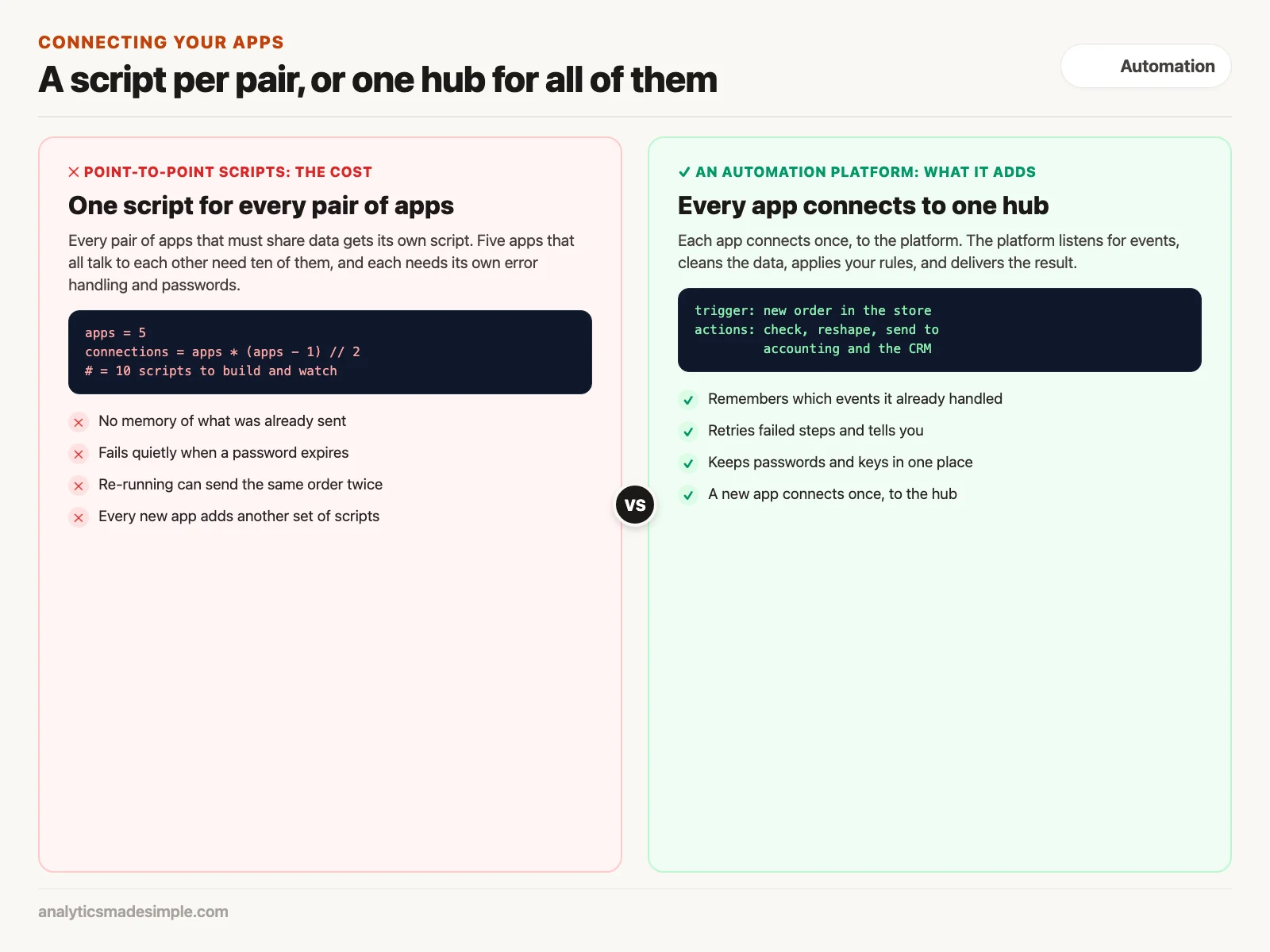
A script that connects two apps works until the day something changes, and then it fails quietly. It usually has no memory of what it already sent, no way to tell anyone it failed, and no plan for an expired password.
Picture the script you might write first, which every hour checks your online store and pushes new orders into your accounting app through its API (application programming interface, the rules one program uses to ask another for data). A scheduler runs it automatically, and it works for weeks. Then the accounting app switches to a login method whose keys expire and must be refreshed, and one Friday night the script gets an “unauthorized” error, writes it to a log nobody reads, and stops.
On Monday you notice, refresh the key, and run the script again. But it has no record of which orders it already sent before it failed, so it sends some of them twice, and those customers are billed twice. Nothing in the script was badly written, but it was missing the parts that remember, retry, and warn.
The number of scripts also grows quickly, because if every app must share data with every other, two apps need one connection, five apps need ten, and six apps need fifteen. Each one needs its own error handling, password storage, and alerts.
The four jobs inside every automation platform
An automation platform puts one shared system in the middle, so each app connects to it once. Behind the drag-and-drop screen, it always does four jobs: take in the event, clean up the data, apply your rules, and deliver the result. Open-source n8n and paid services such as Zapier and Make all work this way.
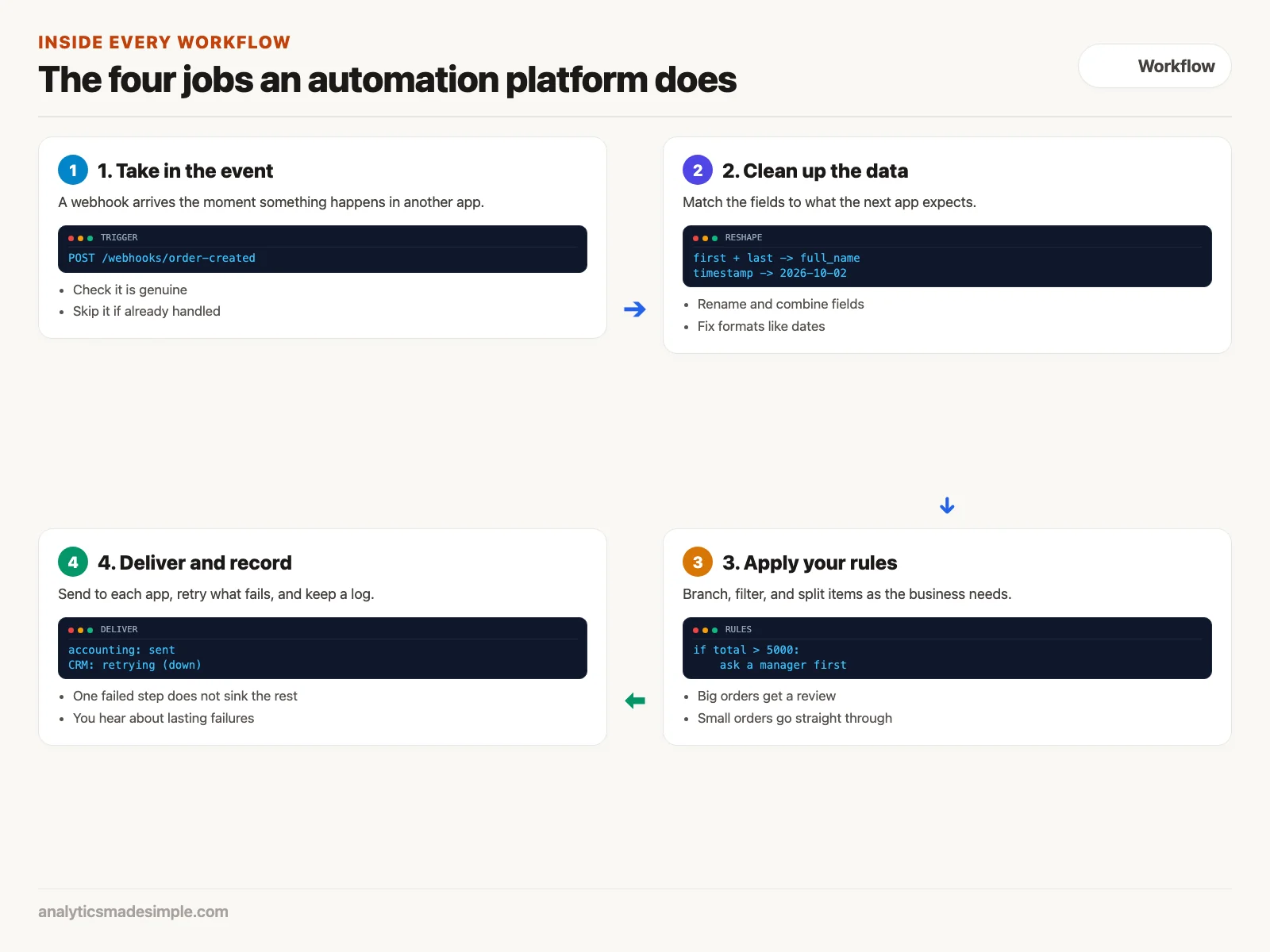
- Take in the event. A workflow waits until something starts it, and the cleanest signal is a webhook: the other app sends a message to the platform’s web address the moment something happens, as a web request that delivers new data. The platform checks the message is genuine and not a repeat.
- Clean up the data. Apps format the same facts differently. One splits first and last names, another wants one full-name field. One stores dates as a count of seconds, another as text. The platform lets you map one field to another without writing code.
- Apply your rules. Real processes branch, so an order over $5,000 might need a manager’s sign-off, while a small one goes straight through. You can also split one order’s ten items into ten separate steps.
- Deliver and record. The platform sends the result to each app that needs it. If one app is down for maintenance, it retries just that step, waiting longer each time, and tells you if it keeps failing.
Polling versus webhooks
A platform can find out about new data in two ways: by asking on a timer, called polling, or by being told, through a webhook. Choose webhooks whenever an app offers them, because they react at once and do not waste requests.
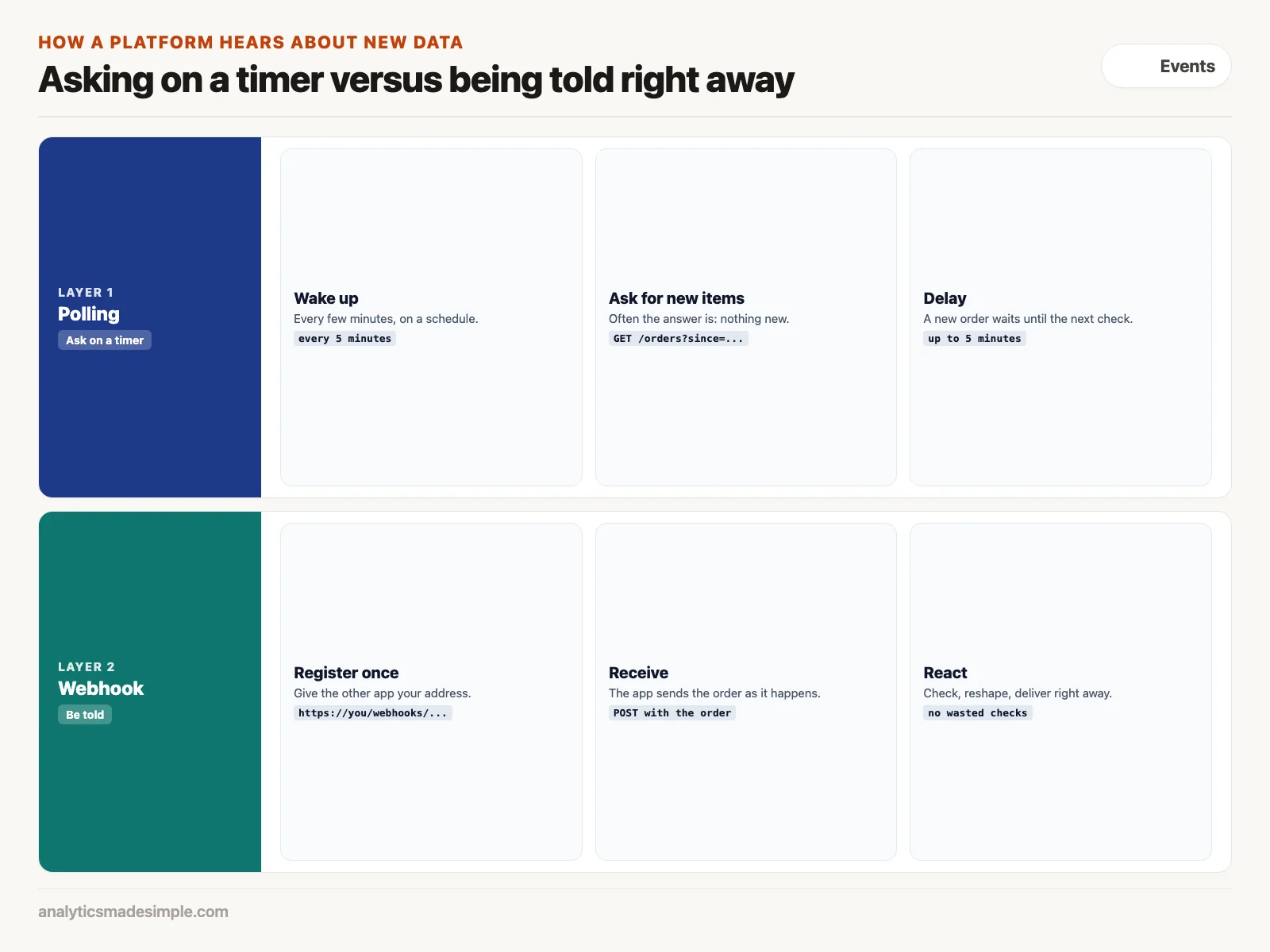
Polling is like asking “are we there yet” on a timer. Every few minutes the platform sends a request asking for anything new since the last check. Often the answer is nothing, but each check still counts against the app’s limit on requests. And there is always a delay: an order placed just after a check waits until the next one.
A webhook flips that around: you give the other app your address once, and it sends each new order the moment it happens, with all the details. If an app gives you the choice, pick the webhook.
Hands-on code: what a safe webhook receiver needs
Receiving one webhook safely takes more work than it sounds. This Python example uses Flask, a small web framework (a library for building web apps), and shows the three checks a real receiver needs: is the message genuine, is it a repeat, and which fields matter. An automation platform does all of this inside one drag-and-drop step.
Install Flask with pip install flask, and set WEBHOOK_SECRET to the shared secret you entered in the sending app’s webhook settings.
import hashlib
import hmac
import os
import time

from flask import Flask, jsonify, request

app = Flask(__name__)
# The shared secret you set in the sending app's webhook settings
WEBHOOK_SECRET = os.environ.get("WEBHOOK_SECRET", "change-me").encode()
PROCESSED_EVENTS = set()  # in production, store this in a database


@app.route("/webhooks/order-created", methods=["POST"])
def handle_order_created():
    # 1. Check the signature, so a stranger cannot send fake orders
    signature = request.headers.get("X-Hub-Signature-256", "")
    expected = "sha256=" + hmac.new(WEBHOOK_SECRET, request.data, hashlib.sha256).hexdigest()
    if not hmac.compare_digest(signature, expected):
        return jsonify({"error": "invalid signature"}), 403

    payload = request.get_json(silent=True)
    if not payload or "id" not in payload:
        return jsonify({"error": "malformed body"}), 400

    # 2. Ignore repeats, so a retried delivery is not processed twice
    event_id = payload["id"]
    if event_id in PROCESSED_EVENTS:
        return jsonify({"status": "ignored", "reason": "duplicate"}), 200
    PROCESSED_EVENTS.add(event_id)

    # 3. Keep only the fields the next app needs
    order = {
        "source_id": event_id,
        "customer": payload.get("customer", {}).get("email"),
        "total_amount": float(payload.get("current_total_price", 0.0)),
        "received_at": int(time.time()),
    }
    print(f"Accepted order {order['source_id']} for {order['customer']}")
    return jsonify({"status": "received", "event_id": event_id}), 200


if __name__ == "__main__":
    app.run(port=8080)
In plain words: the sending app signs each message with the shared secret, and the receiver recomputes that signature and rejects any message where it does not match, so strangers cannot send fake orders. Then it skips any event ID it has already handled, so a retried delivery is not processed twice. Last, it keeps only the fields the next app needs.
Testing it with Flask’s built-in test client, with three requests, gave these results. The first signed delivery was accepted with status 200. Sending the same delivery again returned 200 with "reason": "duplicate", so it was not processed twice. A delivery with a wrong signature was rejected with status 403.
Notice that none of this has done anything with the order yet. A production version would also need a database to remember handled events after a restart, a queue so slow steps do not time out the request, and an alert when something breaks. Platforms such as n8n bundle these into a webhook step you configure from a menu.
Choosing an approach
The right tool depends on how much control you need, where your data may live, and how much volume you expect. A one-person business wiring up a three-step flow needs something very different from a hospital handling patient records under HIPAA, the US law that protects health information.
| Integration Approach | Setup Speed | Technical Skill | Maintenance Burden | Best Operational Fit |
|---|---|---|---|---|
| Custom Cron Scripts | Slow (days) | Senior Software Engineer | High (manual monitoring) | Highly bespoke algorithms and existing microservice meshes |
| Zapier (Cloud SaaS) | Blazing (minutes) | Zero (non-technical) | Near Zero (fully managed) | Rapid prototyping and low-volume standard SaaS connections |
| Make / Integromat | Fast (hours) | Moderate (data modeling) | Near Zero (fully managed) | Complex multi-branch routing and nested array aggregations |
| Self-Hosted n8n | Fast (hours) | Intermediate (Docker/VPC) | Low (self-managed server) | Data sovereignty, high task volumes, and custom AI workflows |
| Enterprise iPaaS (Workato) | Slow (months) | Enterprise IT Specialists | Moderate (governance overhead) | Large Fortune 500 compliance and enterprise ERP migrations |
When not to use an automation platform
Automation platforms are built to move one event’s worth of data between apps. Reach for something else in three cases:
- Moving very large data sets. Copying millions of rows into a data warehouse (a central database built for reporting) every night is a job for tools built for bulk loading, such as Airbyte or Fivetran, because a workflow tool handles events one at a time.
- Work that must happen in milliseconds. Each workflow step adds some delay while it logs and passes data along. Real-time systems such as ad bidding belong in your own code.
- Your core business logic. Pricing rules or fraud checks belong in your own codebase, where they are tested and reviewed. Use the platform to connect apps, not to replace the software your business runs on.
What to do next
- Find the copy-paste jobs. Ask your team which tasks need two browser windows side by side to retype the same information, and rank them by hours spent each week. The top job on that list is your first workflow.
- Check for webhooks. Look up whether the app causing the most pain can send webhooks, or only lets you poll on a schedule, because that decides how fast your workflow can react.
- List the fields. Write down the five to ten fields that must move between the two apps, and note any format mismatches, such as phone numbers written two ways.
The next post in this series covers triggers, actions, and branching, including how to stop a workflow from looping.
Series notes
This is Part 1 of Automation platforms from scratch. Next: triggers, actions, and routing.
Sources
- n8n documentation: the Webhook node. docs.n8n.io
- GitHub documentation: validating webhook deliveries with an HMAC signature. docs.github.com
- Fielding, R. T. (2000). Architectural Styles and the Design of Network-based Software Architectures. Doctoral dissertation, University of California, Irvine. ics.uci.edu
- Flask documentation. flask.palletsprojects.com
Keep going
Same lessons in your feed
Short diagrams, hooks, and weekly tutorials on Substack, Instagram, X, and Facebook.