
A desktop app labeled “local” can still send your prompt to someone else’s server if its cloud mode is switched on. What leaves when you press send is the text, any files you paste, and usually some technical details about the request. Running locally with cloud turned off can keep all of that on your own machine. And when the text is allowed to leave, a work chat plan at around $20 a month is often the honest privacy choice.
Say you are in people operations and you paste a 12-page draft offer letter into an app you had labeled “local.” The letter has a base salary of $118,500, a sign-on bonus, equity, and the candidate’s name on page one. The model picker still showed a cloud model from last Tuesday, because the model file on your own disk took 22 seconds per paragraph, and the reply landed in 4 seconds. That speed was the giveaway, since the 12 pages had already left the building.
This post maps what travels when you send a prompt, when running locally is worth the extra heat (health notes, unreleased numbers, and children on a shared house chat), and how to read the model line before you paste. One more reminder: Groq, spelled with a q, is a hosting company, and it is not Grok, the chatbot from xAI.
What leaves when you hit send
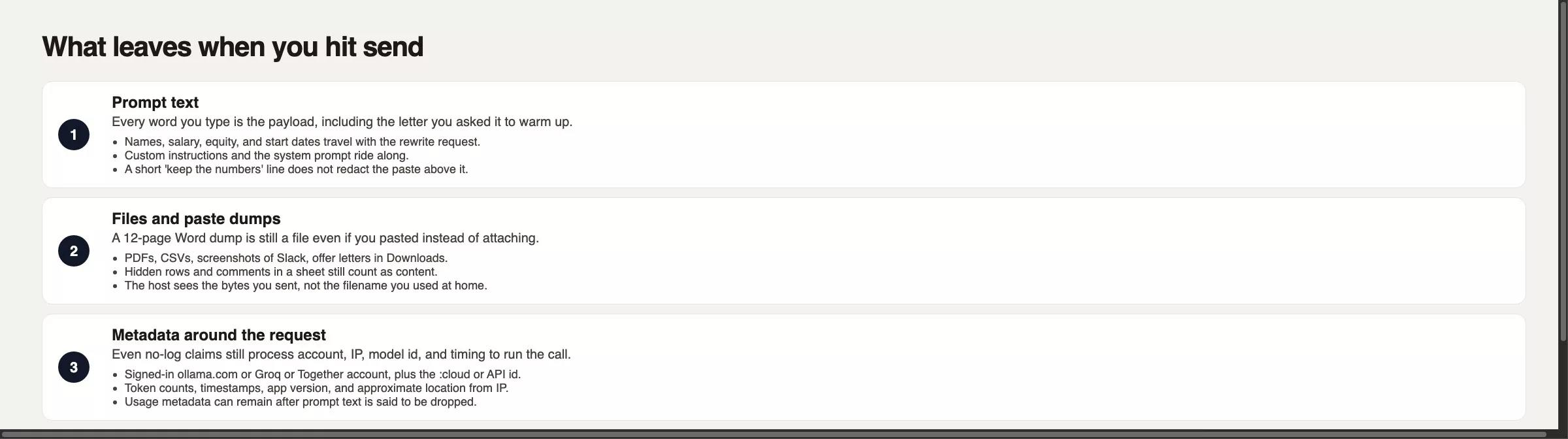
People argue about brands, but the useful thing to think about is the packet of data that travels. A request like “make this warmer, keep the numbers” does not hide $118,500, because the model has to see the letter to rewrite it. Your custom instructions ride along as well. Files are the same payload with a different button, whether that is a PDF, a spreadsheet, a screenshot from a chat, or a 12-page paste. Hidden spreadsheet rows and Word comments still count, and the filename on your disk is only a local label. The other side sees the content.
Even when a host says it does not keep your prompt text, the call still has to be routed, which usually means an account, an IP address (the number that identifies your connection), a model name, a timestamp, and a count of tokens (the small pieces of text a model reads). Ollama’s FAQ, checked in August 2026, says local runs stay on your machine, while cloud-hosted models are processed to provide the service, with a claim of no storage or training on that content, plus “basic account info and limited usage metadata.” Together’s documentation says inputs and outputs are not stored by default (zero data retention, or ZDR), with training available only if you opt in. Those are policy sentences, and they do not mean “nothing left the laptop.”
After the reply, a history exists. A ChatGPT or Claude thread sits in a conversation list, and a Groq playground has the same shape because it is a product with an account. A local app writes chats to a folder on your disk, and Time Machine, OneDrive, and the other login on the living-room laptop can all read that folder. The delete button in an app is a button plus a vendor policy, and legal holds and abuse-log clauses are reasons not to treat the trash can as proof.
Rule of thumb: If the model name contains the word cloud, or the reply was faster than your fan, treat the paste as a document you emailed to that host.
Local is not a privacy spell
A file on your own disk can stay there. With llama.cpp, a GGUF file you downloaded (a compact model file), or Ollama or LM Studio (a free app for running models on your own computer) using a local model with cloud features off, the words are processed in your computer’s working memory (RAM) on hardware you paid for. Ollama’s FAQ states that they do not see your prompts when you run locally, and LM Studio’s app privacy page (effective June 2026) says local messages and documents stay on the device.
That benefit comes with conditions. Full-disk encryption has to be on, and the app must not be signed into a cloud model for this chat. Web search add-ons send your query text to a search vendor. Serving the model on your house network (OLLAMA_HOST=0.0.0.0, or LM Studio’s “serve on network” setting) means a sibling’s laptop can reach the same endpoint, the network address the model answers on, and a later post will spend a page on sharing one machine. A stolen laptop is still a privacy problem, and so is a partner who uses the same macOS user. Local means “not that vendor,” and it does not mean invisible.
Hosted open weights still leave
Using Llama or Qwen on a playground is a question of location, not a question of license. Groq is a hosted inference (running a trained model to get answers) company that runs models on its own custom chips instead of the usual graphics chips (GPUs) (called LPUs, a kind of processor built for language models), and it is not the Grok chatbot from xAI. Together and Fireworks rent out graphics chips (GPUs) and list many model families. OpenRouter is a switchboard with one key and many model providers behind it, so its privacy story is whichever provider handles your request. In August 2026 Together described zero data retention by default and a separate toggle for passthrough models that forward your traffic to another provider, and Fireworks advertised zero-retention options. Groq publishes a trust center and a privacy policy. Do not paste an offer letter because a blog said “ZDR.” Open the host’s current privacy pages the week you send traffic.
Hosted is the right choice when you want a 70B-class model that your laptop cannot hold, and the text is allowed to leave. It is the wrong choice when you told your colleagues “we run this locally.” The license document on Hugging Face does not travel to the host’s logs. If you picked “open” because you wanted privacy, then a call to Groq or Together missed that requirement. If you picked “open” because you wanted a model family and a per-token bill, write that in the team note.
The desktop app with a cloud toggle
This is the trap that ate the offer letter, and the confidential agreement in the earlier privacy guide. Ollama’s public site and documentation sell models that run on your computer and cloud models that run on Ollama’s servers. Cloud model names look like local ones, and the docs show names such as gpt-oss:120b-cloud. You stay in the same command-line tool and the same window, but the request does not stay in RAM. LM Studio has grown a similar split: local, remote on hardware you own (LM Link), and a Secure Cloud path with a zero-retention claim. It is one icon with two buildings behind it.
You can turn the cloud path off. Ollama documents a local-only mode, where you set disable_ollama_cloud to true in ~/.ollama/server.json, or export OLLAMA_NO_CLOUD=1, and then restart. The logs should show that cloud is disabled. Flags change over time, so read ollama --help and the FAQ the week you lock this down. Until that switch is on, a leftover :cloud name in the picker is enough to send your text away. Speed is a cheap detector. Your local 8B model needed 22 seconds per paragraph, so four seconds means another computer answered. If you felt the fan spin on a toy prompt yesterday and do not feel it today, look at the model line before you paste the real file.
When local is worth the heat
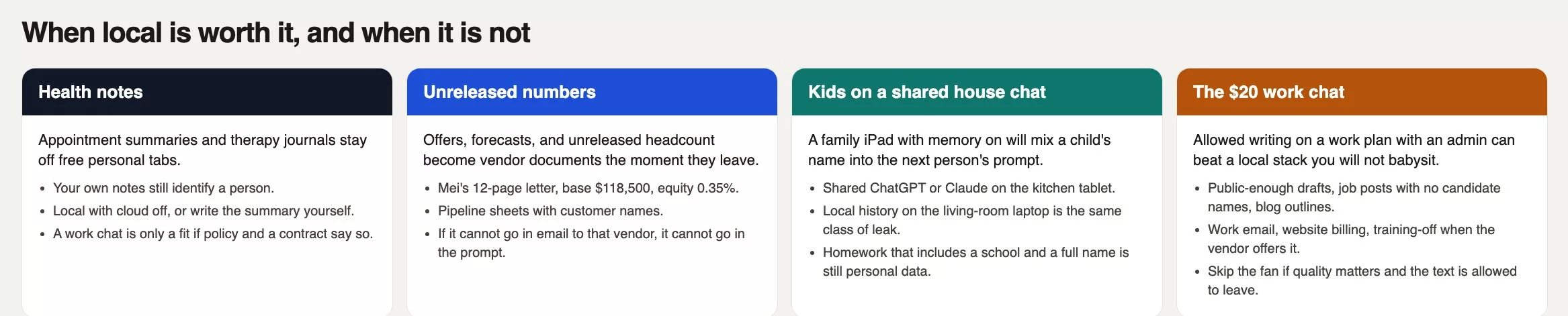
You do not need a threat model built for a spy agency. You need to spot three ordinary piles of text that should not become someone else’s support ticket, autocomplete suggestion, or training data.
Health notes
A discharge summary, a therapy journal, a medication list, or an email from a school nurse is about a real person, and even your own notes still identify you. The cafeteria spreadsheet in the earlier privacy post, with 2,118 rows and dates of birth in column D, was this pile. Running locally with cloud off is a good fit if you accept slower models. A contracted work workspace is a fit only if your policy says health data may go there, and a free personal tab on a phone is not. If you will not maintain a local setup, write the summary yourself.
Unreleased numbers
Offer letters, a forecast that is not public, headcount you have not announced, and a sheet of open sales deals with customer names all belong here. The $118,500 salary plus 0.35 percent equity is this pile, and so is a message like “Q3 is going to miss by $140k” in a screenshot. If you would not attach the file to an email addressed to that vendor’s privacy inbox, do not paste it. Use local, or use no model at all. A work ChatGPT or Claude workspace can be allowed when your legal team has a data processing agreement and an administrator has turned off training on chats (when the product offers that control). Re-read the admin documentation this month.
Kids on a shared house chat
Imagine the kitchen tablet is signed into one ChatGPT or Claude account with memory turned on. A child pastes a homework prompt that includes a full name, a school, and a teacher. Later an adult asks for a packing list, and the model still has last night’s names within reach. That is a house-rules problem, not an open-weights problem. A local app on the living-room laptop leaks the same way if everyone shares one user login. Use separate profiles, turn cloud off, or keep homework in a paper notebook.
When a $20 work chat is honest
Local is a control you have to operate, and if you will not operate it, do not set it up just to say you run AI locally. A closed chat plan around $20 a month (ChatGPT Plus, Claude Pro, and similar plans, with prices checked in August 2026, so confirm the vendor page the week you buy) on your work email is often the honest privacy move for text that is allowed to leave. You get an administrator, a billing setup that finance recognizes, and on many work tiers a control that turns training off. The earlier post on accounts covered that $20 rung, and the guide to personal versus work accounts explains the identity split: the email on the account is the legal person in the room.
Use that plan for a job post with no candidate names, a blog outline, a thank-you note, or a public FAQ. Do not stand up Ollama for a paragraph you would have pasted into Claude at work anyway. Do not put the 12-page offer letter into Plus on a personal Gmail account either, because the work identity and the work policy are the control. If your workplace has no approved vendor, you still have two adult options: local with cloud off, or no model. “I used Llama so it was fine” is not a third option when Llama ran on Groq.
Worked example: 12 pages, one cloud model
Picture yourself in people operations at a 40-person analytics company. Legal stuffed a 6-page assignment of inventions agreement into the offer, so the draft hit 12 pages. The picker still had a cloud model from an earlier slow 8B run, and you pasted the letter in. Four seconds later you had warmer prose and a document sitting with a vendor.
| Lane | What leaves | Who can see | Delete path |
|---|---|---|---|
| Local (cloud off, your disk) | Prompt stays in RAM and the chat folder. Update checks may send app version, not the letter. | You, other logins, backups, a stolen disk. | Delete the chat file. Empty backups. Encrypt the disk. |
| Hosted open (Groq, Together, Fireworks, Ollama cloud) | Prompt, files, and usage metadata go to that host. ZDR, if true this week, is a no-keep claim, not a no-send claim. | The host, subprocessors, anyone with your API key. | Account settings, org privacy toggles, key rotation. ZDR can mean nothing listed to erase. |
| Closed chat (~$20 work plan) | Text plus a stored thread. Work tiers may keep it inside a workspace. | The vendor, your workspace admin, possibly legal hold. Personal Gmail Plus is not work SSO. | In-app delete, Data controls, admin retention. Read this week’s help page. |
That row was hosted open weights (model files anyone can download) wearing a local icon. The fix is dull: disable cloud, and confirm the model line has no :cloud, no remote host, and no Groq or Together name. Paste a two-paragraph public sample first and time it. If 22 seconds is unacceptable for a 12-page offer, either keep the offer away from models entirely or put it in a contracted work workspace that legal has already approved. Do not split the difference with a toggle you left out of the hiring checklist.
Below is a checklist you can keep next to the app. Names and flags change, so fill in the blanks the week you run it.
# Leave-the-building checklist (before a real paste)
# Date: [today]
# App: [Ollama / LM Studio / Groq playground / ChatGPT work / Claude work]
# Mode I think I am in: [local file / :cloud id / hosted API / closed chat]

1. Copy the model line from the picker: [ ]
   STOP if it contains: cloud, remote, groq, together, fireworks, openrouter, or a URL.
2. What I am about to send:
   Prompt text: yes/no
   File or page count: [ ]
   Names of people: yes/no
   Money numbers not public: yes/no
   Health, school, or kids: yes/no
3. If any names / money / health / kids is yes:
   Allowed to leave the building? yes/no
   If no: cloud off, confirm local-only, or do not paste.
4. Local-only (Ollama as of writing, August 2026; re-read the FAQ):
   # ~/.ollama/server.json -> { "disable_ollama_cloud": true }
   # or: export OLLAMA_NO_CLOUD=1
   # restart, then: ollama list
   # Use a line with no :cloud suffix.
5. After the session, write the delete path I can click:
   Chat lives in: [app folder / vendor history / I do not know]
   I clicked: [ ]
The point of that checklist is to force a location sentence before the paste. You could have filled in line 1, seen :cloud, and stopped, and the 4-second reply would have been a warning instead of a postmortem.
Local is not the same as private
- Calling a desktop runner private because a 4.7 GB file (GB means gigabytes, a measure of disk space) once downloaded, then using the cloud model in the same window.
- Saying Groq when you mean Grok, or treating a Groq Llama playground as a laptop.
- Deleting a ChatGPT thread and filing that as “the vendor never got it.”
- Pasting an offer, a forecast, or a child’s homework into a shared house account with memory on.
- Building a local setup for a public blog outline that belonged on the $20 work plan.
- Leaving Ollama reachable on the house network (LAN, short for local area network) and calling that offline.
Write where the prompt goes
Pick one app you already have. Write one sentence on a sticky note that says local, hosted open, or closed work chat, plus the model line. Run the checklist on a public two-paragraph sample, never on an offer letter. If you use Ollama, set local-only mode and confirm the log line. If the job is ordinary writing that is allowed to leave, pay on the vendor’s website with your work email and skip the fan noise. The next post, quality without benchmark theater, explains why public test scores, called benchmarks, can mislead. The chooser lives in the privacy paste test, and hands-on local setup starts in Run open models from scratch. You can find more paths on the Learn page.
Three privacy reasons that matter
- Read the model line before you paste, because “cloud” in the name means the text left.
- Count the prompt, the files, the metadata, and the place where the transcript will sit.
- Keep health notes, unreleased numbers, and children’s named homework off shared and hosted chats unless policy says otherwise.
- If the text is allowed to leave and you want better prose, use the $20 work plan, and if it is not allowed, use local with cloud off, or no model.
Series notes
This is Part 4 of Open-source AI explained (series code OS4). Previous: size and quantization. Next: quality without benchmark theater. Related: privacy paste test and hosted vs download.
Sources
Names, flags, and retention claims move. Re-open these the week you toggle anything.
- Ollama: Cloud models (cloud names, same command-line tool, offload to Ollama’s service)
- Ollama FAQ (local prompts stay local; cloud processing plus metadata;
disable_ollama_cloud/OLLAMA_NO_CLOUD) - Ollama (product home: computer and cloud)
- LM Studio: Desktop app privacy (local stays on device; cloud under a zero-retention claim)
- LM Studio and llama.cpp
- Groq (hosted inference; not xAI Grok) and Groq privacy policy
- Together AI: Privacy and security (default ZDR, training opt-in, passthrough toggle)
- Fireworks AI (hosted open models; confirm retention on their current legal pages)
- Hugging Face: Model cards
- Analytics Made Simple: privacy, run it yourself (three lanes chooser)
Keep going
Same lessons in your feed
Short diagrams, hooks, and weekly tutorials on Substack, Instagram, X, and Facebook.



