You can pay for a finished AI coding tool, or run an open one you can inspect and change. The paid tool is quicker to start. The open one is easier to leave, easier for a security team to check, and lets you choose which AI model it uses.
Imagine the coding tool your team relies on doubles its price halfway through a project, and it only works with its maker’s own AI. Switching now means retraining everyone. A tool you can read, change, and point at any model suddenly looks a lot safer.
What a price change can reveal
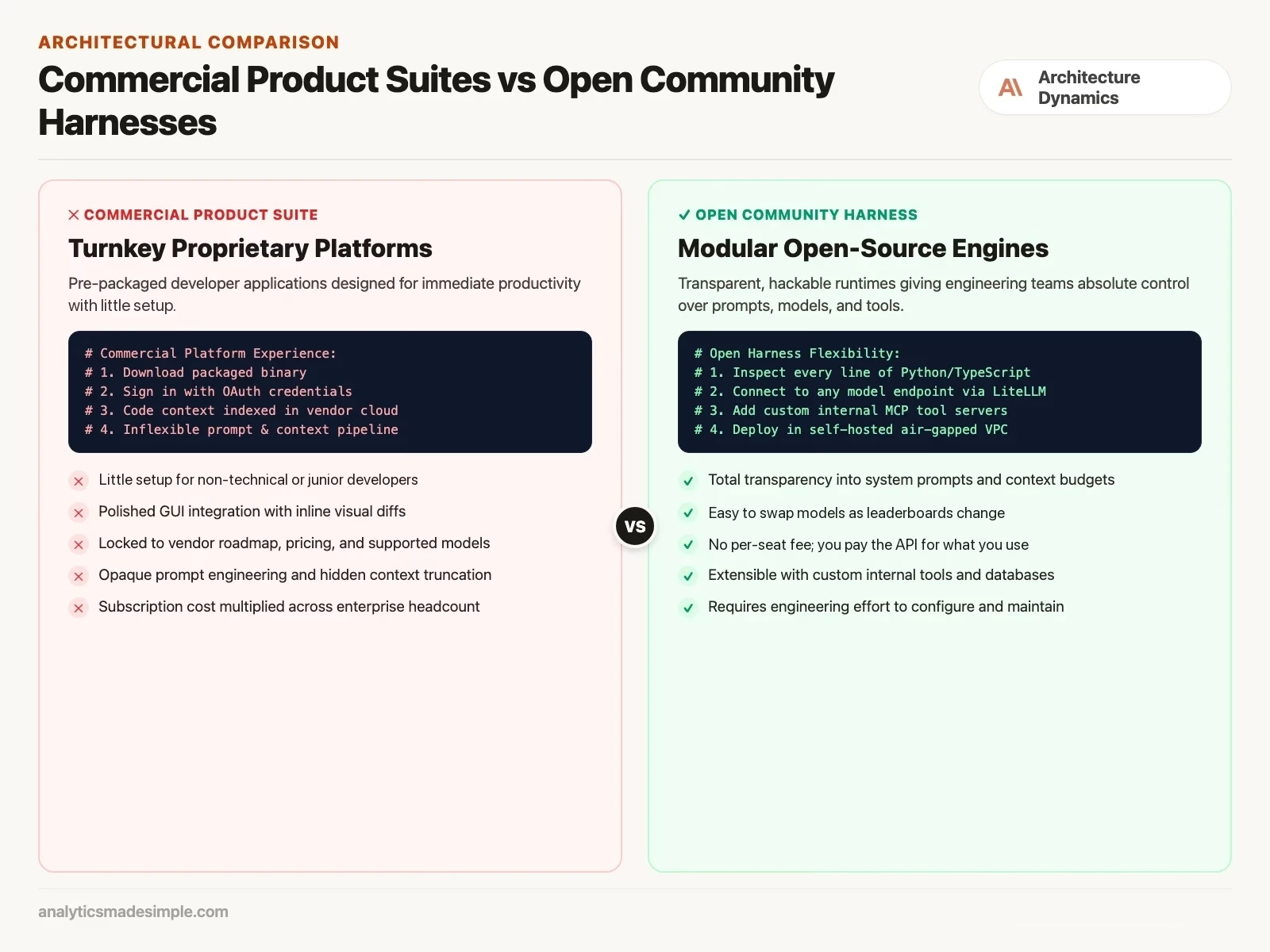
Imagine your company buys hundreds of seats of a popular commercial AI code editor. At first, developers love it, and routine code gets written faster.
A year later, two things happen. The vendor raises the price per seat and adds tighter usage limits. And your company signs a healthcare contract with strict patient-data rules (HIPAA, the US law for patient data) that forbid sending code through a shared outside cloud service. Your security team asks the vendor for a version that runs on your own servers and for logs of exactly what gets sent to the model. The vendor cannot offer either.
Meanwhile, cheaper open models are getting good at coding, but the editor only works with the vendor’s own service. You cannot switch.
That is when an open harness starts to look attractive. Built on open-source projects, it can run on your own machines, send work to whichever model fits, and show your security team every request. It takes more work to set up and maintain. The lesson: when you rent a finished tool, you also hand over how easily you can leave, so check that before you sign.
What’s inside a commercial coding tool
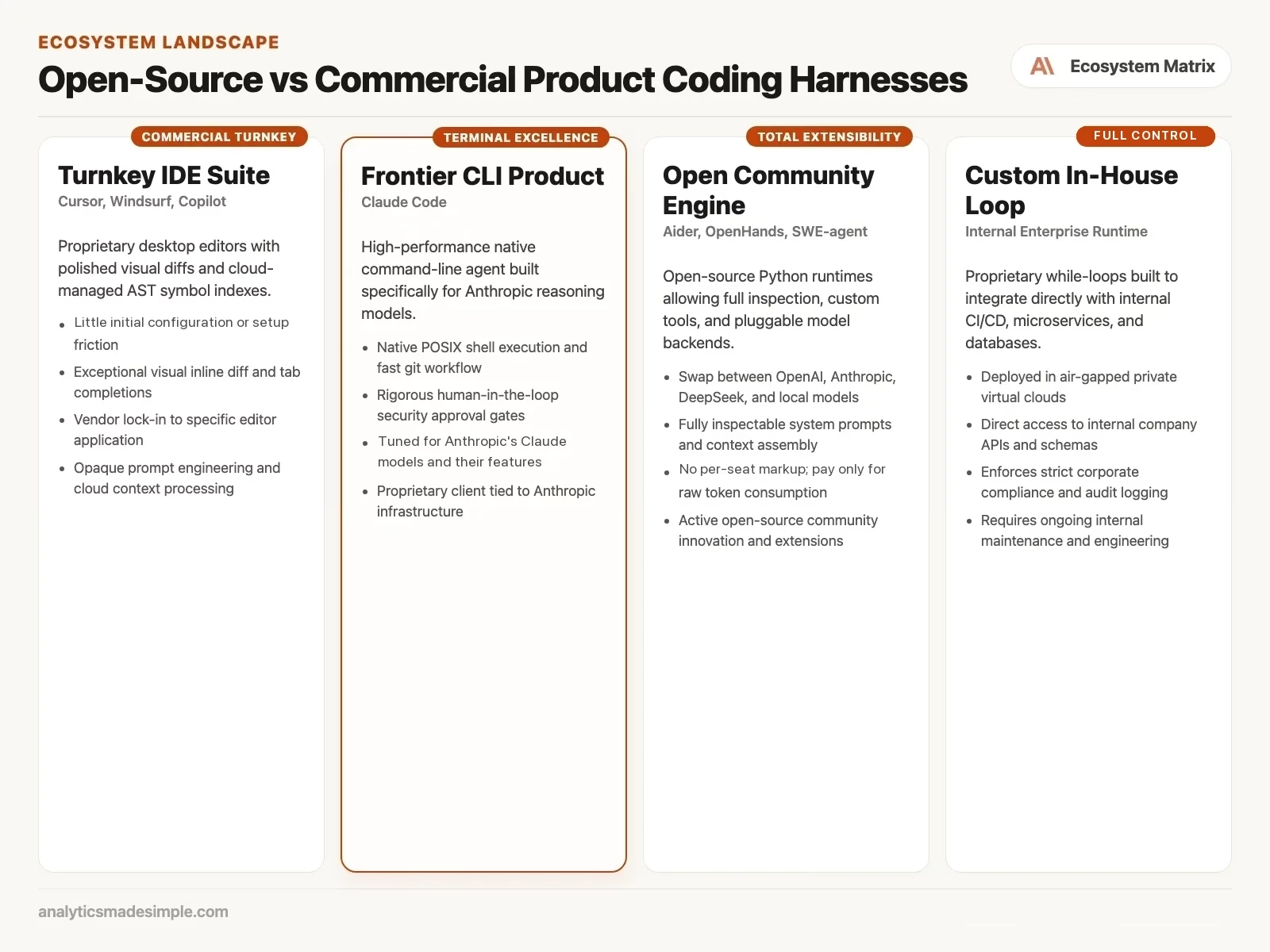
Commercial coding tools, like Cursor, Windsurf, and GitHub Copilot, are genuinely impressive pieces of software design. They succeed because they remove friction. Download the installer, sign in, and you have an AI-assisted setup running with zero configuration.
Underneath that simple surface, these tools bundle several complicated systems working together:
- Background indexing you don’t see. The editor quietly runs its own background processes. It builds a searchable map of your whole codebase, and uploads pieces of it to a cloud cache, a stored copy kept on the vendor’s servers, so it can find relevant code fast.
- Deep hooks into how you type. The tool watches your cursor, your open tabs, and pauses in your typing, so it can offer suggestions at the right moment.
- Built-in suggested-edit display. When it proposes a change, the editor inserts extra lines directly into your view, showing red for removals and green for additions, with keyboard shortcuts to accept them.
- A prompt built and tuned by the vendor. The company behind the tool constantly adjusts its own internal instructions and formatting rules, tuned specifically for the models it supports.
This kind of ready-to-use design is genuinely convenient. But that convenience comes at a cost. You can’t see the instructions it’s actually sending, you can’t change how it decides what context to include, and you can’t check exactly what data leaves your machine.
What open-source coding tools give you back
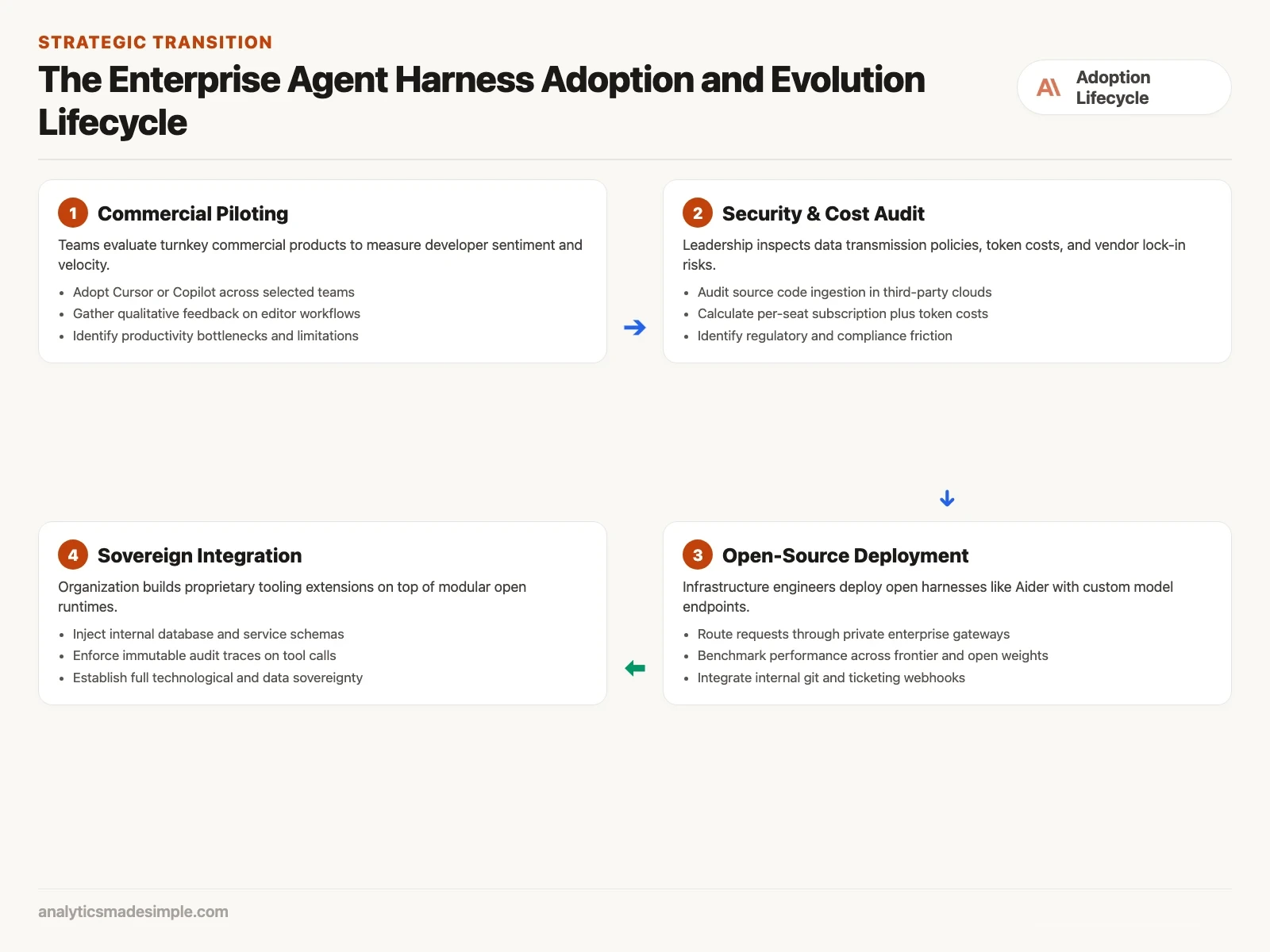
You stay in charge. Open-source tools, like Aider, OpenHands, SWE-agent (SWE is short for software engineering), and Goose, let you read the code. Every line, from the core loop to how it formats a code change, is open to read and change.
The real advantages of open tools are significant:
- You can switch models freely. Open tools connect to models through a shared adapter layer. Point one at a commercial model in the morning. Switch to your own internally hosted model in the afternoon. Test a fully offline model on a laptop with no internet connection that evening. All without changing a line of code.
- The economics are simpler. Commercial platforms usually charge twenty to forty dollars per person, per month, often with a token allowance that just disappears if you don’t use it. A token is a small chunk of text, often part of a word, and you pay by the chunk. With an open tool, there’s no markup on top. You bring your own model access and pay only for what your team actually uses.
- You keep your own editor. Open tools mostly live in the terminal (the text window where you type commands). Nobody’s forced to give up Neovim, Emacs, or whatever custom setup they already have. A developer can run the assistant on a remote server in one city while editing from their own laptop in another.
- You can actually audit it. In regulated fields like finance, healthcare, or defense, open tools can be checked line by line. You know exactly what gets sent to the model. You can strip sensitive data out before it’s ever sent. You can keep a permanent record of every action it takes.
The newest wave of coding tools
The model makers now ship their own tools. These sit between plain open-source projects and fully closed commercial suites. Anthropic’s Claude Code, Google’s Antigravity, and xAI’s Grok Build each come from the team that also built the model. The goal is to use that model’s reasoning, tool use, and long conversations well.
Claude Code: shows what’s possible when a model’s own creator builds the tool around the terminal instead of around a text editor. Running right in your shell, it asks for your approval at key moments, and searches across many files at once using a fast search tool. It also works cleanly with the Model Context Protocol, a shared standard for connecting tools to a model, described further below. Tools stay separate from any one specific runtime (the software environment the code runs in).
Google Antigravity: is built for more advanced, multi-step work. Instead of one simple back-and-forth conversation, it turns the assistant into something closer to a small team: background tasks, work handed off to sub-assistants, and reusable custom skills. By combining terminal commands with a deep map of your codebase, it lets developers hand off complex, multi-step changes while still keeping a close eye on what’s happening.
xAI Grok Build: is built to make the most of Grok’s real-time reasoning and its ability to hold a lot of context at once. Built for fast iteration, it’s especially good at tracking down obscure build failures, running complex test suites, and rewriting code structure across a codebase quickly.
A simple framework: buy, build, or go open
To land on a sensible policy, it helps to think through four questions:
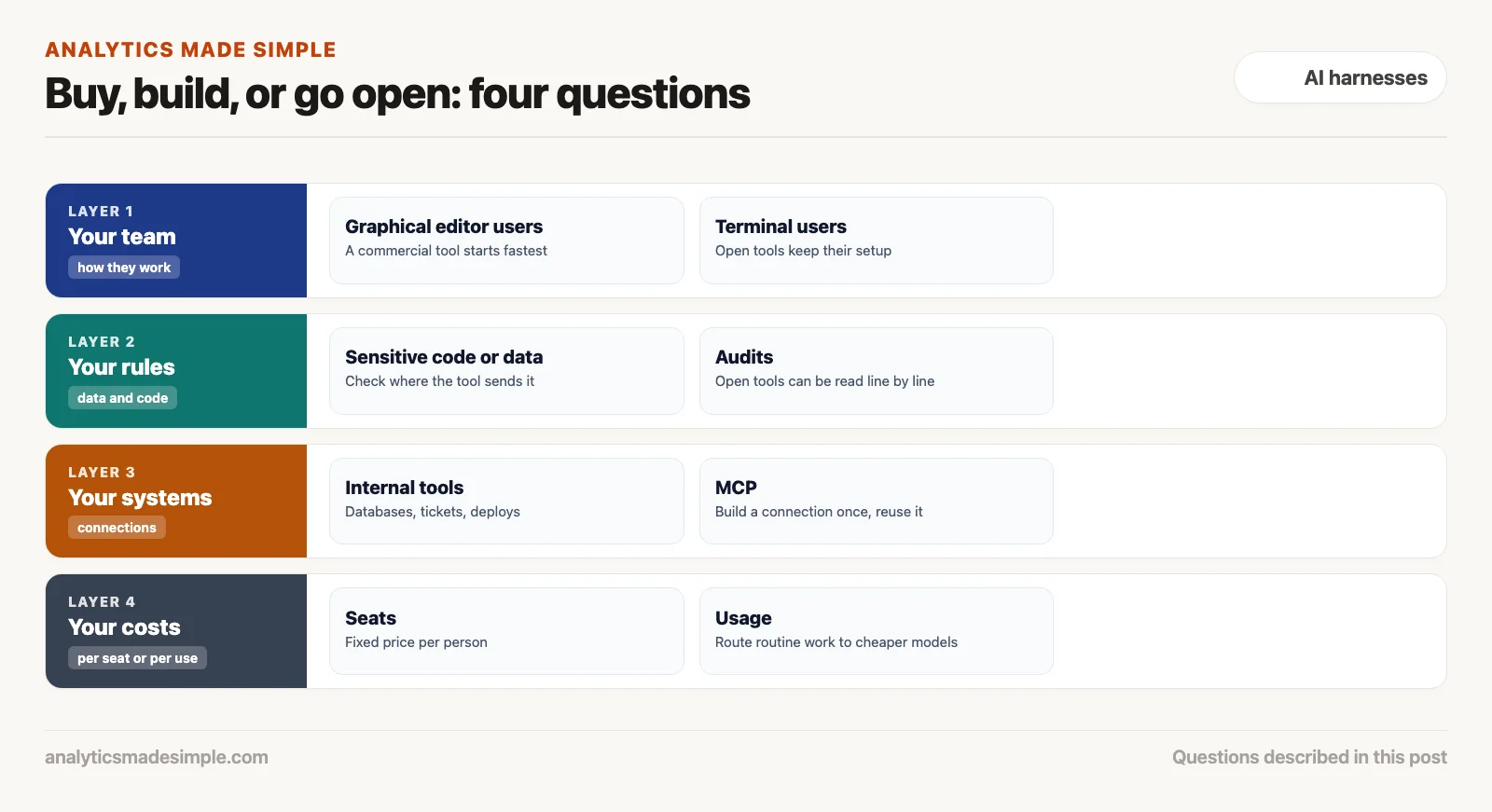
1. Who’s on your team, and how they work
Match the tool to the people who will use it. If your team mostly works in a graphical editor, a commercial tool like Cursor gives a quick speed boost. There is almost no learning curve. If your team lives in the terminal and on remote servers, a terminal tool like Claude Code or Aider fits better.
2. What rules you have to follow
Say your codebase includes proprietary intellectual property, export-controlled code, or sensitive medical or financial data. A commercial tool that caches your code on someone else’s servers is a real legal risk. In that situation, running an open tool inside your own private, disconnected network, talking only to models you host yourself, is really the only option that holds up.
3. The internal tools you need to connect
Your own systems matter. Commercial editors handle generic programming well. They know nothing about your company’s internal systems, databases, or ticket tracker. Open tools let you add your own connections, using MCP (Model Context Protocol), a shared standard that lets tools connect to an AI model in one common way. The assistant can then check a staging environment, look at a service health page, or link a pull request to a ticket.
How a shared standard freed tools from any one vendor
Until recently, one of the biggest advantages commercial tools had was their library of ready-made connections. Want your assistant to look at a pull request, check a database, or read a Slack message? You had to build a custom connection, tied to that one specific tool.
A shared, open standard called the Model Context Protocol (MCP) changed that. It’s a simple, open way for programs to talk to each other. It draws a clean line between the assistant you’re using and the tools it connects to. Build one connection to, say, your internal database or a documentation site. That same connection works whether you’re using Claude Desktop, Claude Code, an open-source tool like Goose, or your own custom script.
That shift hands power back to engineering teams. Build a solid, secure internal connection once. Then swap out your coding assistant, or the model underneath it, whenever you want, without rebuilding all your internal integrations from scratch.
Paying per seat versus paying for what you use
For engineering leadership, the cost difference between a commercial suite and an open setup adds up fast at scale. Picture a mid-sized team of one hundred developers.
At forty dollars a seat per month, that team pays forty-eight thousand dollars a year in fixed software costs before a single line of code gets written. On top of that, when developers hit their monthly usage limit on the better models, the company has to buy extra credit bundles.
An open setup, paired with smart routing between models, can cost much less. In that kind of setup, most routine work goes to cheaper, openly available models. Think writing boilerplate, unit tests, renaming variables, formatting data. The system only reaches for a premium model when tests fail or the task genuinely needs deeper reasoning across many files.
How much you save depends on your own usage, so do the math before you switch. Add up your seat costs and extra credits for a year. Then estimate how much of your work could go to cheaper models, and what running and maintaining the open setup would cost you. The open setup also takes people’s time to run, so count that too.
Running it fully offline, with open models
Some teams work under defense contracts, strict banking rules, or tight confidentiality agreements. For them, sending code over the public internet to any outside AI service simply isn’t allowed. Commercial tools can’t work in that situation at all, because their indexing and their models both depend on an outside server.
Open tools handle this well. Pair a lightweight terminal tool, like Aider, with a model running locally, through llama.cpp or a similar engine, on your own Apple hardware or your own graphics-card servers. Developers get a full working coding assistant on a machine that’s never connected to the internet at all. Not a single byte of code leaves the building, meeting even the strictest security requirements, while developers still get real help.
What this means, and what’s next
The coding tool you choose becomes the operating system your engineers actually work inside all day. Commercial suites offer real convenience for everyday editing. Open tools offer the freedom to switch models, keep your data on your own systems, and control costs, all things a durable, long-term setup actually needs.
The next post in this series looks at the riskier side of autonomous coding assistants: runaway loops, leaked secrets, and destructive commands. We’ll look at real cases: an assistant that accidentally leaked a production access key, one that ran up a runaway cloud bill, another that deleted data it shouldn’t have. And we’ll cover the safety checks that keep those mistakes from happening to you.
Your next step
Write the four questions from this post at the top of a page, answer them for your team, and share the page before your next tool renewal. If the answers point to open tools, try one on a side project first. Deciding on paper before the renewal date avoids a rushed choice.
Series notes
This is Part 6 of AI harnesses from scratch. Previous: evaluation. Next: safety for runaway loops and secrets.
Keep going
Same lessons in your feed
Short diagrams, hooks, and weekly tutorials on Substack, Instagram, X, and Facebook.