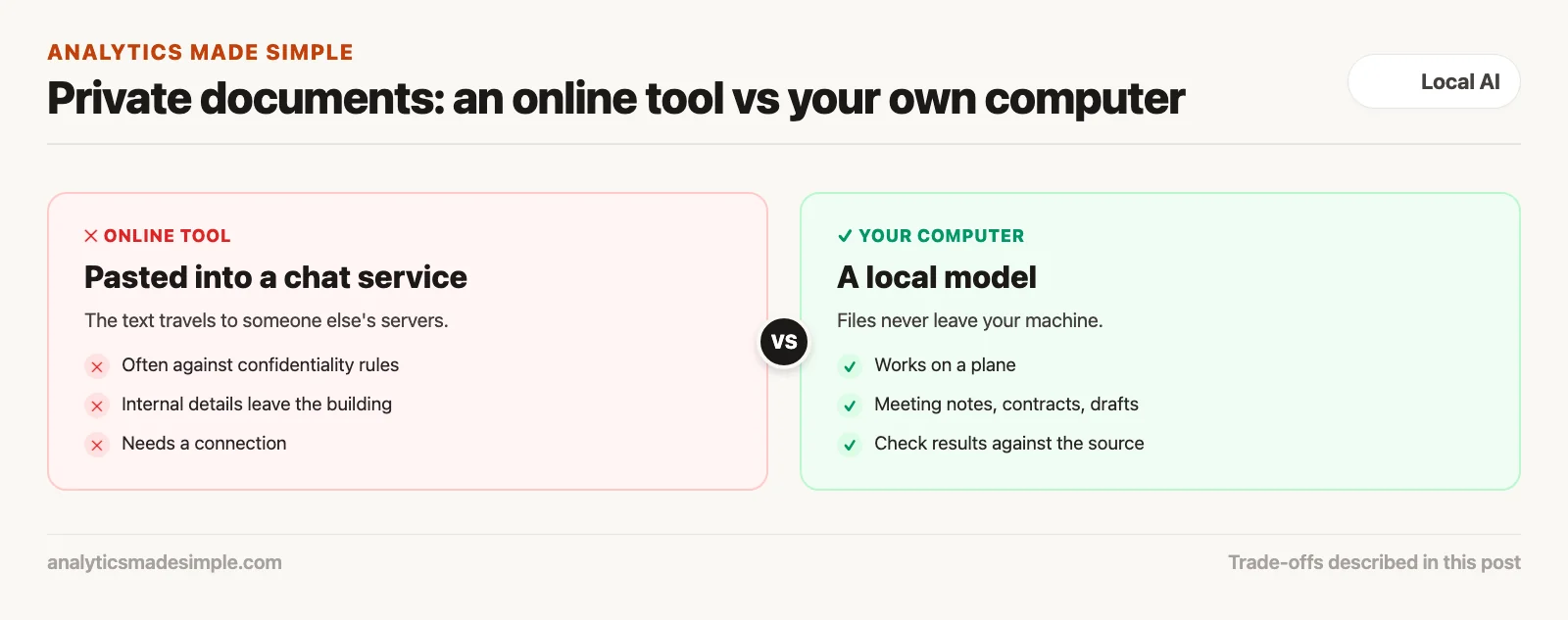
An AI model running on your own computer is great for three everyday jobs: cleaning up meeting notes, pulling key facts out of private contracts, and rewriting touchy drafts before they go out. Your files never leave your computer. For private paperwork like this, an online chat tool is the wrong place.
Imagine you are on a long flight with no internet and four hundred pages of confidential documents to review before you land. Your company’s rules say those pages can never go into an online AI tool anyway. With a model running on your own laptop, you can work through the pile during the flight and land with a summary already written.
From setup to real work
The earlier posts in this series covered the setup: checking your hardware, shrinking models to fit, and using tools like Ollama, LM Studio (LM is short for language model), and llama.cpp. Those are just tools. The point is to do useful work that should not go anywhere near an online service.
Many newcomers expect a local model to act like a know-it-all chat buddy. At work, that is the least useful thing it does. Its real strength is turning messy, private text into something organized that you can act on.
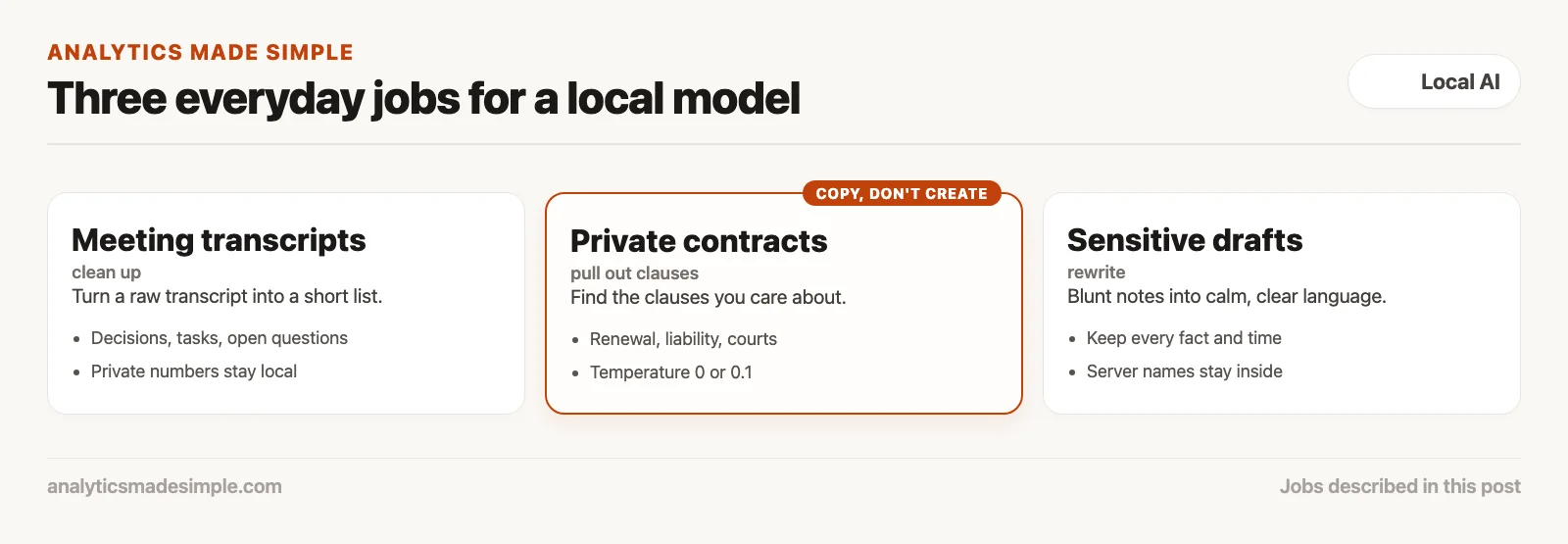
This post covers three everyday jobs where a mid-size model, with 7 to 14 billion parameters (the numbers a model learns in training), does well: cleaning up meeting transcripts, pulling facts from contracts, and rewriting sensitive drafts.
Job 1: cleaning up meeting transcripts
A raw meeting transcript is hard to read. A local model can turn it into a short list of decisions, tasks, and open questions.
Free speech-to-text tools, like OpenAI’s Whisper running on your own computer through a project called whisper.cpp, can turn a recorded meeting into a word-for-word transcript without anything leaving your machine. The catch is that a raw transcript is nearly unreadable.
It is full of false starts, repeated words, filler like “um” and “you know,” side chats, and jumps back and forth. A ninety-minute call with twelve people can produce twenty thousand words of noise. Reading it takes longer than the meeting did.
Local models are good at cleaning this up, because the facts are already in the text. The model does not need to invent anything. It just needs to filter. Give it clear instructions and a low temperature, the setting that controls how much the model improvises, and a 7B or 8B model can sort the meeting into five sections:
- Decisions made: things the group actually agreed on, not ideas that came up and got dropped.
- Action items: specific tasks, each with a person and a due date.
- Open questions: points where people disagreed and nobody settled it.
- Numbers that matter: every budget figure, headcount, or deadline mentioned.
- Dates: a simple list of every target date, in order.
Meetings often touch on private numbers, unreleased plans, or staff changes. Doing the cleanup on your own computer means none of that goes to an outside transcription service.
Job 2: pulling key facts out of private contracts
A local model can read long contracts and pull out the specific clauses you care about, without the contract ever leaving your computer.
Contracts are long, dense, and often covered by a confidentiality agreement that rules out pasting them into an online chat tool.
When a company reviews hundreds of contracts, say during a merger or a compliance check, people end up reading page after page, hunting for a few risky clauses:
- Change of ownership: whether a customer can cancel or demand a refund if your company gets bought.
- Limits on damages: whether the amount you could owe is capped, or unlimited in case of a data leak.
- Which courts: which state or country’s courts handle a dispute.
- Breach notice: how quickly the supplier must tell you about a security problem.
- Automatic renewal: how much notice, often 30, 60, or 90 days, you need to give to stop a contract from renewing.
A model with around 12 to 14 billion parameters, like Gemma 4 12B or Ministral 3 14B, current releases as of October 2026, handles this well. The job is to copy facts, not to be creative, so set the temperature to 0 or 0.1 to keep answers consistent. In your standing instructions to the model, called the system prompt, tell it to answer “Not specified” when a clause is missing, rather than guessing.
Job 3: rewriting sensitive messages
A local model can turn a blunt internal write-up into a calm, clear message for customers, without exposing internal details to an online service.
When something breaks at work, the internal notes are often blunt, full of jargon, and sometimes full of blame. That is normal among specialists under pressure.
But you cannot send those notes to a customer or a regulator. They need to become calm, clear language that explains what happened and how it was fixed, without getting the facts wrong or admitting legal fault.
A local model is a safe place to do that rewrite. Paste the internal notes in and give the model clear style rules, like this:
“Rewrite these internal incident notes as a professional summary for customers. Keep every technical fact and time exactly right. Remove slang, blame, and guesses. Use clear, calm, accountable language.”
Internal notes like these often name real server (a computer that runs programs for others to use) names, internal network addresses, and weak spots. Pasting them into an online chat tool is a real security risk. Doing it locally keeps those details on your own machine.
Split long documents into pieces
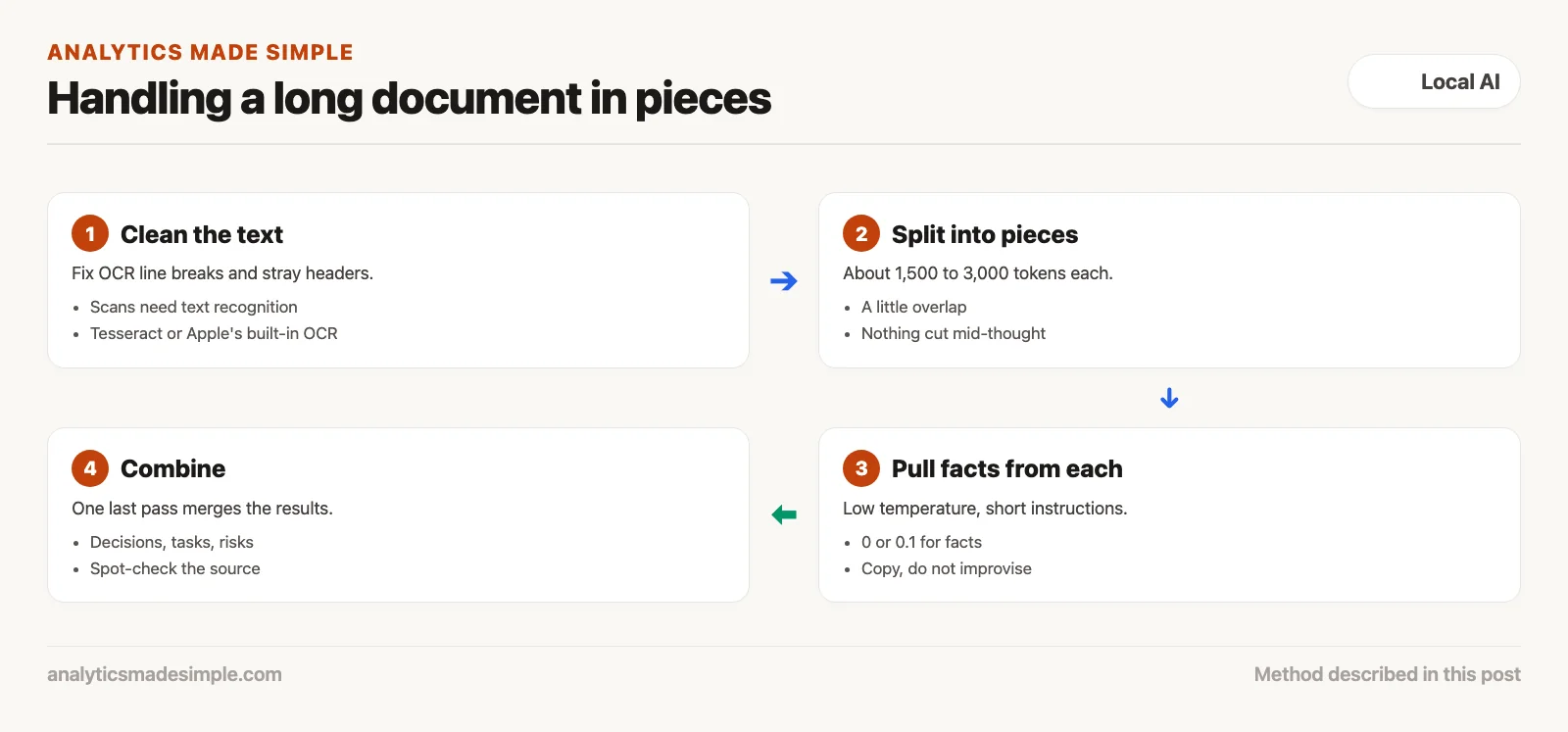
Do not feed a long document to the model all at once. Split it into smaller pieces, summarize each one, then combine the summaries.
Every model has a limit on how much text it can hold at once, called its context window. Text is measured in tokens, small chunks of about three-quarters of a word. Many models claim room for 32,000 or even 128,000 tokens, but pasting a whole eighty-page contract in one go is a bad idea, for two reasons.
First, models lose track of details in long inputs. Facts buried in the middle of a very long document are the ones most likely to be missed.
Second, long inputs are slow and use a lot of memory. On a normal laptop, a very long document can make the computer seem frozen for minutes before the first word comes back.
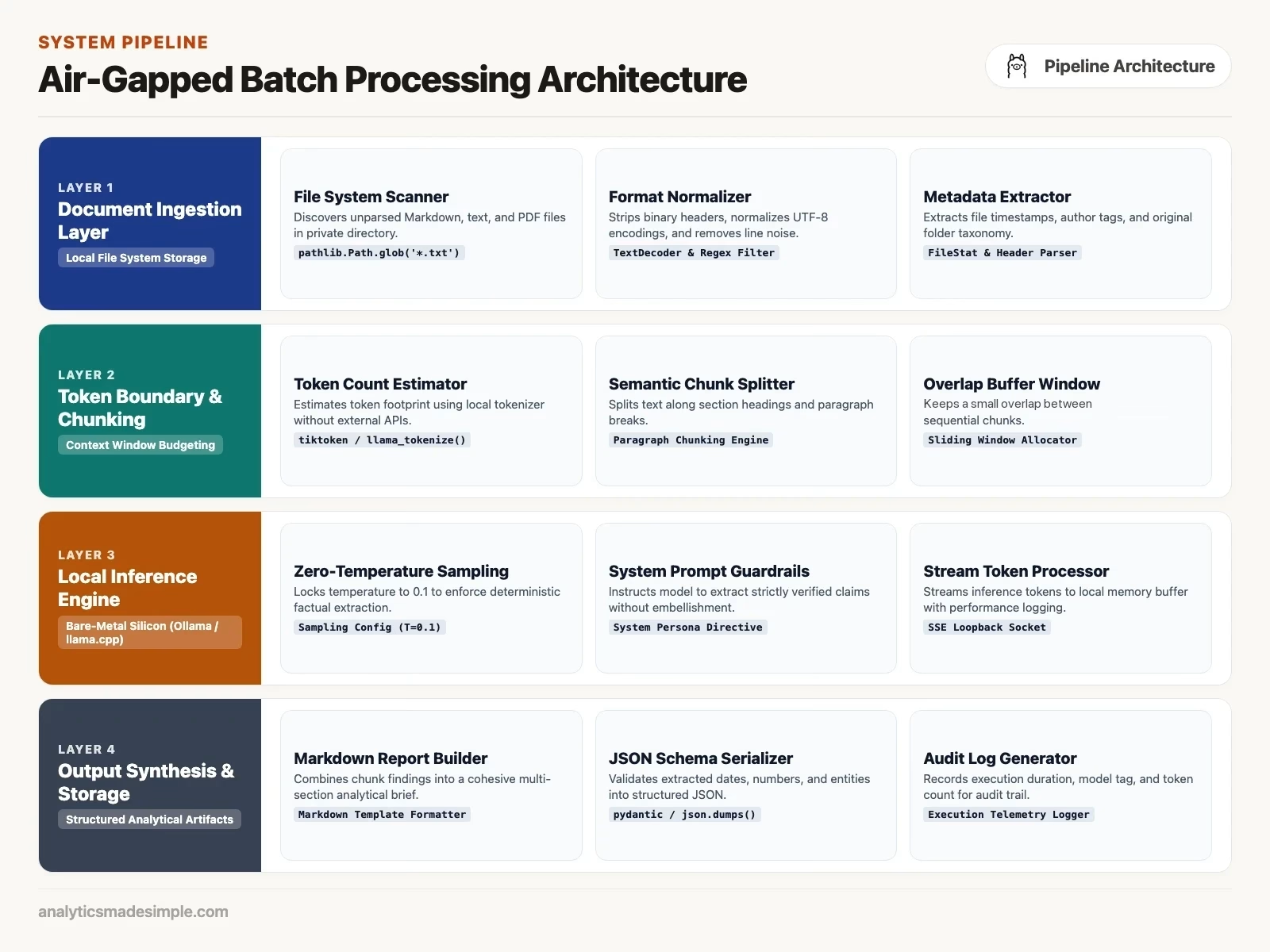
The fix is to split the document into pieces of about 1,500 to 3,000 tokens, with a little overlap so nothing gets cut off mid-thought. Run each piece through the model, pull out the facts you need, then run one more pass that combines the notes into a single report.
Try it: an offline document pipeline in Python
Here is a complete Python program that reads a folder of private notes, sends each file to a model on your own computer, pulls out action items and risks, and writes one combined summary.
It needs no online services. It uses OpenAI’s free Python library, pointed at your own computer (Ollama or llama-server) instead of the internet:
import os
import sys
import time
from pathlib import Path
from openai import OpenAI

# Point client to local Ollama (port 11434/v1) or llama-server (port 8080/v1)
client = OpenAI(
    base_url="http://127.0.0.1:11434/v1",
    api_key="offline-local"
)

MODEL_NAME = "qwen3.5:9b"
DOCS_DIRECTORY = Path("./confidential_docs")
OUTPUT_FILE = Path("./consolidated_executive_brief.md")

# System instructions enforcing strict factual extraction
EXTRACTION_SYSTEM_PROMPT = """
You are an expert executive briefing analyst working on air-gapped private files.
Your objective is to extract essential operational intelligence from the provided text.
Follow these strict formatting rules:
1. Extract primary decisions made, explicit action items with assignees, and deadlines.
2. Identify operational or regulatory risks mentioned with exact numerical figures.
3. Be factual, concise, and direct. Do not add introductory remarks or conversational filler.
4. If no clear action items exist in the excerpt, state 'No explicit action items identified.'
"""

def extract_document_intelligence(doc_title: str, text_content: str) -> str:
    """Process an individual document through the local model."""
    prompt_payload = f"Document Title: {doc_title}\n\nDocument Content:\n{text_content}"

    response = client.chat.completions.create(
        model=MODEL_NAME,
        messages=[
            {"role": "system", "content": EXTRACTION_SYSTEM_PROMPT.strip()},
            {"role": "user", "content": prompt_payload}
        ],
        temperature=0.1,
        max_tokens=800
    )
    return response.choices[0].message.content.strip()

def main():
    DOCS_DIRECTORY.mkdir(parents=True, exist_ok=True)

    # Create sample confidential documents if folder is empty
    sample_file = DOCS_DIRECTORY / "board_review_q3.txt"
    if not sample_file.exists():
        sample_file.write_text("""
        Executive Committee Review - September 2026
        Participants: Engineering Lead (CTO), Head of Risk, CFO
        Decision: Terminated cloud data sharing contract with external marketing vendor.
        Action: Risk lead to audit remaining vendor API tokens by October 15.
        Action: Systems team to migrate internal credit risk database to on-premises servers by Nov 1.
        Financial Note: Allocated $450,000 for local high-memory workstation procurement.
        Risk: Potential $1.2M regulatory penalty if GDPR audit reveals historical log retention.
        """)

    doc_files = list(DOCS_DIRECTORY.glob("*.txt")) + list(DOCS_DIRECTORY.glob("*.md"))
    if not doc_files:
        print(f"No documents found in {DOCS_DIRECTORY}. Place text files there.")
        return

    print(f"Discovered {len(doc_files)} private documents for offline analysis.")
    summaries = []
    start_time = time.time()

    for idx, filepath in enumerate(doc_files, 1):
        print(f"[{idx}/{len(doc_files)}] Processing {filepath.name}...")
        content = filepath.read_text(encoding="utf-8")

        summary = extract_document_intelligence(filepath.name, content)
        summaries.append(f"### Source: {filepath.name}\n\n{summary}\n")

    # Compile final master brief
    total_time = time.time() - start_time
    master_report = f"# Executive Due Diligence & Operational Brief\n"
    master_report += f"*Generated Offline on {time.strftime('%Y-%m-%d %H:%M:%S')}*\n\n"
    master_report += f"Total documents processed: {len(doc_files)} in {total_time:.2f} seconds.\n\n"
    master_report += "---\n\n"
    master_report += "\n".join(summaries)

    OUTPUT_FILE.write_text(master_report, encoding="utf-8")
    print(f"\nConsolidated executive brief written successfully to: {OUTPUT_FILE}")

if __name__ == "__main__":
    main()
Run it, and it works through your files one at a time and builds the report. You can run it with the Wi-Fi off, and your private data never leaves your computer. Check the results against the source the first few times, as you would with any new tool.
Common mistakes
Watch out for three mistakes when you start working with documents this way.
- The wrong temperature. For pulling facts, do not use the usual chat setting, often around 0.7 to 1.0. A higher temperature makes the model improvise, which can mean made-up clauses or changed dates. Set it to 0 or 0.1 for anything factual.
- Messy scanned text. When you pull text from a scanned document with OCR (optical character recognition, which turns a picture of text into real text), the result often has broken lines, split words, and stray headers. Clean that up before sending it to the model.
- Instructions that are too long. Small models do best with short, direct instructions. Skip the five-hundred-word rulebook, and break a big job into smaller steps instead.
Common questions
Can a small model pull numbers out of text accurately? Yes, as long as the numbers are written in the text. These models are good at copying and sorting. Do not ask one to do math, like working out a percentage change. Let the model pull the numbers out, and let a simple program do the math.
How do I handle scanned documents offline? Use a free text-recognition tool that runs on your computer, such as Tesseract, or the text recognition built into Apple’s devices. Then send the text to your local model, with no internet needed.
Which model is best for summaries? With 16 gigabytes of memory, qwen3.5:9b (a 6.55 GB download) and gemma4:e4b (6.58 GB) are good starting points. With 32 gigabytes or more, qwen3.5:27b (17.48 GB) is worth testing for legal and detailed work, on your own documents (Ollama library, checked October 4, 2026).
Does this drain a laptop battery quickly? Yes. Constant AI work keeps the chips busy, drawing a lot of power. For big batches, plug in, so the laptop does not slow itself down from heat or a low battery.
Sources
- Ollama, model library with tags and download sizes, and OpenAI compatibility, checked October 4, 2026.
- Model cards: Qwen3.5-9B, Gemma 4, and Ministral 3, checked October 4, 2026.
Series notes
This is Part 7 of Local LLMs from scratch. Previous: llama.cpp as the engine. Next: keeping models updated without breaking your setup.
Keep going
Same lessons in your feed
Short diagrams, hooks, and weekly tutorials on Substack, Instagram, X, and Facebook.