
Choose the kind of Claude by what you need in hand when the job is done: an answer in a chat window, a change to software code, or finished files on your computer. Those three needs match Claude chat, Claude Code, and Cowork.
Say your inbox holds a “quick” ask for a one-page spend summary. You have last month’s card export, a folder of receipt photos, and three chat threads that contradict each other. You open Claude chat, paste in the export, a CSV file (a plain spreadsheet-style text file), and get a nice table. Then you spend twenty minutes copying it into Excel while the photo filenames stay as IMG_4821.HEIC. A developer on your team says to just use Claude Code, but you do not have any software code, only receipts. Someone else says to try Cowork. Now you have three product names and one deadline.
Update, October 2, 2026: On September 16, 2026, Anthropic merged Cowork into the main Claude app, rolling out to Pro and Max first and to other plans later. What Cowork could do, such as working through a folder of files, is now available from any Claude conversation, so you may no longer see a separate Cowork tab. The choice this post teaches still applies to that kind of task.
This post opens the Claude Cowork tutorial. We sort out the three forms of Claude you will actually meet, which are regular chat, Claude Code, and Claude Cowork. The next post covers setup and your first real file task. If Claude itself still feels fuzzy, including plans, first-week habits, and Projects, start with the beginner series on learning Claude. If you want the whole product lineup in map form, use the Claude product map. If your work is software kept in a git repository (a project’s folder of code and its history), the deep path is the Claude Code tutorial. Here we go deep on when Cowork, an agent (an AI that takes steps on its own), is the right choice, and when it is not.
Menu labels and rollouts keep changing, so treat the names below as a mid-2026 snapshot. Re-check claude.com/product/cowork and Anthropic’s Help Center the week you enable anything for a team.
Three surfaces, one family
Anthropic offers several ways to talk to Claude. For day-to-day office work, three names matter most:
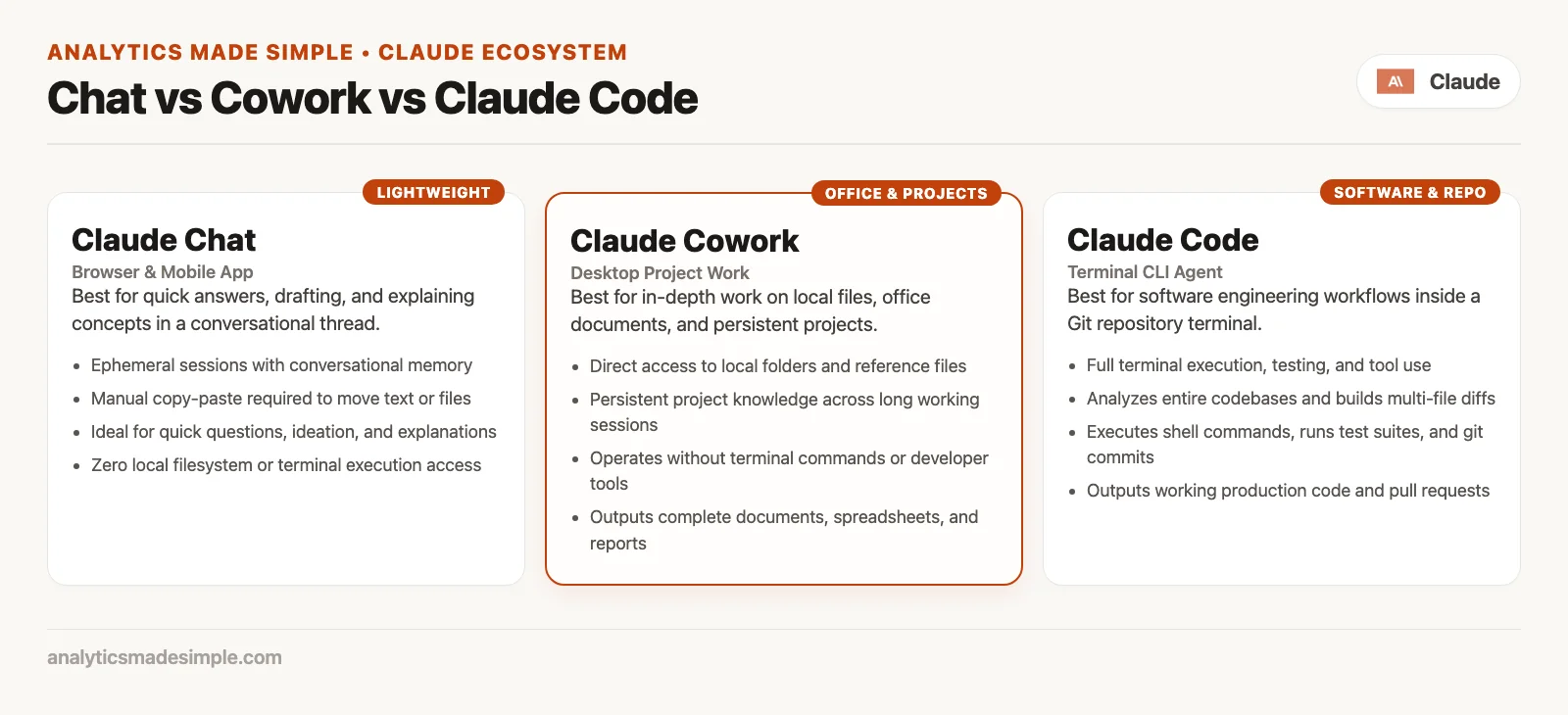
- Chat on claude.ai and in the apps is for conversation, drafting, questions and answers, and thinking out loud with you. You bring the context by pasting or uploading it, and you carry the results out yourself.
- Claude Code is an agent for software work. It handles code repositories, terminals, code editors, tests, diffs, and pull requests (PRs, proposed changes waiting for review). It is built for people whose finished product is code that ships.
- Claude Cowork is an agent for office work beyond coding. It handles folders, documents, sheets, decks, research summaries, and multi-step office tasks. It uses the same agent idea as Code, but you do not need a terminal (the text window where you type commands).
Chooser rule: Code is for software, Cowork is for office files and knowledge tasks, and chat is for conversation. Pick by the finished product you need, not by which button looked shiny in a demo.
That rule is boring on purpose. Most of the frustration that sounds like “Claude is inconsistent” is really “I used the wrong form for the job.” The model can be excellent in all three and still feel useless if you ask chat to reorganize 200 files by itself. It can also fall short if you ask Cowork to own a large code cleanup that has to pass continuous integration (CI), the automatic checks that run on every code change.
What each one is best at
Chat: conversation and drafts
Chat is the picture that many users carry over from other AI assistants. You ask, Claude answers, and you refine, then you copy the useful bits into an email, a document, or a slide outline. Uploads and Projects help, but you remain the one doing the work. You open the spreadsheet, you rename the files, and you paste in the chart.
Stay in chat when the win is a better paragraph, a clearer explanation, a short plan, a rewritten subject line, or a walkthrough of a concept. Chat is also the right place when mistakes should stay small. A wrong reply is awkward, but a wrong rename across many files in a shared drive is a week of cleanup.
Chat usually uses less of your plan’s allowance for the same amount of thinking out loud. That matters if you already spend capacity on agent runs elsewhere.
Claude Code: software
Claude Code is the coding agent. It lives in terminal workflows, code editor extensions, and related developer tools. Success looks like tests that pass, a diff a human can review, a pull request description that matches what changed, and a project that still builds. You steer it with the project’s context, permission modes, and engineering habits such as branching, review, and committing.
If your measure of success is passing automatic checks and a clean merge, start in Code. Cowork can touch code-shaped files in some office workflows, but it is not a substitute for the loop in the Code tutorial, which is to explore, plan, change, and review. If you only need a one-off script (a small program) explained, chat might be enough, and if you need the agent inside a real project, use Code.
Claude Cowork: knowledge work with files and tools
Cowork is where you hand Claude real multi-step work that ends in office-style deliverables: organized folders, expense workbooks with formulas, first-pass decks, research briefs, batch renames, transcript cleanups. Anthropic’s product language is blunt about it. You set the goal, Claude works across the files and tools you choose, and you come back to something you can review.
Behind the scenes, Cowork uses the same family of agent abilities that power Claude Code, aimed at non-coding work and without forcing you into a developer terminal. That is the important point if you are not an engineer, because you can get multi-step execution without opening a terminal. You do still need a paid plan, clear access grants, and a review habit.
Cowork is the right bet when you keep saying things like “I’ll just copy this into Excel after,” “I’ll rename these after lunch,” or “I’ll stitch the sales note and the call summary into a brief tonight.” Those sentences describe jobs an agent can do, where files are the unit of work.
Side-by-side comparison
Keep this table nearby, because it compresses the whole series into one screen.
| Surface | Primary job | How it touches work | What “done” looks like | You still must… |
|---|---|---|---|---|
| Chat | Answers, drafts, thinking with you | You paste or upload; Claude replies in the thread | Text (or an artifact) you move yourself | Copy, apply, and own the final file |
| Claude Code | Software engineering | Code repository, terminal, code editor, tests, pull request flow | Diffs, tests, shippable code | Review the diffs, run the checks, and merge carefully |
| Claude Cowork | Non-coding knowledge work | Folders and tools you authorize, across multi-step tasks | Docs, sheets, decks, organized files, briefs | Review numbers, names, tone, and policy |
The same underlying models can power all three. What changes is the permissions, the defaults, the tools, and what the screen is designed for. People get annoyed at Cowork when they really wanted a quiet brainstorm in chat, and they get annoyed at Code when they only needed a renamed PDF pack. Match the tool to the finished product you need.
How Cowork actually runs (plain English)
Anthropic’s Help Center describes Cowork as bringing Claude Code’s agentic (able to carry out several steps on its own) capabilities to knowledge work beyond coding. A few mechanics matter even before you click anything.
Shared home with chat
Chat and Cowork share one home. On the web, desktop, or mobile, you start from the same message box. You select Cowork when you want a task carried out and not only discussed, and you select Chat when you want the familiar back-and-forth. That switch is easy to miss if you habitually type into the box without looking, so if Claude will not open your folder, check that you are not still in Chat.
Remote sessions (and why your laptop can close)
Cowork runs your tasks remotely, and the support materials describe this as a beta. Claude does its work on Anthropic’s servers in an isolated environment. The sessions and files for the task live with your Claude account, so you can start on one device and check from another. Work can continue if you close the laptop, which is the product’s pitch for handing a job off and going to a meeting.
Isolation protects your machine from commands running wild on your disk, but it does not mean Claude can touch nothing. The access you grant, such as folders, connectors, and browser control, still matters. Isolation is not a free pass to skip your review.
Local files and browser need the desktop app
A remote session does not replace the desktop app for everything. When a task needs something on your own computer, such as a local folder, browser automation, or steps where Claude controls your screen, Claude reaches that computer through the Claude Desktop app for macOS or Windows. The support docs are clear that for local file access, browser use, and computer use, you should keep Desktop open and connected even though the session itself may run remotely.
In practice, web and mobile are great for kicking off a task and steering it. Desktop is where local folders work best, so if the only copy of the files lives on your laptop, plan on using Desktop for that job.
Where it runs: desktop, web, and mobile
In mid-2026, Anthropic offers Cowork on these platforms:
- Claude Desktop for macOS and Windows (Windows needs a current app build; download from the official Claude download page).
- Web at claude.ai.
- Claude Mobile for iOS and Android (latest app builds).
Web and mobile have been rolling out in beta waves across paid plans, and the support text has described rollouts that reached Max first and other plans later. If you do not see Cowork on your phone yet, check that your plan qualifies and your app is current before assuming the product is gone. Labels in the message box can shift slightly between devices, so look for the Cowork option next to Chat.
Who gets Cowork (and what it costs in usage)
Cowork is a paid capability. Official availability language lists Pro, Max, Team, and Enterprise. A free chat account is not the place to expect full Cowork. Confirm the live pricing page before you buy a plan only for Cowork, because what each plan includes and what it costs both change.
Two facts about usage limits show up repeatedly in product and support pages:
- Cowork consumes more of your usage allocation than regular chat. Multi-step tool use, helper agents, and long runs cost more tokens (the small chunks of text that AI plans count) than a short rewrite.
- Limits are shared with other Claude work on your plan. A heavy Cowork afternoon can leave chat and Code feeling tight. That is a capacity limit, and it does not mean the model is getting dumber.
If you plan to hand off multi-step folder jobs every day, budget for Max or Team-level capacity instead of assuming a Pro plan will feel like chat forever. Use chat for small asks, and reserve Cowork for jobs that change files and take many steps. The next post shows a first task that is useful without emptying your weekly allowance on a toy rename of three files.
The Monday chooser
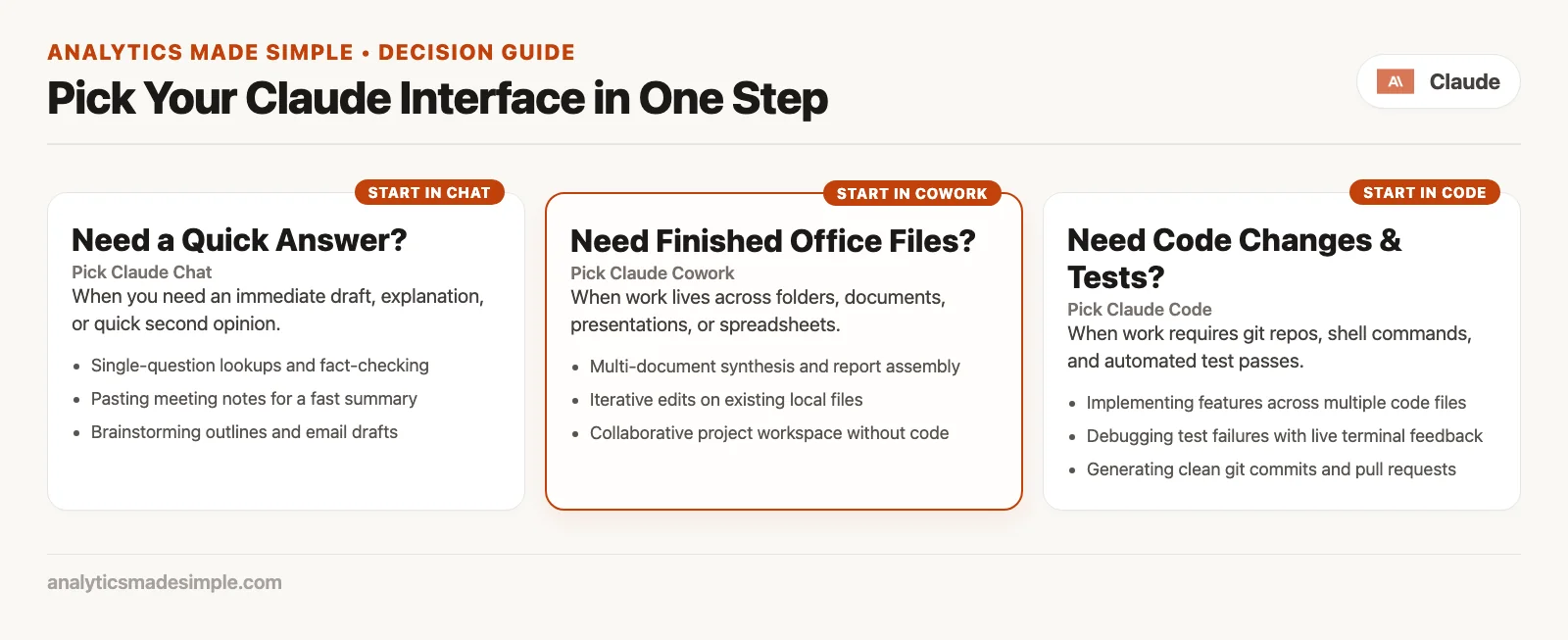
When you sit down with a vague thought that you should use AI for this, run through the short path below out loud.
- What must exist when you are done? It might be a paragraph in an email, a passing test suite, a filled workbook in a folder, a deck outline, or a cleaned folder. Name the finished product.
- Is the unit of work a software repository? If yes, use Claude Code, or chat for tiny one-off questions about a snippet. If no, keep going.
- Do you need Claude to read and write files or use tools across several steps, without you acting as the copy-and-paste go-between? If yes, use Cowork. If no, chat is probably enough.
- Is a wrong result annoying or dangerous? If it is dangerous, as with money, legal matters, medical topics, regulated client data, or live production systems, stay in modes where you see every step, use tight folders, and get human sign-off. Prefer chat for pure advice if policy is unclear.
- Where do the files live? If they are only on your laptop, plan on Desktop plus a folder grant. If they are mostly in cloud tools, connectors and web or mobile may be enough, and you should still review the result.
Here are some example answers:
| Situation | Pick | Why |
|---|---|---|
| Rewrite a cold email in a warmer tone | Chat | The finished product is text, so no file agent is needed |
Explain why a Jest test fails in checkout.spec.ts | Code, or chat for a pasted snippet | It is a software question, and the repository is best for real fixes |
| Turn 40 receipts + one CSV into an expense workbook | Cowork | Multi-step file work that ends in a finished sheet |
| Brainstorm titles for a blog series | Chat | It is a conversation, and mistakes cost little |
| Refactor a monorepo package boundary | Code | Diffs, tests, and the pull request loop |
| Rename and sort a contract pack by control area | Cowork | Folder mutation is the job |
| “What does Cowork even mean?” | Chat (this series) | You are learning, not working with files |
A workday with three wrong tools, then the right ones
Here is a composite workday that shows the cost of a mismatch. The details are made up, but the pattern is real.
First, a quick email. You need a friendlier rewrite of a vendor chase email. You open Cowork, grant your whole Documents folder just in case, and burn ten minutes of setup on a task that chat would finish in two. The right tool was chat.
Next, a broken build. You have a failing software build on a feature branch. You paste the error logs into Cowork and ask it to fix the app. Without a proper Code session inside the project, you get plausible advice and a half-applied patch that you cannot review with git diff. The right tool was Claude Code in the project folder, with a small first ask and a review before you commit. See the Claude Code tutorial.
Finally, a finance request. Finance wants a quarterly card summary. You upload two CSVs to chat, get a table back, and retype it into Excel while the receipt photos sit untouched. The right tool was Cowork on a sandbox folder holding the CSVs and copies of the photos, with a request for a workbook with explicit columns, followed by human spot-checks.
That was one person, one day, and one subscription. The skill is choosing the right tool for each job, and it does not take heroics.
What Cowork is not
- Not a free-tier feature. It needs a paid plan, and the docs list Pro, Max, Team, and Enterprise.
- Not chat with a darker theme. Selecting Cowork changes the way it works, because it plans, acts, and delivers files and multi-step results.
- Not a replacement for Claude Code on software delivery. It comes from the same agent family but has a different job and different tools.
- Not unsupervised truth. Numbers, names, legal claims, and client-facing language still need a human, and Anthropic’s own safety materials stress that Cowork takes real actions on files and tools.
- Not a reason to point the agent at your entire home folder. Limited scope is a feature, so start with a sandbox.
- Not identical everywhere. Local folder power is strongest with Desktop, while web and mobile help you stay mobile, and beta rollouts may lag.
Risk and review without panic
Agent products let a mistake do more damage. Chat mistakes are mostly text, but Cowork mistakes can be wrong sheets, messy renames, or tools that send or change something you did not fully read. That is not a reason to avoid the product. It is a reason to treat it like a fast junior colleague who has access to one limited folder.
Here is the minimum review loop after any Cowork run that is not trivial:
- Scope: Did it only touch the folders and tools you meant?
- Sample: Spot-check rows, filenames, and totals against the sources.
- Story: Would you defend this deck or memo in a meeting?
- Policy: Did any data leave the place it should have stayed, given the way you ran the task?
- Stop rule: If an official source exists, such as the billing system, the HR team’s employee records system, or the ledger, verify there before you send.
The support docs also describe permission modes, which range from manual approval, to automatic with safety checks, to skipping approvals entirely. The names can change in the app, but the habit does not. For money, messages sent as you, or important files, stay close and watch. Later posts in this series cover autonomy and quality control in depth. For now you only need the instinct that agent output is a draft until you say otherwise.
How this series fits the Claude path on this site
- Learn Claude from scratch covers everyday Claude, plans, first sessions, and judgment.
- Claude product map shows where chat, Code, Cowork, and the other products sit on one board.
- Claude Code tutorial goes deep on installation and the working loops for software.
- Claude Cowork tutorial (this series) is the deep path for office and file-based agents, starting with this chooser.
You do not need every series. Many readers live in chat with the occasional Code session. Cowork is for people whose week is full of folders, decks, multi-tool prep, and promises to clean up that export later. If that is you, the rest of this tutorial is the practical path.
Common mix-ups and how to fix them
| Mistake | What happens | Better move |
|---|---|---|
| Using chat as a file agent | Endless pasting and incomplete tables | Cowork with a scoped folder and outcome language |
| Using Cowork for repo delivery | Awkward engineering and weak git habits | Claude Code tutorial loop |
| Using Code for receipt piles | Terminal overhead for office work | Cowork, or chat for tiny questions |
| Skipping the Cowork or Chat selector | “It won’t touch my files” | Select Cowork in the shared message box |
| Expecting free-tier Cowork | Feature missing or upgrade walls | Pro, Max, Team, or Enterprise as live docs say |
| Ignoring Desktop for local folders | Tasks that cannot reach laptop files | Desktop open for local file and browser paths |
| Treating remote run as “no review needed” | Wrong deliverables at scale | Sample the sources, and keep humans on the important work |
| Burning agent runs on tiny rewrites | Usage limits mid-week | Use chat for small jobs and Cowork for multi-step file jobs |
Practice this week
- Write three real tasks from your actual job on sticky notes or in a notes app, with one sentence each describing the finished product that must exist when you are done.
- Label each note Chat, Code, or Cowork using the chooser, and do not open Claude yet.
- If you already have a paid plan, open the app and find the Chat or Cowork switch in the message box, so you know where it is before a deadline arrives.
- If you are still on free chat, decide whether Pro is worth it for file agents, or whether chat is enough for now. Either answer is fine.
- Pick one low-risk folder job for the next post, such as receipt copies, a renamed PDF pack, or a sandbox CSV. Copy the files into a dedicated folder, and do not use production drives as the playground.
Common questions
Is Cowork “just Claude Code without a terminal”?
That is close, but incomplete. Cowork uses the same agent approach as Claude Code, aimed at non-coding office work, without requiring a terminal. The jobs, file types, defaults, and review habits still differ, so think of them as siblings and not as the same product renamed.
Can I start on my phone?
When mobile Cowork is available on your plan and app version, yes: start or steer from phone, with remote sessions continuing in the cloud. For local laptop folders, Desktop still matters. Beta rollouts mean your account may lag behind the screenshots in marketing pages.
Do I need both Code and Cowork?
Only if your work needs both software delivery and office file agents, and many roles need one deeply and the other rarely. Pay for the time you will save and not for the product names.
Why does chat feel “smarter” some days?
Often you are comparing a tight conversational ask to a vague multi-step agent job, or you hit usage limits after agent runs. Check the usage page in Settings, shrink the task, and match the tool to the job before you blame the model.
Quick recap
- Chat is for conversation and drafts, Code is for software, and Cowork is for office files and multi-step knowledge tasks.
- Cowork is an agent for office work in the same family as Code, without a terminal requirement.
- Cowork is paid only, on Pro, Max, Team, or Enterprise, so confirm the live plan details.
- Cowork runs on Desktop for macOS and Windows, on the web, and on mobile in beta rollouts. Chat and Cowork share the message box, so select Cowork for tasks.
- Sessions run remotely, but local files and browser control go through Desktop when the work lives on your machine.
- Agent runs use more of your allowance than chat, and you should review every important deliverable.
- The next post covers setup, a dedicated working folder, and a recipe for a first real file task.
Series notes: the next post is Cowork setup and your first real file task, once it is published. You will prepare a sandbox folder, start Cowork correctly, run one job described by its outcome, and review the result without trusting the filename alone.
Sources
Product details change. Re-check these the week you enable a feature.
- Claude Cowork product page (capabilities, plans, chat vs Code vs Cowork FAQs, desktop and web/mobile notes)
- Claude Help Center: Get started with Claude Cowork (availability, shared message box, remote sessions, Desktop for local files, usage)
- Claude Help Center: Use Claude Cowork safely (access, risks, human control)
- Claude Help Center: Use Claude Cowork on web, desktop, and mobile (surface differences)
- Claude Help Center: Claude Cowork architecture overview (remote default, isolation framing)
- Anthropic blog: Claude Cowork on web and mobile (hand-off across devices)
- Analytics Made Simple: Learn Claude from scratch
- Analytics Made Simple: Claude product map
- Analytics Made Simple: Claude Code tutorial
Keep going
Same lessons in your feed
Short diagrams, hooks, and weekly tutorials on Substack, Instagram, X, and Facebook.



