

An AI coding tool is only as safe as the habits of the team using it, and those habits need to be written down. Personal caution does not scale, but a short list of shared rules does.
Say you and a teammate both use Claude Code, Anthropic’s coding assistant that edits files and runs commands on your computer. You keep a notes file called CLAUDE.md that says never touch production settings, always open a pull request (a proposed change that a teammate reviews before it goes in), and never paste customer exports into the agent (an AI tool that takes several steps on its own to finish a task). Your teammate switches on the most hands-off mode on Friday afternoons and accepts edits across many files while half listening in a meeting. One week a database change goes out because the agent said the practice run looked fine. It is the same product with a very different amount of damage waiting to happen. The gap has nothing to do with how smart the model is. It comes from team habits and safety rails, meaning the written rules that stop a mistake before it reaches customers.
This post closes the Claude Code tutorial. The earlier posts took you from your first run through exploring a project, commands, skills, memory, instruction files, plugins, agent loops, and the personal habit of reading every diff (the list of lines an agent added and removed) before you keep anything. Now we add the group layer: shared rules, pull requests, automated checks, a secrets policy, no silent production releases by an agent, and teaching newer developers to review before they get more freedom.
Tool names, plan bundles, and enterprise controls keep changing. Before you turn this post into a required company policy, re-check the Claude Code docs and your own security team’s guidance.
Why personal habits are not enough
The earlier post on reviewing changes taught a five-step personal loop: read the diff, run the tests, check for secrets, check that the change stayed in scope, and let a human make the final commit. That loop still applies. Teams fail when it stays optional folklore. New hires never hear about it, and contractors never see it. Someone on a deadline skips it once, gets lucky, and teaches everyone that luck is a process.
Agentic coding, where the tool works through many steps on its own, makes uneven habits more expensive. One person can produce a change touching 40 files in a single afternoon. Reviewers cannot judge quality by skimming a chat transcript. They need small changes, passing automated checks, and a culture that treats “the model said it was fine” as no reason at all.
If your company already has a secure development process, change approvals, and access limited to what each person needs, Claude Code plugs into those and does not replace them. If you have none of that yet, do not wait for a perfect platform team. Start with the smallest written agreements that prevent your worst Fridays.
The core set of team safety rails
Think of the rails in three groups: a shared brain, gates before code merges, and limits on data and releases.
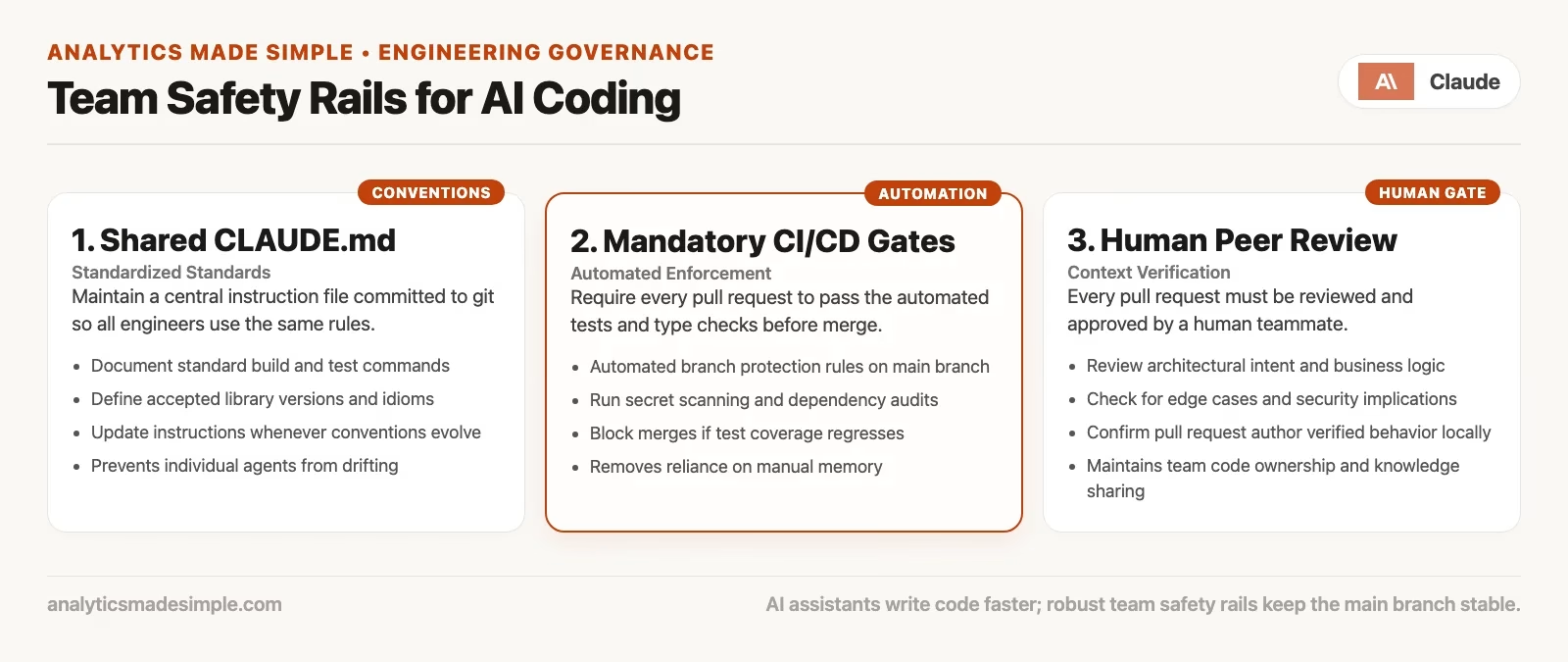
Shared instruction file and shared skills
One project file of rules for the agent beats twelve private notebooks of prompts. Put the build and test commands, the facts about your tools, your “never do this” list, and your review expectations in files that live in the project’s git history, where the whole team can see them. The earlier posts on instruction files and skills covered the details, and the team version is simple: if it is a rule, it lives in the repo.
At a minimum, the shared file should cover four things.
- How to install, build, test, and check style, with the exact commands
- Code style that actually matters, such as the formatter, the package manager, and anything the team does not use
- Safety rules on secrets, production releases, sensitive data, and force-pushing (overwriting shared history)
- Where skills live (
.claude/skills/…) for repeated jobs like release notes, a code review checklist, or a database change checklist
Keep the file short and true, because aspirational novels go stale. When reality changes, update the file in the same change as the process, so the agent and the people stay in agreement.
## Team safety (example CLAUDE.md section)
- Open a PR for all shared-branch work. No direct pushes to main.
- CI must be green before merge. Do not “merge and fix later” on red typecheck.
- Never commit secrets, customer PII, or production .env files.
- Never deploy to production from an agent session alone. Humans run/approve release.
- Prefer smallest diff. Do not reformat unrelated files.
- Do not delete tests without a linked ticket and reviewer OK.
- Force-push only on personal branches you alone use; never on main or release/*.
Pull requests required and automated checks passing
A pull request (PR) is not paperwork for its own sake. It forces a pause in which a second person sees the same diff you were supposed to read yourself. Require a PR for any change going into a protected branch, and require automated checks, known as continuous integration (CI), to pass first. Those checks are the tests, style checks, and security scans that run on every change. A note saying “Claude wrote it” is not a check.
A few habits keep agent-made PRs easy to review.
- Small PRs. Aim for one ticket and one main idea, and split cleanup work from new features so a reviewer can hold the whole thing in their head.
- Honest titles and descriptions. Say what you asked the agent to do, what you checked yourself, and what risks remain.
- No rubber stamps. A comment like “AI generated, looks good to me” does not count, because reviewers still own the merge button.
- Green means green on this branch. Passing checks from last week on the main branch tell you nothing about today’s change.
If your team is tiny, say two people, PRs still give you an audit trail and a place for checks to run. Merging your own change after a waiting period is far better than pushing silently and hoping nothing breaks late at night.
Secrets and data policy
Write down what may never enter an agent session. That usually means production passwords and keys, raw customer personal data, HR files, unreleased financials if your policy says so, and anything under a legal hold. Point people to your approved secret manager and, if you have one, your approved company AI account. A personal paid account does not become compliant just because the model is helpful.
Then add the dull technical rules, because they catch most accidents.
.envfiles and key files stay out of git, and you run hooks or secret scanning when they are available- Example settings use obvious fakes (
sk_test_xxx,REPLACE_ME), never strings that look almost real - Logs and sample data used in demos are made-up data
- There is a plan for the day a secret lands in git: change the secret, tell the team, and never rewrite history alone
Claude Code lets you deny certain commands and file paths, so use that feature. Permission rules are not a full data governance program, but they catch careless mistakes. The vendor’s page on how to configure permissions explains the options.
No silent production releases from an agent
This rule deserves its own line in every team document: no silent production deploys from an agent session alone. An agent can help draft a release script, prepare a changelog, or open a PR that starts the automated release steps. A human still owns the production button, or the formal approval in your release system. If your setup releases automatically whenever the main branch changes, protect that branch and require review. That keeps the agent away from live customers.
The same spirit applies to destructive work such as dropping database tables, shifting live traffic, updating thousands of customer rows at once, or force-pushing a release branch. Being able to run a command in the terminal (the text window where you type commands) is not the same as being authorized to run it.
A starter pack of team habits
If you want something you can introduce on Monday without a six-week “AI governance program,” start with the habits below.
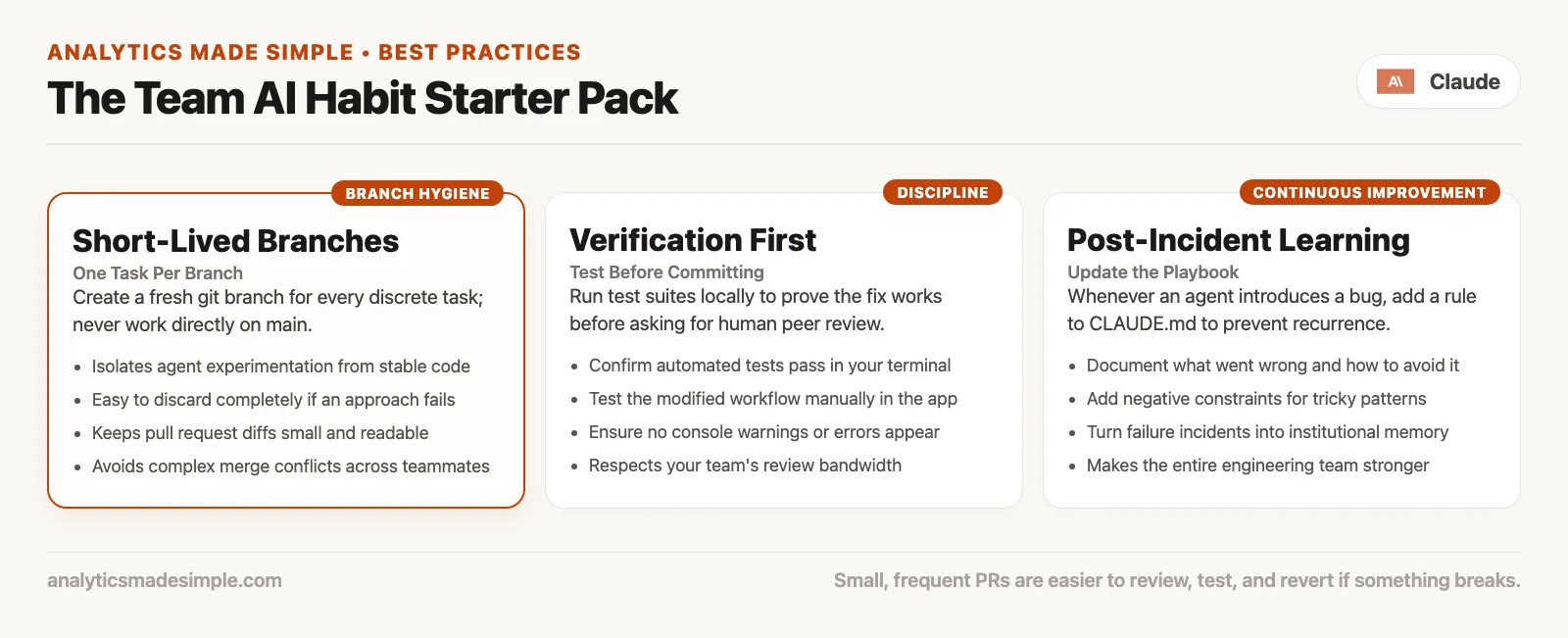
| Habit | What good looks like | What goes wrong without it |
|---|---|---|
| One branch per task | One ticket becomes one branch and one PR | The main branch turns into a scratchpad of half-finished agent runs |
| Small PRs | A reviewer can finish one in a single sitting | An 800-line “misc fixes” change that nobody reads |
| Test before merge | Tests pass on your machine and in the automated checks for risky code | “It works on my machine” or “the model said so” |
| Write it in the instruction file | Commands and never-dos stay current | Knowledge that only the senior people remember |
| Look back at agent failures | A five-minute note on what slipped and which rule to add | The same secret leak every quarter |
Looking back does not need ceremony. A shared document called “Agent incidents” with the date, what happened, and one process change is enough. For example, an agent once deleted a flaky test to make the checks pass. The team wrote a rule that no test gets deleted without a ticket, and set the checks to fail if test coverage drops on important code.
Agree out loud on autonomy levels
The earlier post on agent loops described autonomy as three modes: watch every step, steer in batches, or walk away with rails in place. Teams need one shared map of those modes so a junior developer does not copy a staff engineer’s high-trust setup on day three.
| Level | Who | Typical mode | Required gates |
|---|---|---|---|
| Watch | Everyone learning the project | Approve each sensitive tool use | Read every diff, and no push without local tests |
| Steer | People comfortable with the tools and the review loop | Accept batches of edits but still review them | PR and passing checks, and no production release alone |
| Walk away (limited) | Experienced people, in an isolated sandbox only | Longer agent runs on throwaway branches | No secrets, no production access, and a human merges later |
Write down which level is the default for production projects. “Walk away” on a laptop that holds production cluster credentials is not a level at all, and it is the sort of story that ends up in an incident channel.
Teach juniors to review before they get high autonomy
The kindest onboarding is not “here is the most powerful setting.” It is “here is how we say no to a bad patch.” Teach the personal review loop as a real skill, and cover these five things.
- How to read
git diff --statand spot scope creep, which is when a change wanders into files it had no reason to touch - How to restore unrelated files without panicking
- How to run the project’s test commands cold, with no senior person standing behind them
- How to write a PR description that admits what the agent did
- How to say “I am not merging this” without drama
One good pairing works like this: the junior drives Claude Code while the senior only reviews the diff and asks questions. After a few sessions they swap seats. The goal is not to police enthusiasm. It is to make review a reflex, so that autonomy is earned and never just assumed.
Managers should measure outcomes that matter. Good ones are how often incidents happen, how long reviews wait, and how many defects reach customers. Counting “lines generated by AI” is a trap, because lines are easy to game and customer trust is not.
A lightweight one-week rollout plan
You do not need a task force, only five working days of deliberate defaults.
- Day 1: Create or refresh the root
CLAUDE.mdwith commands and a safety section. Open a PR for it and talk it over at your team meeting. - Day 2: Turn on branch protection for
main, or confirm it is already on. That means a PR is required and passing checks are required. - Day 3: Add or document secret scanning and
.envchecks, and share the “never paste” list of data. - Day 4: Write one shared skill, for example
/team-pr-checklist, that prints the review loop and the list of warning signs from the earlier review post. - Day 5: Hold a 30-minute team demo. Show a messy agent diff, restore the extra files, and open a clean PR. Write down every question in the agent incidents document.
If you already have strong engineering habits, Day 1 and Day 5 may be enough. The point is explicit agreement, and new tools are not required for it.
A sample PR template for agent-assisted work
Paste something like this into a file named PULL_REQUEST_TEMPLATE.md so every agent-heavy change leaves a paper trail.
## Summary
- Ticket:
- Intentional human goal (one sentence):

## Agent assist
- [ ] Claude Code (or other) used
- Prompt / skill used (short):
- Files I asked it to touch:
- Files it also touched (if any) and what I did about them:

## Verification
- [ ] I read the full diff (not only the chat summary)
- [ ] Tests run (commands):
- [ ] No secrets or PII in the patch
- [ ] Scope matches the ticket

## Risk
- What could break:
- Rollback plan:

## Deploy
- [ ] No production deploy from agent alone
- Human owner for release:
Templates feel fussy until the second time a PR arrives with a surprise software update tucked inside. After that, they feel cheap.
What teams argue about, with a default stance
| Debate | Default stance for most product teams |
|---|---|
| Ban agents on production projects? | No. Require the rails instead. Ban them only if you cannot yet get PRs, checks, and secrets under control. |
| Allow high-autonomy modes? | Yes in sandboxes and personal experiments, and default to lower autonomy on shared production code. |
| Must every line be typed by a human? | No. Every merge should be understood by a human. |
| AI-only code review? | A useful helper, but not the only approver for high-risk code. |
| Same rules for senior people? | Yes for secrets and production. Seniors model the review loop, and they do not skip it. |
Your industry may be regulated and need stricter defaults, which is fine. Write them down, because unwritten strictness is just uneven enforcement.
Mistakes teams keep making
- Private super-prompts instead of repo rules. When the author leaves the company, the rails leave with them.
- PRs required in theory but direct pushes in practice. Protect the branch in the hosting settings, and do not rely on a wiki page alone.
- Checks treated as optional “when we are busy.” Busy is exactly when you need them most.
- Teaching juniors the fastest settings first. Teach restoring files and reviewing changes first.
- Silent production releases because the agent can run the script. Being able to do something is not the same as being approved to do it.
- No place to record agent failures. You will relearn the same lesson again under a new name.
- Assuming the chat product and Claude Code carry the same risk. Claude Code edits your real project, so your rails must match that power.
- Copying another company’s 40-page AI policy without your own commands. Your actual
npm testline matters more than their philosophy appendix.
Practice: a 45-minute team session
- Pick one real project and open its current
CLAUDE.md, or create a draft. - As a group, write five never-dos and three exact test commands.
- Confirm that branch protection and required checks are on for the default branch, and screenshot the settings for the team document.
- Run a deliberately messy agent task on a throwaway branch, then practice restoring files and reviewing the diff live, so the team learns recovery before it needs it.
- Add one entry to an “agent incidents and lessons” document, even if the lesson is that your first drill went fine.
- Name a human owner who checks every month that
CLAUDE.mdstill matches reality. Fifteen minutes on a calendar is enough.
What this series covered
The Claude Code tutorial was a deep track on coding agents for people who will touch a real project. Here is the path it followed.
| Order | Focus |
|---|---|
| 1 | Install and open Claude Code, then your first run |
| 2 | Talking to a codebase: ask, explore, change |
| 3 | Slash commands and common patterns |
| 4 | Skills: add and use |
| 5 | Memory and context: what sticks and what resets |
| 6 | Markdown and project instruction files |
| 7 | Plugins, connectors, and tools |
| 8 | Loops and agentic runs |
| 9 | Reviewing diffs, undoing, and not shipping blind |
| 10 | Team habits and safety rails (this post) |
If you keep only one idea from all ten posts, keep this one: Claude Code is a strong pair programmer with tools, and it is not an unsupervised release engineer. The more freedom you give it, the more real your review habits and your team rails have to be.
What comes next on this site
This closes the Claude Code tutorial. The next deep track on the content plan is the Claude Cowork tutorial, which covers agent-style help for broader office work such as files, folders, documents, spreadsheets, and connectors. It is aimed at non-developers and mixed teams, and it still leans on good judgment and firm data boundaries. Cowork is not “Code but easier,” because it is a different tool for different jobs. Do not carry terminal habits over blindly. Do carry over the habit of checking the result.
If you still need product orientation more than a deep tutorial, these are good places to go.
- Learn Claude from scratch covers everyday chat, Projects, privacy, and how to spot the wrong tool
- Claude product map compares chat, Code, Cowork, and other flavors, and says when each is the default
- Learn hub lists the wider set of paths on this site, from SQL (the standard language for asking a database for data) and Python to data quality and metrics
If you are an analyst who uses Code or chat to draft queries, keep the checking habit close with how to check AI-written SQL before you ship it.
Quick recap
- A shared
CLAUDE.mdand shared skills beat private folklore. - A required PR and passing checks are gates before merging, and they are more than niceties.
- Secrets and sensitive data need written never-dos, backed by technical enforcement wherever possible.
- An agent never releases to production alone, because a human owns the release.
- Teach review before high autonomy, and let seniors follow the same rails.
- Starter habits are one branch per task, small PRs, testing before merge, writing rules down, and looking back at failures.
- The series is complete. The next deep track is Claude Cowork, and Learn Claude plus the product map help with orientation.
Ship the rails first and raise autonomy second. The other order makes exciting demos and quiet outages.
Your next step
Draft a one-page CLAUDE.md for your team’s main repository (the shared project folder that tracks every change) with three never-dos: no secrets in code, no merging without passing checks, no releases by an agent alone. Share it in your next team meeting. A short written rule that everyone has seen beats habits each person keeps in their head.
Series notes
This is Part 10 of the Claude Code tutorial and the final post in the series. Related: Learn Claude from scratch, Claude product map.
Sources
Docs and related reading for team rails, permissions, and verify culture:
- Claude Code documentation: Overview (product scope; re-check when writing org policy)
- Claude Code documentation: Configure permissions (team-distributable permission rules and modes)
- Anthropic Engineering: How we built Claude Code auto mode (default permission posture and tradeoffs of skipping approvals)
- Anthropic Engineering: How we contain Claude across products (different agentic surfaces need different containment)
- Pro Git: Distributed workflows (branch and integration patterns teams still rely on)
- GitHub Docs: About protected branches (PR and status-check gates; adapt if you use GitLab/Bitbucket equivalents)
- OWASP Top 10 for LLM Applications (sensitive information, over-reliance, and supply-chain themes for agent tooling)
- Analytics Made Simple: How to check AI-written SQL before you ship it (verify habit for fluent wrong outputs)
- Analytics Made Simple: Learn Claude from scratch (everyday orientation series)
- Analytics Made Simple: Claude product map (which Claude product for which job)
- Analytics Made Simple: Learn (related paths on this site)
Keep going
Same lessons in your feed
Short diagrams, hooks, and weekly tutorials on Substack, Instagram, X, and Facebook.



